


Inference of LLaMA model in pure C/C++
Hot topics:
- Quantization formats
Q4andQ8have changed again (19 May) - (info) - Quantization formats
Q4andQ5have changed - requantize any old models (info) - Roadmap May 2023
Table of Contents
- Description
- Usage
- Get the Code
- Build
- BLAS Build
- Prepare Data & Run
- Memory/Disk Requirements
- Quantization
- Interactive mode
- Instruction mode with Alpaca
- Using GPT4All
- Using Pygmalion 7B & Metharme 7B
- Obtaining the Facebook LLaMA original model and Stanford Alpaca model data
- Verifying the model files
- Seminal papers and background on the models
- Perplexity (measuring model quality)
- Android
- Docker
- Contributing
- Coding guidelines
- Docs
The main goal of llama.cpp is to run the LLaMA model using 4-bit integer quantization on a MacBook
- Plain C/C++ implementation without dependencies
- Apple silicon first-class citizen - optimized via ARM NEON and Accelerate framework
- AVX, AVX2 and AVX512 support for x86 architectures
- Mixed F16 / F32 precision
- 4-bit, 5-bit and 8-bit integer quantization support
- Runs on the CPU
- OpenBLAS support
- cuBLAS and CLBlast support
The original implementation of llama.cpp was hacked in an evening.
Since then, the project has improved significantly thanks to many contributions. This project is for educational purposes and serves
as the main playground for developing new features for the ggml library.
Supported platforms:
- Mac OS
- Linux
- Windows (via CMake)
- Docker
Supported models:
- LLaMA 🦙
- Alpaca
- GPT4All
- Chinese LLaMA / Alpaca
- Vigogne (French)
- Vicuna
- Koala
- OpenBuddy 🐶 (Multilingual)
- Pygmalion 7B / Metharme 7B
- WizardLM
Bindings:
- Python: abetlen/llama-cpp-python
- Go: go-skynet/go-llama.cpp
- Node.js: hlhr202/llama-node
- Ruby: yoshoku/llama_cpp.rb
- C#/.NET: SciSharp/LLamaSharp
UI:
Here is a typical run using LLaMA-7B:
make -j && ./main -m ./models/7B/ggml-model-q4_0.bin -p"Building a website can be done in 10 simple steps:" -n512Illama.cppbuildinfo:
IUNAME_S: DarwinIUNAME_P: armIUNAME_M: arm64ICFLAGS: -I. -O3 -DNDEBUG -std=c11 -fPIC -pthread -DGGML_USE_ACCELERATEICXXFLAGS: -I. -I./examples -O3 -DNDEBUG -std=c++11 -fPIC -pthreadILDFLAGS: -frameworkAccelerateICC: Appleclangversion14.0.0 (clang-1400.0.29.202)
ICXX: Appleclangversion14.0.0 (clang-1400.0.29.202)
make: Nothingtobedonefor `default'.
main: seed = 1678486056llama_model_load: loadingmodelfrom'./models/7B/ggml-model-q4_0.bin' - pleasewait ...
llama_model_load: n_vocab = 32000llama_model_load: n_ctx = 512llama_model_load: n_embd = 4096llama_model_load: n_mult = 256llama_model_load: n_head = 32llama_model_load: n_layer = 32llama_model_load: n_rot = 128llama_model_load: f16 = 2llama_model_load: n_ff = 11008llama_model_load: ggmlctxsize = 4529.34MBllama_model_load: memory_size = 512.00MB, n_mem = 16384llama_model_load: .................................... donellama_model_load: modelsize = 4017.27MB / numtensors = 291main: prompt: 'Building a website can be done in 10 simple steps:'main: numberoftokensinprompt = 151 -> ''
8893 -> 'Build'292 -> 'ing'263 -> ' a'4700 -> ' website'508 -> ' can'367 -> ' be'2309 -> ' done'297 -> ' in'29871 -> ' '29896 -> '1'29900 -> '0'2560 -> ' simple'6576 -> ' steps'29901 -> ':'samplingparameters: temp = 0.800000, top_k = 40, top_p = 0.950000Buildingawebsitecanbedonein10simplesteps:
1) Selectadomainnameandwebhostingplan2) Completeasitemap3) Listyourproducts4) Writeproductdescriptions5) Createauseraccount6) Buildthetemplate7) Startbuildingthewebsite8) Advertisethewebsite9) Provideemailsupport10) SubmitthewebsitetosearchenginesAwebsiteisacollectionofwebpagesthatareformattedwithHTML. HTMListhecodethatdefineswhatthewebsitelookslikeandhowitbehaves.
TheHTMLcodeisformattedintoatemplateoraformat. Oncethisisdone, itisdisplayedontheuser's browser.
Thewebpagesarestoredinawebserver. Thewebserverisalsocalledahost. Whenthewebsiteisaccessed, itisretrievedfromtheserveranddisplayedontheuser's computer.
Awebsiteisknownasawebsite when itishosted. Thismeansthatitisdisplayedonahost. Thehostisusuallyawebserver.
Awebsitecanbedisplayedondifferentbrowsers. Thebrowsersarebasicallythesoftwarethatrendersthewebsiteontheuser's screen.
Awebsitecanalsobeviewedondifferentdevicessuchasdesktops, tabletsandsmartphones.
Hence, tohaveawebsitedisplayedonabrowser, thewebsitemustbehosted.
Adomainnameisanaddressofawebsite. Itisthenameofthewebsite.
Thewebsiteisknownasawebsite when itishosted. Thismeansthatitisdisplayedonahost. Thehostisusuallyawebserver.
Awebsitecanbedisplayedondifferentbrowsers. Thebrowsersarebasicallythesoftwarethatrendersthewebsiteontheuser’sscreen.
Awebsitecanalsobeviewedondifferentdevicessuchasdesktops, tabletsandsmartphones. Hence, tohaveawebsitedisplayedonabrowser, thewebsitemustbehosted.
Adomainnameisanaddressofawebsite. Itisthenameofthewebsite.
Awebsiteisanaddressofawebsite. ItisacollectionofwebpagesthatareformattedwithHTML. HTMListhecodethatdefineswhatthewebsitelookslikeandhowitbehaves.
TheHTMLcodeisformattedintoatemplateoraformat. Oncethisisdone, itisdisplayedontheuser’sbrowser.
Awebsiteisknownasawebsite when itishostedmain: mempertoken = 14434244bytesmain: loadtime = 1332.48msmain: sampletime = 1081.40msmain: predicttime = 31378.77ms / 61.41mspertokenmain: totaltime = 34036.74ms
And here is another demo of running both LLaMA-7B and whisper.cpp on a single M1 Pro MacBook:
whisper-llama-lq.mp4
Here are the steps for the LLaMA-7B model.
git clone https://github.com/ggerganov/llama.cpp
cd llama.cppIn order to build llama.cpp you have three different options.
Using
make:On Linux or MacOS:
make
On Windows:
- Download the latest fortran version of w64devkit.
- Extract
w64devkiton your pc. - Run
w64devkit.exe. - Use the
cdcommand to reach thellama.cppfolder. - From here you can run:
make
Using
CMake:mkdir build cd build cmake .. cmake --build . --config Release
Using
Zig:zig build -Drelease-fast
Building the program with BLAS support may lead to some performance improvements in prompt processing using batch sizes higher than 32 (the default is 512). BLAS doesn't affect the normal generation performance. There are currently three different implementations of it:
Accelerate Framework:
This is only available on Mac PCs and it's enabled by default. You can just build using the normal instructions.
OpenBLAS:
This provides BLAS acceleration using only the CPU. Make sure to have OpenBLAS installed on your machine.
Using
make:On Linux:
make LLAMA_OPENBLAS=1
On Windows:
Download the latest fortran version of w64devkit.
Download the latest version of OpenBLAS for Windows.
Extract
w64devkiton your pc.From the OpenBLAS zip that you just downloaded copy
libopenblas.a, located inside thelibfolder, insidew64devkit\x86_64-w64-mingw32\lib.From the same OpenBLAS zip copy the content of the
includefolder insidew64devkit\x86_64-w64-mingw32\include.Run
w64devkit.exe.Use the
cdcommand to reach thellama.cppfolder.From here you can run:
make LLAMA_OPENBLAS=1
Using
CMakeon Linux:mkdir build cd build cmake .. -DLLAMA_OPENBLAS=ON cmake --build . --config Release
cuBLAS
This provides BLAS acceleration using the CUDA cores of your Nvidia GPU. Make sure to have the CUDA toolkit installed. You can download it from your Linux distro's package manager or from here: CUDA Toolkit.
Using
make:make LLAMA_CUBLAS=1
Using
CMake:mkdir build cd build cmake .. -DLLAMA_CUBLAS=ON cmake --build . --config Release
Note: Because llama.cpp uses multiple CUDA streams for matrix multiplication results are not guaranteed to be reproducible. If you need reproducibility, set GGML_CUDA_MAX_STREAMS in the file ggml-cuda.cu to 1.
# obtain the original LLaMA model weights and place them in ./models
ls ./models
65B 30B 13B 7B tokenizer_checklist.chk tokenizer.model
# install Python dependencies
python3 -m pip install -r requirements.txt
# convert the 7B model to ggml FP16 format
python3 convert.py models/7B/
# quantize the model to 4-bits (using q4_0 method)
./quantize ./models/7B/ggml-model-f16.bin ./models/7B/ggml-model-q4_0.bin q4_0
# run the inference
./main -m ./models/7B/ggml-model-q4_0.bin -n 128
When running the larger models, make sure you have enough disk space to store all the intermediate files.
As the models are currently fully loaded into memory, you will need adequate disk space to save them and sufficient RAM to load them. At the moment, memory and disk requirements are the same.
| Model | Original size | Quantized size (4-bit) |
|---|---|---|
| 7B | 13 GB | 3.9 GB |
| 13B | 24 GB | 7.8 GB |
| 30B | 60 GB | 19.5 GB |
| 65B | 120 GB | 38.5 GB |
Several quantization methods are supported. They differ in the resulting model disk size and inference speed.
| Model | Measure | F16 | Q4_0 | Q4_1 | Q5_0 | Q5_1 | Q8_0 |
|---|---|---|---|---|---|---|---|
| 7B | perplexity | 5.9066 | 6.1565 | 6.0912 | 5.9862 | 5.9481 | 5.9070 |
| 7B | file size | 13.0G | 3.5G | 3.9G | 4.3G | 4.7G | 6.7G |
| 7B | ms/tok @ 4th | 127 | 55 | 54 | 76 | 83 | 72 |
| 7B | ms/tok @ 8th | 122 | 43 | 45 | 52 | 56 | 67 |
| 7B | bits/weight | 16.0 | 4.5 | 5.0 | 5.5 | 6.0 | 8.5 |
| 13B | perplexity | 5.2543 | 5.3860 | 5.3608 | 5.2856 | 5.2706 | 5.2548 |
| 13B | file size | 25.0G | 6.8G | 7.6G | 8.3G | 9.1G | 13G |
| 13B | ms/tok @ 4th | - | 103 | 105 | 148 | 160 | 131 |
| 13B | ms/tok @ 8th | - | 73 | 82 | 98 | 105 | 128 |
| 13B | bits/weight | 16.0 | 4.5 | 5.0 | 5.5 | 6.0 | 8.5 |
You can use the perplexity example to measure perplexity over a given prompt (lower perplexity is better).
For more information, see https://huggingface.co/docs/transformers/perplexity.
The perplexity measurements in table above are done against the wikitext2 test dataset (https://paperswithcode.com/dataset/wikitext-2), with context length of 512.
The time per token is measured on a MacBook M1 Pro 32GB RAM using 4 and 8 threads.
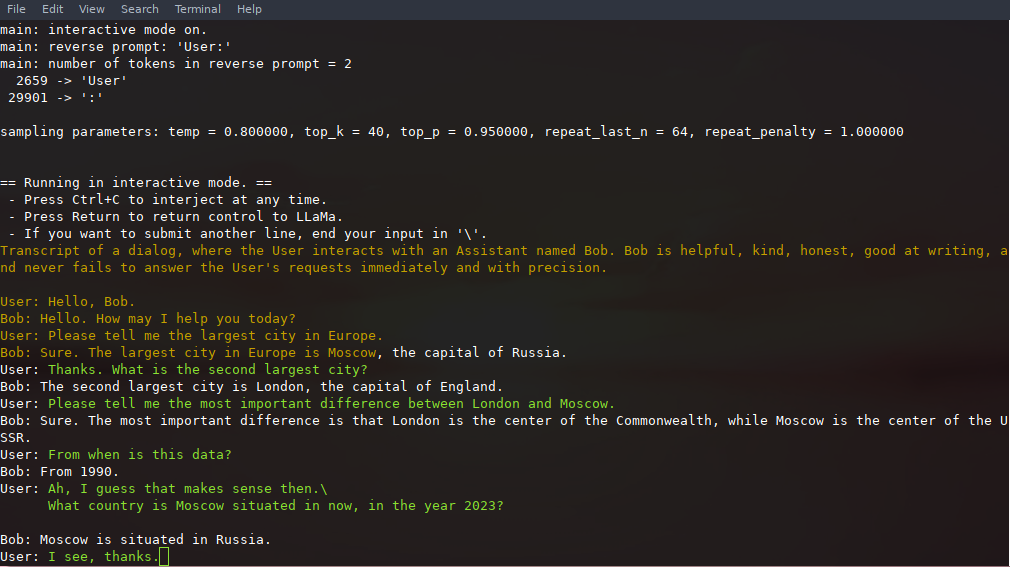
If you want a more ChatGPT-like experience, you can run in interactive mode by passing -i as a parameter.
In this mode, you can always interrupt generation by pressing Ctrl+C and entering one or more lines of text, which will be converted into tokens and appended to the current context. You can also specify a reverse prompt with the parameter -r "reverse prompt string". This will result in user input being prompted whenever the exact tokens of the reverse prompt string are encountered in the generation. A typical use is to use a prompt that makes LLaMa emulate a chat between multiple users, say Alice and Bob, and pass -r "Alice:".
Here is an example of a few-shot interaction, invoked with the command
# default arguments using a 7B model
./examples/chat.sh
# advanced chat with a 13B model
./examples/chat-13B.sh
# custom arguments using a 13B model
./main -m ./models/13B/ggml-model-q4_0.bin -n 256 --repeat_penalty 1.0 --color -i -r "User:" -f prompts/chat-with-bob.txt
Note the use of --color to distinguish between user input and generated text. Other parameters are explained in more detail in the README for the main example program.
- First, download the
ggmlAlpaca model into the./modelsfolder - Run the
maintool like this:
./examples/alpaca.sh
Sample run:
== Running in interactive mode. ==
- Press Ctrl+C to interject at any time.
- Press Return to return control to LLaMa.
- If you want to submit another line, end your input in '\'.
Below is an instruction that describes a task. Write a response that appropriately completes the request.
> How many letters are there in the English alphabet?
There 26 letters in the English Alphabet
> What is the most common way of transportation in Amsterdam?
The majority (54%) are using public transit. This includes buses, trams and metros with over 100 lines throughout the city which make it very accessible for tourists to navigate around town as well as locals who commute by tram or metro on a daily basis
> List 5 words that start with "ca".
cadaver, cauliflower, cabbage (vegetable), catalpa (tree) and Cailleach.
>
Using GPT4All
- Obtain the
tokenizer.modelfile from LLaMA model and put it tomodels - Obtain the
added_tokens.jsonfile from Alpaca model and put it tomodels - Obtain the
gpt4all-lora-quantized.binfile from GPT4All model and put it tomodels/gpt4all-7B - It is distributed in the old
ggmlformat which is now obsoleted - You have to convert it to the new format using
convert.py:
python3 convert.py models/gpt4all-7B/gpt4all-lora-quantized.binYou can now use the newly generated
models/gpt4all-7B/ggml-model-q4_0.binmodel in exactly the same way as all other modelsThe newer GPT4All-J model is not yet supported!
- Obtain the LLaMA weights
- Obtain the Pygmalion 7B or Metharme 7B XOR encoded weights
- Convert the LLaMA model with the latest HF convert script
- Merge the XOR files with the converted LLaMA weights by running the xor_codec script
- Convert to
ggmlformat using theconvert.pyscript in this repo:
python3 convert.py pygmalion-7b/ --outtype q4_1The Pygmalion 7B & Metharme 7B weights are saved in bfloat16 precision. If you wish to convert to
ggmlwithout quantizating, please specify the--outtypeasf32instead off16.
- Under no circumstances should IPFS, magnet links, or any other links to model downloads be shared anywhere in this repository, including in issues, discussions, or pull requests. They will be immediately deleted.
- The LLaMA models are officially distributed by Facebook and will never be provided through this repository.
- Refer to Facebook's LLaMA repository if you need to request access to the model data.
Please verify the sha256 checksums of all downloaded model files to confirm that you have the correct model data files before creating an issue relating to your model files.
- The following python script will verify if you have all possible latest files in your self-installed
./modelssubdirectory:
# run the verification script
python3 .\scripts\verify-checksum-models.py- On linux or macOS it is also possible to run the following commands to verify if you have all possible latest files in your self-installed
./modelssubdirectory:- On Linux:
sha256sum --ignore-missing -c SHA256SUMS - on macOS:
shasum -a 256 --ignore-missing -c SHA256SUMS
- On Linux:
If your issue is with model generation quality, then please at least scan the following links and papers to understand the limitations of LLaMA models. This is especially important when choosing an appropriate model size and appreciating both the significant and subtle differences between LLaMA models and ChatGPT:
- LLaMA:
- GPT-3
- GPT-3.5 / InstructGPT / ChatGPT:
- Download/extract: https://s3.amazonaws.com/research.metamind.io/wikitext/wikitext-2-raw-v1.zip?ref=salesforce-research
- Run
./perplexity -m models/7B/ggml-model-q4_0.bin -f wiki.test.raw - Output:
perplexity : calculating perplexity over 655 chunks
24.43 seconds per pass - ETA 4.45 hours
[1]4.5970,[2]5.1807,[3]6.0382,...
And after 4.45 hours, you will have the final perplexity.
You can easily run llama.cpp on Android device with termux.
First, obtain the Android NDK and then build with CMake:
$ mkdir build-android
$ cd build-android
$ export NDK=<your_ndk_directory>
$ cmake -DCMAKE_TOOLCHAIN_FILE=$NDK/build/cmake/android.toolchain.cmake -DANDROID_ABI=arm64-v8a -DANDROID_PLATFORM=android-23 -DCMAKE_C_FLAGS=-march=armv8.4a+dotprod ..
$ make
Install termux on your device and run termux-setup-storage to get access to your SD card.
Finally, copy the llama binary and the model files to your device storage. Here is a demo of an interactive session running on Pixel 5 phone:
llama-interactive2.mp4
- Docker must be installed and running on your system.
- Create a folder to store big models & intermediate files (ex. /llama/models)
We have two Docker images available for this project:
ghcr.io/ggerganov/llama.cpp:full: This image includes both the main executable file and the tools to convert LLaMA models into ggml and convert into 4-bit quantization.ghcr.io/ggerganov/llama.cpp:light: This image only includes the main executable file.
The easiest way to download the models, convert them to ggml and optimize them is with the --all-in-one command which includes the full docker image.
Replace /path/to/models below with the actual path where you downloaded the models.
docker run -v /path/to/models:/models ghcr.io/ggerganov/llama.cpp:full --all-in-one "/models/" 7BOn completion, you are ready to play!
docker run -v /path/to/models:/models ghcr.io/ggerganov/llama.cpp:full --run -m /models/7B/ggml-model-q4_0.bin -p "Building a website can be done in 10 simple steps:" -n 512or with a light image:
docker run -v /path/to/models:/models ghcr.io/ggerganov/llama.cpp:light -m /models/7B/ggml-model-q4_0.bin -p "Building a website can be done in 10 simple steps:" -n 512- Contributors can open PRs
- Collaborators can push to branches in the
llama.cpprepo and merge PRs into themasterbranch - Collaborators will be invited based on contributions
- Any help with managing issues and PRs is very appreciated!
- Make sure to read this: Inference at the edge
- A bit of backstory for those who are interested: Changelog podcast
- Avoid adding third-party dependencies, extra files, extra headers, etc.
- Always consider cross-compatibility with other operating systems and architectures
- Avoid fancy looking modern STL constructs, use basic
forloops, avoid templates, keep it simple - There are no strict rules for the code style, but try to follow the patterns in the code (indentation, spaces, etc.). Vertical alignment makes things more readable and easier to batch edit
- Clean-up any trailing whitespaces, use 4 spaces for indentation, brackets on the same line,
void * ptr,int & a - See good first issues for tasks suitable for first contributions