


A clock-style timepicker for Bootstrap 4 (or Bootstrap 3 or jQuery). Documentation and examples.
Below are the screens for Bootstrap 4 and Bootstrap 4 with Daemonite material UI


And the original screens from Weareoutman for Bootstrap 3

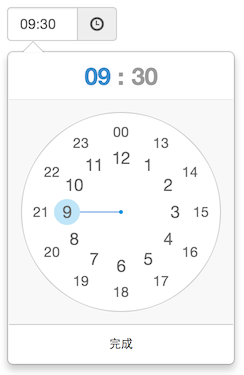
All major browsers are supported, including IE 9+. It should look and behave well enough in IE 8.
Both desktop and mobile device are supported. It also works great in touch screen device.
ClockPicker was designed for Bootstrap in the beginning. So Bootstrap (3 or 4 and jQuery) is the only dependency(s).
Since it only used .popover and some of .btn styles of Bootstrap, I picked these styles to build a jQuery plugin.
Feel free to use jquery-* files instead of bootstrap-* , for non-bootstrap project.
<!-- Bootstrap stylesheet --><linkrel="stylesheet" type="text/css" href="assets/css/bootstrap.min.css"><!-- ClockPicker Stylesheet --><linkrel="stylesheet" type="text/css" href="dist/bootstrap-clockpicker.min.css"><!-- Input group, just add class 'clockpicker', and optional data-* --><divclass="input-group clockpicker" data-placement="right" data-align="top" data-autoclose="true"><inputtype="text" class="form-control" value="09:32"><spanclass="input-group-addon"><spanclass="glyphicon glyphicon-time"></span></span></div><!-- Or just a input --><inputid="demo-input" /><!-- jQuery and Bootstrap scripts --><scripttype="text/javascript" src="assets/js/jquery.min.js"></script><scripttype="text/javascript" src="assets/js/bootstrap.min.js"></script><!-- ClockPicker script --><scripttype="text/javascript" src="dist/bootstrap-clockpicker.min.js"></script><scripttype="text/javascript">$('.clockpicker').clockpicker().find('input').change(function(){// TODO: time changedconsole.log(this.value);});$('#demo-input').clockpicker({autoclose: true});if(something){// Manual operations (after clockpicker is initialized).$('#demo-input').clockpicker('show')// Or hide, remove ....clockpicker('toggleView','minutes');}</script>| Name | Default | Description |
|---|---|---|
| default | '' | default time, 'now' or '13:14' e.g. |
| placement | 'bottom' | popover placement |
| align | 'left' | popover arrow align |
| donetext | 'OK' ('完成' in BS3) | done button text |
| autoclose | false | auto close when minute is selected |
| twelvehour | false | enables twelve hour mode with AM & PM buttons |
| vibrate | true | vibrate the device when dragging clock hand |
| fromnow | 0 | set default time to * milliseconds from now (using with default = 'now') |
| init | callback function triggered after the colorpicker has been initiated | |
| beforeShow | callback function triggered before popup is shown | |
| afterShow | callback function triggered after popup is shown | |
| beforeHide | callback function triggered before popup is hidden Note:will be triggered between a beforeDone and afterDone | |
| afterHide | callback function triggered after popup is hidden Note:will be triggered between a beforeDone and afterDone | |
| beforeHourSelect | callback function triggered before user makes an hour selection | |
| afterHourSelect | callback function triggered after user makes an hour selection | |
| beforeDone | callback function triggered before time is written to input | |
| afterDone | callback function triggered after time is written to input |
| operation | Arguments | Description |
|---|---|---|
| show | show the clockpicker | |
| hide | hide the clockpicker | |
| remove | remove the clockpicker (and event listeners) | |
| toggleView | 'hours' or 'minutes' | toggle to hours or minutes view |
clockpicker/
├── dist/
│ ├── bootstrap-clockpicker.css # full code for bootstrap 3
│ ├── bootstrap-clockpicker.js
│ ├── bootstrap-clockpicker.min.css # compiled and minified files for bootstrap 3
│ ├── bootstrap-clockpicker.min.js
||── bootstrap4-clockpicker.css # full code for bootstrap 4
│ ├── bootstrap4-clockpicker.js
│ ├── bootstrap4-clockpicker.min.css # compiled and minified files for bootstrap 4
│ ├── bootstrap4-clockpicker.min.js
│ ├── jquery-clockpicker.css # full code for jquery
│ ├── jquery-clockpicker.js
│ ├── jquery-clockpicker.min.css # compiled and minified files for jquery
│ └── jquery-clockpicker.min.js
└── src/ # source code
├── clockpicker.css
├── clockpicker.js
└── standalone.css # some styles picked from bootstrapgit clone https://github.com/weareoutman/clockpicker.git
cd clockpicker
npm install -g gulp
npm install
gulp
# gulp test- Auto placement and align.
- Events.
- Customize format.
- Seconds View ?
0.2.1
- moved AM-PM buttons to the header and removed AM-PM block
- inverted animation for top positioned picker
- unified CSS files (compatible with BS 4.1.3, MDBootstrap 4.5.4 and Daemonite material UI)
- need help to fix cancel button
0.2
- migrated all classes to BS4
- enhenced material design
- added popover opening animation
- added Cancel button (doesn't work right now :( )
- prevent user-select on all elements
- next version : move AM and PM buttons in popover-header, fix cancel button
0.1
- Bootstrap 4 compatible (tested with BS 4.1.1)
- Universal theming using CSS variables
0.0.7
- Enables twelve hour mode with AM & PM buttons.
0.0.6
- Default time can be setted to
now. - Registered as a bower package.
0.0.5
- Functional operations.
MIT