


WebSockets is a Fantom implementation of the W3C WebSocket API and adheres to RFC 6455.
The same WebSocket class may be used as a Fantom desktop client, a Javascript web client, or from a web server.
WebSockets does not currently support frame fragmentation or continuations.
Install WebSockets with the Fantom Pod Manager ( FPM ):
C:\> fpm install afWebSockets
Or install WebSockets with fanr:
C:\> fanr install -r http://eggbox.fantomfactory.org/fanr/ afWebSockets
To use in a Fantom project, add a dependency to build.fan:
depends = ["sys 1.0", ..., "afWebSockets 0.2"]
Full API & fandocs are available on the Eggbox - the Fantom Pod Repository.
This example is a simple instant messaging application called Chatbox!
It has a basic client that, using the same Fantom code, runs in a browser and as a desktop application. A BedSheet web application is used to service the WebSockets and serve the Chatbox web client.
Due to the web client being Javascript compiled from Fantom code, Chatbox must first be compiled to a pod. All the interesting WebSocket code is in the ChatboxRoutes and ChatboxClient classes.
Create a text file called
Chatbox.fancontaining the Chatbox code.Compile the script to create a
wsChatboxpod, the warnings are expected and may be ignored.C:\> fan Chatbox.fan -build WARN: Type 'afConcurrent::Synchronized' not available in Js WARN: Unknown build option -build compile [wsChatbox] Compile [wsChatbox] FindSourceFiles [1 files] CompileJs WritePod [file:/C:/Apps/Fantom/fan/lib/fan/wsChatbox.pod] BUILD SUCCESS [237ms]!Start the Chatbox server:
 C:\> fan wsChatbox -server
[info] [afBedSheet] Found mod 'wsChatbox::AppModule'
[info] [afBedSheet] Starting Bed App 'wsChatbox' on port 8069
[info] [web] http started on port 8069
[info] [afIoc] Adding module definitions from pod 'afWebSockets'
[info] [afIoc] Adding module definition for wsChatbox::AppModule
[info] [afIoc] Adding module afWebSockets::WebSocketsModule
[info] [afIoc] Adding module afConcurrent::ConcurrentModule
[info] [afIoc] Adding module afBedSheet::BedSheetModule
[info] [afIoc] Adding module afIocConfig::ConfigModule
[info] [afIoc] Adding module afIocEnv::IocEnvModule
[info] [afIoc] Adding module afDuvet::DuvetModule
[info] [afIoc] Adding module wsChatbox::AppModule
[info] [afIoc] Adding module afBedSheet::BedSheetEnvModule
....
___ __ _____ _
/ _ | / /_____ _____ / ___/__ ___/ /_________ __ __
/ _ | / // / -_|/ _ /===/ __// _ \/ _/ __/ _ / __|/ // /
/_/ |_|/_//_/\__|/_//_/ /_/ \_,_/__/\__/____/_/ \_, /
Alien-Factory BedSheet v1.5.0, IoC v3.0.0 /___/
IoC Registry built in 200ms and started up in 78ms
Bed App 'ChatBox - A WebSocket Demo' listening on http://localhost:8069/
Visit
http://localhost:8069/to load a Chatbox web client:
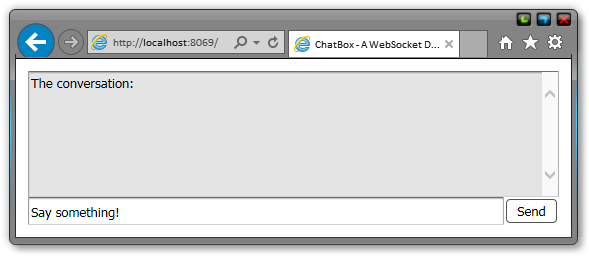
You may also start a Chatbox desktop client:
C:\> fan wsChatbox -client
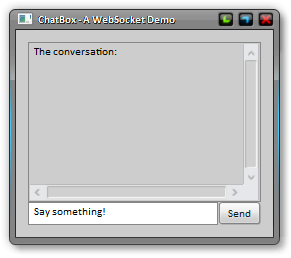
Messages are sent to the server, which then broadcasts it back out all connected clients. Instant messaging!
The WebSocket class adheres to the W3C WebSocket API and may be used as a client, or on the server, and even from Javascript. It has hooks that allow you to respond to various WebSocket events:
To create a Fantom WebSocket client:
webSock := WebSocket()
webSock.onMessage |MsgEvent e| { ... }
webSock.open(`ws:localhost:8069`)
// block in an event loop until the socket is closed
webSock.read
Note that WebSocket.read() enters a read event loop that blocks the current thread / Actor until the WebSocket is closed. Therefore it may be advantageous to call the read() method in an asynchronous fashion. Alien-Factory's Concurrent library is the easiest way to do this:
using afConcurrent::Synchronized
// call the blocking read() method in a background thread
safeSock := Unsafe(webSock)
Synchronized(ActorPool()).async |->| {
safeSock.val->read
}
To create a Javascript WebSocket client:
webSock := WebSocket()
webSock.onMessage |MsgEvent e| { ... }
webSock.open(`ws:localhost:8069`)
Note that due to the asynchronous of Javascript, there is no need to call the read() method.
To use in a BedSheet web application to service HTTP requests, simply create a Route handler that returns a WebSocket instance:
using afWebSockets
const class WsRoutes {
WebSocket serviceWs() {
webSock := WebSocket()
webSock.onMessage |MsgEvent e| { ... }
return webSock
}
}
The instance will be saved in the WebSockets service so messages may be sent to the client at any time.
@Inject private const WebSockets webSockets
...
Void sayHello(Uri webSockId) {
webSockets[webSockId].sendText("Hello Pips!")
}
The WebSocket instance will be automatically disposed of when the connection is closed, either by the client or server.
To use in a WebMod, the WebSocket instance needs to be upgraded manually:
using afWebSockets
const class WsWebMod : WebMod {
Void serviceWs() {
webSock := WebSocket()
webSock.onMessage |MsgEvent e| { ... }
webSock.upgrade(req, res)
webSock.read
}
}
Or you could store in a WebSockets instance:
using afWebSockets
using web
const class WsWebMod : WebMod {
const WebSockets webSockets := WebSockets(ActorPool())
Void serviceWs() {
webSock := WebSocket()
webSock.onMessage |MsgEvent e| { ... }
webSockets.service(webSock, req, res)
}
override Void onStop() {
webSockets.shutdown
}
}
A fully working client and server instant messaging program for the web and desktop!
using afWebSockets
using afIoc
using afBedSheet
using afBedSheet::Text as BsText
using afConcurrent::Synchronized
using afDuvet::DuvetModule
using afDuvet::HtmlInjector
using concurrent::ActorPool
using fwt
using build::BuildPod
class Main {
Void main(Str[] args) {
if (args.first == "-client")
ChatboxClient().main
if (args.first == "-server")
BedSheetBuilder(AppModule#.qname).addModulesFromPod("afWebSockets").startWisp(8069)
if (args.first == "-build")
Builder().main
}
}
const class AppModule {
@Contribute { serviceType=Routes# }
Void contributeRoutes(Configuration conf) {
conf.add(Route(`/`, ChatboxRoutes#indexPage))
conf.add(Route(`/ws`, ChatboxRoutes#serviceWebSocket))
}
}
const class ChatboxRoutes {
@Inject private const WebSockets webSockets
@Inject private const HtmlInjector htmlInjector
new make(|This|in) { in(this) }
BsText indexPage() {
htmlInjector.injectFantomMethod(ChatboxClient#main)
return BsText.fromHtml(
"<!DOCTYPE html>
<html>
<head>
<title>ChatBox - A WebSocket Demo</title>
</head>
<body>
</body>
</html>")
}
WebSocket serviceWebSocket() {
WebSocket() {
ws := it
onMessage = |MsgEvent me| {
webSockets.broadcast("${ws.id} says, '${me.txt}'")
}
}
}
}
@Js
class ChatboxClient {
Void main() {
webSock := WebSocket().open(`ws://localhost:8069/ws`)
convBox := Text { text = "The conversation:\r\n"; multiLine = true; editable = false }
textBox := Text { text = "Say something!" }
sendMsg := |Event e| {
webSock.sendText(textBox.text)
textBox.text = ""
}
webSock.onMessage = |MsgEvent msgEnv| {
convBox.text += "\r\n" + msgEnv.txt
}
textBox.onAction.add(sendMsg)
window := Window {
title = "ChatBox - A WebSocket Demo"
InsetPane {
EdgePane {
center = convBox
bottom = EdgePane {
center = textBox
right = Button { text = "Send"; onAction.add(sendMsg) }
}
},
},
}
// desktop only code
if (Env.cur.runtime != "js") {
// ensure event funcs are run in the UI thread
safeFunc := Unsafe(webSock.onMessage)
webSock.onMessage = |MsgEvent msgEnv| {
safeMess := Unsafe(msgEnv)
Desktop.callAsync |->| { safeFunc.val->call(safeMess.val) }
}
// call the blocking read() method in a background thread
safeSock := Unsafe(webSock)
Synchronized(ActorPool()).async |->| {
safeSock.val->read
}
}
window.open
}
}
class Builder : BuildPod {
new make() {
podName = "wsChatbox"
summary = "A WebSocket Demo"
meta = [
"proj.name" : "ChatBox - A WebSocket Demo",
"afIoc.module" : "wsChatbox::AppModule",
]
depends = [
"sys 1.0.70 - 1.0",
"fwt 1.0.70 - 1.0",
"web 1.0.70 - 1.0",
"build 1.0.70 - 1.0",
"concurrent 1.0.70 - 1.0",
"afIoc 3.0.6 - 3.0",
"afConcurrent 1.0.20 - 1.0",
"afBedSheet 1.5.10 - 1.5",
"afDuvet 1.1.8 - 1.1",
"afWebSockets 0.2.0 - 0.1",
]
srcDirs = [`Chatbox.fan`]
}
}