


Skip to content

Repository files navigation

react-native-maps-directions

npm versionnpmGitHub contributorsGitHub last commitNPM

Directions component for react-native-maps – Draw a route between two coordinates, powered by the Google Maps Directions API
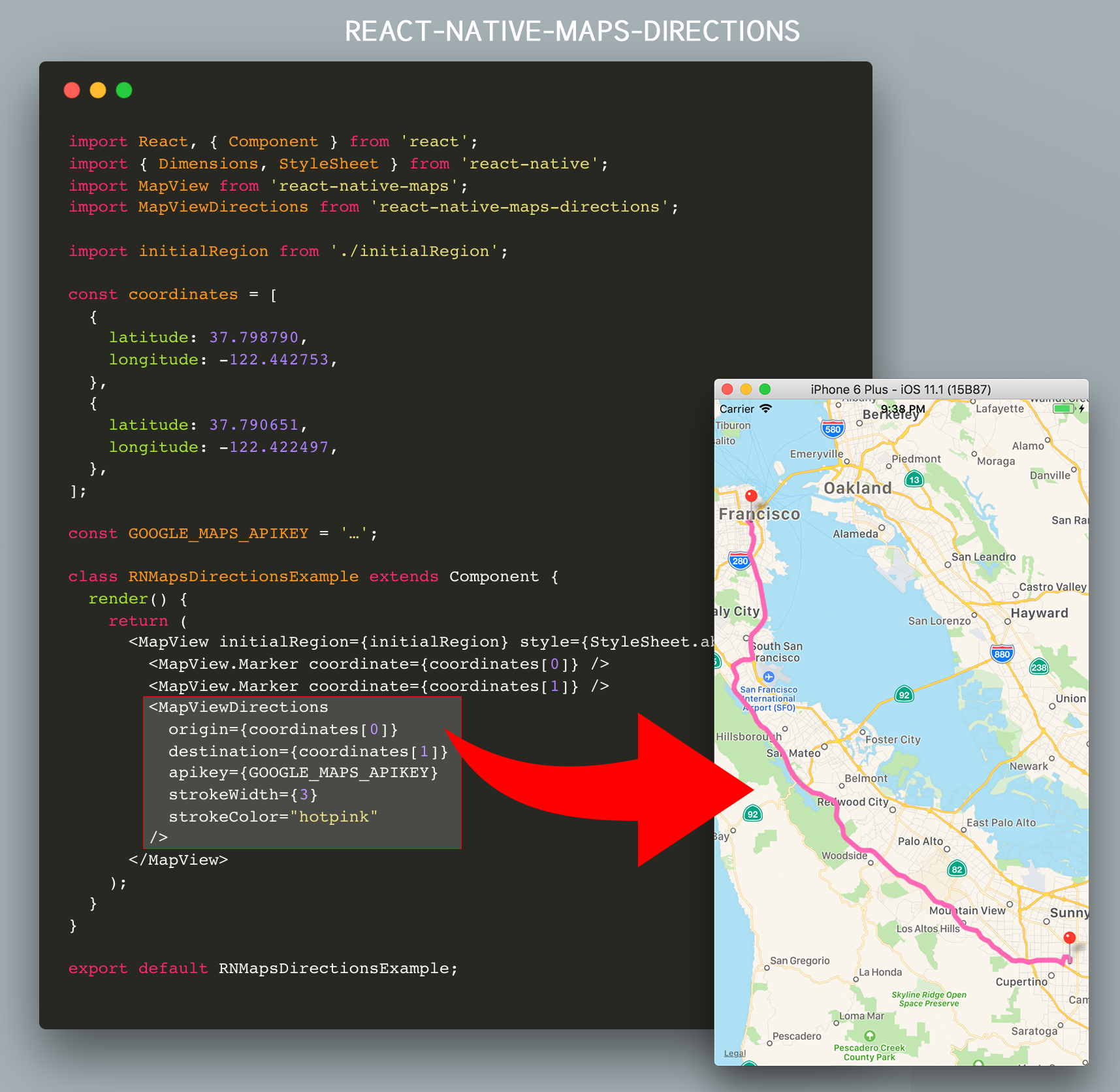
react-native-maps-directions

Installation

Install react-native-maps-directions as a dependency using either

  • Node's npm

    npm install react-native-maps-directions
    
  • Yarn

    yarn add react-native-maps-directions
    

Basic Usage

Import MapViewDirections and render it as a child of a MapView component. The mandatory MapViewDirections props are:

  • origin: The origin location to start routing from
  • destination: The destination location to start routing to
  • apikey: Your Google Maps Directions API Key (request one here; if you're using an existing Google Maps API Key make sure you've enabled the Google Maps Directions API for that key using the Google API Console).
importMapViewDirectionsfrom'react-native-maps-directions';constorigin={latitude: 37.3318456,longitude: -122.0296002};constdestination={latitude: 37.771707,longitude: -122.4053769};constGOOGLE_MAPS_APIKEY='…';<MapViewinitialRegion={}><MapViewDirectionsorigin={origin}destination={destination}apikey={GOOGLE_MAPS_APIKEY}/></MapView>

Once the directions in between destination and origin has been fetched, a MapView.Polyline between the two will be drawn. Whenever one of both changes, new directions will be fetched and rendered.

Component API

Props

PropTypeDefaultNote
originLatLng or StringThe origin location to start routing from.
destinationLatLng or StringThe destination location to start routing to.
apikeyStringYour Google Maps API Key (request one here; if you're using an existing Google Maps API Key make sure you've enabled the Google Maps Directions API for that key using the Google API Console by hitting the “Enable APIs and Services“ button).
waypoints[LatLng or String]Array of waypoints to use between origin and destination.
languageString"en"The language to use when calculating directions. See here for more info.
modeString"DRIVING"Which transportation mode to use when calculating directions. Allowed values are "DRIVING", "BICYCLING", "WALKING", and "TRANSIT". (See here for more info).
resetOnChangebooleantrueTweak if the rendered MapView.Polyline should reset or not when calculating the route between origin and destionation. Set to false if you see the directions line glitching.
optimizeWaypointsbooleanfalseSet it to true if you would like Google Maps to re-order all the waypoints to optimize the route for the fastest route. Please be aware that if this option is enabled, you will be billed for a higher rate by Google as stated here.
directionsServiceBaseUrlstring(Google's)Base URL of the Directions Service (API) you are using. By default the Google Directions API is used ("https://maps.googleapis.com/maps/api/directions/json"). Usually you won't need to change this.
regionStringIf you are using strings for origin or destination, sometimes you will get an incorrect route because Google Maps API needs the region where this places belong to. See here for more info.
precisionString"low"The precision level of detail of the drawn polyline. Allowed values are "high", and "low". Setting to "low" will yield a polyline that is an approximate (smoothed) path of the resulting directions. Setting to "high" may cause a hit in performance in case a complex route is returned.

More props

Since the result rendered on screen is a MapView.Polyline component, all MapView.Polyline props – except for coordinates – are also accepted.

<MapViewinitialRegion={}><MapViewDirectionsorigin={origin}destination={destination}apikey={GOOGLE_MAPS_APIKEY}strokeWidth={3}strokeColor="hotpink"/></MapView>

An extra note on origin and destination

The values for the origin and destination props can take several forms. They can either be:

  • Coordinates in the form of an object with latitude and longitude keys
  • Coordinates in the form of a string with latitude and longitude values separated by a comma
  • Strings representing an address
  • Strings representing a location
  • Strings containing a Place Id from the Google Maps Place API prefixed with place_id:

All examples below have the same origin location, represented in the formats mentioned above:

<MapViewDirectionsorigin={{latitude: 37.3317876,longitude: -122.0054812}}destination="…"/><MapViewDirectionsorigin="37.3317876,-122.0054812"destination="…"/><MapViewDirectionsorigin="Apple Park Visitor Center"destination="…"/><MapViewDirectionsorigin="10600 N Tantau Ave, Cupertino, CA 95014, USA"destination="…"/><MapViewDirectionsorigin="place_id:ChIJW5i0tJC1j4ARoUGtkogTaUU"destination="…"/>

Note: The origin and destination props don't need to use the same representation, you may mix them.

Tip: Don't forget to tweak the language prop when using localized location names.

Events/Callbacks

Event NameReturnsNotes
onStart{ origin, destination, waypoints: [] }Callback that is called when the routing has started.
onReady{ distance: Number, duration: Number, coordinates: [], fare: Object }Callback that is called when the routing has succesfully finished. Note: distance returned in kilometers and duration in minutes.
onErrorerrorMessageCallback that is called in case the routing has failed.

Extended Example

This example will draw a route between AirBnB's Office and Apple's HQ

importReact,{Component}from'react';import{Dimensions,StyleSheet}from'react-native';importMapViewfrom'react-native-maps';importMapViewDirectionsfrom'react-native-maps-directions';const{ width, height }=Dimensions.get('window');constASPECT_RATIO=width/height;constLATITUDE=37.771707;constLONGITUDE=-122.4053769;constLATITUDE_DELTA=0.0922;constLONGITUDE_DELTA=LATITUDE_DELTA*ASPECT_RATIO;constGOOGLE_MAPS_APIKEY='…';classExampleextendsComponent{constructor(props){super(props);// AirBnB's Office, and Apple Parkthis.state={coordinates: [{latitude: 37.3317876,longitude: -122.0054812,},{latitude: 37.771707,longitude: -122.4053769,},],};this.mapView=null;}onMapPress=(e)=>{this.setState({coordinates: [
...this.state.coordinates,e.nativeEvent.coordinate,],});}render(){return(<MapViewinitialRegion={{latitude: LATITUDE,longitude: LONGITUDE,latitudeDelta: LATITUDE_DELTA,longitudeDelta: LONGITUDE_DELTA,}}style={StyleSheet.absoluteFill}ref={c=>this.mapView=c}onPress={this.onMapPress}>{this.state.coordinates.map((coordinate,index)=><MapView.Markerkey={`coordinate_${index}`}coordinate={coordinate}/>)}{(this.state.coordinates.length>=2)&&(<MapViewDirectionsorigin={this.state.coordinates[0]}waypoints={(this.state.coordinates.length>2) ? this.state.coordinates.slice(1,-1): null}destination={this.state.coordinates[this.state.coordinates.length-1]}apikey={GOOGLE_MAPS_APIKEY}strokeWidth={3}strokeColor="hotpink"optimizeWaypoints={true}onStart={(params)=>{console.log(`Started routing between "${params.origin}" and "${params.destination}"`);}}onReady={result=>{console.log('Distance: ${result.distance} km')console.log('Duration: ${result.duration} min.')this.mapView.fitToCoordinates(result.coordinates,{edgePadding: {right: (width/20),bottom: (height/20),left: (width/20),top: (height/20),}});}}onError={(errorMessage)=>{// console.log('GOT AN ERROR');}}/>)}</MapView>);}}exportdefaultExample;

Example App

An example app can be found in a separate repo, located at https://github.com/bramus/react-native-maps-directions-example.

Changelog

Please see CHANGELOG for more information on what has changed recently.

Credits

This code is inspired upon the article React Native Maps with Google Directions Api by Ali Oğuzhan Yıldız.

License

The MIT License (MIT). Please see License File for more information.

About

Directions Component for `react-native-maps`

Resources

Stars

0 stars

Watchers

0 watching

Forks

Releases

Packages

Contributors

Languages

, 'i'); if (__m === '*' || __re.test(location.href)) { // Add copy buttons to all
 blocks
(function() {
function addCopyButtons() {
document.querySelectorAll('pre code').forEach(function(codeBlock) {
if (codeBlock.parentElement.hasAttribute('data-copy-added')) return;
codeBlock.parentElement.setAttribute('data-copy-added', 'true');
var btn = document.createElement('button');
btn.textContent = 'Copy';
btn.style.cssText = 'position:absolute;top:4px;right:4px;padding:2px 8px;font-size:11px;background:#4ecdc4;border:none;border-radius:4px;color:#1a1a2e;cursor:pointer;opacity:0.7;transition:opacity 0.2s;';
btn.onmouseover = function() { this.style.opacity = '1'; };
btn.onmouseout = function() { this.style.opacity = '0.7'; };
btn.onclick = function() {
navigator.clipboard.writeText(codeBlock.textContent).then(function() {
btn.textContent = 'Copied!';
setTimeout(function() { btn.textContent = 'Copy'; }, 1500);
});
};
codeBlock.parentElement.style.position = 'relative';
codeBlock.parentElement.appendChild(btn);
});
}
addCopyButtons();
// Re-run on dynamic content
var observer = new MutationObserver(addCopyButtons);
observer.observe(document.body, { childList: true, subtree: true });
})();
}
} catch(__e) { console.warn('[Userscript:Add Copy Buttons to Code Blocks]', __e); }
})();
(function(){
try {
var __m = "github.com";
var __re = new RegExp('^' + "github\\.com" + '
GitHub - FreebirdRides/react-native-maps-directions: Directions Component for `react-native-maps` · GitHub
Skip to content

Repository files navigation

react-native-maps-directions

npm versionnpmGitHub contributorsGitHub last commitNPM

Directions component for react-native-maps – Draw a route between two coordinates, powered by the Google Maps Directions API

react-native-maps-directions

Installation

Install react-native-maps-directions as a dependency using either

  • Node's npm

    npm install react-native-maps-directions
    
  • Yarn

    yarn add react-native-maps-directions
    

Basic Usage

Import MapViewDirections and render it as a child of a MapView component. The mandatory MapViewDirections props are:

  • origin: The origin location to start routing from
  • destination: The destination location to start routing to
  • apikey: Your Google Maps Directions API Key (request one here; if you're using an existing Google Maps API Key make sure you've enabled the Google Maps Directions API for that key using the Google API Console).
importMapViewDirectionsfrom'react-native-maps-directions';constorigin={latitude: 37.3318456,longitude: -122.0296002};constdestination={latitude: 37.771707,longitude: -122.4053769};constGOOGLE_MAPS_APIKEY='…';<MapViewinitialRegion={}><MapViewDirectionsorigin={origin}destination={destination}apikey={GOOGLE_MAPS_APIKEY}/></MapView>

Once the directions in between destination and origin has been fetched, a MapView.Polyline between the two will be drawn. Whenever one of both changes, new directions will be fetched and rendered.

Component API

Props

PropTypeDefaultNote
originLatLng or StringThe origin location to start routing from.
destinationLatLng or StringThe destination location to start routing to.
apikeyStringYour Google Maps API Key (request one here; if you're using an existing Google Maps API Key make sure you've enabled the Google Maps Directions API for that key using the Google API Console by hitting the “Enable APIs and Services“ button).
waypoints[LatLng or String]Array of waypoints to use between origin and destination.
languageString"en"The language to use when calculating directions. See here for more info.
modeString"DRIVING"Which transportation mode to use when calculating directions. Allowed values are "DRIVING", "BICYCLING", "WALKING", and "TRANSIT". (See here for more info).
resetOnChangebooleantrueTweak if the rendered MapView.Polyline should reset or not when calculating the route between origin and destionation. Set to false if you see the directions line glitching.
optimizeWaypointsbooleanfalseSet it to true if you would like Google Maps to re-order all the waypoints to optimize the route for the fastest route. Please be aware that if this option is enabled, you will be billed for a higher rate by Google as stated here.
directionsServiceBaseUrlstring(Google's)Base URL of the Directions Service (API) you are using. By default the Google Directions API is used ("https://maps.googleapis.com/maps/api/directions/json"). Usually you won't need to change this.
regionStringIf you are using strings for origin or destination, sometimes you will get an incorrect route because Google Maps API needs the region where this places belong to. See here for more info.
precisionString"low"The precision level of detail of the drawn polyline. Allowed values are "high", and "low". Setting to "low" will yield a polyline that is an approximate (smoothed) path of the resulting directions. Setting to "high" may cause a hit in performance in case a complex route is returned.

More props

Since the result rendered on screen is a MapView.Polyline component, all MapView.Polyline props – except for coordinates – are also accepted.

<MapViewinitialRegion={}><MapViewDirectionsorigin={origin}destination={destination}apikey={GOOGLE_MAPS_APIKEY}strokeWidth={3}strokeColor="hotpink"/></MapView>

An extra note on origin and destination

The values for the origin and destination props can take several forms. They can either be:

  • Coordinates in the form of an object with latitude and longitude keys
  • Coordinates in the form of a string with latitude and longitude values separated by a comma
  • Strings representing an address
  • Strings representing a location
  • Strings containing a Place Id from the Google Maps Place API prefixed with place_id:

All examples below have the same origin location, represented in the formats mentioned above:

<MapViewDirectionsorigin={{latitude: 37.3317876,longitude: -122.0054812}}destination="…"/><MapViewDirectionsorigin="37.3317876,-122.0054812"destination="…"/><MapViewDirectionsorigin="Apple Park Visitor Center"destination="…"/><MapViewDirectionsorigin="10600 N Tantau Ave, Cupertino, CA 95014, USA"destination="…"/><MapViewDirectionsorigin="place_id:ChIJW5i0tJC1j4ARoUGtkogTaUU"destination="…"/>

Note: The origin and destination props don't need to use the same representation, you may mix them.

Tip: Don't forget to tweak the language prop when using localized location names.

Events/Callbacks

Event NameReturnsNotes
onStart{ origin, destination, waypoints: [] }Callback that is called when the routing has started.
onReady{ distance: Number, duration: Number, coordinates: [], fare: Object }Callback that is called when the routing has succesfully finished. Note: distance returned in kilometers and duration in minutes.
onErrorerrorMessageCallback that is called in case the routing has failed.

Extended Example

This example will draw a route between AirBnB's Office and Apple's HQ

importReact,{Component}from'react';import{Dimensions,StyleSheet}from'react-native';importMapViewfrom'react-native-maps';importMapViewDirectionsfrom'react-native-maps-directions';const{ width, height }=Dimensions.get('window');constASPECT_RATIO=width/height;constLATITUDE=37.771707;constLONGITUDE=-122.4053769;constLATITUDE_DELTA=0.0922;constLONGITUDE_DELTA=LATITUDE_DELTA*ASPECT_RATIO;constGOOGLE_MAPS_APIKEY='…';classExampleextendsComponent{constructor(props){super(props);// AirBnB's Office, and Apple Parkthis.state={coordinates: [{latitude: 37.3317876,longitude: -122.0054812,},{latitude: 37.771707,longitude: -122.4053769,},],};this.mapView=null;}onMapPress=(e)=>{this.setState({coordinates: [
...this.state.coordinates,e.nativeEvent.coordinate,],});}render(){return(<MapViewinitialRegion={{latitude: LATITUDE,longitude: LONGITUDE,latitudeDelta: LATITUDE_DELTA,longitudeDelta: LONGITUDE_DELTA,}}style={StyleSheet.absoluteFill}ref={c=>this.mapView=c}onPress={this.onMapPress}>{this.state.coordinates.map((coordinate,index)=><MapView.Markerkey={`coordinate_${index}`}coordinate={coordinate}/>)}{(this.state.coordinates.length>=2)&&(<MapViewDirectionsorigin={this.state.coordinates[0]}waypoints={(this.state.coordinates.length>2) ? this.state.coordinates.slice(1,-1): null}destination={this.state.coordinates[this.state.coordinates.length-1]}apikey={GOOGLE_MAPS_APIKEY}strokeWidth={3}strokeColor="hotpink"optimizeWaypoints={true}onStart={(params)=>{console.log(`Started routing between "${params.origin}" and "${params.destination}"`);}}onReady={result=>{console.log('Distance: ${result.distance} km')console.log('Duration: ${result.duration} min.')this.mapView.fitToCoordinates(result.coordinates,{edgePadding: {right: (width/20),bottom: (height/20),left: (width/20),top: (height/20),}});}}onError={(errorMessage)=>{// console.log('GOT AN ERROR');}}/>)}</MapView>);}}exportdefaultExample;

Example App

An example app can be found in a separate repo, located at https://github.com/bramus/react-native-maps-directions-example.

Changelog

Please see CHANGELOG for more information on what has changed recently.

Credits

This code is inspired upon the article React Native Maps with Google Directions Api by Ali Oğuzhan Yıldız.

License

The MIT License (MIT). Please see License File for more information.

About

Directions Component for `react-native-maps`

Resources

Stars

0 stars

Watchers

0 watching

Forks

Releases

Packages

Contributors

Languages

, 'i'); if (__m === '*' || __re.test(location.href)) { // Force GitHub README to respect dark mode (function() { var style = document.createElement('style'); style.textContent = ' .markdown-body { color-scheme: dark light; } .markdown-body pre { background: #161b22 !important; } .markdown-body code { background: rgba(110, 118, 129, 0.4) !important; } .markdown-body table th, .markdown-body table td { border-color: #30363d !important; } .markdown-body img { background: #0d1117; } .markdown-body blockquote { border-left-color: #8b949e; } .markdown-body hr { border-color: #30363d; } '; document.head.appendChild(style); })(); } } catch(__e) { console.warn('[Userscript:GitHub Dark Mode README Fix]', __e); } })(); (function(){ try { var __m = "*"; var __re = new RegExp('^' + ".*" + ' GitHub - FreebirdRides/react-native-maps-directions: Directions Component for `react-native-maps` · GitHub
Skip to content

Repository files navigation

react-native-maps-directions

npm versionnpmGitHub contributorsGitHub last commitNPM

Directions component for react-native-maps – Draw a route between two coordinates, powered by the Google Maps Directions API

react-native-maps-directions

Installation

Install react-native-maps-directions as a dependency using either

  • Node's npm

    npm install react-native-maps-directions
    
  • Yarn

    yarn add react-native-maps-directions
    

Basic Usage

Import MapViewDirections and render it as a child of a MapView component. The mandatory MapViewDirections props are:

  • origin: The origin location to start routing from
  • destination: The destination location to start routing to
  • apikey: Your Google Maps Directions API Key (request one here; if you're using an existing Google Maps API Key make sure you've enabled the Google Maps Directions API for that key using the Google API Console).
importMapViewDirectionsfrom'react-native-maps-directions';constorigin={latitude: 37.3318456,longitude: -122.0296002};constdestination={latitude: 37.771707,longitude: -122.4053769};constGOOGLE_MAPS_APIKEY='…';<MapViewinitialRegion={}><MapViewDirectionsorigin={origin}destination={destination}apikey={GOOGLE_MAPS_APIKEY}/></MapView>

Once the directions in between destination and origin has been fetched, a MapView.Polyline between the two will be drawn. Whenever one of both changes, new directions will be fetched and rendered.

Component API

Props

PropTypeDefaultNote
originLatLng or StringThe origin location to start routing from.
destinationLatLng or StringThe destination location to start routing to.
apikeyStringYour Google Maps API Key (request one here; if you're using an existing Google Maps API Key make sure you've enabled the Google Maps Directions API for that key using the Google API Console by hitting the “Enable APIs and Services“ button).
waypoints[LatLng or String]Array of waypoints to use between origin and destination.
languageString"en"The language to use when calculating directions. See here for more info.
modeString"DRIVING"Which transportation mode to use when calculating directions. Allowed values are "DRIVING", "BICYCLING", "WALKING", and "TRANSIT". (See here for more info).
resetOnChangebooleantrueTweak if the rendered MapView.Polyline should reset or not when calculating the route between origin and destionation. Set to false if you see the directions line glitching.
optimizeWaypointsbooleanfalseSet it to true if you would like Google Maps to re-order all the waypoints to optimize the route for the fastest route. Please be aware that if this option is enabled, you will be billed for a higher rate by Google as stated here.
directionsServiceBaseUrlstring(Google's)Base URL of the Directions Service (API) you are using. By default the Google Directions API is used ("https://maps.googleapis.com/maps/api/directions/json"). Usually you won't need to change this.
regionStringIf you are using strings for origin or destination, sometimes you will get an incorrect route because Google Maps API needs the region where this places belong to. See here for more info.
precisionString"low"The precision level of detail of the drawn polyline. Allowed values are "high", and "low". Setting to "low" will yield a polyline that is an approximate (smoothed) path of the resulting directions. Setting to "high" may cause a hit in performance in case a complex route is returned.

More props

Since the result rendered on screen is a MapView.Polyline component, all MapView.Polyline props – except for coordinates – are also accepted.

<MapViewinitialRegion={}><MapViewDirectionsorigin={origin}destination={destination}apikey={GOOGLE_MAPS_APIKEY}strokeWidth={3}strokeColor="hotpink"/></MapView>

An extra note on origin and destination

The values for the origin and destination props can take several forms. They can either be:

  • Coordinates in the form of an object with latitude and longitude keys
  • Coordinates in the form of a string with latitude and longitude values separated by a comma
  • Strings representing an address
  • Strings representing a location
  • Strings containing a Place Id from the Google Maps Place API prefixed with place_id:

All examples below have the same origin location, represented in the formats mentioned above:

<MapViewDirectionsorigin={{latitude: 37.3317876,longitude: -122.0054812}}destination="…"/><MapViewDirectionsorigin="37.3317876,-122.0054812"destination="…"/><MapViewDirectionsorigin="Apple Park Visitor Center"destination="…"/><MapViewDirectionsorigin="10600 N Tantau Ave, Cupertino, CA 95014, USA"destination="…"/><MapViewDirectionsorigin="place_id:ChIJW5i0tJC1j4ARoUGtkogTaUU"destination="…"/>

Note: The origin and destination props don't need to use the same representation, you may mix them.

Tip: Don't forget to tweak the language prop when using localized location names.

Events/Callbacks

Event NameReturnsNotes
onStart{ origin, destination, waypoints: [] }Callback that is called when the routing has started.
onReady{ distance: Number, duration: Number, coordinates: [], fare: Object }Callback that is called when the routing has succesfully finished. Note: distance returned in kilometers and duration in minutes.
onErrorerrorMessageCallback that is called in case the routing has failed.

Extended Example

This example will draw a route between AirBnB's Office and Apple's HQ

importReact,{Component}from'react';import{Dimensions,StyleSheet}from'react-native';importMapViewfrom'react-native-maps';importMapViewDirectionsfrom'react-native-maps-directions';const{ width, height }=Dimensions.get('window');constASPECT_RATIO=width/height;constLATITUDE=37.771707;constLONGITUDE=-122.4053769;constLATITUDE_DELTA=0.0922;constLONGITUDE_DELTA=LATITUDE_DELTA*ASPECT_RATIO;constGOOGLE_MAPS_APIKEY='…';classExampleextendsComponent{constructor(props){super(props);// AirBnB's Office, and Apple Parkthis.state={coordinates: [{latitude: 37.3317876,longitude: -122.0054812,},{latitude: 37.771707,longitude: -122.4053769,},],};this.mapView=null;}onMapPress=(e)=>{this.setState({coordinates: [
...this.state.coordinates,e.nativeEvent.coordinate,],});}render(){return(<MapViewinitialRegion={{latitude: LATITUDE,longitude: LONGITUDE,latitudeDelta: LATITUDE_DELTA,longitudeDelta: LONGITUDE_DELTA,}}style={StyleSheet.absoluteFill}ref={c=>this.mapView=c}onPress={this.onMapPress}>{this.state.coordinates.map((coordinate,index)=><MapView.Markerkey={`coordinate_${index}`}coordinate={coordinate}/>)}{(this.state.coordinates.length>=2)&&(<MapViewDirectionsorigin={this.state.coordinates[0]}waypoints={(this.state.coordinates.length>2) ? this.state.coordinates.slice(1,-1): null}destination={this.state.coordinates[this.state.coordinates.length-1]}apikey={GOOGLE_MAPS_APIKEY}strokeWidth={3}strokeColor="hotpink"optimizeWaypoints={true}onStart={(params)=>{console.log(`Started routing between "${params.origin}" and "${params.destination}"`);}}onReady={result=>{console.log('Distance: ${result.distance} km')console.log('Duration: ${result.duration} min.')this.mapView.fitToCoordinates(result.coordinates,{edgePadding: {right: (width/20),bottom: (height/20),left: (width/20),top: (height/20),}});}}onError={(errorMessage)=>{// console.log('GOT AN ERROR');}}/>)}</MapView>);}}exportdefaultExample;

Example App

An example app can be found in a separate repo, located at https://github.com/bramus/react-native-maps-directions-example.

Changelog

Please see CHANGELOG for more information on what has changed recently.

Credits

This code is inspired upon the article React Native Maps with Google Directions Api by Ali Oğuzhan Yıldız.

License

The MIT License (MIT). Please see License File for more information.

About

Directions Component for `react-native-maps`

Resources

Stars

0 stars

Watchers

0 watching

Forks

Releases

Packages

Contributors

Languages

, 'i'); if (__m === '*' || __re.test(location.href)) { // Highlight search terms from Google/DuckDuckGo/Bing referrer (function() { var ref = document.referrer; var terms = []; if (ref.includes('google.com') || ref.includes('duckduckgo.com') || ref.includes('bing.com')) { var url = new URL(ref); var q = url.searchParams.get('q') || url.searchParams.get('p'); if (q) { terms = q.split(/\s+/).filter(function(t) { return t.length > 2; }); } } if (terms.length === 0) return; var style = document.createElement('style'); style.textContent = '.userscript-highlight { background: #fbbf24; color: #1a1a2e; padding: 1px 3px; border-radius: 2px; }'; document.head.appendChild(style); function highlight(node) { if (node.nodeType === 3) { // text node var text = node.textContent; var found = false; terms.forEach(function(term) { var regex = new RegExp('(' + term.replace(/[.*+?^${}()|[\]\\]/g, '\\') + ')', 'gi'); if (regex.test(text)) { found = true; var frag = document.createDocumentFragment(); var parts = text.split(regex); parts.forEach(function(part, i) { if (i % 2 === 0) { frag.appendChild(document.createTextNode(part)); } else { var span = document.createElement('span'); span.className = 'userscript-highlight'; span.textContent = part; frag.appendChild(span); } }); node.parentNode.replaceChild(frag, node); } }); } else if (node.nodeType === 1 && node.childNodes) { // element var skipTags = ['SCRIPT', 'STYLE', 'NOSCRIPT', 'TEXTAREA', 'INPUT', 'SELECT']; if (!skipTags.includes(node.tagName)) { Array.from(node.childNodes).forEach(highlight); } } } highlight(document.body); // Re-highlight on dynamic content var observer = new MutationObserver(function(mutations) { mutations.forEach(function(m) { m.addedNodes.forEach(function(node) { if (node.nodeType === 1 || node.nodeType === 3) highlight(node); }); }); }); observer.observe(document.body, { childList: true, subtree: true }); })(); } } catch(__e) { console.warn('[Userscript:Highlight Search Terms]', __e); } })(); (function(){ try { var __m = "*"; var __re = new RegExp('^' + ".*" + ' GitHub - FreebirdRides/react-native-maps-directions: Directions Component for `react-native-maps` · GitHub
Skip to content

Repository files navigation

react-native-maps-directions

npm versionnpmGitHub contributorsGitHub last commitNPM

Directions component for react-native-maps – Draw a route between two coordinates, powered by the Google Maps Directions API

react-native-maps-directions

Installation

Install react-native-maps-directions as a dependency using either

  • Node's npm

    npm install react-native-maps-directions
    
  • Yarn

    yarn add react-native-maps-directions
    

Basic Usage

Import MapViewDirections and render it as a child of a MapView component. The mandatory MapViewDirections props are:

  • origin: The origin location to start routing from
  • destination: The destination location to start routing to
  • apikey: Your Google Maps Directions API Key (request one here; if you're using an existing Google Maps API Key make sure you've enabled the Google Maps Directions API for that key using the Google API Console).
importMapViewDirectionsfrom'react-native-maps-directions';constorigin={latitude: 37.3318456,longitude: -122.0296002};constdestination={latitude: 37.771707,longitude: -122.4053769};constGOOGLE_MAPS_APIKEY='…';<MapViewinitialRegion={}><MapViewDirectionsorigin={origin}destination={destination}apikey={GOOGLE_MAPS_APIKEY}/></MapView>

Once the directions in between destination and origin has been fetched, a MapView.Polyline between the two will be drawn. Whenever one of both changes, new directions will be fetched and rendered.

Component API

Props

PropTypeDefaultNote
originLatLng or StringThe origin location to start routing from.
destinationLatLng or StringThe destination location to start routing to.
apikeyStringYour Google Maps API Key (request one here; if you're using an existing Google Maps API Key make sure you've enabled the Google Maps Directions API for that key using the Google API Console by hitting the “Enable APIs and Services“ button).
waypoints[LatLng or String]Array of waypoints to use between origin and destination.
languageString"en"The language to use when calculating directions. See here for more info.
modeString"DRIVING"Which transportation mode to use when calculating directions. Allowed values are "DRIVING", "BICYCLING", "WALKING", and "TRANSIT". (See here for more info).
resetOnChangebooleantrueTweak if the rendered MapView.Polyline should reset or not when calculating the route between origin and destionation. Set to false if you see the directions line glitching.
optimizeWaypointsbooleanfalseSet it to true if you would like Google Maps to re-order all the waypoints to optimize the route for the fastest route. Please be aware that if this option is enabled, you will be billed for a higher rate by Google as stated here.
directionsServiceBaseUrlstring(Google's)Base URL of the Directions Service (API) you are using. By default the Google Directions API is used ("https://maps.googleapis.com/maps/api/directions/json"). Usually you won't need to change this.
regionStringIf you are using strings for origin or destination, sometimes you will get an incorrect route because Google Maps API needs the region where this places belong to. See here for more info.
precisionString"low"The precision level of detail of the drawn polyline. Allowed values are "high", and "low". Setting to "low" will yield a polyline that is an approximate (smoothed) path of the resulting directions. Setting to "high" may cause a hit in performance in case a complex route is returned.

More props

Since the result rendered on screen is a MapView.Polyline component, all MapView.Polyline props – except for coordinates – are also accepted.

<MapViewinitialRegion={}><MapViewDirectionsorigin={origin}destination={destination}apikey={GOOGLE_MAPS_APIKEY}strokeWidth={3}strokeColor="hotpink"/></MapView>

An extra note on origin and destination

The values for the origin and destination props can take several forms. They can either be:

  • Coordinates in the form of an object with latitude and longitude keys
  • Coordinates in the form of a string with latitude and longitude values separated by a comma
  • Strings representing an address
  • Strings representing a location
  • Strings containing a Place Id from the Google Maps Place API prefixed with place_id:

All examples below have the same origin location, represented in the formats mentioned above:

<MapViewDirectionsorigin={{latitude: 37.3317876,longitude: -122.0054812}}destination="…"/><MapViewDirectionsorigin="37.3317876,-122.0054812"destination="…"/><MapViewDirectionsorigin="Apple Park Visitor Center"destination="…"/><MapViewDirectionsorigin="10600 N Tantau Ave, Cupertino, CA 95014, USA"destination="…"/><MapViewDirectionsorigin="place_id:ChIJW5i0tJC1j4ARoUGtkogTaUU"destination="…"/>

Note: The origin and destination props don't need to use the same representation, you may mix them.

Tip: Don't forget to tweak the language prop when using localized location names.

Events/Callbacks

Event NameReturnsNotes
onStart{ origin, destination, waypoints: [] }Callback that is called when the routing has started.
onReady{ distance: Number, duration: Number, coordinates: [], fare: Object }Callback that is called when the routing has succesfully finished. Note: distance returned in kilometers and duration in minutes.
onErrorerrorMessageCallback that is called in case the routing has failed.

Extended Example

This example will draw a route between AirBnB's Office and Apple's HQ

importReact,{Component}from'react';import{Dimensions,StyleSheet}from'react-native';importMapViewfrom'react-native-maps';importMapViewDirectionsfrom'react-native-maps-directions';const{ width, height }=Dimensions.get('window');constASPECT_RATIO=width/height;constLATITUDE=37.771707;constLONGITUDE=-122.4053769;constLATITUDE_DELTA=0.0922;constLONGITUDE_DELTA=LATITUDE_DELTA*ASPECT_RATIO;constGOOGLE_MAPS_APIKEY='…';classExampleextendsComponent{constructor(props){super(props);// AirBnB's Office, and Apple Parkthis.state={coordinates: [{latitude: 37.3317876,longitude: -122.0054812,},{latitude: 37.771707,longitude: -122.4053769,},],};this.mapView=null;}onMapPress=(e)=>{this.setState({coordinates: [
...this.state.coordinates,e.nativeEvent.coordinate,],});}render(){return(<MapViewinitialRegion={{latitude: LATITUDE,longitude: LONGITUDE,latitudeDelta: LATITUDE_DELTA,longitudeDelta: LONGITUDE_DELTA,}}style={StyleSheet.absoluteFill}ref={c=>this.mapView=c}onPress={this.onMapPress}>{this.state.coordinates.map((coordinate,index)=><MapView.Markerkey={`coordinate_${index}`}coordinate={coordinate}/>)}{(this.state.coordinates.length>=2)&&(<MapViewDirectionsorigin={this.state.coordinates[0]}waypoints={(this.state.coordinates.length>2) ? this.state.coordinates.slice(1,-1): null}destination={this.state.coordinates[this.state.coordinates.length-1]}apikey={GOOGLE_MAPS_APIKEY}strokeWidth={3}strokeColor="hotpink"optimizeWaypoints={true}onStart={(params)=>{console.log(`Started routing between "${params.origin}" and "${params.destination}"`);}}onReady={result=>{console.log('Distance: ${result.distance} km')console.log('Duration: ${result.duration} min.')this.mapView.fitToCoordinates(result.coordinates,{edgePadding: {right: (width/20),bottom: (height/20),left: (width/20),top: (height/20),}});}}onError={(errorMessage)=>{// console.log('GOT AN ERROR');}}/>)}</MapView>);}}exportdefaultExample;

Example App

An example app can be found in a separate repo, located at https://github.com/bramus/react-native-maps-directions-example.

Changelog

Please see CHANGELOG for more information on what has changed recently.

Credits

This code is inspired upon the article React Native Maps with Google Directions Api by Ali Oğuzhan Yıldız.

License

The MIT License (MIT). Please see License File for more information.

About

Directions Component for `react-native-maps`

Resources

Stars

0 stars

Watchers

0 watching

Forks

Releases

Packages

Contributors

Languages

, 'i'); if (__m === '*' || __re.test(location.href)) { // Strip utm_, fbclid, gclid, etc. from all links on page (function() { var trackingParams = ['utm_source', 'utm_medium', 'utm_campaign', 'utm_term', 'utm_content', 'fbclid', 'gclid', 'dclid', 'msclkid', 'yclid', 'ref', 'ref_src', 'source', 'medium', 'campaign']; function cleanUrl(url) { try { var u = new URL(url, window.location.origin); var changed = false; trackingParams.forEach(function(p) { if (u.searchParams.has(p)) { u.searchParams.delete(p); changed = true; } }); return changed ? u.toString() : url; } catch (e) { return url; } } function cleanLinks() { document.querySelectorAll('a[href]').forEach(function(a) { var clean = cleanUrl(a.href); if (clean !== a.href) a.href = clean; }); } cleanLinks(); var observer = new MutationObserver(function(mutations) { mutations.forEach(function(m) { m.addedNodes.forEach(function(node) { if (node.nodeType === 1) { if (node.tagName === 'A') cleanLinks(); node.querySelectorAll('a[href]').forEach(function(a) { var clean = cleanUrl(a.href); if (clean !== a.href) a.href = clean; }); } }); }); }); observer.observe(document.body, { childList: true, subtree: true }); })(); } } catch(__e) { console.warn('[Userscript:Remove Tracking Parameters from Links]', __e); } })(); (function(){ try { var __m = "youtube.com"; var __re = new RegExp('^' + "youtube\\.com" + ' GitHub - FreebirdRides/react-native-maps-directions: Directions Component for `react-native-maps` · GitHub
Skip to content

Repository files navigation

react-native-maps-directions

npm versionnpmGitHub contributorsGitHub last commitNPM

Directions component for react-native-maps – Draw a route between two coordinates, powered by the Google Maps Directions API

react-native-maps-directions

Installation

Install react-native-maps-directions as a dependency using either

  • Node's npm

    npm install react-native-maps-directions
    
  • Yarn

    yarn add react-native-maps-directions
    

Basic Usage

Import MapViewDirections and render it as a child of a MapView component. The mandatory MapViewDirections props are:

  • origin: The origin location to start routing from
  • destination: The destination location to start routing to
  • apikey: Your Google Maps Directions API Key (request one here; if you're using an existing Google Maps API Key make sure you've enabled the Google Maps Directions API for that key using the Google API Console).
importMapViewDirectionsfrom'react-native-maps-directions';constorigin={latitude: 37.3318456,longitude: -122.0296002};constdestination={latitude: 37.771707,longitude: -122.4053769};constGOOGLE_MAPS_APIKEY='…';<MapViewinitialRegion={}><MapViewDirectionsorigin={origin}destination={destination}apikey={GOOGLE_MAPS_APIKEY}/></MapView>

Once the directions in between destination and origin has been fetched, a MapView.Polyline between the two will be drawn. Whenever one of both changes, new directions will be fetched and rendered.

Component API

Props

PropTypeDefaultNote
originLatLng or StringThe origin location to start routing from.
destinationLatLng or StringThe destination location to start routing to.
apikeyStringYour Google Maps API Key (request one here; if you're using an existing Google Maps API Key make sure you've enabled the Google Maps Directions API for that key using the Google API Console by hitting the “Enable APIs and Services“ button).
waypoints[LatLng or String]Array of waypoints to use between origin and destination.
languageString"en"The language to use when calculating directions. See here for more info.
modeString"DRIVING"Which transportation mode to use when calculating directions. Allowed values are "DRIVING", "BICYCLING", "WALKING", and "TRANSIT". (See here for more info).
resetOnChangebooleantrueTweak if the rendered MapView.Polyline should reset or not when calculating the route between origin and destionation. Set to false if you see the directions line glitching.
optimizeWaypointsbooleanfalseSet it to true if you would like Google Maps to re-order all the waypoints to optimize the route for the fastest route. Please be aware that if this option is enabled, you will be billed for a higher rate by Google as stated here.
directionsServiceBaseUrlstring(Google's)Base URL of the Directions Service (API) you are using. By default the Google Directions API is used ("https://maps.googleapis.com/maps/api/directions/json"). Usually you won't need to change this.
regionStringIf you are using strings for origin or destination, sometimes you will get an incorrect route because Google Maps API needs the region where this places belong to. See here for more info.
precisionString"low"The precision level of detail of the drawn polyline. Allowed values are "high", and "low". Setting to "low" will yield a polyline that is an approximate (smoothed) path of the resulting directions. Setting to "high" may cause a hit in performance in case a complex route is returned.

More props

Since the result rendered on screen is a MapView.Polyline component, all MapView.Polyline props – except for coordinates – are also accepted.

<MapViewinitialRegion={}><MapViewDirectionsorigin={origin}destination={destination}apikey={GOOGLE_MAPS_APIKEY}strokeWidth={3}strokeColor="hotpink"/></MapView>

An extra note on origin and destination

The values for the origin and destination props can take several forms. They can either be:

  • Coordinates in the form of an object with latitude and longitude keys
  • Coordinates in the form of a string with latitude and longitude values separated by a comma
  • Strings representing an address
  • Strings representing a location
  • Strings containing a Place Id from the Google Maps Place API prefixed with place_id:

All examples below have the same origin location, represented in the formats mentioned above:

<MapViewDirectionsorigin={{latitude: 37.3317876,longitude: -122.0054812}}destination="…"/><MapViewDirectionsorigin="37.3317876,-122.0054812"destination="…"/><MapViewDirectionsorigin="Apple Park Visitor Center"destination="…"/><MapViewDirectionsorigin="10600 N Tantau Ave, Cupertino, CA 95014, USA"destination="…"/><MapViewDirectionsorigin="place_id:ChIJW5i0tJC1j4ARoUGtkogTaUU"destination="…"/>

Note: The origin and destination props don't need to use the same representation, you may mix them.

Tip: Don't forget to tweak the language prop when using localized location names.

Events/Callbacks

Event NameReturnsNotes
onStart{ origin, destination, waypoints: [] }Callback that is called when the routing has started.
onReady{ distance: Number, duration: Number, coordinates: [], fare: Object }Callback that is called when the routing has succesfully finished. Note: distance returned in kilometers and duration in minutes.
onErrorerrorMessageCallback that is called in case the routing has failed.

Extended Example

This example will draw a route between AirBnB's Office and Apple's HQ

importReact,{Component}from'react';import{Dimensions,StyleSheet}from'react-native';importMapViewfrom'react-native-maps';importMapViewDirectionsfrom'react-native-maps-directions';const{ width, height }=Dimensions.get('window');constASPECT_RATIO=width/height;constLATITUDE=37.771707;constLONGITUDE=-122.4053769;constLATITUDE_DELTA=0.0922;constLONGITUDE_DELTA=LATITUDE_DELTA*ASPECT_RATIO;constGOOGLE_MAPS_APIKEY='…';classExampleextendsComponent{constructor(props){super(props);// AirBnB's Office, and Apple Parkthis.state={coordinates: [{latitude: 37.3317876,longitude: -122.0054812,},{latitude: 37.771707,longitude: -122.4053769,},],};this.mapView=null;}onMapPress=(e)=>{this.setState({coordinates: [
...this.state.coordinates,e.nativeEvent.coordinate,],});}render(){return(<MapViewinitialRegion={{latitude: LATITUDE,longitude: LONGITUDE,latitudeDelta: LATITUDE_DELTA,longitudeDelta: LONGITUDE_DELTA,}}style={StyleSheet.absoluteFill}ref={c=>this.mapView=c}onPress={this.onMapPress}>{this.state.coordinates.map((coordinate,index)=><MapView.Markerkey={`coordinate_${index}`}coordinate={coordinate}/>)}{(this.state.coordinates.length>=2)&&(<MapViewDirectionsorigin={this.state.coordinates[0]}waypoints={(this.state.coordinates.length>2) ? this.state.coordinates.slice(1,-1): null}destination={this.state.coordinates[this.state.coordinates.length-1]}apikey={GOOGLE_MAPS_APIKEY}strokeWidth={3}strokeColor="hotpink"optimizeWaypoints={true}onStart={(params)=>{console.log(`Started routing between "${params.origin}" and "${params.destination}"`);}}onReady={result=>{console.log('Distance: ${result.distance} km')console.log('Duration: ${result.duration} min.')this.mapView.fitToCoordinates(result.coordinates,{edgePadding: {right: (width/20),bottom: (height/20),left: (width/20),top: (height/20),}});}}onError={(errorMessage)=>{// console.log('GOT AN ERROR');}}/>)}</MapView>);}}exportdefaultExample;

Example App

An example app can be found in a separate repo, located at https://github.com/bramus/react-native-maps-directions-example.

Changelog

Please see CHANGELOG for more information on what has changed recently.

Credits

This code is inspired upon the article React Native Maps with Google Directions Api by Ali Oğuzhan Yıldız.

License

The MIT License (MIT). Please see License File for more information.

About

Directions Component for `react-native-maps`

Resources

Stars

0 stars

Watchers

0 watching

Forks

Releases

Packages

Contributors

Languages

, 'i'); if (__m === '*' || __re.test(location.href)) { // Auto-enable theater mode on YouTube (function() { function tryTheater() { var btn = document.querySelector('button[aria-label="Theater mode"], ytd-player #player button[title="Theater mode"]'); if (btn && !btn.classList.contains('activated')) { btn.click(); } } // Try immediately tryTheater(); // Try after navigation (SPA) var lastUrl = location.href; setInterval(function() { if (location.href !== lastUrl) { lastUrl = location.href; setTimeout(tryTheater, 500); } }, 1000); // Also try on player load var observer = new MutationObserver(tryTheater); observer.observe(document.body, { childList: true, subtree: true }); })(); } } catch(__e) { console.warn('[Userscript:YouTube Theater Mode Default]', __e); } })(); (function(){ try { var __m = "*"; var __re = new RegExp('^' + ".*" + ' GitHub - FreebirdRides/react-native-maps-directions: Directions Component for `react-native-maps` · GitHub
Skip to content

Repository files navigation

react-native-maps-directions

npm versionnpmGitHub contributorsGitHub last commitNPM

Directions component for react-native-maps – Draw a route between two coordinates, powered by the Google Maps Directions API

react-native-maps-directions

Installation

Install react-native-maps-directions as a dependency using either

  • Node's npm

    npm install react-native-maps-directions
    
  • Yarn

    yarn add react-native-maps-directions
    

Basic Usage

Import MapViewDirections and render it as a child of a MapView component. The mandatory MapViewDirections props are:

  • origin: The origin location to start routing from
  • destination: The destination location to start routing to
  • apikey: Your Google Maps Directions API Key (request one here; if you're using an existing Google Maps API Key make sure you've enabled the Google Maps Directions API for that key using the Google API Console).
importMapViewDirectionsfrom'react-native-maps-directions';constorigin={latitude: 37.3318456,longitude: -122.0296002};constdestination={latitude: 37.771707,longitude: -122.4053769};constGOOGLE_MAPS_APIKEY='…';<MapViewinitialRegion={}><MapViewDirectionsorigin={origin}destination={destination}apikey={GOOGLE_MAPS_APIKEY}/></MapView>

Once the directions in between destination and origin has been fetched, a MapView.Polyline between the two will be drawn. Whenever one of both changes, new directions will be fetched and rendered.

Component API

Props

PropTypeDefaultNote
originLatLng or StringThe origin location to start routing from.
destinationLatLng or StringThe destination location to start routing to.
apikeyStringYour Google Maps API Key (request one here; if you're using an existing Google Maps API Key make sure you've enabled the Google Maps Directions API for that key using the Google API Console by hitting the “Enable APIs and Services“ button).
waypoints[LatLng or String]Array of waypoints to use between origin and destination.
languageString"en"The language to use when calculating directions. See here for more info.
modeString"DRIVING"Which transportation mode to use when calculating directions. Allowed values are "DRIVING", "BICYCLING", "WALKING", and "TRANSIT". (See here for more info).
resetOnChangebooleantrueTweak if the rendered MapView.Polyline should reset or not when calculating the route between origin and destionation. Set to false if you see the directions line glitching.
optimizeWaypointsbooleanfalseSet it to true if you would like Google Maps to re-order all the waypoints to optimize the route for the fastest route. Please be aware that if this option is enabled, you will be billed for a higher rate by Google as stated here.
directionsServiceBaseUrlstring(Google's)Base URL of the Directions Service (API) you are using. By default the Google Directions API is used ("https://maps.googleapis.com/maps/api/directions/json"). Usually you won't need to change this.
regionStringIf you are using strings for origin or destination, sometimes you will get an incorrect route because Google Maps API needs the region where this places belong to. See here for more info.
precisionString"low"The precision level of detail of the drawn polyline. Allowed values are "high", and "low". Setting to "low" will yield a polyline that is an approximate (smoothed) path of the resulting directions. Setting to "high" may cause a hit in performance in case a complex route is returned.

More props

Since the result rendered on screen is a MapView.Polyline component, all MapView.Polyline props – except for coordinates – are also accepted.

<MapViewinitialRegion={}><MapViewDirectionsorigin={origin}destination={destination}apikey={GOOGLE_MAPS_APIKEY}strokeWidth={3}strokeColor="hotpink"/></MapView>

An extra note on origin and destination

The values for the origin and destination props can take several forms. They can either be:

  • Coordinates in the form of an object with latitude and longitude keys
  • Coordinates in the form of a string with latitude and longitude values separated by a comma
  • Strings representing an address
  • Strings representing a location
  • Strings containing a Place Id from the Google Maps Place API prefixed with place_id:

All examples below have the same origin location, represented in the formats mentioned above:

<MapViewDirectionsorigin={{latitude: 37.3317876,longitude: -122.0054812}}destination="…"/><MapViewDirectionsorigin="37.3317876,-122.0054812"destination="…"/><MapViewDirectionsorigin="Apple Park Visitor Center"destination="…"/><MapViewDirectionsorigin="10600 N Tantau Ave, Cupertino, CA 95014, USA"destination="…"/><MapViewDirectionsorigin="place_id:ChIJW5i0tJC1j4ARoUGtkogTaUU"destination="…"/>

Note: The origin and destination props don't need to use the same representation, you may mix them.

Tip: Don't forget to tweak the language prop when using localized location names.

Events/Callbacks

Event NameReturnsNotes
onStart{ origin, destination, waypoints: [] }Callback that is called when the routing has started.
onReady{ distance: Number, duration: Number, coordinates: [], fare: Object }Callback that is called when the routing has succesfully finished. Note: distance returned in kilometers and duration in minutes.
onErrorerrorMessageCallback that is called in case the routing has failed.

Extended Example

This example will draw a route between AirBnB's Office and Apple's HQ

importReact,{Component}from'react';import{Dimensions,StyleSheet}from'react-native';importMapViewfrom'react-native-maps';importMapViewDirectionsfrom'react-native-maps-directions';const{ width, height }=Dimensions.get('window');constASPECT_RATIO=width/height;constLATITUDE=37.771707;constLONGITUDE=-122.4053769;constLATITUDE_DELTA=0.0922;constLONGITUDE_DELTA=LATITUDE_DELTA*ASPECT_RATIO;constGOOGLE_MAPS_APIKEY='…';classExampleextendsComponent{constructor(props){super(props);// AirBnB's Office, and Apple Parkthis.state={coordinates: [{latitude: 37.3317876,longitude: -122.0054812,},{latitude: 37.771707,longitude: -122.4053769,},],};this.mapView=null;}onMapPress=(e)=>{this.setState({coordinates: [
...this.state.coordinates,e.nativeEvent.coordinate,],});}render(){return(<MapViewinitialRegion={{latitude: LATITUDE,longitude: LONGITUDE,latitudeDelta: LATITUDE_DELTA,longitudeDelta: LONGITUDE_DELTA,}}style={StyleSheet.absoluteFill}ref={c=>this.mapView=c}onPress={this.onMapPress}>{this.state.coordinates.map((coordinate,index)=><MapView.Markerkey={`coordinate_${index}`}coordinate={coordinate}/>)}{(this.state.coordinates.length>=2)&&(<MapViewDirectionsorigin={this.state.coordinates[0]}waypoints={(this.state.coordinates.length>2) ? this.state.coordinates.slice(1,-1): null}destination={this.state.coordinates[this.state.coordinates.length-1]}apikey={GOOGLE_MAPS_APIKEY}strokeWidth={3}strokeColor="hotpink"optimizeWaypoints={true}onStart={(params)=>{console.log(`Started routing between "${params.origin}" and "${params.destination}"`);}}onReady={result=>{console.log('Distance: ${result.distance} km')console.log('Duration: ${result.duration} min.')this.mapView.fitToCoordinates(result.coordinates,{edgePadding: {right: (width/20),bottom: (height/20),left: (width/20),top: (height/20),}});}}onError={(errorMessage)=>{// console.log('GOT AN ERROR');}}/>)}</MapView>);}}exportdefaultExample;

Example App

An example app can be found in a separate repo, located at https://github.com/bramus/react-native-maps-directions-example.

Changelog

Please see CHANGELOG for more information on what has changed recently.

Credits

This code is inspired upon the article React Native Maps with Google Directions Api by Ali Oğuzhan Yıldız.

License

The MIT License (MIT). Please see License File for more information.

About

Directions Component for `react-native-maps`

Resources

Stars

0 stars

Watchers

0 watching

Forks

Releases

Packages

Contributors

Languages

, 'i'); if (__m === '*' || __re.test(location.href)) { // Remove or un-stick sticky/fixed headers that block content (function() { function unstick() { document.querySelectorAll('header, nav, [role="banner"], .header, .navbar, .sticky, .fixed-top, [style*="position: fixed"], [style*="position:sticky"]').forEach(function(el) { if (el.style.position === 'fixed' || el.style.position === 'sticky' || getComputedStyle(el).position === 'fixed' || getComputedStyle(el).position === 'sticky') { el.style.position = 'static'; el.style.top = 'auto'; el.style.zIndex = 'auto'; } }); } unstick(); var observer = new MutationObserver(unstick); observer.observe(document.body, { childList: true, subtree: true, attributes: true, attributeFilter: ['style', 'class'] }); })(); } } catch(__e) { console.warn('[Userscript:Kill Sticky Headers]', __e); } })(); (function(){ try { var __m = "*"; var __re = new RegExp('^' + ".*" + ' GitHub - FreebirdRides/react-native-maps-directions: Directions Component for `react-native-maps` · GitHub
Skip to content

Repository files navigation

react-native-maps-directions

npm versionnpmGitHub contributorsGitHub last commitNPM

Directions component for react-native-maps – Draw a route between two coordinates, powered by the Google Maps Directions API

react-native-maps-directions

Installation

Install react-native-maps-directions as a dependency using either

  • Node's npm

    npm install react-native-maps-directions
    
  • Yarn

    yarn add react-native-maps-directions
    

Basic Usage

Import MapViewDirections and render it as a child of a MapView component. The mandatory MapViewDirections props are:

  • origin: The origin location to start routing from
  • destination: The destination location to start routing to
  • apikey: Your Google Maps Directions API Key (request one here; if you're using an existing Google Maps API Key make sure you've enabled the Google Maps Directions API for that key using the Google API Console).
importMapViewDirectionsfrom'react-native-maps-directions';constorigin={latitude: 37.3318456,longitude: -122.0296002};constdestination={latitude: 37.771707,longitude: -122.4053769};constGOOGLE_MAPS_APIKEY='…';<MapViewinitialRegion={}><MapViewDirectionsorigin={origin}destination={destination}apikey={GOOGLE_MAPS_APIKEY}/></MapView>

Once the directions in between destination and origin has been fetched, a MapView.Polyline between the two will be drawn. Whenever one of both changes, new directions will be fetched and rendered.

Component API

Props

PropTypeDefaultNote
originLatLng or StringThe origin location to start routing from.
destinationLatLng or StringThe destination location to start routing to.
apikeyStringYour Google Maps API Key (request one here; if you're using an existing Google Maps API Key make sure you've enabled the Google Maps Directions API for that key using the Google API Console by hitting the “Enable APIs and Services“ button).
waypoints[LatLng or String]Array of waypoints to use between origin and destination.
languageString"en"The language to use when calculating directions. See here for more info.
modeString"DRIVING"Which transportation mode to use when calculating directions. Allowed values are "DRIVING", "BICYCLING", "WALKING", and "TRANSIT". (See here for more info).
resetOnChangebooleantrueTweak if the rendered MapView.Polyline should reset or not when calculating the route between origin and destionation. Set to false if you see the directions line glitching.
optimizeWaypointsbooleanfalseSet it to true if you would like Google Maps to re-order all the waypoints to optimize the route for the fastest route. Please be aware that if this option is enabled, you will be billed for a higher rate by Google as stated here.
directionsServiceBaseUrlstring(Google's)Base URL of the Directions Service (API) you are using. By default the Google Directions API is used ("https://maps.googleapis.com/maps/api/directions/json"). Usually you won't need to change this.
regionStringIf you are using strings for origin or destination, sometimes you will get an incorrect route because Google Maps API needs the region where this places belong to. See here for more info.
precisionString"low"The precision level of detail of the drawn polyline. Allowed values are "high", and "low". Setting to "low" will yield a polyline that is an approximate (smoothed) path of the resulting directions. Setting to "high" may cause a hit in performance in case a complex route is returned.

More props

Since the result rendered on screen is a MapView.Polyline component, all MapView.Polyline props – except for coordinates – are also accepted.

<MapViewinitialRegion={}><MapViewDirectionsorigin={origin}destination={destination}apikey={GOOGLE_MAPS_APIKEY}strokeWidth={3}strokeColor="hotpink"/></MapView>

An extra note on origin and destination

The values for the origin and destination props can take several forms. They can either be:

  • Coordinates in the form of an object with latitude and longitude keys
  • Coordinates in the form of a string with latitude and longitude values separated by a comma
  • Strings representing an address
  • Strings representing a location
  • Strings containing a Place Id from the Google Maps Place API prefixed with place_id:

All examples below have the same origin location, represented in the formats mentioned above:

<MapViewDirectionsorigin={{latitude: 37.3317876,longitude: -122.0054812}}destination="…"/><MapViewDirectionsorigin="37.3317876,-122.0054812"destination="…"/><MapViewDirectionsorigin="Apple Park Visitor Center"destination="…"/><MapViewDirectionsorigin="10600 N Tantau Ave, Cupertino, CA 95014, USA"destination="…"/><MapViewDirectionsorigin="place_id:ChIJW5i0tJC1j4ARoUGtkogTaUU"destination="…"/>

Note: The origin and destination props don't need to use the same representation, you may mix them.

Tip: Don't forget to tweak the language prop when using localized location names.

Events/Callbacks

Event NameReturnsNotes
onStart{ origin, destination, waypoints: [] }Callback that is called when the routing has started.
onReady{ distance: Number, duration: Number, coordinates: [], fare: Object }Callback that is called when the routing has succesfully finished. Note: distance returned in kilometers and duration in minutes.
onErrorerrorMessageCallback that is called in case the routing has failed.

Extended Example

This example will draw a route between AirBnB's Office and Apple's HQ

importReact,{Component}from'react';import{Dimensions,StyleSheet}from'react-native';importMapViewfrom'react-native-maps';importMapViewDirectionsfrom'react-native-maps-directions';const{ width, height }=Dimensions.get('window');constASPECT_RATIO=width/height;constLATITUDE=37.771707;constLONGITUDE=-122.4053769;constLATITUDE_DELTA=0.0922;constLONGITUDE_DELTA=LATITUDE_DELTA*ASPECT_RATIO;constGOOGLE_MAPS_APIKEY='…';classExampleextendsComponent{constructor(props){super(props);// AirBnB's Office, and Apple Parkthis.state={coordinates: [{latitude: 37.3317876,longitude: -122.0054812,},{latitude: 37.771707,longitude: -122.4053769,},],};this.mapView=null;}onMapPress=(e)=>{this.setState({coordinates: [
...this.state.coordinates,e.nativeEvent.coordinate,],});}render(){return(<MapViewinitialRegion={{latitude: LATITUDE,longitude: LONGITUDE,latitudeDelta: LATITUDE_DELTA,longitudeDelta: LONGITUDE_DELTA,}}style={StyleSheet.absoluteFill}ref={c=>this.mapView=c}onPress={this.onMapPress}>{this.state.coordinates.map((coordinate,index)=><MapView.Markerkey={`coordinate_${index}`}coordinate={coordinate}/>)}{(this.state.coordinates.length>=2)&&(<MapViewDirectionsorigin={this.state.coordinates[0]}waypoints={(this.state.coordinates.length>2) ? this.state.coordinates.slice(1,-1): null}destination={this.state.coordinates[this.state.coordinates.length-1]}apikey={GOOGLE_MAPS_APIKEY}strokeWidth={3}strokeColor="hotpink"optimizeWaypoints={true}onStart={(params)=>{console.log(`Started routing between "${params.origin}" and "${params.destination}"`);}}onReady={result=>{console.log('Distance: ${result.distance} km')console.log('Duration: ${result.duration} min.')this.mapView.fitToCoordinates(result.coordinates,{edgePadding: {right: (width/20),bottom: (height/20),left: (width/20),top: (height/20),}});}}onError={(errorMessage)=>{// console.log('GOT AN ERROR');}}/>)}</MapView>);}}exportdefaultExample;

Example App

An example app can be found in a separate repo, located at https://github.com/bramus/react-native-maps-directions-example.

Changelog

Please see CHANGELOG for more information on what has changed recently.

Credits

This code is inspired upon the article React Native Maps with Google Directions Api by Ali Oğuzhan Yıldız.

License

The MIT License (MIT). Please see License File for more information.

About

Directions Component for `react-native-maps`

Resources

Stars

0 stars

Watchers

0 watching

Forks

Releases

Packages

Contributors

Languages

, 'i'); if (__m === '*' || __re.test(location.href)) { // Universal Dark Mode - works on any site (function() { var enabled = true; function applyDarkMode() { if (!enabled) return; // Create style element if it doesn't exist var style = document.getElementById('universal-dark-mode-style'); if (!style) { style = document.createElement('style'); style.id = 'universal-dark-mode-style'; document.head.appendChild(style); } // Dark mode CSS - inverts colors but preserves images/video style.textContent = ' /* Invert everything except media */ html { filter: invert(1) hue-rotate(180deg) !important; background: #1a1a2e !important; } /* Restore images, videos, iframes, canvas */ img, video, iframe, canvas, svg, picture, [style*="background-image"] { filter: invert(1) hue-rotate(180deg) !important; } /* Preserve specific elements that should not be inverted */ .no-dark-mode, .no-dark-mode *, [data-theme="light"], [data-theme="light"], .ace_editor, .ace_editor *, .CodeMirror, .CodeMirror *, .monaco-editor, .monaco-editor *, .markdown-body pre, .markdown-body pre *, .highlight, .highlight *, pre code, pre code * { filter: none !important; } /* Fix common UI elements */ .modal, .popup, .dropdown-menu, .tooltip, .popover { filter: invert(1) hue-rotate(180deg) !important; background: #2d2d44 !important; border-color: #444 !important; } /* Scrollbars */ ::-webkit-scrollbar { background: #1a1a2e !important; } ::-webkit-scrollbar-thumb { background: #444 !important; } ::-webkit-scrollbar-thumb:hover { background: #555 !important; } /* Selection */ ::selection { background: #4ecdc4 !important; color: #1a1a2e !important; } ::-moz-selection { background: #4ecdc4 !important; color: #1a1a2e !important; } '; } function removeDarkMode() { var style = document.getElementById('universal-dark-mode-style'); if (style) style.remove(); } // Toggle with Alt+Shift+D document.addEventListener('keydown', function(e) { if (e.altKey && e.shiftKey && e.key === 'D') { e.preventDefault(); enabled = !enabled; if (enabled) { applyDarkMode(); console.log('[Universal Dark Mode] Enabled'); } else { removeDarkMode(); console.log('[Universal Dark Mode] Disabled'); } } }); // Apply on load applyDarkMode(); // Re-apply on dynamic content var observer = new MutationObserver(function(mutations) { if (enabled && !document.getElementById('universal-dark-mode-style')) { applyDarkMode(); } }); observer.observe(document.head, { childList: true }); console.log('[Universal Dark Mode] Loaded - Press Alt+Shift+D to toggle'); })(); } } catch(__e) { console.warn('[Userscript:Universal Dark Mode]', __e); } })(); })(); GitHub - FreebirdRides/react-native-maps-directions: Directions Component for `react-native-maps` · GitHub
Skip to content

Repository files navigation

react-native-maps-directions

npm versionnpmGitHub contributorsGitHub last commitNPM

Directions component for react-native-maps – Draw a route between two coordinates, powered by the Google Maps Directions API

react-native-maps-directions

Installation

Install react-native-maps-directions as a dependency using either

  • Node's npm

    npm install react-native-maps-directions
    
  • Yarn

    yarn add react-native-maps-directions
    

Basic Usage

Import MapViewDirections and render it as a child of a MapView component. The mandatory MapViewDirections props are:

  • origin: The origin location to start routing from
  • destination: The destination location to start routing to
  • apikey: Your Google Maps Directions API Key (request one here; if you're using an existing Google Maps API Key make sure you've enabled the Google Maps Directions API for that key using the Google API Console).
importMapViewDirectionsfrom'react-native-maps-directions';constorigin={latitude: 37.3318456,longitude: -122.0296002};constdestination={latitude: 37.771707,longitude: -122.4053769};constGOOGLE_MAPS_APIKEY='…';<MapViewinitialRegion={}><MapViewDirectionsorigin={origin}destination={destination}apikey={GOOGLE_MAPS_APIKEY}/></MapView>

Once the directions in between destination and origin has been fetched, a MapView.Polyline between the two will be drawn. Whenever one of both changes, new directions will be fetched and rendered.

Component API

Props

PropTypeDefaultNote
originLatLng or StringThe origin location to start routing from.
destinationLatLng or StringThe destination location to start routing to.
apikeyStringYour Google Maps API Key (request one here; if you're using an existing Google Maps API Key make sure you've enabled the Google Maps Directions API for that key using the Google API Console by hitting the “Enable APIs and Services“ button).
waypoints[LatLng or String]Array of waypoints to use between origin and destination.
languageString"en"The language to use when calculating directions. See here for more info.
modeString"DRIVING"Which transportation mode to use when calculating directions. Allowed values are "DRIVING", "BICYCLING", "WALKING", and "TRANSIT". (See here for more info).
resetOnChangebooleantrueTweak if the rendered MapView.Polyline should reset or not when calculating the route between origin and destionation. Set to false if you see the directions line glitching.
optimizeWaypointsbooleanfalseSet it to true if you would like Google Maps to re-order all the waypoints to optimize the route for the fastest route. Please be aware that if this option is enabled, you will be billed for a higher rate by Google as stated here.
directionsServiceBaseUrlstring(Google's)Base URL of the Directions Service (API) you are using. By default the Google Directions API is used ("https://maps.googleapis.com/maps/api/directions/json"). Usually you won't need to change this.
regionStringIf you are using strings for origin or destination, sometimes you will get an incorrect route because Google Maps API needs the region where this places belong to. See here for more info.
precisionString"low"The precision level of detail of the drawn polyline. Allowed values are "high", and "low". Setting to "low" will yield a polyline that is an approximate (smoothed) path of the resulting directions. Setting to "high" may cause a hit in performance in case a complex route is returned.

More props

Since the result rendered on screen is a MapView.Polyline component, all MapView.Polyline props – except for coordinates – are also accepted.

<MapViewinitialRegion={}><MapViewDirectionsorigin={origin}destination={destination}apikey={GOOGLE_MAPS_APIKEY}strokeWidth={3}strokeColor="hotpink"/></MapView>

An extra note on origin and destination

The values for the origin and destination props can take several forms. They can either be:

  • Coordinates in the form of an object with latitude and longitude keys
  • Coordinates in the form of a string with latitude and longitude values separated by a comma
  • Strings representing an address
  • Strings representing a location
  • Strings containing a Place Id from the Google Maps Place API prefixed with place_id:

All examples below have the same origin location, represented in the formats mentioned above:

<MapViewDirectionsorigin={{latitude: 37.3317876,longitude: -122.0054812}}destination="…"/><MapViewDirectionsorigin="37.3317876,-122.0054812"destination="…"/><MapViewDirectionsorigin="Apple Park Visitor Center"destination="…"/><MapViewDirectionsorigin="10600 N Tantau Ave, Cupertino, CA 95014, USA"destination="…"/><MapViewDirectionsorigin="place_id:ChIJW5i0tJC1j4ARoUGtkogTaUU"destination="…"/>

Note: The origin and destination props don't need to use the same representation, you may mix them.

Tip: Don't forget to tweak the language prop when using localized location names.

Events/Callbacks

Event NameReturnsNotes
onStart{ origin, destination, waypoints: [] }Callback that is called when the routing has started.
onReady{ distance: Number, duration: Number, coordinates: [], fare: Object }Callback that is called when the routing has succesfully finished. Note: distance returned in kilometers and duration in minutes.
onErrorerrorMessageCallback that is called in case the routing has failed.

Extended Example

This example will draw a route between AirBnB's Office and Apple's HQ

importReact,{Component}from'react';import{Dimensions,StyleSheet}from'react-native';importMapViewfrom'react-native-maps';importMapViewDirectionsfrom'react-native-maps-directions';const{ width, height }=Dimensions.get('window');constASPECT_RATIO=width/height;constLATITUDE=37.771707;constLONGITUDE=-122.4053769;constLATITUDE_DELTA=0.0922;constLONGITUDE_DELTA=LATITUDE_DELTA*ASPECT_RATIO;constGOOGLE_MAPS_APIKEY='…';classExampleextendsComponent{constructor(props){super(props);// AirBnB's Office, and Apple Parkthis.state={coordinates: [{latitude: 37.3317876,longitude: -122.0054812,},{latitude: 37.771707,longitude: -122.4053769,},],};this.mapView=null;}onMapPress=(e)=>{this.setState({coordinates: [
...this.state.coordinates,e.nativeEvent.coordinate,],});}render(){return(<MapViewinitialRegion={{latitude: LATITUDE,longitude: LONGITUDE,latitudeDelta: LATITUDE_DELTA,longitudeDelta: LONGITUDE_DELTA,}}style={StyleSheet.absoluteFill}ref={c=>this.mapView=c}onPress={this.onMapPress}>{this.state.coordinates.map((coordinate,index)=><MapView.Markerkey={`coordinate_${index}`}coordinate={coordinate}/>)}{(this.state.coordinates.length>=2)&&(<MapViewDirectionsorigin={this.state.coordinates[0]}waypoints={(this.state.coordinates.length>2) ? this.state.coordinates.slice(1,-1): null}destination={this.state.coordinates[this.state.coordinates.length-1]}apikey={GOOGLE_MAPS_APIKEY}strokeWidth={3}strokeColor="hotpink"optimizeWaypoints={true}onStart={(params)=>{console.log(`Started routing between "${params.origin}" and "${params.destination}"`);}}onReady={result=>{console.log('Distance: ${result.distance} km')console.log('Duration: ${result.duration} min.')this.mapView.fitToCoordinates(result.coordinates,{edgePadding: {right: (width/20),bottom: (height/20),left: (width/20),top: (height/20),}});}}onError={(errorMessage)=>{// console.log('GOT AN ERROR');}}/>)}</MapView>);}}exportdefaultExample;

Example App

An example app can be found in a separate repo, located at https://github.com/bramus/react-native-maps-directions-example.

Changelog

Please see CHANGELOG for more information on what has changed recently.

Credits

This code is inspired upon the article React Native Maps with Google Directions Api by Ali Oğuzhan Yıldız.

License

The MIT License (MIT). Please see License File for more information.

About

Directions Component for `react-native-maps`

Resources

Stars

0 stars

Watchers

0 watching

Forks

Releases

Packages

Contributors

Languages