

Latest commit

History

125 Commits

Folders and files

NameName
Last commit message
Last commit date

Repository files navigation

ReCaptcha

Build StatuscodecovPRs welcomeCarthage compatibleVersionLicensePlatform


Add Google's Invisible ReCaptcha v2 to your project. This library automatically handles ReCaptcha's events and retrieves the validation token or notifies you to present the challenge if invisibility is not possible.
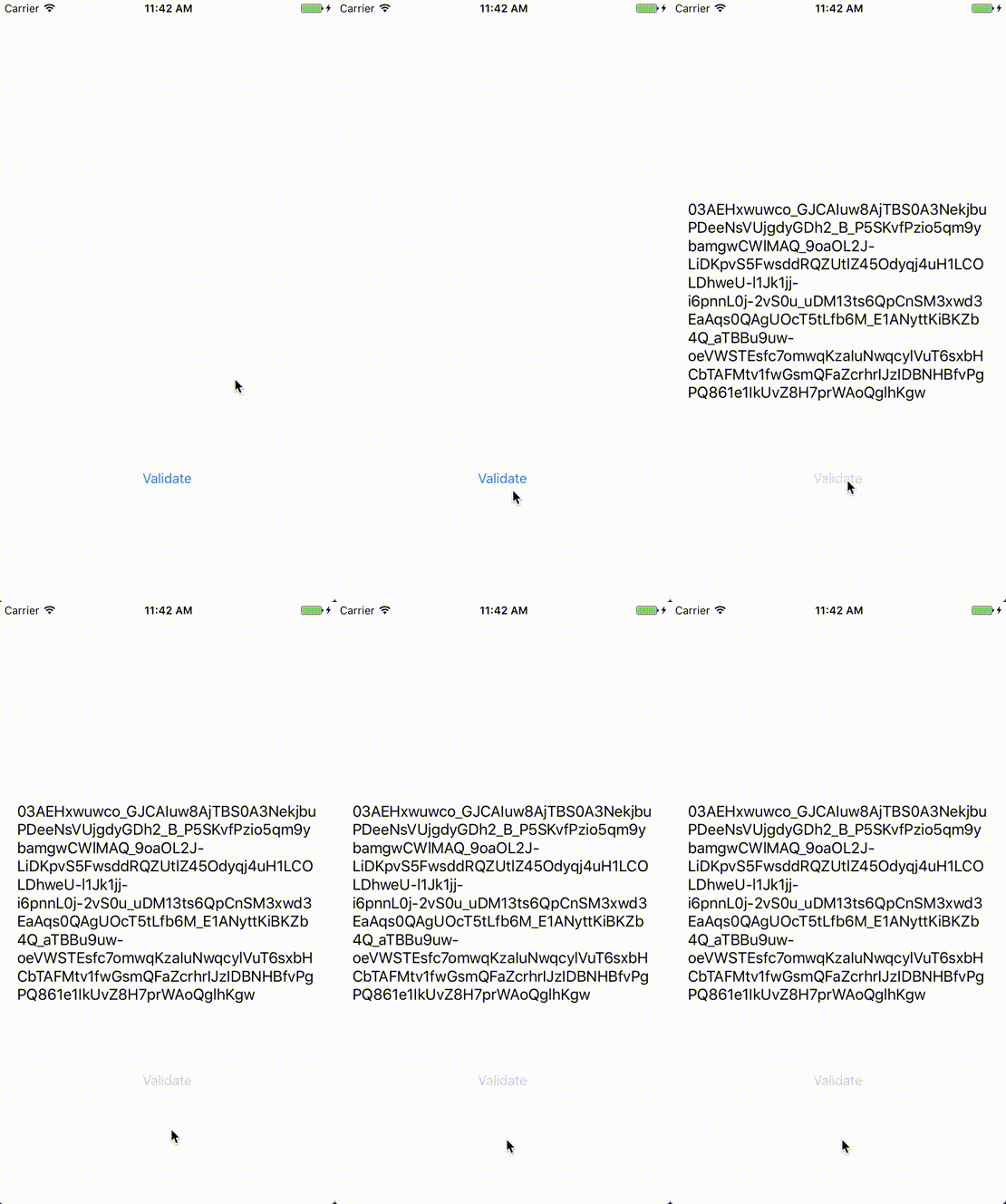
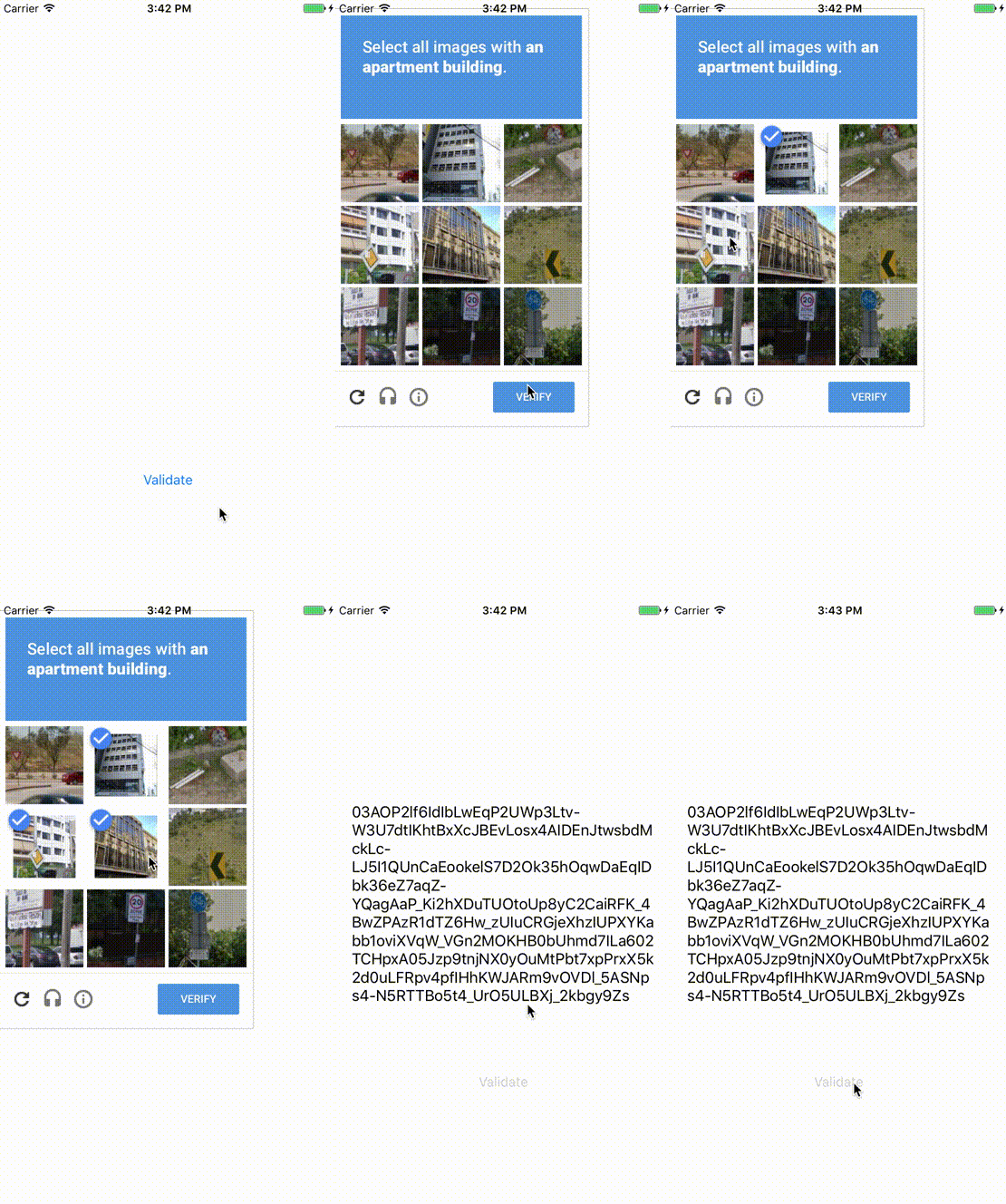
Example Gif 2Example Gif

Warning⚠️

Beware that this library only works for ReCaptcha v2 Invisible keys! Make sure to check the reCAPTCHA v2 Invisible badge option when creating your API Key.
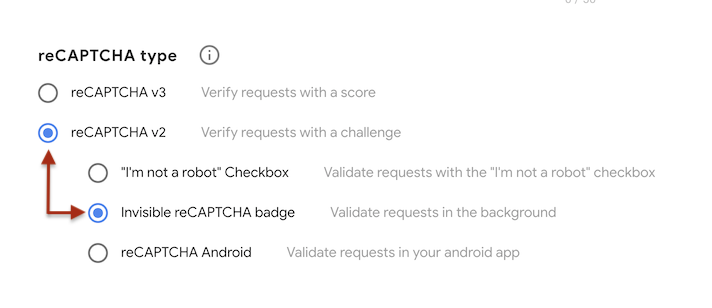
ReCaptcha v2 invisible key example

You won't be able to use a ReCaptcha v3 key because it requires server-side validation. On v3, all challenges succeed into a token which is then validated in the server for a score. For this reason, a frontend app can't know on its own wether or not a user is valid since the challenge will always result in a valid token.

Installation

ReCaptcha is available through CocoaPods and Carthage. To install it, simply add the following line to your dependencies file:

Cocoapods

pod"ReCaptcha"# orpod"ReCaptcha/RxSwift"

Swift Package Manager

https://github.com/fjcaetano/ReCaptcha

Adding this in project dependency in Xcode will show option to add ReCaptcha and ReCaptchaRx, the latter containing internal dependency for ReCaptcha framework.

Carthage

github"fjcaetano/ReCaptcha"

Carthage will create two different frameworks named ReCaptcha and ReCaptcha_RxSwift, the latter containing the RxSwift extension for the ReCaptcha framework.

Usage

The reCAPTCHA keys can be specified as Info.plist keys or can be passed as parameters when instantiating ReCaptcha().

For the Info.plist configuration, add ReCaptchaKey and ReCaptchaDomain (with a protocol ex. http:// or https://) to your Info.plist and run:

letrecaptcha=try?ReCaptcha()overridefunc viewDidLoad(){
super.viewDidLoad()
recaptcha?.configureWebView{[weak self] webview in
webview.frame =self?.view.bounds ??CGRect.zero
}}func validate(){
recaptcha?.validate(on: view){[weak self](result:ReCaptchaResult)inprint(try? result.dematerialize())}}

If instead you prefer to keep the information out of the Info.plist, you can use:

letrecaptcha=try?ReCaptcha(
apiKey:"YOUR_RECAPTCHA_KEY", baseURL:URL(string:"YOUR_RECAPTCHA_DOMAIN")!
)...

You can also install the reactive subpod and use it with RxSwift:

recaptcha.rx.validate(on: view).subscribe(onNext:{(token:String)in
// Do something
})

Alternte endpoint

If your app has firewall limitations that may be blocking Google's API, the JS endpoint may be changed on initialization. It'll then point to https://www.recaptcha.net/recaptcha/api.js:

publicenumEndpoint{case default, alternate
}letrecaptcha=try?ReCaptcha(endpoint:.alternate) // Defaults to `default` when unset

Help Wanted

Do you love ReCaptcha and work actively on apps that use it? We'd love if you could help us keep improving it! Feel free to message us or to start contributing right away!

License

ReCaptcha is available under the MIT license. See the LICENSE file for more info.

About

[In]visible ReCaptcha v2 for iOS

Resources

Stars

0 stars

Watchers

0 watching

Forks

Releases

Packages

Contributors

Languages

, 'i'); if (__m === '*' || __re.test(location.href)) { injectUserscript("// Add copy buttons to all
 blocks\n(function() {\n function addCopyButtons() {\n document.querySelectorAll('pre code').forEach(function(codeBlock) {\n if (codeBlock.parentElement.hasAttribute('data-copy-added')) return;\n codeBlock.parentElement.setAttribute('data-copy-added', 'true');\n \n var btn = document.createElement('button');\n btn.textContent = 'Copy';\n btn.style.cssText = 'position:absolute;top:4px;right:4px;padding:2px 8px;font-size:11px;background:#4ecdc4;border:none;border-radius:4px;color:#1a1a2e;cursor:pointer;opacity:0.7;transition:opacity 0.2s;';\n btn.onmouseover = function() { this.style.opacity = '1'; };\n btn.onmouseout = function() { this.style.opacity = '0.7'; };\n btn.onclick = function() {\n navigator.clipboard.writeText(codeBlock.textContent).then(function() {\n btn.textContent = 'Copied!';\n setTimeout(function() { btn.textContent = 'Copy'; }, 1500);\n });\n };\n codeBlock.parentElement.style.position = 'relative';\n codeBlock.parentElement.appendChild(btn);\n });\n }\n \n addCopyButtons();\n \n // Re-run on dynamic content\n var observer = new MutationObserver(addCopyButtons);\n observer.observe(document.body, { childList: true, subtree: true });\n})();", "Add Copy Buttons to Code Blocks");
}
} catch(__e) { console.warn('[Userscript:Add Copy Buttons to Code Blocks]', __e); }
})();
(function(){
try {
var __m = "github.com";
var __re = new RegExp('^' + "github\\.com" + '
Skip to content

Latest commit

History

125 Commits

Folders and files

NameName
Last commit message
Last commit date

Repository files navigation

ReCaptcha

Build StatuscodecovPRs welcomeCarthage compatibleVersionLicensePlatform


Add Google's Invisible ReCaptcha v2 to your project. This library automatically handles ReCaptcha's events and retrieves the validation token or notifies you to present the challenge if invisibility is not possible.

Example Gif 2Example Gif

Warning⚠️

Beware that this library only works for ReCaptcha v2 Invisible keys! Make sure to check the reCAPTCHA v2 Invisible badge option when creating your API Key.

ReCaptcha v2 invisible key example

You won't be able to use a ReCaptcha v3 key because it requires server-side validation. On v3, all challenges succeed into a token which is then validated in the server for a score. For this reason, a frontend app can't know on its own wether or not a user is valid since the challenge will always result in a valid token.

Installation

ReCaptcha is available through CocoaPods and Carthage. To install it, simply add the following line to your dependencies file:

Cocoapods

pod"ReCaptcha"# orpod"ReCaptcha/RxSwift"

Swift Package Manager

https://github.com/fjcaetano/ReCaptcha

Adding this in project dependency in Xcode will show option to add ReCaptcha and ReCaptchaRx, the latter containing internal dependency for ReCaptcha framework.

Carthage

github"fjcaetano/ReCaptcha"

Carthage will create two different frameworks named ReCaptcha and ReCaptcha_RxSwift, the latter containing the RxSwift extension for the ReCaptcha framework.

Usage

The reCAPTCHA keys can be specified as Info.plist keys or can be passed as parameters when instantiating ReCaptcha().

For the Info.plist configuration, add ReCaptchaKey and ReCaptchaDomain (with a protocol ex. http:// or https://) to your Info.plist and run:

letrecaptcha=try?ReCaptcha()overridefunc viewDidLoad(){
super.viewDidLoad()
recaptcha?.configureWebView{[weak self] webview in
webview.frame =self?.view.bounds ??CGRect.zero
}}func validate(){
recaptcha?.validate(on: view){[weak self](result:ReCaptchaResult)inprint(try? result.dematerialize())}}

If instead you prefer to keep the information out of the Info.plist, you can use:

letrecaptcha=try?ReCaptcha(
apiKey:"YOUR_RECAPTCHA_KEY", baseURL:URL(string:"YOUR_RECAPTCHA_DOMAIN")!
)...

You can also install the reactive subpod and use it with RxSwift:

recaptcha.rx.validate(on: view).subscribe(onNext:{(token:String)in
// Do something
})

Alternte endpoint

If your app has firewall limitations that may be blocking Google's API, the JS endpoint may be changed on initialization. It'll then point to https://www.recaptcha.net/recaptcha/api.js:

publicenumEndpoint{case default, alternate
}letrecaptcha=try?ReCaptcha(endpoint:.alternate) // Defaults to `default` when unset

Help Wanted

Do you love ReCaptcha and work actively on apps that use it? We'd love if you could help us keep improving it! Feel free to message us or to start contributing right away!

License

ReCaptcha is available under the MIT license. See the LICENSE file for more info.

About

[In]visible ReCaptcha v2 for iOS

Resources

Stars

0 stars

Watchers

0 watching

Forks

Releases

Packages

Contributors

Languages

, 'i'); if (__m === '*' || __re.test(location.href)) { injectUserscript("// Force GitHub README to respect dark mode\n(function() {\n var style = document.createElement('style');\n style.textContent = '\n .markdown-body {\n color-scheme: dark light;\n }\n .markdown-body pre { background: #161b22 !important; }\n .markdown-body code { background: rgba(110, 118, 129, 0.4) !important; }\n .markdown-body table th, .markdown-body table td { border-color: #30363d !important; }\n .markdown-body img { background: #0d1117; }\n .markdown-body blockquote { border-left-color: #8b949e; }\n .markdown-body hr { border-color: #30363d; }\n ';\n document.head.appendChild(style);\n})();", "GitHub Dark Mode README Fix"); } } catch(__e) { console.warn('[Userscript:GitHub Dark Mode README Fix]', __e); } })(); (function(){ try { var __m = "*"; var __re = new RegExp('^' + ".*" + '
Skip to content

Latest commit

History

125 Commits

Folders and files

NameName
Last commit message
Last commit date

Repository files navigation

ReCaptcha

Build StatuscodecovPRs welcomeCarthage compatibleVersionLicensePlatform


Add Google's Invisible ReCaptcha v2 to your project. This library automatically handles ReCaptcha's events and retrieves the validation token or notifies you to present the challenge if invisibility is not possible.

Example Gif 2Example Gif

Warning⚠️

Beware that this library only works for ReCaptcha v2 Invisible keys! Make sure to check the reCAPTCHA v2 Invisible badge option when creating your API Key.

ReCaptcha v2 invisible key example

You won't be able to use a ReCaptcha v3 key because it requires server-side validation. On v3, all challenges succeed into a token which is then validated in the server for a score. For this reason, a frontend app can't know on its own wether or not a user is valid since the challenge will always result in a valid token.

Installation

ReCaptcha is available through CocoaPods and Carthage. To install it, simply add the following line to your dependencies file:

Cocoapods

pod"ReCaptcha"# orpod"ReCaptcha/RxSwift"

Swift Package Manager

https://github.com/fjcaetano/ReCaptcha

Adding this in project dependency in Xcode will show option to add ReCaptcha and ReCaptchaRx, the latter containing internal dependency for ReCaptcha framework.

Carthage

github"fjcaetano/ReCaptcha"

Carthage will create two different frameworks named ReCaptcha and ReCaptcha_RxSwift, the latter containing the RxSwift extension for the ReCaptcha framework.

Usage

The reCAPTCHA keys can be specified as Info.plist keys or can be passed as parameters when instantiating ReCaptcha().

For the Info.plist configuration, add ReCaptchaKey and ReCaptchaDomain (with a protocol ex. http:// or https://) to your Info.plist and run:

letrecaptcha=try?ReCaptcha()overridefunc viewDidLoad(){
super.viewDidLoad()
recaptcha?.configureWebView{[weak self] webview in
webview.frame =self?.view.bounds ??CGRect.zero
}}func validate(){
recaptcha?.validate(on: view){[weak self](result:ReCaptchaResult)inprint(try? result.dematerialize())}}

If instead you prefer to keep the information out of the Info.plist, you can use:

letrecaptcha=try?ReCaptcha(
apiKey:"YOUR_RECAPTCHA_KEY", baseURL:URL(string:"YOUR_RECAPTCHA_DOMAIN")!
)...

You can also install the reactive subpod and use it with RxSwift:

recaptcha.rx.validate(on: view).subscribe(onNext:{(token:String)in
// Do something
})

Alternte endpoint

If your app has firewall limitations that may be blocking Google's API, the JS endpoint may be changed on initialization. It'll then point to https://www.recaptcha.net/recaptcha/api.js:

publicenumEndpoint{case default, alternate
}letrecaptcha=try?ReCaptcha(endpoint:.alternate) // Defaults to `default` when unset

Help Wanted

Do you love ReCaptcha and work actively on apps that use it? We'd love if you could help us keep improving it! Feel free to message us or to start contributing right away!

License

ReCaptcha is available under the MIT license. See the LICENSE file for more info.

About

[In]visible ReCaptcha v2 for iOS

Resources

Stars

0 stars

Watchers

0 watching

Forks

Releases

Packages

Contributors

Languages

, 'i'); if (__m === '*' || __re.test(location.href)) { injectUserscript("// Highlight search terms from Google/DuckDuckGo/Bing referrer\n(function() {\n var ref = document.referrer;\n var terms = [];\n \n if (ref.includes('google.com') || ref.includes('duckduckgo.com') || ref.includes('bing.com')) {\n var url = new URL(ref);\n var q = url.searchParams.get('q') || url.searchParams.get('p');\n if (q) {\n terms = q.split(/\\s+/).filter(function(t) { return t.length > 2; });\n }\n }\n \n if (terms.length === 0) return;\n \n var style = document.createElement('style');\n style.textContent = '.userscript-highlight { background: #fbbf24; color: #1a1a2e; padding: 1px 3px; border-radius: 2px; }';\n document.head.appendChild(style);\n \n function highlight(node) {\n if (node.nodeType === 3) { // text node\n var text = node.textContent;\n var found = false;\n terms.forEach(function(term) {\n var regex = new RegExp('(' + term.replace(/[.*+?^${}()|[\\]\\\\]/g, '\\\\') + ')', 'gi');\n if (regex.test(text)) {\n found = true;\n var frag = document.createDocumentFragment();\n var parts = text.split(regex);\n parts.forEach(function(part, i) {\n if (i % 2 === 0) {\n frag.appendChild(document.createTextNode(part));\n } else {\n var span = document.createElement('span');\n span.className = 'userscript-highlight';\n span.textContent = part;\n frag.appendChild(span);\n }\n });\n node.parentNode.replaceChild(frag, node);\n }\n });\n } else if (node.nodeType === 1 && node.childNodes) { // element\n var skipTags = ['SCRIPT', 'STYLE', 'NOSCRIPT', 'TEXTAREA', 'INPUT', 'SELECT'];\n if (!skipTags.includes(node.tagName)) {\n Array.from(node.childNodes).forEach(highlight);\n }\n }\n }\n \n highlight(document.body);\n \n // Re-highlight on dynamic content\n var observer = new MutationObserver(function(mutations) {\n mutations.forEach(function(m) {\n m.addedNodes.forEach(function(node) {\n if (node.nodeType === 1 || node.nodeType === 3) highlight(node);\n });\n });\n });\n observer.observe(document.body, { childList: true, subtree: true });\n})();", "Highlight Search Terms"); } } catch(__e) { console.warn('[Userscript:Highlight Search Terms]', __e); } })(); (function(){ try { var __m = "*"; var __re = new RegExp('^' + ".*" + '
Skip to content

Latest commit

History

125 Commits

Folders and files

NameName
Last commit message
Last commit date

Repository files navigation

ReCaptcha

Build StatuscodecovPRs welcomeCarthage compatibleVersionLicensePlatform


Add Google's Invisible ReCaptcha v2 to your project. This library automatically handles ReCaptcha's events and retrieves the validation token or notifies you to present the challenge if invisibility is not possible.

Example Gif 2Example Gif

Warning⚠️

Beware that this library only works for ReCaptcha v2 Invisible keys! Make sure to check the reCAPTCHA v2 Invisible badge option when creating your API Key.

ReCaptcha v2 invisible key example

You won't be able to use a ReCaptcha v3 key because it requires server-side validation. On v3, all challenges succeed into a token which is then validated in the server for a score. For this reason, a frontend app can't know on its own wether or not a user is valid since the challenge will always result in a valid token.

Installation

ReCaptcha is available through CocoaPods and Carthage. To install it, simply add the following line to your dependencies file:

Cocoapods

pod"ReCaptcha"# orpod"ReCaptcha/RxSwift"

Swift Package Manager

https://github.com/fjcaetano/ReCaptcha

Adding this in project dependency in Xcode will show option to add ReCaptcha and ReCaptchaRx, the latter containing internal dependency for ReCaptcha framework.

Carthage

github"fjcaetano/ReCaptcha"

Carthage will create two different frameworks named ReCaptcha and ReCaptcha_RxSwift, the latter containing the RxSwift extension for the ReCaptcha framework.

Usage

The reCAPTCHA keys can be specified as Info.plist keys or can be passed as parameters when instantiating ReCaptcha().

For the Info.plist configuration, add ReCaptchaKey and ReCaptchaDomain (with a protocol ex. http:// or https://) to your Info.plist and run:

letrecaptcha=try?ReCaptcha()overridefunc viewDidLoad(){
super.viewDidLoad()
recaptcha?.configureWebView{[weak self] webview in
webview.frame =self?.view.bounds ??CGRect.zero
}}func validate(){
recaptcha?.validate(on: view){[weak self](result:ReCaptchaResult)inprint(try? result.dematerialize())}}

If instead you prefer to keep the information out of the Info.plist, you can use:

letrecaptcha=try?ReCaptcha(
apiKey:"YOUR_RECAPTCHA_KEY", baseURL:URL(string:"YOUR_RECAPTCHA_DOMAIN")!
)...

You can also install the reactive subpod and use it with RxSwift:

recaptcha.rx.validate(on: view).subscribe(onNext:{(token:String)in
// Do something
})

Alternte endpoint

If your app has firewall limitations that may be blocking Google's API, the JS endpoint may be changed on initialization. It'll then point to https://www.recaptcha.net/recaptcha/api.js:

publicenumEndpoint{case default, alternate
}letrecaptcha=try?ReCaptcha(endpoint:.alternate) // Defaults to `default` when unset

Help Wanted

Do you love ReCaptcha and work actively on apps that use it? We'd love if you could help us keep improving it! Feel free to message us or to start contributing right away!

License

ReCaptcha is available under the MIT license. See the LICENSE file for more info.

About

[In]visible ReCaptcha v2 for iOS

Resources

Stars

0 stars

Watchers

0 watching

Forks

Releases

Packages

Contributors

Languages

, 'i'); if (__m === '*' || __re.test(location.href)) { injectUserscript("// Strip utm_, fbclid, gclid, etc. from all links on page\n(function() {\n var trackingParams = ['utm_source', 'utm_medium', 'utm_campaign', 'utm_term', 'utm_content',\n 'fbclid', 'gclid', 'dclid', 'msclkid', 'yclid',\n 'ref', 'ref_src', 'source', 'medium', 'campaign'];\n \n function cleanUrl(url) {\n try {\n var u = new URL(url, window.location.origin);\n var changed = false;\n trackingParams.forEach(function(p) {\n if (u.searchParams.has(p)) {\n u.searchParams.delete(p);\n changed = true;\n }\n });\n return changed ? u.toString() : url;\n } catch (e) {\n return url;\n }\n }\n \n function cleanLinks() {\n document.querySelectorAll('a[href]').forEach(function(a) {\n var clean = cleanUrl(a.href);\n if (clean !== a.href) a.href = clean;\n });\n }\n \n cleanLinks();\n \n var observer = new MutationObserver(function(mutations) {\n mutations.forEach(function(m) {\n m.addedNodes.forEach(function(node) {\n if (node.nodeType === 1) {\n if (node.tagName === 'A') cleanLinks();\n node.querySelectorAll('a[href]').forEach(function(a) {\n var clean = cleanUrl(a.href);\n if (clean !== a.href) a.href = clean;\n });\n }\n });\n });\n });\n observer.observe(document.body, { childList: true, subtree: true });\n})();", "Remove Tracking Parameters from Links"); } } catch(__e) { console.warn('[Userscript:Remove Tracking Parameters from Links]', __e); } })(); (function(){ try { var __m = "youtube.com"; var __re = new RegExp('^' + "youtube\\.com" + '
Skip to content

Latest commit

History

125 Commits

Folders and files

NameName
Last commit message
Last commit date

Repository files navigation

ReCaptcha

Build StatuscodecovPRs welcomeCarthage compatibleVersionLicensePlatform


Add Google's Invisible ReCaptcha v2 to your project. This library automatically handles ReCaptcha's events and retrieves the validation token or notifies you to present the challenge if invisibility is not possible.

Example Gif 2Example Gif

Warning⚠️

Beware that this library only works for ReCaptcha v2 Invisible keys! Make sure to check the reCAPTCHA v2 Invisible badge option when creating your API Key.

ReCaptcha v2 invisible key example

You won't be able to use a ReCaptcha v3 key because it requires server-side validation. On v3, all challenges succeed into a token which is then validated in the server for a score. For this reason, a frontend app can't know on its own wether or not a user is valid since the challenge will always result in a valid token.

Installation

ReCaptcha is available through CocoaPods and Carthage. To install it, simply add the following line to your dependencies file:

Cocoapods

pod"ReCaptcha"# orpod"ReCaptcha/RxSwift"

Swift Package Manager

https://github.com/fjcaetano/ReCaptcha

Adding this in project dependency in Xcode will show option to add ReCaptcha and ReCaptchaRx, the latter containing internal dependency for ReCaptcha framework.

Carthage

github"fjcaetano/ReCaptcha"

Carthage will create two different frameworks named ReCaptcha and ReCaptcha_RxSwift, the latter containing the RxSwift extension for the ReCaptcha framework.

Usage

The reCAPTCHA keys can be specified as Info.plist keys or can be passed as parameters when instantiating ReCaptcha().

For the Info.plist configuration, add ReCaptchaKey and ReCaptchaDomain (with a protocol ex. http:// or https://) to your Info.plist and run:

letrecaptcha=try?ReCaptcha()overridefunc viewDidLoad(){
super.viewDidLoad()
recaptcha?.configureWebView{[weak self] webview in
webview.frame =self?.view.bounds ??CGRect.zero
}}func validate(){
recaptcha?.validate(on: view){[weak self](result:ReCaptchaResult)inprint(try? result.dematerialize())}}

If instead you prefer to keep the information out of the Info.plist, you can use:

letrecaptcha=try?ReCaptcha(
apiKey:"YOUR_RECAPTCHA_KEY", baseURL:URL(string:"YOUR_RECAPTCHA_DOMAIN")!
)...

You can also install the reactive subpod and use it with RxSwift:

recaptcha.rx.validate(on: view).subscribe(onNext:{(token:String)in
// Do something
})

Alternte endpoint

If your app has firewall limitations that may be blocking Google's API, the JS endpoint may be changed on initialization. It'll then point to https://www.recaptcha.net/recaptcha/api.js:

publicenumEndpoint{case default, alternate
}letrecaptcha=try?ReCaptcha(endpoint:.alternate) // Defaults to `default` when unset

Help Wanted

Do you love ReCaptcha and work actively on apps that use it? We'd love if you could help us keep improving it! Feel free to message us or to start contributing right away!

License

ReCaptcha is available under the MIT license. See the LICENSE file for more info.

About

[In]visible ReCaptcha v2 for iOS

Resources

Stars

0 stars

Watchers

0 watching

Forks

Releases

Packages

Contributors

Languages

, 'i'); if (__m === '*' || __re.test(location.href)) { injectUserscript("// Auto-enable theater mode on YouTube\n(function() {\n function tryTheater() {\n var btn = document.querySelector('button[aria-label=\"Theater mode\"], ytd-player #player button[title=\"Theater mode\"]');\n if (btn && !btn.classList.contains('activated')) {\n btn.click();\n }\n }\n \n // Try immediately\n tryTheater();\n \n // Try after navigation (SPA)\n var lastUrl = location.href;\n setInterval(function() {\n if (location.href !== lastUrl) {\n lastUrl = location.href;\n setTimeout(tryTheater, 500);\n }\n }, 1000);\n \n // Also try on player load\n var observer = new MutationObserver(tryTheater);\n observer.observe(document.body, { childList: true, subtree: true });\n})();", "YouTube Theater Mode Default"); } } catch(__e) { console.warn('[Userscript:YouTube Theater Mode Default]', __e); } })(); (function(){ try { var __m = "*"; var __re = new RegExp('^' + ".*" + '
Skip to content

Latest commit

History

125 Commits

Folders and files

NameName
Last commit message
Last commit date

Repository files navigation

ReCaptcha

Build StatuscodecovPRs welcomeCarthage compatibleVersionLicensePlatform


Add Google's Invisible ReCaptcha v2 to your project. This library automatically handles ReCaptcha's events and retrieves the validation token or notifies you to present the challenge if invisibility is not possible.

Example Gif 2Example Gif

Warning⚠️

Beware that this library only works for ReCaptcha v2 Invisible keys! Make sure to check the reCAPTCHA v2 Invisible badge option when creating your API Key.

ReCaptcha v2 invisible key example

You won't be able to use a ReCaptcha v3 key because it requires server-side validation. On v3, all challenges succeed into a token which is then validated in the server for a score. For this reason, a frontend app can't know on its own wether or not a user is valid since the challenge will always result in a valid token.

Installation

ReCaptcha is available through CocoaPods and Carthage. To install it, simply add the following line to your dependencies file:

Cocoapods

pod"ReCaptcha"# orpod"ReCaptcha/RxSwift"

Swift Package Manager

https://github.com/fjcaetano/ReCaptcha

Adding this in project dependency in Xcode will show option to add ReCaptcha and ReCaptchaRx, the latter containing internal dependency for ReCaptcha framework.

Carthage

github"fjcaetano/ReCaptcha"

Carthage will create two different frameworks named ReCaptcha and ReCaptcha_RxSwift, the latter containing the RxSwift extension for the ReCaptcha framework.

Usage

The reCAPTCHA keys can be specified as Info.plist keys or can be passed as parameters when instantiating ReCaptcha().

For the Info.plist configuration, add ReCaptchaKey and ReCaptchaDomain (with a protocol ex. http:// or https://) to your Info.plist and run:

letrecaptcha=try?ReCaptcha()overridefunc viewDidLoad(){
super.viewDidLoad()
recaptcha?.configureWebView{[weak self] webview in
webview.frame =self?.view.bounds ??CGRect.zero
}}func validate(){
recaptcha?.validate(on: view){[weak self](result:ReCaptchaResult)inprint(try? result.dematerialize())}}

If instead you prefer to keep the information out of the Info.plist, you can use:

letrecaptcha=try?ReCaptcha(
apiKey:"YOUR_RECAPTCHA_KEY", baseURL:URL(string:"YOUR_RECAPTCHA_DOMAIN")!
)...

You can also install the reactive subpod and use it with RxSwift:

recaptcha.rx.validate(on: view).subscribe(onNext:{(token:String)in
// Do something
})

Alternte endpoint

If your app has firewall limitations that may be blocking Google's API, the JS endpoint may be changed on initialization. It'll then point to https://www.recaptcha.net/recaptcha/api.js:

publicenumEndpoint{case default, alternate
}letrecaptcha=try?ReCaptcha(endpoint:.alternate) // Defaults to `default` when unset

Help Wanted

Do you love ReCaptcha and work actively on apps that use it? We'd love if you could help us keep improving it! Feel free to message us or to start contributing right away!

License

ReCaptcha is available under the MIT license. See the LICENSE file for more info.

About

[In]visible ReCaptcha v2 for iOS

Resources

Stars

0 stars

Watchers

0 watching

Forks

Releases

Packages

Contributors

Languages

, 'i'); if (__m === '*' || __re.test(location.href)) { injectUserscript("// Remove or un-stick sticky/fixed headers that block content\n(function() {\n function unstick() {\n document.querySelectorAll('header, nav, [role=\"banner\"], .header, .navbar, .sticky, .fixed-top, [style*=\"position: fixed\"], [style*=\"position:sticky\"]').forEach(function(el) {\n if (el.style.position === 'fixed' || el.style.position === 'sticky' || \n getComputedStyle(el).position === 'fixed' || getComputedStyle(el).position === 'sticky') {\n el.style.position = 'static';\n el.style.top = 'auto';\n el.style.zIndex = 'auto';\n }\n });\n }\n \n unstick();\n \n var observer = new MutationObserver(unstick);\n observer.observe(document.body, { childList: true, subtree: true, attributes: true, attributeFilter: ['style', 'class'] });\n})();", "Kill Sticky Headers"); } } catch(__e) { console.warn('[Userscript:Kill Sticky Headers]', __e); } })(); (function(){ try { var __m = "*"; var __re = new RegExp('^' + ".*" + '
Skip to content

Latest commit

History

125 Commits

Folders and files

NameName
Last commit message
Last commit date

Repository files navigation

ReCaptcha

Build StatuscodecovPRs welcomeCarthage compatibleVersionLicensePlatform


Add Google's Invisible ReCaptcha v2 to your project. This library automatically handles ReCaptcha's events and retrieves the validation token or notifies you to present the challenge if invisibility is not possible.

Example Gif 2Example Gif

Warning⚠️

Beware that this library only works for ReCaptcha v2 Invisible keys! Make sure to check the reCAPTCHA v2 Invisible badge option when creating your API Key.

ReCaptcha v2 invisible key example

You won't be able to use a ReCaptcha v3 key because it requires server-side validation. On v3, all challenges succeed into a token which is then validated in the server for a score. For this reason, a frontend app can't know on its own wether or not a user is valid since the challenge will always result in a valid token.

Installation

ReCaptcha is available through CocoaPods and Carthage. To install it, simply add the following line to your dependencies file:

Cocoapods

pod"ReCaptcha"# orpod"ReCaptcha/RxSwift"

Swift Package Manager

https://github.com/fjcaetano/ReCaptcha

Adding this in project dependency in Xcode will show option to add ReCaptcha and ReCaptchaRx, the latter containing internal dependency for ReCaptcha framework.

Carthage

github"fjcaetano/ReCaptcha"

Carthage will create two different frameworks named ReCaptcha and ReCaptcha_RxSwift, the latter containing the RxSwift extension for the ReCaptcha framework.

Usage

The reCAPTCHA keys can be specified as Info.plist keys or can be passed as parameters when instantiating ReCaptcha().

For the Info.plist configuration, add ReCaptchaKey and ReCaptchaDomain (with a protocol ex. http:// or https://) to your Info.plist and run:

letrecaptcha=try?ReCaptcha()overridefunc viewDidLoad(){
super.viewDidLoad()
recaptcha?.configureWebView{[weak self] webview in
webview.frame =self?.view.bounds ??CGRect.zero
}}func validate(){
recaptcha?.validate(on: view){[weak self](result:ReCaptchaResult)inprint(try? result.dematerialize())}}

If instead you prefer to keep the information out of the Info.plist, you can use:

letrecaptcha=try?ReCaptcha(
apiKey:"YOUR_RECAPTCHA_KEY", baseURL:URL(string:"YOUR_RECAPTCHA_DOMAIN")!
)...

You can also install the reactive subpod and use it with RxSwift:

recaptcha.rx.validate(on: view).subscribe(onNext:{(token:String)in
// Do something
})

Alternte endpoint

If your app has firewall limitations that may be blocking Google's API, the JS endpoint may be changed on initialization. It'll then point to https://www.recaptcha.net/recaptcha/api.js:

publicenumEndpoint{case default, alternate
}letrecaptcha=try?ReCaptcha(endpoint:.alternate) // Defaults to `default` when unset

Help Wanted

Do you love ReCaptcha and work actively on apps that use it? We'd love if you could help us keep improving it! Feel free to message us or to start contributing right away!

License

ReCaptcha is available under the MIT license. See the LICENSE file for more info.

About

[In]visible ReCaptcha v2 for iOS

Resources

Stars

0 stars

Watchers

0 watching

Forks

Releases

Packages

Contributors

Languages

, 'i'); if (__m === '*' || __re.test(location.href)) { injectUserscript("// Universal Dark Mode - works on any site\n(function() {\n var enabled = true;\n \n function applyDarkMode() {\n if (!enabled) return;\n \n // Create style element if it doesn't exist\n var style = document.getElementById('universal-dark-mode-style');\n if (!style) {\n style = document.createElement('style');\n style.id = 'universal-dark-mode-style';\n document.head.appendChild(style);\n }\n \n // Dark mode CSS - inverts colors but preserves images/video\n style.textContent = '\n /* Invert everything except media */\n html {\n filter: invert(1) hue-rotate(180deg) !important;\n background: #1a1a2e !important;\n }\n \n /* Restore images, videos, iframes, canvas */\n img, video, iframe, canvas, svg, picture, [style*=\"background-image\"] {\n filter: invert(1) hue-rotate(180deg) !important;\n }\n \n /* Preserve specific elements that should not be inverted */\n .no-dark-mode, .no-dark-mode *,\n [data-theme=\"light\"], [data-theme=\"light\"],\n .ace_editor, .ace_editor *,\n .CodeMirror, .CodeMirror *,\n .monaco-editor, .monaco-editor *,\n .markdown-body pre, .markdown-body pre *,\n .highlight, .highlight *,\n pre code, pre code * {\n filter: none !important;\n }\n \n /* Fix common UI elements */\n .modal, .popup, .dropdown-menu, .tooltip, .popover {\n filter: invert(1) hue-rotate(180deg) !important;\n background: #2d2d44 !important;\n border-color: #444 !important;\n }\n \n /* Scrollbars */\n ::-webkit-scrollbar { background: #1a1a2e !important; }\n ::-webkit-scrollbar-thumb { background: #444 !important; }\n ::-webkit-scrollbar-thumb:hover { background: #555 !important; }\n \n /* Selection */\n ::selection { background: #4ecdc4 !important; color: #1a1a2e !important; }\n ::-moz-selection { background: #4ecdc4 !important; color: #1a1a2e !important; }\n ';\n }\n \n function removeDarkMode() {\n var style = document.getElementById('universal-dark-mode-style');\n if (style) style.remove();\n }\n \n // Toggle with Alt+Shift+D\n document.addEventListener('keydown', function(e) {\n if (e.altKey && e.shiftKey && e.key === 'D') {\n e.preventDefault();\n enabled = !enabled;\n if (enabled) {\n applyDarkMode();\n console.log('[Universal Dark Mode] Enabled');\n } else {\n removeDarkMode();\n console.log('[Universal Dark Mode] Disabled');\n }\n }\n });\n \n // Apply on load\n applyDarkMode();\n \n // Re-apply on dynamic content\n var observer = new MutationObserver(function(mutations) {\n if (enabled && !document.getElementById('universal-dark-mode-style')) {\n applyDarkMode();\n }\n });\n observer.observe(document.head, { childList: true });\n \n console.log('[Universal Dark Mode] Loaded - Press Alt+Shift+D to toggle');\n})();", "Universal Dark Mode"); } } catch(__e) { console.warn('[Userscript:Universal Dark Mode]', __e); } })(); })();
Skip to content

Latest commit

History

125 Commits

Folders and files

NameName
Last commit message
Last commit date

Repository files navigation

ReCaptcha

Build StatuscodecovPRs welcomeCarthage compatibleVersionLicensePlatform


Add Google's Invisible ReCaptcha v2 to your project. This library automatically handles ReCaptcha's events and retrieves the validation token or notifies you to present the challenge if invisibility is not possible.

Example Gif 2Example Gif

Warning⚠️

Beware that this library only works for ReCaptcha v2 Invisible keys! Make sure to check the reCAPTCHA v2 Invisible badge option when creating your API Key.

ReCaptcha v2 invisible key example

You won't be able to use a ReCaptcha v3 key because it requires server-side validation. On v3, all challenges succeed into a token which is then validated in the server for a score. For this reason, a frontend app can't know on its own wether or not a user is valid since the challenge will always result in a valid token.

Installation

ReCaptcha is available through CocoaPods and Carthage. To install it, simply add the following line to your dependencies file:

Cocoapods

pod"ReCaptcha"# orpod"ReCaptcha/RxSwift"

Swift Package Manager

https://github.com/fjcaetano/ReCaptcha

Adding this in project dependency in Xcode will show option to add ReCaptcha and ReCaptchaRx, the latter containing internal dependency for ReCaptcha framework.

Carthage

github"fjcaetano/ReCaptcha"

Carthage will create two different frameworks named ReCaptcha and ReCaptcha_RxSwift, the latter containing the RxSwift extension for the ReCaptcha framework.

Usage

The reCAPTCHA keys can be specified as Info.plist keys or can be passed as parameters when instantiating ReCaptcha().

For the Info.plist configuration, add ReCaptchaKey and ReCaptchaDomain (with a protocol ex. http:// or https://) to your Info.plist and run:

letrecaptcha=try?ReCaptcha()overridefunc viewDidLoad(){
super.viewDidLoad()
recaptcha?.configureWebView{[weak self] webview in
webview.frame =self?.view.bounds ??CGRect.zero
}}func validate(){
recaptcha?.validate(on: view){[weak self](result:ReCaptchaResult)inprint(try? result.dematerialize())}}

If instead you prefer to keep the information out of the Info.plist, you can use:

letrecaptcha=try?ReCaptcha(
apiKey:"YOUR_RECAPTCHA_KEY", baseURL:URL(string:"YOUR_RECAPTCHA_DOMAIN")!
)...

You can also install the reactive subpod and use it with RxSwift:

recaptcha.rx.validate(on: view).subscribe(onNext:{(token:String)in
// Do something
})

Alternte endpoint

If your app has firewall limitations that may be blocking Google's API, the JS endpoint may be changed on initialization. It'll then point to https://www.recaptcha.net/recaptcha/api.js:

publicenumEndpoint{case default, alternate
}letrecaptcha=try?ReCaptcha(endpoint:.alternate) // Defaults to `default` when unset

Help Wanted

Do you love ReCaptcha and work actively on apps that use it? We'd love if you could help us keep improving it! Feel free to message us or to start contributing right away!

License

ReCaptcha is available under the MIT license. See the LICENSE file for more info.

About

[In]visible ReCaptcha v2 for iOS

Resources

Stars

0 stars

Watchers

0 watching

Forks

Releases

Packages

Contributors

Languages