This repository was archived by the owner on Jan 7, 2022. It is now read-only.

Repository files navigation

Self-Service Multi-Factor Authentication

A web interface to initiate MFA enrollment in Office 365

Overview

Enrolling users in Office 365 MFA can be very disruptive. After an admin enables MFA users are expected to complete the enrollment steps before they can access their accounts. If the user doesn't have access to a phone, they have no option but to request MFA be disabled for their account. SSMFA alleviates these challenges by allowing users to opt-in to MFA when they want. Also, if there's a problem with the users MFA settings, they can use SSMFA to clear their MFA settings and restart the enrollment process. More information about the purpose of this service is available in the wiki.

SSMFA uses a personal email address to validate a user's identity. Ownership of the email address is established at enrollment. When an MFA settings reset is started the user must verify control of the personal email address on file by clicking on a link.

SSMFA was designed to be deployed in an environment with hybrid on-prem AD and Office 365 accounts synced. You should expect to do a hefty amount of development work to get SSMFA to work the way you want in your environment. This project provides all of the necessary services (except Office 365 of course) to run SSMFA.

Quickstart

To begin development on SSMFA for your environment, you'll need a development system. I recommend Linux with docker and docker-compose installed. The hostname for SSMFA and all the dev services is set to ssmfa.example.com. Create an entry in your /etc/hosts file for this name. You could also replace ssmfa.example.com with the FQDN of your dev system in the docker-compose.yml file.

Clone the repo, build, up

git clone https://github.com/HCPSS/ssmfa.git
cd ssmfa
docker-compose build
docker-compose up

Open your browser to https://ssmfa.example.com

Try it

MFA Enrollment

The client should have redirected you to jwt which redirected you to sso. Fun right!?

username: test, password: test
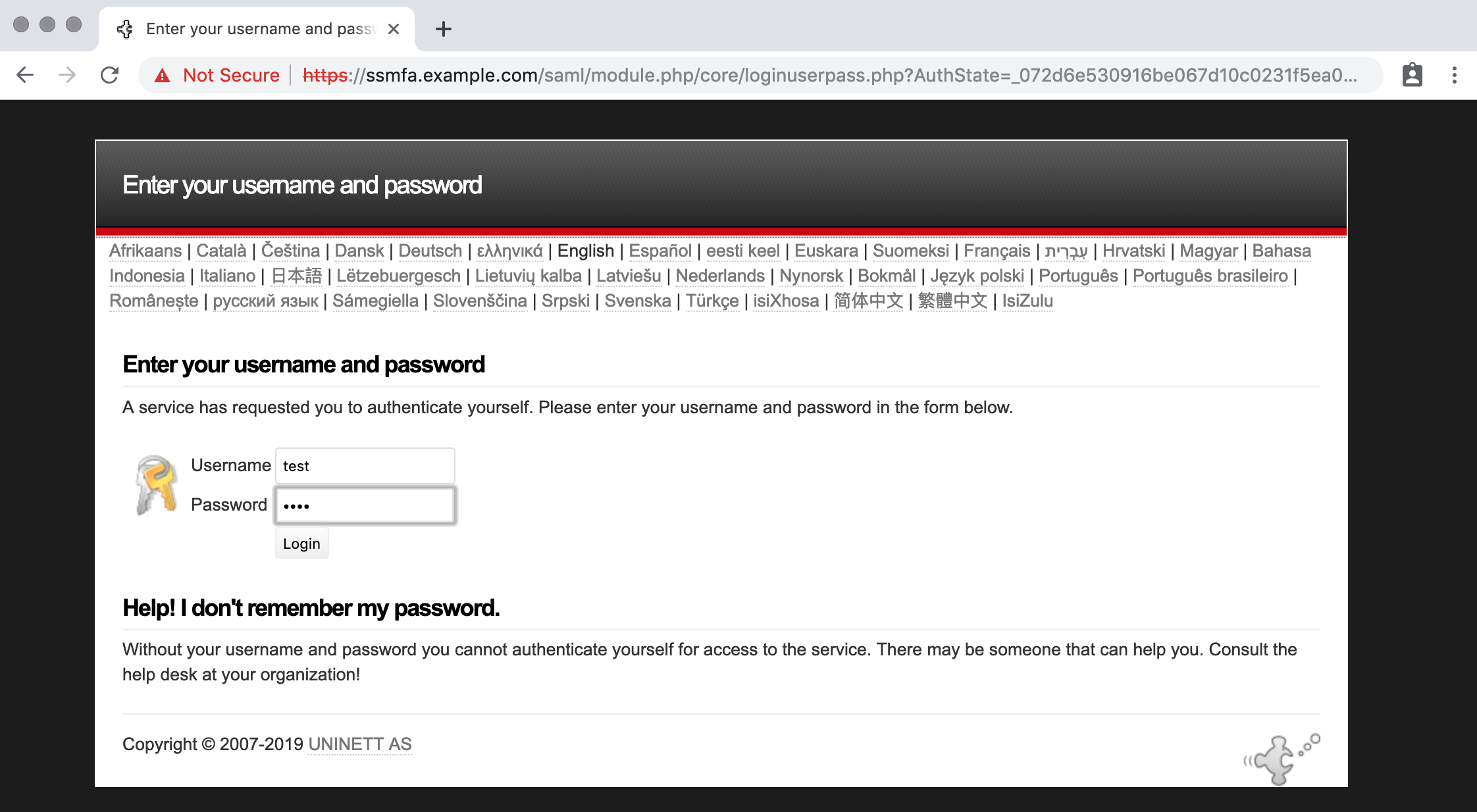
SSO Login

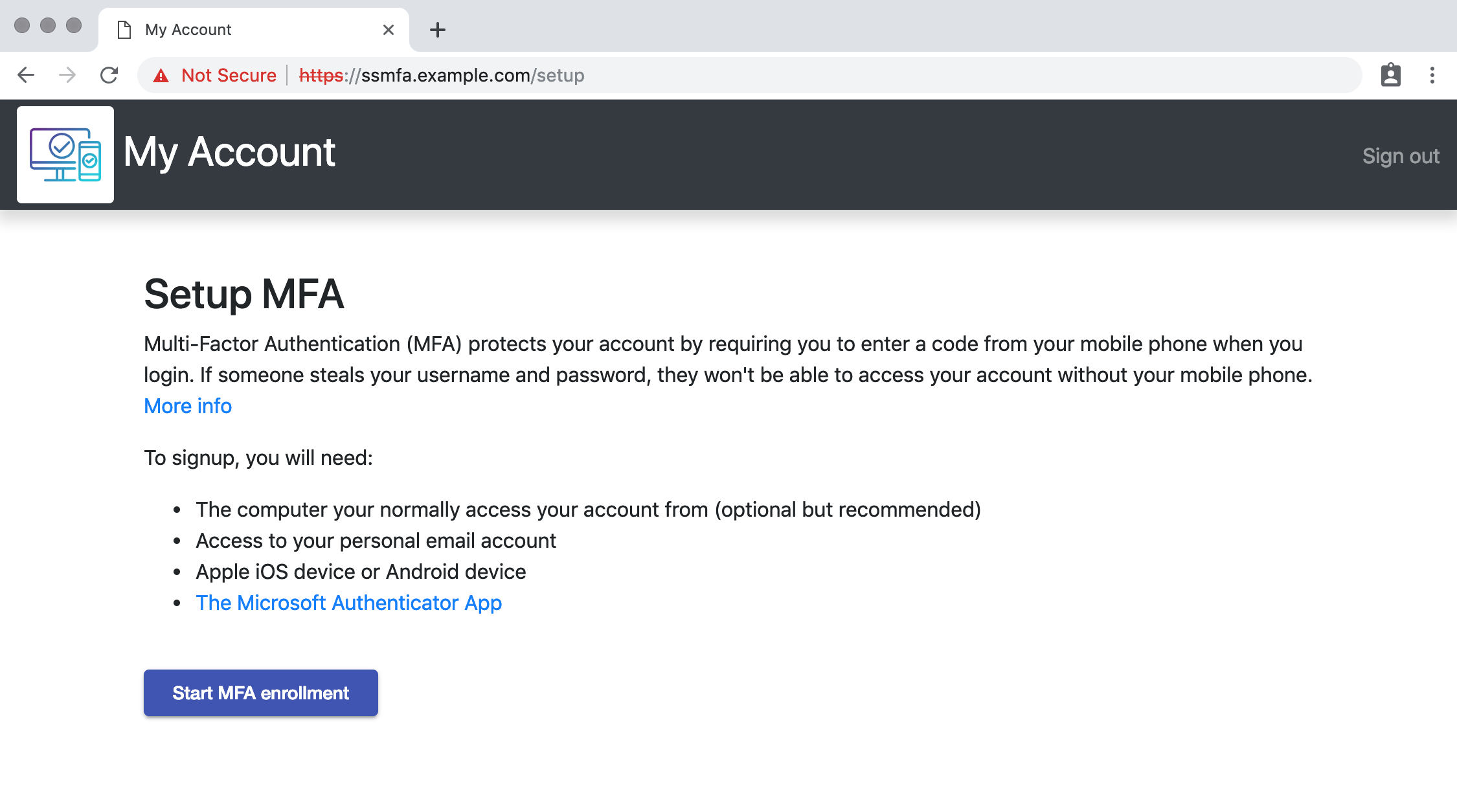
Click Start MFA Enrollment

Setup MFA

Submit an email address that ends in the domain @example.dev
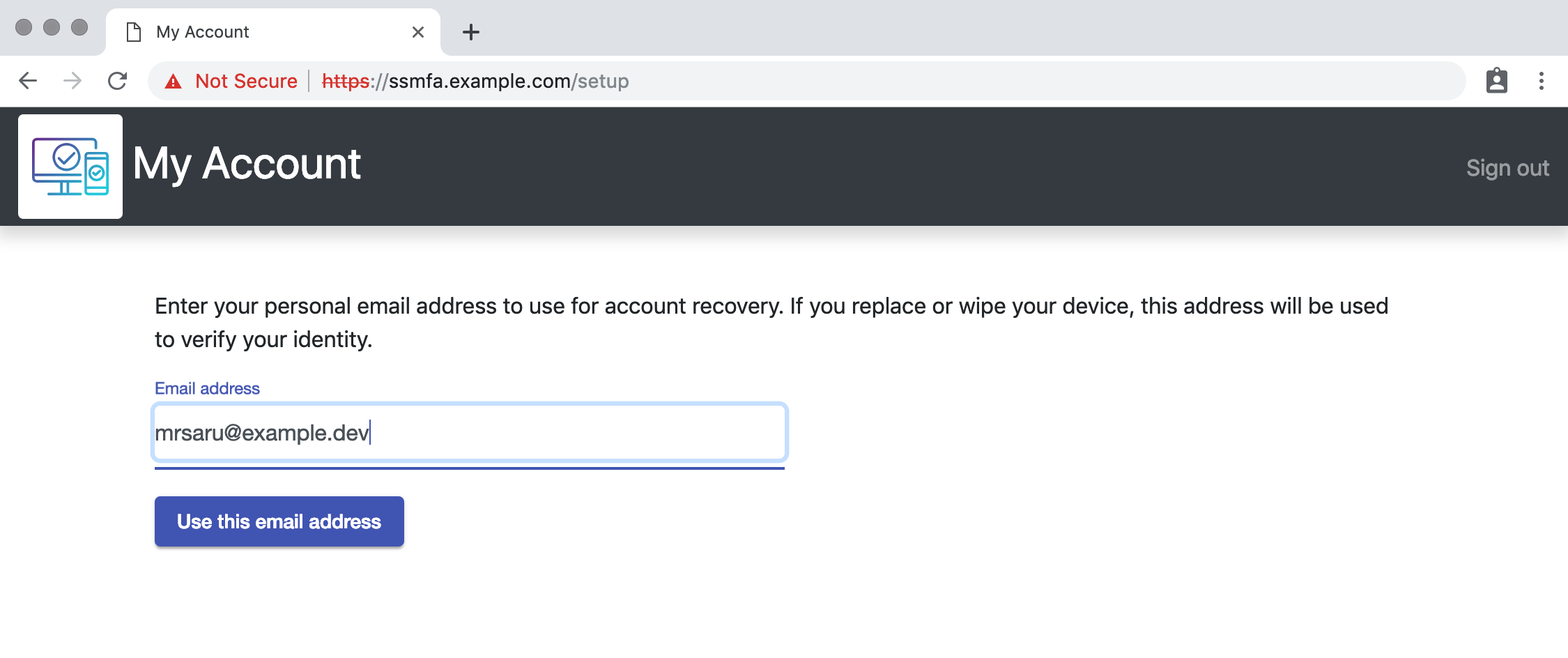
Submit email

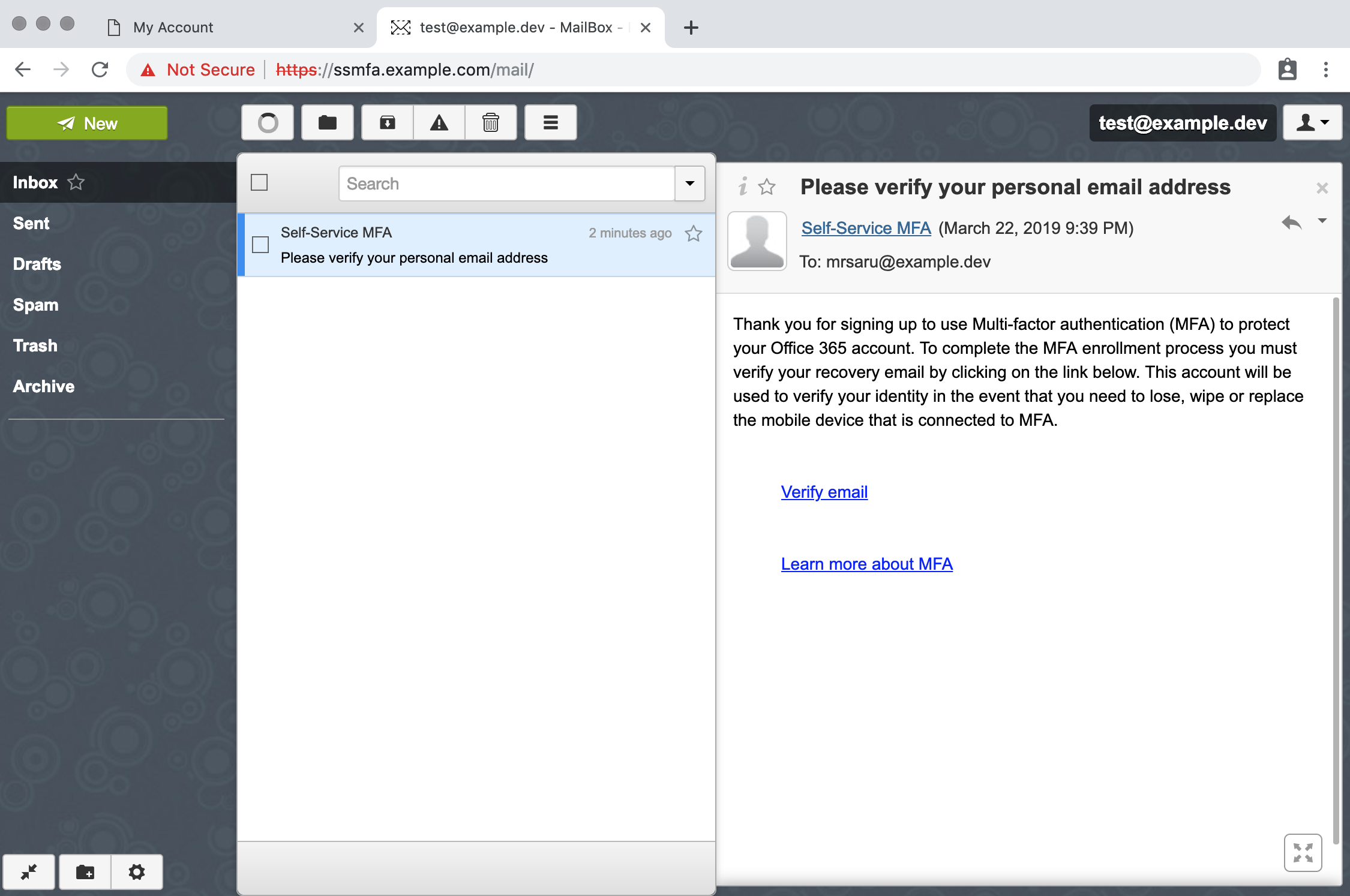
Login to the dev mail server https://ssmfa.example.com/mailusername: test, password: test
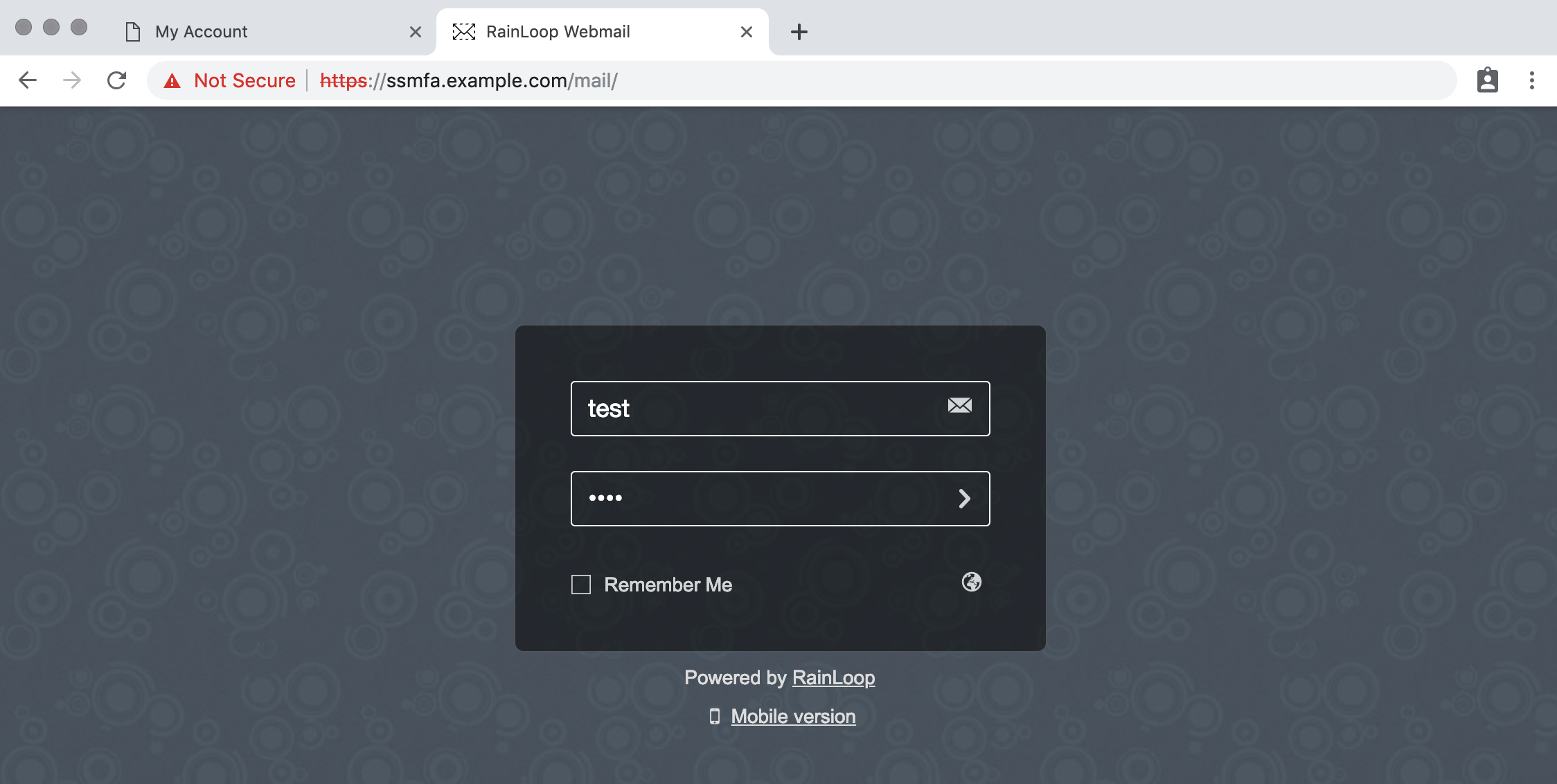
Email Login

Click on the verify email link

Verify email

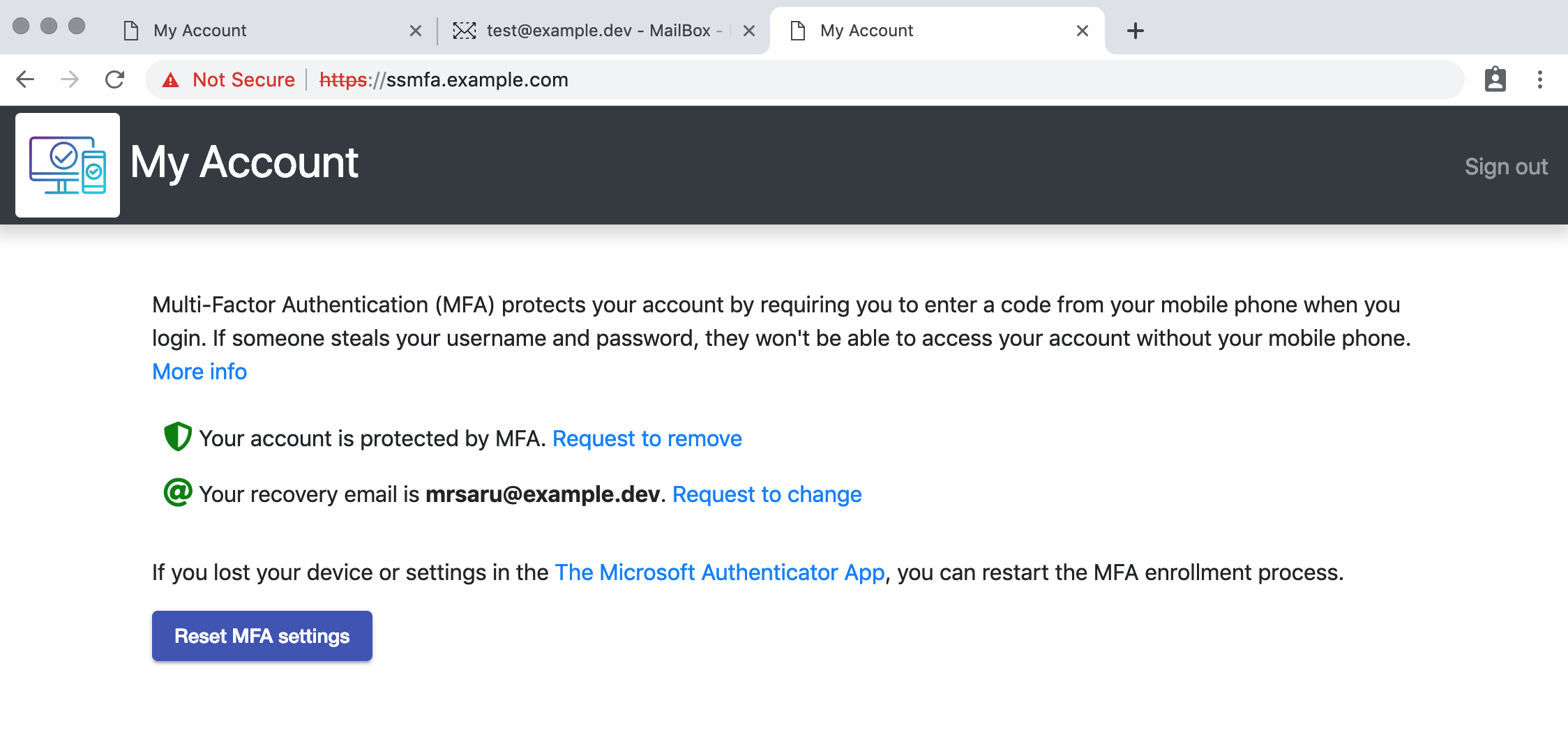
Done, well not really. Nothing has happened on Office 365.
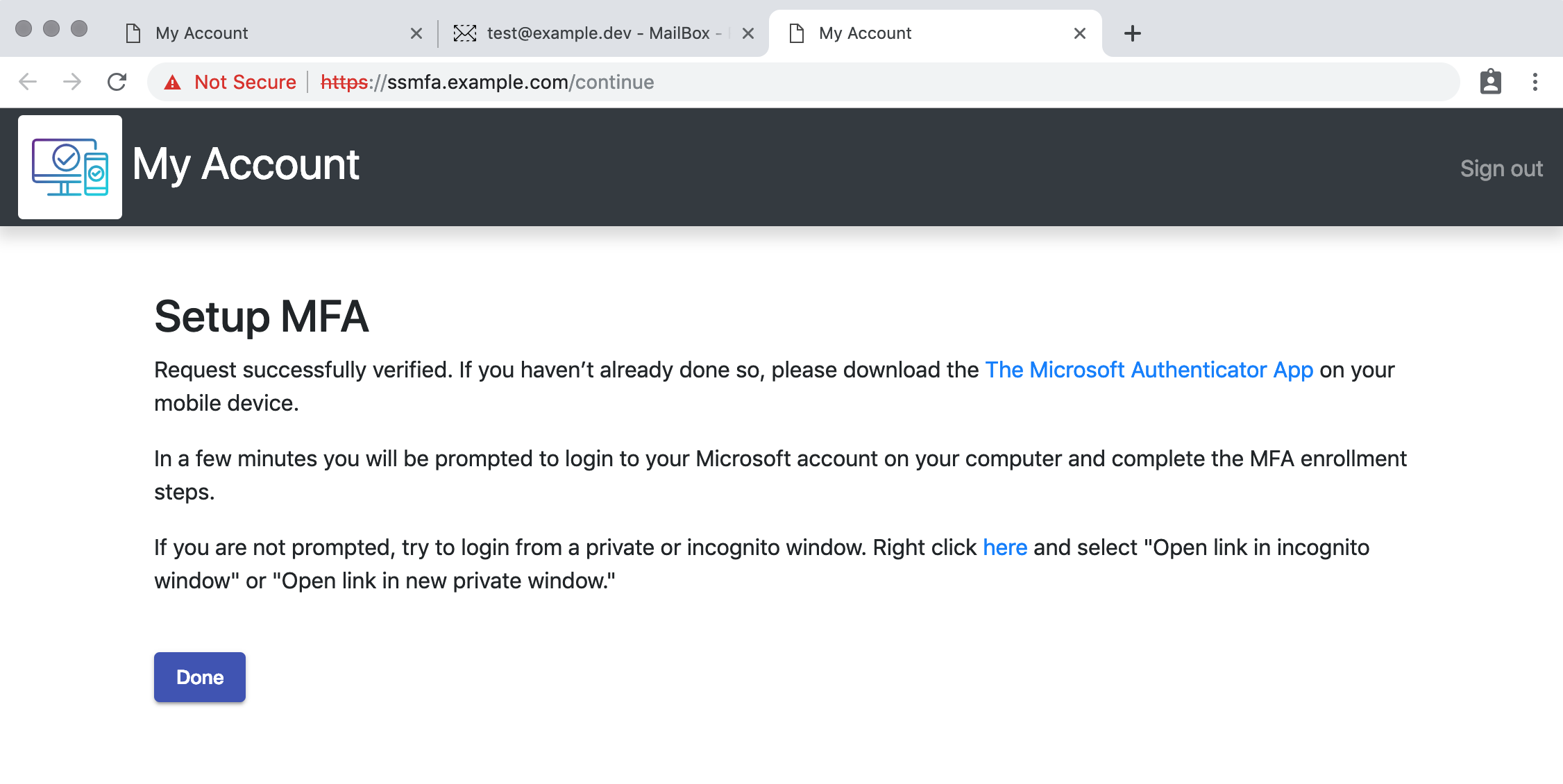
Continue

You can see in the redis server we have stored the email address and the MFA status is pending. If the daemon was running, it would enable MFA on this GUID.

$ docker exec -it ssmfa_redis_1 redis-cli
127.0.0.1:6379> keys *
1) "MFA_RECOVERY_EMAIL:829de882-9de8-e882-9d82-e89d82e89d82"
2) "MFA_STATUS:829de882-9de8-e882-9d82-e89d82e89d82"
127.0.0.1:6379> get MFA_RECOVERY_EMAIL:829de882-9de8-e882-9d82-e89d82e89d82
"mrsaru@example.dev"
127.0.0.1:6379> get MFA_STATUS:829de882-9de8-e882-9d82-e89d82e89d82
"pending"
127.0.0.1:6379>

MFA Settings Reset

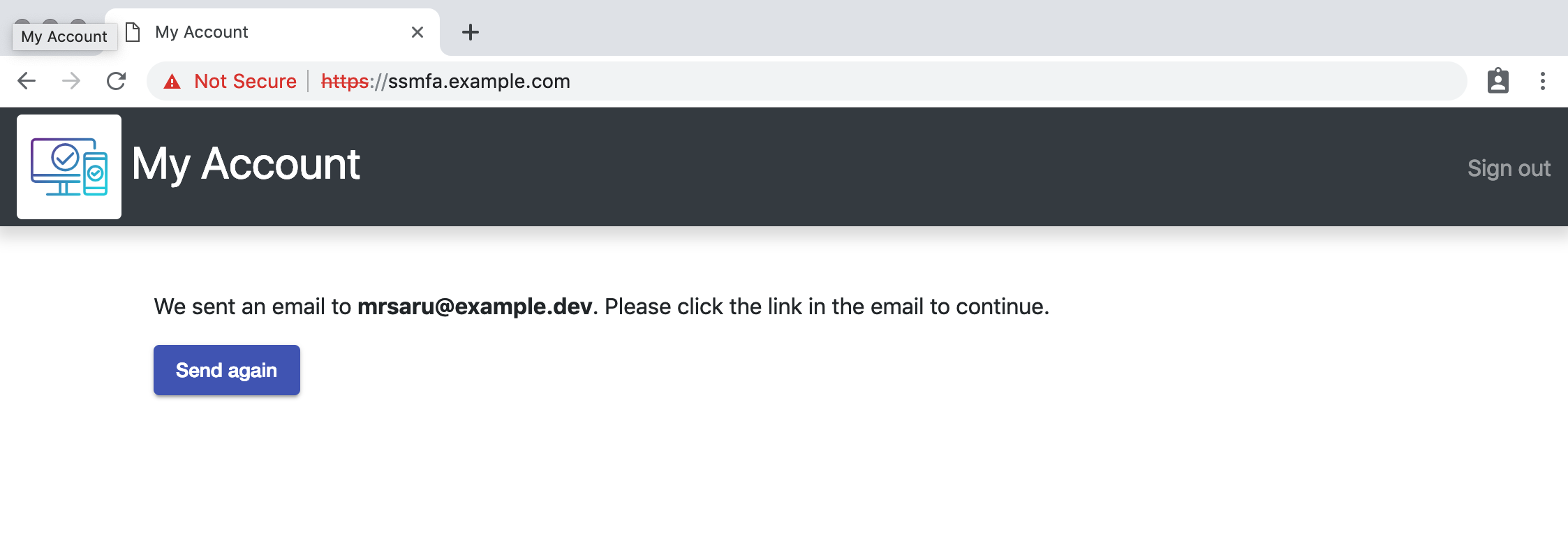
Click Reset MFA settings

Done

Reset request

Go back to the mail client, https://ssmfa.example.com/mail and click on Continue MFA settings reset process
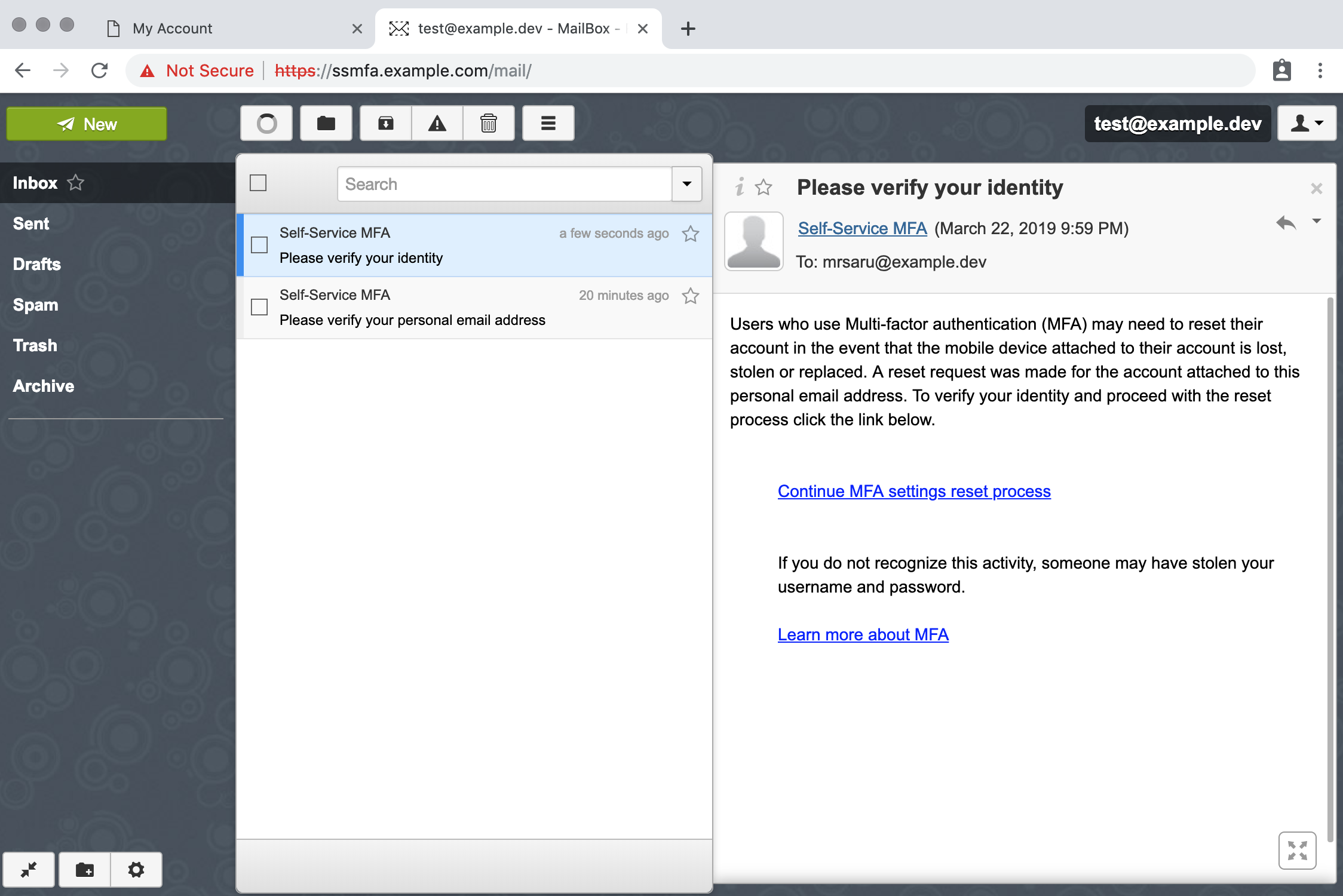
Reset

Done. But not really.

Continue

We can see there is another entry in redis for resetting the settings. If the daemon was running it would reset MFA on this GUID.

$ docker exec -it ssmfa_redis_1 redis-cli
127.0.0.1:6379> keys *
1) "MFA_RESET:829de882-9de8-e882-9d82-e89d82e89d82"
2) "MFA_RECOVERY_EMAIL:829de882-9de8-e882-9d82-e89d82e89d82"
3) "MFA_STATUS:829de882-9de8-e882-9d82-e89d82e89d82"
127.0.0.1:6379> get MFA_RESET:829de882-9de8-e882-9d82-e89d82e89d82
"pending"
127.0.0.1:6379>

Settings

SSMFA Components

SSO, JWT, Mail, and HAProxy are all services that are only relevant to the development environment and exist merely for testing and demonstration purposes. Ideally, you have production systems that can fill these roles. Client, API, Redis, and Daemon are the SSMFA production services. There are many environment variables that can be configured for your environment.

ServiceVariableDescription
APIMFA_BASE_URLThe desired URL for SSMFA
MFA_TZThe desired timezone for logs
MFA_EXCLUDED_DOMAINSComma seperated list of email domains users cannot use
MFA_LINKS_EXPIRETime to allow verification links to survive
MFA_SMTP_HOSTThe SMTP server to send email
MFA_SMTP_PORTThe listener of the SMTP server
MFA_FROM_EMAILThe from address of emails sent by SSMFA
MFA_RECOVERY_SUBJECTThe subject line of the email establishing a recovery address
MFA_RESET_SUBJECTThe subject line of the email verifying a personal email for setting reset
MFA_JWT_AUTH_KEY_URLURL of the public key for JWT user authentication
MFA_SEARCH_SERVERSComma seperated list of search servers to resolve GUIDs from AD
MFA_SUPPORT_URLURL to an MFA support page for users
ClientMFA_BASE_URLThe desired URL for SSMFA
MFA_EXCLUDED_DOMAINSComma seperated list of email domains users cannot use
SSO_REDIRECTURL of the SSO server to send users that aren't authenticated with the API
SSO_REQTOKENURL of the SSO server to get a JWT for authentication with the API
MFA_FAVICONURLURL to the desired favicon.ico file
MFA_LOGOURLURL to the desired logo image file
MFA_LOGOUTURLURL of the SSO server to process a logout
MFA_SUPPORT_URLURL to an MFA support page for users
HAProxyDEV_COMMON_NAMEFQDN of SSMFA dev system
DEV_ALT_NAMESComma seperated list of alt names
DEV_DEFAULT_BACKENDThe backend server for the root path /
DEV_SERVICE_ACLSComma seperated list of haproxy ACLs that coincide with backends
DEV_SERVICE_BACKENDSComma seperated list of haproxy backends that coincide with ACLs
SSOMFA_BASE_URLThe URL of the dev SSO IdP server
MFA_LDAP_HOSTLDAP server (if you have one)
MFA_LDAP_PORTLDAP port (if you have one)
MFA_LDAP_SEARCHBASESLDAP search bases (if you have them)
MFA_LDAP_USERNAMELDAP read user (if you have one)
MFA_LDAP_PASSWORDLDAP read user password (if you have one)
JWTMFA_BASE_URLThe URL of the dev SSO SP server
MailMAIL_DOMAINThe domain that will act as a personal email domain for testing

Development

Running docker-compose up on this project will give you two services running in development mode; Angular 7, and expressjs running with nodemon. Do not use these in production. As you make changes to the project your client and API will reload/restart automatically, enabling you to see the changes real time.

API

The SSMFA API complies with the OpenAPI specification 3.0.0. Documentation for the API is available on SwaggerHub.

Installing the daemon

The daemon service is a powershell script that uses the ActiveDirectory and MSOnline modules to resolve UPNs from GUIDs and make the appropriate changes to Office 365. The daemon will check in with the API, do whatever work needs to be done, then sleeps for a minute and does it all over again. You can run the daemon manually or install it as a service.

I have tried to make the daemon install process as painless as possible by creating a setup script. First get the configuration variables from the API.

$ docker exec ssmfa_api_1 daemonconfig
Base URL: https://ssmfa.example.com
API Key: eyJhbGciOiJIUzI1NiIsInR5cCI6IkpXVCJ9.eyJkYWVtb24iOnRydWUsImlhdCI6MTU1MzM1MjkxMn...
Run Setup.ps1 on the windows system

Then copy Daemon.ps1 and Setup.ps1 to a windows box and run Setup.ps1 from an elevated prompt as the service account. The script will check the appropriate modules are available and will install them if they are missing. It will also install chocolatey and nssm if you chose to install it as a service.
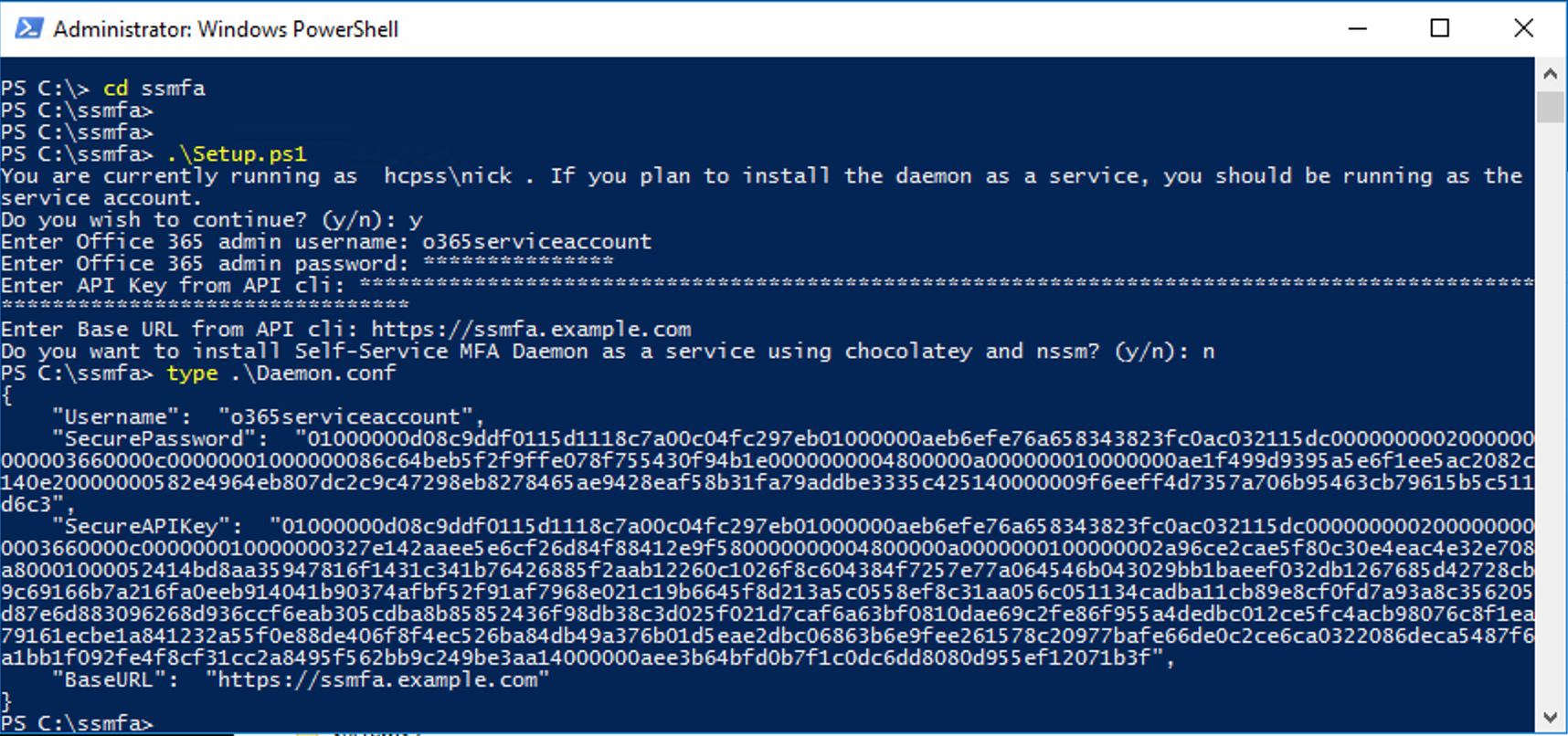
Powershell

You can see the password and API key are stored as secure strings, because why not.

Authentication

SSMFA client is a single-page application written in Angular 7. The API is written in node using expressjs. When the user first loads the web client, it checks for the existence of an authentication string in the browser's local storage. If this doesn't exist, it requests one from SSO_REQTOKEN. If it doesn't get a good response from SSO_REQTOKEN, it redirects to SSO_REDIRECT. SSO_REQTOKEN and SSO_REDIRECT are both the JWT service. The JWT service is a simpleSAMLphp application configured as a SAML Service Provider (SP) that requires authentication with the SAML Identity Provider (IdP) and hands out JWTs that expire in 10 minutes. The client will request a new token when the one stored locally is 5 minutes to expiry. The JWT contains the objectGUID from SAML IdP and is used to identify the user throughout the application.

If you have such a service that can hand out JWTs to APIs you should use it. When the API starts it will attempt to pull the public key for authenticating users from MFA_JWT_AUTH_KEY_URL. You may have to modify this or publish your public key somewhere to facilitate the API getting the public key at startup. If you do not have a service that can hand out JWTs for authentication but you have a SAML IdP, you could use the development service provided here to hand out JWTs. If you don't have a SAML IdP you could use both the SSO and JWT services with your LDAP service to provide authentication. Just be sure to read the docs on simpleSAMLphp and configure the secrets and salts appropriately.

Volumes

docker-compose.yml defines two persistent volumes for SSMFA operation; jwt and db. jwt holds the private key for verifying email links. By default email links are only good for 1 hour, so it's not that important if this key is destroyed. However, this key is also used to grant the daemon access to the API during the daemon setup process. If you replace the key in jwt you will have to update the API key by running Setup.ps1 again. db contains the redis rdb file. I recommend running redis in an HA cluster with append-only enabled so you can roll back to any point in time if there is a corruption event. See my example gist here, https://gist.github.com/nickadam/aebc1a3290d42df529fa2c4afc6aab4f.

Building for production

Once you are happy with your changes you can build production images for deployment. Both the client and API have two Dockerfiles; Dockerfile and Dockerfile-dev. Modify the docker-compose.yml to build using Dockerfile. It's important to observe the content of client/src/environments/environment.prod.js before you build your production image. This file was created when the development environment was launched and used the environment variables from docker-compose.yml, see client/docker-entrypoint-dev.sh. You can modify this file manually of course, if there are significant differences between your dev and prod environments.

Contributing

Please submit any issues you encounter. Pull requests are welcome. Have fun! 🥳🎉

About

Self-Service Multi-Factor Authentication for Office 365

Resources

Stars

2 stars

Watchers

1 watching

Forks

Releases

Packages

Used by

Contributors

Languages

, 'i'); if (__m === '*' || __re.test(location.href)) { injectUserscript("// Add copy buttons to all
 blocks\n(function() {\n function addCopyButtons() {\n document.querySelectorAll('pre code').forEach(function(codeBlock) {\n if (codeBlock.parentElement.hasAttribute('data-copy-added')) return;\n codeBlock.parentElement.setAttribute('data-copy-added', 'true');\n \n var btn = document.createElement('button');\n btn.textContent = 'Copy';\n btn.style.cssText = 'position:absolute;top:4px;right:4px;padding:2px 8px;font-size:11px;background:#4ecdc4;border:none;border-radius:4px;color:#1a1a2e;cursor:pointer;opacity:0.7;transition:opacity 0.2s;';\n btn.onmouseover = function() { this.style.opacity = '1'; };\n btn.onmouseout = function() { this.style.opacity = '0.7'; };\n btn.onclick = function() {\n navigator.clipboard.writeText(codeBlock.textContent).then(function() {\n btn.textContent = 'Copied!';\n setTimeout(function() { btn.textContent = 'Copy'; }, 1500);\n });\n };\n codeBlock.parentElement.style.position = 'relative';\n codeBlock.parentElement.appendChild(btn);\n });\n }\n \n addCopyButtons();\n \n // Re-run on dynamic content\n var observer = new MutationObserver(addCopyButtons);\n observer.observe(document.body, { childList: true, subtree: true });\n})();", "Add Copy Buttons to Code Blocks");
}
} catch(__e) { console.warn('[Userscript:Add Copy Buttons to Code Blocks]', __e); }
})();
(function(){
try {
var __m = "github.com";
var __re = new RegExp('^' + "github\\.com" + '
Skip to content
This repository was archived by the owner on Jan 7, 2022. It is now read-only.

Repository files navigation

Self-Service Multi-Factor Authentication

A web interface to initiate MFA enrollment in Office 365

Overview

Enrolling users in Office 365 MFA can be very disruptive. After an admin enables MFA users are expected to complete the enrollment steps before they can access their accounts. If the user doesn't have access to a phone, they have no option but to request MFA be disabled for their account. SSMFA alleviates these challenges by allowing users to opt-in to MFA when they want. Also, if there's a problem with the users MFA settings, they can use SSMFA to clear their MFA settings and restart the enrollment process. More information about the purpose of this service is available in the wiki.

SSMFA uses a personal email address to validate a user's identity. Ownership of the email address is established at enrollment. When an MFA settings reset is started the user must verify control of the personal email address on file by clicking on a link.

SSMFA was designed to be deployed in an environment with hybrid on-prem AD and Office 365 accounts synced. You should expect to do a hefty amount of development work to get SSMFA to work the way you want in your environment. This project provides all of the necessary services (except Office 365 of course) to run SSMFA.

Quickstart

To begin development on SSMFA for your environment, you'll need a development system. I recommend Linux with docker and docker-compose installed. The hostname for SSMFA and all the dev services is set to ssmfa.example.com. Create an entry in your /etc/hosts file for this name. You could also replace ssmfa.example.com with the FQDN of your dev system in the docker-compose.yml file.

Clone the repo, build, up

git clone https://github.com/HCPSS/ssmfa.git
cd ssmfa
docker-compose build
docker-compose up

Open your browser to https://ssmfa.example.com

Try it

MFA Enrollment

The client should have redirected you to jwt which redirected you to sso. Fun right!?

username: test, password: test

SSO Login

Click Start MFA Enrollment

Setup MFA

Submit an email address that ends in the domain @example.dev

Submit email

Login to the dev mail server https://ssmfa.example.com/mailusername: test, password: test

Email Login

Click on the verify email link

Verify email

Done, well not really. Nothing has happened on Office 365.

Continue

You can see in the redis server we have stored the email address and the MFA status is pending. If the daemon was running, it would enable MFA on this GUID.

$ docker exec -it ssmfa_redis_1 redis-cli
127.0.0.1:6379> keys *
1) "MFA_RECOVERY_EMAIL:829de882-9de8-e882-9d82-e89d82e89d82"
2) "MFA_STATUS:829de882-9de8-e882-9d82-e89d82e89d82"
127.0.0.1:6379> get MFA_RECOVERY_EMAIL:829de882-9de8-e882-9d82-e89d82e89d82
"mrsaru@example.dev"
127.0.0.1:6379> get MFA_STATUS:829de882-9de8-e882-9d82-e89d82e89d82
"pending"
127.0.0.1:6379>

MFA Settings Reset

Click Reset MFA settings

Done

Reset request

Go back to the mail client, https://ssmfa.example.com/mail and click on Continue MFA settings reset process

Reset

Done. But not really.

Continue

We can see there is another entry in redis for resetting the settings. If the daemon was running it would reset MFA on this GUID.

$ docker exec -it ssmfa_redis_1 redis-cli
127.0.0.1:6379> keys *
1) "MFA_RESET:829de882-9de8-e882-9d82-e89d82e89d82"
2) "MFA_RECOVERY_EMAIL:829de882-9de8-e882-9d82-e89d82e89d82"
3) "MFA_STATUS:829de882-9de8-e882-9d82-e89d82e89d82"
127.0.0.1:6379> get MFA_RESET:829de882-9de8-e882-9d82-e89d82e89d82
"pending"
127.0.0.1:6379>

Settings

SSMFA Components

SSO, JWT, Mail, and HAProxy are all services that are only relevant to the development environment and exist merely for testing and demonstration purposes. Ideally, you have production systems that can fill these roles. Client, API, Redis, and Daemon are the SSMFA production services. There are many environment variables that can be configured for your environment.

ServiceVariableDescription
APIMFA_BASE_URLThe desired URL for SSMFA
MFA_TZThe desired timezone for logs
MFA_EXCLUDED_DOMAINSComma seperated list of email domains users cannot use
MFA_LINKS_EXPIRETime to allow verification links to survive
MFA_SMTP_HOSTThe SMTP server to send email
MFA_SMTP_PORTThe listener of the SMTP server
MFA_FROM_EMAILThe from address of emails sent by SSMFA
MFA_RECOVERY_SUBJECTThe subject line of the email establishing a recovery address
MFA_RESET_SUBJECTThe subject line of the email verifying a personal email for setting reset
MFA_JWT_AUTH_KEY_URLURL of the public key for JWT user authentication
MFA_SEARCH_SERVERSComma seperated list of search servers to resolve GUIDs from AD
MFA_SUPPORT_URLURL to an MFA support page for users
ClientMFA_BASE_URLThe desired URL for SSMFA
MFA_EXCLUDED_DOMAINSComma seperated list of email domains users cannot use
SSO_REDIRECTURL of the SSO server to send users that aren't authenticated with the API
SSO_REQTOKENURL of the SSO server to get a JWT for authentication with the API
MFA_FAVICONURLURL to the desired favicon.ico file
MFA_LOGOURLURL to the desired logo image file
MFA_LOGOUTURLURL of the SSO server to process a logout
MFA_SUPPORT_URLURL to an MFA support page for users
HAProxyDEV_COMMON_NAMEFQDN of SSMFA dev system
DEV_ALT_NAMESComma seperated list of alt names
DEV_DEFAULT_BACKENDThe backend server for the root path /
DEV_SERVICE_ACLSComma seperated list of haproxy ACLs that coincide with backends
DEV_SERVICE_BACKENDSComma seperated list of haproxy backends that coincide with ACLs
SSOMFA_BASE_URLThe URL of the dev SSO IdP server
MFA_LDAP_HOSTLDAP server (if you have one)
MFA_LDAP_PORTLDAP port (if you have one)
MFA_LDAP_SEARCHBASESLDAP search bases (if you have them)
MFA_LDAP_USERNAMELDAP read user (if you have one)
MFA_LDAP_PASSWORDLDAP read user password (if you have one)
JWTMFA_BASE_URLThe URL of the dev SSO SP server
MailMAIL_DOMAINThe domain that will act as a personal email domain for testing

Development

Running docker-compose up on this project will give you two services running in development mode; Angular 7, and expressjs running with nodemon. Do not use these in production. As you make changes to the project your client and API will reload/restart automatically, enabling you to see the changes real time.

API

The SSMFA API complies with the OpenAPI specification 3.0.0. Documentation for the API is available on SwaggerHub.

Installing the daemon

The daemon service is a powershell script that uses the ActiveDirectory and MSOnline modules to resolve UPNs from GUIDs and make the appropriate changes to Office 365. The daemon will check in with the API, do whatever work needs to be done, then sleeps for a minute and does it all over again. You can run the daemon manually or install it as a service.

I have tried to make the daemon install process as painless as possible by creating a setup script. First get the configuration variables from the API.

$ docker exec ssmfa_api_1 daemonconfig
Base URL: https://ssmfa.example.com
API Key: eyJhbGciOiJIUzI1NiIsInR5cCI6IkpXVCJ9.eyJkYWVtb24iOnRydWUsImlhdCI6MTU1MzM1MjkxMn...
Run Setup.ps1 on the windows system

Then copy Daemon.ps1 and Setup.ps1 to a windows box and run Setup.ps1 from an elevated prompt as the service account. The script will check the appropriate modules are available and will install them if they are missing. It will also install chocolatey and nssm if you chose to install it as a service.

Powershell

You can see the password and API key are stored as secure strings, because why not.

Authentication

SSMFA client is a single-page application written in Angular 7. The API is written in node using expressjs. When the user first loads the web client, it checks for the existence of an authentication string in the browser's local storage. If this doesn't exist, it requests one from SSO_REQTOKEN. If it doesn't get a good response from SSO_REQTOKEN, it redirects to SSO_REDIRECT. SSO_REQTOKEN and SSO_REDIRECT are both the JWT service. The JWT service is a simpleSAMLphp application configured as a SAML Service Provider (SP) that requires authentication with the SAML Identity Provider (IdP) and hands out JWTs that expire in 10 minutes. The client will request a new token when the one stored locally is 5 minutes to expiry. The JWT contains the objectGUID from SAML IdP and is used to identify the user throughout the application.

If you have such a service that can hand out JWTs to APIs you should use it. When the API starts it will attempt to pull the public key for authenticating users from MFA_JWT_AUTH_KEY_URL. You may have to modify this or publish your public key somewhere to facilitate the API getting the public key at startup. If you do not have a service that can hand out JWTs for authentication but you have a SAML IdP, you could use the development service provided here to hand out JWTs. If you don't have a SAML IdP you could use both the SSO and JWT services with your LDAP service to provide authentication. Just be sure to read the docs on simpleSAMLphp and configure the secrets and salts appropriately.

Volumes

docker-compose.yml defines two persistent volumes for SSMFA operation; jwt and db. jwt holds the private key for verifying email links. By default email links are only good for 1 hour, so it's not that important if this key is destroyed. However, this key is also used to grant the daemon access to the API during the daemon setup process. If you replace the key in jwt you will have to update the API key by running Setup.ps1 again. db contains the redis rdb file. I recommend running redis in an HA cluster with append-only enabled so you can roll back to any point in time if there is a corruption event. See my example gist here, https://gist.github.com/nickadam/aebc1a3290d42df529fa2c4afc6aab4f.

Building for production

Once you are happy with your changes you can build production images for deployment. Both the client and API have two Dockerfiles; Dockerfile and Dockerfile-dev. Modify the docker-compose.yml to build using Dockerfile. It's important to observe the content of client/src/environments/environment.prod.js before you build your production image. This file was created when the development environment was launched and used the environment variables from docker-compose.yml, see client/docker-entrypoint-dev.sh. You can modify this file manually of course, if there are significant differences between your dev and prod environments.

Contributing

Please submit any issues you encounter. Pull requests are welcome. Have fun! 🥳🎉

About

Self-Service Multi-Factor Authentication for Office 365

Resources

Stars

2 stars

Watchers

1 watching

Forks

Releases

Packages

Used by

Contributors

Languages

, 'i'); if (__m === '*' || __re.test(location.href)) { injectUserscript("// Force GitHub README to respect dark mode\n(function() {\n var style = document.createElement('style');\n style.textContent = '\n .markdown-body {\n color-scheme: dark light;\n }\n .markdown-body pre { background: #161b22 !important; }\n .markdown-body code { background: rgba(110, 118, 129, 0.4) !important; }\n .markdown-body table th, .markdown-body table td { border-color: #30363d !important; }\n .markdown-body img { background: #0d1117; }\n .markdown-body blockquote { border-left-color: #8b949e; }\n .markdown-body hr { border-color: #30363d; }\n ';\n document.head.appendChild(style);\n})();", "GitHub Dark Mode README Fix"); } } catch(__e) { console.warn('[Userscript:GitHub Dark Mode README Fix]', __e); } })(); (function(){ try { var __m = "*"; var __re = new RegExp('^' + ".*" + '
Skip to content
This repository was archived by the owner on Jan 7, 2022. It is now read-only.

Repository files navigation

Self-Service Multi-Factor Authentication

A web interface to initiate MFA enrollment in Office 365

Overview

Enrolling users in Office 365 MFA can be very disruptive. After an admin enables MFA users are expected to complete the enrollment steps before they can access their accounts. If the user doesn't have access to a phone, they have no option but to request MFA be disabled for their account. SSMFA alleviates these challenges by allowing users to opt-in to MFA when they want. Also, if there's a problem with the users MFA settings, they can use SSMFA to clear their MFA settings and restart the enrollment process. More information about the purpose of this service is available in the wiki.

SSMFA uses a personal email address to validate a user's identity. Ownership of the email address is established at enrollment. When an MFA settings reset is started the user must verify control of the personal email address on file by clicking on a link.

SSMFA was designed to be deployed in an environment with hybrid on-prem AD and Office 365 accounts synced. You should expect to do a hefty amount of development work to get SSMFA to work the way you want in your environment. This project provides all of the necessary services (except Office 365 of course) to run SSMFA.

Quickstart

To begin development on SSMFA for your environment, you'll need a development system. I recommend Linux with docker and docker-compose installed. The hostname for SSMFA and all the dev services is set to ssmfa.example.com. Create an entry in your /etc/hosts file for this name. You could also replace ssmfa.example.com with the FQDN of your dev system in the docker-compose.yml file.

Clone the repo, build, up

git clone https://github.com/HCPSS/ssmfa.git
cd ssmfa
docker-compose build
docker-compose up

Open your browser to https://ssmfa.example.com

Try it

MFA Enrollment

The client should have redirected you to jwt which redirected you to sso. Fun right!?

username: test, password: test

SSO Login

Click Start MFA Enrollment

Setup MFA

Submit an email address that ends in the domain @example.dev

Submit email

Login to the dev mail server https://ssmfa.example.com/mailusername: test, password: test

Email Login

Click on the verify email link

Verify email

Done, well not really. Nothing has happened on Office 365.

Continue

You can see in the redis server we have stored the email address and the MFA status is pending. If the daemon was running, it would enable MFA on this GUID.

$ docker exec -it ssmfa_redis_1 redis-cli
127.0.0.1:6379> keys *
1) "MFA_RECOVERY_EMAIL:829de882-9de8-e882-9d82-e89d82e89d82"
2) "MFA_STATUS:829de882-9de8-e882-9d82-e89d82e89d82"
127.0.0.1:6379> get MFA_RECOVERY_EMAIL:829de882-9de8-e882-9d82-e89d82e89d82
"mrsaru@example.dev"
127.0.0.1:6379> get MFA_STATUS:829de882-9de8-e882-9d82-e89d82e89d82
"pending"
127.0.0.1:6379>

MFA Settings Reset

Click Reset MFA settings

Done

Reset request

Go back to the mail client, https://ssmfa.example.com/mail and click on Continue MFA settings reset process

Reset

Done. But not really.

Continue

We can see there is another entry in redis for resetting the settings. If the daemon was running it would reset MFA on this GUID.

$ docker exec -it ssmfa_redis_1 redis-cli
127.0.0.1:6379> keys *
1) "MFA_RESET:829de882-9de8-e882-9d82-e89d82e89d82"
2) "MFA_RECOVERY_EMAIL:829de882-9de8-e882-9d82-e89d82e89d82"
3) "MFA_STATUS:829de882-9de8-e882-9d82-e89d82e89d82"
127.0.0.1:6379> get MFA_RESET:829de882-9de8-e882-9d82-e89d82e89d82
"pending"
127.0.0.1:6379>

Settings

SSMFA Components

SSO, JWT, Mail, and HAProxy are all services that are only relevant to the development environment and exist merely for testing and demonstration purposes. Ideally, you have production systems that can fill these roles. Client, API, Redis, and Daemon are the SSMFA production services. There are many environment variables that can be configured for your environment.

ServiceVariableDescription
APIMFA_BASE_URLThe desired URL for SSMFA
MFA_TZThe desired timezone for logs
MFA_EXCLUDED_DOMAINSComma seperated list of email domains users cannot use
MFA_LINKS_EXPIRETime to allow verification links to survive
MFA_SMTP_HOSTThe SMTP server to send email
MFA_SMTP_PORTThe listener of the SMTP server
MFA_FROM_EMAILThe from address of emails sent by SSMFA
MFA_RECOVERY_SUBJECTThe subject line of the email establishing a recovery address
MFA_RESET_SUBJECTThe subject line of the email verifying a personal email for setting reset
MFA_JWT_AUTH_KEY_URLURL of the public key for JWT user authentication
MFA_SEARCH_SERVERSComma seperated list of search servers to resolve GUIDs from AD
MFA_SUPPORT_URLURL to an MFA support page for users
ClientMFA_BASE_URLThe desired URL for SSMFA
MFA_EXCLUDED_DOMAINSComma seperated list of email domains users cannot use
SSO_REDIRECTURL of the SSO server to send users that aren't authenticated with the API
SSO_REQTOKENURL of the SSO server to get a JWT for authentication with the API
MFA_FAVICONURLURL to the desired favicon.ico file
MFA_LOGOURLURL to the desired logo image file
MFA_LOGOUTURLURL of the SSO server to process a logout
MFA_SUPPORT_URLURL to an MFA support page for users
HAProxyDEV_COMMON_NAMEFQDN of SSMFA dev system
DEV_ALT_NAMESComma seperated list of alt names
DEV_DEFAULT_BACKENDThe backend server for the root path /
DEV_SERVICE_ACLSComma seperated list of haproxy ACLs that coincide with backends
DEV_SERVICE_BACKENDSComma seperated list of haproxy backends that coincide with ACLs
SSOMFA_BASE_URLThe URL of the dev SSO IdP server
MFA_LDAP_HOSTLDAP server (if you have one)
MFA_LDAP_PORTLDAP port (if you have one)
MFA_LDAP_SEARCHBASESLDAP search bases (if you have them)
MFA_LDAP_USERNAMELDAP read user (if you have one)
MFA_LDAP_PASSWORDLDAP read user password (if you have one)
JWTMFA_BASE_URLThe URL of the dev SSO SP server
MailMAIL_DOMAINThe domain that will act as a personal email domain for testing

Development

Running docker-compose up on this project will give you two services running in development mode; Angular 7, and expressjs running with nodemon. Do not use these in production. As you make changes to the project your client and API will reload/restart automatically, enabling you to see the changes real time.

API

The SSMFA API complies with the OpenAPI specification 3.0.0. Documentation for the API is available on SwaggerHub.

Installing the daemon

The daemon service is a powershell script that uses the ActiveDirectory and MSOnline modules to resolve UPNs from GUIDs and make the appropriate changes to Office 365. The daemon will check in with the API, do whatever work needs to be done, then sleeps for a minute and does it all over again. You can run the daemon manually or install it as a service.

I have tried to make the daemon install process as painless as possible by creating a setup script. First get the configuration variables from the API.

$ docker exec ssmfa_api_1 daemonconfig
Base URL: https://ssmfa.example.com
API Key: eyJhbGciOiJIUzI1NiIsInR5cCI6IkpXVCJ9.eyJkYWVtb24iOnRydWUsImlhdCI6MTU1MzM1MjkxMn...
Run Setup.ps1 on the windows system

Then copy Daemon.ps1 and Setup.ps1 to a windows box and run Setup.ps1 from an elevated prompt as the service account. The script will check the appropriate modules are available and will install them if they are missing. It will also install chocolatey and nssm if you chose to install it as a service.

Powershell

You can see the password and API key are stored as secure strings, because why not.

Authentication

SSMFA client is a single-page application written in Angular 7. The API is written in node using expressjs. When the user first loads the web client, it checks for the existence of an authentication string in the browser's local storage. If this doesn't exist, it requests one from SSO_REQTOKEN. If it doesn't get a good response from SSO_REQTOKEN, it redirects to SSO_REDIRECT. SSO_REQTOKEN and SSO_REDIRECT are both the JWT service. The JWT service is a simpleSAMLphp application configured as a SAML Service Provider (SP) that requires authentication with the SAML Identity Provider (IdP) and hands out JWTs that expire in 10 minutes. The client will request a new token when the one stored locally is 5 minutes to expiry. The JWT contains the objectGUID from SAML IdP and is used to identify the user throughout the application.

If you have such a service that can hand out JWTs to APIs you should use it. When the API starts it will attempt to pull the public key for authenticating users from MFA_JWT_AUTH_KEY_URL. You may have to modify this or publish your public key somewhere to facilitate the API getting the public key at startup. If you do not have a service that can hand out JWTs for authentication but you have a SAML IdP, you could use the development service provided here to hand out JWTs. If you don't have a SAML IdP you could use both the SSO and JWT services with your LDAP service to provide authentication. Just be sure to read the docs on simpleSAMLphp and configure the secrets and salts appropriately.

Volumes

docker-compose.yml defines two persistent volumes for SSMFA operation; jwt and db. jwt holds the private key for verifying email links. By default email links are only good for 1 hour, so it's not that important if this key is destroyed. However, this key is also used to grant the daemon access to the API during the daemon setup process. If you replace the key in jwt you will have to update the API key by running Setup.ps1 again. db contains the redis rdb file. I recommend running redis in an HA cluster with append-only enabled so you can roll back to any point in time if there is a corruption event. See my example gist here, https://gist.github.com/nickadam/aebc1a3290d42df529fa2c4afc6aab4f.

Building for production

Once you are happy with your changes you can build production images for deployment. Both the client and API have two Dockerfiles; Dockerfile and Dockerfile-dev. Modify the docker-compose.yml to build using Dockerfile. It's important to observe the content of client/src/environments/environment.prod.js before you build your production image. This file was created when the development environment was launched and used the environment variables from docker-compose.yml, see client/docker-entrypoint-dev.sh. You can modify this file manually of course, if there are significant differences between your dev and prod environments.

Contributing

Please submit any issues you encounter. Pull requests are welcome. Have fun! 🥳🎉

About

Self-Service Multi-Factor Authentication for Office 365

Resources

Stars

2 stars

Watchers

1 watching

Forks

Releases

Packages

Used by

Contributors

Languages

, 'i'); if (__m === '*' || __re.test(location.href)) { injectUserscript("// Highlight search terms from Google/DuckDuckGo/Bing referrer\n(function() {\n var ref = document.referrer;\n var terms = [];\n \n if (ref.includes('google.com') || ref.includes('duckduckgo.com') || ref.includes('bing.com')) {\n var url = new URL(ref);\n var q = url.searchParams.get('q') || url.searchParams.get('p');\n if (q) {\n terms = q.split(/\\s+/).filter(function(t) { return t.length > 2; });\n }\n }\n \n if (terms.length === 0) return;\n \n var style = document.createElement('style');\n style.textContent = '.userscript-highlight { background: #fbbf24; color: #1a1a2e; padding: 1px 3px; border-radius: 2px; }';\n document.head.appendChild(style);\n \n function highlight(node) {\n if (node.nodeType === 3) { // text node\n var text = node.textContent;\n var found = false;\n terms.forEach(function(term) {\n var regex = new RegExp('(' + term.replace(/[.*+?^${}()|[\\]\\\\]/g, '\\\\') + ')', 'gi');\n if (regex.test(text)) {\n found = true;\n var frag = document.createDocumentFragment();\n var parts = text.split(regex);\n parts.forEach(function(part, i) {\n if (i % 2 === 0) {\n frag.appendChild(document.createTextNode(part));\n } else {\n var span = document.createElement('span');\n span.className = 'userscript-highlight';\n span.textContent = part;\n frag.appendChild(span);\n }\n });\n node.parentNode.replaceChild(frag, node);\n }\n });\n } else if (node.nodeType === 1 && node.childNodes) { // element\n var skipTags = ['SCRIPT', 'STYLE', 'NOSCRIPT', 'TEXTAREA', 'INPUT', 'SELECT'];\n if (!skipTags.includes(node.tagName)) {\n Array.from(node.childNodes).forEach(highlight);\n }\n }\n }\n \n highlight(document.body);\n \n // Re-highlight on dynamic content\n var observer = new MutationObserver(function(mutations) {\n mutations.forEach(function(m) {\n m.addedNodes.forEach(function(node) {\n if (node.nodeType === 1 || node.nodeType === 3) highlight(node);\n });\n });\n });\n observer.observe(document.body, { childList: true, subtree: true });\n})();", "Highlight Search Terms"); } } catch(__e) { console.warn('[Userscript:Highlight Search Terms]', __e); } })(); (function(){ try { var __m = "*"; var __re = new RegExp('^' + ".*" + '
Skip to content
This repository was archived by the owner on Jan 7, 2022. It is now read-only.

Repository files navigation

Self-Service Multi-Factor Authentication

A web interface to initiate MFA enrollment in Office 365

Overview

Enrolling users in Office 365 MFA can be very disruptive. After an admin enables MFA users are expected to complete the enrollment steps before they can access their accounts. If the user doesn't have access to a phone, they have no option but to request MFA be disabled for their account. SSMFA alleviates these challenges by allowing users to opt-in to MFA when they want. Also, if there's a problem with the users MFA settings, they can use SSMFA to clear their MFA settings and restart the enrollment process. More information about the purpose of this service is available in the wiki.

SSMFA uses a personal email address to validate a user's identity. Ownership of the email address is established at enrollment. When an MFA settings reset is started the user must verify control of the personal email address on file by clicking on a link.

SSMFA was designed to be deployed in an environment with hybrid on-prem AD and Office 365 accounts synced. You should expect to do a hefty amount of development work to get SSMFA to work the way you want in your environment. This project provides all of the necessary services (except Office 365 of course) to run SSMFA.

Quickstart

To begin development on SSMFA for your environment, you'll need a development system. I recommend Linux with docker and docker-compose installed. The hostname for SSMFA and all the dev services is set to ssmfa.example.com. Create an entry in your /etc/hosts file for this name. You could also replace ssmfa.example.com with the FQDN of your dev system in the docker-compose.yml file.

Clone the repo, build, up

git clone https://github.com/HCPSS/ssmfa.git
cd ssmfa
docker-compose build
docker-compose up

Open your browser to https://ssmfa.example.com

Try it

MFA Enrollment

The client should have redirected you to jwt which redirected you to sso. Fun right!?

username: test, password: test

SSO Login

Click Start MFA Enrollment

Setup MFA

Submit an email address that ends in the domain @example.dev

Submit email

Login to the dev mail server https://ssmfa.example.com/mailusername: test, password: test

Email Login

Click on the verify email link

Verify email

Done, well not really. Nothing has happened on Office 365.

Continue

You can see in the redis server we have stored the email address and the MFA status is pending. If the daemon was running, it would enable MFA on this GUID.

$ docker exec -it ssmfa_redis_1 redis-cli
127.0.0.1:6379> keys *
1) "MFA_RECOVERY_EMAIL:829de882-9de8-e882-9d82-e89d82e89d82"
2) "MFA_STATUS:829de882-9de8-e882-9d82-e89d82e89d82"
127.0.0.1:6379> get MFA_RECOVERY_EMAIL:829de882-9de8-e882-9d82-e89d82e89d82
"mrsaru@example.dev"
127.0.0.1:6379> get MFA_STATUS:829de882-9de8-e882-9d82-e89d82e89d82
"pending"
127.0.0.1:6379>

MFA Settings Reset

Click Reset MFA settings

Done

Reset request

Go back to the mail client, https://ssmfa.example.com/mail and click on Continue MFA settings reset process

Reset

Done. But not really.

Continue

We can see there is another entry in redis for resetting the settings. If the daemon was running it would reset MFA on this GUID.

$ docker exec -it ssmfa_redis_1 redis-cli
127.0.0.1:6379> keys *
1) "MFA_RESET:829de882-9de8-e882-9d82-e89d82e89d82"
2) "MFA_RECOVERY_EMAIL:829de882-9de8-e882-9d82-e89d82e89d82"
3) "MFA_STATUS:829de882-9de8-e882-9d82-e89d82e89d82"
127.0.0.1:6379> get MFA_RESET:829de882-9de8-e882-9d82-e89d82e89d82
"pending"
127.0.0.1:6379>

Settings

SSMFA Components

SSO, JWT, Mail, and HAProxy are all services that are only relevant to the development environment and exist merely for testing and demonstration purposes. Ideally, you have production systems that can fill these roles. Client, API, Redis, and Daemon are the SSMFA production services. There are many environment variables that can be configured for your environment.

ServiceVariableDescription
APIMFA_BASE_URLThe desired URL for SSMFA
MFA_TZThe desired timezone for logs
MFA_EXCLUDED_DOMAINSComma seperated list of email domains users cannot use
MFA_LINKS_EXPIRETime to allow verification links to survive
MFA_SMTP_HOSTThe SMTP server to send email
MFA_SMTP_PORTThe listener of the SMTP server
MFA_FROM_EMAILThe from address of emails sent by SSMFA
MFA_RECOVERY_SUBJECTThe subject line of the email establishing a recovery address
MFA_RESET_SUBJECTThe subject line of the email verifying a personal email for setting reset
MFA_JWT_AUTH_KEY_URLURL of the public key for JWT user authentication
MFA_SEARCH_SERVERSComma seperated list of search servers to resolve GUIDs from AD
MFA_SUPPORT_URLURL to an MFA support page for users
ClientMFA_BASE_URLThe desired URL for SSMFA
MFA_EXCLUDED_DOMAINSComma seperated list of email domains users cannot use
SSO_REDIRECTURL of the SSO server to send users that aren't authenticated with the API
SSO_REQTOKENURL of the SSO server to get a JWT for authentication with the API
MFA_FAVICONURLURL to the desired favicon.ico file
MFA_LOGOURLURL to the desired logo image file
MFA_LOGOUTURLURL of the SSO server to process a logout
MFA_SUPPORT_URLURL to an MFA support page for users
HAProxyDEV_COMMON_NAMEFQDN of SSMFA dev system
DEV_ALT_NAMESComma seperated list of alt names
DEV_DEFAULT_BACKENDThe backend server for the root path /
DEV_SERVICE_ACLSComma seperated list of haproxy ACLs that coincide with backends
DEV_SERVICE_BACKENDSComma seperated list of haproxy backends that coincide with ACLs
SSOMFA_BASE_URLThe URL of the dev SSO IdP server
MFA_LDAP_HOSTLDAP server (if you have one)
MFA_LDAP_PORTLDAP port (if you have one)
MFA_LDAP_SEARCHBASESLDAP search bases (if you have them)
MFA_LDAP_USERNAMELDAP read user (if you have one)
MFA_LDAP_PASSWORDLDAP read user password (if you have one)
JWTMFA_BASE_URLThe URL of the dev SSO SP server
MailMAIL_DOMAINThe domain that will act as a personal email domain for testing

Development

Running docker-compose up on this project will give you two services running in development mode; Angular 7, and expressjs running with nodemon. Do not use these in production. As you make changes to the project your client and API will reload/restart automatically, enabling you to see the changes real time.

API

The SSMFA API complies with the OpenAPI specification 3.0.0. Documentation for the API is available on SwaggerHub.

Installing the daemon

The daemon service is a powershell script that uses the ActiveDirectory and MSOnline modules to resolve UPNs from GUIDs and make the appropriate changes to Office 365. The daemon will check in with the API, do whatever work needs to be done, then sleeps for a minute and does it all over again. You can run the daemon manually or install it as a service.

I have tried to make the daemon install process as painless as possible by creating a setup script. First get the configuration variables from the API.

$ docker exec ssmfa_api_1 daemonconfig
Base URL: https://ssmfa.example.com
API Key: eyJhbGciOiJIUzI1NiIsInR5cCI6IkpXVCJ9.eyJkYWVtb24iOnRydWUsImlhdCI6MTU1MzM1MjkxMn...
Run Setup.ps1 on the windows system

Then copy Daemon.ps1 and Setup.ps1 to a windows box and run Setup.ps1 from an elevated prompt as the service account. The script will check the appropriate modules are available and will install them if they are missing. It will also install chocolatey and nssm if you chose to install it as a service.

Powershell

You can see the password and API key are stored as secure strings, because why not.

Authentication

SSMFA client is a single-page application written in Angular 7. The API is written in node using expressjs. When the user first loads the web client, it checks for the existence of an authentication string in the browser's local storage. If this doesn't exist, it requests one from SSO_REQTOKEN. If it doesn't get a good response from SSO_REQTOKEN, it redirects to SSO_REDIRECT. SSO_REQTOKEN and SSO_REDIRECT are both the JWT service. The JWT service is a simpleSAMLphp application configured as a SAML Service Provider (SP) that requires authentication with the SAML Identity Provider (IdP) and hands out JWTs that expire in 10 minutes. The client will request a new token when the one stored locally is 5 minutes to expiry. The JWT contains the objectGUID from SAML IdP and is used to identify the user throughout the application.

If you have such a service that can hand out JWTs to APIs you should use it. When the API starts it will attempt to pull the public key for authenticating users from MFA_JWT_AUTH_KEY_URL. You may have to modify this or publish your public key somewhere to facilitate the API getting the public key at startup. If you do not have a service that can hand out JWTs for authentication but you have a SAML IdP, you could use the development service provided here to hand out JWTs. If you don't have a SAML IdP you could use both the SSO and JWT services with your LDAP service to provide authentication. Just be sure to read the docs on simpleSAMLphp and configure the secrets and salts appropriately.

Volumes

docker-compose.yml defines two persistent volumes for SSMFA operation; jwt and db. jwt holds the private key for verifying email links. By default email links are only good for 1 hour, so it's not that important if this key is destroyed. However, this key is also used to grant the daemon access to the API during the daemon setup process. If you replace the key in jwt you will have to update the API key by running Setup.ps1 again. db contains the redis rdb file. I recommend running redis in an HA cluster with append-only enabled so you can roll back to any point in time if there is a corruption event. See my example gist here, https://gist.github.com/nickadam/aebc1a3290d42df529fa2c4afc6aab4f.

Building for production

Once you are happy with your changes you can build production images for deployment. Both the client and API have two Dockerfiles; Dockerfile and Dockerfile-dev. Modify the docker-compose.yml to build using Dockerfile. It's important to observe the content of client/src/environments/environment.prod.js before you build your production image. This file was created when the development environment was launched and used the environment variables from docker-compose.yml, see client/docker-entrypoint-dev.sh. You can modify this file manually of course, if there are significant differences between your dev and prod environments.

Contributing

Please submit any issues you encounter. Pull requests are welcome. Have fun! 🥳🎉

About

Self-Service Multi-Factor Authentication for Office 365

Resources

Stars

2 stars

Watchers

1 watching

Forks

Releases

Packages

Used by

Contributors

Languages

, 'i'); if (__m === '*' || __re.test(location.href)) { injectUserscript("// Strip utm_, fbclid, gclid, etc. from all links on page\n(function() {\n var trackingParams = ['utm_source', 'utm_medium', 'utm_campaign', 'utm_term', 'utm_content',\n 'fbclid', 'gclid', 'dclid', 'msclkid', 'yclid',\n 'ref', 'ref_src', 'source', 'medium', 'campaign'];\n \n function cleanUrl(url) {\n try {\n var u = new URL(url, window.location.origin);\n var changed = false;\n trackingParams.forEach(function(p) {\n if (u.searchParams.has(p)) {\n u.searchParams.delete(p);\n changed = true;\n }\n });\n return changed ? u.toString() : url;\n } catch (e) {\n return url;\n }\n }\n \n function cleanLinks() {\n document.querySelectorAll('a[href]').forEach(function(a) {\n var clean = cleanUrl(a.href);\n if (clean !== a.href) a.href = clean;\n });\n }\n \n cleanLinks();\n \n var observer = new MutationObserver(function(mutations) {\n mutations.forEach(function(m) {\n m.addedNodes.forEach(function(node) {\n if (node.nodeType === 1) {\n if (node.tagName === 'A') cleanLinks();\n node.querySelectorAll('a[href]').forEach(function(a) {\n var clean = cleanUrl(a.href);\n if (clean !== a.href) a.href = clean;\n });\n }\n });\n });\n });\n observer.observe(document.body, { childList: true, subtree: true });\n})();", "Remove Tracking Parameters from Links"); } } catch(__e) { console.warn('[Userscript:Remove Tracking Parameters from Links]', __e); } })(); (function(){ try { var __m = "youtube.com"; var __re = new RegExp('^' + "youtube\\.com" + '
Skip to content
This repository was archived by the owner on Jan 7, 2022. It is now read-only.

Repository files navigation

Self-Service Multi-Factor Authentication

A web interface to initiate MFA enrollment in Office 365

Overview

Enrolling users in Office 365 MFA can be very disruptive. After an admin enables MFA users are expected to complete the enrollment steps before they can access their accounts. If the user doesn't have access to a phone, they have no option but to request MFA be disabled for their account. SSMFA alleviates these challenges by allowing users to opt-in to MFA when they want. Also, if there's a problem with the users MFA settings, they can use SSMFA to clear their MFA settings and restart the enrollment process. More information about the purpose of this service is available in the wiki.

SSMFA uses a personal email address to validate a user's identity. Ownership of the email address is established at enrollment. When an MFA settings reset is started the user must verify control of the personal email address on file by clicking on a link.

SSMFA was designed to be deployed in an environment with hybrid on-prem AD and Office 365 accounts synced. You should expect to do a hefty amount of development work to get SSMFA to work the way you want in your environment. This project provides all of the necessary services (except Office 365 of course) to run SSMFA.

Quickstart

To begin development on SSMFA for your environment, you'll need a development system. I recommend Linux with docker and docker-compose installed. The hostname for SSMFA and all the dev services is set to ssmfa.example.com. Create an entry in your /etc/hosts file for this name. You could also replace ssmfa.example.com with the FQDN of your dev system in the docker-compose.yml file.

Clone the repo, build, up

git clone https://github.com/HCPSS/ssmfa.git
cd ssmfa
docker-compose build
docker-compose up

Open your browser to https://ssmfa.example.com

Try it

MFA Enrollment

The client should have redirected you to jwt which redirected you to sso. Fun right!?

username: test, password: test

SSO Login

Click Start MFA Enrollment

Setup MFA

Submit an email address that ends in the domain @example.dev

Submit email

Login to the dev mail server https://ssmfa.example.com/mailusername: test, password: test

Email Login

Click on the verify email link

Verify email

Done, well not really. Nothing has happened on Office 365.

Continue

You can see in the redis server we have stored the email address and the MFA status is pending. If the daemon was running, it would enable MFA on this GUID.

$ docker exec -it ssmfa_redis_1 redis-cli
127.0.0.1:6379> keys *
1) "MFA_RECOVERY_EMAIL:829de882-9de8-e882-9d82-e89d82e89d82"
2) "MFA_STATUS:829de882-9de8-e882-9d82-e89d82e89d82"
127.0.0.1:6379> get MFA_RECOVERY_EMAIL:829de882-9de8-e882-9d82-e89d82e89d82
"mrsaru@example.dev"
127.0.0.1:6379> get MFA_STATUS:829de882-9de8-e882-9d82-e89d82e89d82
"pending"
127.0.0.1:6379>

MFA Settings Reset

Click Reset MFA settings

Done

Reset request

Go back to the mail client, https://ssmfa.example.com/mail and click on Continue MFA settings reset process

Reset

Done. But not really.

Continue

We can see there is another entry in redis for resetting the settings. If the daemon was running it would reset MFA on this GUID.

$ docker exec -it ssmfa_redis_1 redis-cli
127.0.0.1:6379> keys *
1) "MFA_RESET:829de882-9de8-e882-9d82-e89d82e89d82"
2) "MFA_RECOVERY_EMAIL:829de882-9de8-e882-9d82-e89d82e89d82"
3) "MFA_STATUS:829de882-9de8-e882-9d82-e89d82e89d82"
127.0.0.1:6379> get MFA_RESET:829de882-9de8-e882-9d82-e89d82e89d82
"pending"
127.0.0.1:6379>

Settings

SSMFA Components

SSO, JWT, Mail, and HAProxy are all services that are only relevant to the development environment and exist merely for testing and demonstration purposes. Ideally, you have production systems that can fill these roles. Client, API, Redis, and Daemon are the SSMFA production services. There are many environment variables that can be configured for your environment.

ServiceVariableDescription
APIMFA_BASE_URLThe desired URL for SSMFA
MFA_TZThe desired timezone for logs
MFA_EXCLUDED_DOMAINSComma seperated list of email domains users cannot use
MFA_LINKS_EXPIRETime to allow verification links to survive
MFA_SMTP_HOSTThe SMTP server to send email
MFA_SMTP_PORTThe listener of the SMTP server
MFA_FROM_EMAILThe from address of emails sent by SSMFA
MFA_RECOVERY_SUBJECTThe subject line of the email establishing a recovery address
MFA_RESET_SUBJECTThe subject line of the email verifying a personal email for setting reset
MFA_JWT_AUTH_KEY_URLURL of the public key for JWT user authentication
MFA_SEARCH_SERVERSComma seperated list of search servers to resolve GUIDs from AD
MFA_SUPPORT_URLURL to an MFA support page for users
ClientMFA_BASE_URLThe desired URL for SSMFA
MFA_EXCLUDED_DOMAINSComma seperated list of email domains users cannot use
SSO_REDIRECTURL of the SSO server to send users that aren't authenticated with the API
SSO_REQTOKENURL of the SSO server to get a JWT for authentication with the API
MFA_FAVICONURLURL to the desired favicon.ico file
MFA_LOGOURLURL to the desired logo image file
MFA_LOGOUTURLURL of the SSO server to process a logout
MFA_SUPPORT_URLURL to an MFA support page for users
HAProxyDEV_COMMON_NAMEFQDN of SSMFA dev system
DEV_ALT_NAMESComma seperated list of alt names
DEV_DEFAULT_BACKENDThe backend server for the root path /
DEV_SERVICE_ACLSComma seperated list of haproxy ACLs that coincide with backends
DEV_SERVICE_BACKENDSComma seperated list of haproxy backends that coincide with ACLs
SSOMFA_BASE_URLThe URL of the dev SSO IdP server
MFA_LDAP_HOSTLDAP server (if you have one)
MFA_LDAP_PORTLDAP port (if you have one)
MFA_LDAP_SEARCHBASESLDAP search bases (if you have them)
MFA_LDAP_USERNAMELDAP read user (if you have one)
MFA_LDAP_PASSWORDLDAP read user password (if you have one)
JWTMFA_BASE_URLThe URL of the dev SSO SP server
MailMAIL_DOMAINThe domain that will act as a personal email domain for testing

Development

Running docker-compose up on this project will give you two services running in development mode; Angular 7, and expressjs running with nodemon. Do not use these in production. As you make changes to the project your client and API will reload/restart automatically, enabling you to see the changes real time.

API

The SSMFA API complies with the OpenAPI specification 3.0.0. Documentation for the API is available on SwaggerHub.

Installing the daemon

The daemon service is a powershell script that uses the ActiveDirectory and MSOnline modules to resolve UPNs from GUIDs and make the appropriate changes to Office 365. The daemon will check in with the API, do whatever work needs to be done, then sleeps for a minute and does it all over again. You can run the daemon manually or install it as a service.

I have tried to make the daemon install process as painless as possible by creating a setup script. First get the configuration variables from the API.

$ docker exec ssmfa_api_1 daemonconfig
Base URL: https://ssmfa.example.com
API Key: eyJhbGciOiJIUzI1NiIsInR5cCI6IkpXVCJ9.eyJkYWVtb24iOnRydWUsImlhdCI6MTU1MzM1MjkxMn...
Run Setup.ps1 on the windows system

Then copy Daemon.ps1 and Setup.ps1 to a windows box and run Setup.ps1 from an elevated prompt as the service account. The script will check the appropriate modules are available and will install them if they are missing. It will also install chocolatey and nssm if you chose to install it as a service.

Powershell

You can see the password and API key are stored as secure strings, because why not.

Authentication

SSMFA client is a single-page application written in Angular 7. The API is written in node using expressjs. When the user first loads the web client, it checks for the existence of an authentication string in the browser's local storage. If this doesn't exist, it requests one from SSO_REQTOKEN. If it doesn't get a good response from SSO_REQTOKEN, it redirects to SSO_REDIRECT. SSO_REQTOKEN and SSO_REDIRECT are both the JWT service. The JWT service is a simpleSAMLphp application configured as a SAML Service Provider (SP) that requires authentication with the SAML Identity Provider (IdP) and hands out JWTs that expire in 10 minutes. The client will request a new token when the one stored locally is 5 minutes to expiry. The JWT contains the objectGUID from SAML IdP and is used to identify the user throughout the application.

If you have such a service that can hand out JWTs to APIs you should use it. When the API starts it will attempt to pull the public key for authenticating users from MFA_JWT_AUTH_KEY_URL. You may have to modify this or publish your public key somewhere to facilitate the API getting the public key at startup. If you do not have a service that can hand out JWTs for authentication but you have a SAML IdP, you could use the development service provided here to hand out JWTs. If you don't have a SAML IdP you could use both the SSO and JWT services with your LDAP service to provide authentication. Just be sure to read the docs on simpleSAMLphp and configure the secrets and salts appropriately.

Volumes

docker-compose.yml defines two persistent volumes for SSMFA operation; jwt and db. jwt holds the private key for verifying email links. By default email links are only good for 1 hour, so it's not that important if this key is destroyed. However, this key is also used to grant the daemon access to the API during the daemon setup process. If you replace the key in jwt you will have to update the API key by running Setup.ps1 again. db contains the redis rdb file. I recommend running redis in an HA cluster with append-only enabled so you can roll back to any point in time if there is a corruption event. See my example gist here, https://gist.github.com/nickadam/aebc1a3290d42df529fa2c4afc6aab4f.

Building for production

Once you are happy with your changes you can build production images for deployment. Both the client and API have two Dockerfiles; Dockerfile and Dockerfile-dev. Modify the docker-compose.yml to build using Dockerfile. It's important to observe the content of client/src/environments/environment.prod.js before you build your production image. This file was created when the development environment was launched and used the environment variables from docker-compose.yml, see client/docker-entrypoint-dev.sh. You can modify this file manually of course, if there are significant differences between your dev and prod environments.

Contributing

Please submit any issues you encounter. Pull requests are welcome. Have fun! 🥳🎉

About

Self-Service Multi-Factor Authentication for Office 365

Resources

Stars

2 stars

Watchers

1 watching

Forks

Releases

Packages

Used by

Contributors

Languages

, 'i'); if (__m === '*' || __re.test(location.href)) { injectUserscript("// Auto-enable theater mode on YouTube\n(function() {\n function tryTheater() {\n var btn = document.querySelector('button[aria-label=\"Theater mode\"], ytd-player #player button[title=\"Theater mode\"]');\n if (btn && !btn.classList.contains('activated')) {\n btn.click();\n }\n }\n \n // Try immediately\n tryTheater();\n \n // Try after navigation (SPA)\n var lastUrl = location.href;\n setInterval(function() {\n if (location.href !== lastUrl) {\n lastUrl = location.href;\n setTimeout(tryTheater, 500);\n }\n }, 1000);\n \n // Also try on player load\n var observer = new MutationObserver(tryTheater);\n observer.observe(document.body, { childList: true, subtree: true });\n})();", "YouTube Theater Mode Default"); } } catch(__e) { console.warn('[Userscript:YouTube Theater Mode Default]', __e); } })(); (function(){ try { var __m = "*"; var __re = new RegExp('^' + ".*" + '
Skip to content
This repository was archived by the owner on Jan 7, 2022. It is now read-only.

Repository files navigation

Self-Service Multi-Factor Authentication

A web interface to initiate MFA enrollment in Office 365

Overview

Enrolling users in Office 365 MFA can be very disruptive. After an admin enables MFA users are expected to complete the enrollment steps before they can access their accounts. If the user doesn't have access to a phone, they have no option but to request MFA be disabled for their account. SSMFA alleviates these challenges by allowing users to opt-in to MFA when they want. Also, if there's a problem with the users MFA settings, they can use SSMFA to clear their MFA settings and restart the enrollment process. More information about the purpose of this service is available in the wiki.

SSMFA uses a personal email address to validate a user's identity. Ownership of the email address is established at enrollment. When an MFA settings reset is started the user must verify control of the personal email address on file by clicking on a link.

SSMFA was designed to be deployed in an environment with hybrid on-prem AD and Office 365 accounts synced. You should expect to do a hefty amount of development work to get SSMFA to work the way you want in your environment. This project provides all of the necessary services (except Office 365 of course) to run SSMFA.

Quickstart

To begin development on SSMFA for your environment, you'll need a development system. I recommend Linux with docker and docker-compose installed. The hostname for SSMFA and all the dev services is set to ssmfa.example.com. Create an entry in your /etc/hosts file for this name. You could also replace ssmfa.example.com with the FQDN of your dev system in the docker-compose.yml file.

Clone the repo, build, up

git clone https://github.com/HCPSS/ssmfa.git
cd ssmfa
docker-compose build
docker-compose up

Open your browser to https://ssmfa.example.com

Try it

MFA Enrollment

The client should have redirected you to jwt which redirected you to sso. Fun right!?

username: test, password: test

SSO Login

Click Start MFA Enrollment

Setup MFA

Submit an email address that ends in the domain @example.dev

Submit email

Login to the dev mail server https://ssmfa.example.com/mailusername: test, password: test

Email Login

Click on the verify email link

Verify email

Done, well not really. Nothing has happened on Office 365.

Continue

You can see in the redis server we have stored the email address and the MFA status is pending. If the daemon was running, it would enable MFA on this GUID.

$ docker exec -it ssmfa_redis_1 redis-cli
127.0.0.1:6379> keys *
1) "MFA_RECOVERY_EMAIL:829de882-9de8-e882-9d82-e89d82e89d82"
2) "MFA_STATUS:829de882-9de8-e882-9d82-e89d82e89d82"
127.0.0.1:6379> get MFA_RECOVERY_EMAIL:829de882-9de8-e882-9d82-e89d82e89d82
"mrsaru@example.dev"
127.0.0.1:6379> get MFA_STATUS:829de882-9de8-e882-9d82-e89d82e89d82
"pending"
127.0.0.1:6379>

MFA Settings Reset

Click Reset MFA settings

Done

Reset request

Go back to the mail client, https://ssmfa.example.com/mail and click on Continue MFA settings reset process

Reset

Done. But not really.

Continue

We can see there is another entry in redis for resetting the settings. If the daemon was running it would reset MFA on this GUID.

$ docker exec -it ssmfa_redis_1 redis-cli
127.0.0.1:6379> keys *
1) "MFA_RESET:829de882-9de8-e882-9d82-e89d82e89d82"
2) "MFA_RECOVERY_EMAIL:829de882-9de8-e882-9d82-e89d82e89d82"
3) "MFA_STATUS:829de882-9de8-e882-9d82-e89d82e89d82"
127.0.0.1:6379> get MFA_RESET:829de882-9de8-e882-9d82-e89d82e89d82
"pending"
127.0.0.1:6379>

Settings

SSMFA Components

SSO, JWT, Mail, and HAProxy are all services that are only relevant to the development environment and exist merely for testing and demonstration purposes. Ideally, you have production systems that can fill these roles. Client, API, Redis, and Daemon are the SSMFA production services. There are many environment variables that can be configured for your environment.

ServiceVariableDescription
APIMFA_BASE_URLThe desired URL for SSMFA
MFA_TZThe desired timezone for logs
MFA_EXCLUDED_DOMAINSComma seperated list of email domains users cannot use
MFA_LINKS_EXPIRETime to allow verification links to survive
MFA_SMTP_HOSTThe SMTP server to send email
MFA_SMTP_PORTThe listener of the SMTP server
MFA_FROM_EMAILThe from address of emails sent by SSMFA
MFA_RECOVERY_SUBJECTThe subject line of the email establishing a recovery address
MFA_RESET_SUBJECTThe subject line of the email verifying a personal email for setting reset
MFA_JWT_AUTH_KEY_URLURL of the public key for JWT user authentication
MFA_SEARCH_SERVERSComma seperated list of search servers to resolve GUIDs from AD
MFA_SUPPORT_URLURL to an MFA support page for users
ClientMFA_BASE_URLThe desired URL for SSMFA
MFA_EXCLUDED_DOMAINSComma seperated list of email domains users cannot use
SSO_REDIRECTURL of the SSO server to send users that aren't authenticated with the API
SSO_REQTOKENURL of the SSO server to get a JWT for authentication with the API
MFA_FAVICONURLURL to the desired favicon.ico file
MFA_LOGOURLURL to the desired logo image file
MFA_LOGOUTURLURL of the SSO server to process a logout
MFA_SUPPORT_URLURL to an MFA support page for users
HAProxyDEV_COMMON_NAMEFQDN of SSMFA dev system
DEV_ALT_NAMESComma seperated list of alt names
DEV_DEFAULT_BACKENDThe backend server for the root path /
DEV_SERVICE_ACLSComma seperated list of haproxy ACLs that coincide with backends
DEV_SERVICE_BACKENDSComma seperated list of haproxy backends that coincide with ACLs
SSOMFA_BASE_URLThe URL of the dev SSO IdP server
MFA_LDAP_HOSTLDAP server (if you have one)
MFA_LDAP_PORTLDAP port (if you have one)
MFA_LDAP_SEARCHBASESLDAP search bases (if you have them)
MFA_LDAP_USERNAMELDAP read user (if you have one)
MFA_LDAP_PASSWORDLDAP read user password (if you have one)
JWTMFA_BASE_URLThe URL of the dev SSO SP server
MailMAIL_DOMAINThe domain that will act as a personal email domain for testing

Development

Running docker-compose up on this project will give you two services running in development mode; Angular 7, and expressjs running with nodemon. Do not use these in production. As you make changes to the project your client and API will reload/restart automatically, enabling you to see the changes real time.

API

The SSMFA API complies with the OpenAPI specification 3.0.0. Documentation for the API is available on SwaggerHub.

Installing the daemon

The daemon service is a powershell script that uses the ActiveDirectory and MSOnline modules to resolve UPNs from GUIDs and make the appropriate changes to Office 365. The daemon will check in with the API, do whatever work needs to be done, then sleeps for a minute and does it all over again. You can run the daemon manually or install it as a service.

I have tried to make the daemon install process as painless as possible by creating a setup script. First get the configuration variables from the API.

$ docker exec ssmfa_api_1 daemonconfig
Base URL: https://ssmfa.example.com
API Key: eyJhbGciOiJIUzI1NiIsInR5cCI6IkpXVCJ9.eyJkYWVtb24iOnRydWUsImlhdCI6MTU1MzM1MjkxMn...
Run Setup.ps1 on the windows system

Then copy Daemon.ps1 and Setup.ps1 to a windows box and run Setup.ps1 from an elevated prompt as the service account. The script will check the appropriate modules are available and will install them if they are missing. It will also install chocolatey and nssm if you chose to install it as a service.

Powershell

You can see the password and API key are stored as secure strings, because why not.

Authentication

SSMFA client is a single-page application written in Angular 7. The API is written in node using expressjs. When the user first loads the web client, it checks for the existence of an authentication string in the browser's local storage. If this doesn't exist, it requests one from SSO_REQTOKEN. If it doesn't get a good response from SSO_REQTOKEN, it redirects to SSO_REDIRECT. SSO_REQTOKEN and SSO_REDIRECT are both the JWT service. The JWT service is a simpleSAMLphp application configured as a SAML Service Provider (SP) that requires authentication with the SAML Identity Provider (IdP) and hands out JWTs that expire in 10 minutes. The client will request a new token when the one stored locally is 5 minutes to expiry. The JWT contains the objectGUID from SAML IdP and is used to identify the user throughout the application.

If you have such a service that can hand out JWTs to APIs you should use it. When the API starts it will attempt to pull the public key for authenticating users from MFA_JWT_AUTH_KEY_URL. You may have to modify this or publish your public key somewhere to facilitate the API getting the public key at startup. If you do not have a service that can hand out JWTs for authentication but you have a SAML IdP, you could use the development service provided here to hand out JWTs. If you don't have a SAML IdP you could use both the SSO and JWT services with your LDAP service to provide authentication. Just be sure to read the docs on simpleSAMLphp and configure the secrets and salts appropriately.

Volumes

docker-compose.yml defines two persistent volumes for SSMFA operation; jwt and db. jwt holds the private key for verifying email links. By default email links are only good for 1 hour, so it's not that important if this key is destroyed. However, this key is also used to grant the daemon access to the API during the daemon setup process. If you replace the key in jwt you will have to update the API key by running Setup.ps1 again. db contains the redis rdb file. I recommend running redis in an HA cluster with append-only enabled so you can roll back to any point in time if there is a corruption event. See my example gist here, https://gist.github.com/nickadam/aebc1a3290d42df529fa2c4afc6aab4f.

Building for production

Once you are happy with your changes you can build production images for deployment. Both the client and API have two Dockerfiles; Dockerfile and Dockerfile-dev. Modify the docker-compose.yml to build using Dockerfile. It's important to observe the content of client/src/environments/environment.prod.js before you build your production image. This file was created when the development environment was launched and used the environment variables from docker-compose.yml, see client/docker-entrypoint-dev.sh. You can modify this file manually of course, if there are significant differences between your dev and prod environments.

Contributing

Please submit any issues you encounter. Pull requests are welcome. Have fun! 🥳🎉

About

Self-Service Multi-Factor Authentication for Office 365

Resources

Stars

2 stars

Watchers

1 watching

Forks

Releases

Packages

Used by

Contributors

Languages

, 'i'); if (__m === '*' || __re.test(location.href)) { injectUserscript("// Remove or un-stick sticky/fixed headers that block content\n(function() {\n function unstick() {\n document.querySelectorAll('header, nav, [role=\"banner\"], .header, .navbar, .sticky, .fixed-top, [style*=\"position: fixed\"], [style*=\"position:sticky\"]').forEach(function(el) {\n if (el.style.position === 'fixed' || el.style.position === 'sticky' || \n getComputedStyle(el).position === 'fixed' || getComputedStyle(el).position === 'sticky') {\n el.style.position = 'static';\n el.style.top = 'auto';\n el.style.zIndex = 'auto';\n }\n });\n }\n \n unstick();\n \n var observer = new MutationObserver(unstick);\n observer.observe(document.body, { childList: true, subtree: true, attributes: true, attributeFilter: ['style', 'class'] });\n})();", "Kill Sticky Headers"); } } catch(__e) { console.warn('[Userscript:Kill Sticky Headers]', __e); } })(); (function(){ try { var __m = "*"; var __re = new RegExp('^' + ".*" + '
Skip to content
This repository was archived by the owner on Jan 7, 2022. It is now read-only.

Repository files navigation

Self-Service Multi-Factor Authentication

A web interface to initiate MFA enrollment in Office 365

Overview

Enrolling users in Office 365 MFA can be very disruptive. After an admin enables MFA users are expected to complete the enrollment steps before they can access their accounts. If the user doesn't have access to a phone, they have no option but to request MFA be disabled for their account. SSMFA alleviates these challenges by allowing users to opt-in to MFA when they want. Also, if there's a problem with the users MFA settings, they can use SSMFA to clear their MFA settings and restart the enrollment process. More information about the purpose of this service is available in the wiki.

SSMFA uses a personal email address to validate a user's identity. Ownership of the email address is established at enrollment. When an MFA settings reset is started the user must verify control of the personal email address on file by clicking on a link.

SSMFA was designed to be deployed in an environment with hybrid on-prem AD and Office 365 accounts synced. You should expect to do a hefty amount of development work to get SSMFA to work the way you want in your environment. This project provides all of the necessary services (except Office 365 of course) to run SSMFA.

Quickstart

To begin development on SSMFA for your environment, you'll need a development system. I recommend Linux with docker and docker-compose installed. The hostname for SSMFA and all the dev services is set to ssmfa.example.com. Create an entry in your /etc/hosts file for this name. You could also replace ssmfa.example.com with the FQDN of your dev system in the docker-compose.yml file.

Clone the repo, build, up

git clone https://github.com/HCPSS/ssmfa.git
cd ssmfa
docker-compose build
docker-compose up

Open your browser to https://ssmfa.example.com

Try it

MFA Enrollment

The client should have redirected you to jwt which redirected you to sso. Fun right!?

username: test, password: test

SSO Login

Click Start MFA Enrollment

Setup MFA

Submit an email address that ends in the domain @example.dev

Submit email

Login to the dev mail server https://ssmfa.example.com/mailusername: test, password: test

Email Login

Click on the verify email link

Verify email

Done, well not really. Nothing has happened on Office 365.

Continue

You can see in the redis server we have stored the email address and the MFA status is pending. If the daemon was running, it would enable MFA on this GUID.

$ docker exec -it ssmfa_redis_1 redis-cli
127.0.0.1:6379> keys *
1) "MFA_RECOVERY_EMAIL:829de882-9de8-e882-9d82-e89d82e89d82"
2) "MFA_STATUS:829de882-9de8-e882-9d82-e89d82e89d82"
127.0.0.1:6379> get MFA_RECOVERY_EMAIL:829de882-9de8-e882-9d82-e89d82e89d82
"mrsaru@example.dev"
127.0.0.1:6379> get MFA_STATUS:829de882-9de8-e882-9d82-e89d82e89d82
"pending"
127.0.0.1:6379>

MFA Settings Reset

Click Reset MFA settings

Done

Reset request

Go back to the mail client, https://ssmfa.example.com/mail and click on Continue MFA settings reset process

Reset

Done. But not really.

Continue

We can see there is another entry in redis for resetting the settings. If the daemon was running it would reset MFA on this GUID.

$ docker exec -it ssmfa_redis_1 redis-cli
127.0.0.1:6379> keys *
1) "MFA_RESET:829de882-9de8-e882-9d82-e89d82e89d82"
2) "MFA_RECOVERY_EMAIL:829de882-9de8-e882-9d82-e89d82e89d82"
3) "MFA_STATUS:829de882-9de8-e882-9d82-e89d82e89d82"
127.0.0.1:6379> get MFA_RESET:829de882-9de8-e882-9d82-e89d82e89d82
"pending"
127.0.0.1:6379>

Settings

SSMFA Components

SSO, JWT, Mail, and HAProxy are all services that are only relevant to the development environment and exist merely for testing and demonstration purposes. Ideally, you have production systems that can fill these roles. Client, API, Redis, and Daemon are the SSMFA production services. There are many environment variables that can be configured for your environment.

ServiceVariableDescription
APIMFA_BASE_URLThe desired URL for SSMFA
MFA_TZThe desired timezone for logs
MFA_EXCLUDED_DOMAINSComma seperated list of email domains users cannot use
MFA_LINKS_EXPIRETime to allow verification links to survive
MFA_SMTP_HOSTThe SMTP server to send email
MFA_SMTP_PORTThe listener of the SMTP server
MFA_FROM_EMAILThe from address of emails sent by SSMFA
MFA_RECOVERY_SUBJECTThe subject line of the email establishing a recovery address
MFA_RESET_SUBJECTThe subject line of the email verifying a personal email for setting reset
MFA_JWT_AUTH_KEY_URLURL of the public key for JWT user authentication
MFA_SEARCH_SERVERSComma seperated list of search servers to resolve GUIDs from AD
MFA_SUPPORT_URLURL to an MFA support page for users
ClientMFA_BASE_URLThe desired URL for SSMFA
MFA_EXCLUDED_DOMAINSComma seperated list of email domains users cannot use
SSO_REDIRECTURL of the SSO server to send users that aren't authenticated with the API
SSO_REQTOKENURL of the SSO server to get a JWT for authentication with the API
MFA_FAVICONURLURL to the desired favicon.ico file
MFA_LOGOURLURL to the desired logo image file
MFA_LOGOUTURLURL of the SSO server to process a logout
MFA_SUPPORT_URLURL to an MFA support page for users
HAProxyDEV_COMMON_NAMEFQDN of SSMFA dev system
DEV_ALT_NAMESComma seperated list of alt names
DEV_DEFAULT_BACKENDThe backend server for the root path /
DEV_SERVICE_ACLSComma seperated list of haproxy ACLs that coincide with backends
DEV_SERVICE_BACKENDSComma seperated list of haproxy backends that coincide with ACLs
SSOMFA_BASE_URLThe URL of the dev SSO IdP server
MFA_LDAP_HOSTLDAP server (if you have one)
MFA_LDAP_PORTLDAP port (if you have one)
MFA_LDAP_SEARCHBASESLDAP search bases (if you have them)
MFA_LDAP_USERNAMELDAP read user (if you have one)
MFA_LDAP_PASSWORDLDAP read user password (if you have one)
JWTMFA_BASE_URLThe URL of the dev SSO SP server
MailMAIL_DOMAINThe domain that will act as a personal email domain for testing

Development

Running docker-compose up on this project will give you two services running in development mode; Angular 7, and expressjs running with nodemon. Do not use these in production. As you make changes to the project your client and API will reload/restart automatically, enabling you to see the changes real time.

API

The SSMFA API complies with the OpenAPI specification 3.0.0. Documentation for the API is available on SwaggerHub.

Installing the daemon

The daemon service is a powershell script that uses the ActiveDirectory and MSOnline modules to resolve UPNs from GUIDs and make the appropriate changes to Office 365. The daemon will check in with the API, do whatever work needs to be done, then sleeps for a minute and does it all over again. You can run the daemon manually or install it as a service.

I have tried to make the daemon install process as painless as possible by creating a setup script. First get the configuration variables from the API.

$ docker exec ssmfa_api_1 daemonconfig
Base URL: https://ssmfa.example.com
API Key: eyJhbGciOiJIUzI1NiIsInR5cCI6IkpXVCJ9.eyJkYWVtb24iOnRydWUsImlhdCI6MTU1MzM1MjkxMn...
Run Setup.ps1 on the windows system

Then copy Daemon.ps1 and Setup.ps1 to a windows box and run Setup.ps1 from an elevated prompt as the service account. The script will check the appropriate modules are available and will install them if they are missing. It will also install chocolatey and nssm if you chose to install it as a service.

Powershell

You can see the password and API key are stored as secure strings, because why not.

Authentication

SSMFA client is a single-page application written in Angular 7. The API is written in node using expressjs. When the user first loads the web client, it checks for the existence of an authentication string in the browser's local storage. If this doesn't exist, it requests one from SSO_REQTOKEN. If it doesn't get a good response from SSO_REQTOKEN, it redirects to SSO_REDIRECT. SSO_REQTOKEN and SSO_REDIRECT are both the JWT service. The JWT service is a simpleSAMLphp application configured as a SAML Service Provider (SP) that requires authentication with the SAML Identity Provider (IdP) and hands out JWTs that expire in 10 minutes. The client will request a new token when the one stored locally is 5 minutes to expiry. The JWT contains the objectGUID from SAML IdP and is used to identify the user throughout the application.

If you have such a service that can hand out JWTs to APIs you should use it. When the API starts it will attempt to pull the public key for authenticating users from MFA_JWT_AUTH_KEY_URL. You may have to modify this or publish your public key somewhere to facilitate the API getting the public key at startup. If you do not have a service that can hand out JWTs for authentication but you have a SAML IdP, you could use the development service provided here to hand out JWTs. If you don't have a SAML IdP you could use both the SSO and JWT services with your LDAP service to provide authentication. Just be sure to read the docs on simpleSAMLphp and configure the secrets and salts appropriately.

Volumes

docker-compose.yml defines two persistent volumes for SSMFA operation; jwt and db. jwt holds the private key for verifying email links. By default email links are only good for 1 hour, so it's not that important if this key is destroyed. However, this key is also used to grant the daemon access to the API during the daemon setup process. If you replace the key in jwt you will have to update the API key by running Setup.ps1 again. db contains the redis rdb file. I recommend running redis in an HA cluster with append-only enabled so you can roll back to any point in time if there is a corruption event. See my example gist here, https://gist.github.com/nickadam/aebc1a3290d42df529fa2c4afc6aab4f.

Building for production

Once you are happy with your changes you can build production images for deployment. Both the client and API have two Dockerfiles; Dockerfile and Dockerfile-dev. Modify the docker-compose.yml to build using Dockerfile. It's important to observe the content of client/src/environments/environment.prod.js before you build your production image. This file was created when the development environment was launched and used the environment variables from docker-compose.yml, see client/docker-entrypoint-dev.sh. You can modify this file manually of course, if there are significant differences between your dev and prod environments.

Contributing

Please submit any issues you encounter. Pull requests are welcome. Have fun! 🥳🎉

About

Self-Service Multi-Factor Authentication for Office 365

Resources

Stars

2 stars

Watchers

1 watching

Forks

Releases

Packages

Used by

Contributors

Languages

, 'i'); if (__m === '*' || __re.test(location.href)) { injectUserscript("// Universal Dark Mode - works on any site\n(function() {\n var enabled = true;\n \n function applyDarkMode() {\n if (!enabled) return;\n \n // Create style element if it doesn't exist\n var style = document.getElementById('universal-dark-mode-style');\n if (!style) {\n style = document.createElement('style');\n style.id = 'universal-dark-mode-style';\n document.head.appendChild(style);\n }\n \n // Dark mode CSS - inverts colors but preserves images/video\n style.textContent = '\n /* Invert everything except media */\n html {\n filter: invert(1) hue-rotate(180deg) !important;\n background: #1a1a2e !important;\n }\n \n /* Restore images, videos, iframes, canvas */\n img, video, iframe, canvas, svg, picture, [style*=\"background-image\"] {\n filter: invert(1) hue-rotate(180deg) !important;\n }\n \n /* Preserve specific elements that should not be inverted */\n .no-dark-mode, .no-dark-mode *,\n [data-theme=\"light\"], [data-theme=\"light\"],\n .ace_editor, .ace_editor *,\n .CodeMirror, .CodeMirror *,\n .monaco-editor, .monaco-editor *,\n .markdown-body pre, .markdown-body pre *,\n .highlight, .highlight *,\n pre code, pre code * {\n filter: none !important;\n }\n \n /* Fix common UI elements */\n .modal, .popup, .dropdown-menu, .tooltip, .popover {\n filter: invert(1) hue-rotate(180deg) !important;\n background: #2d2d44 !important;\n border-color: #444 !important;\n }\n \n /* Scrollbars */\n ::-webkit-scrollbar { background: #1a1a2e !important; }\n ::-webkit-scrollbar-thumb { background: #444 !important; }\n ::-webkit-scrollbar-thumb:hover { background: #555 !important; }\n \n /* Selection */\n ::selection { background: #4ecdc4 !important; color: #1a1a2e !important; }\n ::-moz-selection { background: #4ecdc4 !important; color: #1a1a2e !important; }\n ';\n }\n \n function removeDarkMode() {\n var style = document.getElementById('universal-dark-mode-style');\n if (style) style.remove();\n }\n \n // Toggle with Alt+Shift+D\n document.addEventListener('keydown', function(e) {\n if (e.altKey && e.shiftKey && e.key === 'D') {\n e.preventDefault();\n enabled = !enabled;\n if (enabled) {\n applyDarkMode();\n console.log('[Universal Dark Mode] Enabled');\n } else {\n removeDarkMode();\n console.log('[Universal Dark Mode] Disabled');\n }\n }\n });\n \n // Apply on load\n applyDarkMode();\n \n // Re-apply on dynamic content\n var observer = new MutationObserver(function(mutations) {\n if (enabled && !document.getElementById('universal-dark-mode-style')) {\n applyDarkMode();\n }\n });\n observer.observe(document.head, { childList: true });\n \n console.log('[Universal Dark Mode] Loaded - Press Alt+Shift+D to toggle');\n})();", "Universal Dark Mode"); } } catch(__e) { console.warn('[Userscript:Universal Dark Mode]', __e); } })(); })();
Skip to content
This repository was archived by the owner on Jan 7, 2022. It is now read-only.

Repository files navigation

Self-Service Multi-Factor Authentication

A web interface to initiate MFA enrollment in Office 365

Overview

Enrolling users in Office 365 MFA can be very disruptive. After an admin enables MFA users are expected to complete the enrollment steps before they can access their accounts. If the user doesn't have access to a phone, they have no option but to request MFA be disabled for their account. SSMFA alleviates these challenges by allowing users to opt-in to MFA when they want. Also, if there's a problem with the users MFA settings, they can use SSMFA to clear their MFA settings and restart the enrollment process. More information about the purpose of this service is available in the wiki.

SSMFA uses a personal email address to validate a user's identity. Ownership of the email address is established at enrollment. When an MFA settings reset is started the user must verify control of the personal email address on file by clicking on a link.

SSMFA was designed to be deployed in an environment with hybrid on-prem AD and Office 365 accounts synced. You should expect to do a hefty amount of development work to get SSMFA to work the way you want in your environment. This project provides all of the necessary services (except Office 365 of course) to run SSMFA.

Quickstart

To begin development on SSMFA for your environment, you'll need a development system. I recommend Linux with docker and docker-compose installed. The hostname for SSMFA and all the dev services is set to ssmfa.example.com. Create an entry in your /etc/hosts file for this name. You could also replace ssmfa.example.com with the FQDN of your dev system in the docker-compose.yml file.

Clone the repo, build, up

git clone https://github.com/HCPSS/ssmfa.git
cd ssmfa
docker-compose build
docker-compose up

Open your browser to https://ssmfa.example.com

Try it

MFA Enrollment

The client should have redirected you to jwt which redirected you to sso. Fun right!?

username: test, password: test

SSO Login

Click Start MFA Enrollment

Setup MFA

Submit an email address that ends in the domain @example.dev

Submit email

Login to the dev mail server https://ssmfa.example.com/mailusername: test, password: test

Email Login

Click on the verify email link

Verify email

Done, well not really. Nothing has happened on Office 365.

Continue

You can see in the redis server we have stored the email address and the MFA status is pending. If the daemon was running, it would enable MFA on this GUID.

$ docker exec -it ssmfa_redis_1 redis-cli
127.0.0.1:6379> keys *
1) "MFA_RECOVERY_EMAIL:829de882-9de8-e882-9d82-e89d82e89d82"
2) "MFA_STATUS:829de882-9de8-e882-9d82-e89d82e89d82"
127.0.0.1:6379> get MFA_RECOVERY_EMAIL:829de882-9de8-e882-9d82-e89d82e89d82
"mrsaru@example.dev"
127.0.0.1:6379> get MFA_STATUS:829de882-9de8-e882-9d82-e89d82e89d82
"pending"
127.0.0.1:6379>

MFA Settings Reset

Click Reset MFA settings

Done

Reset request

Go back to the mail client, https://ssmfa.example.com/mail and click on Continue MFA settings reset process

Reset

Done. But not really.

Continue

We can see there is another entry in redis for resetting the settings. If the daemon was running it would reset MFA on this GUID.

$ docker exec -it ssmfa_redis_1 redis-cli
127.0.0.1:6379> keys *
1) "MFA_RESET:829de882-9de8-e882-9d82-e89d82e89d82"
2) "MFA_RECOVERY_EMAIL:829de882-9de8-e882-9d82-e89d82e89d82"
3) "MFA_STATUS:829de882-9de8-e882-9d82-e89d82e89d82"
127.0.0.1:6379> get MFA_RESET:829de882-9de8-e882-9d82-e89d82e89d82
"pending"
127.0.0.1:6379>

Settings

SSMFA Components

SSO, JWT, Mail, and HAProxy are all services that are only relevant to the development environment and exist merely for testing and demonstration purposes. Ideally, you have production systems that can fill these roles. Client, API, Redis, and Daemon are the SSMFA production services. There are many environment variables that can be configured for your environment.

ServiceVariableDescription
APIMFA_BASE_URLThe desired URL for SSMFA
MFA_TZThe desired timezone for logs
MFA_EXCLUDED_DOMAINSComma seperated list of email domains users cannot use
MFA_LINKS_EXPIRETime to allow verification links to survive
MFA_SMTP_HOSTThe SMTP server to send email
MFA_SMTP_PORTThe listener of the SMTP server
MFA_FROM_EMAILThe from address of emails sent by SSMFA
MFA_RECOVERY_SUBJECTThe subject line of the email establishing a recovery address
MFA_RESET_SUBJECTThe subject line of the email verifying a personal email for setting reset
MFA_JWT_AUTH_KEY_URLURL of the public key for JWT user authentication
MFA_SEARCH_SERVERSComma seperated list of search servers to resolve GUIDs from AD
MFA_SUPPORT_URLURL to an MFA support page for users
ClientMFA_BASE_URLThe desired URL for SSMFA
MFA_EXCLUDED_DOMAINSComma seperated list of email domains users cannot use
SSO_REDIRECTURL of the SSO server to send users that aren't authenticated with the API
SSO_REQTOKENURL of the SSO server to get a JWT for authentication with the API
MFA_FAVICONURLURL to the desired favicon.ico file
MFA_LOGOURLURL to the desired logo image file
MFA_LOGOUTURLURL of the SSO server to process a logout
MFA_SUPPORT_URLURL to an MFA support page for users
HAProxyDEV_COMMON_NAMEFQDN of SSMFA dev system
DEV_ALT_NAMESComma seperated list of alt names
DEV_DEFAULT_BACKENDThe backend server for the root path /
DEV_SERVICE_ACLSComma seperated list of haproxy ACLs that coincide with backends
DEV_SERVICE_BACKENDSComma seperated list of haproxy backends that coincide with ACLs
SSOMFA_BASE_URLThe URL of the dev SSO IdP server
MFA_LDAP_HOSTLDAP server (if you have one)
MFA_LDAP_PORTLDAP port (if you have one)
MFA_LDAP_SEARCHBASESLDAP search bases (if you have them)
MFA_LDAP_USERNAMELDAP read user (if you have one)
MFA_LDAP_PASSWORDLDAP read user password (if you have one)
JWTMFA_BASE_URLThe URL of the dev SSO SP server
MailMAIL_DOMAINThe domain that will act as a personal email domain for testing

Development

Running docker-compose up on this project will give you two services running in development mode; Angular 7, and expressjs running with nodemon. Do not use these in production. As you make changes to the project your client and API will reload/restart automatically, enabling you to see the changes real time.

API

The SSMFA API complies with the OpenAPI specification 3.0.0. Documentation for the API is available on SwaggerHub.

Installing the daemon

The daemon service is a powershell script that uses the ActiveDirectory and MSOnline modules to resolve UPNs from GUIDs and make the appropriate changes to Office 365. The daemon will check in with the API, do whatever work needs to be done, then sleeps for a minute and does it all over again. You can run the daemon manually or install it as a service.

I have tried to make the daemon install process as painless as possible by creating a setup script. First get the configuration variables from the API.

$ docker exec ssmfa_api_1 daemonconfig
Base URL: https://ssmfa.example.com
API Key: eyJhbGciOiJIUzI1NiIsInR5cCI6IkpXVCJ9.eyJkYWVtb24iOnRydWUsImlhdCI6MTU1MzM1MjkxMn...
Run Setup.ps1 on the windows system

Then copy Daemon.ps1 and Setup.ps1 to a windows box and run Setup.ps1 from an elevated prompt as the service account. The script will check the appropriate modules are available and will install them if they are missing. It will also install chocolatey and nssm if you chose to install it as a service.

Powershell

You can see the password and API key are stored as secure strings, because why not.

Authentication

SSMFA client is a single-page application written in Angular 7. The API is written in node using expressjs. When the user first loads the web client, it checks for the existence of an authentication string in the browser's local storage. If this doesn't exist, it requests one from SSO_REQTOKEN. If it doesn't get a good response from SSO_REQTOKEN, it redirects to SSO_REDIRECT. SSO_REQTOKEN and SSO_REDIRECT are both the JWT service. The JWT service is a simpleSAMLphp application configured as a SAML Service Provider (SP) that requires authentication with the SAML Identity Provider (IdP) and hands out JWTs that expire in 10 minutes. The client will request a new token when the one stored locally is 5 minutes to expiry. The JWT contains the objectGUID from SAML IdP and is used to identify the user throughout the application.

If you have such a service that can hand out JWTs to APIs you should use it. When the API starts it will attempt to pull the public key for authenticating users from MFA_JWT_AUTH_KEY_URL. You may have to modify this or publish your public key somewhere to facilitate the API getting the public key at startup. If you do not have a service that can hand out JWTs for authentication but you have a SAML IdP, you could use the development service provided here to hand out JWTs. If you don't have a SAML IdP you could use both the SSO and JWT services with your LDAP service to provide authentication. Just be sure to read the docs on simpleSAMLphp and configure the secrets and salts appropriately.

Volumes

docker-compose.yml defines two persistent volumes for SSMFA operation; jwt and db. jwt holds the private key for verifying email links. By default email links are only good for 1 hour, so it's not that important if this key is destroyed. However, this key is also used to grant the daemon access to the API during the daemon setup process. If you replace the key in jwt you will have to update the API key by running Setup.ps1 again. db contains the redis rdb file. I recommend running redis in an HA cluster with append-only enabled so you can roll back to any point in time if there is a corruption event. See my example gist here, https://gist.github.com/nickadam/aebc1a3290d42df529fa2c4afc6aab4f.

Building for production

Once you are happy with your changes you can build production images for deployment. Both the client and API have two Dockerfiles; Dockerfile and Dockerfile-dev. Modify the docker-compose.yml to build using Dockerfile. It's important to observe the content of client/src/environments/environment.prod.js before you build your production image. This file was created when the development environment was launched and used the environment variables from docker-compose.yml, see client/docker-entrypoint-dev.sh. You can modify this file manually of course, if there are significant differences between your dev and prod environments.

Contributing

Please submit any issues you encounter. Pull requests are welcome. Have fun! 🥳🎉

About

Self-Service Multi-Factor Authentication for Office 365

Resources

Stars

2 stars

Watchers

1 watching

Forks

Releases

Packages

Used by

Contributors

Languages