by HTMLGuy, LLC (https://htmlguy.com)
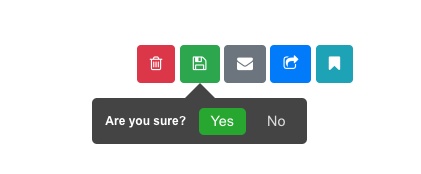

jQuery confirmation tooltip plugin. Easy to use and configure with excellent responsive placement (on the demo page, try resizing your screen!).
- Backdrops (black, white, blurred)
- Themes (black, white, bootstrap 4, bootstrap 4 white)
- Sizes (tiny, small, medium, large)
- Responsive (prefers the supplied position, if it doesn't fit, it attempts to make it smaller by stacking the question and buttons, if it doesn't fit, it tries the "auto" setting, if it still doesn't fit, it shows as a modal in the middle of the screen)
- Customizable buttons and events
- No-conflict CSS
- Additional events like tooltip hide/show for extra control
Clone this repo to your website's public folder
OR
Available on NPM (https://www.npmjs.com/package/jconfirm):
npm install jconfirmjQuery 3.0+
Include the plugin in your code:
<linkrel="stylesheet" href="jConfirm-master/jConfirm.min.css"><scriptsrc="jConfirm-master/jConfirm.min.js"></script>jConfirm's defaults make it dead-simple to get started:
<ahref='#' data-toggle="confirm"
data-id="1">Delete it!</a>$(function(){$('[data-toggle="confirm"]').jConfirm().on('confirm',function(e){varbtn=$(this),id=btn.data('id');//make your ajax call to delete this record});});Defaults are shown
$(function(){$('[data-toggle="confirm"]').jConfirm({//false|array: if provided, this will override the default confirm/deny buttons (see below for an example)btns: false,//string: question displayed to the userquestion: 'Are you sure?',//string: confirm button textconfirm_text: 'Yes',//string: deny button textdeny_text: 'No',//boolean: if true, when the confirm button is clicked the user will be redirected to the button's href locationfollow_href: true,//boolean: if true and follow_href is true, the href will be opened in a new windowopen_new_tab: false,//boolean : if true, the tooltip will be hidden if you click outside of ithide_on_click: true,//string ('auto','top','bottom','left','right'): preferred location of the tooltip (defaults to auto if no space)position: 'auto',//string: class(es) to add to the tooltipclass: '',//boolean: if true, the deny button will be shownshow_deny_btn: true,//string ('black', 'white', 'bootstrap-4', 'bootstrap-4-white')theme: 'black',//string ('tiny', 'small', 'medium', 'large')size: 'small',//boolean: show the tooltip immediately on instantiationshow_now: false,//string|false ('black', 'white', 'blurred')backdrop: false}).on('confirm',function(e){varbtn=$(this);//triggered on confirm}).on('deny',function(e){varbtn=$(this);//triggered on deny}).on('jc-show',function(e,tooltip){//triggered on show of tooltip//tooltip dom element is passed as the second parameter}).on('jc-hide',function(e){//triggered on hide of tooltip});//gets the currently displayed tooltip (if any)varcurrent_tooltip=$.jConfirm.current;//gets the button that was clicked for the current tooltipcurrent_tooltip.dom;//hides the current tooltip (remember to make sure there is one first)//returns the original dom element//you can pass false to disable triggering the hide eventcurrent_tooltip.hide(false);});You can set any of the options you see above globally using this syntax:
$.jConfirm.defaults.question='Are you sure?';$.jConfirm.defaults.confirm_text='Yes';$.jConfirm.defaults.deny_text='No';$.jConfirm.defaults.theme='black';You can override the global and passed options by setting data attributes:
<ahref='#' data-toggle="confirm"
data-question="Are you sure?"
data-confirm_text="Yes"
data-deny_text="No"
data-id="1">Delete it!</a>$('[data-toggle="confirm"]').jConfirm().on('confirm',function(e){varbtn=$(this),id=btn.data('id');//do something});Bootstrap theme:
$(function(){$('[data-toggle="confirm"]').jConfirm({theme: 'bootstrap-4'});});or globally:
$.jConfirm.defaults.theme='bootstrap-4';Preferred positioning:
$(function(){$('[data-toggle="confirm"]').jConfirm({position: 'right'});});Follow link on confirm:
<ahref="https://htmlguy.com" class="btn btn-secondary outside-link">
HTMLGuy.com
</a>$('.outside-link').jConfirm({question:'You are about to visit an external site, are you sure you want to leave?',confirm_text: 'Yes, let\'s go!',deny_text:' No way!',follow_href: true,});Custom question and button text using data attributes:
<ahref="#" class="btn btn-secondary send-email" data-question="Are you ready to send your message?" data-confirm_text="Yes, send now" data-deny_text="No, cancel">
Send
</a>$('.send-email').jConfirm().on('confirm',function(e){//send email});Overriding the confirm and deny buttons to create a custom tooltip:
<ahref="#" class="btn btn-primary social-share" data-url-to-share="https://htmlguy.com">
Share
</a>$('.social-share').jConfirm({question: 'Share to your favorite social media sites!',btns: [{text:'Facebook',event:'facebook-share',data: {some_data_attr: 1},class:'facebook-btn jc-button-highlight'},{text:'Twitter',event:'twitter-share',data: {some_data_attr: 2},class:'twitter-btn jc-button-highlight'}]}).on('facebook-share',function(e,data){varbtn=$(this);vardata_attr=data.some_data_attr;//1console.log('Sharing to facebook: '+btn.data('url-to-share'));}).on('twitter-share',function(e,data){varbtn=$(this);vardata_attr=data.some_data_attr;//2console.log('Sharing to twitter: '+btn.data('url-to-share'));});