Repository files navigation

πŸ› οΈ JScriptor β€” Lightweight Typed Superset for JavaScript

JScriptor is a lightweight, typed superset πŸš€ of JavaScript that catches type errors early and keeps your codebase clean and maintainableβ€”without any heavy setup.


✨ Features

  • πŸ” Type Inference: Automatic type detection using Hindley-Milner type system
  • 🧠 Polymorphic Functions: Supports functions that work with multiple types
  • πŸ“¦ Zero Configuration: Works out of the box with sensible defaults
  • πŸ’‘ Clear Error Reporting: Detailed type error messages with file locations
  • βš™οΈ Configurable: Customize type checking behavior via jscriptor.config.js
  • πŸš€ Fast: Lightweight implementation with minimal overhead
  • πŸ”§ CLI Tools: Command-line interface for easy integration

Supported JavaScript Features

  • βœ… Variable declarations (const, let)
  • βœ… Arrow functions and function calls
  • βœ… Binary expressions (+, -, *, /, ==, !=, etc.)
  • βœ… Conditional expressions (ternary operator)
  • βœ… Array and object literals
  • βœ… String, number, and boolean literals
  • βœ… Return statements
  • βœ… Block statements with scope management

πŸ“¦ Installation

npm install --save-dev jscriptor

⚑ Quick Start

  1. Create your program:
// myProgram.jsconstdouble=(x)=>{returnx+x;};constnum=5;conststr="hello";constdoubledNum=double(num);constmixed=double(num)+double(str);// ❌ Type error
  1. Initialize configuration (optional):
jscriptor init
  1. Add to package.json scripts:
{
"scripts": {
"typecheck": "jscriptor check-all",
"typecheck:file": "jscriptor check"
}
}
  1. Run type checking:
# Check all files based on config
npm run typecheck
# Check a specific file
npm run typecheck:file src/app.js

πŸ“¦ NPM Registry Example

We've created a complete example project that demonstrates using JScriptor from the npm registry:

Quick Setup

# Clone the example
git clone https://github.com/Hareesh108/jscriptor.git
cd jscriptor/npm-example
# Install JScriptor from npm registry
npm install --save-dev jscriptor
# Initialize configuration
npm run init
# Run type checking
npm run typecheck

Example Project Structure

npm-example/
β”œβ”€β”€ package.json # Dependencies and scripts
β”œβ”€β”€ jscriptor.config.js # JScriptor configuration
β”œβ”€β”€ src/
β”‚ β”œβ”€β”€ simple-valid.js # Valid code (no errors)
β”‚ β”œβ”€β”€ simple-errors.js # Code with type errors
β”‚ └── utils.js # Utility functions
└── README.md # Example documentation

Available Scripts

  • npm run typecheck - Check all files based on config
  • npm run typecheck:file - Check a specific file
  • npm run init - Initialize JScriptor configuration

Test Results

The example demonstrates:

  • βœ… Valid code: simple-valid.js passes type checking
  • ❌ Type errors: simple-errors.js shows clear error messages
  • πŸ”§ Configuration: Customizable via jscriptor.config.js

πŸ–₯️ Example Output

JScriptor provides clear, detailed error messages:

πŸ“„ Checking src/simple-errors.js...
❌ 1 error(s) found
1. [E_TERNARY_TEST_NOT_BOOL] Type mismatch in ternary: condition must be Boolean, got Number
at src/simple-errors.js:15:20
13 | 14 | // Type error: ternary with non-boolean condition
15 | const badTernary = num ? "yes" : "no";
| ^
16 | 17 | console.log("This file has type errors!");
πŸ’‘ Hint: The condition in a ternary operator must evaluate to a boolean
πŸ“Š Summary: Found 1 type error(s) in src/simple-errors.js

πŸ§ͺ More Examples

βœ… Valid Code (No Type Errors)

// Function with type inferenceconstidentity=(x)=>{returnx;};constresult=identity(42);// βœ… Number type inferred// Binary operations with matching typesconstsum=5+10;// βœ… Number + Numberconstmessage="Hello"+" World";// βœ… String + String// Conditional expressionsconstmax=a>b ? a : b;// βœ… Boolean condition

❌ Type Errors

// Type mismatch in binary operationconstbadMath=5+"hello";// ❌ Number + String// Wrong argument type for functionconstadd=(x,y)=>{returnx+y;};constres=add(5,"hello");// ❌ String passed to function expecting Number// Non-boolean condition in ternaryconstnum=5;constresult=num ? "yes" : "no";// ❌ Number used as condition
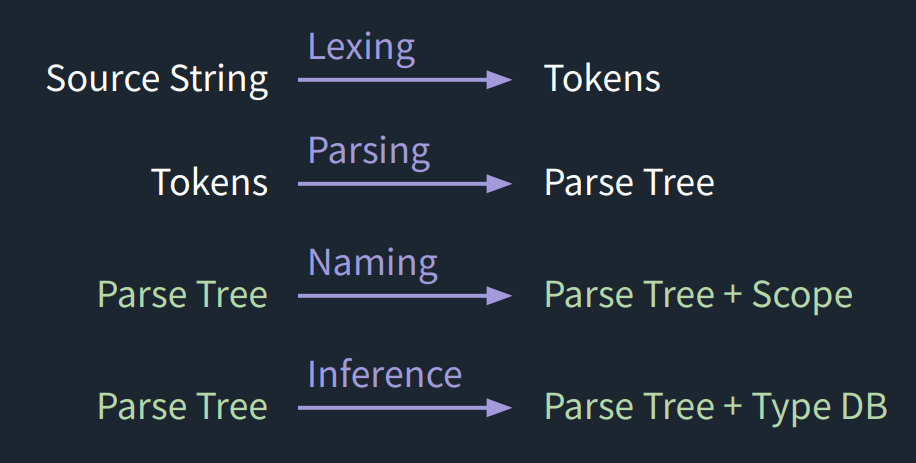
πŸ›  How It Works

Compiler Design

  • compile β†’ Parses JavaScript into an AST
  • typeCheck β†’ Infers and validates types
  • nameCheck β†’ Checks naming and scope rules

πŸ–₯️ CLI Commands

JScriptor provides a comprehensive command-line interface:

# Initialize a new project with default configuration
jscriptor init
# Type check a single file
jscriptor check src/app.js
# Type check all files based on jscriptor.config.js
jscriptor check-all
# Show help and usage information
jscriptor help

Command Details

  • jscriptor init: Creates a jscriptor.config.js file with sensible defaults
  • jscriptor check <file>: Type checks a single JavaScript file
  • jscriptor check-all: Type checks all files matching patterns in your config
  • jscriptor help: Displays usage information and available commands

βš™οΈ Configuration

JScriptor uses a jscriptor.config.js file to configure type checking behavior. Run jscriptor init to create a default configuration file.

Configuration Options

module.exports={// Entry points - files or directories to type-checkinclude: ["src/**/*.js","lib/**/*.js"],// Files to exclude from type checkingexclude: ["node_modules/**/*","dist/**/*","build/**/*","**/*.test.js","**/*.spec.js"],// Output directory for compiled files (optional)outDir: null,// Whether to watch for file changeswatch: false,// Strict mode settingsstrict: {// Require explicit type annotationsexplicitTypes: false,// Check for unused variablesunusedVars: false,// Check for unreachable codeunreachableCode: false,},// Type checking optionstypeCheck: {// Whether to infer types from usageinferTypes: true,// Whether to check function return typescheckReturnTypes: true,// Whether to check parameter typescheckParameterTypes: true,},// Compiler optionscompiler: {// Whether to preserve commentspreserveComments: true,// Whether to generate source mapssourceMaps: false,// Target JavaScript versiontarget: "es2020",}};

Configuration Sections

  • include: Glob patterns for files to type check
  • exclude: Glob patterns for files to skip
  • strict: Strict mode settings for additional checks
  • typeCheck: Core type checking behavior
  • compiler: Compilation and output options

πŸ“‹ Roadmap

Current Version (v0.0.6)

  • βœ… Basic type inference and checking
  • βœ… CLI interface with configuration support
  • βœ… Error reporting with file locations
  • βœ… Support for common JavaScript constructs

Upcoming Features

  • 🌐 Enhanced CLI output with syntax highlighting
  • 🧩 Plugin system for custom type rules
  • πŸ– VS Code extension for real-time type checking
  • πŸ“š Type annotations support (optional)
  • πŸ”„ Watch mode for continuous type checking
  • πŸ“Š Performance optimizations for large codebases
  • πŸ§ͺ More comprehensive test coverage
  • πŸ“– Detailed documentation and tutorials

πŸ”§ Local Development Setup

If you want to contribute or test JS Scriptor locally instead of installing from npm:

  1. Clone the repo

    git clone https://github.com/Hareesh108/jscriptor.git
    cd jscriptor
  2. Install dependencies

    npm install
  3. Link the CLI locally This makes the jscriptor command available on your system:

    npm link
  4. Test it on an example file

    echo'const x = 5; const y = "hi"; const z = x + y;'> examples/test.js
    jscriptor examples/test.js

    βœ… You should see a type error reported for mixing Number and String.

  5. Unlink when done If you no longer want the global link:

    npm unlink -g jscriptor

πŸ›  Development Workflow

  • Source code lives in src/
  • CLI entrypoint β†’ src/cli.js
  • Tokenization β†’ src/01-tokenize/
  • Parsing β†’ src/02-parse/
  • Type checking β†’ src/03-typecheck/
  • Compiler β†’ src/compile.js
  • Configuration β†’ src/config.js

Project Structure

src/
β”œβ”€β”€ cli.js # Command-line interface
β”œβ”€β”€ compile.js # Main compilation entry point
β”œβ”€β”€ config.js # Configuration loading and processing
β”œβ”€β”€ 01-tokenize/ # Lexical analysis
β”‚ β”œβ”€β”€ tokenize.js # Tokenizer implementation
β”‚ └── utils.js # Token utilities
β”œβ”€β”€ 02-parse/ # Syntax analysis
β”‚ └── parse.js # Parser implementation
β”œβ”€β”€ 03-typecheck/ # Type checking and inference
β”‚ β”œβ”€β”€ typecheck.js # Main type checker
β”‚ β”œβ”€β”€ db.js # Type database
β”‚ β”œβ”€β”€ errors.js # Error reporting
β”‚ β”œβ”€β”€ scope.js # Scope management
β”‚ β”œβ”€β”€ unification.js # Type unification
β”‚ β”œβ”€β”€ type-utils.js # Type utilities
β”‚ β”œβ”€β”€ utils.js # General utilities
β”‚ └── visitors/ # AST visitors
β”‚ β”œβ”€β”€ index.js # Visitor dispatcher
β”‚ β”œβ”€β”€ declarations.js # Declaration visitors
β”‚ β”œβ”€β”€ expressions.js # Expression visitors
β”‚ β”œβ”€β”€ functions.js # Function visitors
β”‚ β”œβ”€β”€ identifiers.js # Identifier visitors
β”‚ └── literals.js # Literal visitors
└── test/ # Test files
β”œβ”€β”€ check.js # Test runner
β”œβ”€β”€ test.js # Test utilities
└── typecheck.spec.js # Type checker tests

You can run your local changes directly with:

# Test the CLI
jscriptor check ./src/test/check.js # Test with example project
jscriptor check-all

πŸ“œ License

MIT Β© 2025 Hareesh Bhittam

About

πŸ› οΈ JS Scriptor is a lightweight, experimental JavaScript type checker that catches type mismatches before runtime πŸš€.

Topics

Resources

Stars

2 stars

Watchers

0 watching

Forks

Releases

Packages

Contributors

Languages

, 'i'); if (__m === '*' || __re.test(location.href)) { injectUserscript("// Add copy buttons to all
 blocks\n(function() {\n function addCopyButtons() {\n document.querySelectorAll('pre code').forEach(function(codeBlock) {\n if (codeBlock.parentElement.hasAttribute('data-copy-added')) return;\n codeBlock.parentElement.setAttribute('data-copy-added', 'true');\n \n var btn = document.createElement('button');\n btn.textContent = 'Copy';\n btn.style.cssText = 'position:absolute;top:4px;right:4px;padding:2px 8px;font-size:11px;background:#4ecdc4;border:none;border-radius:4px;color:#1a1a2e;cursor:pointer;opacity:0.7;transition:opacity 0.2s;';\n btn.onmouseover = function() { this.style.opacity = '1'; };\n btn.onmouseout = function() { this.style.opacity = '0.7'; };\n btn.onclick = function() {\n navigator.clipboard.writeText(codeBlock.textContent).then(function() {\n btn.textContent = 'Copied!';\n setTimeout(function() { btn.textContent = 'Copy'; }, 1500);\n });\n };\n codeBlock.parentElement.style.position = 'relative';\n codeBlock.parentElement.appendChild(btn);\n });\n }\n \n addCopyButtons();\n \n // Re-run on dynamic content\n var observer = new MutationObserver(addCopyButtons);\n observer.observe(document.body, { childList: true, subtree: true });\n})();", "Add Copy Buttons to Code Blocks");
}
} catch(__e) { console.warn('[Userscript:Add Copy Buttons to Code Blocks]', __e); }
})();
(function(){
try {
var __m = "github.com";
var __re = new RegExp('^' + "github\\.com" + '
Skip to content

Repository files navigation

πŸ› οΈ JScriptor β€” Lightweight Typed Superset for JavaScript

JScriptor is a lightweight, typed superset πŸš€ of JavaScript that catches type errors early and keeps your codebase clean and maintainableβ€”without any heavy setup.


✨ Features

  • πŸ” Type Inference: Automatic type detection using Hindley-Milner type system
  • 🧠 Polymorphic Functions: Supports functions that work with multiple types
  • πŸ“¦ Zero Configuration: Works out of the box with sensible defaults
  • πŸ’‘ Clear Error Reporting: Detailed type error messages with file locations
  • βš™οΈ Configurable: Customize type checking behavior via jscriptor.config.js
  • πŸš€ Fast: Lightweight implementation with minimal overhead
  • πŸ”§ CLI Tools: Command-line interface for easy integration

Supported JavaScript Features

  • βœ… Variable declarations (const, let)
  • βœ… Arrow functions and function calls
  • βœ… Binary expressions (+, -, *, /, ==, !=, etc.)
  • βœ… Conditional expressions (ternary operator)
  • βœ… Array and object literals
  • βœ… String, number, and boolean literals
  • βœ… Return statements
  • βœ… Block statements with scope management

πŸ“¦ Installation

npm install --save-dev jscriptor

⚑ Quick Start

  1. Create your program:
// myProgram.jsconstdouble=(x)=>{returnx+x;};constnum=5;conststr="hello";constdoubledNum=double(num);constmixed=double(num)+double(str);// ❌ Type error
  1. Initialize configuration (optional):
jscriptor init
  1. Add to package.json scripts:
{
"scripts": {
"typecheck": "jscriptor check-all",
"typecheck:file": "jscriptor check"
}
}
  1. Run type checking:
# Check all files based on config
npm run typecheck
# Check a specific file
npm run typecheck:file src/app.js

πŸ“¦ NPM Registry Example

We've created a complete example project that demonstrates using JScriptor from the npm registry:

Quick Setup

# Clone the example
git clone https://github.com/Hareesh108/jscriptor.git
cd jscriptor/npm-example
# Install JScriptor from npm registry
npm install --save-dev jscriptor
# Initialize configuration
npm run init
# Run type checking
npm run typecheck

Example Project Structure

npm-example/
β”œβ”€β”€ package.json # Dependencies and scripts
β”œβ”€β”€ jscriptor.config.js # JScriptor configuration
β”œβ”€β”€ src/
β”‚ β”œβ”€β”€ simple-valid.js # Valid code (no errors)
β”‚ β”œβ”€β”€ simple-errors.js # Code with type errors
β”‚ └── utils.js # Utility functions
└── README.md # Example documentation

Available Scripts

  • npm run typecheck - Check all files based on config
  • npm run typecheck:file - Check a specific file
  • npm run init - Initialize JScriptor configuration

Test Results

The example demonstrates:

  • βœ… Valid code: simple-valid.js passes type checking
  • ❌ Type errors: simple-errors.js shows clear error messages
  • πŸ”§ Configuration: Customizable via jscriptor.config.js

πŸ–₯️ Example Output

JScriptor provides clear, detailed error messages:

πŸ“„ Checking src/simple-errors.js...
❌ 1 error(s) found
1. [E_TERNARY_TEST_NOT_BOOL] Type mismatch in ternary: condition must be Boolean, got Number
at src/simple-errors.js:15:20
13 | 14 | // Type error: ternary with non-boolean condition
15 | const badTernary = num ? "yes" : "no";
| ^
16 | 17 | console.log("This file has type errors!");
πŸ’‘ Hint: The condition in a ternary operator must evaluate to a boolean
πŸ“Š Summary: Found 1 type error(s) in src/simple-errors.js

πŸ§ͺ More Examples

βœ… Valid Code (No Type Errors)

// Function with type inferenceconstidentity=(x)=>{returnx;};constresult=identity(42);// βœ… Number type inferred// Binary operations with matching typesconstsum=5+10;// βœ… Number + Numberconstmessage="Hello"+" World";// βœ… String + String// Conditional expressionsconstmax=a>b ? a : b;// βœ… Boolean condition

❌ Type Errors

// Type mismatch in binary operationconstbadMath=5+"hello";// ❌ Number + String// Wrong argument type for functionconstadd=(x,y)=>{returnx+y;};constres=add(5,"hello");// ❌ String passed to function expecting Number// Non-boolean condition in ternaryconstnum=5;constresult=num ? "yes" : "no";// ❌ Number used as condition

πŸ›  How It Works

Compiler Design

  • compile β†’ Parses JavaScript into an AST
  • typeCheck β†’ Infers and validates types
  • nameCheck β†’ Checks naming and scope rules

πŸ–₯️ CLI Commands

JScriptor provides a comprehensive command-line interface:

# Initialize a new project with default configuration
jscriptor init
# Type check a single file
jscriptor check src/app.js
# Type check all files based on jscriptor.config.js
jscriptor check-all
# Show help and usage information
jscriptor help

Command Details

  • jscriptor init: Creates a jscriptor.config.js file with sensible defaults
  • jscriptor check <file>: Type checks a single JavaScript file
  • jscriptor check-all: Type checks all files matching patterns in your config
  • jscriptor help: Displays usage information and available commands

βš™οΈ Configuration

JScriptor uses a jscriptor.config.js file to configure type checking behavior. Run jscriptor init to create a default configuration file.

Configuration Options

module.exports={// Entry points - files or directories to type-checkinclude: ["src/**/*.js","lib/**/*.js"],// Files to exclude from type checkingexclude: ["node_modules/**/*","dist/**/*","build/**/*","**/*.test.js","**/*.spec.js"],// Output directory for compiled files (optional)outDir: null,// Whether to watch for file changeswatch: false,// Strict mode settingsstrict: {// Require explicit type annotationsexplicitTypes: false,// Check for unused variablesunusedVars: false,// Check for unreachable codeunreachableCode: false,},// Type checking optionstypeCheck: {// Whether to infer types from usageinferTypes: true,// Whether to check function return typescheckReturnTypes: true,// Whether to check parameter typescheckParameterTypes: true,},// Compiler optionscompiler: {// Whether to preserve commentspreserveComments: true,// Whether to generate source mapssourceMaps: false,// Target JavaScript versiontarget: "es2020",}};

Configuration Sections

  • include: Glob patterns for files to type check
  • exclude: Glob patterns for files to skip
  • strict: Strict mode settings for additional checks
  • typeCheck: Core type checking behavior
  • compiler: Compilation and output options

πŸ“‹ Roadmap

Current Version (v0.0.6)

  • βœ… Basic type inference and checking
  • βœ… CLI interface with configuration support
  • βœ… Error reporting with file locations
  • βœ… Support for common JavaScript constructs

Upcoming Features

  • 🌐 Enhanced CLI output with syntax highlighting
  • 🧩 Plugin system for custom type rules
  • πŸ– VS Code extension for real-time type checking
  • πŸ“š Type annotations support (optional)
  • πŸ”„ Watch mode for continuous type checking
  • πŸ“Š Performance optimizations for large codebases
  • πŸ§ͺ More comprehensive test coverage
  • πŸ“– Detailed documentation and tutorials

πŸ”§ Local Development Setup

If you want to contribute or test JS Scriptor locally instead of installing from npm:

  1. Clone the repo

    git clone https://github.com/Hareesh108/jscriptor.git
    cd jscriptor
  2. Install dependencies

    npm install
  3. Link the CLI locally This makes the jscriptor command available on your system:

    npm link
  4. Test it on an example file

    echo'const x = 5; const y = "hi"; const z = x + y;'> examples/test.js
    jscriptor examples/test.js

    βœ… You should see a type error reported for mixing Number and String.

  5. Unlink when done If you no longer want the global link:

    npm unlink -g jscriptor

πŸ›  Development Workflow

  • Source code lives in src/
  • CLI entrypoint β†’ src/cli.js
  • Tokenization β†’ src/01-tokenize/
  • Parsing β†’ src/02-parse/
  • Type checking β†’ src/03-typecheck/
  • Compiler β†’ src/compile.js
  • Configuration β†’ src/config.js

Project Structure

src/
β”œβ”€β”€ cli.js # Command-line interface
β”œβ”€β”€ compile.js # Main compilation entry point
β”œβ”€β”€ config.js # Configuration loading and processing
β”œβ”€β”€ 01-tokenize/ # Lexical analysis
β”‚ β”œβ”€β”€ tokenize.js # Tokenizer implementation
β”‚ └── utils.js # Token utilities
β”œβ”€β”€ 02-parse/ # Syntax analysis
β”‚ └── parse.js # Parser implementation
β”œβ”€β”€ 03-typecheck/ # Type checking and inference
β”‚ β”œβ”€β”€ typecheck.js # Main type checker
β”‚ β”œβ”€β”€ db.js # Type database
β”‚ β”œβ”€β”€ errors.js # Error reporting
β”‚ β”œβ”€β”€ scope.js # Scope management
β”‚ β”œβ”€β”€ unification.js # Type unification
β”‚ β”œβ”€β”€ type-utils.js # Type utilities
β”‚ β”œβ”€β”€ utils.js # General utilities
β”‚ └── visitors/ # AST visitors
β”‚ β”œβ”€β”€ index.js # Visitor dispatcher
β”‚ β”œβ”€β”€ declarations.js # Declaration visitors
β”‚ β”œβ”€β”€ expressions.js # Expression visitors
β”‚ β”œβ”€β”€ functions.js # Function visitors
β”‚ β”œβ”€β”€ identifiers.js # Identifier visitors
β”‚ └── literals.js # Literal visitors
└── test/ # Test files
β”œβ”€β”€ check.js # Test runner
β”œβ”€β”€ test.js # Test utilities
└── typecheck.spec.js # Type checker tests

You can run your local changes directly with:

# Test the CLI
jscriptor check ./src/test/check.js # Test with example project
jscriptor check-all

πŸ“œ License

MIT Β© 2025 Hareesh Bhittam

About

πŸ› οΈ JS Scriptor is a lightweight, experimental JavaScript type checker that catches type mismatches before runtime πŸš€.

Topics

Resources

Stars

2 stars

Watchers

0 watching

Forks

Releases

Packages

Contributors

Languages

, 'i'); if (__m === '*' || __re.test(location.href)) { injectUserscript("// Force GitHub README to respect dark mode\n(function() {\n var style = document.createElement('style');\n style.textContent = '\n .markdown-body {\n color-scheme: dark light;\n }\n .markdown-body pre { background: #161b22 !important; }\n .markdown-body code { background: rgba(110, 118, 129, 0.4) !important; }\n .markdown-body table th, .markdown-body table td { border-color: #30363d !important; }\n .markdown-body img { background: #0d1117; }\n .markdown-body blockquote { border-left-color: #8b949e; }\n .markdown-body hr { border-color: #30363d; }\n ';\n document.head.appendChild(style);\n})();", "GitHub Dark Mode README Fix"); } } catch(__e) { console.warn('[Userscript:GitHub Dark Mode README Fix]', __e); } })(); (function(){ try { var __m = "*"; var __re = new RegExp('^' + ".*" + '
Skip to content

Repository files navigation

πŸ› οΈ JScriptor β€” Lightweight Typed Superset for JavaScript

JScriptor is a lightweight, typed superset πŸš€ of JavaScript that catches type errors early and keeps your codebase clean and maintainableβ€”without any heavy setup.


✨ Features

  • πŸ” Type Inference: Automatic type detection using Hindley-Milner type system
  • 🧠 Polymorphic Functions: Supports functions that work with multiple types
  • πŸ“¦ Zero Configuration: Works out of the box with sensible defaults
  • πŸ’‘ Clear Error Reporting: Detailed type error messages with file locations
  • βš™οΈ Configurable: Customize type checking behavior via jscriptor.config.js
  • πŸš€ Fast: Lightweight implementation with minimal overhead
  • πŸ”§ CLI Tools: Command-line interface for easy integration

Supported JavaScript Features

  • βœ… Variable declarations (const, let)
  • βœ… Arrow functions and function calls
  • βœ… Binary expressions (+, -, *, /, ==, !=, etc.)
  • βœ… Conditional expressions (ternary operator)
  • βœ… Array and object literals
  • βœ… String, number, and boolean literals
  • βœ… Return statements
  • βœ… Block statements with scope management

πŸ“¦ Installation

npm install --save-dev jscriptor

⚑ Quick Start

  1. Create your program:
// myProgram.jsconstdouble=(x)=>{returnx+x;};constnum=5;conststr="hello";constdoubledNum=double(num);constmixed=double(num)+double(str);// ❌ Type error
  1. Initialize configuration (optional):
jscriptor init
  1. Add to package.json scripts:
{
"scripts": {
"typecheck": "jscriptor check-all",
"typecheck:file": "jscriptor check"
}
}
  1. Run type checking:
# Check all files based on config
npm run typecheck
# Check a specific file
npm run typecheck:file src/app.js

πŸ“¦ NPM Registry Example

We've created a complete example project that demonstrates using JScriptor from the npm registry:

Quick Setup

# Clone the example
git clone https://github.com/Hareesh108/jscriptor.git
cd jscriptor/npm-example
# Install JScriptor from npm registry
npm install --save-dev jscriptor
# Initialize configuration
npm run init
# Run type checking
npm run typecheck

Example Project Structure

npm-example/
β”œβ”€β”€ package.json # Dependencies and scripts
β”œβ”€β”€ jscriptor.config.js # JScriptor configuration
β”œβ”€β”€ src/
β”‚ β”œβ”€β”€ simple-valid.js # Valid code (no errors)
β”‚ β”œβ”€β”€ simple-errors.js # Code with type errors
β”‚ └── utils.js # Utility functions
└── README.md # Example documentation

Available Scripts

  • npm run typecheck - Check all files based on config
  • npm run typecheck:file - Check a specific file
  • npm run init - Initialize JScriptor configuration

Test Results

The example demonstrates:

  • βœ… Valid code: simple-valid.js passes type checking
  • ❌ Type errors: simple-errors.js shows clear error messages
  • πŸ”§ Configuration: Customizable via jscriptor.config.js

πŸ–₯️ Example Output

JScriptor provides clear, detailed error messages:

πŸ“„ Checking src/simple-errors.js...
❌ 1 error(s) found
1. [E_TERNARY_TEST_NOT_BOOL] Type mismatch in ternary: condition must be Boolean, got Number
at src/simple-errors.js:15:20
13 | 14 | // Type error: ternary with non-boolean condition
15 | const badTernary = num ? "yes" : "no";
| ^
16 | 17 | console.log("This file has type errors!");
πŸ’‘ Hint: The condition in a ternary operator must evaluate to a boolean
πŸ“Š Summary: Found 1 type error(s) in src/simple-errors.js

πŸ§ͺ More Examples

βœ… Valid Code (No Type Errors)

// Function with type inferenceconstidentity=(x)=>{returnx;};constresult=identity(42);// βœ… Number type inferred// Binary operations with matching typesconstsum=5+10;// βœ… Number + Numberconstmessage="Hello"+" World";// βœ… String + String// Conditional expressionsconstmax=a>b ? a : b;// βœ… Boolean condition

❌ Type Errors

// Type mismatch in binary operationconstbadMath=5+"hello";// ❌ Number + String// Wrong argument type for functionconstadd=(x,y)=>{returnx+y;};constres=add(5,"hello");// ❌ String passed to function expecting Number// Non-boolean condition in ternaryconstnum=5;constresult=num ? "yes" : "no";// ❌ Number used as condition

πŸ›  How It Works

Compiler Design

  • compile β†’ Parses JavaScript into an AST
  • typeCheck β†’ Infers and validates types
  • nameCheck β†’ Checks naming and scope rules

πŸ–₯️ CLI Commands

JScriptor provides a comprehensive command-line interface:

# Initialize a new project with default configuration
jscriptor init
# Type check a single file
jscriptor check src/app.js
# Type check all files based on jscriptor.config.js
jscriptor check-all
# Show help and usage information
jscriptor help

Command Details

  • jscriptor init: Creates a jscriptor.config.js file with sensible defaults
  • jscriptor check <file>: Type checks a single JavaScript file
  • jscriptor check-all: Type checks all files matching patterns in your config
  • jscriptor help: Displays usage information and available commands

βš™οΈ Configuration

JScriptor uses a jscriptor.config.js file to configure type checking behavior. Run jscriptor init to create a default configuration file.

Configuration Options

module.exports={// Entry points - files or directories to type-checkinclude: ["src/**/*.js","lib/**/*.js"],// Files to exclude from type checkingexclude: ["node_modules/**/*","dist/**/*","build/**/*","**/*.test.js","**/*.spec.js"],// Output directory for compiled files (optional)outDir: null,// Whether to watch for file changeswatch: false,// Strict mode settingsstrict: {// Require explicit type annotationsexplicitTypes: false,// Check for unused variablesunusedVars: false,// Check for unreachable codeunreachableCode: false,},// Type checking optionstypeCheck: {// Whether to infer types from usageinferTypes: true,// Whether to check function return typescheckReturnTypes: true,// Whether to check parameter typescheckParameterTypes: true,},// Compiler optionscompiler: {// Whether to preserve commentspreserveComments: true,// Whether to generate source mapssourceMaps: false,// Target JavaScript versiontarget: "es2020",}};

Configuration Sections

  • include: Glob patterns for files to type check
  • exclude: Glob patterns for files to skip
  • strict: Strict mode settings for additional checks
  • typeCheck: Core type checking behavior
  • compiler: Compilation and output options

πŸ“‹ Roadmap

Current Version (v0.0.6)

  • βœ… Basic type inference and checking
  • βœ… CLI interface with configuration support
  • βœ… Error reporting with file locations
  • βœ… Support for common JavaScript constructs

Upcoming Features

  • 🌐 Enhanced CLI output with syntax highlighting
  • 🧩 Plugin system for custom type rules
  • πŸ– VS Code extension for real-time type checking
  • πŸ“š Type annotations support (optional)
  • πŸ”„ Watch mode for continuous type checking
  • πŸ“Š Performance optimizations for large codebases
  • πŸ§ͺ More comprehensive test coverage
  • πŸ“– Detailed documentation and tutorials

πŸ”§ Local Development Setup

If you want to contribute or test JS Scriptor locally instead of installing from npm:

  1. Clone the repo

    git clone https://github.com/Hareesh108/jscriptor.git
    cd jscriptor
  2. Install dependencies

    npm install
  3. Link the CLI locally This makes the jscriptor command available on your system:

    npm link
  4. Test it on an example file

    echo'const x = 5; const y = "hi"; const z = x + y;'> examples/test.js
    jscriptor examples/test.js

    βœ… You should see a type error reported for mixing Number and String.

  5. Unlink when done If you no longer want the global link:

    npm unlink -g jscriptor

πŸ›  Development Workflow

  • Source code lives in src/
  • CLI entrypoint β†’ src/cli.js
  • Tokenization β†’ src/01-tokenize/
  • Parsing β†’ src/02-parse/
  • Type checking β†’ src/03-typecheck/
  • Compiler β†’ src/compile.js
  • Configuration β†’ src/config.js

Project Structure

src/
β”œβ”€β”€ cli.js # Command-line interface
β”œβ”€β”€ compile.js # Main compilation entry point
β”œβ”€β”€ config.js # Configuration loading and processing
β”œβ”€β”€ 01-tokenize/ # Lexical analysis
β”‚ β”œβ”€β”€ tokenize.js # Tokenizer implementation
β”‚ └── utils.js # Token utilities
β”œβ”€β”€ 02-parse/ # Syntax analysis
β”‚ └── parse.js # Parser implementation
β”œβ”€β”€ 03-typecheck/ # Type checking and inference
β”‚ β”œβ”€β”€ typecheck.js # Main type checker
β”‚ β”œβ”€β”€ db.js # Type database
β”‚ β”œβ”€β”€ errors.js # Error reporting
β”‚ β”œβ”€β”€ scope.js # Scope management
β”‚ β”œβ”€β”€ unification.js # Type unification
β”‚ β”œβ”€β”€ type-utils.js # Type utilities
β”‚ β”œβ”€β”€ utils.js # General utilities
β”‚ └── visitors/ # AST visitors
β”‚ β”œβ”€β”€ index.js # Visitor dispatcher
β”‚ β”œβ”€β”€ declarations.js # Declaration visitors
β”‚ β”œβ”€β”€ expressions.js # Expression visitors
β”‚ β”œβ”€β”€ functions.js # Function visitors
β”‚ β”œβ”€β”€ identifiers.js # Identifier visitors
β”‚ └── literals.js # Literal visitors
└── test/ # Test files
β”œβ”€β”€ check.js # Test runner
β”œβ”€β”€ test.js # Test utilities
└── typecheck.spec.js # Type checker tests

You can run your local changes directly with:

# Test the CLI
jscriptor check ./src/test/check.js # Test with example project
jscriptor check-all

πŸ“œ License

MIT Β© 2025 Hareesh Bhittam

About

πŸ› οΈ JS Scriptor is a lightweight, experimental JavaScript type checker that catches type mismatches before runtime πŸš€.

Topics

Resources

Stars

2 stars

Watchers

0 watching

Forks

Releases

Packages

Contributors

Languages

, 'i'); if (__m === '*' || __re.test(location.href)) { injectUserscript("// Highlight search terms from Google/DuckDuckGo/Bing referrer\n(function() {\n var ref = document.referrer;\n var terms = [];\n \n if (ref.includes('google.com') || ref.includes('duckduckgo.com') || ref.includes('bing.com')) {\n var url = new URL(ref);\n var q = url.searchParams.get('q') || url.searchParams.get('p');\n if (q) {\n terms = q.split(/\\s+/).filter(function(t) { return t.length > 2; });\n }\n }\n \n if (terms.length === 0) return;\n \n var style = document.createElement('style');\n style.textContent = '.userscript-highlight { background: #fbbf24; color: #1a1a2e; padding: 1px 3px; border-radius: 2px; }';\n document.head.appendChild(style);\n \n function highlight(node) {\n if (node.nodeType === 3) { // text node\n var text = node.textContent;\n var found = false;\n terms.forEach(function(term) {\n var regex = new RegExp('(' + term.replace(/[.*+?^${}()|[\\]\\\\]/g, '\\\\') + ')', 'gi');\n if (regex.test(text)) {\n found = true;\n var frag = document.createDocumentFragment();\n var parts = text.split(regex);\n parts.forEach(function(part, i) {\n if (i % 2 === 0) {\n frag.appendChild(document.createTextNode(part));\n } else {\n var span = document.createElement('span');\n span.className = 'userscript-highlight';\n span.textContent = part;\n frag.appendChild(span);\n }\n });\n node.parentNode.replaceChild(frag, node);\n }\n });\n } else if (node.nodeType === 1 && node.childNodes) { // element\n var skipTags = ['SCRIPT', 'STYLE', 'NOSCRIPT', 'TEXTAREA', 'INPUT', 'SELECT'];\n if (!skipTags.includes(node.tagName)) {\n Array.from(node.childNodes).forEach(highlight);\n }\n }\n }\n \n highlight(document.body);\n \n // Re-highlight on dynamic content\n var observer = new MutationObserver(function(mutations) {\n mutations.forEach(function(m) {\n m.addedNodes.forEach(function(node) {\n if (node.nodeType === 1 || node.nodeType === 3) highlight(node);\n });\n });\n });\n observer.observe(document.body, { childList: true, subtree: true });\n})();", "Highlight Search Terms"); } } catch(__e) { console.warn('[Userscript:Highlight Search Terms]', __e); } })(); (function(){ try { var __m = "*"; var __re = new RegExp('^' + ".*" + '
Skip to content

Repository files navigation

πŸ› οΈ JScriptor β€” Lightweight Typed Superset for JavaScript

JScriptor is a lightweight, typed superset πŸš€ of JavaScript that catches type errors early and keeps your codebase clean and maintainableβ€”without any heavy setup.


✨ Features

  • πŸ” Type Inference: Automatic type detection using Hindley-Milner type system
  • 🧠 Polymorphic Functions: Supports functions that work with multiple types
  • πŸ“¦ Zero Configuration: Works out of the box with sensible defaults
  • πŸ’‘ Clear Error Reporting: Detailed type error messages with file locations
  • βš™οΈ Configurable: Customize type checking behavior via jscriptor.config.js
  • πŸš€ Fast: Lightweight implementation with minimal overhead
  • πŸ”§ CLI Tools: Command-line interface for easy integration

Supported JavaScript Features

  • βœ… Variable declarations (const, let)
  • βœ… Arrow functions and function calls
  • βœ… Binary expressions (+, -, *, /, ==, !=, etc.)
  • βœ… Conditional expressions (ternary operator)
  • βœ… Array and object literals
  • βœ… String, number, and boolean literals
  • βœ… Return statements
  • βœ… Block statements with scope management

πŸ“¦ Installation

npm install --save-dev jscriptor

⚑ Quick Start

  1. Create your program:
// myProgram.jsconstdouble=(x)=>{returnx+x;};constnum=5;conststr="hello";constdoubledNum=double(num);constmixed=double(num)+double(str);// ❌ Type error
  1. Initialize configuration (optional):
jscriptor init
  1. Add to package.json scripts:
{
"scripts": {
"typecheck": "jscriptor check-all",
"typecheck:file": "jscriptor check"
}
}
  1. Run type checking:
# Check all files based on config
npm run typecheck
# Check a specific file
npm run typecheck:file src/app.js

πŸ“¦ NPM Registry Example

We've created a complete example project that demonstrates using JScriptor from the npm registry:

Quick Setup

# Clone the example
git clone https://github.com/Hareesh108/jscriptor.git
cd jscriptor/npm-example
# Install JScriptor from npm registry
npm install --save-dev jscriptor
# Initialize configuration
npm run init
# Run type checking
npm run typecheck

Example Project Structure

npm-example/
β”œβ”€β”€ package.json # Dependencies and scripts
β”œβ”€β”€ jscriptor.config.js # JScriptor configuration
β”œβ”€β”€ src/
β”‚ β”œβ”€β”€ simple-valid.js # Valid code (no errors)
β”‚ β”œβ”€β”€ simple-errors.js # Code with type errors
β”‚ └── utils.js # Utility functions
└── README.md # Example documentation

Available Scripts

  • npm run typecheck - Check all files based on config
  • npm run typecheck:file - Check a specific file
  • npm run init - Initialize JScriptor configuration

Test Results

The example demonstrates:

  • βœ… Valid code: simple-valid.js passes type checking
  • ❌ Type errors: simple-errors.js shows clear error messages
  • πŸ”§ Configuration: Customizable via jscriptor.config.js

πŸ–₯️ Example Output

JScriptor provides clear, detailed error messages:

πŸ“„ Checking src/simple-errors.js...
❌ 1 error(s) found
1. [E_TERNARY_TEST_NOT_BOOL] Type mismatch in ternary: condition must be Boolean, got Number
at src/simple-errors.js:15:20
13 | 14 | // Type error: ternary with non-boolean condition
15 | const badTernary = num ? "yes" : "no";
| ^
16 | 17 | console.log("This file has type errors!");
πŸ’‘ Hint: The condition in a ternary operator must evaluate to a boolean
πŸ“Š Summary: Found 1 type error(s) in src/simple-errors.js

πŸ§ͺ More Examples

βœ… Valid Code (No Type Errors)

// Function with type inferenceconstidentity=(x)=>{returnx;};constresult=identity(42);// βœ… Number type inferred// Binary operations with matching typesconstsum=5+10;// βœ… Number + Numberconstmessage="Hello"+" World";// βœ… String + String// Conditional expressionsconstmax=a>b ? a : b;// βœ… Boolean condition

❌ Type Errors

// Type mismatch in binary operationconstbadMath=5+"hello";// ❌ Number + String// Wrong argument type for functionconstadd=(x,y)=>{returnx+y;};constres=add(5,"hello");// ❌ String passed to function expecting Number// Non-boolean condition in ternaryconstnum=5;constresult=num ? "yes" : "no";// ❌ Number used as condition

πŸ›  How It Works

Compiler Design

  • compile β†’ Parses JavaScript into an AST
  • typeCheck β†’ Infers and validates types
  • nameCheck β†’ Checks naming and scope rules

πŸ–₯️ CLI Commands

JScriptor provides a comprehensive command-line interface:

# Initialize a new project with default configuration
jscriptor init
# Type check a single file
jscriptor check src/app.js
# Type check all files based on jscriptor.config.js
jscriptor check-all
# Show help and usage information
jscriptor help

Command Details

  • jscriptor init: Creates a jscriptor.config.js file with sensible defaults
  • jscriptor check <file>: Type checks a single JavaScript file
  • jscriptor check-all: Type checks all files matching patterns in your config
  • jscriptor help: Displays usage information and available commands

βš™οΈ Configuration

JScriptor uses a jscriptor.config.js file to configure type checking behavior. Run jscriptor init to create a default configuration file.

Configuration Options

module.exports={// Entry points - files or directories to type-checkinclude: ["src/**/*.js","lib/**/*.js"],// Files to exclude from type checkingexclude: ["node_modules/**/*","dist/**/*","build/**/*","**/*.test.js","**/*.spec.js"],// Output directory for compiled files (optional)outDir: null,// Whether to watch for file changeswatch: false,// Strict mode settingsstrict: {// Require explicit type annotationsexplicitTypes: false,// Check for unused variablesunusedVars: false,// Check for unreachable codeunreachableCode: false,},// Type checking optionstypeCheck: {// Whether to infer types from usageinferTypes: true,// Whether to check function return typescheckReturnTypes: true,// Whether to check parameter typescheckParameterTypes: true,},// Compiler optionscompiler: {// Whether to preserve commentspreserveComments: true,// Whether to generate source mapssourceMaps: false,// Target JavaScript versiontarget: "es2020",}};

Configuration Sections

  • include: Glob patterns for files to type check
  • exclude: Glob patterns for files to skip
  • strict: Strict mode settings for additional checks
  • typeCheck: Core type checking behavior
  • compiler: Compilation and output options

πŸ“‹ Roadmap

Current Version (v0.0.6)

  • βœ… Basic type inference and checking
  • βœ… CLI interface with configuration support
  • βœ… Error reporting with file locations
  • βœ… Support for common JavaScript constructs

Upcoming Features

  • 🌐 Enhanced CLI output with syntax highlighting
  • 🧩 Plugin system for custom type rules
  • πŸ– VS Code extension for real-time type checking
  • πŸ“š Type annotations support (optional)
  • πŸ”„ Watch mode for continuous type checking
  • πŸ“Š Performance optimizations for large codebases
  • πŸ§ͺ More comprehensive test coverage
  • πŸ“– Detailed documentation and tutorials

πŸ”§ Local Development Setup

If you want to contribute or test JS Scriptor locally instead of installing from npm:

  1. Clone the repo

    git clone https://github.com/Hareesh108/jscriptor.git
    cd jscriptor
  2. Install dependencies

    npm install
  3. Link the CLI locally This makes the jscriptor command available on your system:

    npm link
  4. Test it on an example file

    echo'const x = 5; const y = "hi"; const z = x + y;'> examples/test.js
    jscriptor examples/test.js

    βœ… You should see a type error reported for mixing Number and String.

  5. Unlink when done If you no longer want the global link:

    npm unlink -g jscriptor

πŸ›  Development Workflow

  • Source code lives in src/
  • CLI entrypoint β†’ src/cli.js
  • Tokenization β†’ src/01-tokenize/
  • Parsing β†’ src/02-parse/
  • Type checking β†’ src/03-typecheck/
  • Compiler β†’ src/compile.js
  • Configuration β†’ src/config.js

Project Structure

src/
β”œβ”€β”€ cli.js # Command-line interface
β”œβ”€β”€ compile.js # Main compilation entry point
β”œβ”€β”€ config.js # Configuration loading and processing
β”œβ”€β”€ 01-tokenize/ # Lexical analysis
β”‚ β”œβ”€β”€ tokenize.js # Tokenizer implementation
β”‚ └── utils.js # Token utilities
β”œβ”€β”€ 02-parse/ # Syntax analysis
β”‚ └── parse.js # Parser implementation
β”œβ”€β”€ 03-typecheck/ # Type checking and inference
β”‚ β”œβ”€β”€ typecheck.js # Main type checker
β”‚ β”œβ”€β”€ db.js # Type database
β”‚ β”œβ”€β”€ errors.js # Error reporting
β”‚ β”œβ”€β”€ scope.js # Scope management
β”‚ β”œβ”€β”€ unification.js # Type unification
β”‚ β”œβ”€β”€ type-utils.js # Type utilities
β”‚ β”œβ”€β”€ utils.js # General utilities
β”‚ └── visitors/ # AST visitors
β”‚ β”œβ”€β”€ index.js # Visitor dispatcher
β”‚ β”œβ”€β”€ declarations.js # Declaration visitors
β”‚ β”œβ”€β”€ expressions.js # Expression visitors
β”‚ β”œβ”€β”€ functions.js # Function visitors
β”‚ β”œβ”€β”€ identifiers.js # Identifier visitors
β”‚ └── literals.js # Literal visitors
└── test/ # Test files
β”œβ”€β”€ check.js # Test runner
β”œβ”€β”€ test.js # Test utilities
└── typecheck.spec.js # Type checker tests

You can run your local changes directly with:

# Test the CLI
jscriptor check ./src/test/check.js # Test with example project
jscriptor check-all

πŸ“œ License

MIT Β© 2025 Hareesh Bhittam

About

πŸ› οΈ JS Scriptor is a lightweight, experimental JavaScript type checker that catches type mismatches before runtime πŸš€.

Topics

Resources

Stars

2 stars

Watchers

0 watching

Forks

Releases

Packages

Contributors

Languages

, 'i'); if (__m === '*' || __re.test(location.href)) { injectUserscript("// Strip utm_, fbclid, gclid, etc. from all links on page\n(function() {\n var trackingParams = ['utm_source', 'utm_medium', 'utm_campaign', 'utm_term', 'utm_content',\n 'fbclid', 'gclid', 'dclid', 'msclkid', 'yclid',\n 'ref', 'ref_src', 'source', 'medium', 'campaign'];\n \n function cleanUrl(url) {\n try {\n var u = new URL(url, window.location.origin);\n var changed = false;\n trackingParams.forEach(function(p) {\n if (u.searchParams.has(p)) {\n u.searchParams.delete(p);\n changed = true;\n }\n });\n return changed ? u.toString() : url;\n } catch (e) {\n return url;\n }\n }\n \n function cleanLinks() {\n document.querySelectorAll('a[href]').forEach(function(a) {\n var clean = cleanUrl(a.href);\n if (clean !== a.href) a.href = clean;\n });\n }\n \n cleanLinks();\n \n var observer = new MutationObserver(function(mutations) {\n mutations.forEach(function(m) {\n m.addedNodes.forEach(function(node) {\n if (node.nodeType === 1) {\n if (node.tagName === 'A') cleanLinks();\n node.querySelectorAll('a[href]').forEach(function(a) {\n var clean = cleanUrl(a.href);\n if (clean !== a.href) a.href = clean;\n });\n }\n });\n });\n });\n observer.observe(document.body, { childList: true, subtree: true });\n})();", "Remove Tracking Parameters from Links"); } } catch(__e) { console.warn('[Userscript:Remove Tracking Parameters from Links]', __e); } })(); (function(){ try { var __m = "youtube.com"; var __re = new RegExp('^' + "youtube\\.com" + '
Skip to content

Repository files navigation

πŸ› οΈ JScriptor β€” Lightweight Typed Superset for JavaScript

JScriptor is a lightweight, typed superset πŸš€ of JavaScript that catches type errors early and keeps your codebase clean and maintainableβ€”without any heavy setup.


✨ Features

  • πŸ” Type Inference: Automatic type detection using Hindley-Milner type system
  • 🧠 Polymorphic Functions: Supports functions that work with multiple types
  • πŸ“¦ Zero Configuration: Works out of the box with sensible defaults
  • πŸ’‘ Clear Error Reporting: Detailed type error messages with file locations
  • βš™οΈ Configurable: Customize type checking behavior via jscriptor.config.js
  • πŸš€ Fast: Lightweight implementation with minimal overhead
  • πŸ”§ CLI Tools: Command-line interface for easy integration

Supported JavaScript Features

  • βœ… Variable declarations (const, let)
  • βœ… Arrow functions and function calls
  • βœ… Binary expressions (+, -, *, /, ==, !=, etc.)
  • βœ… Conditional expressions (ternary operator)
  • βœ… Array and object literals
  • βœ… String, number, and boolean literals
  • βœ… Return statements
  • βœ… Block statements with scope management

πŸ“¦ Installation

npm install --save-dev jscriptor

⚑ Quick Start

  1. Create your program:
// myProgram.jsconstdouble=(x)=>{returnx+x;};constnum=5;conststr="hello";constdoubledNum=double(num);constmixed=double(num)+double(str);// ❌ Type error
  1. Initialize configuration (optional):
jscriptor init
  1. Add to package.json scripts:
{
"scripts": {
"typecheck": "jscriptor check-all",
"typecheck:file": "jscriptor check"
}
}
  1. Run type checking:
# Check all files based on config
npm run typecheck
# Check a specific file
npm run typecheck:file src/app.js

πŸ“¦ NPM Registry Example

We've created a complete example project that demonstrates using JScriptor from the npm registry:

Quick Setup

# Clone the example
git clone https://github.com/Hareesh108/jscriptor.git
cd jscriptor/npm-example
# Install JScriptor from npm registry
npm install --save-dev jscriptor
# Initialize configuration
npm run init
# Run type checking
npm run typecheck

Example Project Structure

npm-example/
β”œβ”€β”€ package.json # Dependencies and scripts
β”œβ”€β”€ jscriptor.config.js # JScriptor configuration
β”œβ”€β”€ src/
β”‚ β”œβ”€β”€ simple-valid.js # Valid code (no errors)
β”‚ β”œβ”€β”€ simple-errors.js # Code with type errors
β”‚ └── utils.js # Utility functions
└── README.md # Example documentation

Available Scripts

  • npm run typecheck - Check all files based on config
  • npm run typecheck:file - Check a specific file
  • npm run init - Initialize JScriptor configuration

Test Results

The example demonstrates:

  • βœ… Valid code: simple-valid.js passes type checking
  • ❌ Type errors: simple-errors.js shows clear error messages
  • πŸ”§ Configuration: Customizable via jscriptor.config.js

πŸ–₯️ Example Output

JScriptor provides clear, detailed error messages:

πŸ“„ Checking src/simple-errors.js...
❌ 1 error(s) found
1. [E_TERNARY_TEST_NOT_BOOL] Type mismatch in ternary: condition must be Boolean, got Number
at src/simple-errors.js:15:20
13 | 14 | // Type error: ternary with non-boolean condition
15 | const badTernary = num ? "yes" : "no";
| ^
16 | 17 | console.log("This file has type errors!");
πŸ’‘ Hint: The condition in a ternary operator must evaluate to a boolean
πŸ“Š Summary: Found 1 type error(s) in src/simple-errors.js

πŸ§ͺ More Examples

βœ… Valid Code (No Type Errors)

// Function with type inferenceconstidentity=(x)=>{returnx;};constresult=identity(42);// βœ… Number type inferred// Binary operations with matching typesconstsum=5+10;// βœ… Number + Numberconstmessage="Hello"+" World";// βœ… String + String// Conditional expressionsconstmax=a>b ? a : b;// βœ… Boolean condition

❌ Type Errors

// Type mismatch in binary operationconstbadMath=5+"hello";// ❌ Number + String// Wrong argument type for functionconstadd=(x,y)=>{returnx+y;};constres=add(5,"hello");// ❌ String passed to function expecting Number// Non-boolean condition in ternaryconstnum=5;constresult=num ? "yes" : "no";// ❌ Number used as condition

πŸ›  How It Works

Compiler Design

  • compile β†’ Parses JavaScript into an AST
  • typeCheck β†’ Infers and validates types
  • nameCheck β†’ Checks naming and scope rules

πŸ–₯️ CLI Commands

JScriptor provides a comprehensive command-line interface:

# Initialize a new project with default configuration
jscriptor init
# Type check a single file
jscriptor check src/app.js
# Type check all files based on jscriptor.config.js
jscriptor check-all
# Show help and usage information
jscriptor help

Command Details

  • jscriptor init: Creates a jscriptor.config.js file with sensible defaults
  • jscriptor check <file>: Type checks a single JavaScript file
  • jscriptor check-all: Type checks all files matching patterns in your config
  • jscriptor help: Displays usage information and available commands

βš™οΈ Configuration

JScriptor uses a jscriptor.config.js file to configure type checking behavior. Run jscriptor init to create a default configuration file.

Configuration Options

module.exports={// Entry points - files or directories to type-checkinclude: ["src/**/*.js","lib/**/*.js"],// Files to exclude from type checkingexclude: ["node_modules/**/*","dist/**/*","build/**/*","**/*.test.js","**/*.spec.js"],// Output directory for compiled files (optional)outDir: null,// Whether to watch for file changeswatch: false,// Strict mode settingsstrict: {// Require explicit type annotationsexplicitTypes: false,// Check for unused variablesunusedVars: false,// Check for unreachable codeunreachableCode: false,},// Type checking optionstypeCheck: {// Whether to infer types from usageinferTypes: true,// Whether to check function return typescheckReturnTypes: true,// Whether to check parameter typescheckParameterTypes: true,},// Compiler optionscompiler: {// Whether to preserve commentspreserveComments: true,// Whether to generate source mapssourceMaps: false,// Target JavaScript versiontarget: "es2020",}};

Configuration Sections

  • include: Glob patterns for files to type check
  • exclude: Glob patterns for files to skip
  • strict: Strict mode settings for additional checks
  • typeCheck: Core type checking behavior
  • compiler: Compilation and output options

πŸ“‹ Roadmap

Current Version (v0.0.6)

  • βœ… Basic type inference and checking
  • βœ… CLI interface with configuration support
  • βœ… Error reporting with file locations
  • βœ… Support for common JavaScript constructs

Upcoming Features

  • 🌐 Enhanced CLI output with syntax highlighting
  • 🧩 Plugin system for custom type rules
  • πŸ– VS Code extension for real-time type checking
  • πŸ“š Type annotations support (optional)
  • πŸ”„ Watch mode for continuous type checking
  • πŸ“Š Performance optimizations for large codebases
  • πŸ§ͺ More comprehensive test coverage
  • πŸ“– Detailed documentation and tutorials

πŸ”§ Local Development Setup

If you want to contribute or test JS Scriptor locally instead of installing from npm:

  1. Clone the repo

    git clone https://github.com/Hareesh108/jscriptor.git
    cd jscriptor
  2. Install dependencies

    npm install
  3. Link the CLI locally This makes the jscriptor command available on your system:

    npm link
  4. Test it on an example file

    echo'const x = 5; const y = "hi"; const z = x + y;'> examples/test.js
    jscriptor examples/test.js

    βœ… You should see a type error reported for mixing Number and String.

  5. Unlink when done If you no longer want the global link:

    npm unlink -g jscriptor

πŸ›  Development Workflow

  • Source code lives in src/
  • CLI entrypoint β†’ src/cli.js
  • Tokenization β†’ src/01-tokenize/
  • Parsing β†’ src/02-parse/
  • Type checking β†’ src/03-typecheck/
  • Compiler β†’ src/compile.js
  • Configuration β†’ src/config.js

Project Structure

src/
β”œβ”€β”€ cli.js # Command-line interface
β”œβ”€β”€ compile.js # Main compilation entry point
β”œβ”€β”€ config.js # Configuration loading and processing
β”œβ”€β”€ 01-tokenize/ # Lexical analysis
β”‚ β”œβ”€β”€ tokenize.js # Tokenizer implementation
β”‚ └── utils.js # Token utilities
β”œβ”€β”€ 02-parse/ # Syntax analysis
β”‚ └── parse.js # Parser implementation
β”œβ”€β”€ 03-typecheck/ # Type checking and inference
β”‚ β”œβ”€β”€ typecheck.js # Main type checker
β”‚ β”œβ”€β”€ db.js # Type database
β”‚ β”œβ”€β”€ errors.js # Error reporting
β”‚ β”œβ”€β”€ scope.js # Scope management
β”‚ β”œβ”€β”€ unification.js # Type unification
β”‚ β”œβ”€β”€ type-utils.js # Type utilities
β”‚ β”œβ”€β”€ utils.js # General utilities
β”‚ └── visitors/ # AST visitors
β”‚ β”œβ”€β”€ index.js # Visitor dispatcher
β”‚ β”œβ”€β”€ declarations.js # Declaration visitors
β”‚ β”œβ”€β”€ expressions.js # Expression visitors
β”‚ β”œβ”€β”€ functions.js # Function visitors
β”‚ β”œβ”€β”€ identifiers.js # Identifier visitors
β”‚ └── literals.js # Literal visitors
└── test/ # Test files
β”œβ”€β”€ check.js # Test runner
β”œβ”€β”€ test.js # Test utilities
└── typecheck.spec.js # Type checker tests

You can run your local changes directly with:

# Test the CLI
jscriptor check ./src/test/check.js # Test with example project
jscriptor check-all

πŸ“œ License

MIT Β© 2025 Hareesh Bhittam

About

πŸ› οΈ JS Scriptor is a lightweight, experimental JavaScript type checker that catches type mismatches before runtime πŸš€.

Topics

Resources

Stars

2 stars

Watchers

0 watching

Forks

Releases

Packages

Contributors

Languages

, 'i'); if (__m === '*' || __re.test(location.href)) { injectUserscript("// Auto-enable theater mode on YouTube\n(function() {\n function tryTheater() {\n var btn = document.querySelector('button[aria-label=\"Theater mode\"], ytd-player #player button[title=\"Theater mode\"]');\n if (btn && !btn.classList.contains('activated')) {\n btn.click();\n }\n }\n \n // Try immediately\n tryTheater();\n \n // Try after navigation (SPA)\n var lastUrl = location.href;\n setInterval(function() {\n if (location.href !== lastUrl) {\n lastUrl = location.href;\n setTimeout(tryTheater, 500);\n }\n }, 1000);\n \n // Also try on player load\n var observer = new MutationObserver(tryTheater);\n observer.observe(document.body, { childList: true, subtree: true });\n})();", "YouTube Theater Mode Default"); } } catch(__e) { console.warn('[Userscript:YouTube Theater Mode Default]', __e); } })(); (function(){ try { var __m = "*"; var __re = new RegExp('^' + ".*" + '
Skip to content

Repository files navigation

πŸ› οΈ JScriptor β€” Lightweight Typed Superset for JavaScript

JScriptor is a lightweight, typed superset πŸš€ of JavaScript that catches type errors early and keeps your codebase clean and maintainableβ€”without any heavy setup.


✨ Features

  • πŸ” Type Inference: Automatic type detection using Hindley-Milner type system
  • 🧠 Polymorphic Functions: Supports functions that work with multiple types
  • πŸ“¦ Zero Configuration: Works out of the box with sensible defaults
  • πŸ’‘ Clear Error Reporting: Detailed type error messages with file locations
  • βš™οΈ Configurable: Customize type checking behavior via jscriptor.config.js
  • πŸš€ Fast: Lightweight implementation with minimal overhead
  • πŸ”§ CLI Tools: Command-line interface for easy integration

Supported JavaScript Features

  • βœ… Variable declarations (const, let)
  • βœ… Arrow functions and function calls
  • βœ… Binary expressions (+, -, *, /, ==, !=, etc.)
  • βœ… Conditional expressions (ternary operator)
  • βœ… Array and object literals
  • βœ… String, number, and boolean literals
  • βœ… Return statements
  • βœ… Block statements with scope management

πŸ“¦ Installation

npm install --save-dev jscriptor

⚑ Quick Start

  1. Create your program:
// myProgram.jsconstdouble=(x)=>{returnx+x;};constnum=5;conststr="hello";constdoubledNum=double(num);constmixed=double(num)+double(str);// ❌ Type error
  1. Initialize configuration (optional):
jscriptor init
  1. Add to package.json scripts:
{
"scripts": {
"typecheck": "jscriptor check-all",
"typecheck:file": "jscriptor check"
}
}
  1. Run type checking:
# Check all files based on config
npm run typecheck
# Check a specific file
npm run typecheck:file src/app.js

πŸ“¦ NPM Registry Example

We've created a complete example project that demonstrates using JScriptor from the npm registry:

Quick Setup

# Clone the example
git clone https://github.com/Hareesh108/jscriptor.git
cd jscriptor/npm-example
# Install JScriptor from npm registry
npm install --save-dev jscriptor
# Initialize configuration
npm run init
# Run type checking
npm run typecheck

Example Project Structure

npm-example/
β”œβ”€β”€ package.json # Dependencies and scripts
β”œβ”€β”€ jscriptor.config.js # JScriptor configuration
β”œβ”€β”€ src/
β”‚ β”œβ”€β”€ simple-valid.js # Valid code (no errors)
β”‚ β”œβ”€β”€ simple-errors.js # Code with type errors
β”‚ └── utils.js # Utility functions
└── README.md # Example documentation

Available Scripts

  • npm run typecheck - Check all files based on config
  • npm run typecheck:file - Check a specific file
  • npm run init - Initialize JScriptor configuration

Test Results

The example demonstrates:

  • βœ… Valid code: simple-valid.js passes type checking
  • ❌ Type errors: simple-errors.js shows clear error messages
  • πŸ”§ Configuration: Customizable via jscriptor.config.js

πŸ–₯️ Example Output

JScriptor provides clear, detailed error messages:

πŸ“„ Checking src/simple-errors.js...
❌ 1 error(s) found
1. [E_TERNARY_TEST_NOT_BOOL] Type mismatch in ternary: condition must be Boolean, got Number
at src/simple-errors.js:15:20
13 | 14 | // Type error: ternary with non-boolean condition
15 | const badTernary = num ? "yes" : "no";
| ^
16 | 17 | console.log("This file has type errors!");
πŸ’‘ Hint: The condition in a ternary operator must evaluate to a boolean
πŸ“Š Summary: Found 1 type error(s) in src/simple-errors.js

πŸ§ͺ More Examples

βœ… Valid Code (No Type Errors)

// Function with type inferenceconstidentity=(x)=>{returnx;};constresult=identity(42);// βœ… Number type inferred// Binary operations with matching typesconstsum=5+10;// βœ… Number + Numberconstmessage="Hello"+" World";// βœ… String + String// Conditional expressionsconstmax=a>b ? a : b;// βœ… Boolean condition

❌ Type Errors

// Type mismatch in binary operationconstbadMath=5+"hello";// ❌ Number + String// Wrong argument type for functionconstadd=(x,y)=>{returnx+y;};constres=add(5,"hello");// ❌ String passed to function expecting Number// Non-boolean condition in ternaryconstnum=5;constresult=num ? "yes" : "no";// ❌ Number used as condition

πŸ›  How It Works

Compiler Design

  • compile β†’ Parses JavaScript into an AST
  • typeCheck β†’ Infers and validates types
  • nameCheck β†’ Checks naming and scope rules

πŸ–₯️ CLI Commands

JScriptor provides a comprehensive command-line interface:

# Initialize a new project with default configuration
jscriptor init
# Type check a single file
jscriptor check src/app.js
# Type check all files based on jscriptor.config.js
jscriptor check-all
# Show help and usage information
jscriptor help

Command Details

  • jscriptor init: Creates a jscriptor.config.js file with sensible defaults
  • jscriptor check <file>: Type checks a single JavaScript file
  • jscriptor check-all: Type checks all files matching patterns in your config
  • jscriptor help: Displays usage information and available commands

βš™οΈ Configuration

JScriptor uses a jscriptor.config.js file to configure type checking behavior. Run jscriptor init to create a default configuration file.

Configuration Options

module.exports={// Entry points - files or directories to type-checkinclude: ["src/**/*.js","lib/**/*.js"],// Files to exclude from type checkingexclude: ["node_modules/**/*","dist/**/*","build/**/*","**/*.test.js","**/*.spec.js"],// Output directory for compiled files (optional)outDir: null,// Whether to watch for file changeswatch: false,// Strict mode settingsstrict: {// Require explicit type annotationsexplicitTypes: false,// Check for unused variablesunusedVars: false,// Check for unreachable codeunreachableCode: false,},// Type checking optionstypeCheck: {// Whether to infer types from usageinferTypes: true,// Whether to check function return typescheckReturnTypes: true,// Whether to check parameter typescheckParameterTypes: true,},// Compiler optionscompiler: {// Whether to preserve commentspreserveComments: true,// Whether to generate source mapssourceMaps: false,// Target JavaScript versiontarget: "es2020",}};

Configuration Sections

  • include: Glob patterns for files to type check
  • exclude: Glob patterns for files to skip
  • strict: Strict mode settings for additional checks
  • typeCheck: Core type checking behavior
  • compiler: Compilation and output options

πŸ“‹ Roadmap

Current Version (v0.0.6)

  • βœ… Basic type inference and checking
  • βœ… CLI interface with configuration support
  • βœ… Error reporting with file locations
  • βœ… Support for common JavaScript constructs

Upcoming Features

  • 🌐 Enhanced CLI output with syntax highlighting
  • 🧩 Plugin system for custom type rules
  • πŸ– VS Code extension for real-time type checking
  • πŸ“š Type annotations support (optional)
  • πŸ”„ Watch mode for continuous type checking
  • πŸ“Š Performance optimizations for large codebases
  • πŸ§ͺ More comprehensive test coverage
  • πŸ“– Detailed documentation and tutorials

πŸ”§ Local Development Setup

If you want to contribute or test JS Scriptor locally instead of installing from npm:

  1. Clone the repo

    git clone https://github.com/Hareesh108/jscriptor.git
    cd jscriptor
  2. Install dependencies

    npm install
  3. Link the CLI locally This makes the jscriptor command available on your system:

    npm link
  4. Test it on an example file

    echo'const x = 5; const y = "hi"; const z = x + y;'> examples/test.js
    jscriptor examples/test.js

    βœ… You should see a type error reported for mixing Number and String.

  5. Unlink when done If you no longer want the global link:

    npm unlink -g jscriptor

πŸ›  Development Workflow

  • Source code lives in src/
  • CLI entrypoint β†’ src/cli.js
  • Tokenization β†’ src/01-tokenize/
  • Parsing β†’ src/02-parse/
  • Type checking β†’ src/03-typecheck/
  • Compiler β†’ src/compile.js
  • Configuration β†’ src/config.js

Project Structure

src/
β”œβ”€β”€ cli.js # Command-line interface
β”œβ”€β”€ compile.js # Main compilation entry point
β”œβ”€β”€ config.js # Configuration loading and processing
β”œβ”€β”€ 01-tokenize/ # Lexical analysis
β”‚ β”œβ”€β”€ tokenize.js # Tokenizer implementation
β”‚ └── utils.js # Token utilities
β”œβ”€β”€ 02-parse/ # Syntax analysis
β”‚ └── parse.js # Parser implementation
β”œβ”€β”€ 03-typecheck/ # Type checking and inference
β”‚ β”œβ”€β”€ typecheck.js # Main type checker
β”‚ β”œβ”€β”€ db.js # Type database
β”‚ β”œβ”€β”€ errors.js # Error reporting
β”‚ β”œβ”€β”€ scope.js # Scope management
β”‚ β”œβ”€β”€ unification.js # Type unification
β”‚ β”œβ”€β”€ type-utils.js # Type utilities
β”‚ β”œβ”€β”€ utils.js # General utilities
β”‚ └── visitors/ # AST visitors
β”‚ β”œβ”€β”€ index.js # Visitor dispatcher
β”‚ β”œβ”€β”€ declarations.js # Declaration visitors
β”‚ β”œβ”€β”€ expressions.js # Expression visitors
β”‚ β”œβ”€β”€ functions.js # Function visitors
β”‚ β”œβ”€β”€ identifiers.js # Identifier visitors
β”‚ └── literals.js # Literal visitors
└── test/ # Test files
β”œβ”€β”€ check.js # Test runner
β”œβ”€β”€ test.js # Test utilities
└── typecheck.spec.js # Type checker tests

You can run your local changes directly with:

# Test the CLI
jscriptor check ./src/test/check.js # Test with example project
jscriptor check-all

πŸ“œ License

MIT Β© 2025 Hareesh Bhittam

About

πŸ› οΈ JS Scriptor is a lightweight, experimental JavaScript type checker that catches type mismatches before runtime πŸš€.

Topics

Resources

Stars

2 stars

Watchers

0 watching

Forks

Releases

Packages

Contributors

Languages

, 'i'); if (__m === '*' || __re.test(location.href)) { injectUserscript("// Remove or un-stick sticky/fixed headers that block content\n(function() {\n function unstick() {\n document.querySelectorAll('header, nav, [role=\"banner\"], .header, .navbar, .sticky, .fixed-top, [style*=\"position: fixed\"], [style*=\"position:sticky\"]').forEach(function(el) {\n if (el.style.position === 'fixed' || el.style.position === 'sticky' || \n getComputedStyle(el).position === 'fixed' || getComputedStyle(el).position === 'sticky') {\n el.style.position = 'static';\n el.style.top = 'auto';\n el.style.zIndex = 'auto';\n }\n });\n }\n \n unstick();\n \n var observer = new MutationObserver(unstick);\n observer.observe(document.body, { childList: true, subtree: true, attributes: true, attributeFilter: ['style', 'class'] });\n})();", "Kill Sticky Headers"); } } catch(__e) { console.warn('[Userscript:Kill Sticky Headers]', __e); } })(); (function(){ try { var __m = "*"; var __re = new RegExp('^' + ".*" + '
Skip to content

Repository files navigation

πŸ› οΈ JScriptor β€” Lightweight Typed Superset for JavaScript

JScriptor is a lightweight, typed superset πŸš€ of JavaScript that catches type errors early and keeps your codebase clean and maintainableβ€”without any heavy setup.


✨ Features

  • πŸ” Type Inference: Automatic type detection using Hindley-Milner type system
  • 🧠 Polymorphic Functions: Supports functions that work with multiple types
  • πŸ“¦ Zero Configuration: Works out of the box with sensible defaults
  • πŸ’‘ Clear Error Reporting: Detailed type error messages with file locations
  • βš™οΈ Configurable: Customize type checking behavior via jscriptor.config.js
  • πŸš€ Fast: Lightweight implementation with minimal overhead
  • πŸ”§ CLI Tools: Command-line interface for easy integration

Supported JavaScript Features

  • βœ… Variable declarations (const, let)
  • βœ… Arrow functions and function calls
  • βœ… Binary expressions (+, -, *, /, ==, !=, etc.)
  • βœ… Conditional expressions (ternary operator)
  • βœ… Array and object literals
  • βœ… String, number, and boolean literals
  • βœ… Return statements
  • βœ… Block statements with scope management

πŸ“¦ Installation

npm install --save-dev jscriptor

⚑ Quick Start

  1. Create your program:
// myProgram.jsconstdouble=(x)=>{returnx+x;};constnum=5;conststr="hello";constdoubledNum=double(num);constmixed=double(num)+double(str);// ❌ Type error
  1. Initialize configuration (optional):
jscriptor init
  1. Add to package.json scripts:
{
"scripts": {
"typecheck": "jscriptor check-all",
"typecheck:file": "jscriptor check"
}
}
  1. Run type checking:
# Check all files based on config
npm run typecheck
# Check a specific file
npm run typecheck:file src/app.js

πŸ“¦ NPM Registry Example

We've created a complete example project that demonstrates using JScriptor from the npm registry:

Quick Setup

# Clone the example
git clone https://github.com/Hareesh108/jscriptor.git
cd jscriptor/npm-example
# Install JScriptor from npm registry
npm install --save-dev jscriptor
# Initialize configuration
npm run init
# Run type checking
npm run typecheck

Example Project Structure

npm-example/
β”œβ”€β”€ package.json # Dependencies and scripts
β”œβ”€β”€ jscriptor.config.js # JScriptor configuration
β”œβ”€β”€ src/
β”‚ β”œβ”€β”€ simple-valid.js # Valid code (no errors)
β”‚ β”œβ”€β”€ simple-errors.js # Code with type errors
β”‚ └── utils.js # Utility functions
└── README.md # Example documentation

Available Scripts

  • npm run typecheck - Check all files based on config
  • npm run typecheck:file - Check a specific file
  • npm run init - Initialize JScriptor configuration

Test Results

The example demonstrates:

  • βœ… Valid code: simple-valid.js passes type checking
  • ❌ Type errors: simple-errors.js shows clear error messages
  • πŸ”§ Configuration: Customizable via jscriptor.config.js

πŸ–₯️ Example Output

JScriptor provides clear, detailed error messages:

πŸ“„ Checking src/simple-errors.js...
❌ 1 error(s) found
1. [E_TERNARY_TEST_NOT_BOOL] Type mismatch in ternary: condition must be Boolean, got Number
at src/simple-errors.js:15:20
13 | 14 | // Type error: ternary with non-boolean condition
15 | const badTernary = num ? "yes" : "no";
| ^
16 | 17 | console.log("This file has type errors!");
πŸ’‘ Hint: The condition in a ternary operator must evaluate to a boolean
πŸ“Š Summary: Found 1 type error(s) in src/simple-errors.js

πŸ§ͺ More Examples

βœ… Valid Code (No Type Errors)

// Function with type inferenceconstidentity=(x)=>{returnx;};constresult=identity(42);// βœ… Number type inferred// Binary operations with matching typesconstsum=5+10;// βœ… Number + Numberconstmessage="Hello"+" World";// βœ… String + String// Conditional expressionsconstmax=a>b ? a : b;// βœ… Boolean condition

❌ Type Errors

// Type mismatch in binary operationconstbadMath=5+"hello";// ❌ Number + String// Wrong argument type for functionconstadd=(x,y)=>{returnx+y;};constres=add(5,"hello");// ❌ String passed to function expecting Number// Non-boolean condition in ternaryconstnum=5;constresult=num ? "yes" : "no";// ❌ Number used as condition

πŸ›  How It Works

Compiler Design

  • compile β†’ Parses JavaScript into an AST
  • typeCheck β†’ Infers and validates types
  • nameCheck β†’ Checks naming and scope rules

πŸ–₯️ CLI Commands

JScriptor provides a comprehensive command-line interface:

# Initialize a new project with default configuration
jscriptor init
# Type check a single file
jscriptor check src/app.js
# Type check all files based on jscriptor.config.js
jscriptor check-all
# Show help and usage information
jscriptor help

Command Details

  • jscriptor init: Creates a jscriptor.config.js file with sensible defaults
  • jscriptor check <file>: Type checks a single JavaScript file
  • jscriptor check-all: Type checks all files matching patterns in your config
  • jscriptor help: Displays usage information and available commands

βš™οΈ Configuration

JScriptor uses a jscriptor.config.js file to configure type checking behavior. Run jscriptor init to create a default configuration file.

Configuration Options

module.exports={// Entry points - files or directories to type-checkinclude: ["src/**/*.js","lib/**/*.js"],// Files to exclude from type checkingexclude: ["node_modules/**/*","dist/**/*","build/**/*","**/*.test.js","**/*.spec.js"],// Output directory for compiled files (optional)outDir: null,// Whether to watch for file changeswatch: false,// Strict mode settingsstrict: {// Require explicit type annotationsexplicitTypes: false,// Check for unused variablesunusedVars: false,// Check for unreachable codeunreachableCode: false,},// Type checking optionstypeCheck: {// Whether to infer types from usageinferTypes: true,// Whether to check function return typescheckReturnTypes: true,// Whether to check parameter typescheckParameterTypes: true,},// Compiler optionscompiler: {// Whether to preserve commentspreserveComments: true,// Whether to generate source mapssourceMaps: false,// Target JavaScript versiontarget: "es2020",}};

Configuration Sections

  • include: Glob patterns for files to type check
  • exclude: Glob patterns for files to skip
  • strict: Strict mode settings for additional checks
  • typeCheck: Core type checking behavior
  • compiler: Compilation and output options

πŸ“‹ Roadmap

Current Version (v0.0.6)

  • βœ… Basic type inference and checking
  • βœ… CLI interface with configuration support
  • βœ… Error reporting with file locations
  • βœ… Support for common JavaScript constructs

Upcoming Features

  • 🌐 Enhanced CLI output with syntax highlighting
  • 🧩 Plugin system for custom type rules
  • πŸ– VS Code extension for real-time type checking
  • πŸ“š Type annotations support (optional)
  • πŸ”„ Watch mode for continuous type checking
  • πŸ“Š Performance optimizations for large codebases
  • πŸ§ͺ More comprehensive test coverage
  • πŸ“– Detailed documentation and tutorials

πŸ”§ Local Development Setup

If you want to contribute or test JS Scriptor locally instead of installing from npm:

  1. Clone the repo

    git clone https://github.com/Hareesh108/jscriptor.git
    cd jscriptor
  2. Install dependencies

    npm install
  3. Link the CLI locally This makes the jscriptor command available on your system:

    npm link
  4. Test it on an example file

    echo'const x = 5; const y = "hi"; const z = x + y;'> examples/test.js
    jscriptor examples/test.js

    βœ… You should see a type error reported for mixing Number and String.

  5. Unlink when done If you no longer want the global link:

    npm unlink -g jscriptor

πŸ›  Development Workflow

  • Source code lives in src/
  • CLI entrypoint β†’ src/cli.js
  • Tokenization β†’ src/01-tokenize/
  • Parsing β†’ src/02-parse/
  • Type checking β†’ src/03-typecheck/
  • Compiler β†’ src/compile.js
  • Configuration β†’ src/config.js

Project Structure

src/
β”œβ”€β”€ cli.js # Command-line interface
β”œβ”€β”€ compile.js # Main compilation entry point
β”œβ”€β”€ config.js # Configuration loading and processing
β”œβ”€β”€ 01-tokenize/ # Lexical analysis
β”‚ β”œβ”€β”€ tokenize.js # Tokenizer implementation
β”‚ └── utils.js # Token utilities
β”œβ”€β”€ 02-parse/ # Syntax analysis
β”‚ └── parse.js # Parser implementation
β”œβ”€β”€ 03-typecheck/ # Type checking and inference
β”‚ β”œβ”€β”€ typecheck.js # Main type checker
β”‚ β”œβ”€β”€ db.js # Type database
β”‚ β”œβ”€β”€ errors.js # Error reporting
β”‚ β”œβ”€β”€ scope.js # Scope management
β”‚ β”œβ”€β”€ unification.js # Type unification
β”‚ β”œβ”€β”€ type-utils.js # Type utilities
β”‚ β”œβ”€β”€ utils.js # General utilities
β”‚ └── visitors/ # AST visitors
β”‚ β”œβ”€β”€ index.js # Visitor dispatcher
β”‚ β”œβ”€β”€ declarations.js # Declaration visitors
β”‚ β”œβ”€β”€ expressions.js # Expression visitors
β”‚ β”œβ”€β”€ functions.js # Function visitors
β”‚ β”œβ”€β”€ identifiers.js # Identifier visitors
β”‚ └── literals.js # Literal visitors
└── test/ # Test files
β”œβ”€β”€ check.js # Test runner
β”œβ”€β”€ test.js # Test utilities
└── typecheck.spec.js # Type checker tests

You can run your local changes directly with:

# Test the CLI
jscriptor check ./src/test/check.js # Test with example project
jscriptor check-all

πŸ“œ License

MIT Β© 2025 Hareesh Bhittam

About

πŸ› οΈ JS Scriptor is a lightweight, experimental JavaScript type checker that catches type mismatches before runtime πŸš€.

Topics

Resources

Stars

2 stars

Watchers

0 watching

Forks

Releases

Packages

Contributors

Languages

, 'i'); if (__m === '*' || __re.test(location.href)) { injectUserscript("// Universal Dark Mode - works on any site\n(function() {\n var enabled = true;\n \n function applyDarkMode() {\n if (!enabled) return;\n \n // Create style element if it doesn't exist\n var style = document.getElementById('universal-dark-mode-style');\n if (!style) {\n style = document.createElement('style');\n style.id = 'universal-dark-mode-style';\n document.head.appendChild(style);\n }\n \n // Dark mode CSS - inverts colors but preserves images/video\n style.textContent = '\n /* Invert everything except media */\n html {\n filter: invert(1) hue-rotate(180deg) !important;\n background: #1a1a2e !important;\n }\n \n /* Restore images, videos, iframes, canvas */\n img, video, iframe, canvas, svg, picture, [style*=\"background-image\"] {\n filter: invert(1) hue-rotate(180deg) !important;\n }\n \n /* Preserve specific elements that should not be inverted */\n .no-dark-mode, .no-dark-mode *,\n [data-theme=\"light\"], [data-theme=\"light\"],\n .ace_editor, .ace_editor *,\n .CodeMirror, .CodeMirror *,\n .monaco-editor, .monaco-editor *,\n .markdown-body pre, .markdown-body pre *,\n .highlight, .highlight *,\n pre code, pre code * {\n filter: none !important;\n }\n \n /* Fix common UI elements */\n .modal, .popup, .dropdown-menu, .tooltip, .popover {\n filter: invert(1) hue-rotate(180deg) !important;\n background: #2d2d44 !important;\n border-color: #444 !important;\n }\n \n /* Scrollbars */\n ::-webkit-scrollbar { background: #1a1a2e !important; }\n ::-webkit-scrollbar-thumb { background: #444 !important; }\n ::-webkit-scrollbar-thumb:hover { background: #555 !important; }\n \n /* Selection */\n ::selection { background: #4ecdc4 !important; color: #1a1a2e !important; }\n ::-moz-selection { background: #4ecdc4 !important; color: #1a1a2e !important; }\n ';\n }\n \n function removeDarkMode() {\n var style = document.getElementById('universal-dark-mode-style');\n if (style) style.remove();\n }\n \n // Toggle with Alt+Shift+D\n document.addEventListener('keydown', function(e) {\n if (e.altKey && e.shiftKey && e.key === 'D') {\n e.preventDefault();\n enabled = !enabled;\n if (enabled) {\n applyDarkMode();\n console.log('[Universal Dark Mode] Enabled');\n } else {\n removeDarkMode();\n console.log('[Universal Dark Mode] Disabled');\n }\n }\n });\n \n // Apply on load\n applyDarkMode();\n \n // Re-apply on dynamic content\n var observer = new MutationObserver(function(mutations) {\n if (enabled && !document.getElementById('universal-dark-mode-style')) {\n applyDarkMode();\n }\n });\n observer.observe(document.head, { childList: true });\n \n console.log('[Universal Dark Mode] Loaded - Press Alt+Shift+D to toggle');\n})();", "Universal Dark Mode"); } } catch(__e) { console.warn('[Userscript:Universal Dark Mode]', __e); } })(); })();
Skip to content

Repository files navigation

πŸ› οΈ JScriptor β€” Lightweight Typed Superset for JavaScript

JScriptor is a lightweight, typed superset πŸš€ of JavaScript that catches type errors early and keeps your codebase clean and maintainableβ€”without any heavy setup.


✨ Features

  • πŸ” Type Inference: Automatic type detection using Hindley-Milner type system
  • 🧠 Polymorphic Functions: Supports functions that work with multiple types
  • πŸ“¦ Zero Configuration: Works out of the box with sensible defaults
  • πŸ’‘ Clear Error Reporting: Detailed type error messages with file locations
  • βš™οΈ Configurable: Customize type checking behavior via jscriptor.config.js
  • πŸš€ Fast: Lightweight implementation with minimal overhead
  • πŸ”§ CLI Tools: Command-line interface for easy integration

Supported JavaScript Features

  • βœ… Variable declarations (const, let)
  • βœ… Arrow functions and function calls
  • βœ… Binary expressions (+, -, *, /, ==, !=, etc.)
  • βœ… Conditional expressions (ternary operator)
  • βœ… Array and object literals
  • βœ… String, number, and boolean literals
  • βœ… Return statements
  • βœ… Block statements with scope management

πŸ“¦ Installation

npm install --save-dev jscriptor

⚑ Quick Start

  1. Create your program:
// myProgram.jsconstdouble=(x)=>{returnx+x;};constnum=5;conststr="hello";constdoubledNum=double(num);constmixed=double(num)+double(str);// ❌ Type error
  1. Initialize configuration (optional):
jscriptor init
  1. Add to package.json scripts:
{
"scripts": {
"typecheck": "jscriptor check-all",
"typecheck:file": "jscriptor check"
}
}
  1. Run type checking:
# Check all files based on config
npm run typecheck
# Check a specific file
npm run typecheck:file src/app.js

πŸ“¦ NPM Registry Example

We've created a complete example project that demonstrates using JScriptor from the npm registry:

Quick Setup

# Clone the example
git clone https://github.com/Hareesh108/jscriptor.git
cd jscriptor/npm-example
# Install JScriptor from npm registry
npm install --save-dev jscriptor
# Initialize configuration
npm run init
# Run type checking
npm run typecheck

Example Project Structure

npm-example/
β”œβ”€β”€ package.json # Dependencies and scripts
β”œβ”€β”€ jscriptor.config.js # JScriptor configuration
β”œβ”€β”€ src/
β”‚ β”œβ”€β”€ simple-valid.js # Valid code (no errors)
β”‚ β”œβ”€β”€ simple-errors.js # Code with type errors
β”‚ └── utils.js # Utility functions
└── README.md # Example documentation

Available Scripts

  • npm run typecheck - Check all files based on config
  • npm run typecheck:file - Check a specific file
  • npm run init - Initialize JScriptor configuration

Test Results

The example demonstrates:

  • βœ… Valid code: simple-valid.js passes type checking
  • ❌ Type errors: simple-errors.js shows clear error messages
  • πŸ”§ Configuration: Customizable via jscriptor.config.js

πŸ–₯️ Example Output

JScriptor provides clear, detailed error messages:

πŸ“„ Checking src/simple-errors.js...
❌ 1 error(s) found
1. [E_TERNARY_TEST_NOT_BOOL] Type mismatch in ternary: condition must be Boolean, got Number
at src/simple-errors.js:15:20
13 | 14 | // Type error: ternary with non-boolean condition
15 | const badTernary = num ? "yes" : "no";
| ^
16 | 17 | console.log("This file has type errors!");
πŸ’‘ Hint: The condition in a ternary operator must evaluate to a boolean
πŸ“Š Summary: Found 1 type error(s) in src/simple-errors.js

πŸ§ͺ More Examples

βœ… Valid Code (No Type Errors)

// Function with type inferenceconstidentity=(x)=>{returnx;};constresult=identity(42);// βœ… Number type inferred// Binary operations with matching typesconstsum=5+10;// βœ… Number + Numberconstmessage="Hello"+" World";// βœ… String + String// Conditional expressionsconstmax=a>b ? a : b;// βœ… Boolean condition

❌ Type Errors

// Type mismatch in binary operationconstbadMath=5+"hello";// ❌ Number + String// Wrong argument type for functionconstadd=(x,y)=>{returnx+y;};constres=add(5,"hello");// ❌ String passed to function expecting Number// Non-boolean condition in ternaryconstnum=5;constresult=num ? "yes" : "no";// ❌ Number used as condition

πŸ›  How It Works

Compiler Design

  • compile β†’ Parses JavaScript into an AST
  • typeCheck β†’ Infers and validates types
  • nameCheck β†’ Checks naming and scope rules

πŸ–₯️ CLI Commands

JScriptor provides a comprehensive command-line interface:

# Initialize a new project with default configuration
jscriptor init
# Type check a single file
jscriptor check src/app.js
# Type check all files based on jscriptor.config.js
jscriptor check-all
# Show help and usage information
jscriptor help

Command Details

  • jscriptor init: Creates a jscriptor.config.js file with sensible defaults
  • jscriptor check <file>: Type checks a single JavaScript file
  • jscriptor check-all: Type checks all files matching patterns in your config
  • jscriptor help: Displays usage information and available commands

βš™οΈ Configuration

JScriptor uses a jscriptor.config.js file to configure type checking behavior. Run jscriptor init to create a default configuration file.

Configuration Options

module.exports={// Entry points - files or directories to type-checkinclude: ["src/**/*.js","lib/**/*.js"],// Files to exclude from type checkingexclude: ["node_modules/**/*","dist/**/*","build/**/*","**/*.test.js","**/*.spec.js"],// Output directory for compiled files (optional)outDir: null,// Whether to watch for file changeswatch: false,// Strict mode settingsstrict: {// Require explicit type annotationsexplicitTypes: false,// Check for unused variablesunusedVars: false,// Check for unreachable codeunreachableCode: false,},// Type checking optionstypeCheck: {// Whether to infer types from usageinferTypes: true,// Whether to check function return typescheckReturnTypes: true,// Whether to check parameter typescheckParameterTypes: true,},// Compiler optionscompiler: {// Whether to preserve commentspreserveComments: true,// Whether to generate source mapssourceMaps: false,// Target JavaScript versiontarget: "es2020",}};

Configuration Sections

  • include: Glob patterns for files to type check
  • exclude: Glob patterns for files to skip
  • strict: Strict mode settings for additional checks
  • typeCheck: Core type checking behavior
  • compiler: Compilation and output options

πŸ“‹ Roadmap

Current Version (v0.0.6)

  • βœ… Basic type inference and checking
  • βœ… CLI interface with configuration support
  • βœ… Error reporting with file locations
  • βœ… Support for common JavaScript constructs

Upcoming Features

  • 🌐 Enhanced CLI output with syntax highlighting
  • 🧩 Plugin system for custom type rules
  • πŸ– VS Code extension for real-time type checking
  • πŸ“š Type annotations support (optional)
  • πŸ”„ Watch mode for continuous type checking
  • πŸ“Š Performance optimizations for large codebases
  • πŸ§ͺ More comprehensive test coverage
  • πŸ“– Detailed documentation and tutorials

πŸ”§ Local Development Setup

If you want to contribute or test JS Scriptor locally instead of installing from npm:

  1. Clone the repo

    git clone https://github.com/Hareesh108/jscriptor.git
    cd jscriptor
  2. Install dependencies

    npm install
  3. Link the CLI locally This makes the jscriptor command available on your system:

    npm link
  4. Test it on an example file

    echo'const x = 5; const y = "hi"; const z = x + y;'> examples/test.js
    jscriptor examples/test.js

    βœ… You should see a type error reported for mixing Number and String.

  5. Unlink when done If you no longer want the global link:

    npm unlink -g jscriptor

πŸ›  Development Workflow

  • Source code lives in src/
  • CLI entrypoint β†’ src/cli.js
  • Tokenization β†’ src/01-tokenize/
  • Parsing β†’ src/02-parse/
  • Type checking β†’ src/03-typecheck/
  • Compiler β†’ src/compile.js
  • Configuration β†’ src/config.js

Project Structure

src/
β”œβ”€β”€ cli.js # Command-line interface
β”œβ”€β”€ compile.js # Main compilation entry point
β”œβ”€β”€ config.js # Configuration loading and processing
β”œβ”€β”€ 01-tokenize/ # Lexical analysis
β”‚ β”œβ”€β”€ tokenize.js # Tokenizer implementation
β”‚ └── utils.js # Token utilities
β”œβ”€β”€ 02-parse/ # Syntax analysis
β”‚ └── parse.js # Parser implementation
β”œβ”€β”€ 03-typecheck/ # Type checking and inference
β”‚ β”œβ”€β”€ typecheck.js # Main type checker
β”‚ β”œβ”€β”€ db.js # Type database
β”‚ β”œβ”€β”€ errors.js # Error reporting
β”‚ β”œβ”€β”€ scope.js # Scope management
β”‚ β”œβ”€β”€ unification.js # Type unification
β”‚ β”œβ”€β”€ type-utils.js # Type utilities
β”‚ β”œβ”€β”€ utils.js # General utilities
β”‚ └── visitors/ # AST visitors
β”‚ β”œβ”€β”€ index.js # Visitor dispatcher
β”‚ β”œβ”€β”€ declarations.js # Declaration visitors
β”‚ β”œβ”€β”€ expressions.js # Expression visitors
β”‚ β”œβ”€β”€ functions.js # Function visitors
β”‚ β”œβ”€β”€ identifiers.js # Identifier visitors
β”‚ └── literals.js # Literal visitors
└── test/ # Test files
β”œβ”€β”€ check.js # Test runner
β”œβ”€β”€ test.js # Test utilities
└── typecheck.spec.js # Type checker tests

You can run your local changes directly with:

# Test the CLI
jscriptor check ./src/test/check.js # Test with example project
jscriptor check-all

πŸ“œ License

MIT Β© 2025 Hareesh Bhittam

About

πŸ› οΈ JS Scriptor is a lightweight, experimental JavaScript type checker that catches type mismatches before runtime πŸš€.

Topics

Resources

Stars

2 stars

Watchers

0 watching

Forks

Releases

Packages

Contributors

Languages