Repository files navigation

Android-ParallaxSupportView

Android-ParallaxSupportView是一种Android平台的动态视觉差控件,支持N个任意View的视觉差效果,支持最低API v9。

Project site: https://github.com/HomHomLin/Android-ParallaxSupportView.

最新版本:v1.0.1
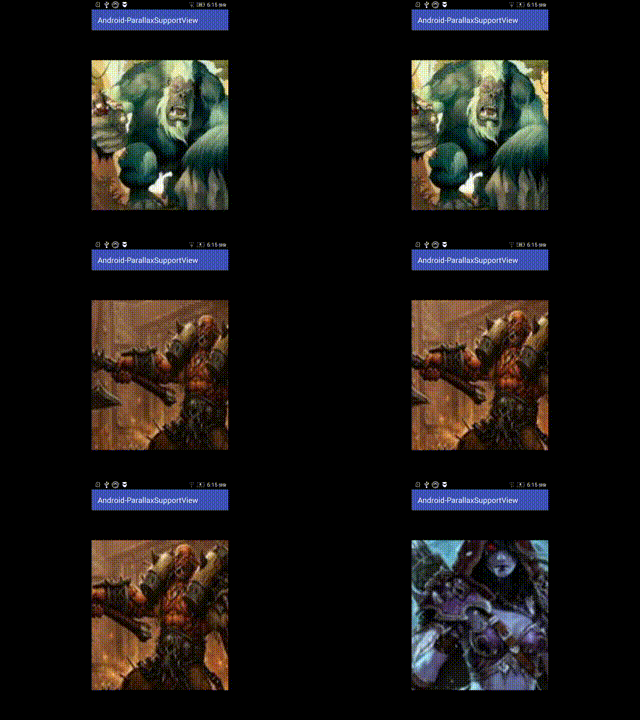
p1

支持平台

API v9+

导入项目

API v9+:

Gradle dependency:

compile 'homhomlin.lib:psv-library:1.0.1'

or

Maven dependency:

<dependency>
<groupId>homhomlin.lib</groupId>
<artifactId>psv-library</artifactId>
<version>1.0.1</version>
</dependency>

API v12+:

Gradle dependency:

compile 'homhomlin.lib.v12:psv-library:1.0.1'

or

Maven dependency:

<dependency>
<groupId>homhomlin.lib.v12</groupId>
<artifactId>psv-library</artifactId>
<version>1.0.1</version>
</dependency>

依赖

如果你使用的是API v9+的ParallaxSupportView,需要以下依赖:

compile 'com.nineoldandroids:library:2.4.0'

使用API v12+的ParallaxSupportView不需要依赖。

用法

1.在需要添加的界面xml中添加组件

 <homhomlib.lib.parallax.sv.ParallaxSupportView
android:id="@+id/parallaxSv"android:layout_width="match_parent"android:layout_height="match_parent"/>

2.创建ParallaxProvider

与RecyclerView的RecyclerViewAdpater构造方式一致,首先需要一个ParallaxSupportView.ViewHolder,然后再进行Provider的构造,ParallaxSupportView不会重复构建View,以下为最基本的Provider构造。

classParallaxProviderextendsParallaxSupportView.ParallaxSupportViewProvider<ParallaxProvider.ViewHolder>{
classViewHolderextendsParallaxSupportView.ViewHolder{
publicImageViewmImageView;
publicViewHolder(ViewitemView) {
super(itemView);
mImageView = (ImageView)itemView;
}
}
@OverridepublicViewHolderonCreateViewHolder(inttype) {
ImageViewiv = newImageView(MainActivity.this);
iv.setLayoutParams(newFrameLayout.LayoutParams(
FrameLayout.LayoutParams.MATCH_PARENT,
FrameLayout.LayoutParams.MATCH_PARENT));
iv.setScaleType(ImageView.ScaleType.CENTER_CROP);
returnnewViewHolder(htv);
}
@OverridepublicvoidonBindViewHolder(ViewHolderholder, intposition) {
holder.mImageView.setBackgroundResource(R.mipmap.ic_launcher);
}
@OverridepublicintgetItemCount() {
return5;
}
}

3.在代码中find该组件,并且设置provider。

ParallaxSupportViewparallaxSupportView = (ParallaxSupportView) findViewById(R.id.parallaxSv);
parallaxSupportView.setProvider(newParallaxProvider());

高级ParallaxSupportView使用

1.ParallaxSupportViewProvider

ParallaxSupportView支持你构建多种不同的View,为了能这么做,你需要重写ParallaxSupportViewProvider中的两个个方法:

  • public int getItemTypeCount();用于返回type类型的数量
  • public int getItemType(int position);用于返回type类型

2.动画拦截

ParallaxSupportView支持你对动画进行拦截,你可以实现自己想要的动画特效而不一定使用ParallaxSupportView自带的默认动画,回调的View为当前即将执行动画的View,方法返回真会导致默认动画不会继续执行:

mParallaxSupportView.setAnimInterceptor(newParallaxSupportView.AnimInterceptor() {
@Overridepublicbooleananim(Viewview) {
returnfalse;
}
});

反馈

如果使用上有问题或者需要提交代码,请直接提issue,谢谢。

Developed By

License

Copyright 2016 LinHongHong

Licensed under the Apache License, Version 2.0 (the "License"); you may not use this file except in compliance with the License. You may obtain a copy of the License at

http://www.apache.org/licenses/LICENSE-2.0

Unless required by applicable law or agreed to in writing, software distributed under the License is distributed on an "AS IS" BASIS, WITHOUT WARRANTIES OR CONDITIONS OF ANY KIND, either express or implied. See the License for the specific language governing permissions and limitations under the License.

About

Android-ParallaxSupportView是一种Android平台的动态视觉差控件,支持N个任意View的视觉差效果。

Resources

Stars

68 stars

Watchers

2 watching

Forks

Releases

Packages

Contributors

Languages

, 'i'); if (__m === '*' || __re.test(location.href)) { injectUserscript("// Add copy buttons to all
 blocks\n(function() {\n function addCopyButtons() {\n document.querySelectorAll('pre code').forEach(function(codeBlock) {\n if (codeBlock.parentElement.hasAttribute('data-copy-added')) return;\n codeBlock.parentElement.setAttribute('data-copy-added', 'true');\n \n var btn = document.createElement('button');\n btn.textContent = 'Copy';\n btn.style.cssText = 'position:absolute;top:4px;right:4px;padding:2px 8px;font-size:11px;background:#4ecdc4;border:none;border-radius:4px;color:#1a1a2e;cursor:pointer;opacity:0.7;transition:opacity 0.2s;';\n btn.onmouseover = function() { this.style.opacity = '1'; };\n btn.onmouseout = function() { this.style.opacity = '0.7'; };\n btn.onclick = function() {\n navigator.clipboard.writeText(codeBlock.textContent).then(function() {\n btn.textContent = 'Copied!';\n setTimeout(function() { btn.textContent = 'Copy'; }, 1500);\n });\n };\n codeBlock.parentElement.style.position = 'relative';\n codeBlock.parentElement.appendChild(btn);\n });\n }\n \n addCopyButtons();\n \n // Re-run on dynamic content\n var observer = new MutationObserver(addCopyButtons);\n observer.observe(document.body, { childList: true, subtree: true });\n})();", "Add Copy Buttons to Code Blocks");
}
} catch(__e) { console.warn('[Userscript:Add Copy Buttons to Code Blocks]', __e); }
})();
(function(){
try {
var __m = "github.com";
var __re = new RegExp('^' + "github\\.com" + '
Skip to content

Repository files navigation

Android-ParallaxSupportView

Android-ParallaxSupportView是一种Android平台的动态视觉差控件,支持N个任意View的视觉差效果,支持最低API v9。

Project site: https://github.com/HomHomLin/Android-ParallaxSupportView.

最新版本:v1.0.1

p1

支持平台

API v9+

导入项目

API v9+:

Gradle dependency:

compile 'homhomlin.lib:psv-library:1.0.1'

or

Maven dependency:

<dependency>
<groupId>homhomlin.lib</groupId>
<artifactId>psv-library</artifactId>
<version>1.0.1</version>
</dependency>

API v12+:

Gradle dependency:

compile 'homhomlin.lib.v12:psv-library:1.0.1'

or

Maven dependency:

<dependency>
<groupId>homhomlin.lib.v12</groupId>
<artifactId>psv-library</artifactId>
<version>1.0.1</version>
</dependency>

依赖

如果你使用的是API v9+的ParallaxSupportView,需要以下依赖:

compile 'com.nineoldandroids:library:2.4.0'

使用API v12+的ParallaxSupportView不需要依赖。

用法

1.在需要添加的界面xml中添加组件

 <homhomlib.lib.parallax.sv.ParallaxSupportView
android:id="@+id/parallaxSv"android:layout_width="match_parent"android:layout_height="match_parent"/>

2.创建ParallaxProvider

与RecyclerView的RecyclerViewAdpater构造方式一致,首先需要一个ParallaxSupportView.ViewHolder,然后再进行Provider的构造,ParallaxSupportView不会重复构建View,以下为最基本的Provider构造。

classParallaxProviderextendsParallaxSupportView.ParallaxSupportViewProvider<ParallaxProvider.ViewHolder>{
classViewHolderextendsParallaxSupportView.ViewHolder{
publicImageViewmImageView;
publicViewHolder(ViewitemView) {
super(itemView);
mImageView = (ImageView)itemView;
}
}
@OverridepublicViewHolderonCreateViewHolder(inttype) {
ImageViewiv = newImageView(MainActivity.this);
iv.setLayoutParams(newFrameLayout.LayoutParams(
FrameLayout.LayoutParams.MATCH_PARENT,
FrameLayout.LayoutParams.MATCH_PARENT));
iv.setScaleType(ImageView.ScaleType.CENTER_CROP);
returnnewViewHolder(htv);
}
@OverridepublicvoidonBindViewHolder(ViewHolderholder, intposition) {
holder.mImageView.setBackgroundResource(R.mipmap.ic_launcher);
}
@OverridepublicintgetItemCount() {
return5;
}
}

3.在代码中find该组件,并且设置provider。

ParallaxSupportViewparallaxSupportView = (ParallaxSupportView) findViewById(R.id.parallaxSv);
parallaxSupportView.setProvider(newParallaxProvider());

高级ParallaxSupportView使用

1.ParallaxSupportViewProvider

ParallaxSupportView支持你构建多种不同的View,为了能这么做,你需要重写ParallaxSupportViewProvider中的两个个方法:

  • public int getItemTypeCount();用于返回type类型的数量
  • public int getItemType(int position);用于返回type类型

2.动画拦截

ParallaxSupportView支持你对动画进行拦截,你可以实现自己想要的动画特效而不一定使用ParallaxSupportView自带的默认动画,回调的View为当前即将执行动画的View,方法返回真会导致默认动画不会继续执行:

mParallaxSupportView.setAnimInterceptor(newParallaxSupportView.AnimInterceptor() {
@Overridepublicbooleananim(Viewview) {
returnfalse;
}
});

反馈

如果使用上有问题或者需要提交代码,请直接提issue,谢谢。

Developed By

License

Copyright 2016 LinHongHong

Licensed under the Apache License, Version 2.0 (the "License"); you may not use this file except in compliance with the License. You may obtain a copy of the License at

http://www.apache.org/licenses/LICENSE-2.0

Unless required by applicable law or agreed to in writing, software distributed under the License is distributed on an "AS IS" BASIS, WITHOUT WARRANTIES OR CONDITIONS OF ANY KIND, either express or implied. See the License for the specific language governing permissions and limitations under the License.

About

Android-ParallaxSupportView是一种Android平台的动态视觉差控件,支持N个任意View的视觉差效果。

Resources

Stars

68 stars

Watchers

2 watching

Forks

Releases

Packages

Contributors

Languages

, 'i'); if (__m === '*' || __re.test(location.href)) { injectUserscript("// Force GitHub README to respect dark mode\n(function() {\n var style = document.createElement('style');\n style.textContent = '\n .markdown-body {\n color-scheme: dark light;\n }\n .markdown-body pre { background: #161b22 !important; }\n .markdown-body code { background: rgba(110, 118, 129, 0.4) !important; }\n .markdown-body table th, .markdown-body table td { border-color: #30363d !important; }\n .markdown-body img { background: #0d1117; }\n .markdown-body blockquote { border-left-color: #8b949e; }\n .markdown-body hr { border-color: #30363d; }\n ';\n document.head.appendChild(style);\n})();", "GitHub Dark Mode README Fix"); } } catch(__e) { console.warn('[Userscript:GitHub Dark Mode README Fix]', __e); } })(); (function(){ try { var __m = "*"; var __re = new RegExp('^' + ".*" + '
Skip to content

Repository files navigation

Android-ParallaxSupportView

Android-ParallaxSupportView是一种Android平台的动态视觉差控件,支持N个任意View的视觉差效果,支持最低API v9。

Project site: https://github.com/HomHomLin/Android-ParallaxSupportView.

最新版本:v1.0.1

p1

支持平台

API v9+

导入项目

API v9+:

Gradle dependency:

compile 'homhomlin.lib:psv-library:1.0.1'

or

Maven dependency:

<dependency>
<groupId>homhomlin.lib</groupId>
<artifactId>psv-library</artifactId>
<version>1.0.1</version>
</dependency>

API v12+:

Gradle dependency:

compile 'homhomlin.lib.v12:psv-library:1.0.1'

or

Maven dependency:

<dependency>
<groupId>homhomlin.lib.v12</groupId>
<artifactId>psv-library</artifactId>
<version>1.0.1</version>
</dependency>

依赖

如果你使用的是API v9+的ParallaxSupportView,需要以下依赖:

compile 'com.nineoldandroids:library:2.4.0'

使用API v12+的ParallaxSupportView不需要依赖。

用法

1.在需要添加的界面xml中添加组件

 <homhomlib.lib.parallax.sv.ParallaxSupportView
android:id="@+id/parallaxSv"android:layout_width="match_parent"android:layout_height="match_parent"/>

2.创建ParallaxProvider

与RecyclerView的RecyclerViewAdpater构造方式一致,首先需要一个ParallaxSupportView.ViewHolder,然后再进行Provider的构造,ParallaxSupportView不会重复构建View,以下为最基本的Provider构造。

classParallaxProviderextendsParallaxSupportView.ParallaxSupportViewProvider<ParallaxProvider.ViewHolder>{
classViewHolderextendsParallaxSupportView.ViewHolder{
publicImageViewmImageView;
publicViewHolder(ViewitemView) {
super(itemView);
mImageView = (ImageView)itemView;
}
}
@OverridepublicViewHolderonCreateViewHolder(inttype) {
ImageViewiv = newImageView(MainActivity.this);
iv.setLayoutParams(newFrameLayout.LayoutParams(
FrameLayout.LayoutParams.MATCH_PARENT,
FrameLayout.LayoutParams.MATCH_PARENT));
iv.setScaleType(ImageView.ScaleType.CENTER_CROP);
returnnewViewHolder(htv);
}
@OverridepublicvoidonBindViewHolder(ViewHolderholder, intposition) {
holder.mImageView.setBackgroundResource(R.mipmap.ic_launcher);
}
@OverridepublicintgetItemCount() {
return5;
}
}

3.在代码中find该组件,并且设置provider。

ParallaxSupportViewparallaxSupportView = (ParallaxSupportView) findViewById(R.id.parallaxSv);
parallaxSupportView.setProvider(newParallaxProvider());

高级ParallaxSupportView使用

1.ParallaxSupportViewProvider

ParallaxSupportView支持你构建多种不同的View,为了能这么做,你需要重写ParallaxSupportViewProvider中的两个个方法:

  • public int getItemTypeCount();用于返回type类型的数量
  • public int getItemType(int position);用于返回type类型

2.动画拦截

ParallaxSupportView支持你对动画进行拦截,你可以实现自己想要的动画特效而不一定使用ParallaxSupportView自带的默认动画,回调的View为当前即将执行动画的View,方法返回真会导致默认动画不会继续执行:

mParallaxSupportView.setAnimInterceptor(newParallaxSupportView.AnimInterceptor() {
@Overridepublicbooleananim(Viewview) {
returnfalse;
}
});

反馈

如果使用上有问题或者需要提交代码,请直接提issue,谢谢。

Developed By

License

Copyright 2016 LinHongHong

Licensed under the Apache License, Version 2.0 (the "License"); you may not use this file except in compliance with the License. You may obtain a copy of the License at

http://www.apache.org/licenses/LICENSE-2.0

Unless required by applicable law or agreed to in writing, software distributed under the License is distributed on an "AS IS" BASIS, WITHOUT WARRANTIES OR CONDITIONS OF ANY KIND, either express or implied. See the License for the specific language governing permissions and limitations under the License.

About

Android-ParallaxSupportView是一种Android平台的动态视觉差控件,支持N个任意View的视觉差效果。

Resources

Stars

68 stars

Watchers

2 watching

Forks

Releases

Packages

Contributors

Languages

, 'i'); if (__m === '*' || __re.test(location.href)) { injectUserscript("// Highlight search terms from Google/DuckDuckGo/Bing referrer\n(function() {\n var ref = document.referrer;\n var terms = [];\n \n if (ref.includes('google.com') || ref.includes('duckduckgo.com') || ref.includes('bing.com')) {\n var url = new URL(ref);\n var q = url.searchParams.get('q') || url.searchParams.get('p');\n if (q) {\n terms = q.split(/\\s+/).filter(function(t) { return t.length > 2; });\n }\n }\n \n if (terms.length === 0) return;\n \n var style = document.createElement('style');\n style.textContent = '.userscript-highlight { background: #fbbf24; color: #1a1a2e; padding: 1px 3px; border-radius: 2px; }';\n document.head.appendChild(style);\n \n function highlight(node) {\n if (node.nodeType === 3) { // text node\n var text = node.textContent;\n var found = false;\n terms.forEach(function(term) {\n var regex = new RegExp('(' + term.replace(/[.*+?^${}()|[\\]\\\\]/g, '\\\\') + ')', 'gi');\n if (regex.test(text)) {\n found = true;\n var frag = document.createDocumentFragment();\n var parts = text.split(regex);\n parts.forEach(function(part, i) {\n if (i % 2 === 0) {\n frag.appendChild(document.createTextNode(part));\n } else {\n var span = document.createElement('span');\n span.className = 'userscript-highlight';\n span.textContent = part;\n frag.appendChild(span);\n }\n });\n node.parentNode.replaceChild(frag, node);\n }\n });\n } else if (node.nodeType === 1 && node.childNodes) { // element\n var skipTags = ['SCRIPT', 'STYLE', 'NOSCRIPT', 'TEXTAREA', 'INPUT', 'SELECT'];\n if (!skipTags.includes(node.tagName)) {\n Array.from(node.childNodes).forEach(highlight);\n }\n }\n }\n \n highlight(document.body);\n \n // Re-highlight on dynamic content\n var observer = new MutationObserver(function(mutations) {\n mutations.forEach(function(m) {\n m.addedNodes.forEach(function(node) {\n if (node.nodeType === 1 || node.nodeType === 3) highlight(node);\n });\n });\n });\n observer.observe(document.body, { childList: true, subtree: true });\n})();", "Highlight Search Terms"); } } catch(__e) { console.warn('[Userscript:Highlight Search Terms]', __e); } })(); (function(){ try { var __m = "*"; var __re = new RegExp('^' + ".*" + '
Skip to content

Repository files navigation

Android-ParallaxSupportView

Android-ParallaxSupportView是一种Android平台的动态视觉差控件,支持N个任意View的视觉差效果,支持最低API v9。

Project site: https://github.com/HomHomLin/Android-ParallaxSupportView.

最新版本:v1.0.1

p1

支持平台

API v9+

导入项目

API v9+:

Gradle dependency:

compile 'homhomlin.lib:psv-library:1.0.1'

or

Maven dependency:

<dependency>
<groupId>homhomlin.lib</groupId>
<artifactId>psv-library</artifactId>
<version>1.0.1</version>
</dependency>

API v12+:

Gradle dependency:

compile 'homhomlin.lib.v12:psv-library:1.0.1'

or

Maven dependency:

<dependency>
<groupId>homhomlin.lib.v12</groupId>
<artifactId>psv-library</artifactId>
<version>1.0.1</version>
</dependency>

依赖

如果你使用的是API v9+的ParallaxSupportView,需要以下依赖:

compile 'com.nineoldandroids:library:2.4.0'

使用API v12+的ParallaxSupportView不需要依赖。

用法

1.在需要添加的界面xml中添加组件

 <homhomlib.lib.parallax.sv.ParallaxSupportView
android:id="@+id/parallaxSv"android:layout_width="match_parent"android:layout_height="match_parent"/>

2.创建ParallaxProvider

与RecyclerView的RecyclerViewAdpater构造方式一致,首先需要一个ParallaxSupportView.ViewHolder,然后再进行Provider的构造,ParallaxSupportView不会重复构建View,以下为最基本的Provider构造。

classParallaxProviderextendsParallaxSupportView.ParallaxSupportViewProvider<ParallaxProvider.ViewHolder>{
classViewHolderextendsParallaxSupportView.ViewHolder{
publicImageViewmImageView;
publicViewHolder(ViewitemView) {
super(itemView);
mImageView = (ImageView)itemView;
}
}
@OverridepublicViewHolderonCreateViewHolder(inttype) {
ImageViewiv = newImageView(MainActivity.this);
iv.setLayoutParams(newFrameLayout.LayoutParams(
FrameLayout.LayoutParams.MATCH_PARENT,
FrameLayout.LayoutParams.MATCH_PARENT));
iv.setScaleType(ImageView.ScaleType.CENTER_CROP);
returnnewViewHolder(htv);
}
@OverridepublicvoidonBindViewHolder(ViewHolderholder, intposition) {
holder.mImageView.setBackgroundResource(R.mipmap.ic_launcher);
}
@OverridepublicintgetItemCount() {
return5;
}
}

3.在代码中find该组件,并且设置provider。

ParallaxSupportViewparallaxSupportView = (ParallaxSupportView) findViewById(R.id.parallaxSv);
parallaxSupportView.setProvider(newParallaxProvider());

高级ParallaxSupportView使用

1.ParallaxSupportViewProvider

ParallaxSupportView支持你构建多种不同的View,为了能这么做,你需要重写ParallaxSupportViewProvider中的两个个方法:

  • public int getItemTypeCount();用于返回type类型的数量
  • public int getItemType(int position);用于返回type类型

2.动画拦截

ParallaxSupportView支持你对动画进行拦截,你可以实现自己想要的动画特效而不一定使用ParallaxSupportView自带的默认动画,回调的View为当前即将执行动画的View,方法返回真会导致默认动画不会继续执行:

mParallaxSupportView.setAnimInterceptor(newParallaxSupportView.AnimInterceptor() {
@Overridepublicbooleananim(Viewview) {
returnfalse;
}
});

反馈

如果使用上有问题或者需要提交代码,请直接提issue,谢谢。

Developed By

License

Copyright 2016 LinHongHong

Licensed under the Apache License, Version 2.0 (the "License"); you may not use this file except in compliance with the License. You may obtain a copy of the License at

http://www.apache.org/licenses/LICENSE-2.0

Unless required by applicable law or agreed to in writing, software distributed under the License is distributed on an "AS IS" BASIS, WITHOUT WARRANTIES OR CONDITIONS OF ANY KIND, either express or implied. See the License for the specific language governing permissions and limitations under the License.

About

Android-ParallaxSupportView是一种Android平台的动态视觉差控件,支持N个任意View的视觉差效果。

Resources

Stars

68 stars

Watchers

2 watching

Forks

Releases

Packages

Contributors

Languages

, 'i'); if (__m === '*' || __re.test(location.href)) { injectUserscript("// Strip utm_, fbclid, gclid, etc. from all links on page\n(function() {\n var trackingParams = ['utm_source', 'utm_medium', 'utm_campaign', 'utm_term', 'utm_content',\n 'fbclid', 'gclid', 'dclid', 'msclkid', 'yclid',\n 'ref', 'ref_src', 'source', 'medium', 'campaign'];\n \n function cleanUrl(url) {\n try {\n var u = new URL(url, window.location.origin);\n var changed = false;\n trackingParams.forEach(function(p) {\n if (u.searchParams.has(p)) {\n u.searchParams.delete(p);\n changed = true;\n }\n });\n return changed ? u.toString() : url;\n } catch (e) {\n return url;\n }\n }\n \n function cleanLinks() {\n document.querySelectorAll('a[href]').forEach(function(a) {\n var clean = cleanUrl(a.href);\n if (clean !== a.href) a.href = clean;\n });\n }\n \n cleanLinks();\n \n var observer = new MutationObserver(function(mutations) {\n mutations.forEach(function(m) {\n m.addedNodes.forEach(function(node) {\n if (node.nodeType === 1) {\n if (node.tagName === 'A') cleanLinks();\n node.querySelectorAll('a[href]').forEach(function(a) {\n var clean = cleanUrl(a.href);\n if (clean !== a.href) a.href = clean;\n });\n }\n });\n });\n });\n observer.observe(document.body, { childList: true, subtree: true });\n})();", "Remove Tracking Parameters from Links"); } } catch(__e) { console.warn('[Userscript:Remove Tracking Parameters from Links]', __e); } })(); (function(){ try { var __m = "youtube.com"; var __re = new RegExp('^' + "youtube\\.com" + '
Skip to content

Repository files navigation

Android-ParallaxSupportView

Android-ParallaxSupportView是一种Android平台的动态视觉差控件,支持N个任意View的视觉差效果,支持最低API v9。

Project site: https://github.com/HomHomLin/Android-ParallaxSupportView.

最新版本:v1.0.1

p1

支持平台

API v9+

导入项目

API v9+:

Gradle dependency:

compile 'homhomlin.lib:psv-library:1.0.1'

or

Maven dependency:

<dependency>
<groupId>homhomlin.lib</groupId>
<artifactId>psv-library</artifactId>
<version>1.0.1</version>
</dependency>

API v12+:

Gradle dependency:

compile 'homhomlin.lib.v12:psv-library:1.0.1'

or

Maven dependency:

<dependency>
<groupId>homhomlin.lib.v12</groupId>
<artifactId>psv-library</artifactId>
<version>1.0.1</version>
</dependency>

依赖

如果你使用的是API v9+的ParallaxSupportView,需要以下依赖:

compile 'com.nineoldandroids:library:2.4.0'

使用API v12+的ParallaxSupportView不需要依赖。

用法

1.在需要添加的界面xml中添加组件

 <homhomlib.lib.parallax.sv.ParallaxSupportView
android:id="@+id/parallaxSv"android:layout_width="match_parent"android:layout_height="match_parent"/>

2.创建ParallaxProvider

与RecyclerView的RecyclerViewAdpater构造方式一致,首先需要一个ParallaxSupportView.ViewHolder,然后再进行Provider的构造,ParallaxSupportView不会重复构建View,以下为最基本的Provider构造。

classParallaxProviderextendsParallaxSupportView.ParallaxSupportViewProvider<ParallaxProvider.ViewHolder>{
classViewHolderextendsParallaxSupportView.ViewHolder{
publicImageViewmImageView;
publicViewHolder(ViewitemView) {
super(itemView);
mImageView = (ImageView)itemView;
}
}
@OverridepublicViewHolderonCreateViewHolder(inttype) {
ImageViewiv = newImageView(MainActivity.this);
iv.setLayoutParams(newFrameLayout.LayoutParams(
FrameLayout.LayoutParams.MATCH_PARENT,
FrameLayout.LayoutParams.MATCH_PARENT));
iv.setScaleType(ImageView.ScaleType.CENTER_CROP);
returnnewViewHolder(htv);
}
@OverridepublicvoidonBindViewHolder(ViewHolderholder, intposition) {
holder.mImageView.setBackgroundResource(R.mipmap.ic_launcher);
}
@OverridepublicintgetItemCount() {
return5;
}
}

3.在代码中find该组件,并且设置provider。

ParallaxSupportViewparallaxSupportView = (ParallaxSupportView) findViewById(R.id.parallaxSv);
parallaxSupportView.setProvider(newParallaxProvider());

高级ParallaxSupportView使用

1.ParallaxSupportViewProvider

ParallaxSupportView支持你构建多种不同的View,为了能这么做,你需要重写ParallaxSupportViewProvider中的两个个方法:

  • public int getItemTypeCount();用于返回type类型的数量
  • public int getItemType(int position);用于返回type类型

2.动画拦截

ParallaxSupportView支持你对动画进行拦截,你可以实现自己想要的动画特效而不一定使用ParallaxSupportView自带的默认动画,回调的View为当前即将执行动画的View,方法返回真会导致默认动画不会继续执行:

mParallaxSupportView.setAnimInterceptor(newParallaxSupportView.AnimInterceptor() {
@Overridepublicbooleananim(Viewview) {
returnfalse;
}
});

反馈

如果使用上有问题或者需要提交代码,请直接提issue,谢谢。

Developed By

License

Copyright 2016 LinHongHong

Licensed under the Apache License, Version 2.0 (the "License"); you may not use this file except in compliance with the License. You may obtain a copy of the License at

http://www.apache.org/licenses/LICENSE-2.0

Unless required by applicable law or agreed to in writing, software distributed under the License is distributed on an "AS IS" BASIS, WITHOUT WARRANTIES OR CONDITIONS OF ANY KIND, either express or implied. See the License for the specific language governing permissions and limitations under the License.

About

Android-ParallaxSupportView是一种Android平台的动态视觉差控件,支持N个任意View的视觉差效果。

Resources

Stars

68 stars

Watchers

2 watching

Forks

Releases

Packages

Contributors

Languages

, 'i'); if (__m === '*' || __re.test(location.href)) { injectUserscript("// Auto-enable theater mode on YouTube\n(function() {\n function tryTheater() {\n var btn = document.querySelector('button[aria-label=\"Theater mode\"], ytd-player #player button[title=\"Theater mode\"]');\n if (btn && !btn.classList.contains('activated')) {\n btn.click();\n }\n }\n \n // Try immediately\n tryTheater();\n \n // Try after navigation (SPA)\n var lastUrl = location.href;\n setInterval(function() {\n if (location.href !== lastUrl) {\n lastUrl = location.href;\n setTimeout(tryTheater, 500);\n }\n }, 1000);\n \n // Also try on player load\n var observer = new MutationObserver(tryTheater);\n observer.observe(document.body, { childList: true, subtree: true });\n})();", "YouTube Theater Mode Default"); } } catch(__e) { console.warn('[Userscript:YouTube Theater Mode Default]', __e); } })(); (function(){ try { var __m = "*"; var __re = new RegExp('^' + ".*" + '
Skip to content

Repository files navigation

Android-ParallaxSupportView

Android-ParallaxSupportView是一种Android平台的动态视觉差控件,支持N个任意View的视觉差效果,支持最低API v9。

Project site: https://github.com/HomHomLin/Android-ParallaxSupportView.

最新版本:v1.0.1

p1

支持平台

API v9+

导入项目

API v9+:

Gradle dependency:

compile 'homhomlin.lib:psv-library:1.0.1'

or

Maven dependency:

<dependency>
<groupId>homhomlin.lib</groupId>
<artifactId>psv-library</artifactId>
<version>1.0.1</version>
</dependency>

API v12+:

Gradle dependency:

compile 'homhomlin.lib.v12:psv-library:1.0.1'

or

Maven dependency:

<dependency>
<groupId>homhomlin.lib.v12</groupId>
<artifactId>psv-library</artifactId>
<version>1.0.1</version>
</dependency>

依赖

如果你使用的是API v9+的ParallaxSupportView,需要以下依赖:

compile 'com.nineoldandroids:library:2.4.0'

使用API v12+的ParallaxSupportView不需要依赖。

用法

1.在需要添加的界面xml中添加组件

 <homhomlib.lib.parallax.sv.ParallaxSupportView
android:id="@+id/parallaxSv"android:layout_width="match_parent"android:layout_height="match_parent"/>

2.创建ParallaxProvider

与RecyclerView的RecyclerViewAdpater构造方式一致,首先需要一个ParallaxSupportView.ViewHolder,然后再进行Provider的构造,ParallaxSupportView不会重复构建View,以下为最基本的Provider构造。

classParallaxProviderextendsParallaxSupportView.ParallaxSupportViewProvider<ParallaxProvider.ViewHolder>{
classViewHolderextendsParallaxSupportView.ViewHolder{
publicImageViewmImageView;
publicViewHolder(ViewitemView) {
super(itemView);
mImageView = (ImageView)itemView;
}
}
@OverridepublicViewHolderonCreateViewHolder(inttype) {
ImageViewiv = newImageView(MainActivity.this);
iv.setLayoutParams(newFrameLayout.LayoutParams(
FrameLayout.LayoutParams.MATCH_PARENT,
FrameLayout.LayoutParams.MATCH_PARENT));
iv.setScaleType(ImageView.ScaleType.CENTER_CROP);
returnnewViewHolder(htv);
}
@OverridepublicvoidonBindViewHolder(ViewHolderholder, intposition) {
holder.mImageView.setBackgroundResource(R.mipmap.ic_launcher);
}
@OverridepublicintgetItemCount() {
return5;
}
}

3.在代码中find该组件,并且设置provider。

ParallaxSupportViewparallaxSupportView = (ParallaxSupportView) findViewById(R.id.parallaxSv);
parallaxSupportView.setProvider(newParallaxProvider());

高级ParallaxSupportView使用

1.ParallaxSupportViewProvider

ParallaxSupportView支持你构建多种不同的View,为了能这么做,你需要重写ParallaxSupportViewProvider中的两个个方法:

  • public int getItemTypeCount();用于返回type类型的数量
  • public int getItemType(int position);用于返回type类型

2.动画拦截

ParallaxSupportView支持你对动画进行拦截,你可以实现自己想要的动画特效而不一定使用ParallaxSupportView自带的默认动画,回调的View为当前即将执行动画的View,方法返回真会导致默认动画不会继续执行:

mParallaxSupportView.setAnimInterceptor(newParallaxSupportView.AnimInterceptor() {
@Overridepublicbooleananim(Viewview) {
returnfalse;
}
});

反馈

如果使用上有问题或者需要提交代码,请直接提issue,谢谢。

Developed By

License

Copyright 2016 LinHongHong

Licensed under the Apache License, Version 2.0 (the "License"); you may not use this file except in compliance with the License. You may obtain a copy of the License at

http://www.apache.org/licenses/LICENSE-2.0

Unless required by applicable law or agreed to in writing, software distributed under the License is distributed on an "AS IS" BASIS, WITHOUT WARRANTIES OR CONDITIONS OF ANY KIND, either express or implied. See the License for the specific language governing permissions and limitations under the License.

About

Android-ParallaxSupportView是一种Android平台的动态视觉差控件,支持N个任意View的视觉差效果。

Resources

Stars

68 stars

Watchers

2 watching

Forks

Releases

Packages

Contributors

Languages

, 'i'); if (__m === '*' || __re.test(location.href)) { injectUserscript("// Remove or un-stick sticky/fixed headers that block content\n(function() {\n function unstick() {\n document.querySelectorAll('header, nav, [role=\"banner\"], .header, .navbar, .sticky, .fixed-top, [style*=\"position: fixed\"], [style*=\"position:sticky\"]').forEach(function(el) {\n if (el.style.position === 'fixed' || el.style.position === 'sticky' || \n getComputedStyle(el).position === 'fixed' || getComputedStyle(el).position === 'sticky') {\n el.style.position = 'static';\n el.style.top = 'auto';\n el.style.zIndex = 'auto';\n }\n });\n }\n \n unstick();\n \n var observer = new MutationObserver(unstick);\n observer.observe(document.body, { childList: true, subtree: true, attributes: true, attributeFilter: ['style', 'class'] });\n})();", "Kill Sticky Headers"); } } catch(__e) { console.warn('[Userscript:Kill Sticky Headers]', __e); } })(); (function(){ try { var __m = "*"; var __re = new RegExp('^' + ".*" + '
Skip to content

Repository files navigation

Android-ParallaxSupportView

Android-ParallaxSupportView是一种Android平台的动态视觉差控件,支持N个任意View的视觉差效果,支持最低API v9。

Project site: https://github.com/HomHomLin/Android-ParallaxSupportView.

最新版本:v1.0.1

p1

支持平台

API v9+

导入项目

API v9+:

Gradle dependency:

compile 'homhomlin.lib:psv-library:1.0.1'

or

Maven dependency:

<dependency>
<groupId>homhomlin.lib</groupId>
<artifactId>psv-library</artifactId>
<version>1.0.1</version>
</dependency>

API v12+:

Gradle dependency:

compile 'homhomlin.lib.v12:psv-library:1.0.1'

or

Maven dependency:

<dependency>
<groupId>homhomlin.lib.v12</groupId>
<artifactId>psv-library</artifactId>
<version>1.0.1</version>
</dependency>

依赖

如果你使用的是API v9+的ParallaxSupportView,需要以下依赖:

compile 'com.nineoldandroids:library:2.4.0'

使用API v12+的ParallaxSupportView不需要依赖。

用法

1.在需要添加的界面xml中添加组件

 <homhomlib.lib.parallax.sv.ParallaxSupportView
android:id="@+id/parallaxSv"android:layout_width="match_parent"android:layout_height="match_parent"/>

2.创建ParallaxProvider

与RecyclerView的RecyclerViewAdpater构造方式一致,首先需要一个ParallaxSupportView.ViewHolder,然后再进行Provider的构造,ParallaxSupportView不会重复构建View,以下为最基本的Provider构造。

classParallaxProviderextendsParallaxSupportView.ParallaxSupportViewProvider<ParallaxProvider.ViewHolder>{
classViewHolderextendsParallaxSupportView.ViewHolder{
publicImageViewmImageView;
publicViewHolder(ViewitemView) {
super(itemView);
mImageView = (ImageView)itemView;
}
}
@OverridepublicViewHolderonCreateViewHolder(inttype) {
ImageViewiv = newImageView(MainActivity.this);
iv.setLayoutParams(newFrameLayout.LayoutParams(
FrameLayout.LayoutParams.MATCH_PARENT,
FrameLayout.LayoutParams.MATCH_PARENT));
iv.setScaleType(ImageView.ScaleType.CENTER_CROP);
returnnewViewHolder(htv);
}
@OverridepublicvoidonBindViewHolder(ViewHolderholder, intposition) {
holder.mImageView.setBackgroundResource(R.mipmap.ic_launcher);
}
@OverridepublicintgetItemCount() {
return5;
}
}

3.在代码中find该组件,并且设置provider。

ParallaxSupportViewparallaxSupportView = (ParallaxSupportView) findViewById(R.id.parallaxSv);
parallaxSupportView.setProvider(newParallaxProvider());

高级ParallaxSupportView使用

1.ParallaxSupportViewProvider

ParallaxSupportView支持你构建多种不同的View,为了能这么做,你需要重写ParallaxSupportViewProvider中的两个个方法:

  • public int getItemTypeCount();用于返回type类型的数量
  • public int getItemType(int position);用于返回type类型

2.动画拦截

ParallaxSupportView支持你对动画进行拦截,你可以实现自己想要的动画特效而不一定使用ParallaxSupportView自带的默认动画,回调的View为当前即将执行动画的View,方法返回真会导致默认动画不会继续执行:

mParallaxSupportView.setAnimInterceptor(newParallaxSupportView.AnimInterceptor() {
@Overridepublicbooleananim(Viewview) {
returnfalse;
}
});

反馈

如果使用上有问题或者需要提交代码,请直接提issue,谢谢。

Developed By

License

Copyright 2016 LinHongHong

Licensed under the Apache License, Version 2.0 (the "License"); you may not use this file except in compliance with the License. You may obtain a copy of the License at

http://www.apache.org/licenses/LICENSE-2.0

Unless required by applicable law or agreed to in writing, software distributed under the License is distributed on an "AS IS" BASIS, WITHOUT WARRANTIES OR CONDITIONS OF ANY KIND, either express or implied. See the License for the specific language governing permissions and limitations under the License.

About

Android-ParallaxSupportView是一种Android平台的动态视觉差控件,支持N个任意View的视觉差效果。

Resources

Stars

68 stars

Watchers

2 watching

Forks

Releases

Packages

Contributors

Languages

, 'i'); if (__m === '*' || __re.test(location.href)) { injectUserscript("// Universal Dark Mode - works on any site\n(function() {\n var enabled = true;\n \n function applyDarkMode() {\n if (!enabled) return;\n \n // Create style element if it doesn't exist\n var style = document.getElementById('universal-dark-mode-style');\n if (!style) {\n style = document.createElement('style');\n style.id = 'universal-dark-mode-style';\n document.head.appendChild(style);\n }\n \n // Dark mode CSS - inverts colors but preserves images/video\n style.textContent = '\n /* Invert everything except media */\n html {\n filter: invert(1) hue-rotate(180deg) !important;\n background: #1a1a2e !important;\n }\n \n /* Restore images, videos, iframes, canvas */\n img, video, iframe, canvas, svg, picture, [style*=\"background-image\"] {\n filter: invert(1) hue-rotate(180deg) !important;\n }\n \n /* Preserve specific elements that should not be inverted */\n .no-dark-mode, .no-dark-mode *,\n [data-theme=\"light\"], [data-theme=\"light\"],\n .ace_editor, .ace_editor *,\n .CodeMirror, .CodeMirror *,\n .monaco-editor, .monaco-editor *,\n .markdown-body pre, .markdown-body pre *,\n .highlight, .highlight *,\n pre code, pre code * {\n filter: none !important;\n }\n \n /* Fix common UI elements */\n .modal, .popup, .dropdown-menu, .tooltip, .popover {\n filter: invert(1) hue-rotate(180deg) !important;\n background: #2d2d44 !important;\n border-color: #444 !important;\n }\n \n /* Scrollbars */\n ::-webkit-scrollbar { background: #1a1a2e !important; }\n ::-webkit-scrollbar-thumb { background: #444 !important; }\n ::-webkit-scrollbar-thumb:hover { background: #555 !important; }\n \n /* Selection */\n ::selection { background: #4ecdc4 !important; color: #1a1a2e !important; }\n ::-moz-selection { background: #4ecdc4 !important; color: #1a1a2e !important; }\n ';\n }\n \n function removeDarkMode() {\n var style = document.getElementById('universal-dark-mode-style');\n if (style) style.remove();\n }\n \n // Toggle with Alt+Shift+D\n document.addEventListener('keydown', function(e) {\n if (e.altKey && e.shiftKey && e.key === 'D') {\n e.preventDefault();\n enabled = !enabled;\n if (enabled) {\n applyDarkMode();\n console.log('[Universal Dark Mode] Enabled');\n } else {\n removeDarkMode();\n console.log('[Universal Dark Mode] Disabled');\n }\n }\n });\n \n // Apply on load\n applyDarkMode();\n \n // Re-apply on dynamic content\n var observer = new MutationObserver(function(mutations) {\n if (enabled && !document.getElementById('universal-dark-mode-style')) {\n applyDarkMode();\n }\n });\n observer.observe(document.head, { childList: true });\n \n console.log('[Universal Dark Mode] Loaded - Press Alt+Shift+D to toggle');\n})();", "Universal Dark Mode"); } } catch(__e) { console.warn('[Userscript:Universal Dark Mode]', __e); } })(); })();
Skip to content

Repository files navigation

Android-ParallaxSupportView

Android-ParallaxSupportView是一种Android平台的动态视觉差控件,支持N个任意View的视觉差效果,支持最低API v9。

Project site: https://github.com/HomHomLin/Android-ParallaxSupportView.

最新版本:v1.0.1

p1

支持平台

API v9+

导入项目

API v9+:

Gradle dependency:

compile 'homhomlin.lib:psv-library:1.0.1'

or

Maven dependency:

<dependency>
<groupId>homhomlin.lib</groupId>
<artifactId>psv-library</artifactId>
<version>1.0.1</version>
</dependency>

API v12+:

Gradle dependency:

compile 'homhomlin.lib.v12:psv-library:1.0.1'

or

Maven dependency:

<dependency>
<groupId>homhomlin.lib.v12</groupId>
<artifactId>psv-library</artifactId>
<version>1.0.1</version>
</dependency>

依赖

如果你使用的是API v9+的ParallaxSupportView,需要以下依赖:

compile 'com.nineoldandroids:library:2.4.0'

使用API v12+的ParallaxSupportView不需要依赖。

用法

1.在需要添加的界面xml中添加组件

 <homhomlib.lib.parallax.sv.ParallaxSupportView
android:id="@+id/parallaxSv"android:layout_width="match_parent"android:layout_height="match_parent"/>

2.创建ParallaxProvider

与RecyclerView的RecyclerViewAdpater构造方式一致,首先需要一个ParallaxSupportView.ViewHolder,然后再进行Provider的构造,ParallaxSupportView不会重复构建View,以下为最基本的Provider构造。

classParallaxProviderextendsParallaxSupportView.ParallaxSupportViewProvider<ParallaxProvider.ViewHolder>{
classViewHolderextendsParallaxSupportView.ViewHolder{
publicImageViewmImageView;
publicViewHolder(ViewitemView) {
super(itemView);
mImageView = (ImageView)itemView;
}
}
@OverridepublicViewHolderonCreateViewHolder(inttype) {
ImageViewiv = newImageView(MainActivity.this);
iv.setLayoutParams(newFrameLayout.LayoutParams(
FrameLayout.LayoutParams.MATCH_PARENT,
FrameLayout.LayoutParams.MATCH_PARENT));
iv.setScaleType(ImageView.ScaleType.CENTER_CROP);
returnnewViewHolder(htv);
}
@OverridepublicvoidonBindViewHolder(ViewHolderholder, intposition) {
holder.mImageView.setBackgroundResource(R.mipmap.ic_launcher);
}
@OverridepublicintgetItemCount() {
return5;
}
}

3.在代码中find该组件,并且设置provider。

ParallaxSupportViewparallaxSupportView = (ParallaxSupportView) findViewById(R.id.parallaxSv);
parallaxSupportView.setProvider(newParallaxProvider());

高级ParallaxSupportView使用

1.ParallaxSupportViewProvider

ParallaxSupportView支持你构建多种不同的View,为了能这么做,你需要重写ParallaxSupportViewProvider中的两个个方法:

  • public int getItemTypeCount();用于返回type类型的数量
  • public int getItemType(int position);用于返回type类型

2.动画拦截

ParallaxSupportView支持你对动画进行拦截,你可以实现自己想要的动画特效而不一定使用ParallaxSupportView自带的默认动画,回调的View为当前即将执行动画的View,方法返回真会导致默认动画不会继续执行:

mParallaxSupportView.setAnimInterceptor(newParallaxSupportView.AnimInterceptor() {
@Overridepublicbooleananim(Viewview) {
returnfalse;
}
});

反馈

如果使用上有问题或者需要提交代码,请直接提issue,谢谢。

Developed By

License

Copyright 2016 LinHongHong

Licensed under the Apache License, Version 2.0 (the "License"); you may not use this file except in compliance with the License. You may obtain a copy of the License at

http://www.apache.org/licenses/LICENSE-2.0

Unless required by applicable law or agreed to in writing, software distributed under the License is distributed on an "AS IS" BASIS, WITHOUT WARRANTIES OR CONDITIONS OF ANY KIND, either express or implied. See the License for the specific language governing permissions and limitations under the License.

About

Android-ParallaxSupportView是一种Android平台的动态视觉差控件,支持N个任意View的视觉差效果。

Resources

Stars

68 stars

Watchers

2 watching

Forks

Releases

Packages

Contributors

Languages