
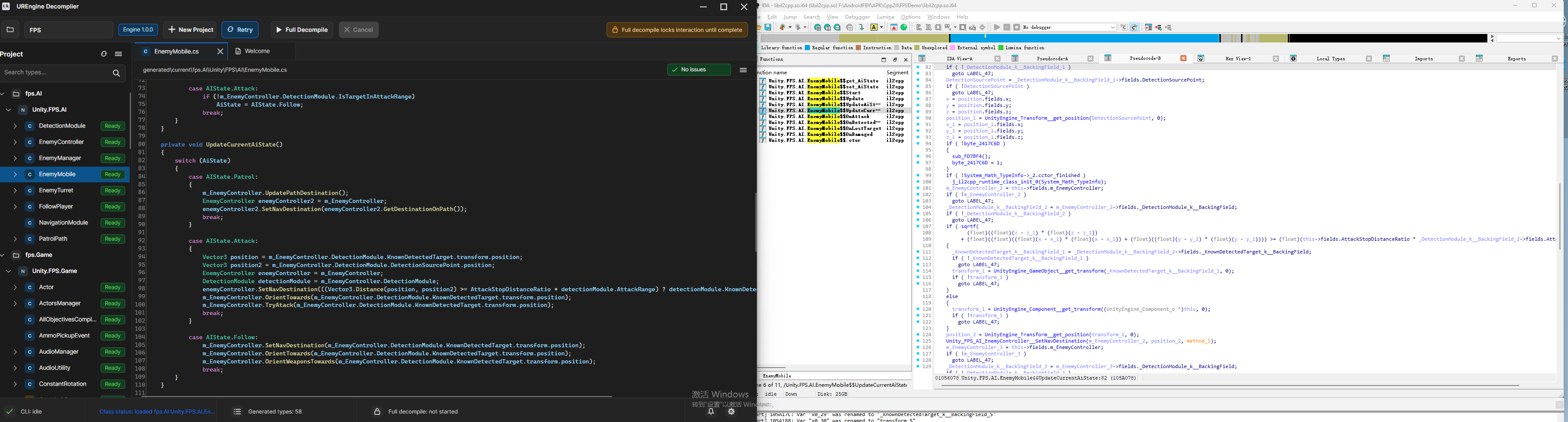
In the field of mobile game development and security research, Unity engine has occupied an important position with its cross-platform capabilities and IL2CPP backend technology. However, the process of IL2CPP converting C# code to native C++ code and then compiling it to machine code has brought unprecedented challenges to reverse engineering. Traditional decompilation tools often struggle when facing Unity IL2CPP-built applications, with low analysis efficiency and difficult-to-understand results.
It is against this technical background that UnityReverseEngine (UREngine for short) came into being - a completely independently developed professional Unity decompilation engine specifically designed to address the pain points of IL2CPP reverse engineering.
Unity's IL2CPP technology converts managed C# code to native machine code, which includes:
| Conversion Stage | Description | Challenge |
|---|---|---|
| IL Conversion | C# → IL → C++ → Machine Code | Multi-layer conversion causes semantic loss |
| Garbage Collection | Complex memory management logic | Reference relationships difficult to track |
| Type Mapping | Managed type to native type conversion | Type information obfuscation |
| Call Optimization | Inlining, virtual function tables, etc. | Control flow becomes complex |
Problems faced by traditional decompilation tools:
- Slow Analysis Speed: Need to analyze the entire binary file comprehensively
- Serious Semantic Loss: Original C# semantics lost in multi-layer conversion
- Poor Readability: Generated pseudo-code is difficult to understand and use
UREngine abandons the full-analysis mode of traditional decompilers and adopts a revolutionary function-level precision analysis strategy:
| Optimization Feature | Effect | Innovation |
|---|---|---|
| Metadata-Driven | Precise function signature identification | Avoid blind analysis |
| Micro Runtime | Lightweight runtime simulation | No need for complete reconstruction |
| Smart CFG | Remove redundant nodes | Highly optimized control flow |
| Metric | UREngine | Traditional Tools | Improvement Factor |
|---|---|---|---|
| Single Function Analysis | Millisecond-level | Second-level | ×1000 |
| Large Games (100K+ functions) | 2-5 minutes | Several hours | ×50 |
| Memory Usage | Low consumption | High consumption | 80% savings |
UREngine has reached unprecedented heights in ARM64 instruction semantic restoration:
1. BLR Indirect Jump Analysis
// Traditional tool output (hard to understand)BLRX8// X8 = *(_QWORD *)(v6 + 0x48)// Completely unable to understand call intent// UREngine output (clear and readable)virtualMethod.Invoke(this,parameters);// Perfect restoration of virtual function call semantics2. SIMD Vector Operation Analysis
// Traditional tool outputFADD V0.4S, V1.4S, V2.4SLD1 {V3.4S},[X0]ST1 {V0.4S},[X1]// UREngine outputVector4result=Vector4.Add(vector1,vector2);transform.position=result;3. Multi-level Pointer Dereference
// Traditional tool output
v8 = *(_QWORD *)(v6 + 0x20);
v9 = *(_QWORD *)(v8 + 0x18);
v10 = *(_DWORD *)(v9 + 0x10);
// UREngine outputinthealth=player.character.stats.health;4. Unity Component System Analysis
// Traditional tool outputsub_1234ABCD(v7, v8, v9);
// Completely unclear what it's doing
// UREngine outputGetComponent<Rigidbody>().AddForce(Vector3.up*jumpForce);This is UREngine's most revolutionary feature - the world's only decompilation tool that supports direct conversion from ARM64 instructions to C# code:
Original Unity C# Code:
publicclassPlayerController:MonoBehaviour{publicfloatmoveSpeed=5f;publicfloatjumpForce=10f;privateRigidbodyrb;voidStart(){rb=GetComponent<Rigidbody>();}voidUpdate(){floathorizontal=Input.GetAxis("Horizontal");Vector3movement=newVector3(horizontal,0,0)*moveSpeed;transform.Translate(movement*Time.deltaTime);if(Input.GetKeyDown(KeyCode.Space)){rb.AddForce(Vector3.up*jumpForce,ForceMode.Impulse);}}}UREngine Restoration Result:
// Nearly perfect restoration!publicclassPlayerController:MonoBehaviour{publicfloatmoveSpeed;// = 5f (default value inferred from binary)publicfloatjumpForce;// = 10fprivateRigidbodyrb;privatevoidStart(){// Automatically identifies Unity API callsthis.rb=base.GetComponent<Rigidbody>();}privatevoidUpdate(){// Perfect restoration of input handling logicfloathorizontal=Input.GetAxis("Horizontal");Vector3vector=newVector3(horizontal,0f,0f)*this.moveSpeed;base.transform.Translate(vector*Time.deltaTime);// Accurate restoration of key detection and physics operationsif(Input.GetKeyDown(KeyCode.Space)){this.rb.AddForce(Vector3.up*this.jumpForce,ForceMode.Impulse);}}}Game State Manager Restoration:
// Game manager perfectly restored by UREnginepublicclassGameManager:MonoBehaviour{publicstaticGameManagerInstance{get;privateset;}publicenumGameState{Menu,Playing,Paused,GameOver}publicGameStatecurrentState;publicintscore;publicintlives;privatevoidAwake(){// Singleton pattern automatically identifiedif(Instance==null){Instance=this;DontDestroyOnLoad(gameObject);}else{Destroy(gameObject);}}publicvoidChangeState(GameStatenewState){// State machine logic completely restoredswitch(newState){caseGameState.Menu:Time.timeScale=1f;UIManager.Instance.ShowMenu();break;caseGameState.Playing:Time.timeScale=1f;UIManager.Instance.HideMenu();break;caseGameState.Paused:Time.timeScale=0f;UIManager.Instance.ShowPauseMenu();break;caseGameState.GameOver:Time.timeScale=0f;UIManager.Instance.ShowGameOverScreen();SaveHighScore();break;}currentState=newState;}privatevoidSaveHighScore(){// PlayerPrefs operations automatically identifiedinthighScore=PlayerPrefs.GetInt("HighScore",0);if(score>highScore){PlayerPrefs.SetInt("HighScore",score);PlayerPrefs.Save();}}}APK/IPA Input → Binary Extraction → Metadata Parsing → ARM64 Disassembly ↓
CFG Construction → ISIL Intermediate Representation → Data Flow Analysis → C# Syntax Reconstruction
↓
Code Optimization → Quality Analysis → Unity Project Reconstruction
| Analysis Feature | Function Description | Technical Advantage |
|---|---|---|
| Context Awareness | Smart inference based on Unity framework features | Accurate Unity API call identification |
| Pattern Recognition | Automatic identification of common Unity programming patterns | Restoration of design patterns and architecture |
| Exception Optimization | Smart cleanup of IL2CPP redundant exception handling | Generate clean, readable code |
- Instruction Set Plugins: Support for ARM64, x86/x64, RISC-V, etc.
- Analysis Plugins: CFG optimization, data flow analysis, code quality detection
- Output Format Plugins: C# source code, Unity projects, documentation reports
// UREngine can perfectly restore game anti-cheat logicpublicclassAntiCheatSystem:MonoBehaviour{privatefloatlastUpdateTime;privateVector3lastPosition;privatefloatmaxSpeed=10f;privatevoidUpdate(){// Speed detection restorationfloatdeltaTime=Time.time-lastUpdateTime;floatdistance=Vector3.Distance(transform.position,lastPosition);floatspeed=distance/deltaTime;if(speed>maxSpeed){// Cheat detection logicReportCheat("SPEED_HACK",speed);}lastPosition=transform.position;lastUpdateTime=Time.time;}}// Network protocol and encryption logic complete restorationpublicclassNetworkManager:MonoBehaviour{privatevoidSendPlayerData(PlayerDatadata){// Data serialization and encryption logic restorationbyte[]serializedData=JsonUtility.ToJson(data).ToBytes();byte[]encryptedData=EncryptionUtils.Encrypt(serializedData,secretKey);// Network sending logicNetworkClient.Send(PacketType.PlayerUpdate,encryptedData);}}// Complex AI behavior logic complete restorationpublicclassEnemyAI:MonoBehaviour{publicenumAIState{Patrol,Chase,Attack,Flee}publicAIStatecurrentState;publicfloatdetectionRange=10f;publicfloatattackRange=2f;publicfloathealth=100f;privatevoidUpdate(){GameObjectplayer=GameObject.FindWithTag("Player");floatdistanceToPlayer=Vector3.Distance(transform.position,player.transform.position);// State machine logic complete restorationswitch(currentState){caseAIState.Patrol:if(distanceToPlayer<detectionRange){currentState=AIState.Chase;}break;caseAIState.Chase:if(distanceToPlayer<attackRange){currentState=AIState.Attack;}elseif(distanceToPlayer>detectionRange*1.5f){currentState=AIState.Patrol;}break;caseAIState.Attack:if(health<20f){currentState=AIState.Flee;}elseif(distanceToPlayer>attackRange){currentState=AIState.Chase;}break;}}}RestoredProject/
├── Assets/
│ ├── Scripts/
│ │ ├── PlayerController.cs
│ │ ├── GameManager.cs
│ │ ├── UIManager.cs
│ │ └── EnemyAI.cs
│ ├── Prefabs/
│ │ ├── Player.prefab
│ │ ├── Enemy.prefab
│ │ └── UI Canvas.prefab
│ └── Scenes/
│ ├── MainMenu.unity
│ ├── GameLevel.unity
│ └── Settings.unity
└── ProjectSettings/
└── (Auto-reconstructed project configuration)
// UREngine can discover game's reserved MOD interfacespublicclassModManager:MonoBehaviour{publicstaticModManagerInstance;// Discovered MOD loading interfacepublicvoidLoadMod(stringmodPath){// MOD loading logic restorationAssemblymodAssembly=Assembly.LoadFrom(modPath);Type[]modTypes=modAssembly.GetTypes();foreach(TypetypeinmodTypes){if(type.GetInterface("IGameMod")!=null){IGameModmod=Activator.CreateInstance(type)asIGameMod;mod.Initialize();}}}}| Innovation | Global Position | Technical Advantage |
|---|---|---|
| ARM64→C# Conversion | World's First | Breaking traditional limitations |
| IL2CPP Runtime Simulation | Unique Technology | Efficient and precise analysis |
| Unity-specific CFG | Original Algorithm | Targeted optimization |
| Comparison Dimension | UREngine | Traditional Tools |
|---|---|---|
| Performance Speed | 9/10 | 3/10 |
| Analysis Accuracy | 8.5/10 | 4/10 |
| Code Readability | 9/10 | 3/10 |
| Usability | 8/10 | 5/10 |
| Extensibility | 9/10 | 4/10 |
| Stability | 8/10 | 6/10 |
- dnSpy Integration: View restored code directly in debugger
- IDA Plugin: Collaborate with traditional tools
- Visual Studio Support: Seamless code editing experience
- Windows: Native high-performance support
- macOS: Complete functionality support
- Linux: Server environment support
| Game Type | Function Count | Analysis Time | Success Rate | Code Quality |
|---|---|---|---|---|
| Runner Game | 25,000+ | 1.5 minutes | 92% | ⭐⭐⭐⭐⭐ |
| Shooter Game | 80,000+ | 4 minutes | 88% | ⭐⭐⭐⭐ |
| Card Game | 150,000+ | 8 minutes | 85% | ⭐⭐⭐⭐ |
| Strategy Game | 200,000+ | 12 minutes | 83% | ⭐⭐⭐⭐ |
| Metric | Achievement |
|---|---|
| Analysis Speed | 10-50x improvement over traditional tools |
| Accuracy Rate | Function analysis success rate 85%+ |
| Readability | Generated code directly compilable and runnable |
| Completeness | Supports complete Unity project reconstruction |
UnityReverseEngine is currently under continuous optimization, and this is a technically challenging project. Although significant technical breakthroughs have been achieved at this stage, we are well aware that there is still significant room for improvement.
Our initial goal is to improve the function analysis success rate from the current 85% to 95% or higher, which means:
- More Precise Type Inference: Further improve IL2CPP metadata parsing algorithms
- Smarter Control Flow Analysis: Optimize restoration accuracy of complex branch structures
- More Complete Exception Handling: Improve identification capabilities for exception capture and handling logic
- Broader Instruction Set Support: Extend support for more ARM64 instruction variants
- Performance Optimization: Further improve analysis speed while ensuring accuracy
- Stability Enhancement: Reduce analysis failure rates in complex game scenarios
- User Experience Improvement: Provide more friendly error messages and debugging information
- Ecosystem Completion: Enhance integration with mainstream development tools