Soft masking for uGUI elements in Unity.






<< Description | WebGL Demo | Download | Usage | Development Note >>
What's new? See changelog 

Do you want to receive notifications for new releases? Watch this repo 


SoftMask is a smooth masking component for uGUI elements in Unity. By using SoftMask instead of default Mask, rounded edges of UI elements can be expressed beautifully.

- SoftMask is compatible with Mask.
- You can adjust the visible part.

- Text, Image, RawImage can be used as a masking.
- Support multiple-sprites and SpriteAtlas.
- Support up to 4 nested soft masks.

- Support scroll view.

- Support inversed soft mask.

- Support overlay, camera space and world space.

- Raycast is filtered only for the visible part.

- Contain soft maskable UI shader.
- Support soft masks in your custom shaders by adding just 3 lines. For details, please see Development Note.
- Adjust soft mask buffer size to improve performance.
- Convert existing Mask to SoftMask from context menu.

- Render the soft mask buffer only when needed to improve performance.
- Add a SoftMaskable component to the child UI elements of SoftMask from the inspector.

- Preview soft mask buffer in inspector.

- Support TextMeshPro.

- Make multiple holes on one background by 'Parts of parent' option.

- Camera movement affects the mask rendering when on a World Space Canvas.


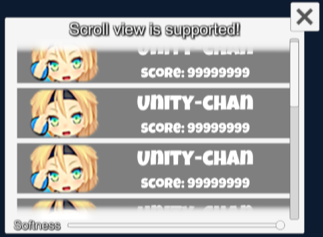






| Component | Description | Screenshot |
|---|---|---|
| SoftMask | Use instead of Mask for smooth masking. Show Mask Graphic: Show the graphic that is associated with the Mask render area. Desampling Rate: The desampling rate for soft mask buffer. The larger the value, the better the performance but the lower the quality. Softness: The value used by the soft mask to select the area of influence defined over the soft mask's graphic. Ignore Parent: Should the soft mask ignore parent soft masks? Part Of Parent: Is the soft mask a part of parent soft mask? |  |
| SoftMaskable | Add this component to Graphic under SoftMask for smooth masking. Inverse: The graphic will be visible only in areas where no mask is present. | 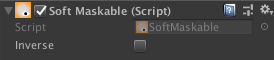 |
Find the manifest.json file in the Packages folder of your project and edit it to look like this:
{"dependencies": {"com.coffee.softmask-for-ugui": "https://github.com/mob-sakai/SoftMaskForUGUI.git#0.8.1",
...
},}
To update the package, change #{version} to the target version.
Or, use UpmGitExtension.
Download *.unitypackage from Releases and import the package into your Unity project.
Select Assets > Import Package > Custom Package from the menu.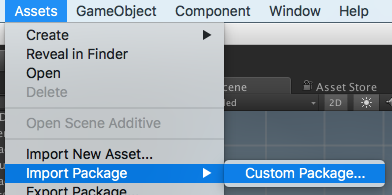
- Import
SoftMask_Demo.unitypackageinto your project. - The unitypackage exists in
Assets/Assets/Coffee/UIExtensions/SoftMaskForUGUIorPackages/Soft Mask For uGUI.
- Open SoftMask_Demo scene and play it.
- The demo requires
TextMeshProandTextMeshPro Essential Resources. Import it before playing.

- Add SoftMask component instead of Mask component.
Or, convert existing Mask component to SoftMask component from the context menu. - Add SoftMaskable components to the child UI elements of SoftMask component.

Or, add SoftMaskable components from the inspector of SoftMask component. - Adjust softness of SoftMask.
- Enjoy!

- Unity 2017 or later (including Unity 2018.x)
- No other SDK are required
You can support soft masks in your custom shaders, by adding just 3 lines!
- Add
#pragmaand#include.SOFTMASK_EDITORis a keyword for editor only, not included in the build.
If you installed using packageManager, includePackages/com.coffee.softmask-for-ugui/SoftMask.cgincinstead of.
#include "Assets/Coffee/UIExtensions/SoftMaskForUGUI/SoftMask.cginc"
#pragma shader_feature __ SOFTMASK_EDITOR
- Apply a soft mask in the fragment shader.
IN.vertexis clip positionIN.worldPositionis world position
color.a *= SoftMask(IN.vertex, IN.worldPosition);
As an example of implementation, please see UI-Default-SoftMask.shader.
Converting components from the context menu is very convenient. You can convert multiple components at the same time, without having to remove the source components.
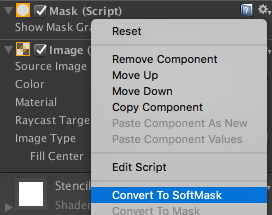
If the destination component has the same properties as the source component, the value is set automatically.
In addition, if the destination component is compatible with the source component, it will not lose its reference.
For example, if public Mask mask; refers to a Mask, converting it to SoftMask in this way does not lose references.
This way consists of two generic methods.
/// <summary>/// Verify whether it can be converted to the specified component./// </summary>protectedstaticboolCanConvertTo<T>(Objectcontext)whereT:MonoBehaviour{returncontext&&context.GetType()!=typeof(T);}/// <summary>/// Convert to the specified component./// </summary>protectedstaticvoidConvertTo<T>(Objectcontext)whereT:MonoBehaviour{vartarget=contextasMonoBehaviour;varso=newSerializedObject(target);so.Update();boololdEnable=target.enabled;target.enabled=false;// Find MonoScript of the specified component.foreach(varscriptinResources.FindObjectsOfTypeAll<MonoScript>()){if(script.GetClass()!=typeof(T))continue;// Set 'm_Script' to convert.so.FindProperty("m_Script").objectReferenceValue=script;so.ApplyModifiedProperties();break;}(so.targetObjectasMonoBehaviour).enabled=oldEnable;}In SoftMask, they are implemented as follows.
- Mask and SoftMask can be converted to each other.
- If conversion is not possible, gray out the context menu.
[MenuItem("CONTEXT/Mask/Convert To SoftMask",true)]staticbool_ConvertToSoftMask(MenuCommandcommand){returnCanConvertTo<SoftMask>(command.context);}[MenuItem("CONTEXT/Mask/Convert To SoftMask",false)]staticvoidConvertToSoftMask(MenuCommandcommand){ConvertTo<SoftMask>(command.context);}[MenuItem("CONTEXT/Mask/Convert To Mask",true)]staticbool_ConvertToMask(MenuCommandcommand){returnCanConvertTo<Mask>(command.context);}[MenuItem("CONTEXT/Mask/Convert To Mask",false)]staticvoidConvertToMask(MenuCommandcommand){ConvertTo<Mask>(command.context);}For details, please see SoftMaskEditor.cs.
Do you know how to implement shader code "for editor only"?
SoftMask uses SOFTMASK_EDITOR keyword in shader code to determine whether it is running in the editor.
#pragma shader_feature __ SOFTMASK_EDITOR
SOFTMASK_EDITOR keyword is set from the editor script, but it is not set after it is built. Also, this shader variant will be excluded from build.
#if UNITY_EDITORmaterial=newMaterial(shader);material.hideFlags=HideFlags.HideAndDontSave;material.EnableKeyword("SOFTMASK_EDITOR");
#endifDo you know how to implement shader code "for SceneView only"? SoftMask understands that the current rendering is for SceneView, when SceneView's view projection matrix and UNITY_MATRIX_VP match.
fixed isSceneView = 1 - any(UNITY_MATRIX_VP - _SceneViewVP);
Actually, because of the movement operation in SceneView, use "approximate" instead of "match".
float4x4_SceneViewVP;fixedApproximate(float4x4 a,float4x4 b){float4x4d=abs(a-b);returnstep(max(d._m00,max(d._m01,max(d._m02,max(d._m03,max(d._m10,max(d._m11,max(d._m12,max(d._m13,max(d._m20,max(d._m21,max(d._m22,max(d._m23,max(d._m30,max(d._m31,max(d._m32,d._m33))))))))))))))),0.01);}fixedisSceneView=Approximate(UNITY_MATRIX_VP,_SceneViewVP);_SceneViewVP is set every frame from the editor script.
#if UNITY_EDITORUnityEditor.EditorApplication.update+=(){Camera cam =UnityEditor.SceneView.lastActiveSceneView.camera;Matrix4x4vp=cam.projectionMatrix*cam.worldToCameraMatrix;material.SetMatrix("_SceneViewVP",vp);};
#endif- MIT
- © UTJ/UCL
- GitHub page : https://github.com/mob-sakai/SoftMaskForUGUI
- Releases : https://github.com/mob-sakai/SoftMaskForUGUI/releases
- Issue tracker : https://github.com/mob-sakai/SoftMaskForUGUI/issues
- Current project : https://github.com/mob-sakai/SoftMaskForUGUI/projects/1
- Change log : https://github.com/mob-sakai/SoftMaskForUGUI/blob/upm/CHANGELOG.md