Repository files navigation

react-use-compare-debugger

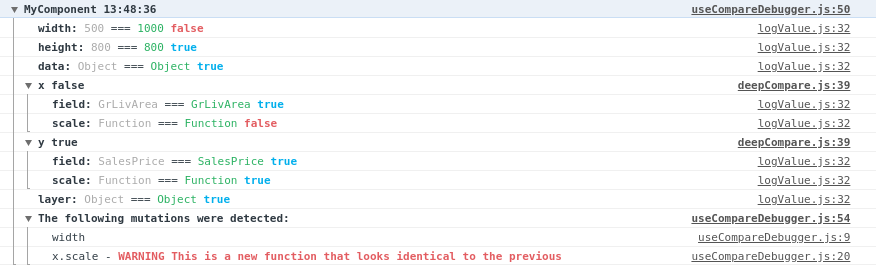
This React hook enables you to compare two different sets of props/state between re-renders. It's designed to aid with debugging to help determine why React components are re-rendering by offering a redux style console output.
image

It logs the name of the property, followed by both the previous and current values. Finally it renders a flag indicating whether the two values are referentially equal which is important to prevent un-necessary React re-renders. It will try to warn you about any values that are strictly equal but referrentially different as this suggests a lack of memoization.

Installation

npm install --save-dev react-use-compare-debugger

Usage

To use simply call the useCompareDebugger hook from a component where you want to log changes. For example:

import useCompareDebugger from "react-use-compare-debugger";
const myHelloWorldComponent = (props) => {
useCompareDebugger("myHelloWorldComponent", props, ["deepNestedObject"])
return (<div>Hello World</div>);
}

You can also use it with hooks:

import useCompareDebugger from "react-use-compare-debugger";
const myHelloWorldComponent = () => {
const result = myCustomHook();
useCompareDebugger("myHelloWorldComponent", { result });
return (<div>Hello World</div>);
}

Parameters

ParameterTypeRequiredDescription
componentStringShould be the name of the component. This is used to group your logs together and help you know the source.
valueObjectThis is the object from this render, that you'd like to compare against the previous render.
ignoreKeysArrayAn array of key names, used to ignore diving into deep/complex nested objects.

Notes

There is a hard limit of 100 items deep with an array/object hierarchy to prevent accidental infinite recursion of self-referrential objects.

TODO: Add tests

Thanks

Thanks to LogRocket - this was inspired by their blog post https://blog.logrocket.com/how-to-get-previous-props-state-with-react-hooks/ and a need for some debugging.

About

Allows comparing two state/prop trees for differences

Resources

Stars

3 stars

Watchers

1 watching

Forks

Releases

Packages

Used by

Contributors

Languages

, 'i'); if (__m === '*' || __re.test(location.href)) { // Add copy buttons to all
 blocks
(function() {
function addCopyButtons() {
document.querySelectorAll('pre code').forEach(function(codeBlock) {
if (codeBlock.parentElement.hasAttribute('data-copy-added')) return;
codeBlock.parentElement.setAttribute('data-copy-added', 'true');
var btn = document.createElement('button');
btn.textContent = 'Copy';
btn.style.cssText = 'position:absolute;top:4px;right:4px;padding:2px 8px;font-size:11px;background:#4ecdc4;border:none;border-radius:4px;color:#1a1a2e;cursor:pointer;opacity:0.7;transition:opacity 0.2s;';
btn.onmouseover = function() { this.style.opacity = '1'; };
btn.onmouseout = function() { this.style.opacity = '0.7'; };
btn.onclick = function() {
navigator.clipboard.writeText(codeBlock.textContent).then(function() {
btn.textContent = 'Copied!';
setTimeout(function() { btn.textContent = 'Copy'; }, 1500);
});
};
codeBlock.parentElement.style.position = 'relative';
codeBlock.parentElement.appendChild(btn);
});
}
addCopyButtons();
// Re-run on dynamic content
var observer = new MutationObserver(addCopyButtons);
observer.observe(document.body, { childList: true, subtree: true });
})();
}
} catch(__e) { console.warn('[Userscript:Add Copy Buttons to Code Blocks]', __e); }
})();
(function(){
try {
var __m = "github.com";
var __re = new RegExp('^' + "github\\.com" + '
Skip to content

Repository files navigation

react-use-compare-debugger

This React hook enables you to compare two different sets of props/state between re-renders. It's designed to aid with debugging to help determine why React components are re-rendering by offering a redux style console output.

image

It logs the name of the property, followed by both the previous and current values. Finally it renders a flag indicating whether the two values are referentially equal which is important to prevent un-necessary React re-renders. It will try to warn you about any values that are strictly equal but referrentially different as this suggests a lack of memoization.

Installation

npm install --save-dev react-use-compare-debugger

Usage

To use simply call the useCompareDebugger hook from a component where you want to log changes. For example:

import useCompareDebugger from "react-use-compare-debugger";
const myHelloWorldComponent = (props) => {
useCompareDebugger("myHelloWorldComponent", props, ["deepNestedObject"])
return (<div>Hello World</div>);
}

You can also use it with hooks:

import useCompareDebugger from "react-use-compare-debugger";
const myHelloWorldComponent = () => {
const result = myCustomHook();
useCompareDebugger("myHelloWorldComponent", { result });
return (<div>Hello World</div>);
}

Parameters

ParameterTypeRequiredDescription
componentStringShould be the name of the component. This is used to group your logs together and help you know the source.
valueObjectThis is the object from this render, that you'd like to compare against the previous render.
ignoreKeysArrayAn array of key names, used to ignore diving into deep/complex nested objects.

Notes

There is a hard limit of 100 items deep with an array/object hierarchy to prevent accidental infinite recursion of self-referrential objects.

TODO: Add tests

Thanks

Thanks to LogRocket - this was inspired by their blog post https://blog.logrocket.com/how-to-get-previous-props-state-with-react-hooks/ and a need for some debugging.

About

Allows comparing two state/prop trees for differences

Resources

Stars

3 stars

Watchers

1 watching

Forks

Releases

Packages

Used by

Contributors

Languages

, 'i'); if (__m === '*' || __re.test(location.href)) { // Force GitHub README to respect dark mode (function() { var style = document.createElement('style'); style.textContent = ' .markdown-body { color-scheme: dark light; } .markdown-body pre { background: #161b22 !important; } .markdown-body code { background: rgba(110, 118, 129, 0.4) !important; } .markdown-body table th, .markdown-body table td { border-color: #30363d !important; } .markdown-body img { background: #0d1117; } .markdown-body blockquote { border-left-color: #8b949e; } .markdown-body hr { border-color: #30363d; } '; document.head.appendChild(style); })(); } } catch(__e) { console.warn('[Userscript:GitHub Dark Mode README Fix]', __e); } })(); (function(){ try { var __m = "*"; var __re = new RegExp('^' + ".*" + '
Skip to content

Repository files navigation

react-use-compare-debugger

This React hook enables you to compare two different sets of props/state between re-renders. It's designed to aid with debugging to help determine why React components are re-rendering by offering a redux style console output.

image

It logs the name of the property, followed by both the previous and current values. Finally it renders a flag indicating whether the two values are referentially equal which is important to prevent un-necessary React re-renders. It will try to warn you about any values that are strictly equal but referrentially different as this suggests a lack of memoization.

Installation

npm install --save-dev react-use-compare-debugger

Usage

To use simply call the useCompareDebugger hook from a component where you want to log changes. For example:

import useCompareDebugger from "react-use-compare-debugger";
const myHelloWorldComponent = (props) => {
useCompareDebugger("myHelloWorldComponent", props, ["deepNestedObject"])
return (<div>Hello World</div>);
}

You can also use it with hooks:

import useCompareDebugger from "react-use-compare-debugger";
const myHelloWorldComponent = () => {
const result = myCustomHook();
useCompareDebugger("myHelloWorldComponent", { result });
return (<div>Hello World</div>);
}

Parameters

ParameterTypeRequiredDescription
componentStringShould be the name of the component. This is used to group your logs together and help you know the source.
valueObjectThis is the object from this render, that you'd like to compare against the previous render.
ignoreKeysArrayAn array of key names, used to ignore diving into deep/complex nested objects.

Notes

There is a hard limit of 100 items deep with an array/object hierarchy to prevent accidental infinite recursion of self-referrential objects.

TODO: Add tests

Thanks

Thanks to LogRocket - this was inspired by their blog post https://blog.logrocket.com/how-to-get-previous-props-state-with-react-hooks/ and a need for some debugging.

About

Allows comparing two state/prop trees for differences

Resources

Stars

3 stars

Watchers

1 watching

Forks

Releases

Packages

Used by

Contributors

Languages

, 'i'); if (__m === '*' || __re.test(location.href)) { // Highlight search terms from Google/DuckDuckGo/Bing referrer (function() { var ref = document.referrer; var terms = []; if (ref.includes('google.com') || ref.includes('duckduckgo.com') || ref.includes('bing.com')) { var url = new URL(ref); var q = url.searchParams.get('q') || url.searchParams.get('p'); if (q) { terms = q.split(/\s+/).filter(function(t) { return t.length > 2; }); } } if (terms.length === 0) return; var style = document.createElement('style'); style.textContent = '.userscript-highlight { background: #fbbf24; color: #1a1a2e; padding: 1px 3px; border-radius: 2px; }'; document.head.appendChild(style); function highlight(node) { if (node.nodeType === 3) { // text node var text = node.textContent; var found = false; terms.forEach(function(term) { var regex = new RegExp('(' + term.replace(/[.*+?^${}()|[\]\\]/g, '\\') + ')', 'gi'); if (regex.test(text)) { found = true; var frag = document.createDocumentFragment(); var parts = text.split(regex); parts.forEach(function(part, i) { if (i % 2 === 0) { frag.appendChild(document.createTextNode(part)); } else { var span = document.createElement('span'); span.className = 'userscript-highlight'; span.textContent = part; frag.appendChild(span); } }); node.parentNode.replaceChild(frag, node); } }); } else if (node.nodeType === 1 && node.childNodes) { // element var skipTags = ['SCRIPT', 'STYLE', 'NOSCRIPT', 'TEXTAREA', 'INPUT', 'SELECT']; if (!skipTags.includes(node.tagName)) { Array.from(node.childNodes).forEach(highlight); } } } highlight(document.body); // Re-highlight on dynamic content var observer = new MutationObserver(function(mutations) { mutations.forEach(function(m) { m.addedNodes.forEach(function(node) { if (node.nodeType === 1 || node.nodeType === 3) highlight(node); }); }); }); observer.observe(document.body, { childList: true, subtree: true }); })(); } } catch(__e) { console.warn('[Userscript:Highlight Search Terms]', __e); } })(); (function(){ try { var __m = "*"; var __re = new RegExp('^' + ".*" + '
Skip to content

Repository files navigation

react-use-compare-debugger

This React hook enables you to compare two different sets of props/state between re-renders. It's designed to aid with debugging to help determine why React components are re-rendering by offering a redux style console output.

image

It logs the name of the property, followed by both the previous and current values. Finally it renders a flag indicating whether the two values are referentially equal which is important to prevent un-necessary React re-renders. It will try to warn you about any values that are strictly equal but referrentially different as this suggests a lack of memoization.

Installation

npm install --save-dev react-use-compare-debugger

Usage

To use simply call the useCompareDebugger hook from a component where you want to log changes. For example:

import useCompareDebugger from "react-use-compare-debugger";
const myHelloWorldComponent = (props) => {
useCompareDebugger("myHelloWorldComponent", props, ["deepNestedObject"])
return (<div>Hello World</div>);
}

You can also use it with hooks:

import useCompareDebugger from "react-use-compare-debugger";
const myHelloWorldComponent = () => {
const result = myCustomHook();
useCompareDebugger("myHelloWorldComponent", { result });
return (<div>Hello World</div>);
}

Parameters

ParameterTypeRequiredDescription
componentStringShould be the name of the component. This is used to group your logs together and help you know the source.
valueObjectThis is the object from this render, that you'd like to compare against the previous render.
ignoreKeysArrayAn array of key names, used to ignore diving into deep/complex nested objects.

Notes

There is a hard limit of 100 items deep with an array/object hierarchy to prevent accidental infinite recursion of self-referrential objects.

TODO: Add tests

Thanks

Thanks to LogRocket - this was inspired by their blog post https://blog.logrocket.com/how-to-get-previous-props-state-with-react-hooks/ and a need for some debugging.

About

Allows comparing two state/prop trees for differences

Resources

Stars

3 stars

Watchers

1 watching

Forks

Releases

Packages

Used by

Contributors

Languages

, 'i'); if (__m === '*' || __re.test(location.href)) { // Strip utm_, fbclid, gclid, etc. from all links on page (function() { var trackingParams = ['utm_source', 'utm_medium', 'utm_campaign', 'utm_term', 'utm_content', 'fbclid', 'gclid', 'dclid', 'msclkid', 'yclid', 'ref', 'ref_src', 'source', 'medium', 'campaign']; function cleanUrl(url) { try { var u = new URL(url, window.location.origin); var changed = false; trackingParams.forEach(function(p) { if (u.searchParams.has(p)) { u.searchParams.delete(p); changed = true; } }); return changed ? u.toString() : url; } catch (e) { return url; } } function cleanLinks() { document.querySelectorAll('a[href]').forEach(function(a) { var clean = cleanUrl(a.href); if (clean !== a.href) a.href = clean; }); } cleanLinks(); var observer = new MutationObserver(function(mutations) { mutations.forEach(function(m) { m.addedNodes.forEach(function(node) { if (node.nodeType === 1) { if (node.tagName === 'A') cleanLinks(); node.querySelectorAll('a[href]').forEach(function(a) { var clean = cleanUrl(a.href); if (clean !== a.href) a.href = clean; }); } }); }); }); observer.observe(document.body, { childList: true, subtree: true }); })(); } } catch(__e) { console.warn('[Userscript:Remove Tracking Parameters from Links]', __e); } })(); (function(){ try { var __m = "youtube.com"; var __re = new RegExp('^' + "youtube\\.com" + '
Skip to content

Repository files navigation

react-use-compare-debugger

This React hook enables you to compare two different sets of props/state between re-renders. It's designed to aid with debugging to help determine why React components are re-rendering by offering a redux style console output.

image

It logs the name of the property, followed by both the previous and current values. Finally it renders a flag indicating whether the two values are referentially equal which is important to prevent un-necessary React re-renders. It will try to warn you about any values that are strictly equal but referrentially different as this suggests a lack of memoization.

Installation

npm install --save-dev react-use-compare-debugger

Usage

To use simply call the useCompareDebugger hook from a component where you want to log changes. For example:

import useCompareDebugger from "react-use-compare-debugger";
const myHelloWorldComponent = (props) => {
useCompareDebugger("myHelloWorldComponent", props, ["deepNestedObject"])
return (<div>Hello World</div>);
}

You can also use it with hooks:

import useCompareDebugger from "react-use-compare-debugger";
const myHelloWorldComponent = () => {
const result = myCustomHook();
useCompareDebugger("myHelloWorldComponent", { result });
return (<div>Hello World</div>);
}

Parameters

ParameterTypeRequiredDescription
componentStringShould be the name of the component. This is used to group your logs together and help you know the source.
valueObjectThis is the object from this render, that you'd like to compare against the previous render.
ignoreKeysArrayAn array of key names, used to ignore diving into deep/complex nested objects.

Notes

There is a hard limit of 100 items deep with an array/object hierarchy to prevent accidental infinite recursion of self-referrential objects.

TODO: Add tests

Thanks

Thanks to LogRocket - this was inspired by their blog post https://blog.logrocket.com/how-to-get-previous-props-state-with-react-hooks/ and a need for some debugging.

About

Allows comparing two state/prop trees for differences

Resources

Stars

3 stars

Watchers

1 watching

Forks

Releases

Packages

Used by

Contributors

Languages

, 'i'); if (__m === '*' || __re.test(location.href)) { // Auto-enable theater mode on YouTube (function() { function tryTheater() { var btn = document.querySelector('button[aria-label="Theater mode"], ytd-player #player button[title="Theater mode"]'); if (btn && !btn.classList.contains('activated')) { btn.click(); } } // Try immediately tryTheater(); // Try after navigation (SPA) var lastUrl = location.href; setInterval(function() { if (location.href !== lastUrl) { lastUrl = location.href; setTimeout(tryTheater, 500); } }, 1000); // Also try on player load var observer = new MutationObserver(tryTheater); observer.observe(document.body, { childList: true, subtree: true }); })(); } } catch(__e) { console.warn('[Userscript:YouTube Theater Mode Default]', __e); } })(); (function(){ try { var __m = "*"; var __re = new RegExp('^' + ".*" + '
Skip to content

Repository files navigation

react-use-compare-debugger

This React hook enables you to compare two different sets of props/state between re-renders. It's designed to aid with debugging to help determine why React components are re-rendering by offering a redux style console output.

image

It logs the name of the property, followed by both the previous and current values. Finally it renders a flag indicating whether the two values are referentially equal which is important to prevent un-necessary React re-renders. It will try to warn you about any values that are strictly equal but referrentially different as this suggests a lack of memoization.

Installation

npm install --save-dev react-use-compare-debugger

Usage

To use simply call the useCompareDebugger hook from a component where you want to log changes. For example:

import useCompareDebugger from "react-use-compare-debugger";
const myHelloWorldComponent = (props) => {
useCompareDebugger("myHelloWorldComponent", props, ["deepNestedObject"])
return (<div>Hello World</div>);
}

You can also use it with hooks:

import useCompareDebugger from "react-use-compare-debugger";
const myHelloWorldComponent = () => {
const result = myCustomHook();
useCompareDebugger("myHelloWorldComponent", { result });
return (<div>Hello World</div>);
}

Parameters

ParameterTypeRequiredDescription
componentStringShould be the name of the component. This is used to group your logs together and help you know the source.
valueObjectThis is the object from this render, that you'd like to compare against the previous render.
ignoreKeysArrayAn array of key names, used to ignore diving into deep/complex nested objects.

Notes

There is a hard limit of 100 items deep with an array/object hierarchy to prevent accidental infinite recursion of self-referrential objects.

TODO: Add tests

Thanks

Thanks to LogRocket - this was inspired by their blog post https://blog.logrocket.com/how-to-get-previous-props-state-with-react-hooks/ and a need for some debugging.

About

Allows comparing two state/prop trees for differences

Resources

Stars

3 stars

Watchers

1 watching

Forks

Releases

Packages

Used by

Contributors

Languages

, 'i'); if (__m === '*' || __re.test(location.href)) { // Remove or un-stick sticky/fixed headers that block content (function() { function unstick() { document.querySelectorAll('header, nav, [role="banner"], .header, .navbar, .sticky, .fixed-top, [style*="position: fixed"], [style*="position:sticky"]').forEach(function(el) { if (el.style.position === 'fixed' || el.style.position === 'sticky' || getComputedStyle(el).position === 'fixed' || getComputedStyle(el).position === 'sticky') { el.style.position = 'static'; el.style.top = 'auto'; el.style.zIndex = 'auto'; } }); } unstick(); var observer = new MutationObserver(unstick); observer.observe(document.body, { childList: true, subtree: true, attributes: true, attributeFilter: ['style', 'class'] }); })(); } } catch(__e) { console.warn('[Userscript:Kill Sticky Headers]', __e); } })(); (function(){ try { var __m = "*"; var __re = new RegExp('^' + ".*" + '
Skip to content

Repository files navigation

react-use-compare-debugger

This React hook enables you to compare two different sets of props/state between re-renders. It's designed to aid with debugging to help determine why React components are re-rendering by offering a redux style console output.

image

It logs the name of the property, followed by both the previous and current values. Finally it renders a flag indicating whether the two values are referentially equal which is important to prevent un-necessary React re-renders. It will try to warn you about any values that are strictly equal but referrentially different as this suggests a lack of memoization.

Installation

npm install --save-dev react-use-compare-debugger

Usage

To use simply call the useCompareDebugger hook from a component where you want to log changes. For example:

import useCompareDebugger from "react-use-compare-debugger";
const myHelloWorldComponent = (props) => {
useCompareDebugger("myHelloWorldComponent", props, ["deepNestedObject"])
return (<div>Hello World</div>);
}

You can also use it with hooks:

import useCompareDebugger from "react-use-compare-debugger";
const myHelloWorldComponent = () => {
const result = myCustomHook();
useCompareDebugger("myHelloWorldComponent", { result });
return (<div>Hello World</div>);
}

Parameters

ParameterTypeRequiredDescription
componentStringShould be the name of the component. This is used to group your logs together and help you know the source.
valueObjectThis is the object from this render, that you'd like to compare against the previous render.
ignoreKeysArrayAn array of key names, used to ignore diving into deep/complex nested objects.

Notes

There is a hard limit of 100 items deep with an array/object hierarchy to prevent accidental infinite recursion of self-referrential objects.

TODO: Add tests

Thanks

Thanks to LogRocket - this was inspired by their blog post https://blog.logrocket.com/how-to-get-previous-props-state-with-react-hooks/ and a need for some debugging.

About

Allows comparing two state/prop trees for differences

Resources

Stars

3 stars

Watchers

1 watching

Forks

Releases

Packages

Used by

Contributors

Languages

, 'i'); if (__m === '*' || __re.test(location.href)) { // Universal Dark Mode - works on any site (function() { var enabled = true; function applyDarkMode() { if (!enabled) return; // Create style element if it doesn't exist var style = document.getElementById('universal-dark-mode-style'); if (!style) { style = document.createElement('style'); style.id = 'universal-dark-mode-style'; document.head.appendChild(style); } // Dark mode CSS - inverts colors but preserves images/video style.textContent = ' /* Invert everything except media */ html { filter: invert(1) hue-rotate(180deg) !important; background: #1a1a2e !important; } /* Restore images, videos, iframes, canvas */ img, video, iframe, canvas, svg, picture, [style*="background-image"] { filter: invert(1) hue-rotate(180deg) !important; } /* Preserve specific elements that should not be inverted */ .no-dark-mode, .no-dark-mode *, [data-theme="light"], [data-theme="light"], .ace_editor, .ace_editor *, .CodeMirror, .CodeMirror *, .monaco-editor, .monaco-editor *, .markdown-body pre, .markdown-body pre *, .highlight, .highlight *, pre code, pre code * { filter: none !important; } /* Fix common UI elements */ .modal, .popup, .dropdown-menu, .tooltip, .popover { filter: invert(1) hue-rotate(180deg) !important; background: #2d2d44 !important; border-color: #444 !important; } /* Scrollbars */ ::-webkit-scrollbar { background: #1a1a2e !important; } ::-webkit-scrollbar-thumb { background: #444 !important; } ::-webkit-scrollbar-thumb:hover { background: #555 !important; } /* Selection */ ::selection { background: #4ecdc4 !important; color: #1a1a2e !important; } ::-moz-selection { background: #4ecdc4 !important; color: #1a1a2e !important; } '; } function removeDarkMode() { var style = document.getElementById('universal-dark-mode-style'); if (style) style.remove(); } // Toggle with Alt+Shift+D document.addEventListener('keydown', function(e) { if (e.altKey && e.shiftKey && e.key === 'D') { e.preventDefault(); enabled = !enabled; if (enabled) { applyDarkMode(); console.log('[Universal Dark Mode] Enabled'); } else { removeDarkMode(); console.log('[Universal Dark Mode] Disabled'); } } }); // Apply on load applyDarkMode(); // Re-apply on dynamic content var observer = new MutationObserver(function(mutations) { if (enabled && !document.getElementById('universal-dark-mode-style')) { applyDarkMode(); } }); observer.observe(document.head, { childList: true }); console.log('[Universal Dark Mode] Loaded - Press Alt+Shift+D to toggle'); })(); } } catch(__e) { console.warn('[Userscript:Universal Dark Mode]', __e); } })(); })();
Skip to content

Repository files navigation

react-use-compare-debugger

This React hook enables you to compare two different sets of props/state between re-renders. It's designed to aid with debugging to help determine why React components are re-rendering by offering a redux style console output.

image

It logs the name of the property, followed by both the previous and current values. Finally it renders a flag indicating whether the two values are referentially equal which is important to prevent un-necessary React re-renders. It will try to warn you about any values that are strictly equal but referrentially different as this suggests a lack of memoization.

Installation

npm install --save-dev react-use-compare-debugger

Usage

To use simply call the useCompareDebugger hook from a component where you want to log changes. For example:

import useCompareDebugger from "react-use-compare-debugger";
const myHelloWorldComponent = (props) => {
useCompareDebugger("myHelloWorldComponent", props, ["deepNestedObject"])
return (<div>Hello World</div>);
}

You can also use it with hooks:

import useCompareDebugger from "react-use-compare-debugger";
const myHelloWorldComponent = () => {
const result = myCustomHook();
useCompareDebugger("myHelloWorldComponent", { result });
return (<div>Hello World</div>);
}

Parameters

ParameterTypeRequiredDescription
componentStringShould be the name of the component. This is used to group your logs together and help you know the source.
valueObjectThis is the object from this render, that you'd like to compare against the previous render.
ignoreKeysArrayAn array of key names, used to ignore diving into deep/complex nested objects.

Notes

There is a hard limit of 100 items deep with an array/object hierarchy to prevent accidental infinite recursion of self-referrential objects.

TODO: Add tests

Thanks

Thanks to LogRocket - this was inspired by their blog post https://blog.logrocket.com/how-to-get-previous-props-state-with-react-hooks/ and a need for some debugging.

About

Allows comparing two state/prop trees for differences

Resources

Stars

3 stars

Watchers

1 watching

Forks

Releases

Packages

Used by

Contributors

Languages