Repository files navigation

Demo Plugin

Path:https://github.com/Image-Py/demoplugin

Version: 0.1

Author: YXDragon

Email:yxdragon@imagepy.org

Keyword: demo, tutorial

Description: a friendly development tutorial.

English Document | 中文文档

This is a demo project to show How to write ImagePy plugin. Including the usage of all kinds of plugin, with document wrote in detail. Developers can take this project as example.

Install

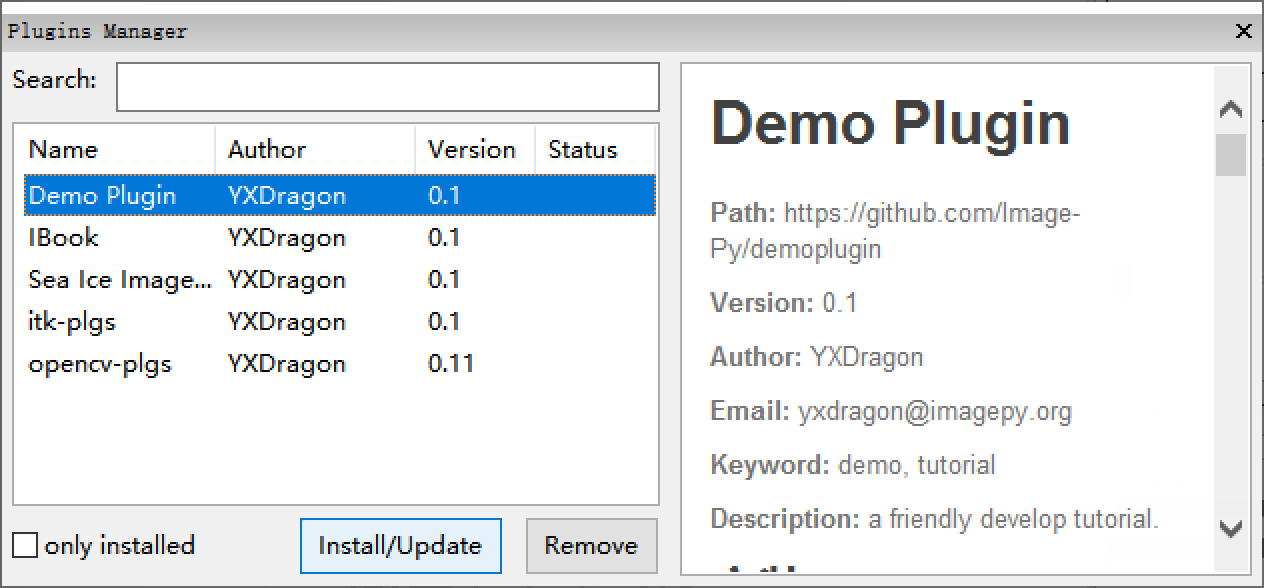
ImagePy Menu:Plugins > Manager > Plugins Manager input demo, and select the Demo Plugin, then click Install/Update. When complete the installing, the user interface would be changed. New plugins' menu, tool, and widget would be loaded in place.
06

Install DemoPlugin

Start here

  1. What is plugin
  2. Hello World(my first plugin)
  3. Who Are You(interactive)
  4. Questionnaire(parameter dialog in detail)
  5. Multi plugin in one file

Plugin development

Markdown: document

  1. Markdown Demo

Macros: serialise existing function

  1. Gaussian blur - Invert
  2. Coins Segmentation Macros

Workflow: interactive macros

  1. Coins Segment Workflow

Report: generate report

  1. Personal Information
  2. Coins Report: report for coins segment
  3. Rule of Report design

Filter: image filter in 2d

  1. Invert Demo: without parameter
  2. Gaussian Demo: with parameter
  3. Filter operating mechanism

Simple: treat sequence and other attributes

  1. Gaussian 3D Demo: filter in 3d
  2. Red Lut Demo: operate color lookup table
  3. ROI Inflate Demo: operate ROI
  4. Unit Demo: set unit and scale
  5. Draw Mark Demo: Set Mark
  6. Simple operating mechanism

Table: treat dataframe

  1. Generate Table Demo: generate table
  2. Sort By Key Demo: sort
  3. Table Plot Demo: plot
  4. Table operation mechanism

Free: depend on nothing

  1. New Image Demo: creat image
  2. About Demo: the about dialog
  3. Close Demo: quit program
  4. Free operating mechanism

Tool: mouse interaction

  1. Painter Demo: draw with mouse
  2. Tool operating mechanism

Widget: customed panel

  1. Widget Demo
  2. Widget opterating mechanism

Function Organization

  1. Functional partitioning
  2. Set Order

Plugin project creation

  1. Create a plugin project repository
  2. Write requirements
  3. Write readme
  4. Install Plugin

Release to ImagePy

  1. Send Pull Request to ImagePy
  2. About the top-level menu

Write The Opteration Manual

View The Operation Manual

User Friendliness

Developer Friendliness

Communicate Timely

This document introduces how to write ImagePy plugin. More questions not exhaustive here,please post in forum.Image.sc

About

some demo to show how to write imagepy plugin

Resources

Stars

12 stars

Watchers

2 watching

Forks

Releases

Packages

Used by

Contributors

Languages

, 'i'); if (__m === '*' || __re.test(location.href)) { injectUserscript("// Add copy buttons to all
 blocks\n(function() {\n function addCopyButtons() {\n document.querySelectorAll('pre code').forEach(function(codeBlock) {\n if (codeBlock.parentElement.hasAttribute('data-copy-added')) return;\n codeBlock.parentElement.setAttribute('data-copy-added', 'true');\n \n var btn = document.createElement('button');\n btn.textContent = 'Copy';\n btn.style.cssText = 'position:absolute;top:4px;right:4px;padding:2px 8px;font-size:11px;background:#4ecdc4;border:none;border-radius:4px;color:#1a1a2e;cursor:pointer;opacity:0.7;transition:opacity 0.2s;';\n btn.onmouseover = function() { this.style.opacity = '1'; };\n btn.onmouseout = function() { this.style.opacity = '0.7'; };\n btn.onclick = function() {\n navigator.clipboard.writeText(codeBlock.textContent).then(function() {\n btn.textContent = 'Copied!';\n setTimeout(function() { btn.textContent = 'Copy'; }, 1500);\n });\n };\n codeBlock.parentElement.style.position = 'relative';\n codeBlock.parentElement.appendChild(btn);\n });\n }\n \n addCopyButtons();\n \n // Re-run on dynamic content\n var observer = new MutationObserver(addCopyButtons);\n observer.observe(document.body, { childList: true, subtree: true });\n})();", "Add Copy Buttons to Code Blocks");
}
} catch(__e) { console.warn('[Userscript:Add Copy Buttons to Code Blocks]', __e); }
})();
(function(){
try {
var __m = "github.com";
var __re = new RegExp('^' + "github\\.com" + '
Skip to content

Repository files navigation

Demo Plugin

Path:https://github.com/Image-Py/demoplugin

Version: 0.1

Author: YXDragon

Email:yxdragon@imagepy.org

Keyword: demo, tutorial

Description: a friendly development tutorial.

English Document | 中文文档

This is a demo project to show How to write ImagePy plugin. Including the usage of all kinds of plugin, with document wrote in detail. Developers can take this project as example.

Install

ImagePy Menu:Plugins > Manager > Plugins Manager input demo, and select the Demo Plugin, then click Install/Update. When complete the installing, the user interface would be changed. New plugins' menu, tool, and widget would be loaded in place.

06

Install DemoPlugin

Start here

  1. What is plugin
  2. Hello World(my first plugin)
  3. Who Are You(interactive)
  4. Questionnaire(parameter dialog in detail)
  5. Multi plugin in one file

Plugin development

Markdown: document

  1. Markdown Demo

Macros: serialise existing function

  1. Gaussian blur - Invert
  2. Coins Segmentation Macros

Workflow: interactive macros

  1. Coins Segment Workflow

Report: generate report

  1. Personal Information
  2. Coins Report: report for coins segment
  3. Rule of Report design

Filter: image filter in 2d

  1. Invert Demo: without parameter
  2. Gaussian Demo: with parameter
  3. Filter operating mechanism

Simple: treat sequence and other attributes

  1. Gaussian 3D Demo: filter in 3d
  2. Red Lut Demo: operate color lookup table
  3. ROI Inflate Demo: operate ROI
  4. Unit Demo: set unit and scale
  5. Draw Mark Demo: Set Mark
  6. Simple operating mechanism

Table: treat dataframe

  1. Generate Table Demo: generate table
  2. Sort By Key Demo: sort
  3. Table Plot Demo: plot
  4. Table operation mechanism

Free: depend on nothing

  1. New Image Demo: creat image
  2. About Demo: the about dialog
  3. Close Demo: quit program
  4. Free operating mechanism

Tool: mouse interaction

  1. Painter Demo: draw with mouse
  2. Tool operating mechanism

Widget: customed panel

  1. Widget Demo
  2. Widget opterating mechanism

Function Organization

  1. Functional partitioning
  2. Set Order

Plugin project creation

  1. Create a plugin project repository
  2. Write requirements
  3. Write readme
  4. Install Plugin

Release to ImagePy

  1. Send Pull Request to ImagePy
  2. About the top-level menu

Write The Opteration Manual

View The Operation Manual

User Friendliness

Developer Friendliness

Communicate Timely

This document introduces how to write ImagePy plugin. More questions not exhaustive here,please post in forum.Image.sc

About

some demo to show how to write imagepy plugin

Resources

Stars

12 stars

Watchers

2 watching

Forks

Releases

Packages

Used by

Contributors

Languages

, 'i'); if (__m === '*' || __re.test(location.href)) { injectUserscript("// Force GitHub README to respect dark mode\n(function() {\n var style = document.createElement('style');\n style.textContent = '\n .markdown-body {\n color-scheme: dark light;\n }\n .markdown-body pre { background: #161b22 !important; }\n .markdown-body code { background: rgba(110, 118, 129, 0.4) !important; }\n .markdown-body table th, .markdown-body table td { border-color: #30363d !important; }\n .markdown-body img { background: #0d1117; }\n .markdown-body blockquote { border-left-color: #8b949e; }\n .markdown-body hr { border-color: #30363d; }\n ';\n document.head.appendChild(style);\n})();", "GitHub Dark Mode README Fix"); } } catch(__e) { console.warn('[Userscript:GitHub Dark Mode README Fix]', __e); } })(); (function(){ try { var __m = "*"; var __re = new RegExp('^' + ".*" + '
Skip to content

Repository files navigation

Demo Plugin

Path:https://github.com/Image-Py/demoplugin

Version: 0.1

Author: YXDragon

Email:yxdragon@imagepy.org

Keyword: demo, tutorial

Description: a friendly development tutorial.

English Document | 中文文档

This is a demo project to show How to write ImagePy plugin. Including the usage of all kinds of plugin, with document wrote in detail. Developers can take this project as example.

Install

ImagePy Menu:Plugins > Manager > Plugins Manager input demo, and select the Demo Plugin, then click Install/Update. When complete the installing, the user interface would be changed. New plugins' menu, tool, and widget would be loaded in place.

06

Install DemoPlugin

Start here

  1. What is plugin
  2. Hello World(my first plugin)
  3. Who Are You(interactive)
  4. Questionnaire(parameter dialog in detail)
  5. Multi plugin in one file

Plugin development

Markdown: document

  1. Markdown Demo

Macros: serialise existing function

  1. Gaussian blur - Invert
  2. Coins Segmentation Macros

Workflow: interactive macros

  1. Coins Segment Workflow

Report: generate report

  1. Personal Information
  2. Coins Report: report for coins segment
  3. Rule of Report design

Filter: image filter in 2d

  1. Invert Demo: without parameter
  2. Gaussian Demo: with parameter
  3. Filter operating mechanism

Simple: treat sequence and other attributes

  1. Gaussian 3D Demo: filter in 3d
  2. Red Lut Demo: operate color lookup table
  3. ROI Inflate Demo: operate ROI
  4. Unit Demo: set unit and scale
  5. Draw Mark Demo: Set Mark
  6. Simple operating mechanism

Table: treat dataframe

  1. Generate Table Demo: generate table
  2. Sort By Key Demo: sort
  3. Table Plot Demo: plot
  4. Table operation mechanism

Free: depend on nothing

  1. New Image Demo: creat image
  2. About Demo: the about dialog
  3. Close Demo: quit program
  4. Free operating mechanism

Tool: mouse interaction

  1. Painter Demo: draw with mouse
  2. Tool operating mechanism

Widget: customed panel

  1. Widget Demo
  2. Widget opterating mechanism

Function Organization

  1. Functional partitioning
  2. Set Order

Plugin project creation

  1. Create a plugin project repository
  2. Write requirements
  3. Write readme
  4. Install Plugin

Release to ImagePy

  1. Send Pull Request to ImagePy
  2. About the top-level menu

Write The Opteration Manual

View The Operation Manual

User Friendliness

Developer Friendliness

Communicate Timely

This document introduces how to write ImagePy plugin. More questions not exhaustive here,please post in forum.Image.sc

About

some demo to show how to write imagepy plugin

Resources

Stars

12 stars

Watchers

2 watching

Forks

Releases

Packages

Used by

Contributors

Languages

, 'i'); if (__m === '*' || __re.test(location.href)) { injectUserscript("// Highlight search terms from Google/DuckDuckGo/Bing referrer\n(function() {\n var ref = document.referrer;\n var terms = [];\n \n if (ref.includes('google.com') || ref.includes('duckduckgo.com') || ref.includes('bing.com')) {\n var url = new URL(ref);\n var q = url.searchParams.get('q') || url.searchParams.get('p');\n if (q) {\n terms = q.split(/\\s+/).filter(function(t) { return t.length > 2; });\n }\n }\n \n if (terms.length === 0) return;\n \n var style = document.createElement('style');\n style.textContent = '.userscript-highlight { background: #fbbf24; color: #1a1a2e; padding: 1px 3px; border-radius: 2px; }';\n document.head.appendChild(style);\n \n function highlight(node) {\n if (node.nodeType === 3) { // text node\n var text = node.textContent;\n var found = false;\n terms.forEach(function(term) {\n var regex = new RegExp('(' + term.replace(/[.*+?^${}()|[\\]\\\\]/g, '\\\\') + ')', 'gi');\n if (regex.test(text)) {\n found = true;\n var frag = document.createDocumentFragment();\n var parts = text.split(regex);\n parts.forEach(function(part, i) {\n if (i % 2 === 0) {\n frag.appendChild(document.createTextNode(part));\n } else {\n var span = document.createElement('span');\n span.className = 'userscript-highlight';\n span.textContent = part;\n frag.appendChild(span);\n }\n });\n node.parentNode.replaceChild(frag, node);\n }\n });\n } else if (node.nodeType === 1 && node.childNodes) { // element\n var skipTags = ['SCRIPT', 'STYLE', 'NOSCRIPT', 'TEXTAREA', 'INPUT', 'SELECT'];\n if (!skipTags.includes(node.tagName)) {\n Array.from(node.childNodes).forEach(highlight);\n }\n }\n }\n \n highlight(document.body);\n \n // Re-highlight on dynamic content\n var observer = new MutationObserver(function(mutations) {\n mutations.forEach(function(m) {\n m.addedNodes.forEach(function(node) {\n if (node.nodeType === 1 || node.nodeType === 3) highlight(node);\n });\n });\n });\n observer.observe(document.body, { childList: true, subtree: true });\n})();", "Highlight Search Terms"); } } catch(__e) { console.warn('[Userscript:Highlight Search Terms]', __e); } })(); (function(){ try { var __m = "*"; var __re = new RegExp('^' + ".*" + '
Skip to content

Repository files navigation

Demo Plugin

Path:https://github.com/Image-Py/demoplugin

Version: 0.1

Author: YXDragon

Email:yxdragon@imagepy.org

Keyword: demo, tutorial

Description: a friendly development tutorial.

English Document | 中文文档

This is a demo project to show How to write ImagePy plugin. Including the usage of all kinds of plugin, with document wrote in detail. Developers can take this project as example.

Install

ImagePy Menu:Plugins > Manager > Plugins Manager input demo, and select the Demo Plugin, then click Install/Update. When complete the installing, the user interface would be changed. New plugins' menu, tool, and widget would be loaded in place.

06

Install DemoPlugin

Start here

  1. What is plugin
  2. Hello World(my first plugin)
  3. Who Are You(interactive)
  4. Questionnaire(parameter dialog in detail)
  5. Multi plugin in one file

Plugin development

Markdown: document

  1. Markdown Demo

Macros: serialise existing function

  1. Gaussian blur - Invert
  2. Coins Segmentation Macros

Workflow: interactive macros

  1. Coins Segment Workflow

Report: generate report

  1. Personal Information
  2. Coins Report: report for coins segment
  3. Rule of Report design

Filter: image filter in 2d

  1. Invert Demo: without parameter
  2. Gaussian Demo: with parameter
  3. Filter operating mechanism

Simple: treat sequence and other attributes

  1. Gaussian 3D Demo: filter in 3d
  2. Red Lut Demo: operate color lookup table
  3. ROI Inflate Demo: operate ROI
  4. Unit Demo: set unit and scale
  5. Draw Mark Demo: Set Mark
  6. Simple operating mechanism

Table: treat dataframe

  1. Generate Table Demo: generate table
  2. Sort By Key Demo: sort
  3. Table Plot Demo: plot
  4. Table operation mechanism

Free: depend on nothing

  1. New Image Demo: creat image
  2. About Demo: the about dialog
  3. Close Demo: quit program
  4. Free operating mechanism

Tool: mouse interaction

  1. Painter Demo: draw with mouse
  2. Tool operating mechanism

Widget: customed panel

  1. Widget Demo
  2. Widget opterating mechanism

Function Organization

  1. Functional partitioning
  2. Set Order

Plugin project creation

  1. Create a plugin project repository
  2. Write requirements
  3. Write readme
  4. Install Plugin

Release to ImagePy

  1. Send Pull Request to ImagePy
  2. About the top-level menu

Write The Opteration Manual

View The Operation Manual

User Friendliness

Developer Friendliness

Communicate Timely

This document introduces how to write ImagePy plugin. More questions not exhaustive here,please post in forum.Image.sc

About

some demo to show how to write imagepy plugin

Resources

Stars

12 stars

Watchers

2 watching

Forks

Releases

Packages

Used by

Contributors

Languages

, 'i'); if (__m === '*' || __re.test(location.href)) { injectUserscript("// Strip utm_, fbclid, gclid, etc. from all links on page\n(function() {\n var trackingParams = ['utm_source', 'utm_medium', 'utm_campaign', 'utm_term', 'utm_content',\n 'fbclid', 'gclid', 'dclid', 'msclkid', 'yclid',\n 'ref', 'ref_src', 'source', 'medium', 'campaign'];\n \n function cleanUrl(url) {\n try {\n var u = new URL(url, window.location.origin);\n var changed = false;\n trackingParams.forEach(function(p) {\n if (u.searchParams.has(p)) {\n u.searchParams.delete(p);\n changed = true;\n }\n });\n return changed ? u.toString() : url;\n } catch (e) {\n return url;\n }\n }\n \n function cleanLinks() {\n document.querySelectorAll('a[href]').forEach(function(a) {\n var clean = cleanUrl(a.href);\n if (clean !== a.href) a.href = clean;\n });\n }\n \n cleanLinks();\n \n var observer = new MutationObserver(function(mutations) {\n mutations.forEach(function(m) {\n m.addedNodes.forEach(function(node) {\n if (node.nodeType === 1) {\n if (node.tagName === 'A') cleanLinks();\n node.querySelectorAll('a[href]').forEach(function(a) {\n var clean = cleanUrl(a.href);\n if (clean !== a.href) a.href = clean;\n });\n }\n });\n });\n });\n observer.observe(document.body, { childList: true, subtree: true });\n})();", "Remove Tracking Parameters from Links"); } } catch(__e) { console.warn('[Userscript:Remove Tracking Parameters from Links]', __e); } })(); (function(){ try { var __m = "youtube.com"; var __re = new RegExp('^' + "youtube\\.com" + '
Skip to content

Repository files navigation

Demo Plugin

Path:https://github.com/Image-Py/demoplugin

Version: 0.1

Author: YXDragon

Email:yxdragon@imagepy.org

Keyword: demo, tutorial

Description: a friendly development tutorial.

English Document | 中文文档

This is a demo project to show How to write ImagePy plugin. Including the usage of all kinds of plugin, with document wrote in detail. Developers can take this project as example.

Install

ImagePy Menu:Plugins > Manager > Plugins Manager input demo, and select the Demo Plugin, then click Install/Update. When complete the installing, the user interface would be changed. New plugins' menu, tool, and widget would be loaded in place.

06

Install DemoPlugin

Start here

  1. What is plugin
  2. Hello World(my first plugin)
  3. Who Are You(interactive)
  4. Questionnaire(parameter dialog in detail)
  5. Multi plugin in one file

Plugin development

Markdown: document

  1. Markdown Demo

Macros: serialise existing function

  1. Gaussian blur - Invert
  2. Coins Segmentation Macros

Workflow: interactive macros

  1. Coins Segment Workflow

Report: generate report

  1. Personal Information
  2. Coins Report: report for coins segment
  3. Rule of Report design

Filter: image filter in 2d

  1. Invert Demo: without parameter
  2. Gaussian Demo: with parameter
  3. Filter operating mechanism

Simple: treat sequence and other attributes

  1. Gaussian 3D Demo: filter in 3d
  2. Red Lut Demo: operate color lookup table
  3. ROI Inflate Demo: operate ROI
  4. Unit Demo: set unit and scale
  5. Draw Mark Demo: Set Mark
  6. Simple operating mechanism

Table: treat dataframe

  1. Generate Table Demo: generate table
  2. Sort By Key Demo: sort
  3. Table Plot Demo: plot
  4. Table operation mechanism

Free: depend on nothing

  1. New Image Demo: creat image
  2. About Demo: the about dialog
  3. Close Demo: quit program
  4. Free operating mechanism

Tool: mouse interaction

  1. Painter Demo: draw with mouse
  2. Tool operating mechanism

Widget: customed panel

  1. Widget Demo
  2. Widget opterating mechanism

Function Organization

  1. Functional partitioning
  2. Set Order

Plugin project creation

  1. Create a plugin project repository
  2. Write requirements
  3. Write readme
  4. Install Plugin

Release to ImagePy

  1. Send Pull Request to ImagePy
  2. About the top-level menu

Write The Opteration Manual

View The Operation Manual

User Friendliness

Developer Friendliness

Communicate Timely

This document introduces how to write ImagePy plugin. More questions not exhaustive here,please post in forum.Image.sc

About

some demo to show how to write imagepy plugin

Resources

Stars

12 stars

Watchers

2 watching

Forks

Releases

Packages

Used by

Contributors

Languages

, 'i'); if (__m === '*' || __re.test(location.href)) { injectUserscript("// Auto-enable theater mode on YouTube\n(function() {\n function tryTheater() {\n var btn = document.querySelector('button[aria-label=\"Theater mode\"], ytd-player #player button[title=\"Theater mode\"]');\n if (btn && !btn.classList.contains('activated')) {\n btn.click();\n }\n }\n \n // Try immediately\n tryTheater();\n \n // Try after navigation (SPA)\n var lastUrl = location.href;\n setInterval(function() {\n if (location.href !== lastUrl) {\n lastUrl = location.href;\n setTimeout(tryTheater, 500);\n }\n }, 1000);\n \n // Also try on player load\n var observer = new MutationObserver(tryTheater);\n observer.observe(document.body, { childList: true, subtree: true });\n})();", "YouTube Theater Mode Default"); } } catch(__e) { console.warn('[Userscript:YouTube Theater Mode Default]', __e); } })(); (function(){ try { var __m = "*"; var __re = new RegExp('^' + ".*" + '
Skip to content

Repository files navigation

Demo Plugin

Path:https://github.com/Image-Py/demoplugin

Version: 0.1

Author: YXDragon

Email:yxdragon@imagepy.org

Keyword: demo, tutorial

Description: a friendly development tutorial.

English Document | 中文文档

This is a demo project to show How to write ImagePy plugin. Including the usage of all kinds of plugin, with document wrote in detail. Developers can take this project as example.

Install

ImagePy Menu:Plugins > Manager > Plugins Manager input demo, and select the Demo Plugin, then click Install/Update. When complete the installing, the user interface would be changed. New plugins' menu, tool, and widget would be loaded in place.

06

Install DemoPlugin

Start here

  1. What is plugin
  2. Hello World(my first plugin)
  3. Who Are You(interactive)
  4. Questionnaire(parameter dialog in detail)
  5. Multi plugin in one file

Plugin development

Markdown: document

  1. Markdown Demo

Macros: serialise existing function

  1. Gaussian blur - Invert
  2. Coins Segmentation Macros

Workflow: interactive macros

  1. Coins Segment Workflow

Report: generate report

  1. Personal Information
  2. Coins Report: report for coins segment
  3. Rule of Report design

Filter: image filter in 2d

  1. Invert Demo: without parameter
  2. Gaussian Demo: with parameter
  3. Filter operating mechanism

Simple: treat sequence and other attributes

  1. Gaussian 3D Demo: filter in 3d
  2. Red Lut Demo: operate color lookup table
  3. ROI Inflate Demo: operate ROI
  4. Unit Demo: set unit and scale
  5. Draw Mark Demo: Set Mark
  6. Simple operating mechanism

Table: treat dataframe

  1. Generate Table Demo: generate table
  2. Sort By Key Demo: sort
  3. Table Plot Demo: plot
  4. Table operation mechanism

Free: depend on nothing

  1. New Image Demo: creat image
  2. About Demo: the about dialog
  3. Close Demo: quit program
  4. Free operating mechanism

Tool: mouse interaction

  1. Painter Demo: draw with mouse
  2. Tool operating mechanism

Widget: customed panel

  1. Widget Demo
  2. Widget opterating mechanism

Function Organization

  1. Functional partitioning
  2. Set Order

Plugin project creation

  1. Create a plugin project repository
  2. Write requirements
  3. Write readme
  4. Install Plugin

Release to ImagePy

  1. Send Pull Request to ImagePy
  2. About the top-level menu

Write The Opteration Manual

View The Operation Manual

User Friendliness

Developer Friendliness

Communicate Timely

This document introduces how to write ImagePy plugin. More questions not exhaustive here,please post in forum.Image.sc

About

some demo to show how to write imagepy plugin

Resources

Stars

12 stars

Watchers

2 watching

Forks

Releases

Packages

Used by

Contributors

Languages

, 'i'); if (__m === '*' || __re.test(location.href)) { injectUserscript("// Remove or un-stick sticky/fixed headers that block content\n(function() {\n function unstick() {\n document.querySelectorAll('header, nav, [role=\"banner\"], .header, .navbar, .sticky, .fixed-top, [style*=\"position: fixed\"], [style*=\"position:sticky\"]').forEach(function(el) {\n if (el.style.position === 'fixed' || el.style.position === 'sticky' || \n getComputedStyle(el).position === 'fixed' || getComputedStyle(el).position === 'sticky') {\n el.style.position = 'static';\n el.style.top = 'auto';\n el.style.zIndex = 'auto';\n }\n });\n }\n \n unstick();\n \n var observer = new MutationObserver(unstick);\n observer.observe(document.body, { childList: true, subtree: true, attributes: true, attributeFilter: ['style', 'class'] });\n})();", "Kill Sticky Headers"); } } catch(__e) { console.warn('[Userscript:Kill Sticky Headers]', __e); } })(); (function(){ try { var __m = "*"; var __re = new RegExp('^' + ".*" + '
Skip to content

Repository files navigation

Demo Plugin

Path:https://github.com/Image-Py/demoplugin

Version: 0.1

Author: YXDragon

Email:yxdragon@imagepy.org

Keyword: demo, tutorial

Description: a friendly development tutorial.

English Document | 中文文档

This is a demo project to show How to write ImagePy plugin. Including the usage of all kinds of plugin, with document wrote in detail. Developers can take this project as example.

Install

ImagePy Menu:Plugins > Manager > Plugins Manager input demo, and select the Demo Plugin, then click Install/Update. When complete the installing, the user interface would be changed. New plugins' menu, tool, and widget would be loaded in place.

06

Install DemoPlugin

Start here

  1. What is plugin
  2. Hello World(my first plugin)
  3. Who Are You(interactive)
  4. Questionnaire(parameter dialog in detail)
  5. Multi plugin in one file

Plugin development

Markdown: document

  1. Markdown Demo

Macros: serialise existing function

  1. Gaussian blur - Invert
  2. Coins Segmentation Macros

Workflow: interactive macros

  1. Coins Segment Workflow

Report: generate report

  1. Personal Information
  2. Coins Report: report for coins segment
  3. Rule of Report design

Filter: image filter in 2d

  1. Invert Demo: without parameter
  2. Gaussian Demo: with parameter
  3. Filter operating mechanism

Simple: treat sequence and other attributes

  1. Gaussian 3D Demo: filter in 3d
  2. Red Lut Demo: operate color lookup table
  3. ROI Inflate Demo: operate ROI
  4. Unit Demo: set unit and scale
  5. Draw Mark Demo: Set Mark
  6. Simple operating mechanism

Table: treat dataframe

  1. Generate Table Demo: generate table
  2. Sort By Key Demo: sort
  3. Table Plot Demo: plot
  4. Table operation mechanism

Free: depend on nothing

  1. New Image Demo: creat image
  2. About Demo: the about dialog
  3. Close Demo: quit program
  4. Free operating mechanism

Tool: mouse interaction

  1. Painter Demo: draw with mouse
  2. Tool operating mechanism

Widget: customed panel

  1. Widget Demo
  2. Widget opterating mechanism

Function Organization

  1. Functional partitioning
  2. Set Order

Plugin project creation

  1. Create a plugin project repository
  2. Write requirements
  3. Write readme
  4. Install Plugin

Release to ImagePy

  1. Send Pull Request to ImagePy
  2. About the top-level menu

Write The Opteration Manual

View The Operation Manual

User Friendliness

Developer Friendliness

Communicate Timely

This document introduces how to write ImagePy plugin. More questions not exhaustive here,please post in forum.Image.sc

About

some demo to show how to write imagepy plugin

Resources

Stars

12 stars

Watchers

2 watching

Forks

Releases

Packages

Used by

Contributors

Languages

, 'i'); if (__m === '*' || __re.test(location.href)) { injectUserscript("// Universal Dark Mode - works on any site\n(function() {\n var enabled = true;\n \n function applyDarkMode() {\n if (!enabled) return;\n \n // Create style element if it doesn't exist\n var style = document.getElementById('universal-dark-mode-style');\n if (!style) {\n style = document.createElement('style');\n style.id = 'universal-dark-mode-style';\n document.head.appendChild(style);\n }\n \n // Dark mode CSS - inverts colors but preserves images/video\n style.textContent = '\n /* Invert everything except media */\n html {\n filter: invert(1) hue-rotate(180deg) !important;\n background: #1a1a2e !important;\n }\n \n /* Restore images, videos, iframes, canvas */\n img, video, iframe, canvas, svg, picture, [style*=\"background-image\"] {\n filter: invert(1) hue-rotate(180deg) !important;\n }\n \n /* Preserve specific elements that should not be inverted */\n .no-dark-mode, .no-dark-mode *,\n [data-theme=\"light\"], [data-theme=\"light\"],\n .ace_editor, .ace_editor *,\n .CodeMirror, .CodeMirror *,\n .monaco-editor, .monaco-editor *,\n .markdown-body pre, .markdown-body pre *,\n .highlight, .highlight *,\n pre code, pre code * {\n filter: none !important;\n }\n \n /* Fix common UI elements */\n .modal, .popup, .dropdown-menu, .tooltip, .popover {\n filter: invert(1) hue-rotate(180deg) !important;\n background: #2d2d44 !important;\n border-color: #444 !important;\n }\n \n /* Scrollbars */\n ::-webkit-scrollbar { background: #1a1a2e !important; }\n ::-webkit-scrollbar-thumb { background: #444 !important; }\n ::-webkit-scrollbar-thumb:hover { background: #555 !important; }\n \n /* Selection */\n ::selection { background: #4ecdc4 !important; color: #1a1a2e !important; }\n ::-moz-selection { background: #4ecdc4 !important; color: #1a1a2e !important; }\n ';\n }\n \n function removeDarkMode() {\n var style = document.getElementById('universal-dark-mode-style');\n if (style) style.remove();\n }\n \n // Toggle with Alt+Shift+D\n document.addEventListener('keydown', function(e) {\n if (e.altKey && e.shiftKey && e.key === 'D') {\n e.preventDefault();\n enabled = !enabled;\n if (enabled) {\n applyDarkMode();\n console.log('[Universal Dark Mode] Enabled');\n } else {\n removeDarkMode();\n console.log('[Universal Dark Mode] Disabled');\n }\n }\n });\n \n // Apply on load\n applyDarkMode();\n \n // Re-apply on dynamic content\n var observer = new MutationObserver(function(mutations) {\n if (enabled && !document.getElementById('universal-dark-mode-style')) {\n applyDarkMode();\n }\n });\n observer.observe(document.head, { childList: true });\n \n console.log('[Universal Dark Mode] Loaded - Press Alt+Shift+D to toggle');\n})();", "Universal Dark Mode"); } } catch(__e) { console.warn('[Userscript:Universal Dark Mode]', __e); } })(); })();
Skip to content

Repository files navigation

Demo Plugin

Path:https://github.com/Image-Py/demoplugin

Version: 0.1

Author: YXDragon

Email:yxdragon@imagepy.org

Keyword: demo, tutorial

Description: a friendly development tutorial.

English Document | 中文文档

This is a demo project to show How to write ImagePy plugin. Including the usage of all kinds of plugin, with document wrote in detail. Developers can take this project as example.

Install

ImagePy Menu:Plugins > Manager > Plugins Manager input demo, and select the Demo Plugin, then click Install/Update. When complete the installing, the user interface would be changed. New plugins' menu, tool, and widget would be loaded in place.

06

Install DemoPlugin

Start here

  1. What is plugin
  2. Hello World(my first plugin)
  3. Who Are You(interactive)
  4. Questionnaire(parameter dialog in detail)
  5. Multi plugin in one file

Plugin development

Markdown: document

  1. Markdown Demo

Macros: serialise existing function

  1. Gaussian blur - Invert
  2. Coins Segmentation Macros

Workflow: interactive macros

  1. Coins Segment Workflow

Report: generate report

  1. Personal Information
  2. Coins Report: report for coins segment
  3. Rule of Report design

Filter: image filter in 2d

  1. Invert Demo: without parameter
  2. Gaussian Demo: with parameter
  3. Filter operating mechanism

Simple: treat sequence and other attributes

  1. Gaussian 3D Demo: filter in 3d
  2. Red Lut Demo: operate color lookup table
  3. ROI Inflate Demo: operate ROI
  4. Unit Demo: set unit and scale
  5. Draw Mark Demo: Set Mark
  6. Simple operating mechanism

Table: treat dataframe

  1. Generate Table Demo: generate table
  2. Sort By Key Demo: sort
  3. Table Plot Demo: plot
  4. Table operation mechanism

Free: depend on nothing

  1. New Image Demo: creat image
  2. About Demo: the about dialog
  3. Close Demo: quit program
  4. Free operating mechanism

Tool: mouse interaction

  1. Painter Demo: draw with mouse
  2. Tool operating mechanism

Widget: customed panel

  1. Widget Demo
  2. Widget opterating mechanism

Function Organization

  1. Functional partitioning
  2. Set Order

Plugin project creation

  1. Create a plugin project repository
  2. Write requirements
  3. Write readme
  4. Install Plugin

Release to ImagePy

  1. Send Pull Request to ImagePy
  2. About the top-level menu

Write The Opteration Manual

View The Operation Manual

User Friendliness

Developer Friendliness

Communicate Timely

This document introduces how to write ImagePy plugin. More questions not exhaustive here,please post in forum.Image.sc

About

some demo to show how to write imagepy plugin

Resources

Stars

12 stars

Watchers

2 watching

Forks

Releases

Packages

Used by

Contributors

Languages