



Bridge email to other messaging services.
Do not expose this to the Internet as this is only intended to be used on a local network.
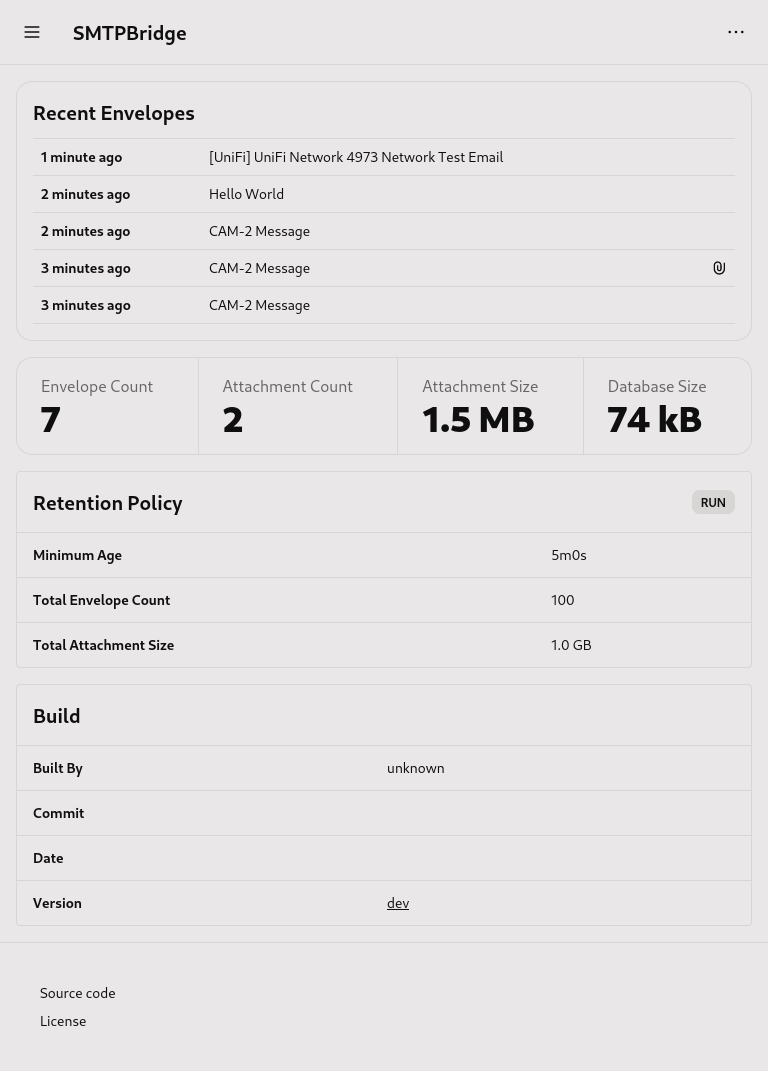
- Receive email from SMTP or HTTP as envelopes
- Send envelopes to endpoints with templates
- Create rules for matching envelopes with endpoints
- View and manage application through the Web UI
- Delete stale envelopes with a retention policy
- Monitor application with healthcheck
- Pictures from IP cameras (e.g. AI Tripwire, ...)
- System messages from servers and applications (e.g. Debian, Nextcloud, UniFi Network Application, ...)
smtpbridge
Apprise requires Python to be installed along with the apprise package.
Install Apprise with the following command.
pip install apprise
If you are using a Python virtual environment, then set the python_executable config variable.
python_executable: .venv/bin/python3Make sure you install Apprise in that virtual environment.
This allows you to run an arbitrary script as an endpoint. stdin is a JSON encoded envelope such as the following.
{
"title": "Test Subject",
"body": "Test Body",
"attachments": [
{
"path": "http://127.0.0.1:8080/apple-touch-icon.png",
"name": "Test Attachment"
}
]
}
The path of an attachment can be a URL or a file path.
Please note that scripts runs concurrently.
Config file is loaded from one of the following locations in order.
config.yamlconfig.yml.smtpbridge.yaml.smtpbridge.yml~/.smtpbridge.yaml~/.smtpbridge.yml/etc/smtpbridge.yaml/etc/smtpbridge.yml
CLI flags take priority over config files and environment.
This config prints emails received via SMTP to console.
endpoints:
hello_world:
kind: consolerules:
hello_world:# Used for developmentdebug: false# Used by HTTP, ...time_format: 12h# [12h, 24h]# Directory for storing datadata_directory: smtpbridge_data# Python executable used by Apprisepython_executable: python3# Healthcheck enables verification that the application has not crashed or lost network access# You can use a third party service such as healthchecks.iohealthcheck:
# URL to fetch, empty means health checking is disabledurl: ""# [https://hc-ping.com/cb8bcf81-d3c4-4c98-85a6-734c3b7ddb2b, ...]# Interval between each fetchinterval: 5m# [5m, 5h45m, ...]# Run on startupstartup: false# Mailman handles sending envelopes to the configured endpointsmailman:
# Number of concurrent workersworkers: 1# Retention policy will delete resources that pass the configured policyretention:
# Envelopes in databaseenvelope_count: # [0, 100, 250, ...]envelope_age: # [5m, 5h45m, ...]# Attachment files in file storeattachment_size: # [100 MB, 1 GB, ...]# Traces in databasetrace_age: 168h# 7 days [5m, 5h45m, ...]# HTTP serverhttp:
disable: falsehost: ""# [127.0.0.1, ...]port: 8080# Authentication is disabled if both username and password are emptyusername: ""password: ""# Public URL used for creating linksurl: ""# [http://127.0.0.1:8080, ...]# SMTP serversmtp:
disable: falsehost: ""# [127.0.0.1, ...]port: 1025# Authentication is disabled if both username and password are emptyusername: ""password: ""# Maximum payload sizemax_payload_size: 25 MB # [100 MB, 1 GB, ...]# Endpoints for envelopesendpoints:
# Consoleconsole_endpoint:
kind: console# Telegramtelegram_endpoint:
kind: telegramconfig:
# https://core.telegram.org/bots/features#creating-a-new-bottoken: 2222222222222222222222# https://stackoverflow.com/a/32572159chat_id: 111111111111111111111# Shoutrrr (can only send text)shoutrrr_endpoint:
kind: shoutrrrconfig:
# https://containrrr.dev/shoutrrr/v0.8/services/overview/urls: telegram://token@telegram?chats=@channel-1[,chat-id-1,...]# Appriseapprise_endpoint:
kind: appriseconfig:
# https://github.com/caronc/apprise#supported-notificationsurls: tgram://bottoken/ChatID# Scriptscript_endpoint:
kind: scriptconfig:
file: my-script.py# Full exampleexample_endpoint:
kind: consolename: Example Endpoint# Do not send title and bodytext_disable: false# Do not send attachmentsattachment_disable: false# Custom template for titletitle_template: "{{ .Message.Subject }}"# Custom template for bodybody_template: "{{ .Message.Text }}"rules:
example_rule:
name: Example Ruleexpression: or (eq .Message.Subject "cam-1") (eq .Message.Subject "cam-2")endpoints:
- console_endpointSee text/template on how to template.
Each *_template has access to the Envelope model via the . operator.
The following custom functions are available in endpoint templates.
| Name | Description | Example |
|---|---|---|
| PermaLink | Permanent HTTP link for the given model. | {{ PermaLink .Message }} => http://127.0.0.1:8080/envelopes/1 |
Rule expressions are just text/template without {{ }}.
The Envelope model can be accessed via the . operator.
They should always evaluate to a boolean expression.
Example:
or
(eq .Message.Subject "cam-1")
(.Message.To.EQ "my-name@example.com")
(eq .Message.From "unleashed@example.com")
This expression will pass if one of the following is true.
- The message's subject equals "cam-1"
- The message is to "my-name@example.com"
- The message is from "unleashed@example.com"
version: "3"services:
smtpbridge:
image: ghcr.io/itsnotgoodname/smtpbridge:latestcontainer_name: smtpbridgeenvironment:
APPRISE_ENABLE: "true"# OptionalAPPRISE_VERSION: "1.5.0"# OptionalSMTPBRIDGE_CONFIG_YAML: | # Optional endpoints: hello_world: kind: console rules: hello_world:ports:
- 1025:1025
- 8080:8080volumes:
- /path/to/data:/data
- /path/to/config:/config # Optional
- /etc/timezone:/etc/timezone:ro # Optional
- /etc/localtime:/etc/localtime:ro # Optionalrestart: unless-stoppeddocker run -d \
--name=smtpbridge \
-e APPRISE_ENABLE=true `# Optional` \
-e APPRISE_ENABLE=1.5.0 `# Optional` \
-p 1025:1025 \
-p 8080:8080 \
-v /path/to/data:/data \
-v /path/to/config:/config `# Optional` \
-v /etc/timezone:/etc/timezone:ro `# Optional` \
-v /etc/localtime:/etc/localtime:ro `# Optional` \
--restart unless-stopped \
ghcr.io/itsnotgoodname/smtpbridge:latestThe following programs are required.
- Make
- Go
- pnpm
You should look at the Makefile before running any of the following commands.
Install tooling.
make tooling
Start the Go server.
make dev
Start Vite.
make dev-web
- refactor: WAY TOO MANY TOOLS TO BUILD THE PROGRAM, REMOVE SOME
- feat: read mbox files
- feat: IMAP for viewing mail
- feat: OpenAPI
- feat: Windows installer
- fix: chrome keeps thinking some HTTP pages are French