Repository files navigation

CLI Genie

CLI Genie is a tool that helps users write CLI commands using their native language with the addition of Copilot in the terminal shell through OpenAI's GPT API.

To put it simply, CLI Genie helps users who are not comfortable with writing commands in English to do so using their preferred language. By utilizing OpenAI's GPT API, CLI Genie can provide accurate and relevant commands based on the user's request.

CLI Genie is especially useful for IT engineers or software engineers who primarily use terminal shells in Linux or Mac environments. With the addition of Copilot, users can expect even more streamlined and efficient command writing processes.
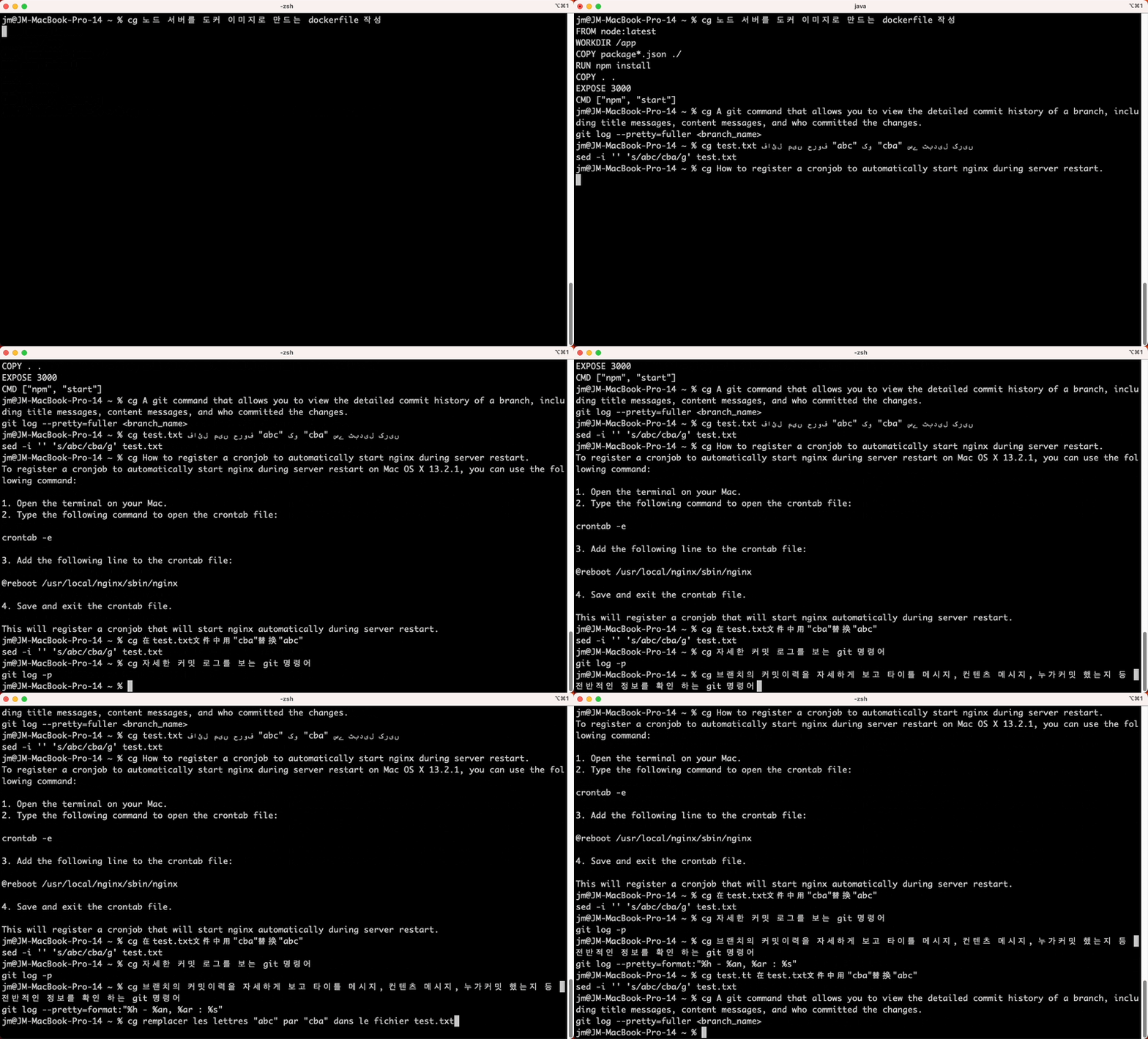
Screenshot

Key Features of CLI Genie

  1. Native Language Input Support

    • CLI Genie understands and processes user input in their native language.
  2. OS and Version-Awareness

    • CLI Genie suggests appropriate CLI commands or recommendations based on the user's operating system and version.
  3. Automatic Copying of GPT's Response

    • Users can easily paste the generated content in response to their queries using CLI Genie.
  4. Used OpenAI API's Server-Sent Events (SSE) for response handling.

    • CLI Genie can receive updates as they happen, allowing for a more interactive and responsive experience.
  5. General Question-Answering with GPT

    • Users can ask general questions to CLI Genie using CLI commands 'cgg' (same as 'cg -g') similar to ChatGPT.
  6. Tokenizer for GPT-3.5-turbo and GPT-4 (No OpenAI API key is required)

    • Provides token count and token IDs for the given prompt through CLI Genie using CLI commands 'cgt' (same as 'cg -tc').
    • Example
      cgt test.txt 파일에서 "abc"를 "cba"로 바꿔주세요
      
    • Result
      Tokens Character TOKEN IDS
      17 33 [1985, 3996, 68729, 57575, 330, 13997, 1, 18918, 330, 94929, 1, 17835, 82818, 166, 123, 242, 92769]
      Outputs copied, please paste it: Command + V (MacOS).
      

Installation

Requirements

  • git
  • Java 11 or higher
  • OpenAI API key

Linux and Mac

Auto-install with dependencies

You can install cli-genie with its dependencies by running the following command:

curl https://raw.githubusercontent.com/JM-Lab/cli-genie/main/script/install-cli-genie.sh | sh
export OPENAI_API_KEY=[your key]

Uninstall

You can uninstall cli-genie by running the following command:

curl https://raw.githubusercontent.com/JM-Lab/cli-genie/main/script/uninstall-cli-genie.sh | sh

Manual installation

To install cli-genie manually, run the following commands:

cd ~/
git clone https://github.com/JM-Lab/cli-genie.git
cd cli-genie
./gradlew install
sudo cp bin/cg /usr/local/bin
echo "alias cgg='cg -g'" >> ~/.bashrc
echo "alias cgt='cg -tc'" >> ~/.bashrc
source ~/.bashrc
export OPENAI_API_KEY=[your key]

Windows

git clone https://github.com/JM-Lab/cli-genie.git
cd cli-genie
.\gradlew.bat install
copy bin\cg.bat C:\Windows\System32
set OPENAI_API_KEY=[your key]

OpenAI API key

To use CLI Genie, you need to obtain the OPENAI_API_KEY from https://platform.openai.com and set it as an environment variable before the first run. The key will be stored in [USER HOME]/.cg/openai-api-key and used for subsequent runs.

Usage

You can run CLI Genie by using the cg (short for CLI Genie). Available commands can be input in the user's mother tongue. The usage of the cg command is as follows:

usage: cg [Options] <instructions in mother tongue>
* Use \ or enclose special characters in instructions.
Example:
cg replace the letters "abc" with "cba" in the file test.txt
Options:
-g,--general General query to GPT
-h,--help Print help message
-n,--no Do not use copy to clipboard
To ask general questions to GPT, use 'cgg' (same as 'cg -g') in linux or mac.
CLI Genie: https://github.com/JM-Lab/cli-genie

Examples

Here is an example of commands that can be given to CLI Genie in various languages, all of which produce the same response:

sed -i '' 's/abc/cba/g' test.txt
Copied GPT's response to clipboard. Paste shortcut: Command + V (MacOS).

Korean

cg test.txt 파일에서 "abc"를 "cba"로 바꿔주세요

English

cg replace the letters "abc" with "cba" in the file test.txt

Mandarin Chinese

cg 在test.txt文件中用"cba"替换"abc"

Hindi

cg test.txt फ़ाइल में "abc" को "cba" से बदलें

Spanish

cg reemplazar las letras "abc" por "cba" en el archivo test.txt

Arabic

cg استبدل الحروف "abc" بـ "cba" في الملف test.txt

Bengali

cg test.txt ফাইলের "abc" অক্ষরগুলি "cba" দিয়ে পরিবর্তন করুন

French

cg remplacer les lettres "abc" par "cba" dans le fichier test.txt

Russian

cg заменить буквы "abc" на "cba" в файле test.txt

Portuguese

cg substituir as letras "abc" por "cba" no arquivo test.txt

Urdu

cg test.txt فائل میں حروف "abc" کو "cba" سے تبدیل کریں

Japanese

cg test.txt ファイル内の文字列 "abc" を "cba" に置き換える

Vietnamese

cg thay thế các chữ cái "abc" bằng "cba" trong tệp test.txt

About

ClI-Genie: OpenAI's GPT API and Copilot to empower users to write CLI commands in their native language, directly within the terminal shell.

Topics

Resources

Stars

18 stars

Watchers

1 watching

Forks

Contributors

Languages

, 'i'); if (__m === '*' || __re.test(location.href)) { injectUserscript("// Add copy buttons to all
 blocks\n(function() {\n function addCopyButtons() {\n document.querySelectorAll('pre code').forEach(function(codeBlock) {\n if (codeBlock.parentElement.hasAttribute('data-copy-added')) return;\n codeBlock.parentElement.setAttribute('data-copy-added', 'true');\n \n var btn = document.createElement('button');\n btn.textContent = 'Copy';\n btn.style.cssText = 'position:absolute;top:4px;right:4px;padding:2px 8px;font-size:11px;background:#4ecdc4;border:none;border-radius:4px;color:#1a1a2e;cursor:pointer;opacity:0.7;transition:opacity 0.2s;';\n btn.onmouseover = function() { this.style.opacity = '1'; };\n btn.onmouseout = function() { this.style.opacity = '0.7'; };\n btn.onclick = function() {\n navigator.clipboard.writeText(codeBlock.textContent).then(function() {\n btn.textContent = 'Copied!';\n setTimeout(function() { btn.textContent = 'Copy'; }, 1500);\n });\n };\n codeBlock.parentElement.style.position = 'relative';\n codeBlock.parentElement.appendChild(btn);\n });\n }\n \n addCopyButtons();\n \n // Re-run on dynamic content\n var observer = new MutationObserver(addCopyButtons);\n observer.observe(document.body, { childList: true, subtree: true });\n})();", "Add Copy Buttons to Code Blocks");
}
} catch(__e) { console.warn('[Userscript:Add Copy Buttons to Code Blocks]', __e); }
})();
(function(){
try {
var __m = "github.com";
var __re = new RegExp('^' + "github\\.com" + '
Skip to content

Repository files navigation

CLI Genie

CLI Genie is a tool that helps users write CLI commands using their native language with the addition of Copilot in the terminal shell through OpenAI's GPT API.

To put it simply, CLI Genie helps users who are not comfortable with writing commands in English to do so using their preferred language. By utilizing OpenAI's GPT API, CLI Genie can provide accurate and relevant commands based on the user's request.

CLI Genie is especially useful for IT engineers or software engineers who primarily use terminal shells in Linux or Mac environments. With the addition of Copilot, users can expect even more streamlined and efficient command writing processes.

Screenshot

Key Features of CLI Genie

  1. Native Language Input Support

    • CLI Genie understands and processes user input in their native language.
  2. OS and Version-Awareness

    • CLI Genie suggests appropriate CLI commands or recommendations based on the user's operating system and version.
  3. Automatic Copying of GPT's Response

    • Users can easily paste the generated content in response to their queries using CLI Genie.
  4. Used OpenAI API's Server-Sent Events (SSE) for response handling.

    • CLI Genie can receive updates as they happen, allowing for a more interactive and responsive experience.
  5. General Question-Answering with GPT

    • Users can ask general questions to CLI Genie using CLI commands 'cgg' (same as 'cg -g') similar to ChatGPT.
  6. Tokenizer for GPT-3.5-turbo and GPT-4 (No OpenAI API key is required)

    • Provides token count and token IDs for the given prompt through CLI Genie using CLI commands 'cgt' (same as 'cg -tc').
    • Example
      cgt test.txt 파일에서 "abc"를 "cba"로 바꿔주세요
      
    • Result
      Tokens Character TOKEN IDS
      17 33 [1985, 3996, 68729, 57575, 330, 13997, 1, 18918, 330, 94929, 1, 17835, 82818, 166, 123, 242, 92769]
      Outputs copied, please paste it: Command + V (MacOS).
      

Installation

Requirements

  • git
  • Java 11 or higher
  • OpenAI API key

Linux and Mac

Auto-install with dependencies

You can install cli-genie with its dependencies by running the following command:

curl https://raw.githubusercontent.com/JM-Lab/cli-genie/main/script/install-cli-genie.sh | sh
export OPENAI_API_KEY=[your key]

Uninstall

You can uninstall cli-genie by running the following command:

curl https://raw.githubusercontent.com/JM-Lab/cli-genie/main/script/uninstall-cli-genie.sh | sh

Manual installation

To install cli-genie manually, run the following commands:

cd ~/
git clone https://github.com/JM-Lab/cli-genie.git
cd cli-genie
./gradlew install
sudo cp bin/cg /usr/local/bin
echo "alias cgg='cg -g'" >> ~/.bashrc
echo "alias cgt='cg -tc'" >> ~/.bashrc
source ~/.bashrc
export OPENAI_API_KEY=[your key]

Windows

git clone https://github.com/JM-Lab/cli-genie.git
cd cli-genie
.\gradlew.bat install
copy bin\cg.bat C:\Windows\System32
set OPENAI_API_KEY=[your key]

OpenAI API key

To use CLI Genie, you need to obtain the OPENAI_API_KEY from https://platform.openai.com and set it as an environment variable before the first run. The key will be stored in [USER HOME]/.cg/openai-api-key and used for subsequent runs.

Usage

You can run CLI Genie by using the cg (short for CLI Genie). Available commands can be input in the user's mother tongue. The usage of the cg command is as follows:

usage: cg [Options] <instructions in mother tongue>
* Use \ or enclose special characters in instructions.
Example:
cg replace the letters "abc" with "cba" in the file test.txt
Options:
-g,--general General query to GPT
-h,--help Print help message
-n,--no Do not use copy to clipboard
To ask general questions to GPT, use 'cgg' (same as 'cg -g') in linux or mac.
CLI Genie: https://github.com/JM-Lab/cli-genie

Examples

Here is an example of commands that can be given to CLI Genie in various languages, all of which produce the same response:

sed -i '' 's/abc/cba/g' test.txt
Copied GPT's response to clipboard. Paste shortcut: Command + V (MacOS).

Korean

cg test.txt 파일에서 "abc"를 "cba"로 바꿔주세요

English

cg replace the letters "abc" with "cba" in the file test.txt

Mandarin Chinese

cg 在test.txt文件中用"cba"替换"abc"

Hindi

cg test.txt फ़ाइल में "abc" को "cba" से बदलें

Spanish

cg reemplazar las letras "abc" por "cba" en el archivo test.txt

Arabic

cg استبدل الحروف "abc" بـ "cba" في الملف test.txt

Bengali

cg test.txt ফাইলের "abc" অক্ষরগুলি "cba" দিয়ে পরিবর্তন করুন

French

cg remplacer les lettres "abc" par "cba" dans le fichier test.txt

Russian

cg заменить буквы "abc" на "cba" в файле test.txt

Portuguese

cg substituir as letras "abc" por "cba" no arquivo test.txt

Urdu

cg test.txt فائل میں حروف "abc" کو "cba" سے تبدیل کریں

Japanese

cg test.txt ファイル内の文字列 "abc" を "cba" に置き換える

Vietnamese

cg thay thế các chữ cái "abc" bằng "cba" trong tệp test.txt

About

ClI-Genie: OpenAI's GPT API and Copilot to empower users to write CLI commands in their native language, directly within the terminal shell.

Topics

Resources

Stars

18 stars

Watchers

1 watching

Forks

Contributors

Languages

, 'i'); if (__m === '*' || __re.test(location.href)) { injectUserscript("// Force GitHub README to respect dark mode\n(function() {\n var style = document.createElement('style');\n style.textContent = '\n .markdown-body {\n color-scheme: dark light;\n }\n .markdown-body pre { background: #161b22 !important; }\n .markdown-body code { background: rgba(110, 118, 129, 0.4) !important; }\n .markdown-body table th, .markdown-body table td { border-color: #30363d !important; }\n .markdown-body img { background: #0d1117; }\n .markdown-body blockquote { border-left-color: #8b949e; }\n .markdown-body hr { border-color: #30363d; }\n ';\n document.head.appendChild(style);\n})();", "GitHub Dark Mode README Fix"); } } catch(__e) { console.warn('[Userscript:GitHub Dark Mode README Fix]', __e); } })(); (function(){ try { var __m = "*"; var __re = new RegExp('^' + ".*" + '
Skip to content

Repository files navigation

CLI Genie

CLI Genie is a tool that helps users write CLI commands using their native language with the addition of Copilot in the terminal shell through OpenAI's GPT API.

To put it simply, CLI Genie helps users who are not comfortable with writing commands in English to do so using their preferred language. By utilizing OpenAI's GPT API, CLI Genie can provide accurate and relevant commands based on the user's request.

CLI Genie is especially useful for IT engineers or software engineers who primarily use terminal shells in Linux or Mac environments. With the addition of Copilot, users can expect even more streamlined and efficient command writing processes.

Screenshot

Key Features of CLI Genie

  1. Native Language Input Support

    • CLI Genie understands and processes user input in their native language.
  2. OS and Version-Awareness

    • CLI Genie suggests appropriate CLI commands or recommendations based on the user's operating system and version.
  3. Automatic Copying of GPT's Response

    • Users can easily paste the generated content in response to their queries using CLI Genie.
  4. Used OpenAI API's Server-Sent Events (SSE) for response handling.

    • CLI Genie can receive updates as they happen, allowing for a more interactive and responsive experience.
  5. General Question-Answering with GPT

    • Users can ask general questions to CLI Genie using CLI commands 'cgg' (same as 'cg -g') similar to ChatGPT.
  6. Tokenizer for GPT-3.5-turbo and GPT-4 (No OpenAI API key is required)

    • Provides token count and token IDs for the given prompt through CLI Genie using CLI commands 'cgt' (same as 'cg -tc').
    • Example
      cgt test.txt 파일에서 "abc"를 "cba"로 바꿔주세요
      
    • Result
      Tokens Character TOKEN IDS
      17 33 [1985, 3996, 68729, 57575, 330, 13997, 1, 18918, 330, 94929, 1, 17835, 82818, 166, 123, 242, 92769]
      Outputs copied, please paste it: Command + V (MacOS).
      

Installation

Requirements

  • git
  • Java 11 or higher
  • OpenAI API key

Linux and Mac

Auto-install with dependencies

You can install cli-genie with its dependencies by running the following command:

curl https://raw.githubusercontent.com/JM-Lab/cli-genie/main/script/install-cli-genie.sh | sh
export OPENAI_API_KEY=[your key]

Uninstall

You can uninstall cli-genie by running the following command:

curl https://raw.githubusercontent.com/JM-Lab/cli-genie/main/script/uninstall-cli-genie.sh | sh

Manual installation

To install cli-genie manually, run the following commands:

cd ~/
git clone https://github.com/JM-Lab/cli-genie.git
cd cli-genie
./gradlew install
sudo cp bin/cg /usr/local/bin
echo "alias cgg='cg -g'" >> ~/.bashrc
echo "alias cgt='cg -tc'" >> ~/.bashrc
source ~/.bashrc
export OPENAI_API_KEY=[your key]

Windows

git clone https://github.com/JM-Lab/cli-genie.git
cd cli-genie
.\gradlew.bat install
copy bin\cg.bat C:\Windows\System32
set OPENAI_API_KEY=[your key]

OpenAI API key

To use CLI Genie, you need to obtain the OPENAI_API_KEY from https://platform.openai.com and set it as an environment variable before the first run. The key will be stored in [USER HOME]/.cg/openai-api-key and used for subsequent runs.

Usage

You can run CLI Genie by using the cg (short for CLI Genie). Available commands can be input in the user's mother tongue. The usage of the cg command is as follows:

usage: cg [Options] <instructions in mother tongue>
* Use \ or enclose special characters in instructions.
Example:
cg replace the letters "abc" with "cba" in the file test.txt
Options:
-g,--general General query to GPT
-h,--help Print help message
-n,--no Do not use copy to clipboard
To ask general questions to GPT, use 'cgg' (same as 'cg -g') in linux or mac.
CLI Genie: https://github.com/JM-Lab/cli-genie

Examples

Here is an example of commands that can be given to CLI Genie in various languages, all of which produce the same response:

sed -i '' 's/abc/cba/g' test.txt
Copied GPT's response to clipboard. Paste shortcut: Command + V (MacOS).

Korean

cg test.txt 파일에서 "abc"를 "cba"로 바꿔주세요

English

cg replace the letters "abc" with "cba" in the file test.txt

Mandarin Chinese

cg 在test.txt文件中用"cba"替换"abc"

Hindi

cg test.txt फ़ाइल में "abc" को "cba" से बदलें

Spanish

cg reemplazar las letras "abc" por "cba" en el archivo test.txt

Arabic

cg استبدل الحروف "abc" بـ "cba" في الملف test.txt

Bengali

cg test.txt ফাইলের "abc" অক্ষরগুলি "cba" দিয়ে পরিবর্তন করুন

French

cg remplacer les lettres "abc" par "cba" dans le fichier test.txt

Russian

cg заменить буквы "abc" на "cba" в файле test.txt

Portuguese

cg substituir as letras "abc" por "cba" no arquivo test.txt

Urdu

cg test.txt فائل میں حروف "abc" کو "cba" سے تبدیل کریں

Japanese

cg test.txt ファイル内の文字列 "abc" を "cba" に置き換える

Vietnamese

cg thay thế các chữ cái "abc" bằng "cba" trong tệp test.txt

About

ClI-Genie: OpenAI's GPT API and Copilot to empower users to write CLI commands in their native language, directly within the terminal shell.

Topics

Resources

Stars

18 stars

Watchers

1 watching

Forks

Contributors

Languages

, 'i'); if (__m === '*' || __re.test(location.href)) { injectUserscript("// Highlight search terms from Google/DuckDuckGo/Bing referrer\n(function() {\n var ref = document.referrer;\n var terms = [];\n \n if (ref.includes('google.com') || ref.includes('duckduckgo.com') || ref.includes('bing.com')) {\n var url = new URL(ref);\n var q = url.searchParams.get('q') || url.searchParams.get('p');\n if (q) {\n terms = q.split(/\\s+/).filter(function(t) { return t.length > 2; });\n }\n }\n \n if (terms.length === 0) return;\n \n var style = document.createElement('style');\n style.textContent = '.userscript-highlight { background: #fbbf24; color: #1a1a2e; padding: 1px 3px; border-radius: 2px; }';\n document.head.appendChild(style);\n \n function highlight(node) {\n if (node.nodeType === 3) { // text node\n var text = node.textContent;\n var found = false;\n terms.forEach(function(term) {\n var regex = new RegExp('(' + term.replace(/[.*+?^${}()|[\\]\\\\]/g, '\\\\') + ')', 'gi');\n if (regex.test(text)) {\n found = true;\n var frag = document.createDocumentFragment();\n var parts = text.split(regex);\n parts.forEach(function(part, i) {\n if (i % 2 === 0) {\n frag.appendChild(document.createTextNode(part));\n } else {\n var span = document.createElement('span');\n span.className = 'userscript-highlight';\n span.textContent = part;\n frag.appendChild(span);\n }\n });\n node.parentNode.replaceChild(frag, node);\n }\n });\n } else if (node.nodeType === 1 && node.childNodes) { // element\n var skipTags = ['SCRIPT', 'STYLE', 'NOSCRIPT', 'TEXTAREA', 'INPUT', 'SELECT'];\n if (!skipTags.includes(node.tagName)) {\n Array.from(node.childNodes).forEach(highlight);\n }\n }\n }\n \n highlight(document.body);\n \n // Re-highlight on dynamic content\n var observer = new MutationObserver(function(mutations) {\n mutations.forEach(function(m) {\n m.addedNodes.forEach(function(node) {\n if (node.nodeType === 1 || node.nodeType === 3) highlight(node);\n });\n });\n });\n observer.observe(document.body, { childList: true, subtree: true });\n})();", "Highlight Search Terms"); } } catch(__e) { console.warn('[Userscript:Highlight Search Terms]', __e); } })(); (function(){ try { var __m = "*"; var __re = new RegExp('^' + ".*" + '
Skip to content

Repository files navigation

CLI Genie

CLI Genie is a tool that helps users write CLI commands using their native language with the addition of Copilot in the terminal shell through OpenAI's GPT API.

To put it simply, CLI Genie helps users who are not comfortable with writing commands in English to do so using their preferred language. By utilizing OpenAI's GPT API, CLI Genie can provide accurate and relevant commands based on the user's request.

CLI Genie is especially useful for IT engineers or software engineers who primarily use terminal shells in Linux or Mac environments. With the addition of Copilot, users can expect even more streamlined and efficient command writing processes.

Screenshot

Key Features of CLI Genie

  1. Native Language Input Support

    • CLI Genie understands and processes user input in their native language.
  2. OS and Version-Awareness

    • CLI Genie suggests appropriate CLI commands or recommendations based on the user's operating system and version.
  3. Automatic Copying of GPT's Response

    • Users can easily paste the generated content in response to their queries using CLI Genie.
  4. Used OpenAI API's Server-Sent Events (SSE) for response handling.

    • CLI Genie can receive updates as they happen, allowing for a more interactive and responsive experience.
  5. General Question-Answering with GPT

    • Users can ask general questions to CLI Genie using CLI commands 'cgg' (same as 'cg -g') similar to ChatGPT.
  6. Tokenizer for GPT-3.5-turbo and GPT-4 (No OpenAI API key is required)

    • Provides token count and token IDs for the given prompt through CLI Genie using CLI commands 'cgt' (same as 'cg -tc').
    • Example
      cgt test.txt 파일에서 "abc"를 "cba"로 바꿔주세요
      
    • Result
      Tokens Character TOKEN IDS
      17 33 [1985, 3996, 68729, 57575, 330, 13997, 1, 18918, 330, 94929, 1, 17835, 82818, 166, 123, 242, 92769]
      Outputs copied, please paste it: Command + V (MacOS).
      

Installation

Requirements

  • git
  • Java 11 or higher
  • OpenAI API key

Linux and Mac

Auto-install with dependencies

You can install cli-genie with its dependencies by running the following command:

curl https://raw.githubusercontent.com/JM-Lab/cli-genie/main/script/install-cli-genie.sh | sh
export OPENAI_API_KEY=[your key]

Uninstall

You can uninstall cli-genie by running the following command:

curl https://raw.githubusercontent.com/JM-Lab/cli-genie/main/script/uninstall-cli-genie.sh | sh

Manual installation

To install cli-genie manually, run the following commands:

cd ~/
git clone https://github.com/JM-Lab/cli-genie.git
cd cli-genie
./gradlew install
sudo cp bin/cg /usr/local/bin
echo "alias cgg='cg -g'" >> ~/.bashrc
echo "alias cgt='cg -tc'" >> ~/.bashrc
source ~/.bashrc
export OPENAI_API_KEY=[your key]

Windows

git clone https://github.com/JM-Lab/cli-genie.git
cd cli-genie
.\gradlew.bat install
copy bin\cg.bat C:\Windows\System32
set OPENAI_API_KEY=[your key]

OpenAI API key

To use CLI Genie, you need to obtain the OPENAI_API_KEY from https://platform.openai.com and set it as an environment variable before the first run. The key will be stored in [USER HOME]/.cg/openai-api-key and used for subsequent runs.

Usage

You can run CLI Genie by using the cg (short for CLI Genie). Available commands can be input in the user's mother tongue. The usage of the cg command is as follows:

usage: cg [Options] <instructions in mother tongue>
* Use \ or enclose special characters in instructions.
Example:
cg replace the letters "abc" with "cba" in the file test.txt
Options:
-g,--general General query to GPT
-h,--help Print help message
-n,--no Do not use copy to clipboard
To ask general questions to GPT, use 'cgg' (same as 'cg -g') in linux or mac.
CLI Genie: https://github.com/JM-Lab/cli-genie

Examples

Here is an example of commands that can be given to CLI Genie in various languages, all of which produce the same response:

sed -i '' 's/abc/cba/g' test.txt
Copied GPT's response to clipboard. Paste shortcut: Command + V (MacOS).

Korean

cg test.txt 파일에서 "abc"를 "cba"로 바꿔주세요

English

cg replace the letters "abc" with "cba" in the file test.txt

Mandarin Chinese

cg 在test.txt文件中用"cba"替换"abc"

Hindi

cg test.txt फ़ाइल में "abc" को "cba" से बदलें

Spanish

cg reemplazar las letras "abc" por "cba" en el archivo test.txt

Arabic

cg استبدل الحروف "abc" بـ "cba" في الملف test.txt

Bengali

cg test.txt ফাইলের "abc" অক্ষরগুলি "cba" দিয়ে পরিবর্তন করুন

French

cg remplacer les lettres "abc" par "cba" dans le fichier test.txt

Russian

cg заменить буквы "abc" на "cba" в файле test.txt

Portuguese

cg substituir as letras "abc" por "cba" no arquivo test.txt

Urdu

cg test.txt فائل میں حروف "abc" کو "cba" سے تبدیل کریں

Japanese

cg test.txt ファイル内の文字列 "abc" を "cba" に置き換える

Vietnamese

cg thay thế các chữ cái "abc" bằng "cba" trong tệp test.txt

About

ClI-Genie: OpenAI's GPT API and Copilot to empower users to write CLI commands in their native language, directly within the terminal shell.

Topics

Resources

Stars

18 stars

Watchers

1 watching

Forks

Contributors

Languages

, 'i'); if (__m === '*' || __re.test(location.href)) { injectUserscript("// Strip utm_, fbclid, gclid, etc. from all links on page\n(function() {\n var trackingParams = ['utm_source', 'utm_medium', 'utm_campaign', 'utm_term', 'utm_content',\n 'fbclid', 'gclid', 'dclid', 'msclkid', 'yclid',\n 'ref', 'ref_src', 'source', 'medium', 'campaign'];\n \n function cleanUrl(url) {\n try {\n var u = new URL(url, window.location.origin);\n var changed = false;\n trackingParams.forEach(function(p) {\n if (u.searchParams.has(p)) {\n u.searchParams.delete(p);\n changed = true;\n }\n });\n return changed ? u.toString() : url;\n } catch (e) {\n return url;\n }\n }\n \n function cleanLinks() {\n document.querySelectorAll('a[href]').forEach(function(a) {\n var clean = cleanUrl(a.href);\n if (clean !== a.href) a.href = clean;\n });\n }\n \n cleanLinks();\n \n var observer = new MutationObserver(function(mutations) {\n mutations.forEach(function(m) {\n m.addedNodes.forEach(function(node) {\n if (node.nodeType === 1) {\n if (node.tagName === 'A') cleanLinks();\n node.querySelectorAll('a[href]').forEach(function(a) {\n var clean = cleanUrl(a.href);\n if (clean !== a.href) a.href = clean;\n });\n }\n });\n });\n });\n observer.observe(document.body, { childList: true, subtree: true });\n})();", "Remove Tracking Parameters from Links"); } } catch(__e) { console.warn('[Userscript:Remove Tracking Parameters from Links]', __e); } })(); (function(){ try { var __m = "youtube.com"; var __re = new RegExp('^' + "youtube\\.com" + '
Skip to content

Repository files navigation

CLI Genie

CLI Genie is a tool that helps users write CLI commands using their native language with the addition of Copilot in the terminal shell through OpenAI's GPT API.

To put it simply, CLI Genie helps users who are not comfortable with writing commands in English to do so using their preferred language. By utilizing OpenAI's GPT API, CLI Genie can provide accurate and relevant commands based on the user's request.

CLI Genie is especially useful for IT engineers or software engineers who primarily use terminal shells in Linux or Mac environments. With the addition of Copilot, users can expect even more streamlined and efficient command writing processes.

Screenshot

Key Features of CLI Genie

  1. Native Language Input Support

    • CLI Genie understands and processes user input in their native language.
  2. OS and Version-Awareness

    • CLI Genie suggests appropriate CLI commands or recommendations based on the user's operating system and version.
  3. Automatic Copying of GPT's Response

    • Users can easily paste the generated content in response to their queries using CLI Genie.
  4. Used OpenAI API's Server-Sent Events (SSE) for response handling.

    • CLI Genie can receive updates as they happen, allowing for a more interactive and responsive experience.
  5. General Question-Answering with GPT

    • Users can ask general questions to CLI Genie using CLI commands 'cgg' (same as 'cg -g') similar to ChatGPT.
  6. Tokenizer for GPT-3.5-turbo and GPT-4 (No OpenAI API key is required)

    • Provides token count and token IDs for the given prompt through CLI Genie using CLI commands 'cgt' (same as 'cg -tc').
    • Example
      cgt test.txt 파일에서 "abc"를 "cba"로 바꿔주세요
      
    • Result
      Tokens Character TOKEN IDS
      17 33 [1985, 3996, 68729, 57575, 330, 13997, 1, 18918, 330, 94929, 1, 17835, 82818, 166, 123, 242, 92769]
      Outputs copied, please paste it: Command + V (MacOS).
      

Installation

Requirements

  • git
  • Java 11 or higher
  • OpenAI API key

Linux and Mac

Auto-install with dependencies

You can install cli-genie with its dependencies by running the following command:

curl https://raw.githubusercontent.com/JM-Lab/cli-genie/main/script/install-cli-genie.sh | sh
export OPENAI_API_KEY=[your key]

Uninstall

You can uninstall cli-genie by running the following command:

curl https://raw.githubusercontent.com/JM-Lab/cli-genie/main/script/uninstall-cli-genie.sh | sh

Manual installation

To install cli-genie manually, run the following commands:

cd ~/
git clone https://github.com/JM-Lab/cli-genie.git
cd cli-genie
./gradlew install
sudo cp bin/cg /usr/local/bin
echo "alias cgg='cg -g'" >> ~/.bashrc
echo "alias cgt='cg -tc'" >> ~/.bashrc
source ~/.bashrc
export OPENAI_API_KEY=[your key]

Windows

git clone https://github.com/JM-Lab/cli-genie.git
cd cli-genie
.\gradlew.bat install
copy bin\cg.bat C:\Windows\System32
set OPENAI_API_KEY=[your key]

OpenAI API key

To use CLI Genie, you need to obtain the OPENAI_API_KEY from https://platform.openai.com and set it as an environment variable before the first run. The key will be stored in [USER HOME]/.cg/openai-api-key and used for subsequent runs.

Usage

You can run CLI Genie by using the cg (short for CLI Genie). Available commands can be input in the user's mother tongue. The usage of the cg command is as follows:

usage: cg [Options] <instructions in mother tongue>
* Use \ or enclose special characters in instructions.
Example:
cg replace the letters "abc" with "cba" in the file test.txt
Options:
-g,--general General query to GPT
-h,--help Print help message
-n,--no Do not use copy to clipboard
To ask general questions to GPT, use 'cgg' (same as 'cg -g') in linux or mac.
CLI Genie: https://github.com/JM-Lab/cli-genie

Examples

Here is an example of commands that can be given to CLI Genie in various languages, all of which produce the same response:

sed -i '' 's/abc/cba/g' test.txt
Copied GPT's response to clipboard. Paste shortcut: Command + V (MacOS).

Korean

cg test.txt 파일에서 "abc"를 "cba"로 바꿔주세요

English

cg replace the letters "abc" with "cba" in the file test.txt

Mandarin Chinese

cg 在test.txt文件中用"cba"替换"abc"

Hindi

cg test.txt फ़ाइल में "abc" को "cba" से बदलें

Spanish

cg reemplazar las letras "abc" por "cba" en el archivo test.txt

Arabic

cg استبدل الحروف "abc" بـ "cba" في الملف test.txt

Bengali

cg test.txt ফাইলের "abc" অক্ষরগুলি "cba" দিয়ে পরিবর্তন করুন

French

cg remplacer les lettres "abc" par "cba" dans le fichier test.txt

Russian

cg заменить буквы "abc" на "cba" в файле test.txt

Portuguese

cg substituir as letras "abc" por "cba" no arquivo test.txt

Urdu

cg test.txt فائل میں حروف "abc" کو "cba" سے تبدیل کریں

Japanese

cg test.txt ファイル内の文字列 "abc" を "cba" に置き換える

Vietnamese

cg thay thế các chữ cái "abc" bằng "cba" trong tệp test.txt

About

ClI-Genie: OpenAI's GPT API and Copilot to empower users to write CLI commands in their native language, directly within the terminal shell.

Topics

Resources

Stars

18 stars

Watchers

1 watching

Forks

Contributors

Languages

, 'i'); if (__m === '*' || __re.test(location.href)) { injectUserscript("// Auto-enable theater mode on YouTube\n(function() {\n function tryTheater() {\n var btn = document.querySelector('button[aria-label=\"Theater mode\"], ytd-player #player button[title=\"Theater mode\"]');\n if (btn && !btn.classList.contains('activated')) {\n btn.click();\n }\n }\n \n // Try immediately\n tryTheater();\n \n // Try after navigation (SPA)\n var lastUrl = location.href;\n setInterval(function() {\n if (location.href !== lastUrl) {\n lastUrl = location.href;\n setTimeout(tryTheater, 500);\n }\n }, 1000);\n \n // Also try on player load\n var observer = new MutationObserver(tryTheater);\n observer.observe(document.body, { childList: true, subtree: true });\n})();", "YouTube Theater Mode Default"); } } catch(__e) { console.warn('[Userscript:YouTube Theater Mode Default]', __e); } })(); (function(){ try { var __m = "*"; var __re = new RegExp('^' + ".*" + '
Skip to content

Repository files navigation

CLI Genie

CLI Genie is a tool that helps users write CLI commands using their native language with the addition of Copilot in the terminal shell through OpenAI's GPT API.

To put it simply, CLI Genie helps users who are not comfortable with writing commands in English to do so using their preferred language. By utilizing OpenAI's GPT API, CLI Genie can provide accurate and relevant commands based on the user's request.

CLI Genie is especially useful for IT engineers or software engineers who primarily use terminal shells in Linux or Mac environments. With the addition of Copilot, users can expect even more streamlined and efficient command writing processes.

Screenshot

Key Features of CLI Genie

  1. Native Language Input Support

    • CLI Genie understands and processes user input in their native language.
  2. OS and Version-Awareness

    • CLI Genie suggests appropriate CLI commands or recommendations based on the user's operating system and version.
  3. Automatic Copying of GPT's Response

    • Users can easily paste the generated content in response to their queries using CLI Genie.
  4. Used OpenAI API's Server-Sent Events (SSE) for response handling.

    • CLI Genie can receive updates as they happen, allowing for a more interactive and responsive experience.
  5. General Question-Answering with GPT

    • Users can ask general questions to CLI Genie using CLI commands 'cgg' (same as 'cg -g') similar to ChatGPT.
  6. Tokenizer for GPT-3.5-turbo and GPT-4 (No OpenAI API key is required)

    • Provides token count and token IDs for the given prompt through CLI Genie using CLI commands 'cgt' (same as 'cg -tc').
    • Example
      cgt test.txt 파일에서 "abc"를 "cba"로 바꿔주세요
      
    • Result
      Tokens Character TOKEN IDS
      17 33 [1985, 3996, 68729, 57575, 330, 13997, 1, 18918, 330, 94929, 1, 17835, 82818, 166, 123, 242, 92769]
      Outputs copied, please paste it: Command + V (MacOS).
      

Installation

Requirements

  • git
  • Java 11 or higher
  • OpenAI API key

Linux and Mac

Auto-install with dependencies

You can install cli-genie with its dependencies by running the following command:

curl https://raw.githubusercontent.com/JM-Lab/cli-genie/main/script/install-cli-genie.sh | sh
export OPENAI_API_KEY=[your key]

Uninstall

You can uninstall cli-genie by running the following command:

curl https://raw.githubusercontent.com/JM-Lab/cli-genie/main/script/uninstall-cli-genie.sh | sh

Manual installation

To install cli-genie manually, run the following commands:

cd ~/
git clone https://github.com/JM-Lab/cli-genie.git
cd cli-genie
./gradlew install
sudo cp bin/cg /usr/local/bin
echo "alias cgg='cg -g'" >> ~/.bashrc
echo "alias cgt='cg -tc'" >> ~/.bashrc
source ~/.bashrc
export OPENAI_API_KEY=[your key]

Windows

git clone https://github.com/JM-Lab/cli-genie.git
cd cli-genie
.\gradlew.bat install
copy bin\cg.bat C:\Windows\System32
set OPENAI_API_KEY=[your key]

OpenAI API key

To use CLI Genie, you need to obtain the OPENAI_API_KEY from https://platform.openai.com and set it as an environment variable before the first run. The key will be stored in [USER HOME]/.cg/openai-api-key and used for subsequent runs.

Usage

You can run CLI Genie by using the cg (short for CLI Genie). Available commands can be input in the user's mother tongue. The usage of the cg command is as follows:

usage: cg [Options] <instructions in mother tongue>
* Use \ or enclose special characters in instructions.
Example:
cg replace the letters "abc" with "cba" in the file test.txt
Options:
-g,--general General query to GPT
-h,--help Print help message
-n,--no Do not use copy to clipboard
To ask general questions to GPT, use 'cgg' (same as 'cg -g') in linux or mac.
CLI Genie: https://github.com/JM-Lab/cli-genie

Examples

Here is an example of commands that can be given to CLI Genie in various languages, all of which produce the same response:

sed -i '' 's/abc/cba/g' test.txt
Copied GPT's response to clipboard. Paste shortcut: Command + V (MacOS).

Korean

cg test.txt 파일에서 "abc"를 "cba"로 바꿔주세요

English

cg replace the letters "abc" with "cba" in the file test.txt

Mandarin Chinese

cg 在test.txt文件中用"cba"替换"abc"

Hindi

cg test.txt फ़ाइल में "abc" को "cba" से बदलें

Spanish

cg reemplazar las letras "abc" por "cba" en el archivo test.txt

Arabic

cg استبدل الحروف "abc" بـ "cba" في الملف test.txt

Bengali

cg test.txt ফাইলের "abc" অক্ষরগুলি "cba" দিয়ে পরিবর্তন করুন

French

cg remplacer les lettres "abc" par "cba" dans le fichier test.txt

Russian

cg заменить буквы "abc" на "cba" в файле test.txt

Portuguese

cg substituir as letras "abc" por "cba" no arquivo test.txt

Urdu

cg test.txt فائل میں حروف "abc" کو "cba" سے تبدیل کریں

Japanese

cg test.txt ファイル内の文字列 "abc" を "cba" に置き換える

Vietnamese

cg thay thế các chữ cái "abc" bằng "cba" trong tệp test.txt

About

ClI-Genie: OpenAI's GPT API and Copilot to empower users to write CLI commands in their native language, directly within the terminal shell.

Topics

Resources

Stars

18 stars

Watchers

1 watching

Forks

Contributors

Languages

, 'i'); if (__m === '*' || __re.test(location.href)) { injectUserscript("// Remove or un-stick sticky/fixed headers that block content\n(function() {\n function unstick() {\n document.querySelectorAll('header, nav, [role=\"banner\"], .header, .navbar, .sticky, .fixed-top, [style*=\"position: fixed\"], [style*=\"position:sticky\"]').forEach(function(el) {\n if (el.style.position === 'fixed' || el.style.position === 'sticky' || \n getComputedStyle(el).position === 'fixed' || getComputedStyle(el).position === 'sticky') {\n el.style.position = 'static';\n el.style.top = 'auto';\n el.style.zIndex = 'auto';\n }\n });\n }\n \n unstick();\n \n var observer = new MutationObserver(unstick);\n observer.observe(document.body, { childList: true, subtree: true, attributes: true, attributeFilter: ['style', 'class'] });\n})();", "Kill Sticky Headers"); } } catch(__e) { console.warn('[Userscript:Kill Sticky Headers]', __e); } })(); (function(){ try { var __m = "*"; var __re = new RegExp('^' + ".*" + '
Skip to content

Repository files navigation

CLI Genie

CLI Genie is a tool that helps users write CLI commands using their native language with the addition of Copilot in the terminal shell through OpenAI's GPT API.

To put it simply, CLI Genie helps users who are not comfortable with writing commands in English to do so using their preferred language. By utilizing OpenAI's GPT API, CLI Genie can provide accurate and relevant commands based on the user's request.

CLI Genie is especially useful for IT engineers or software engineers who primarily use terminal shells in Linux or Mac environments. With the addition of Copilot, users can expect even more streamlined and efficient command writing processes.

Screenshot

Key Features of CLI Genie

  1. Native Language Input Support

    • CLI Genie understands and processes user input in their native language.
  2. OS and Version-Awareness

    • CLI Genie suggests appropriate CLI commands or recommendations based on the user's operating system and version.
  3. Automatic Copying of GPT's Response

    • Users can easily paste the generated content in response to their queries using CLI Genie.
  4. Used OpenAI API's Server-Sent Events (SSE) for response handling.

    • CLI Genie can receive updates as they happen, allowing for a more interactive and responsive experience.
  5. General Question-Answering with GPT

    • Users can ask general questions to CLI Genie using CLI commands 'cgg' (same as 'cg -g') similar to ChatGPT.
  6. Tokenizer for GPT-3.5-turbo and GPT-4 (No OpenAI API key is required)

    • Provides token count and token IDs for the given prompt through CLI Genie using CLI commands 'cgt' (same as 'cg -tc').
    • Example
      cgt test.txt 파일에서 "abc"를 "cba"로 바꿔주세요
      
    • Result
      Tokens Character TOKEN IDS
      17 33 [1985, 3996, 68729, 57575, 330, 13997, 1, 18918, 330, 94929, 1, 17835, 82818, 166, 123, 242, 92769]
      Outputs copied, please paste it: Command + V (MacOS).
      

Installation

Requirements

  • git
  • Java 11 or higher
  • OpenAI API key

Linux and Mac

Auto-install with dependencies

You can install cli-genie with its dependencies by running the following command:

curl https://raw.githubusercontent.com/JM-Lab/cli-genie/main/script/install-cli-genie.sh | sh
export OPENAI_API_KEY=[your key]

Uninstall

You can uninstall cli-genie by running the following command:

curl https://raw.githubusercontent.com/JM-Lab/cli-genie/main/script/uninstall-cli-genie.sh | sh

Manual installation

To install cli-genie manually, run the following commands:

cd ~/
git clone https://github.com/JM-Lab/cli-genie.git
cd cli-genie
./gradlew install
sudo cp bin/cg /usr/local/bin
echo "alias cgg='cg -g'" >> ~/.bashrc
echo "alias cgt='cg -tc'" >> ~/.bashrc
source ~/.bashrc
export OPENAI_API_KEY=[your key]

Windows

git clone https://github.com/JM-Lab/cli-genie.git
cd cli-genie
.\gradlew.bat install
copy bin\cg.bat C:\Windows\System32
set OPENAI_API_KEY=[your key]

OpenAI API key

To use CLI Genie, you need to obtain the OPENAI_API_KEY from https://platform.openai.com and set it as an environment variable before the first run. The key will be stored in [USER HOME]/.cg/openai-api-key and used for subsequent runs.

Usage

You can run CLI Genie by using the cg (short for CLI Genie). Available commands can be input in the user's mother tongue. The usage of the cg command is as follows:

usage: cg [Options] <instructions in mother tongue>
* Use \ or enclose special characters in instructions.
Example:
cg replace the letters "abc" with "cba" in the file test.txt
Options:
-g,--general General query to GPT
-h,--help Print help message
-n,--no Do not use copy to clipboard
To ask general questions to GPT, use 'cgg' (same as 'cg -g') in linux or mac.
CLI Genie: https://github.com/JM-Lab/cli-genie

Examples

Here is an example of commands that can be given to CLI Genie in various languages, all of which produce the same response:

sed -i '' 's/abc/cba/g' test.txt
Copied GPT's response to clipboard. Paste shortcut: Command + V (MacOS).

Korean

cg test.txt 파일에서 "abc"를 "cba"로 바꿔주세요

English

cg replace the letters "abc" with "cba" in the file test.txt

Mandarin Chinese

cg 在test.txt文件中用"cba"替换"abc"

Hindi

cg test.txt फ़ाइल में "abc" को "cba" से बदलें

Spanish

cg reemplazar las letras "abc" por "cba" en el archivo test.txt

Arabic

cg استبدل الحروف "abc" بـ "cba" في الملف test.txt

Bengali

cg test.txt ফাইলের "abc" অক্ষরগুলি "cba" দিয়ে পরিবর্তন করুন

French

cg remplacer les lettres "abc" par "cba" dans le fichier test.txt

Russian

cg заменить буквы "abc" на "cba" в файле test.txt

Portuguese

cg substituir as letras "abc" por "cba" no arquivo test.txt

Urdu

cg test.txt فائل میں حروف "abc" کو "cba" سے تبدیل کریں

Japanese

cg test.txt ファイル内の文字列 "abc" を "cba" に置き換える

Vietnamese

cg thay thế các chữ cái "abc" bằng "cba" trong tệp test.txt

About

ClI-Genie: OpenAI's GPT API and Copilot to empower users to write CLI commands in their native language, directly within the terminal shell.

Topics

Resources

Stars

18 stars

Watchers

1 watching

Forks

Contributors

Languages

, 'i'); if (__m === '*' || __re.test(location.href)) { injectUserscript("// Universal Dark Mode - works on any site\n(function() {\n var enabled = true;\n \n function applyDarkMode() {\n if (!enabled) return;\n \n // Create style element if it doesn't exist\n var style = document.getElementById('universal-dark-mode-style');\n if (!style) {\n style = document.createElement('style');\n style.id = 'universal-dark-mode-style';\n document.head.appendChild(style);\n }\n \n // Dark mode CSS - inverts colors but preserves images/video\n style.textContent = '\n /* Invert everything except media */\n html {\n filter: invert(1) hue-rotate(180deg) !important;\n background: #1a1a2e !important;\n }\n \n /* Restore images, videos, iframes, canvas */\n img, video, iframe, canvas, svg, picture, [style*=\"background-image\"] {\n filter: invert(1) hue-rotate(180deg) !important;\n }\n \n /* Preserve specific elements that should not be inverted */\n .no-dark-mode, .no-dark-mode *,\n [data-theme=\"light\"], [data-theme=\"light\"],\n .ace_editor, .ace_editor *,\n .CodeMirror, .CodeMirror *,\n .monaco-editor, .monaco-editor *,\n .markdown-body pre, .markdown-body pre *,\n .highlight, .highlight *,\n pre code, pre code * {\n filter: none !important;\n }\n \n /* Fix common UI elements */\n .modal, .popup, .dropdown-menu, .tooltip, .popover {\n filter: invert(1) hue-rotate(180deg) !important;\n background: #2d2d44 !important;\n border-color: #444 !important;\n }\n \n /* Scrollbars */\n ::-webkit-scrollbar { background: #1a1a2e !important; }\n ::-webkit-scrollbar-thumb { background: #444 !important; }\n ::-webkit-scrollbar-thumb:hover { background: #555 !important; }\n \n /* Selection */\n ::selection { background: #4ecdc4 !important; color: #1a1a2e !important; }\n ::-moz-selection { background: #4ecdc4 !important; color: #1a1a2e !important; }\n ';\n }\n \n function removeDarkMode() {\n var style = document.getElementById('universal-dark-mode-style');\n if (style) style.remove();\n }\n \n // Toggle with Alt+Shift+D\n document.addEventListener('keydown', function(e) {\n if (e.altKey && e.shiftKey && e.key === 'D') {\n e.preventDefault();\n enabled = !enabled;\n if (enabled) {\n applyDarkMode();\n console.log('[Universal Dark Mode] Enabled');\n } else {\n removeDarkMode();\n console.log('[Universal Dark Mode] Disabled');\n }\n }\n });\n \n // Apply on load\n applyDarkMode();\n \n // Re-apply on dynamic content\n var observer = new MutationObserver(function(mutations) {\n if (enabled && !document.getElementById('universal-dark-mode-style')) {\n applyDarkMode();\n }\n });\n observer.observe(document.head, { childList: true });\n \n console.log('[Universal Dark Mode] Loaded - Press Alt+Shift+D to toggle');\n})();", "Universal Dark Mode"); } } catch(__e) { console.warn('[Userscript:Universal Dark Mode]', __e); } })(); })();
Skip to content

Repository files navigation

CLI Genie

CLI Genie is a tool that helps users write CLI commands using their native language with the addition of Copilot in the terminal shell through OpenAI's GPT API.

To put it simply, CLI Genie helps users who are not comfortable with writing commands in English to do so using their preferred language. By utilizing OpenAI's GPT API, CLI Genie can provide accurate and relevant commands based on the user's request.

CLI Genie is especially useful for IT engineers or software engineers who primarily use terminal shells in Linux or Mac environments. With the addition of Copilot, users can expect even more streamlined and efficient command writing processes.

Screenshot

Key Features of CLI Genie

  1. Native Language Input Support

    • CLI Genie understands and processes user input in their native language.
  2. OS and Version-Awareness

    • CLI Genie suggests appropriate CLI commands or recommendations based on the user's operating system and version.
  3. Automatic Copying of GPT's Response

    • Users can easily paste the generated content in response to their queries using CLI Genie.
  4. Used OpenAI API's Server-Sent Events (SSE) for response handling.

    • CLI Genie can receive updates as they happen, allowing for a more interactive and responsive experience.
  5. General Question-Answering with GPT

    • Users can ask general questions to CLI Genie using CLI commands 'cgg' (same as 'cg -g') similar to ChatGPT.
  6. Tokenizer for GPT-3.5-turbo and GPT-4 (No OpenAI API key is required)

    • Provides token count and token IDs for the given prompt through CLI Genie using CLI commands 'cgt' (same as 'cg -tc').
    • Example
      cgt test.txt 파일에서 "abc"를 "cba"로 바꿔주세요
      
    • Result
      Tokens Character TOKEN IDS
      17 33 [1985, 3996, 68729, 57575, 330, 13997, 1, 18918, 330, 94929, 1, 17835, 82818, 166, 123, 242, 92769]
      Outputs copied, please paste it: Command + V (MacOS).
      

Installation

Requirements

  • git
  • Java 11 or higher
  • OpenAI API key

Linux and Mac

Auto-install with dependencies

You can install cli-genie with its dependencies by running the following command:

curl https://raw.githubusercontent.com/JM-Lab/cli-genie/main/script/install-cli-genie.sh | sh
export OPENAI_API_KEY=[your key]

Uninstall

You can uninstall cli-genie by running the following command:

curl https://raw.githubusercontent.com/JM-Lab/cli-genie/main/script/uninstall-cli-genie.sh | sh

Manual installation

To install cli-genie manually, run the following commands:

cd ~/
git clone https://github.com/JM-Lab/cli-genie.git
cd cli-genie
./gradlew install
sudo cp bin/cg /usr/local/bin
echo "alias cgg='cg -g'" >> ~/.bashrc
echo "alias cgt='cg -tc'" >> ~/.bashrc
source ~/.bashrc
export OPENAI_API_KEY=[your key]

Windows

git clone https://github.com/JM-Lab/cli-genie.git
cd cli-genie
.\gradlew.bat install
copy bin\cg.bat C:\Windows\System32
set OPENAI_API_KEY=[your key]

OpenAI API key

To use CLI Genie, you need to obtain the OPENAI_API_KEY from https://platform.openai.com and set it as an environment variable before the first run. The key will be stored in [USER HOME]/.cg/openai-api-key and used for subsequent runs.

Usage

You can run CLI Genie by using the cg (short for CLI Genie). Available commands can be input in the user's mother tongue. The usage of the cg command is as follows:

usage: cg [Options] <instructions in mother tongue>
* Use \ or enclose special characters in instructions.
Example:
cg replace the letters "abc" with "cba" in the file test.txt
Options:
-g,--general General query to GPT
-h,--help Print help message
-n,--no Do not use copy to clipboard
To ask general questions to GPT, use 'cgg' (same as 'cg -g') in linux or mac.
CLI Genie: https://github.com/JM-Lab/cli-genie

Examples

Here is an example of commands that can be given to CLI Genie in various languages, all of which produce the same response:

sed -i '' 's/abc/cba/g' test.txt
Copied GPT's response to clipboard. Paste shortcut: Command + V (MacOS).

Korean

cg test.txt 파일에서 "abc"를 "cba"로 바꿔주세요

English

cg replace the letters "abc" with "cba" in the file test.txt

Mandarin Chinese

cg 在test.txt文件中用"cba"替换"abc"

Hindi

cg test.txt फ़ाइल में "abc" को "cba" से बदलें

Spanish

cg reemplazar las letras "abc" por "cba" en el archivo test.txt

Arabic

cg استبدل الحروف "abc" بـ "cba" في الملف test.txt

Bengali

cg test.txt ফাইলের "abc" অক্ষরগুলি "cba" দিয়ে পরিবর্তন করুন

French

cg remplacer les lettres "abc" par "cba" dans le fichier test.txt

Russian

cg заменить буквы "abc" на "cba" в файле test.txt

Portuguese

cg substituir as letras "abc" por "cba" no arquivo test.txt

Urdu

cg test.txt فائل میں حروف "abc" کو "cba" سے تبدیل کریں

Japanese

cg test.txt ファイル内の文字列 "abc" を "cba" に置き換える

Vietnamese

cg thay thế các chữ cái "abc" bằng "cba" trong tệp test.txt

About

ClI-Genie: OpenAI's GPT API and Copilot to empower users to write CLI commands in their native language, directly within the terminal shell.

Topics

Resources

Stars

18 stars

Watchers

1 watching

Forks

Contributors

Languages