Maintained fork of @tisoap/react-flow-smart-edge by Tiso Alvarez Puccinelli
Updated for @xyflow/react v12+ with zero security vulnerabilities
Custom Edges for React Flow that never intersect with other nodes, using pathfinding.



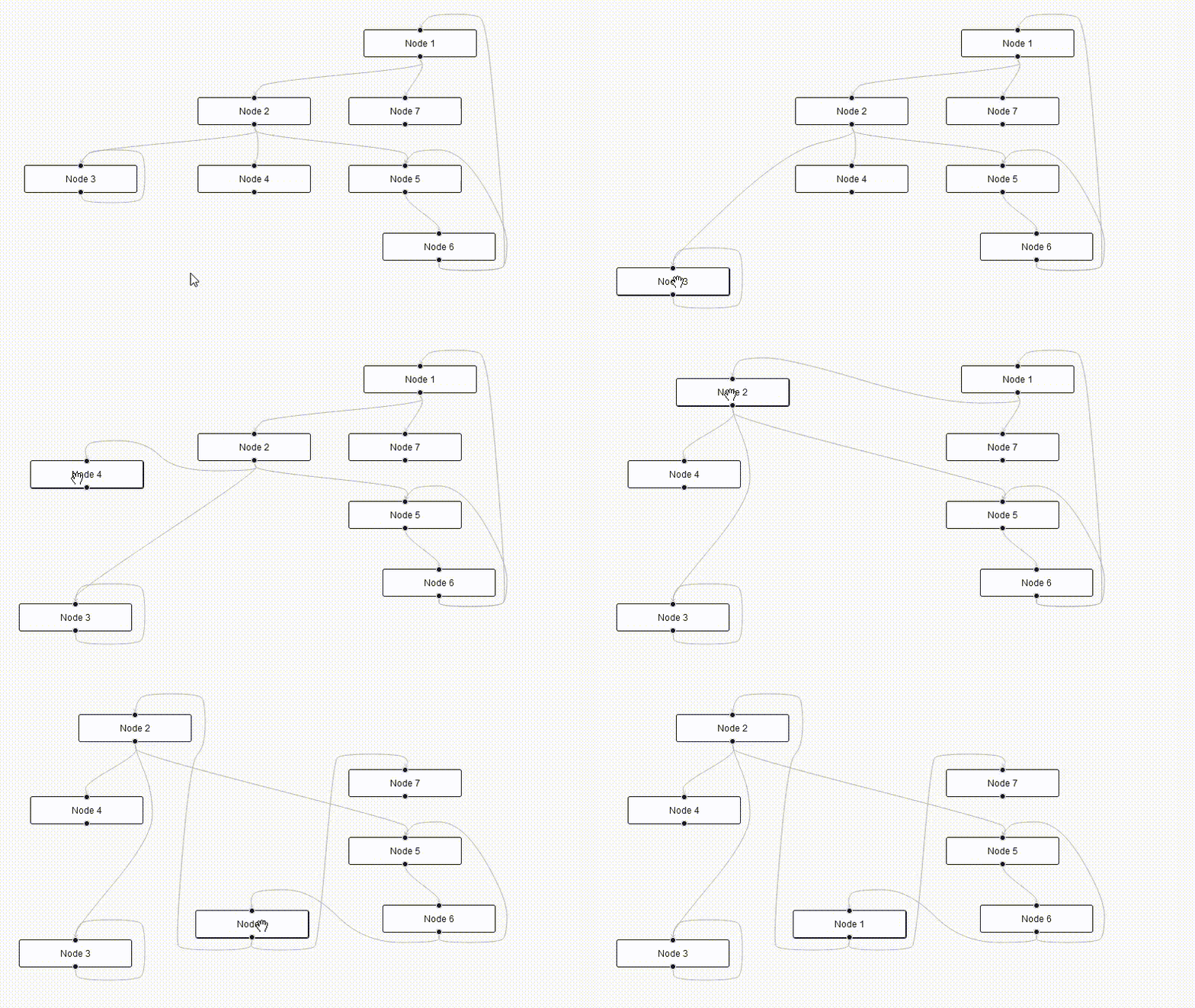
The original @tisoap/react-flow-smart-edge has been archived and unmaintained for 3+ years. This fork provides:
- ✅ @xyflow/react v12+ compatibility (migrated from deprecated
reactflowpackage) - ✅ Zero security vulnerabilities (was 22+ in original)
- ✅ Reduced bundle size (removed Storybook dependencies)
- ✅ Updated dependencies (all packages updated to latest compatible versions)
- ✅ Modern TypeScript support (TypeScript 5.8+)
- ✅ Active maintenance (accepting issues and PRs)
If you're using the original package:
# Remove old package
npm uninstall @tisoap/react-flow-smart-edge reactflow
# Install new packages
npm install @jalez/react-flow-smart-edge @xyflow/react
The API remains 100% compatible - just update your imports:
// Update your React Flow importsimport{ReactFlow,Node,Edge}from'@xyflow/react'import'@xyflow/react/dist/style.css'// Smart Edge imports remain the sameimport{SmartBezierEdge}from'@jalez/react-flow-smart-edge'With npm:
npm install @jalez/react-flow-smart-edge @xyflow/reactWith yarn:
yarn add @jalez/react-flow-smart-edge @xyflow/reactThis package is compatible with @xyflow/react v12+ (the new official React Flow package).
This package ships with the following Smart Edges components:
SmartBezierEdge: A smart equivalent to React Flow's BezierEdgeSmartStraightEdge: A smart equivalent to React Flow's StraightEdgeSmartStepEdge: A smart equivalent to React Flow's StepEdge
Each one can be imported individually as a named export.
importReactfrom'react'import{ReactFlow}from'@xyflow/react'import{SmartBezierEdge}from'@jalez/react-flow-smart-edge'import'@xyflow/react/dist/style.css'constnodes=[{id: '1',data: {label: 'Node 1'},position: {x: 300,y: 100}},{id: '2',data: {label: 'Node 2'},position: {x: 300,y: 200}}]constedges=[{id: 'e21',source: '2',target: '1',type: 'smart'}]// You can give any name to your edge types// https://reactflow.dev/docs/api/edges/custom-edges/constedgeTypes={smart: SmartBezierEdge}exportconstGraph=(props)=>{const{ children, ...rest}=propsreturn(<ReactFlowdefaultNodes={nodes}defaultEdges={edges}edgeTypes={edgeTypes}{...rest}>{children}</ReactFlow>)}All smart edges will take the exact same options as a React Flow Edge.
You can have more control over how the edge is rerendered by creating a custom edge and using the provided getSmartEdge function. It takes an object with the following keys:
sourcePosition,targetPosition,sourceX,sourceY,targetXandtargetY: The same values your custom edge will take as propsnodes: An array containing all graph nodes, you can get it from theuseNodeshook
Just like you can use getBezierPath from reactflow to create a custom edge with a button, you can do the same with getSmartEdge:
importReactfrom'react'import{useNodes,BezierEdge}from'@xyflow/react'import{getSmartEdge}from'@jalez/react-flow-smart-edge'constforeignObjectSize=200exportfunctionSmartEdgeWithButtonLabel(props){const{
id,
sourcePosition,
targetPosition,
sourceX,
sourceY,
targetX,
targetY,
style,
markerStart,
markerEnd
}=propsconstnodes=useNodes()constgetSmartEdgeResponse=getSmartEdge({
sourcePosition,
targetPosition,
sourceX,
sourceY,
targetX,
targetY,
nodes
})// If the value returned is null, it means "getSmartEdge" was unable to find// a valid path, and you should do something else insteadif(getSmartEdgeResponse===null){return<BezierEdge{...props}/>}const{ edgeCenterX, edgeCenterY, svgPathString }=getSmartEdgeResponsereturn(<><pathstyle={style}className='react-flow__edge-path'd={svgPathString}markerEnd={markerEnd}markerStart={markerStart}/><foreignObjectwidth={foreignObjectSize}height={foreignObjectSize}x={edgeCenterX-foreignObjectSize/2}y={edgeCenterY-foreignObjectSize/2}requiredExtensions='http://www.w3.org/1999/xhtml'><buttononClick={(event)=>{event.stopPropagation()alert(`remove ${id}`)}}>
X
</button></foreignObject></>)}The getSmartEdge function also accepts an optional object options, which allows you to configure aspects of the path-finding algorithm. You may use it like so:
constmyOptions={// your configuration goes herenodePadding: 20,gridRatio: 15}// ...constgetSmartEdgeResponse=getSmartEdge({
sourcePosition,
targetPosition,
sourceX,
sourceY,
targetX,
targetY,
nodes,// Pass down options in the getSmartEdge objectoptions: myOptions})
The options object accepts the following keys (they're all optional):
nodePadding: How many pixels of padding are added around nodes, or by how much should the edge avoid the walls of a node. Default10, minimum2.gridRatio: The size in pixels of each square grid cell used for path-finding. Smaller values for a more accurate path, bigger for faster path-finding. Default10, minimum2.drawEdge: Allows you to change the function responsible to draw the SVG line, by default it's the same used bySmartBezierEdge(more below)generatePath: Allows you to change the function for the path-finding, by default it's the same used bySmartBezierEdge(more below)
With the drawEdge option, you can change the function used to generate the final SVG path string, used to draw the line. By default it's the svgDrawSmoothLinePath function (same as used by the SmartBezierEdge), but the package also includes svgDrawStraightLinePath (same as used by the SmartStraightEdge and SmartStepEdge), or you can provide your own.
import{getSmartEdge,// Available built-in SVG draw functionssvgDrawSmoothLinePath,svgDrawStraightLinePath}from'@jalez/react-flow-smart-edge'// Using provided SVG draw functions:constresult=getSmartEdge({// ...options: {drawEdge: svgDrawSmoothLinePath}})// ...or using your own custom functionconstresult=getSmartEdge({// ...options: {drawEdge: (source,target,path)=>{// your code goes here// ...returnsvgPath}}})The function you provided must comply with this signature:
typeSVGDrawFunction=(source: XYPosition,// The starting {x, y} pointtarget: XYPosition,// The ending {x, y} pointpath: number[][]// The sequence of points [x, y] the line must follow)=>string// A string to be used in the "d" property of the SVG lineFor inspiration on how to implement your own, you can check the drawSvgPath.ts source code.
With the generatePath option, you can change the function used to do Pathfinding. By default, it's the pathfindingAStarDiagonal function (same as used by the SmartBezierEdge), but the package also includes pathfindingAStarNoDiagonal (used by SmartStraightEdge) and pathfindingJumpPointNoDiagonal (used by SmartStepEdge), or your can provide your own. The built-in functions use the pathfinding dependency behind the scenes.
import{getSmartEdge,// Available built-in pathfinding functionspathfindingAStarDiagonal,pathfindingAStarNoDiagonal,pathfindingJumpPointNoDiagonal}from'@jalez/react-flow-smart-edge'// Using provided pathfinding functions:constresult=getSmartEdge({// ...options: {generatePath: pathfindingJumpPointNoDiagonal}})// ...or using your own custom functionconstresult=getSmartEdge({// ...options: {generatePath: (grid,start,end)=>{// your code goes here// ...return{ fullPath, smoothedPath }}}})The function you provide must comply with this signature:
typePathFindingFunction=(grid: Grid,// Grid representation of the graphstart: XYPosition,// The starting {x, y} pointend: XYPosition// The ending {x, y} point)=>{fullPath: number[][]// Array of points [x, y] representing the full path with all pointssmoothedPath: number[][]// Array of points [x, y] representing a smaller, compressed path}|null// The function should return null if it was unable to do pathfindingFor inspiration on how to implement your own, you can check the generatePath.ts source code and the pathfinding dependency documentation.
import{getSmartEdge,svgDrawSmoothLinePath,svgDrawStraightLinePathpathfindingAStarDiagonal,pathfindingAStarNoDiagonal,pathfindingJumpPointNoDiagonal}from'@jalez/react-flow-smart-edge'// ...// Same as importing "SmartBezierEdge" directlyconstbezierResult=getSmartEdge({// ...options: {drawEdge: svgDrawSmoothLinePath,generatePath: pathfindingAStarDiagonal,}})// Same as importing "SmartStepEdge" directlyconststepResult=getSmartEdge({// ...options: {drawEdge: svgDrawStraightLinePath,generatePath: pathfindingJumpPointNoDiagonal,}})// Same as importing "SmartStraightEdge" directlyconststraightResult=getSmartEdge({// ...options: {drawEdge: svgDrawStraightLinePath,generatePath: pathfindingAStarNoDiagonal,}})This package is a maintained fork of @tisoap/react-flow-smart-edge by Tiso Alvarez Puccinelli.
Original project contributors:
- Tiso Alvarez Puccinelli (@tisoap) - Original author
- All original contributors
- 🐛 Bug reports: Open an issue
- 💡 Feature requests: Open an issue
- 📖 Documentation: This README and inline TypeScript types
- 💬 Discussions: GitHub Discussions
This project is MIT licensed, same as the original.
Original license: MIT by Tiso Alvarez Puccinelli