Uh oh!
There was an error while loading. Please reload this page.
Book details page - #57
Conversation
# Conflicts:
#	client-web/src/exlibris-app/exlibris-app.html
# Conflicts:
#	client-web/src/exlibris-app/exlibris-app.html
# Conflicts:
#	client-web/src/exlibris-app/exlibris-app.html
# Conflicts:
#	client-web/src/exlibris-app/exlibris-app.html
# Conflicts:
#	client-web/src/exlibris-app/exlibris-app.html
YegorUdovchenko
commented
May 7, 2018
@dkalinin PTAL |
| return Object.assign({}, state, { | ||
| bookDetails: { | ||
| book: {}, | ||
| loadingStatus: ExlibrisApp.LoadingStatus.NOT_FOUND |
There was a problem hiding this comment.
Empty book + loaded:false = Book not found.
Book + loaded:false = Completed.
It's enough to have boolean property loaded instead of enum LoadingStatus.
| if (Array.isArray(arguments[i])) { | ||
| const filteredArray = arguments[i].filter(x => x.id === id); | ||
| if (filteredArray.length > 0) { | ||
| element = filteredArray[0]; |
There was a problem hiding this comment.
| booksAndButtonsCombinations.forEach(function (combination) { | ||
| const element = fixture('BasicTestFixture'); | ||
| element.set('book', combination.book); | ||
| testElements.push(element); |
There was a problem hiding this comment.
It's better to create a separate test for each combination:
suite(...,()=>{booksAndButtonsCombinations.forEach(function(combination){test(`should display book action button with title ${combination.book}`,done=>{constelement=fixture('BasicTestFixture');element.set('book',combination.book);constwideScreenButton= ....});});})| ~ OF THIS SOFTWARE, EVEN IF ADVISED OF THE POSSIBILITY OF SUCH DAMAGE. | ||
| --> | ||
| <link rel="import" href="../shell/exlibris-app-namespace.html"> |
There was a problem hiding this comment.
Project imports should be after bower imports.
| <link rel="import" href="../shell/exlibris-app-namespace.html"> | ||
| <link rel="import" href="../../../bower_components/polymer/polymer-element.html"> | ||
| <link rel="import" href="../../../bower_components/polymer-redux/polymer-redux.html"> | ||
| <link rel="import" href="../../../bower_components/polymer/lib/elements/dom-if.html"> |
| <link rel="import" href="../shell/exlibris-app-namespace.html"> | ||
| <link rel="import" href="../../../bower_components/polymer/polymer-element.html"> | ||
| <link rel="import" href="../../../bower_components/polymer-redux/polymer-redux.html"> |
| * @property {boolean} isAllowedLoanExtension true if the loan extension is provided. | ||
| * @property {Date} date the date when the book is expected to become available. | ||
| * @property {Date} dueDate the date when the book should be returned. | ||
| * @property {BookStatus} status one of the BookStatus values. |
There was a problem hiding this comment.
If BookStatus is type it should be described in @typedef before.
| * @returns {Object} the title and the click function of the button for the specified book. | ||
| * @private | ||
| */ | ||
| _chooseButton(book) { |
There was a problem hiding this comment.
It's enough to have status and isAllowedLoanExtension params.
| * for the specified book. | ||
| * @private | ||
| */ | ||
| _calculateActionUnsupportedMessage(book) { |
There was a problem hiding this comment.
It's enough to have status and isAllowedLoanExtension params.
dkalinin
commented
May 18, 2018
@YegorUdovchenko Gray on gray is not readable: |
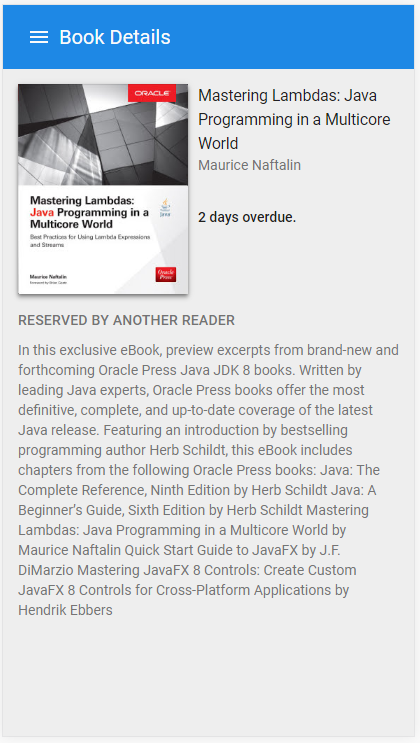
…y showing the loading failure.
…per-spinner` hiding delay.
YegorUdovchenko
commented
Jun 12, 2018
@YuriiHaidamaka PTAL |
 YuriiHaidamaka
left a comment
YuriiHaidamaka
left a comment
There was a problem hiding this comment.
LGTM, but fix comments, please.
| // Searching for a book in a local data. | ||
| // Should be removed when implement server response | ||
| const id = action.bookId; | ||
| const book = findElement(id, state.allBooks, state.expectedSoonBooks, state.borrowedBooks, state.reservedBooks); |
There was a problem hiding this comment.
I think it will be better here.
const book = [...state.allBooks, ...state.expectedSoonBooks, ...state.borrowedBooks, ...state.reservedBooks].find((item) => item.id === id);
| * The book details page component. | ||
| * | ||
| * This component allows to display the book details page with the book | ||
| * specific messages, the book cover and the button when it is supported. |
There was a problem hiding this comment.
Please delete redundant space.
| } | ||
| }; | ||
| function findElement(id) { |
There was a problem hiding this comment.
If you did the above change you would be able to delete this function.
YegorUdovchenko
commented
Jun 18, 2018
@dkalinin PTAL |
In this PR the book details page view was implemented. It is shown after the book tile click or passing the following URL directly:
/#/book-details/{book-id}/{book-title}.The
{book-title}part is not functional. It is used to add meaning to the URL.The following custom elements were created and tested:
<exlibris-book-details>- the main details view component. It applies theExlibrisApp.ReduxMixin. It is used to dispatch the book related actions provided by this view and to receive the book from the application state.This component displays whole book description with the cover. Also, it displays the status messages and the button. Those values are calculated from the book status and other specific book properties.
The book
loadingandnotFoundfields were added to indicate the book loading failure or the loading delay. It allows showingview 404on invalid Id values passed and theparer-spinnerwhen the loading delay happen. To implement this functionality, some temporary functions were added to imitate server response with a delay.<exlibris-book-details-redirect-link>the part of book details component used to create the external link to the specified book. The link generation depends on the book code format.The book details page examples:
The same page on the mobile screen:


