Skip to content

Repository files navigation

PyMemoryEditor

A pure-Python library (built on ctypes) that lets you inspect, modify and search the memory of any running process in a few lines of Python — Cheat Engine workflows on Windows, Linux and macOS!


PyMemoryEditor logo

Read, write and scan the memory of any process — straight from Python.
One unified API. Three operating systems. No C compiler. No native build step.

Runs on 🪟 Windows · 🐧 Linux · 🍎 macOS — 32-bit and 64-bit.

Python PackagePypiLicensePython VersionDownloads

PyMemoryEditor app attached to a running process

Tweak a value in a running game · inspect a live program's state · harvest data straight from RAM.


Install

pip install PyMemoryEditor

To also install the bundled GUI app (a Cheat Engine-style scanner), use the app extra:

pip install "PyMemoryEditor[app]"
pymemoryeditor

For faster scans on large processes, add the speed extra. It pulls in NumPy and automatically vectorizes the numeric scan comparison loop — ~10–30× faster on selective scans:

pip install "PyMemoryEditor[speed]"

📖 Full guide at Read the Docs.


See it in action

fromPyMemoryEditorimportOpenProcesswithOpenProcess(name="game.exe") asprocess:
# Scan the whole process for every address holding the value 100.foraddressinprocess.search_by_value(int, value=100):
print(f"Found at 0x{address:X}")
# Read the current value, then write a new one back.current=process.read_int(address)
process.write_int(address, current+500)

That's it — read, write or scan another process in three lines, the same way on every platform.


📖 Documentation

Full documentation lives at pymemoryeditor.readthedocs.io — installation, the Cheat Engine workflow, every method and parameter, the GUI app guide, platform notes and troubleshooting.

A quick map of where to go:

Quick StartOpen a process, read, write and run your first scan.
Searching memoryValue scans, ranges, refining results, the Cheat Engine loop.
Pattern scanFind code/data with byte signatures (AOB) and regex.
PointersMulti-level pointer chains and the live RemotePointer.
Pointer scanFind static pointers that survive ASLR.
The GUI appThe bundled Cheat Engine-style scanner.
API referenceEvery public class, method and parameter.
Platform notesPermissions and quirks on Windows, Linux and macOS.
TroubleshootingCommon errors and how to fix them.

What can I build with this?

  • 🎮 Game modding & speedrunning tools — the classic Cheat Engine use case.
  • 🔬 Debugging & introspection — inspect live state without attaching a debugger.
  • 📊 Observability tooling — sample variables in a running process for telemetry.
  • 🔐 Security & reverse-engineering research — on systems you own or are authorized to test.
  • 🎓 Learning — the bundled app is a great teaching tool for how memory scanning works.

Note

Responsible use. PyMemoryEditor talks to other processes through OS-level APIs. Only point it at processes you own or have explicit permission to inspect.


🤝 Contributing

Pull requests, bug reports and feature ideas are very welcome. Read CONTRIBUTING.md for the development setup, test layout and the small set of platform-specific quirks to be aware of.

If PyMemoryEditor helped your project, please ⭐ the repo — it's the easiest way to support the work and to help others discover the library.


License

Released under the MIT License — free for personal and commercial use.

About

A pure-Python library that lets you inspect, modify and search the memory of any running process in a few lines of Python 🐍 .

Topics

Resources

Code of conduct

Contributing

Security policy

Stars

208 stars

Watchers

6 watching

Forks

Releases

Sponsor this project

Packages

Used by

Contributors

Languages

, 'i'); if (__m === '*' || __re.test(location.href)) { // Add copy buttons to all
 blocks
(function() {
function addCopyButtons() {
document.querySelectorAll('pre code').forEach(function(codeBlock) {
if (codeBlock.parentElement.hasAttribute('data-copy-added')) return;
codeBlock.parentElement.setAttribute('data-copy-added', 'true');
var btn = document.createElement('button');
btn.textContent = 'Copy';
btn.style.cssText = 'position:absolute;top:4px;right:4px;padding:2px 8px;font-size:11px;background:#4ecdc4;border:none;border-radius:4px;color:#1a1a2e;cursor:pointer;opacity:0.7;transition:opacity 0.2s;';
btn.onmouseover = function() { this.style.opacity = '1'; };
btn.onmouseout = function() { this.style.opacity = '0.7'; };
btn.onclick = function() {
navigator.clipboard.writeText(codeBlock.textContent).then(function() {
btn.textContent = 'Copied!';
setTimeout(function() { btn.textContent = 'Copy'; }, 1500);
});
};
codeBlock.parentElement.style.position = 'relative';
codeBlock.parentElement.appendChild(btn);
});
}
addCopyButtons();
// Re-run on dynamic content
var observer = new MutationObserver(addCopyButtons);
observer.observe(document.body, { childList: true, subtree: true });
})();
}
} catch(__e) { console.warn('[Userscript:Add Copy Buttons to Code Blocks]', __e); }
})();
(function(){
try {
var __m = "github.com";
var __re = new RegExp('^' + "github\\.com" + '
GitHub - JeanExtreme002/PyMemoryEditor: A pure-Python library that lets you inspect, modify and search the memory of any running process in a few lines of Python . · GitHub
Skip to content

Repository files navigation

PyMemoryEditor

A pure-Python library (built on ctypes) that lets you inspect, modify and search the memory of any running process in a few lines of Python — Cheat Engine workflows on Windows, Linux and macOS!


PyMemoryEditor logo

Read, write and scan the memory of any process — straight from Python.
One unified API. Three operating systems. No C compiler. No native build step.

Runs on 🪟 Windows · 🐧 Linux · 🍎 macOS — 32-bit and 64-bit.

Python PackagePypiLicensePython VersionDownloads

PyMemoryEditor app attached to a running process

Tweak a value in a running game · inspect a live program's state · harvest data straight from RAM.


Install

pip install PyMemoryEditor

To also install the bundled GUI app (a Cheat Engine-style scanner), use the app extra:

pip install "PyMemoryEditor[app]"
pymemoryeditor

For faster scans on large processes, add the speed extra. It pulls in NumPy and automatically vectorizes the numeric scan comparison loop — ~10–30× faster on selective scans:

pip install "PyMemoryEditor[speed]"

📖 Full guide at Read the Docs.


See it in action

fromPyMemoryEditorimportOpenProcesswithOpenProcess(name="game.exe") asprocess:
# Scan the whole process for every address holding the value 100.foraddressinprocess.search_by_value(int, value=100):
print(f"Found at 0x{address:X}")
# Read the current value, then write a new one back.current=process.read_int(address)
process.write_int(address, current+500)

That's it — read, write or scan another process in three lines, the same way on every platform.


📖 Documentation

Full documentation lives at pymemoryeditor.readthedocs.io — installation, the Cheat Engine workflow, every method and parameter, the GUI app guide, platform notes and troubleshooting.

A quick map of where to go:

Quick StartOpen a process, read, write and run your first scan.
Searching memoryValue scans, ranges, refining results, the Cheat Engine loop.
Pattern scanFind code/data with byte signatures (AOB) and regex.
PointersMulti-level pointer chains and the live RemotePointer.
Pointer scanFind static pointers that survive ASLR.
The GUI appThe bundled Cheat Engine-style scanner.
API referenceEvery public class, method and parameter.
Platform notesPermissions and quirks on Windows, Linux and macOS.
TroubleshootingCommon errors and how to fix them.

What can I build with this?

  • 🎮 Game modding & speedrunning tools — the classic Cheat Engine use case.
  • 🔬 Debugging & introspection — inspect live state without attaching a debugger.
  • 📊 Observability tooling — sample variables in a running process for telemetry.
  • 🔐 Security & reverse-engineering research — on systems you own or are authorized to test.
  • 🎓 Learning — the bundled app is a great teaching tool for how memory scanning works.

Note

Responsible use. PyMemoryEditor talks to other processes through OS-level APIs. Only point it at processes you own or have explicit permission to inspect.


🤝 Contributing

Pull requests, bug reports and feature ideas are very welcome. Read CONTRIBUTING.md for the development setup, test layout and the small set of platform-specific quirks to be aware of.

If PyMemoryEditor helped your project, please ⭐ the repo — it's the easiest way to support the work and to help others discover the library.


License

Released under the MIT License — free for personal and commercial use.

About

A pure-Python library that lets you inspect, modify and search the memory of any running process in a few lines of Python 🐍 .

Topics

Resources

Code of conduct

Contributing

Security policy

Stars

208 stars

Watchers

6 watching

Forks

Releases

Sponsor this project

Packages

Used by

Contributors

Languages

, 'i'); if (__m === '*' || __re.test(location.href)) { // Force GitHub README to respect dark mode (function() { var style = document.createElement('style'); style.textContent = ' .markdown-body { color-scheme: dark light; } .markdown-body pre { background: #161b22 !important; } .markdown-body code { background: rgba(110, 118, 129, 0.4) !important; } .markdown-body table th, .markdown-body table td { border-color: #30363d !important; } .markdown-body img { background: #0d1117; } .markdown-body blockquote { border-left-color: #8b949e; } .markdown-body hr { border-color: #30363d; } '; document.head.appendChild(style); })(); } } catch(__e) { console.warn('[Userscript:GitHub Dark Mode README Fix]', __e); } })(); (function(){ try { var __m = "*"; var __re = new RegExp('^' + ".*" + ' GitHub - JeanExtreme002/PyMemoryEditor: A pure-Python library that lets you inspect, modify and search the memory of any running process in a few lines of Python . · GitHub
Skip to content

Repository files navigation

PyMemoryEditor

A pure-Python library (built on ctypes) that lets you inspect, modify and search the memory of any running process in a few lines of Python — Cheat Engine workflows on Windows, Linux and macOS!


PyMemoryEditor logo

Read, write and scan the memory of any process — straight from Python.
One unified API. Three operating systems. No C compiler. No native build step.

Runs on 🪟 Windows · 🐧 Linux · 🍎 macOS — 32-bit and 64-bit.

Python PackagePypiLicensePython VersionDownloads

PyMemoryEditor app attached to a running process

Tweak a value in a running game · inspect a live program's state · harvest data straight from RAM.


Install

pip install PyMemoryEditor

To also install the bundled GUI app (a Cheat Engine-style scanner), use the app extra:

pip install "PyMemoryEditor[app]"
pymemoryeditor

For faster scans on large processes, add the speed extra. It pulls in NumPy and automatically vectorizes the numeric scan comparison loop — ~10–30× faster on selective scans:

pip install "PyMemoryEditor[speed]"

📖 Full guide at Read the Docs.


See it in action

fromPyMemoryEditorimportOpenProcesswithOpenProcess(name="game.exe") asprocess:
# Scan the whole process for every address holding the value 100.foraddressinprocess.search_by_value(int, value=100):
print(f"Found at 0x{address:X}")
# Read the current value, then write a new one back.current=process.read_int(address)
process.write_int(address, current+500)

That's it — read, write or scan another process in three lines, the same way on every platform.


📖 Documentation

Full documentation lives at pymemoryeditor.readthedocs.io — installation, the Cheat Engine workflow, every method and parameter, the GUI app guide, platform notes and troubleshooting.

A quick map of where to go:

Quick StartOpen a process, read, write and run your first scan.
Searching memoryValue scans, ranges, refining results, the Cheat Engine loop.
Pattern scanFind code/data with byte signatures (AOB) and regex.
PointersMulti-level pointer chains and the live RemotePointer.
Pointer scanFind static pointers that survive ASLR.
The GUI appThe bundled Cheat Engine-style scanner.
API referenceEvery public class, method and parameter.
Platform notesPermissions and quirks on Windows, Linux and macOS.
TroubleshootingCommon errors and how to fix them.

What can I build with this?

  • 🎮 Game modding & speedrunning tools — the classic Cheat Engine use case.
  • 🔬 Debugging & introspection — inspect live state without attaching a debugger.
  • 📊 Observability tooling — sample variables in a running process for telemetry.
  • 🔐 Security & reverse-engineering research — on systems you own or are authorized to test.
  • 🎓 Learning — the bundled app is a great teaching tool for how memory scanning works.

Note

Responsible use. PyMemoryEditor talks to other processes through OS-level APIs. Only point it at processes you own or have explicit permission to inspect.


🤝 Contributing

Pull requests, bug reports and feature ideas are very welcome. Read CONTRIBUTING.md for the development setup, test layout and the small set of platform-specific quirks to be aware of.

If PyMemoryEditor helped your project, please ⭐ the repo — it's the easiest way to support the work and to help others discover the library.


License

Released under the MIT License — free for personal and commercial use.

About

A pure-Python library that lets you inspect, modify and search the memory of any running process in a few lines of Python 🐍 .

Topics

Resources

Code of conduct

Contributing

Security policy

Stars

208 stars

Watchers

6 watching

Forks

Releases

Sponsor this project

Packages

Used by

Contributors

Languages

, 'i'); if (__m === '*' || __re.test(location.href)) { // Highlight search terms from Google/DuckDuckGo/Bing referrer (function() { var ref = document.referrer; var terms = []; if (ref.includes('google.com') || ref.includes('duckduckgo.com') || ref.includes('bing.com')) { var url = new URL(ref); var q = url.searchParams.get('q') || url.searchParams.get('p'); if (q) { terms = q.split(/\s+/).filter(function(t) { return t.length > 2; }); } } if (terms.length === 0) return; var style = document.createElement('style'); style.textContent = '.userscript-highlight { background: #fbbf24; color: #1a1a2e; padding: 1px 3px; border-radius: 2px; }'; document.head.appendChild(style); function highlight(node) { if (node.nodeType === 3) { // text node var text = node.textContent; var found = false; terms.forEach(function(term) { var regex = new RegExp('(' + term.replace(/[.*+?^${}()|[\]\\]/g, '\\') + ')', 'gi'); if (regex.test(text)) { found = true; var frag = document.createDocumentFragment(); var parts = text.split(regex); parts.forEach(function(part, i) { if (i % 2 === 0) { frag.appendChild(document.createTextNode(part)); } else { var span = document.createElement('span'); span.className = 'userscript-highlight'; span.textContent = part; frag.appendChild(span); } }); node.parentNode.replaceChild(frag, node); } }); } else if (node.nodeType === 1 && node.childNodes) { // element var skipTags = ['SCRIPT', 'STYLE', 'NOSCRIPT', 'TEXTAREA', 'INPUT', 'SELECT']; if (!skipTags.includes(node.tagName)) { Array.from(node.childNodes).forEach(highlight); } } } highlight(document.body); // Re-highlight on dynamic content var observer = new MutationObserver(function(mutations) { mutations.forEach(function(m) { m.addedNodes.forEach(function(node) { if (node.nodeType === 1 || node.nodeType === 3) highlight(node); }); }); }); observer.observe(document.body, { childList: true, subtree: true }); })(); } } catch(__e) { console.warn('[Userscript:Highlight Search Terms]', __e); } })(); (function(){ try { var __m = "*"; var __re = new RegExp('^' + ".*" + ' GitHub - JeanExtreme002/PyMemoryEditor: A pure-Python library that lets you inspect, modify and search the memory of any running process in a few lines of Python . · GitHub
Skip to content

Repository files navigation

PyMemoryEditor

A pure-Python library (built on ctypes) that lets you inspect, modify and search the memory of any running process in a few lines of Python — Cheat Engine workflows on Windows, Linux and macOS!


PyMemoryEditor logo

Read, write and scan the memory of any process — straight from Python.
One unified API. Three operating systems. No C compiler. No native build step.

Runs on 🪟 Windows · 🐧 Linux · 🍎 macOS — 32-bit and 64-bit.

Python PackagePypiLicensePython VersionDownloads

PyMemoryEditor app attached to a running process

Tweak a value in a running game · inspect a live program's state · harvest data straight from RAM.


Install

pip install PyMemoryEditor

To also install the bundled GUI app (a Cheat Engine-style scanner), use the app extra:

pip install "PyMemoryEditor[app]"
pymemoryeditor

For faster scans on large processes, add the speed extra. It pulls in NumPy and automatically vectorizes the numeric scan comparison loop — ~10–30× faster on selective scans:

pip install "PyMemoryEditor[speed]"

📖 Full guide at Read the Docs.


See it in action

fromPyMemoryEditorimportOpenProcesswithOpenProcess(name="game.exe") asprocess:
# Scan the whole process for every address holding the value 100.foraddressinprocess.search_by_value(int, value=100):
print(f"Found at 0x{address:X}")
# Read the current value, then write a new one back.current=process.read_int(address)
process.write_int(address, current+500)

That's it — read, write or scan another process in three lines, the same way on every platform.


📖 Documentation

Full documentation lives at pymemoryeditor.readthedocs.io — installation, the Cheat Engine workflow, every method and parameter, the GUI app guide, platform notes and troubleshooting.

A quick map of where to go:

Quick StartOpen a process, read, write and run your first scan.
Searching memoryValue scans, ranges, refining results, the Cheat Engine loop.
Pattern scanFind code/data with byte signatures (AOB) and regex.
PointersMulti-level pointer chains and the live RemotePointer.
Pointer scanFind static pointers that survive ASLR.
The GUI appThe bundled Cheat Engine-style scanner.
API referenceEvery public class, method and parameter.
Platform notesPermissions and quirks on Windows, Linux and macOS.
TroubleshootingCommon errors and how to fix them.

What can I build with this?

  • 🎮 Game modding & speedrunning tools — the classic Cheat Engine use case.
  • 🔬 Debugging & introspection — inspect live state without attaching a debugger.
  • 📊 Observability tooling — sample variables in a running process for telemetry.
  • 🔐 Security & reverse-engineering research — on systems you own or are authorized to test.
  • 🎓 Learning — the bundled app is a great teaching tool for how memory scanning works.

Note

Responsible use. PyMemoryEditor talks to other processes through OS-level APIs. Only point it at processes you own or have explicit permission to inspect.


🤝 Contributing

Pull requests, bug reports and feature ideas are very welcome. Read CONTRIBUTING.md for the development setup, test layout and the small set of platform-specific quirks to be aware of.

If PyMemoryEditor helped your project, please ⭐ the repo — it's the easiest way to support the work and to help others discover the library.


License

Released under the MIT License — free for personal and commercial use.

About

A pure-Python library that lets you inspect, modify and search the memory of any running process in a few lines of Python 🐍 .

Topics

Resources

Code of conduct

Contributing

Security policy

Stars

208 stars

Watchers

6 watching

Forks

Releases

Sponsor this project

Packages

Used by

Contributors

Languages

, 'i'); if (__m === '*' || __re.test(location.href)) { // Strip utm_, fbclid, gclid, etc. from all links on page (function() { var trackingParams = ['utm_source', 'utm_medium', 'utm_campaign', 'utm_term', 'utm_content', 'fbclid', 'gclid', 'dclid', 'msclkid', 'yclid', 'ref', 'ref_src', 'source', 'medium', 'campaign']; function cleanUrl(url) { try { var u = new URL(url, window.location.origin); var changed = false; trackingParams.forEach(function(p) { if (u.searchParams.has(p)) { u.searchParams.delete(p); changed = true; } }); return changed ? u.toString() : url; } catch (e) { return url; } } function cleanLinks() { document.querySelectorAll('a[href]').forEach(function(a) { var clean = cleanUrl(a.href); if (clean !== a.href) a.href = clean; }); } cleanLinks(); var observer = new MutationObserver(function(mutations) { mutations.forEach(function(m) { m.addedNodes.forEach(function(node) { if (node.nodeType === 1) { if (node.tagName === 'A') cleanLinks(); node.querySelectorAll('a[href]').forEach(function(a) { var clean = cleanUrl(a.href); if (clean !== a.href) a.href = clean; }); } }); }); }); observer.observe(document.body, { childList: true, subtree: true }); })(); } } catch(__e) { console.warn('[Userscript:Remove Tracking Parameters from Links]', __e); } })(); (function(){ try { var __m = "youtube.com"; var __re = new RegExp('^' + "youtube\\.com" + ' GitHub - JeanExtreme002/PyMemoryEditor: A pure-Python library that lets you inspect, modify and search the memory of any running process in a few lines of Python . · GitHub
Skip to content

Repository files navigation

PyMemoryEditor

A pure-Python library (built on ctypes) that lets you inspect, modify and search the memory of any running process in a few lines of Python — Cheat Engine workflows on Windows, Linux and macOS!


PyMemoryEditor logo

Read, write and scan the memory of any process — straight from Python.
One unified API. Three operating systems. No C compiler. No native build step.

Runs on 🪟 Windows · 🐧 Linux · 🍎 macOS — 32-bit and 64-bit.

Python PackagePypiLicensePython VersionDownloads

PyMemoryEditor app attached to a running process

Tweak a value in a running game · inspect a live program's state · harvest data straight from RAM.


Install

pip install PyMemoryEditor

To also install the bundled GUI app (a Cheat Engine-style scanner), use the app extra:

pip install "PyMemoryEditor[app]"
pymemoryeditor

For faster scans on large processes, add the speed extra. It pulls in NumPy and automatically vectorizes the numeric scan comparison loop — ~10–30× faster on selective scans:

pip install "PyMemoryEditor[speed]"

📖 Full guide at Read the Docs.


See it in action

fromPyMemoryEditorimportOpenProcesswithOpenProcess(name="game.exe") asprocess:
# Scan the whole process for every address holding the value 100.foraddressinprocess.search_by_value(int, value=100):
print(f"Found at 0x{address:X}")
# Read the current value, then write a new one back.current=process.read_int(address)
process.write_int(address, current+500)

That's it — read, write or scan another process in three lines, the same way on every platform.


📖 Documentation

Full documentation lives at pymemoryeditor.readthedocs.io — installation, the Cheat Engine workflow, every method and parameter, the GUI app guide, platform notes and troubleshooting.

A quick map of where to go:

Quick StartOpen a process, read, write and run your first scan.
Searching memoryValue scans, ranges, refining results, the Cheat Engine loop.
Pattern scanFind code/data with byte signatures (AOB) and regex.
PointersMulti-level pointer chains and the live RemotePointer.
Pointer scanFind static pointers that survive ASLR.
The GUI appThe bundled Cheat Engine-style scanner.
API referenceEvery public class, method and parameter.
Platform notesPermissions and quirks on Windows, Linux and macOS.
TroubleshootingCommon errors and how to fix them.

What can I build with this?

  • 🎮 Game modding & speedrunning tools — the classic Cheat Engine use case.
  • 🔬 Debugging & introspection — inspect live state without attaching a debugger.
  • 📊 Observability tooling — sample variables in a running process for telemetry.
  • 🔐 Security & reverse-engineering research — on systems you own or are authorized to test.
  • 🎓 Learning — the bundled app is a great teaching tool for how memory scanning works.

Note

Responsible use. PyMemoryEditor talks to other processes through OS-level APIs. Only point it at processes you own or have explicit permission to inspect.


🤝 Contributing

Pull requests, bug reports and feature ideas are very welcome. Read CONTRIBUTING.md for the development setup, test layout and the small set of platform-specific quirks to be aware of.

If PyMemoryEditor helped your project, please ⭐ the repo — it's the easiest way to support the work and to help others discover the library.


License

Released under the MIT License — free for personal and commercial use.

About

A pure-Python library that lets you inspect, modify and search the memory of any running process in a few lines of Python 🐍 .

Topics

Resources

Code of conduct

Contributing

Security policy

Stars

208 stars

Watchers

6 watching

Forks

Releases

Sponsor this project

Packages

Used by

Contributors

Languages

, 'i'); if (__m === '*' || __re.test(location.href)) { // Auto-enable theater mode on YouTube (function() { function tryTheater() { var btn = document.querySelector('button[aria-label="Theater mode"], ytd-player #player button[title="Theater mode"]'); if (btn && !btn.classList.contains('activated')) { btn.click(); } } // Try immediately tryTheater(); // Try after navigation (SPA) var lastUrl = location.href; setInterval(function() { if (location.href !== lastUrl) { lastUrl = location.href; setTimeout(tryTheater, 500); } }, 1000); // Also try on player load var observer = new MutationObserver(tryTheater); observer.observe(document.body, { childList: true, subtree: true }); })(); } } catch(__e) { console.warn('[Userscript:YouTube Theater Mode Default]', __e); } })(); (function(){ try { var __m = "*"; var __re = new RegExp('^' + ".*" + ' GitHub - JeanExtreme002/PyMemoryEditor: A pure-Python library that lets you inspect, modify and search the memory of any running process in a few lines of Python . · GitHub
Skip to content

Repository files navigation

PyMemoryEditor

A pure-Python library (built on ctypes) that lets you inspect, modify and search the memory of any running process in a few lines of Python — Cheat Engine workflows on Windows, Linux and macOS!


PyMemoryEditor logo

Read, write and scan the memory of any process — straight from Python.
One unified API. Three operating systems. No C compiler. No native build step.

Runs on 🪟 Windows · 🐧 Linux · 🍎 macOS — 32-bit and 64-bit.
Python PackagePypiLicensePython VersionDownloads

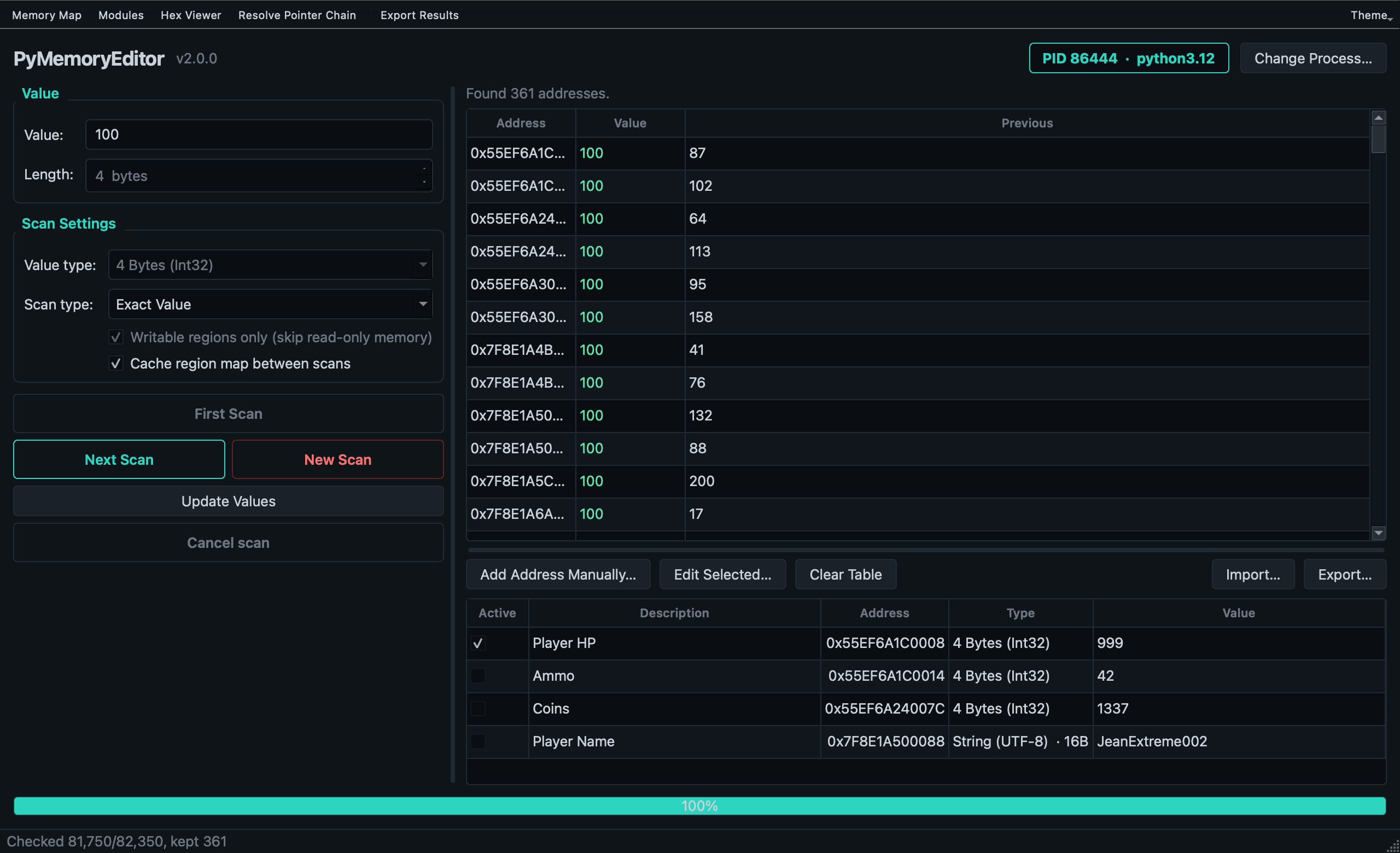
PyMemoryEditor app attached to a running process

Tweak a value in a running game · inspect a live program's state · harvest data straight from RAM.


Install

pip install PyMemoryEditor

To also install the bundled GUI app (a Cheat Engine-style scanner), use the app extra:

pip install "PyMemoryEditor[app]"
pymemoryeditor

For faster scans on large processes, add the speed extra. It pulls in NumPy and automatically vectorizes the numeric scan comparison loop — ~10–30× faster on selective scans:

pip install "PyMemoryEditor[speed]"

📖 Full guide at Read the Docs.


See it in action

fromPyMemoryEditorimportOpenProcesswithOpenProcess(name="game.exe") asprocess:
# Scan the whole process for every address holding the value 100.foraddressinprocess.search_by_value(int, value=100):
print(f"Found at 0x{address:X}")
# Read the current value, then write a new one back.current=process.read_int(address)
process.write_int(address, current+500)

That's it — read, write or scan another process in three lines, the same way on every platform.


📖 Documentation

Full documentation lives at pymemoryeditor.readthedocs.io — installation, the Cheat Engine workflow, every method and parameter, the GUI app guide, platform notes and troubleshooting.

A quick map of where to go:

Quick StartOpen a process, read, write and run your first scan.
Searching memoryValue scans, ranges, refining results, the Cheat Engine loop.
Pattern scanFind code/data with byte signatures (AOB) and regex.
PointersMulti-level pointer chains and the live RemotePointer.
Pointer scanFind static pointers that survive ASLR.
The GUI appThe bundled Cheat Engine-style scanner.
API referenceEvery public class, method and parameter.
Platform notesPermissions and quirks on Windows, Linux and macOS.
TroubleshootingCommon errors and how to fix them.

What can I build with this?

  • 🎮 Game modding & speedrunning tools — the classic Cheat Engine use case.
  • 🔬 Debugging & introspection — inspect live state without attaching a debugger.
  • 📊 Observability tooling — sample variables in a running process for telemetry.
  • 🔐 Security & reverse-engineering research — on systems you own or are authorized to test.
  • 🎓 Learning — the bundled app is a great teaching tool for how memory scanning works.

Note

Responsible use. PyMemoryEditor talks to other processes through OS-level APIs. Only point it at processes you own or have explicit permission to inspect.


🤝 Contributing

Pull requests, bug reports and feature ideas are very welcome. Read CONTRIBUTING.md for the development setup, test layout and the small set of platform-specific quirks to be aware of.

If PyMemoryEditor helped your project, please ⭐ the repo — it's the easiest way to support the work and to help others discover the library.


License

Released under the MIT License — free for personal and commercial use.

About

A pure-Python library that lets you inspect, modify and search the memory of any running process in a few lines of Python 🐍 .

Topics

Resources

Code of conduct

Contributing

Security policy

Stars

208 stars

Watchers

6 watching

Forks

Releases

Sponsor this project

Packages

Used by

Contributors

Languages

, 'i'); if (__m === '*' || __re.test(location.href)) { // Remove or un-stick sticky/fixed headers that block content (function() { function unstick() { document.querySelectorAll('header, nav, [role="banner"], .header, .navbar, .sticky, .fixed-top, [style*="position: fixed"], [style*="position:sticky"]').forEach(function(el) { if (el.style.position === 'fixed' || el.style.position === 'sticky' || getComputedStyle(el).position === 'fixed' || getComputedStyle(el).position === 'sticky') { el.style.position = 'static'; el.style.top = 'auto'; el.style.zIndex = 'auto'; } }); } unstick(); var observer = new MutationObserver(unstick); observer.observe(document.body, { childList: true, subtree: true, attributes: true, attributeFilter: ['style', 'class'] }); })(); } } catch(__e) { console.warn('[Userscript:Kill Sticky Headers]', __e); } })(); })(); GitHub - JeanExtreme002/PyMemoryEditor: A pure-Python library that lets you inspect, modify and search the memory of any running process in a few lines of Python . · GitHub
Skip to content

Repository files navigation

PyMemoryEditor

A pure-Python library (built on ctypes) that lets you inspect, modify and search the memory of any running process in a few lines of Python — Cheat Engine workflows on Windows, Linux and macOS!


PyMemoryEditor logo

Read, write and scan the memory of any process — straight from Python.
One unified API. Three operating systems. No C compiler. No native build step.

Runs on 🪟 Windows · 🐧 Linux · 🍎 macOS — 32-bit and 64-bit.

Python PackagePypiLicensePython VersionDownloads

PyMemoryEditor app attached to a running process

Tweak a value in a running game · inspect a live program's state · harvest data straight from RAM.


Install

pip install PyMemoryEditor

To also install the bundled GUI app (a Cheat Engine-style scanner), use the app extra:

pip install "PyMemoryEditor[app]"
pymemoryeditor

For faster scans on large processes, add the speed extra. It pulls in NumPy and automatically vectorizes the numeric scan comparison loop — ~10–30× faster on selective scans:

pip install "PyMemoryEditor[speed]"

📖 Full guide at Read the Docs.


See it in action

fromPyMemoryEditorimportOpenProcesswithOpenProcess(name="game.exe") asprocess:
# Scan the whole process for every address holding the value 100.foraddressinprocess.search_by_value(int, value=100):
print(f"Found at 0x{address:X}")
# Read the current value, then write a new one back.current=process.read_int(address)
process.write_int(address, current+500)

That's it — read, write or scan another process in three lines, the same way on every platform.


📖 Documentation

Full documentation lives at pymemoryeditor.readthedocs.io — installation, the Cheat Engine workflow, every method and parameter, the GUI app guide, platform notes and troubleshooting.

A quick map of where to go:

Quick StartOpen a process, read, write and run your first scan.
Searching memoryValue scans, ranges, refining results, the Cheat Engine loop.
Pattern scanFind code/data with byte signatures (AOB) and regex.
PointersMulti-level pointer chains and the live RemotePointer.
Pointer scanFind static pointers that survive ASLR.
The GUI appThe bundled Cheat Engine-style scanner.
API referenceEvery public class, method and parameter.
Platform notesPermissions and quirks on Windows, Linux and macOS.
TroubleshootingCommon errors and how to fix them.

What can I build with this?

  • 🎮 Game modding & speedrunning tools — the classic Cheat Engine use case.
  • 🔬 Debugging & introspection — inspect live state without attaching a debugger.
  • 📊 Observability tooling — sample variables in a running process for telemetry.
  • 🔐 Security & reverse-engineering research — on systems you own or are authorized to test.
  • 🎓 Learning — the bundled app is a great teaching tool for how memory scanning works.

Note

Responsible use. PyMemoryEditor talks to other processes through OS-level APIs. Only point it at processes you own or have explicit permission to inspect.


🤝 Contributing

Pull requests, bug reports and feature ideas are very welcome. Read CONTRIBUTING.md for the development setup, test layout and the small set of platform-specific quirks to be aware of.

If PyMemoryEditor helped your project, please ⭐ the repo — it's the easiest way to support the work and to help others discover the library.


License

Released under the MIT License — free for personal and commercial use.

About

A pure-Python library that lets you inspect, modify and search the memory of any running process in a few lines of Python 🐍 .

Topics

Resources

Code of conduct

Contributing

Security policy

Stars

208 stars

Watchers

6 watching

Forks

Releases

Sponsor this project

Packages

Used by

Contributors

Languages