
(1) Updated the installation method for DeepST.
(2) Fixed some bugs.
DeepST first uses H&E staining to extract tissue morphology information through a pre-trained deep learning model, and normalizes each spot’s gene expression according to the similarity of adjacent spots. DeepST further learns a spatial adjacency matrix on spatial location for the construction of graph convolutional network. DeepST uses a graph neural network autoencoder and a denoising autoencoder to jointly generate a latent representation of augmented ST data, while domain adversarial neural networks (DAN) are used to integrate ST data from multi-batches or different technologies. The output of DeepST can be applied to identify spatial domains, batch effect correction and downstream analysis.
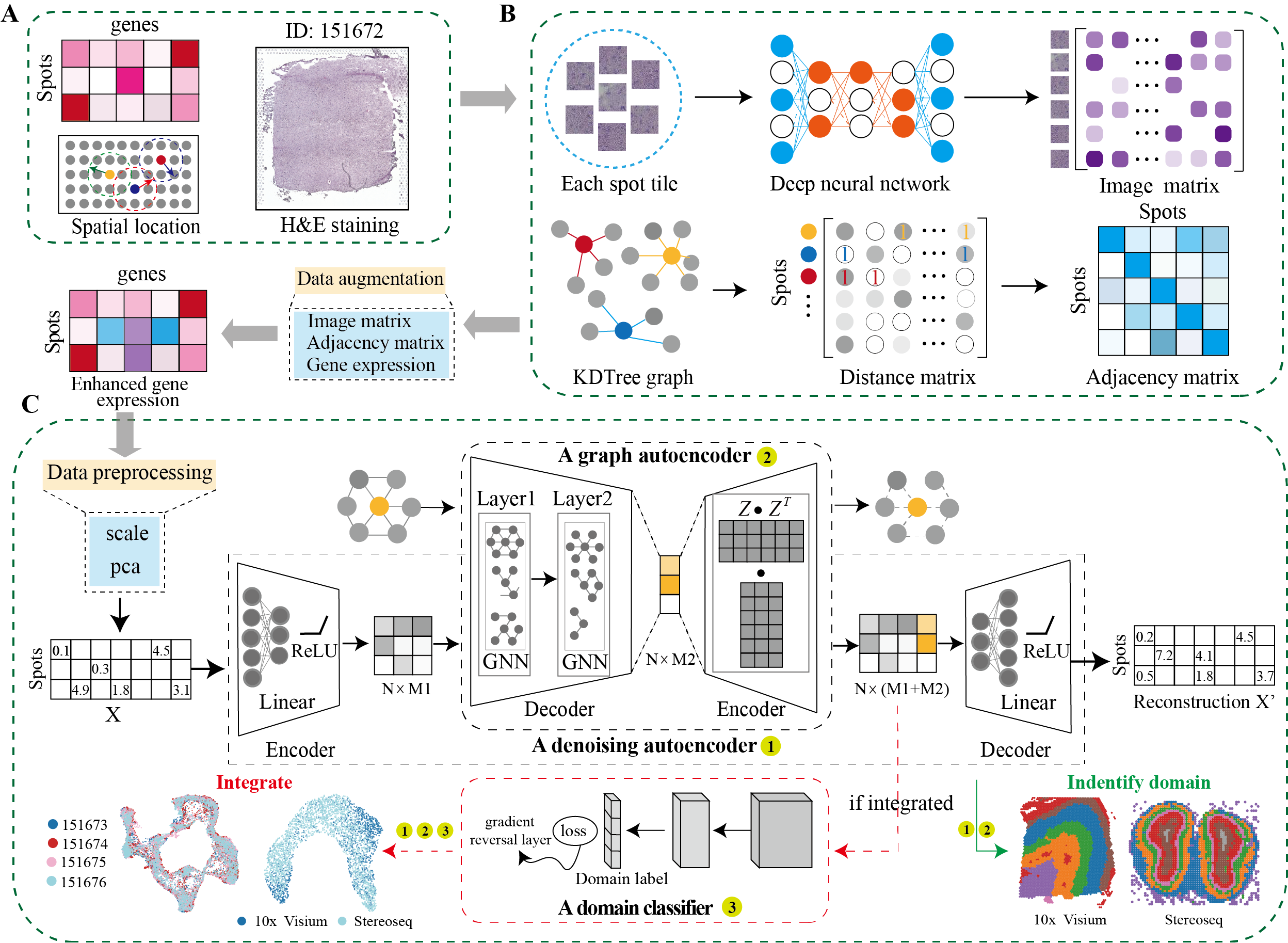
To install DeepST, make sure you have PyTorch and PyG installed. For more details on dependencies, refer to the environment.yml file.
conda create -n deepst-env python=3.9 Activate the environment and install PyTorch and PyG. Adjust the installation commands based on your CUDA version or choose the CPU version if necessary.
- General Installation Command
conda activate deepst-env
pip install torch==2.1.0 torchvision==0.16.0 torchaudio==2.1.0 --index-url https://download.pytorch.org/whl/cu118
pip install pyg_lib==0.3.1+pt21cu118 torch_scatter torch_sparse torch_cluster torch_spline_conv -f https://data.pyg.org/whl/torch-2.1.0+cu118.html
pip install torch_geometric==2.3.1
- Tips for selecting the correct CUDA version
- Run the following command to verify CUDA version:
nvcc --version- Alternatively, use:
nvidia-smi - Modify installation commands based on CUDA
- For CUDA 12.1
pip install torch==2.1.0 torchvision==0.16.0 torchaudio==2.1.0 --index-url https://download.pytorch.org/whl/cu121 pip install pyg_lib==0.3.1+pt21cu121 torch_scatter torch_sparse torch_cluster torch_spline_conv -f https://data.pyg.org/whl/torch-2.1.0+cu121.html pip install torch_geometric==2.3.1 - For CPU-only
pip install torch==2.1.0 torchvision==0.16.0 torchaudio==2.1.0 --index-url https://download.pytorch.org/whl/cpu
pip install pyg_lib==0.3.1+pt21cpu torch_scatter torch_sparse torch_cluster torch_spline_conv -f https://data.pyg.org/whl/torch-2.1.0+cpu.html
pip install torch_geometric==2.3.1
- For CUDA 12.1
pip install deepstkit
import deepstkit as dt
importosimportmatplotlib.pyplotaspltimportscanpyasscimportdeepstkitasdt# ========== Configuration ==========SEED=0# Random seed for reproducibilityDATA_DIR="../data/DLPFC"# Directory containing spatial dataSAMPLE_ID="151673"# Sample identifier to analyzeRESULTS_DIR="../Results"# Directory to save outputsN_DOMAINS=7# Expected number of spatial domains# ========== Initialize Analysis ==========# Set random seed and initialize DeepSTdt.utils_func.seed_torch(seed=SEED)
# Create DeepST instance with analysis parametersdeepst=dt.main.run(
save_path=RESULTS_DIR,
task="Identify_Domain", # Spatial domain identificationpre_epochs=500, # Pretraining iterationsepochs=500, # Main training iterationsuse_gpu=True# Accelerate with GPU if available
)
# ========== Data Loading & Preprocessing ==========# (Optional) Load spatial transcriptomics data (Visium platform)# e.g. adata = anndata.read_h5ad("*.h5ad"), this data including .obsm['spatial']adata=deepst._get_adata(
platform="Visium",
data_path=DATA_DIR,
data_name=SAMPLE_ID
)
# Optional: Incorporate H&E image features (skip if not available)# adata = deepst._get_image_crop(adata, data_name=SAMPLE_ID)# ========== Feature Engineering ==========# Data augmentation (skip morphological if no H&E)adata=deepst._get_augment(
adata,
spatial_type="BallTree",
use_morphological=False# Set True if using H&E features
)
# Construct spatial neighborhood graphgraph_dict=deepst._get_graph(
adata.obsm["spatial"],
distType="KDTree"# Spatial relationship modeling
)
# Dimensionality reductiondata=deepst._data_process(
adata,
pca_n_comps=200# Reduce to 200 principal components
)
# ========== Model Training ==========# Train DeepST model and obtain embeddingsdeepst_embed=deepst._fit(
data=data,
graph_dict=graph_dict
)
adata.obsm["DeepST_embed"] =deepst_embed# ========== Spatial Domain Detection ==========# Cluster spots into spatial domainsadata=deepst._get_cluster_data(
adata,
n_domains=N_DOMAINS, # Expected number of domainspriori=True# Use prior knowledge if available
)
# ========== Visualization & Output ==========# Plot spatial domainssc.pl.spatial(
adata,
color=["DeepST_refine_domain"], # Color by domainframeon=False,
spot_size=150,
title=f"Spatial Domains - {SAMPLE_ID}"
)
# Save resultsoutput_file=os.path.join(RESULTS_DIR, f"{SAMPLE_ID}_domains.pdf")
plt.savefig(output_file, bbox_inches="tight", dpi=300)
print(f"Analysis complete! Results saved to {output_file}")importosimportmatplotlib.pyplotaspltimportscanpyasscimportdeepstkitasdt# ========== Configuration ==========SEED=0DATA_DIR="../data/DLPFC"SAMPLE_IDS= ['151673', '151674','151675', '151676']
RESULTS_DIR="../Results"N_DOMAINS=7INTEGRATION_NAME="_".join(SAMPLE_IDS)
# ========== Initialize Analysis ==========# Set random seed and initialize DeepSTdt.utils_func.seed_torch(seed=SEED)
# ========== Initialize DeepST Integration ==========integration_model=dt.main.run(
save_path=RESULTS_DIR,
task="Integration", # Multi-sample integration taskpre_epochs=500, epochs=500, use_gpu=True )
# ========== Multi-Sample Processing ==========processed_data= []
spatial_graphs= []
forsample_idinSAMPLE_IDS:
# Load and preprocess each sampleadata=integration_model._get_adata(
platform="Visium",
data_path=DATA_DIR,
data_name=sample_id
)
# Incorporate H&E image features (Optional)# adata = integration_model._get_image_crop(adata, data_name=sample_id)# Feature augmentationadata=integration_model._get_augment(
adata,
spatial_type="BallTree",
use_morphological=False, # Use prior knowledge if available
)
# Construct spatial neighborhood graphgraph=integration_model._get_graph(
adata.obsm["spatial"],
distType="KDTree"
)
processed_data.append(adata)
spatial_graphs.append(graph)
# ========== Dataset Integration ==========# Combine multiple samples into integrated datasetcombined_adata, combined_graph=integration_model._get_multiple_adata(
adata_list=processed_data,
data_name_list=SAMPLE_IDS,
graph_list=spatial_graphs
)
# Dimensionality reductionintegrated_data=integration_model._data_process(
combined_adata,
pca_n_comps=200
)
# ========== Integrated Model Training ==========# Train with domain adversarial learningembeddings=integration_model._fit(
data=integrated_data,
graph_dict=combined_graph,
domains=combined_adata.obs["batch"].values, # For batch correctionn_domains=len(SAMPLE_IDS) ) # Number of batchescombined_adata.obsm["DeepST_embed"] =embeddings# ========== Spatial Domain Detection ==========combined_adata=integration_model._get_cluster_data(
combined_adata,
n_domains=N_DOMAINS,
priori=True, # Use biological priors if availablebatch_key="batch_name",
)
# ========== Visualization ==========# UMAP of integrated datasc.pp.neighbors(combined_adata, use_rep='DeepST_embed')
sc.tl.umap(combined_adata)
# Save combined UMAP plotumap_plot=sc.pl.umap(
combined_adata,
color=["DeepST_refine_domain", "batch_name"],
title=f"Integrated UMAP - Samples {INTEGRATION_NAME}",
return_fig=True
)
umap_plot.savefig(
os.path.join(RESULTS_DIR, f"{INTEGRATION_NAME}_integrated_umap.pdf"),
bbox_inches='tight',
dpi=300
)
# Save individual spatial domain plotsforsample_idinSAMPLE_IDS:
sample_data=combined_adata[combined_adata.obs["batch_name"]==sample_id]
spatial_plot=sc.pl.spatial(
sample_data,
color='DeepST_refine_domain',
title=f"Spatial Domains - {sample_id}",
frameon=False,
spot_size=150,
return_fig=True
)
spatial_plot.savefig(
os.path.join(RESULTS_DIR, f"{sample_id}_domains.pdf"),
bbox_inches='tight',
dpi=300
)
print(f"Integration complete! Results saved to {RESULTS_DIR}")Tools that are compared include:
| Platform | Tissue | SampleID |
|---|---|---|
| 10x Visium | Human dorsolateral pre-frontal cortex (DLPFC) | 151507,151508,151509,151510,151669,151670,151671,151672,151673,151674,151675,151676 |
| 10x Visium | Mouse brain section | Coronal,Sagittal-Anterior,Sagittal-Posterior |
| 10x Visium | Human breast cancer | Invasive Ductal Carcinoma breast,Ductal Carcinoma In Situ & Invasive Carcinoma |
| Stereo-Seq | Mouse olfactory bulb | Olfactory bulb |
| Slide-seq | Mouse hippocampus | Coronal |
| MERFISH | Mouse brain slice | Hypothalamic preoptic region |
Spatial transcriptomics data of other platforms can be downloaded https://www.spatialomics.org/SpatialDB/
Feel free to submit an issue or contact us at xuchang0214@163.com for problems about the packages.