


Flutter自定义块样式输入框,实现在输入框中自定义加入任意 TextSpan,并可获得加入的
TextSpan对象。
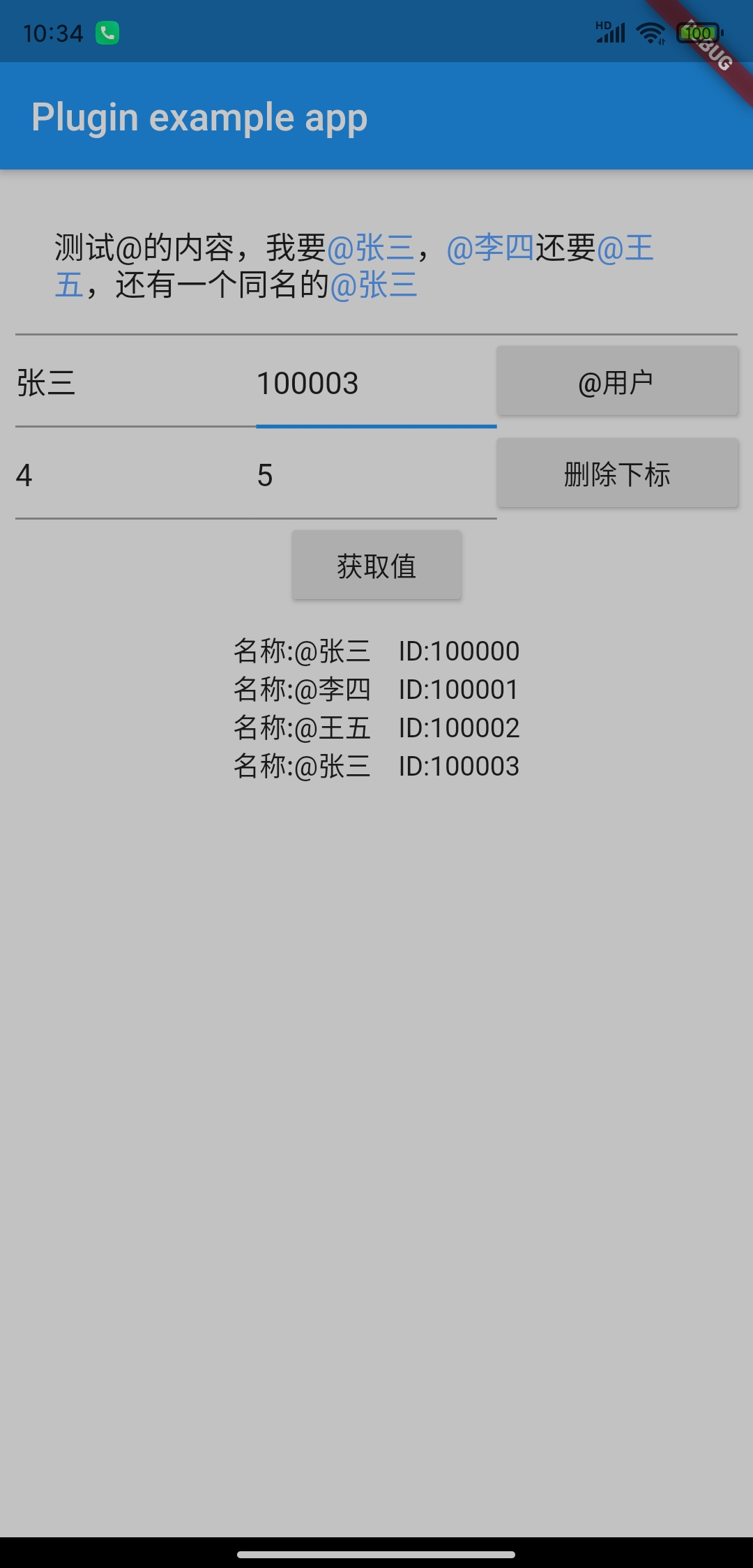
通过此组件可以快速实现@功能值绑定,隐藏域值绑定!
如果您觉得这个插件帮助了您,可以请我喝一杯咖啡
由于此插件是基于 Flutter 内部源码扩展,而 Flutter 迭代速度太快了,故将此插件标注为“停止维护”,后续有时间将会新开一个项目,尽量不涉及到Flutter源码来进行实现与此项目相同功能,届时会在此项目进行通知。
此项目已发布版本可进行继续使用,感谢大家的支持,谢谢。
一个项目的征途结束了,开源的步伐永远不滞。
欢迎加入Flutter讨论群,QQ群号: 850923396
2022-03-30
- @功能 (用户绑定ID,即使重名也能精确的知道@的是哪个用户)
- 隐藏域场景 (@一个用户,我们需要的实际是这个用户的ID,而不是用户名,通过此组件可以快速方便的实现)
- 自定义组件仅能以"块"的形式出现,即一删除会删除整块内容,光标也无法定位到整快组件中间,可参考QQ的@功能
- 在存在自定义组件的情况下,禁止使用 controller.text
进行赋值,如果你不得不添加或删除内容,请使用
append和delete方法 - 自定义组件仅支持
TextSpan及其子类,不支持WidgetSpan
欢迎进入QQ群讨论,点击此处可以直接加入群聊
text_span_field: 最新版本
无需额外配置,已内部打入混淆配置
无需额外配置
TextSpanField(
maxLines:null,
textSpanBuilder: _textSpanBuilder,
decoration:InputDecoration(
contentPadding:EdgeInsets.all(20),
hintText:'分享你的点滴,记录这一刻...',
),
)
其中,textSpanBuilder 属性为 TextSpanBuilder 对象,此对象包含以下公开接口:
| 方法名 | 方法描述 |
|---|---|
| buildSpan | 根据文本和自定义组件构建InlineSpan列表 |
| appendToEnd | 追加自定义的 TextSpan 组件到末尾 |
| appendTextToEnd | 追加普通文本到末尾 |
| appendToCursor | 追加自定义的 TextSpan 组件到光标位置 |
| appendTextToCursor | 追加普通文本光标位置 |
| append | 追加自定义的 TextSpan 组件到指定下标 |
| appendText | 追加普通文本指定下标 |
| delete | 根据开始下标和结束下标删除文本内容 |
| clear | 清空文本内容 |
| getWidgets | 获得自定义组件列表 |
如果你要实现@功能的隐藏域,可以增加一个 AtTextSpan 类,并继承 TextSpan:
/// At功能的TextSpanclassAtTextSpanextendsTextSpan {
/// 被@用户的IDfinalString id;
constAtTextSpan({
@requiredthis.id,
String text,
List<InlineSpan> children,
TextStyle style,
GestureRecognizer recognizer,
String semanticsLabel,
}) :super(text: text, children: children, style: style, recognizer: recognizer, semanticsLabel: semanticsLabel);
}
然后在@的时候通过 appendToCursor 接口添加到编辑器,最后在获得值的时候调用
getWidgets 接口即可:
添加:
_textSpanBuilder.appendToCursor(AtTextSpan(id:"我是ID", text:"我是昵称", style:TextStyle(color:Color(0xFF5BA2FF))));获取:
List<TextSpanWidget> widget =this._textSpanBuilder.getWidgets();
widget.forEach((element) {
if (!(element.span isAtTextSpan)) {
return;
}
AtTextSpan at = element.span;
_valueContent +="名称:${at.text} \t\t ID:${at.id}\n";
});我同时维护的还有以下插件,如果您感兴趣与我一起进行维护,请通过Github联系我,欢迎 issues 和 PR。
| 平台 | 插件 | 描述 | 版本 |
|---|---|---|---|
| Flutter | FlutterVideoPlayerLibrary-Desc | Flutter 最好用的播放器(UI库) | - |
| Flutter | FlutterPerfectVolumeControl | Flutter 完美的音量控制器插件 |  |
| Flutter | FlutterTencentImPlugin | 腾讯云IM插件 |  |
| Flutter | FlutterTencentRtcPlugin | 腾讯云Rtc插件 |  |
| Flutter | FlutterXiaoMiPushPlugin | 小米推送SDK插件 |  |
| Flutter | FlutterHuaWeiPushPlugin | 华为推送(HMS Push)插件 |  |
| Flutter | FlutterTextSpanField | 自定义文本样式输入框 |  |
| Flutter | FlutterClipboardListener | 粘贴板监听器 |  |
| Flutter | FlutterQiniucloudLivePlugin | Flutter 七牛云直播云插件 | 暂未发布,通过 git 集成 |
Thanks goes to these wonderful people (emoji key):
wenbo_lee 💻 | xiejie 💻 | 淡航 💻 | Tracyis 💻 |
This project follows the all-contributors specification. Contributions of any kind welcome!