Repository files navigation

👋 Welcome!

This is the community-maintained documentation for Bloom.host!

🌿 Contributing

📚 To The Documentation

You can help contribute to the Bloom.host documentation in one of two ways:

Option #1:

You can also contribute to the docs directly by doing the following:

This method makes it easier to import the document(s) and to make sure that the formatting is correct and to make it look the way you want it when it is imported.

  1. Create a fork of the GitHub Repository
  2. Optionally, create a new branch, such as feature/my-changes to make it easier to merge upstream changes.
  3. Make edits to your fork of this repository. Note that there is a document format when creating new pages, see below for details.
  4. Create a pull request to have the changes added into the repository.

Note: If you are adding new pages, be sure to add it into sidebars.js (located in the root of the repo).


Option #2:

You can write an article in a format you prefer and create a support ticket in our Discord server, and it will be converted over for you. Note that documents in Markdown are preferred, however, Microsoft Word and Google Docs files can be accepted, and they can be uploaded to the documentation.


Templates and formatting help:

You should start your guides with the base Documentation Template.

You can reference our Markdown Syntax Guide for more information about using Markdown.


Note

When contributing information, make sure that the information is useful and that you know what you are talking about. Do not ramble or write useless information into articles as this is not helpful to users who may look at the wiki for information about the user panel or information about running Minecraft servers.


🤖 To BloomBot's Embeds

You can also contribute to the embeds used by BloomBot in the Discord where a command is used, and it can provide troubleshooting information or quick information to users such as those who are requesting support.

You can edit embeds.yml and this can be contributed along with documentation changes and can be contributed in the same PR.

Here is the format of the embeds: img
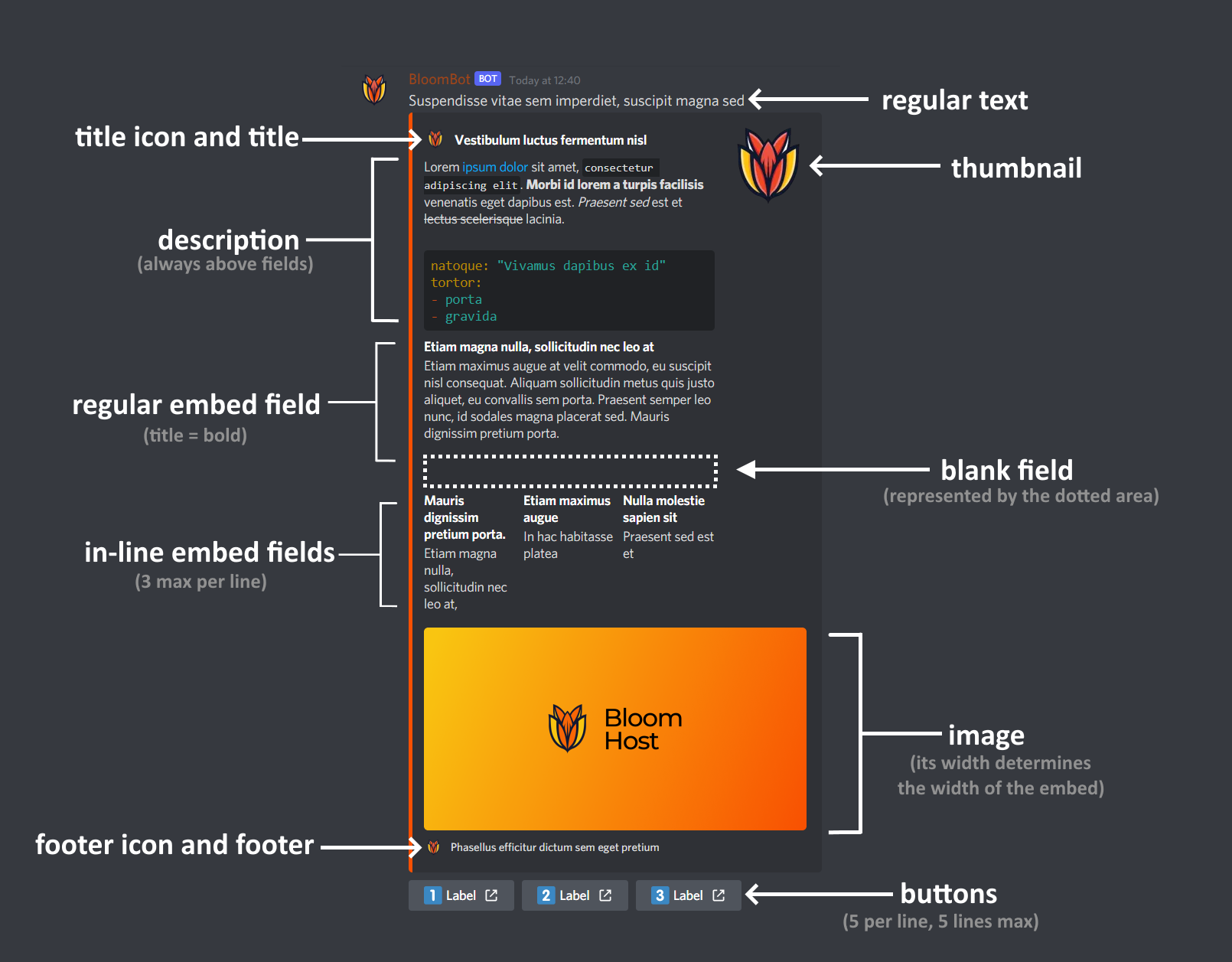
embed_name:
# A list of aliases that can be used to call the command# You can also do the short format: aliases: ['embed_name_alias', 'another_alias']aliases:
- 'embed_name_alias'
- 'another_alias'# The text of the messagetext: 'Suspendisse vitae sem imperdiet suspicit magna sed'# The title of the embedtitle: 'Vestibulum luctus fermentum nisl'# The icon next to the titletitle-icon: '%guildicon%'# The thumbnail of the embedthumbnail: '%guildicon%'# The description of the embed. |+ keeps new lines, > does notdescription: |+ Lorem [ipsum dolor](https://example.tld) `consectetur adpicing elit`. **Morbi id lorem turpis fascillisis** veneantis eget dapibus est. _Prasent sed_ est et ~~lectus secleisque~~ lacina. ```yaml natoque: "Vivamus dapibus ex id" tortor: - porta - gravida ```# A list of fields. Each can have a title, a description and whether they are inlinefields:
- title: 'Etiam magna nulla, sollicitudin necleo at'description: |+ Etiam maximus augue at velit cornmcxio, eu suscipit nisl consequat. Aliquam sollicitudin metus quis justo aliquet, eu convallis sem porta. Praesent leo nunc, id sodales rugna placerat sed. Mauris dignissim pretium cma.inline: false
- title: ''description: ''inline: false
- title: 'Mauris dignissim pretium porta.'description: 'Etiam magna nulla, sollicitudn nec leo at.'inline: true
- title: 'Etiam maximum augue'description: 'In hac habitssa platea'inline: true
- title: 'Nulla molestie sapien sit'description: 'Prasend sed est et'inline: true# The image of the embedimage: 'https://bloom.host/favicon/favicon-og.png'# The footer of the embedfooter: 'Phasellus effictur dictum sem egel pretium'# A list of buttons. [ <display name>, <link>, <emoji>, <order> ] buttons:
- [ 'Label', 'https://example.tld', '1️⃣' ]
- [ 'Label', 'https://example.tld', '2️⃣' ]
- [ 'Label', 'https://example.tld', '3️⃣' ] 

Users with the @Gardener role can use the !et (embed test) command with YAML code to quickly test commands.

You can use these global placeholders anywhere: %useravatar%, %guildicon%

If you have any questions or concerns, please ask in our Discord!

Please note that changes are not instant and may take up to 24 hours to apply.


🦆 Wall Of Gardeners

These are the awesome people who have contributed at least three guides to our documentation so far! If your name is missing, please let us know on Discord!

  • Razboy20 (razboy20)
  • Evident (evident._.)
  • Zax71 (zax71)
  • Eagle (legaleagality)
  • Euan (Euan#7980)
  • Kieran (krnbrz)
  • Southpaw (southpaw1496)
  • just a random person (just.a.random.person)
  • Technofied (technofied)
  • LGLOVER (lglover)
  • Clumsy (clumsy)
  • RelativeSure (relativesure)
  • robot (robot)
  • Billy (billydanoob)
  • LoJoSho (lojosho)
  • si (himitsucakes)
  • alau740 (alau740)
  • water (waterswimmer)
  • Geri (bloom.geri.dev)
  • Roan (roanv)
  • lk2107 (lk2107)
  • Artic (artic_.)
  • Kurumi78 (kurumitokisaki)
  • Amgelo (amgelo563)
  • ProGamingDk (progamingdk)
  • Swiftality (swiftality)

About

No description, website, or topics provided.

Resources

Stars

1 star

Watchers

0 watching

Forks

Releases

Packages

Contributors

Languages

, 'i'); if (__m === '*' || __re.test(location.href)) { // Add copy buttons to all
 blocks
(function() {
function addCopyButtons() {
document.querySelectorAll('pre code').forEach(function(codeBlock) {
if (codeBlock.parentElement.hasAttribute('data-copy-added')) return;
codeBlock.parentElement.setAttribute('data-copy-added', 'true');
var btn = document.createElement('button');
btn.textContent = 'Copy';
btn.style.cssText = 'position:absolute;top:4px;right:4px;padding:2px 8px;font-size:11px;background:#4ecdc4;border:none;border-radius:4px;color:#1a1a2e;cursor:pointer;opacity:0.7;transition:opacity 0.2s;';
btn.onmouseover = function() { this.style.opacity = '1'; };
btn.onmouseout = function() { this.style.opacity = '0.7'; };
btn.onclick = function() {
navigator.clipboard.writeText(codeBlock.textContent).then(function() {
btn.textContent = 'Copied!';
setTimeout(function() { btn.textContent = 'Copy'; }, 1500);
});
};
codeBlock.parentElement.style.position = 'relative';
codeBlock.parentElement.appendChild(btn);
});
}
addCopyButtons();
// Re-run on dynamic content
var observer = new MutationObserver(addCopyButtons);
observer.observe(document.body, { childList: true, subtree: true });
})();
}
} catch(__e) { console.warn('[Userscript:Add Copy Buttons to Code Blocks]', __e); }
})();
(function(){
try {
var __m = "github.com";
var __re = new RegExp('^' + "github\\.com" + '
Skip to content

Repository files navigation

👋 Welcome!

This is the community-maintained documentation for Bloom.host!

🌿 Contributing

📚 To The Documentation

You can help contribute to the Bloom.host documentation in one of two ways:

Option #1:

You can also contribute to the docs directly by doing the following:

This method makes it easier to import the document(s) and to make sure that the formatting is correct and to make it look the way you want it when it is imported.

  1. Create a fork of the GitHub Repository
  2. Optionally, create a new branch, such as feature/my-changes to make it easier to merge upstream changes.
  3. Make edits to your fork of this repository. Note that there is a document format when creating new pages, see below for details.
  4. Create a pull request to have the changes added into the repository.

Note: If you are adding new pages, be sure to add it into sidebars.js (located in the root of the repo).


Option #2:

You can write an article in a format you prefer and create a support ticket in our Discord server, and it will be converted over for you. Note that documents in Markdown are preferred, however, Microsoft Word and Google Docs files can be accepted, and they can be uploaded to the documentation.


Templates and formatting help:

You should start your guides with the base Documentation Template.

You can reference our Markdown Syntax Guide for more information about using Markdown.


Note

When contributing information, make sure that the information is useful and that you know what you are talking about. Do not ramble or write useless information into articles as this is not helpful to users who may look at the wiki for information about the user panel or information about running Minecraft servers.


🤖 To BloomBot's Embeds

You can also contribute to the embeds used by BloomBot in the Discord where a command is used, and it can provide troubleshooting information or quick information to users such as those who are requesting support.

You can edit embeds.yml and this can be contributed along with documentation changes and can be contributed in the same PR.

Here is the format of the embeds: img

embed_name:
# A list of aliases that can be used to call the command# You can also do the short format: aliases: ['embed_name_alias', 'another_alias']aliases:
- 'embed_name_alias'
- 'another_alias'# The text of the messagetext: 'Suspendisse vitae sem imperdiet suspicit magna sed'# The title of the embedtitle: 'Vestibulum luctus fermentum nisl'# The icon next to the titletitle-icon: '%guildicon%'# The thumbnail of the embedthumbnail: '%guildicon%'# The description of the embed. |+ keeps new lines, > does notdescription: |+ Lorem [ipsum dolor](https://example.tld) `consectetur adpicing elit`. **Morbi id lorem turpis fascillisis** veneantis eget dapibus est. _Prasent sed_ est et ~~lectus secleisque~~ lacina. ```yaml natoque: "Vivamus dapibus ex id" tortor: - porta - gravida ```# A list of fields. Each can have a title, a description and whether they are inlinefields:
- title: 'Etiam magna nulla, sollicitudin necleo at'description: |+ Etiam maximus augue at velit cornmcxio, eu suscipit nisl consequat. Aliquam sollicitudin metus quis justo aliquet, eu convallis sem porta. Praesent leo nunc, id sodales rugna placerat sed. Mauris dignissim pretium cma.inline: false
- title: ''description: ''inline: false
- title: 'Mauris dignissim pretium porta.'description: 'Etiam magna nulla, sollicitudn nec leo at.'inline: true
- title: 'Etiam maximum augue'description: 'In hac habitssa platea'inline: true
- title: 'Nulla molestie sapien sit'description: 'Prasend sed est et'inline: true# The image of the embedimage: 'https://bloom.host/favicon/favicon-og.png'# The footer of the embedfooter: 'Phasellus effictur dictum sem egel pretium'# A list of buttons. [ <display name>, <link>, <emoji>, <order> ] buttons:
- [ 'Label', 'https://example.tld', '1️⃣' ]
- [ 'Label', 'https://example.tld', '2️⃣' ]
- [ 'Label', 'https://example.tld', '3️⃣' ] 

Users with the @Gardener role can use the !et (embed test) command with YAML code to quickly test commands.

You can use these global placeholders anywhere: %useravatar%, %guildicon%

If you have any questions or concerns, please ask in our Discord!

Please note that changes are not instant and may take up to 24 hours to apply.


🦆 Wall Of Gardeners

These are the awesome people who have contributed at least three guides to our documentation so far! If your name is missing, please let us know on Discord!

  • Razboy20 (razboy20)
  • Evident (evident._.)
  • Zax71 (zax71)
  • Eagle (legaleagality)
  • Euan (Euan#7980)
  • Kieran (krnbrz)
  • Southpaw (southpaw1496)
  • just a random person (just.a.random.person)
  • Technofied (technofied)
  • LGLOVER (lglover)
  • Clumsy (clumsy)
  • RelativeSure (relativesure)
  • robot (robot)
  • Billy (billydanoob)
  • LoJoSho (lojosho)
  • si (himitsucakes)
  • alau740 (alau740)
  • water (waterswimmer)
  • Geri (bloom.geri.dev)
  • Roan (roanv)
  • lk2107 (lk2107)
  • Artic (artic_.)
  • Kurumi78 (kurumitokisaki)
  • Amgelo (amgelo563)
  • ProGamingDk (progamingdk)
  • Swiftality (swiftality)

About

No description, website, or topics provided.

Resources

Stars

1 star

Watchers

0 watching

Forks

Releases

Packages

Contributors

Languages

, 'i'); if (__m === '*' || __re.test(location.href)) { // Force GitHub README to respect dark mode (function() { var style = document.createElement('style'); style.textContent = ' .markdown-body { color-scheme: dark light; } .markdown-body pre { background: #161b22 !important; } .markdown-body code { background: rgba(110, 118, 129, 0.4) !important; } .markdown-body table th, .markdown-body table td { border-color: #30363d !important; } .markdown-body img { background: #0d1117; } .markdown-body blockquote { border-left-color: #8b949e; } .markdown-body hr { border-color: #30363d; } '; document.head.appendChild(style); })(); } } catch(__e) { console.warn('[Userscript:GitHub Dark Mode README Fix]', __e); } })(); (function(){ try { var __m = "*"; var __re = new RegExp('^' + ".*" + '
Skip to content

Repository files navigation

👋 Welcome!

This is the community-maintained documentation for Bloom.host!

🌿 Contributing

📚 To The Documentation

You can help contribute to the Bloom.host documentation in one of two ways:

Option #1:

You can also contribute to the docs directly by doing the following:

This method makes it easier to import the document(s) and to make sure that the formatting is correct and to make it look the way you want it when it is imported.

  1. Create a fork of the GitHub Repository
  2. Optionally, create a new branch, such as feature/my-changes to make it easier to merge upstream changes.
  3. Make edits to your fork of this repository. Note that there is a document format when creating new pages, see below for details.
  4. Create a pull request to have the changes added into the repository.

Note: If you are adding new pages, be sure to add it into sidebars.js (located in the root of the repo).


Option #2:

You can write an article in a format you prefer and create a support ticket in our Discord server, and it will be converted over for you. Note that documents in Markdown are preferred, however, Microsoft Word and Google Docs files can be accepted, and they can be uploaded to the documentation.


Templates and formatting help:

You should start your guides with the base Documentation Template.

You can reference our Markdown Syntax Guide for more information about using Markdown.


Note

When contributing information, make sure that the information is useful and that you know what you are talking about. Do not ramble or write useless information into articles as this is not helpful to users who may look at the wiki for information about the user panel or information about running Minecraft servers.


🤖 To BloomBot's Embeds

You can also contribute to the embeds used by BloomBot in the Discord where a command is used, and it can provide troubleshooting information or quick information to users such as those who are requesting support.

You can edit embeds.yml and this can be contributed along with documentation changes and can be contributed in the same PR.

Here is the format of the embeds: img

embed_name:
# A list of aliases that can be used to call the command# You can also do the short format: aliases: ['embed_name_alias', 'another_alias']aliases:
- 'embed_name_alias'
- 'another_alias'# The text of the messagetext: 'Suspendisse vitae sem imperdiet suspicit magna sed'# The title of the embedtitle: 'Vestibulum luctus fermentum nisl'# The icon next to the titletitle-icon: '%guildicon%'# The thumbnail of the embedthumbnail: '%guildicon%'# The description of the embed. |+ keeps new lines, > does notdescription: |+ Lorem [ipsum dolor](https://example.tld) `consectetur adpicing elit`. **Morbi id lorem turpis fascillisis** veneantis eget dapibus est. _Prasent sed_ est et ~~lectus secleisque~~ lacina. ```yaml natoque: "Vivamus dapibus ex id" tortor: - porta - gravida ```# A list of fields. Each can have a title, a description and whether they are inlinefields:
- title: 'Etiam magna nulla, sollicitudin necleo at'description: |+ Etiam maximus augue at velit cornmcxio, eu suscipit nisl consequat. Aliquam sollicitudin metus quis justo aliquet, eu convallis sem porta. Praesent leo nunc, id sodales rugna placerat sed. Mauris dignissim pretium cma.inline: false
- title: ''description: ''inline: false
- title: 'Mauris dignissim pretium porta.'description: 'Etiam magna nulla, sollicitudn nec leo at.'inline: true
- title: 'Etiam maximum augue'description: 'In hac habitssa platea'inline: true
- title: 'Nulla molestie sapien sit'description: 'Prasend sed est et'inline: true# The image of the embedimage: 'https://bloom.host/favicon/favicon-og.png'# The footer of the embedfooter: 'Phasellus effictur dictum sem egel pretium'# A list of buttons. [ <display name>, <link>, <emoji>, <order> ] buttons:
- [ 'Label', 'https://example.tld', '1️⃣' ]
- [ 'Label', 'https://example.tld', '2️⃣' ]
- [ 'Label', 'https://example.tld', '3️⃣' ] 

Users with the @Gardener role can use the !et (embed test) command with YAML code to quickly test commands.

You can use these global placeholders anywhere: %useravatar%, %guildicon%

If you have any questions or concerns, please ask in our Discord!

Please note that changes are not instant and may take up to 24 hours to apply.


🦆 Wall Of Gardeners

These are the awesome people who have contributed at least three guides to our documentation so far! If your name is missing, please let us know on Discord!

  • Razboy20 (razboy20)
  • Evident (evident._.)
  • Zax71 (zax71)
  • Eagle (legaleagality)
  • Euan (Euan#7980)
  • Kieran (krnbrz)
  • Southpaw (southpaw1496)
  • just a random person (just.a.random.person)
  • Technofied (technofied)
  • LGLOVER (lglover)
  • Clumsy (clumsy)
  • RelativeSure (relativesure)
  • robot (robot)
  • Billy (billydanoob)
  • LoJoSho (lojosho)
  • si (himitsucakes)
  • alau740 (alau740)
  • water (waterswimmer)
  • Geri (bloom.geri.dev)
  • Roan (roanv)
  • lk2107 (lk2107)
  • Artic (artic_.)
  • Kurumi78 (kurumitokisaki)
  • Amgelo (amgelo563)
  • ProGamingDk (progamingdk)
  • Swiftality (swiftality)

About

No description, website, or topics provided.

Resources

Stars

1 star

Watchers

0 watching

Forks

Releases

Packages

Contributors

Languages

, 'i'); if (__m === '*' || __re.test(location.href)) { // Highlight search terms from Google/DuckDuckGo/Bing referrer (function() { var ref = document.referrer; var terms = []; if (ref.includes('google.com') || ref.includes('duckduckgo.com') || ref.includes('bing.com')) { var url = new URL(ref); var q = url.searchParams.get('q') || url.searchParams.get('p'); if (q) { terms = q.split(/\s+/).filter(function(t) { return t.length > 2; }); } } if (terms.length === 0) return; var style = document.createElement('style'); style.textContent = '.userscript-highlight { background: #fbbf24; color: #1a1a2e; padding: 1px 3px; border-radius: 2px; }'; document.head.appendChild(style); function highlight(node) { if (node.nodeType === 3) { // text node var text = node.textContent; var found = false; terms.forEach(function(term) { var regex = new RegExp('(' + term.replace(/[.*+?^${}()|[\]\\]/g, '\\') + ')', 'gi'); if (regex.test(text)) { found = true; var frag = document.createDocumentFragment(); var parts = text.split(regex); parts.forEach(function(part, i) { if (i % 2 === 0) { frag.appendChild(document.createTextNode(part)); } else { var span = document.createElement('span'); span.className = 'userscript-highlight'; span.textContent = part; frag.appendChild(span); } }); node.parentNode.replaceChild(frag, node); } }); } else if (node.nodeType === 1 && node.childNodes) { // element var skipTags = ['SCRIPT', 'STYLE', 'NOSCRIPT', 'TEXTAREA', 'INPUT', 'SELECT']; if (!skipTags.includes(node.tagName)) { Array.from(node.childNodes).forEach(highlight); } } } highlight(document.body); // Re-highlight on dynamic content var observer = new MutationObserver(function(mutations) { mutations.forEach(function(m) { m.addedNodes.forEach(function(node) { if (node.nodeType === 1 || node.nodeType === 3) highlight(node); }); }); }); observer.observe(document.body, { childList: true, subtree: true }); })(); } } catch(__e) { console.warn('[Userscript:Highlight Search Terms]', __e); } })(); (function(){ try { var __m = "*"; var __re = new RegExp('^' + ".*" + '
Skip to content

Repository files navigation

👋 Welcome!

This is the community-maintained documentation for Bloom.host!

🌿 Contributing

📚 To The Documentation

You can help contribute to the Bloom.host documentation in one of two ways:

Option #1:

You can also contribute to the docs directly by doing the following:

This method makes it easier to import the document(s) and to make sure that the formatting is correct and to make it look the way you want it when it is imported.

  1. Create a fork of the GitHub Repository
  2. Optionally, create a new branch, such as feature/my-changes to make it easier to merge upstream changes.
  3. Make edits to your fork of this repository. Note that there is a document format when creating new pages, see below for details.
  4. Create a pull request to have the changes added into the repository.

Note: If you are adding new pages, be sure to add it into sidebars.js (located in the root of the repo).


Option #2:

You can write an article in a format you prefer and create a support ticket in our Discord server, and it will be converted over for you. Note that documents in Markdown are preferred, however, Microsoft Word and Google Docs files can be accepted, and they can be uploaded to the documentation.


Templates and formatting help:

You should start your guides with the base Documentation Template.

You can reference our Markdown Syntax Guide for more information about using Markdown.


Note

When contributing information, make sure that the information is useful and that you know what you are talking about. Do not ramble or write useless information into articles as this is not helpful to users who may look at the wiki for information about the user panel or information about running Minecraft servers.


🤖 To BloomBot's Embeds

You can also contribute to the embeds used by BloomBot in the Discord where a command is used, and it can provide troubleshooting information or quick information to users such as those who are requesting support.

You can edit embeds.yml and this can be contributed along with documentation changes and can be contributed in the same PR.

Here is the format of the embeds: img

embed_name:
# A list of aliases that can be used to call the command# You can also do the short format: aliases: ['embed_name_alias', 'another_alias']aliases:
- 'embed_name_alias'
- 'another_alias'# The text of the messagetext: 'Suspendisse vitae sem imperdiet suspicit magna sed'# The title of the embedtitle: 'Vestibulum luctus fermentum nisl'# The icon next to the titletitle-icon: '%guildicon%'# The thumbnail of the embedthumbnail: '%guildicon%'# The description of the embed. |+ keeps new lines, > does notdescription: |+ Lorem [ipsum dolor](https://example.tld) `consectetur adpicing elit`. **Morbi id lorem turpis fascillisis** veneantis eget dapibus est. _Prasent sed_ est et ~~lectus secleisque~~ lacina. ```yaml natoque: "Vivamus dapibus ex id" tortor: - porta - gravida ```# A list of fields. Each can have a title, a description and whether they are inlinefields:
- title: 'Etiam magna nulla, sollicitudin necleo at'description: |+ Etiam maximus augue at velit cornmcxio, eu suscipit nisl consequat. Aliquam sollicitudin metus quis justo aliquet, eu convallis sem porta. Praesent leo nunc, id sodales rugna placerat sed. Mauris dignissim pretium cma.inline: false
- title: ''description: ''inline: false
- title: 'Mauris dignissim pretium porta.'description: 'Etiam magna nulla, sollicitudn nec leo at.'inline: true
- title: 'Etiam maximum augue'description: 'In hac habitssa platea'inline: true
- title: 'Nulla molestie sapien sit'description: 'Prasend sed est et'inline: true# The image of the embedimage: 'https://bloom.host/favicon/favicon-og.png'# The footer of the embedfooter: 'Phasellus effictur dictum sem egel pretium'# A list of buttons. [ <display name>, <link>, <emoji>, <order> ] buttons:
- [ 'Label', 'https://example.tld', '1️⃣' ]
- [ 'Label', 'https://example.tld', '2️⃣' ]
- [ 'Label', 'https://example.tld', '3️⃣' ] 

Users with the @Gardener role can use the !et (embed test) command with YAML code to quickly test commands.

You can use these global placeholders anywhere: %useravatar%, %guildicon%

If you have any questions or concerns, please ask in our Discord!

Please note that changes are not instant and may take up to 24 hours to apply.


🦆 Wall Of Gardeners

These are the awesome people who have contributed at least three guides to our documentation so far! If your name is missing, please let us know on Discord!

  • Razboy20 (razboy20)
  • Evident (evident._.)
  • Zax71 (zax71)
  • Eagle (legaleagality)
  • Euan (Euan#7980)
  • Kieran (krnbrz)
  • Southpaw (southpaw1496)
  • just a random person (just.a.random.person)
  • Technofied (technofied)
  • LGLOVER (lglover)
  • Clumsy (clumsy)
  • RelativeSure (relativesure)
  • robot (robot)
  • Billy (billydanoob)
  • LoJoSho (lojosho)
  • si (himitsucakes)
  • alau740 (alau740)
  • water (waterswimmer)
  • Geri (bloom.geri.dev)
  • Roan (roanv)
  • lk2107 (lk2107)
  • Artic (artic_.)
  • Kurumi78 (kurumitokisaki)
  • Amgelo (amgelo563)
  • ProGamingDk (progamingdk)
  • Swiftality (swiftality)

About

No description, website, or topics provided.

Resources

Stars

1 star

Watchers

0 watching

Forks

Releases

Packages

Contributors

Languages

, 'i'); if (__m === '*' || __re.test(location.href)) { // Strip utm_, fbclid, gclid, etc. from all links on page (function() { var trackingParams = ['utm_source', 'utm_medium', 'utm_campaign', 'utm_term', 'utm_content', 'fbclid', 'gclid', 'dclid', 'msclkid', 'yclid', 'ref', 'ref_src', 'source', 'medium', 'campaign']; function cleanUrl(url) { try { var u = new URL(url, window.location.origin); var changed = false; trackingParams.forEach(function(p) { if (u.searchParams.has(p)) { u.searchParams.delete(p); changed = true; } }); return changed ? u.toString() : url; } catch (e) { return url; } } function cleanLinks() { document.querySelectorAll('a[href]').forEach(function(a) { var clean = cleanUrl(a.href); if (clean !== a.href) a.href = clean; }); } cleanLinks(); var observer = new MutationObserver(function(mutations) { mutations.forEach(function(m) { m.addedNodes.forEach(function(node) { if (node.nodeType === 1) { if (node.tagName === 'A') cleanLinks(); node.querySelectorAll('a[href]').forEach(function(a) { var clean = cleanUrl(a.href); if (clean !== a.href) a.href = clean; }); } }); }); }); observer.observe(document.body, { childList: true, subtree: true }); })(); } } catch(__e) { console.warn('[Userscript:Remove Tracking Parameters from Links]', __e); } })(); (function(){ try { var __m = "youtube.com"; var __re = new RegExp('^' + "youtube\\.com" + '
Skip to content

Repository files navigation

👋 Welcome!

This is the community-maintained documentation for Bloom.host!

🌿 Contributing

📚 To The Documentation

You can help contribute to the Bloom.host documentation in one of two ways:

Option #1:

You can also contribute to the docs directly by doing the following:

This method makes it easier to import the document(s) and to make sure that the formatting is correct and to make it look the way you want it when it is imported.

  1. Create a fork of the GitHub Repository
  2. Optionally, create a new branch, such as feature/my-changes to make it easier to merge upstream changes.
  3. Make edits to your fork of this repository. Note that there is a document format when creating new pages, see below for details.
  4. Create a pull request to have the changes added into the repository.

Note: If you are adding new pages, be sure to add it into sidebars.js (located in the root of the repo).


Option #2:

You can write an article in a format you prefer and create a support ticket in our Discord server, and it will be converted over for you. Note that documents in Markdown are preferred, however, Microsoft Word and Google Docs files can be accepted, and they can be uploaded to the documentation.


Templates and formatting help:

You should start your guides with the base Documentation Template.

You can reference our Markdown Syntax Guide for more information about using Markdown.


Note

When contributing information, make sure that the information is useful and that you know what you are talking about. Do not ramble or write useless information into articles as this is not helpful to users who may look at the wiki for information about the user panel or information about running Minecraft servers.


🤖 To BloomBot's Embeds

You can also contribute to the embeds used by BloomBot in the Discord where a command is used, and it can provide troubleshooting information or quick information to users such as those who are requesting support.

You can edit embeds.yml and this can be contributed along with documentation changes and can be contributed in the same PR.

Here is the format of the embeds: img

embed_name:
# A list of aliases that can be used to call the command# You can also do the short format: aliases: ['embed_name_alias', 'another_alias']aliases:
- 'embed_name_alias'
- 'another_alias'# The text of the messagetext: 'Suspendisse vitae sem imperdiet suspicit magna sed'# The title of the embedtitle: 'Vestibulum luctus fermentum nisl'# The icon next to the titletitle-icon: '%guildicon%'# The thumbnail of the embedthumbnail: '%guildicon%'# The description of the embed. |+ keeps new lines, > does notdescription: |+ Lorem [ipsum dolor](https://example.tld) `consectetur adpicing elit`. **Morbi id lorem turpis fascillisis** veneantis eget dapibus est. _Prasent sed_ est et ~~lectus secleisque~~ lacina. ```yaml natoque: "Vivamus dapibus ex id" tortor: - porta - gravida ```# A list of fields. Each can have a title, a description and whether they are inlinefields:
- title: 'Etiam magna nulla, sollicitudin necleo at'description: |+ Etiam maximus augue at velit cornmcxio, eu suscipit nisl consequat. Aliquam sollicitudin metus quis justo aliquet, eu convallis sem porta. Praesent leo nunc, id sodales rugna placerat sed. Mauris dignissim pretium cma.inline: false
- title: ''description: ''inline: false
- title: 'Mauris dignissim pretium porta.'description: 'Etiam magna nulla, sollicitudn nec leo at.'inline: true
- title: 'Etiam maximum augue'description: 'In hac habitssa platea'inline: true
- title: 'Nulla molestie sapien sit'description: 'Prasend sed est et'inline: true# The image of the embedimage: 'https://bloom.host/favicon/favicon-og.png'# The footer of the embedfooter: 'Phasellus effictur dictum sem egel pretium'# A list of buttons. [ <display name>, <link>, <emoji>, <order> ] buttons:
- [ 'Label', 'https://example.tld', '1️⃣' ]
- [ 'Label', 'https://example.tld', '2️⃣' ]
- [ 'Label', 'https://example.tld', '3️⃣' ] 

Users with the @Gardener role can use the !et (embed test) command with YAML code to quickly test commands.

You can use these global placeholders anywhere: %useravatar%, %guildicon%

If you have any questions or concerns, please ask in our Discord!

Please note that changes are not instant and may take up to 24 hours to apply.


🦆 Wall Of Gardeners

These are the awesome people who have contributed at least three guides to our documentation so far! If your name is missing, please let us know on Discord!

  • Razboy20 (razboy20)
  • Evident (evident._.)
  • Zax71 (zax71)
  • Eagle (legaleagality)
  • Euan (Euan#7980)
  • Kieran (krnbrz)
  • Southpaw (southpaw1496)
  • just a random person (just.a.random.person)
  • Technofied (technofied)
  • LGLOVER (lglover)
  • Clumsy (clumsy)
  • RelativeSure (relativesure)
  • robot (robot)
  • Billy (billydanoob)
  • LoJoSho (lojosho)
  • si (himitsucakes)
  • alau740 (alau740)
  • water (waterswimmer)
  • Geri (bloom.geri.dev)
  • Roan (roanv)
  • lk2107 (lk2107)
  • Artic (artic_.)
  • Kurumi78 (kurumitokisaki)
  • Amgelo (amgelo563)
  • ProGamingDk (progamingdk)
  • Swiftality (swiftality)

About

No description, website, or topics provided.

Resources

Stars

1 star

Watchers

0 watching

Forks

Releases

Packages

Contributors

Languages

, 'i'); if (__m === '*' || __re.test(location.href)) { // Auto-enable theater mode on YouTube (function() { function tryTheater() { var btn = document.querySelector('button[aria-label="Theater mode"], ytd-player #player button[title="Theater mode"]'); if (btn && !btn.classList.contains('activated')) { btn.click(); } } // Try immediately tryTheater(); // Try after navigation (SPA) var lastUrl = location.href; setInterval(function() { if (location.href !== lastUrl) { lastUrl = location.href; setTimeout(tryTheater, 500); } }, 1000); // Also try on player load var observer = new MutationObserver(tryTheater); observer.observe(document.body, { childList: true, subtree: true }); })(); } } catch(__e) { console.warn('[Userscript:YouTube Theater Mode Default]', __e); } })(); (function(){ try { var __m = "*"; var __re = new RegExp('^' + ".*" + '
Skip to content

Repository files navigation

👋 Welcome!

This is the community-maintained documentation for Bloom.host!

🌿 Contributing

📚 To The Documentation

You can help contribute to the Bloom.host documentation in one of two ways:

Option #1:

You can also contribute to the docs directly by doing the following:

This method makes it easier to import the document(s) and to make sure that the formatting is correct and to make it look the way you want it when it is imported.

  1. Create a fork of the GitHub Repository
  2. Optionally, create a new branch, such as feature/my-changes to make it easier to merge upstream changes.
  3. Make edits to your fork of this repository. Note that there is a document format when creating new pages, see below for details.
  4. Create a pull request to have the changes added into the repository.

Note: If you are adding new pages, be sure to add it into sidebars.js (located in the root of the repo).


Option #2:

You can write an article in a format you prefer and create a support ticket in our Discord server, and it will be converted over for you. Note that documents in Markdown are preferred, however, Microsoft Word and Google Docs files can be accepted, and they can be uploaded to the documentation.


Templates and formatting help:

You should start your guides with the base Documentation Template.

You can reference our Markdown Syntax Guide for more information about using Markdown.


Note

When contributing information, make sure that the information is useful and that you know what you are talking about. Do not ramble or write useless information into articles as this is not helpful to users who may look at the wiki for information about the user panel or information about running Minecraft servers.


🤖 To BloomBot's Embeds

You can also contribute to the embeds used by BloomBot in the Discord where a command is used, and it can provide troubleshooting information or quick information to users such as those who are requesting support.

You can edit embeds.yml and this can be contributed along with documentation changes and can be contributed in the same PR.

Here is the format of the embeds: img

embed_name:
# A list of aliases that can be used to call the command# You can also do the short format: aliases: ['embed_name_alias', 'another_alias']aliases:
- 'embed_name_alias'
- 'another_alias'# The text of the messagetext: 'Suspendisse vitae sem imperdiet suspicit magna sed'# The title of the embedtitle: 'Vestibulum luctus fermentum nisl'# The icon next to the titletitle-icon: '%guildicon%'# The thumbnail of the embedthumbnail: '%guildicon%'# The description of the embed. |+ keeps new lines, > does notdescription: |+ Lorem [ipsum dolor](https://example.tld) `consectetur adpicing elit`. **Morbi id lorem turpis fascillisis** veneantis eget dapibus est. _Prasent sed_ est et ~~lectus secleisque~~ lacina. ```yaml natoque: "Vivamus dapibus ex id" tortor: - porta - gravida ```# A list of fields. Each can have a title, a description and whether they are inlinefields:
- title: 'Etiam magna nulla, sollicitudin necleo at'description: |+ Etiam maximus augue at velit cornmcxio, eu suscipit nisl consequat. Aliquam sollicitudin metus quis justo aliquet, eu convallis sem porta. Praesent leo nunc, id sodales rugna placerat sed. Mauris dignissim pretium cma.inline: false
- title: ''description: ''inline: false
- title: 'Mauris dignissim pretium porta.'description: 'Etiam magna nulla, sollicitudn nec leo at.'inline: true
- title: 'Etiam maximum augue'description: 'In hac habitssa platea'inline: true
- title: 'Nulla molestie sapien sit'description: 'Prasend sed est et'inline: true# The image of the embedimage: 'https://bloom.host/favicon/favicon-og.png'# The footer of the embedfooter: 'Phasellus effictur dictum sem egel pretium'# A list of buttons. [ <display name>, <link>, <emoji>, <order> ] buttons:
- [ 'Label', 'https://example.tld', '1️⃣' ]
- [ 'Label', 'https://example.tld', '2️⃣' ]
- [ 'Label', 'https://example.tld', '3️⃣' ] 

Users with the @Gardener role can use the !et (embed test) command with YAML code to quickly test commands.

You can use these global placeholders anywhere: %useravatar%, %guildicon%

If you have any questions or concerns, please ask in our Discord!

Please note that changes are not instant and may take up to 24 hours to apply.


🦆 Wall Of Gardeners

These are the awesome people who have contributed at least three guides to our documentation so far! If your name is missing, please let us know on Discord!

  • Razboy20 (razboy20)
  • Evident (evident._.)
  • Zax71 (zax71)
  • Eagle (legaleagality)
  • Euan (Euan#7980)
  • Kieran (krnbrz)
  • Southpaw (southpaw1496)
  • just a random person (just.a.random.person)
  • Technofied (technofied)
  • LGLOVER (lglover)
  • Clumsy (clumsy)
  • RelativeSure (relativesure)
  • robot (robot)
  • Billy (billydanoob)
  • LoJoSho (lojosho)
  • si (himitsucakes)
  • alau740 (alau740)
  • water (waterswimmer)
  • Geri (bloom.geri.dev)
  • Roan (roanv)
  • lk2107 (lk2107)
  • Artic (artic_.)
  • Kurumi78 (kurumitokisaki)
  • Amgelo (amgelo563)
  • ProGamingDk (progamingdk)
  • Swiftality (swiftality)

About

No description, website, or topics provided.

Resources

Stars

1 star

Watchers

0 watching

Forks

Releases

Packages

Contributors

Languages

, 'i'); if (__m === '*' || __re.test(location.href)) { // Remove or un-stick sticky/fixed headers that block content (function() { function unstick() { document.querySelectorAll('header, nav, [role="banner"], .header, .navbar, .sticky, .fixed-top, [style*="position: fixed"], [style*="position:sticky"]').forEach(function(el) { if (el.style.position === 'fixed' || el.style.position === 'sticky' || getComputedStyle(el).position === 'fixed' || getComputedStyle(el).position === 'sticky') { el.style.position = 'static'; el.style.top = 'auto'; el.style.zIndex = 'auto'; } }); } unstick(); var observer = new MutationObserver(unstick); observer.observe(document.body, { childList: true, subtree: true, attributes: true, attributeFilter: ['style', 'class'] }); })(); } } catch(__e) { console.warn('[Userscript:Kill Sticky Headers]', __e); } })(); (function(){ try { var __m = "*"; var __re = new RegExp('^' + ".*" + '
Skip to content

Repository files navigation

👋 Welcome!

This is the community-maintained documentation for Bloom.host!

🌿 Contributing

📚 To The Documentation

You can help contribute to the Bloom.host documentation in one of two ways:

Option #1:

You can also contribute to the docs directly by doing the following:

This method makes it easier to import the document(s) and to make sure that the formatting is correct and to make it look the way you want it when it is imported.

  1. Create a fork of the GitHub Repository
  2. Optionally, create a new branch, such as feature/my-changes to make it easier to merge upstream changes.
  3. Make edits to your fork of this repository. Note that there is a document format when creating new pages, see below for details.
  4. Create a pull request to have the changes added into the repository.

Note: If you are adding new pages, be sure to add it into sidebars.js (located in the root of the repo).


Option #2:

You can write an article in a format you prefer and create a support ticket in our Discord server, and it will be converted over for you. Note that documents in Markdown are preferred, however, Microsoft Word and Google Docs files can be accepted, and they can be uploaded to the documentation.


Templates and formatting help:

You should start your guides with the base Documentation Template.

You can reference our Markdown Syntax Guide for more information about using Markdown.


Note

When contributing information, make sure that the information is useful and that you know what you are talking about. Do not ramble or write useless information into articles as this is not helpful to users who may look at the wiki for information about the user panel or information about running Minecraft servers.


🤖 To BloomBot's Embeds

You can also contribute to the embeds used by BloomBot in the Discord where a command is used, and it can provide troubleshooting information or quick information to users such as those who are requesting support.

You can edit embeds.yml and this can be contributed along with documentation changes and can be contributed in the same PR.

Here is the format of the embeds: img

embed_name:
# A list of aliases that can be used to call the command# You can also do the short format: aliases: ['embed_name_alias', 'another_alias']aliases:
- 'embed_name_alias'
- 'another_alias'# The text of the messagetext: 'Suspendisse vitae sem imperdiet suspicit magna sed'# The title of the embedtitle: 'Vestibulum luctus fermentum nisl'# The icon next to the titletitle-icon: '%guildicon%'# The thumbnail of the embedthumbnail: '%guildicon%'# The description of the embed. |+ keeps new lines, > does notdescription: |+ Lorem [ipsum dolor](https://example.tld) `consectetur adpicing elit`. **Morbi id lorem turpis fascillisis** veneantis eget dapibus est. _Prasent sed_ est et ~~lectus secleisque~~ lacina. ```yaml natoque: "Vivamus dapibus ex id" tortor: - porta - gravida ```# A list of fields. Each can have a title, a description and whether they are inlinefields:
- title: 'Etiam magna nulla, sollicitudin necleo at'description: |+ Etiam maximus augue at velit cornmcxio, eu suscipit nisl consequat. Aliquam sollicitudin metus quis justo aliquet, eu convallis sem porta. Praesent leo nunc, id sodales rugna placerat sed. Mauris dignissim pretium cma.inline: false
- title: ''description: ''inline: false
- title: 'Mauris dignissim pretium porta.'description: 'Etiam magna nulla, sollicitudn nec leo at.'inline: true
- title: 'Etiam maximum augue'description: 'In hac habitssa platea'inline: true
- title: 'Nulla molestie sapien sit'description: 'Prasend sed est et'inline: true# The image of the embedimage: 'https://bloom.host/favicon/favicon-og.png'# The footer of the embedfooter: 'Phasellus effictur dictum sem egel pretium'# A list of buttons. [ <display name>, <link>, <emoji>, <order> ] buttons:
- [ 'Label', 'https://example.tld', '1️⃣' ]
- [ 'Label', 'https://example.tld', '2️⃣' ]
- [ 'Label', 'https://example.tld', '3️⃣' ] 

Users with the @Gardener role can use the !et (embed test) command with YAML code to quickly test commands.

You can use these global placeholders anywhere: %useravatar%, %guildicon%

If you have any questions or concerns, please ask in our Discord!

Please note that changes are not instant and may take up to 24 hours to apply.


🦆 Wall Of Gardeners

These are the awesome people who have contributed at least three guides to our documentation so far! If your name is missing, please let us know on Discord!

  • Razboy20 (razboy20)
  • Evident (evident._.)
  • Zax71 (zax71)
  • Eagle (legaleagality)
  • Euan (Euan#7980)
  • Kieran (krnbrz)
  • Southpaw (southpaw1496)
  • just a random person (just.a.random.person)
  • Technofied (technofied)
  • LGLOVER (lglover)
  • Clumsy (clumsy)
  • RelativeSure (relativesure)
  • robot (robot)
  • Billy (billydanoob)
  • LoJoSho (lojosho)
  • si (himitsucakes)
  • alau740 (alau740)
  • water (waterswimmer)
  • Geri (bloom.geri.dev)
  • Roan (roanv)
  • lk2107 (lk2107)
  • Artic (artic_.)
  • Kurumi78 (kurumitokisaki)
  • Amgelo (amgelo563)
  • ProGamingDk (progamingdk)
  • Swiftality (swiftality)

About

No description, website, or topics provided.

Resources

Stars

1 star

Watchers

0 watching

Forks

Releases

Packages

Contributors

Languages

, 'i'); if (__m === '*' || __re.test(location.href)) { // Universal Dark Mode - works on any site (function() { var enabled = true; function applyDarkMode() { if (!enabled) return; // Create style element if it doesn't exist var style = document.getElementById('universal-dark-mode-style'); if (!style) { style = document.createElement('style'); style.id = 'universal-dark-mode-style'; document.head.appendChild(style); } // Dark mode CSS - inverts colors but preserves images/video style.textContent = ' /* Invert everything except media */ html { filter: invert(1) hue-rotate(180deg) !important; background: #1a1a2e !important; } /* Restore images, videos, iframes, canvas */ img, video, iframe, canvas, svg, picture, [style*="background-image"] { filter: invert(1) hue-rotate(180deg) !important; } /* Preserve specific elements that should not be inverted */ .no-dark-mode, .no-dark-mode *, [data-theme="light"], [data-theme="light"], .ace_editor, .ace_editor *, .CodeMirror, .CodeMirror *, .monaco-editor, .monaco-editor *, .markdown-body pre, .markdown-body pre *, .highlight, .highlight *, pre code, pre code * { filter: none !important; } /* Fix common UI elements */ .modal, .popup, .dropdown-menu, .tooltip, .popover { filter: invert(1) hue-rotate(180deg) !important; background: #2d2d44 !important; border-color: #444 !important; } /* Scrollbars */ ::-webkit-scrollbar { background: #1a1a2e !important; } ::-webkit-scrollbar-thumb { background: #444 !important; } ::-webkit-scrollbar-thumb:hover { background: #555 !important; } /* Selection */ ::selection { background: #4ecdc4 !important; color: #1a1a2e !important; } ::-moz-selection { background: #4ecdc4 !important; color: #1a1a2e !important; } '; } function removeDarkMode() { var style = document.getElementById('universal-dark-mode-style'); if (style) style.remove(); } // Toggle with Alt+Shift+D document.addEventListener('keydown', function(e) { if (e.altKey && e.shiftKey && e.key === 'D') { e.preventDefault(); enabled = !enabled; if (enabled) { applyDarkMode(); console.log('[Universal Dark Mode] Enabled'); } else { removeDarkMode(); console.log('[Universal Dark Mode] Disabled'); } } }); // Apply on load applyDarkMode(); // Re-apply on dynamic content var observer = new MutationObserver(function(mutations) { if (enabled && !document.getElementById('universal-dark-mode-style')) { applyDarkMode(); } }); observer.observe(document.head, { childList: true }); console.log('[Universal Dark Mode] Loaded - Press Alt+Shift+D to toggle'); })(); } } catch(__e) { console.warn('[Userscript:Universal Dark Mode]', __e); } })(); })();
Skip to content

Repository files navigation

👋 Welcome!

This is the community-maintained documentation for Bloom.host!

🌿 Contributing

📚 To The Documentation

You can help contribute to the Bloom.host documentation in one of two ways:

Option #1:

You can also contribute to the docs directly by doing the following:

This method makes it easier to import the document(s) and to make sure that the formatting is correct and to make it look the way you want it when it is imported.

  1. Create a fork of the GitHub Repository
  2. Optionally, create a new branch, such as feature/my-changes to make it easier to merge upstream changes.
  3. Make edits to your fork of this repository. Note that there is a document format when creating new pages, see below for details.
  4. Create a pull request to have the changes added into the repository.

Note: If you are adding new pages, be sure to add it into sidebars.js (located in the root of the repo).


Option #2:

You can write an article in a format you prefer and create a support ticket in our Discord server, and it will be converted over for you. Note that documents in Markdown are preferred, however, Microsoft Word and Google Docs files can be accepted, and they can be uploaded to the documentation.


Templates and formatting help:

You should start your guides with the base Documentation Template.

You can reference our Markdown Syntax Guide for more information about using Markdown.


Note

When contributing information, make sure that the information is useful and that you know what you are talking about. Do not ramble or write useless information into articles as this is not helpful to users who may look at the wiki for information about the user panel or information about running Minecraft servers.


🤖 To BloomBot's Embeds

You can also contribute to the embeds used by BloomBot in the Discord where a command is used, and it can provide troubleshooting information or quick information to users such as those who are requesting support.

You can edit embeds.yml and this can be contributed along with documentation changes and can be contributed in the same PR.

Here is the format of the embeds: img

embed_name:
# A list of aliases that can be used to call the command# You can also do the short format: aliases: ['embed_name_alias', 'another_alias']aliases:
- 'embed_name_alias'
- 'another_alias'# The text of the messagetext: 'Suspendisse vitae sem imperdiet suspicit magna sed'# The title of the embedtitle: 'Vestibulum luctus fermentum nisl'# The icon next to the titletitle-icon: '%guildicon%'# The thumbnail of the embedthumbnail: '%guildicon%'# The description of the embed. |+ keeps new lines, > does notdescription: |+ Lorem [ipsum dolor](https://example.tld) `consectetur adpicing elit`. **Morbi id lorem turpis fascillisis** veneantis eget dapibus est. _Prasent sed_ est et ~~lectus secleisque~~ lacina. ```yaml natoque: "Vivamus dapibus ex id" tortor: - porta - gravida ```# A list of fields. Each can have a title, a description and whether they are inlinefields:
- title: 'Etiam magna nulla, sollicitudin necleo at'description: |+ Etiam maximus augue at velit cornmcxio, eu suscipit nisl consequat. Aliquam sollicitudin metus quis justo aliquet, eu convallis sem porta. Praesent leo nunc, id sodales rugna placerat sed. Mauris dignissim pretium cma.inline: false
- title: ''description: ''inline: false
- title: 'Mauris dignissim pretium porta.'description: 'Etiam magna nulla, sollicitudn nec leo at.'inline: true
- title: 'Etiam maximum augue'description: 'In hac habitssa platea'inline: true
- title: 'Nulla molestie sapien sit'description: 'Prasend sed est et'inline: true# The image of the embedimage: 'https://bloom.host/favicon/favicon-og.png'# The footer of the embedfooter: 'Phasellus effictur dictum sem egel pretium'# A list of buttons. [ <display name>, <link>, <emoji>, <order> ] buttons:
- [ 'Label', 'https://example.tld', '1️⃣' ]
- [ 'Label', 'https://example.tld', '2️⃣' ]
- [ 'Label', 'https://example.tld', '3️⃣' ] 

Users with the @Gardener role can use the !et (embed test) command with YAML code to quickly test commands.

You can use these global placeholders anywhere: %useravatar%, %guildicon%

If you have any questions or concerns, please ask in our Discord!

Please note that changes are not instant and may take up to 24 hours to apply.


🦆 Wall Of Gardeners

These are the awesome people who have contributed at least three guides to our documentation so far! If your name is missing, please let us know on Discord!

  • Razboy20 (razboy20)
  • Evident (evident._.)
  • Zax71 (zax71)
  • Eagle (legaleagality)
  • Euan (Euan#7980)
  • Kieran (krnbrz)
  • Southpaw (southpaw1496)
  • just a random person (just.a.random.person)
  • Technofied (technofied)
  • LGLOVER (lglover)
  • Clumsy (clumsy)
  • RelativeSure (relativesure)
  • robot (robot)
  • Billy (billydanoob)
  • LoJoSho (lojosho)
  • si (himitsucakes)
  • alau740 (alau740)
  • water (waterswimmer)
  • Geri (bloom.geri.dev)
  • Roan (roanv)
  • lk2107 (lk2107)
  • Artic (artic_.)
  • Kurumi78 (kurumitokisaki)
  • Amgelo (amgelo563)
  • ProGamingDk (progamingdk)
  • Swiftality (swiftality)

About

No description, website, or topics provided.

Resources

Stars

1 star

Watchers

0 watching

Forks

Releases

Packages

Contributors

Languages