
A powerful PHP template engine with asset compilation, template inheritance, and variable processing. CommentTemplate provides a simple yet flexible way to manage templates with built-in CSS/JS minification and caching.
- Template Inheritance: Use layouts and include other templates
- Asset Compilation: Automatic CSS/JS minification and caching
- Variable Processing: Template variables with filters and commands
- Base64 Encoding: Inline assets as data URIs
- Flight Framework Integration: Optional integration with Flight PHP framework
Install via Composer:
composer require knifelemon/comment-template<?phprequire_once'vendor/autoload.php';
useKnifeLemon\CommentTemplate\Engine;
// Initialize template engine$template = newEngine();
$template->setPublicPath(__DIR__); // Root directory (where index.php is)$template->setSkinPath('templates'); // Relative to public path$template->setAssetPath('assets'); // Relative to public path$template->setFileExtension('.php');
$template->setCacheBusting(true); // Append ?timestamp to asset URLs// Render template$template->render('homepage', [
'title' => 'Welcome',
'content' => 'Hello World!'
]);<?phprequire_once'vendor/autoload.php';
useKnifeLemon\CommentTemplate\Engine;
$app = Flight::app();
$app->register('view', Engine::class, [], function (Engine$engine) {
$engine->setPublicPath(__DIR__); // Root directory (where index.php is)$engine->setSkinPath('views'); // Relative to public path$engine->setAssetPath('assets'); // Relative to public path$engine->setFileExtension('.php');
$engine->setCacheBusting(true); // Enable cache busting
});
$app->map('render', function(string$template, array$data) use ($app): void {
echo$app->view()->render($template, $data);
});<?phprequire_once'vendor/autoload.php';
useKnifeLemon\CommentTemplate\Engine;
$app = Flight::app();
$app->register('view', Engine::class, [
__DIR__, // Public path (root directory where index.php is)'views', // Templates path (relative to public path) 'assets', // Asset path (relative to public path)'.php', // File extensiontrue// Enable cache busting
]);
$app->map('render', function(string$template, array$data) use ($app): void {
echo$app->view()->render($template, $data);
});CommentTemplate supports different JavaScript loading strategies:
- Normal:
<!--@js(file)-->- Standard blocking script load - Async:
<!--@jsAsync(file)-->- Non-blocking, executes immediately when loaded - Defer:
<!--@jsDefer(file)-->- Non-blocking, waits for HTML parsing to complete - Top placement: Use
jsTop*variants to load scripts in the<head>section - Single files: Use
*Single*variants to skip minification and load individual files
Use layouts to create a common structure:
layout.php:
<!DOCTYPE html><html><head><title>{$title}</title></head><body><!--@contents--></body></html>page.php:
<!--@layout(layout)--><h1>{$title}</h1><p>{$content}</p><!--@css(/css/styles.css)--><!-- Minified and cached --><!--@css(/css/*.css)--><!-- Load all CSS files in folder (sorted alphabetically) --><!--@cssSingle(/css/critical.css)--><!-- Single file, not minified --><!--@js(/js/script.js)--><!-- Minified, loaded at bottom --><!--@js(/js/*.js)--><!-- Load all JS files in folder (sorted alphabetically) --><!--@jsAsync(/js/analytics.js)--><!-- Minified, loaded at bottom with async --><!--@jsDefer(/js/utils.js)--><!-- Minified, loaded at bottom with defer --><!--@jsTop(/js/critical.js)--><!-- Minified, loaded in head --><!--@jsTopAsync(/js/tracking.js)--><!-- Minified, loaded in head with async --><!--@jsTopDefer(/js/polyfill.js)--><!-- Minified, loaded in head with defer --><!--@jsSingle(/js/widget.js)--><!-- Single file, not minified --><!--@jsSingleAsync(/js/ads.js)--><!-- Single file, not minified, async --><!--@jsSingleDefer(/js/social.js)--><!-- Single file, not minified, defer -->Wildcard Support:
- Use
*to match multiple files:<!--@css(/css/*.css)--> - Files are processed in alphabetical order for consistent output
- Works with all asset directives:
@css,@js,@jsAsync,@jsDefer, etc.
Priority Ordering:
All asset directives (@css, @cssSingle, @js, @jsAsync, @jsDefer, @jsTop, @jsTopAsync, @jsTopDefer, @jsSingle, @jsSingleAsync, @jsSingleDefer) support optional priority ordering by adding a number after the file path:
<!--@js(file, priority)--><!--@css(file, priority)-->Priority rules:
- No priority: Files are loaded in the order they appear in the template
- All prioritized: Sorted by priority number (ascending)
- Mixed: Prioritized files first (sorted by number), then non-prioritized in original order
<!-- No priority: loaded in order file1 → file2 → file3 --><!--@js(js/file1.js)--><!--@js(js/file2.js)--><!--@js(js/file3.js)--><!-- All prioritized: loaded in order file2 → file3 → file1 --><!--@js(js/file1.js, 3)--><!--@js(js/file2.js, 1)--><!--@js(js/file3.js, 2)--><!-- Mixed: prioritized first, then non-prioritized → file2 → file1 → file3 --><!--@js(js/file1.js, 3)--><!--@js(js/file2.js, 1)--><!--@js(js/file3.js)--><!-- Works with CSS too --><!--@css(css/reset.css, 1)--><!--@css(css/theme.css, 3)--><!--@css(css/layout.css, 2)-->Enable cache busting to append a timestamp query string (?{filemtime}) to compiled asset URLs. This forces browsers to reload assets when files are updated.
// Via constructor (5th parameter)$template = newEngine(__DIR__, 'views', 'assets', '.php', true);
// Via setter$template->setCacheBusting(true);
Output comparison:
<!-- cacheBusting = false (default) --><linkrel="stylesheet" href="/assets/css/a1b2c3.css"><scriptsrc="/assets/js/d4e5f6.js"></script><!-- cacheBusting = true --><linkrel="stylesheet" href="/assets/css/a1b2c3.css?1742486400"><scriptsrc="/assets/js/d4e5f6.js?1742486400"></script>Works with all asset types: @css, @cssSingle, @js, @jsAsync, @jsDefer, @jsTop, @jsTopAsync, @jsTopDefer, @jsSingle, @jsSingleAsync, @jsSingleDefer.
<!--@base64(images/logo.png)--><!-- Inline as data URI --><!-- Inline small images as data URIs for faster loading --><imgsrc="<!--@base64(images/logo.png)-->" alt="Logo"><divstyle="background-image: url('<!--@base64(icons/star.svg)-->');">
Small icon as background
</div><!--@asset(images/photo.jpg)--><!-- Copy single asset to public directory --><!--@assetDir(assets)--><!-- Copy entire directory to public directory -->CommentTemplate also processes asset directives within CSS and JavaScript files during compilation:
CSS Example:
/* In your CSS files */@font-face {
font-family:'CustomFont';
src:url('<!--@asset(fonts/custom.woff2)-->') format('woff2');
}
.background-image {
background:url('<!--@asset(images/bg.jpg)-->');
}
.inline-icon {
background:url('<!--@base64(icons/star.svg)-->');
}
JavaScript Example:
/* In your JS files */constfontUrl='<!--@asset(fonts/custom.woff2)-->';constimageData='<!--@base64(images/icon.png)-->';Benefits:
- Asset directives are processed during CSS/JS compilation
- Files are automatically copied to the public directory
- URLs are generated with correct asset paths
- Base64 encoding works in CSS/JS files too
Execute PHP code and output the result using <!--@echo()-->:
<!-- Execute PHP functions and constants --><div>Current time: <!--@echo(date('Y-m-d H:i:s'))--></div><div>PHP Version: <!--@echo(PHP_VERSION)--></div><div>App Version: <!--@echo(APP_VERSION)--></div>In JavaScript files:
// Generate dynamic URLs with Flight frameworklocation.href='<!--@echo(Flight::getUrl('login'))-->';constapiUrl='<!--@echo(Flight::getUrl('api'))-->';constdashboardUrl='<!--@echo(Flight::getUrl('dashboard'))-->';// Access constants and configurationconstDEBUG_MODE= <!--@echo(DEBUG ? 'true' : 'false')-->;
constMAX_UPLOAD= <!--@echo(MAX_FILE_SIZE)-->;
In CSS files:
/* Dynamic theme values */
.theme {
--primary-color: <!--@echo($theme['primary'] ?? '#007bff')-->;
--font-url:url('<!--@echo(CDN_URL . '/fonts/custom.woff2')-->');}.logo { background: url('<!--@echo(Flight::getUrl('static') . '/logo.png')-->');
}
Features:
- Executes any PHP expression (functions, constants, class methods)
- Supports nested parentheses and string literals
- Handles complex expressions like
Flight::getUrl('route') - Works in HTML templates, CSS files, and JavaScript files
- Access template variables when used in template context
- Errors are silently replaced with empty string
Important Notes:
- Template variables (
$data) are available in HTML templates - In CSS/JS files, only global functions, constants, and static methods are accessible
- The code is executed during template compilation
- Use carefully as it executes arbitrary PHP code
CommentTemplate provides intelligent path handling for both relative and absolute paths:
The Public Path is the root directory of your web application, typically where index.php resides. This is the document root that web servers serve files from.
// Example: if your index.php is at /var/www/html/myapp/index.php$template->setPublicPath('/var/www/html/myapp'); // Root directory// Windows example: if your index.php is at C:\xampp\htdocs\myapp\index.php$template->setPublicPath('C:\\xampp\\htdocs\\myapp');Templates path supports both relative and absolute paths:
$template = newEngine();
$template->setPublicPath('/var/www/html/myapp'); // Root directory (where index.php is)// Relative paths - automatically combined with public path$template->setSkinPath('views'); // → /var/www/html/myapp/views/$template->setSkinPath('templates/pages'); // → /var/www/html/myapp/templates/pages/// Absolute paths - used as-is (Unix/Linux)$template->setSkinPath('/var/www/templates'); // → /var/www/templates/$template->setSkinPath('/full/path/to/templates'); // → /full/path/to/templates/// Windows absolute paths$template->setSkinPath('C:\\www\\templates'); // → C:\www\templates\$template->setSkinPath('D:/projects/templates'); // → D:/projects/templates/// UNC paths (Windows network shares)$template->setSkinPath('\\\\server\\share\\templates'); // → \\server\share\templates\
Asset path also supports both relative and absolute paths:
// Relative paths - automatically combined with public path$template->setAssetPath('assets'); // → /var/www/html/myapp/assets/$template->setAssetPath('static/files'); // → /var/www/html/myapp/static/files/// Absolute paths - used as-is (Unix/Linux)$template->setAssetPath('/var/www/cdn'); // → /var/www/cdn/$template->setAssetPath('/full/path/to/assets'); // → /full/path/to/assets/// Windows absolute paths$template->setAssetPath('C:\\www\\static'); // → C:\www\static\$template->setAssetPath('D:/projects/assets'); // → D:/projects/assets/// UNC paths (Windows network shares)$template->setAssetPath('\\\\server\\share\\assets'); // → \\server\share\assets\Smart Path Detection:
- Relative Paths: No leading separators (
/,\) or drive letters - Unix Absolute: Starts with
/(e.g.,/var/www/assets) - Windows Absolute: Starts with drive letter (e.g.,
C:\www,D:/assets) - UNC Paths: Starts with
\\(e.g.,\\server\share)
How it works:
- All paths are automatically resolved based on type (relative vs absolute)
- Relative paths are combined with the public path
@cssand@jscreate minified files in:{resolvedAssetPath}/css/or{resolvedAssetPath}/js/@assetcopies single files to:{resolvedAssetPath}/{relativePath}@assetDircopies directories to:{resolvedAssetPath}/{relativePath}- Smart caching: files only copied when source is newer than destination
<!-- Copy entire assets folder --><!--@assetDir(assets)--><!-- Copy specific subdirectory --><!--@assetDir(images)--><!--@assetDir(fonts)--><!-- Copy and reference static assets --><imgsrc="<!--@asset(images/hero-banner.jpg)-->" alt="Hero Banner"><ahref="<!--@asset(documents/brochure.pdf)-->" download>Download Brochure</a><!-- Copy entire directory (fonts, icons, etc.) --><!--@assetDir(assets/fonts)--><!--@assetDir(assets/icons)-->Directory structure example:
templates/
├── resources/
│ ├── images/
│ │ ├── logo.png
│ │ └── banner.jpg
│ ├── css/
│ │ └── style.css
│ └── js/
│ └── app.js
└── layout.php
After <!--@assetDir(resources)--> in template:
public/
└── assets/ # (configured asset path)
└── resources/ # (copied directory)
├── images/
├── css/
└── js/
<!--@import(components/header)--><!-- Include other templates --><!-- Include reusable components --><!--@import(components/header)--><main><h1>Welcome to our website</h1><!--@import(components/sidebar)--><divclass="content"><p>Main content here...</p></div></main><!--@import(components/footer)-->{$title|upper} <!-- Convert to uppercase -->
{$content|lower} <!-- Convert to lowercase -->
{$html|striptag} <!-- Strip HTML tags -->
{$text|escape} <!-- Escape HTML -->
{$multiline|nl2br} <!-- Convert newlines to <br> -->
{$html|br2nl} <!-- Convert <br> tags to newlines -->
{$description|trim} <!-- Trim whitespace -->
{$subject|title} <!-- Convert to title case -->{$title|default=Default Title} <!-- Set default value -->
{$name|concat= (Admin)} <!-- Concatenate text -->{$content|striptag|trim|escape} <!-- Chain multiple filters -->Example:
<h1>{$title|upper}</h1><p>{$description|striptag}</p>Template comments are completely removed from the output and won't appear in the final HTML:
{* This is a single-line template comment *}
{* This is a multi-line template comment that spans several lines
*}
<h1>{$title}</h1>
{* Debug comment: checking if title variable works *}
<p>{$content}</p>Note: Template comments {* ... *} are different from HTML comments <!-- ... -->. Template comments are removed during processing and never reach the browser.
publicfunction __construct(string$publicPath = "", string$skinPath = "", string$assetPath = "", string$fileExtension = "", bool$cacheBusting = false)render(string $template, array $data = []): void
- Render template and output to browser
fetch(string $template, array $data = []): string
- Render template and return as string
setPublicPath(string $path): void
- Set public path for asset compilation
setSkinPath(string $path): void
- Set template directory path (supports both relative and absolute paths)
setFileExtension(string $extension): void
- Set template file extension
setAssetPath(string $path): void
- Set asset storage path (supports both relative and absolute paths)
setCacheBusting(bool $enabled): void
- Enable or disable cache busting (appends
?{filemtime}to asset URLs)
getPublicPath(): string
- Get current public path
getSkinPath(): string
- Get current template directory path
getFileExtension(): string
- Get current template file extension
getAssetPath(): string
- Get current asset storage path
getCacheBusting(): bool
- Get current cache busting setting
This will:
- Minify and combine CSS files
- Minify and combine JS files
- Cache compiled assets
- Inject
<link>and<script>tags automatically
composer testcomposer phpstancomposer test-coverageCommentTemplate includes integration with Tracy Debugger for development logging and debugging.
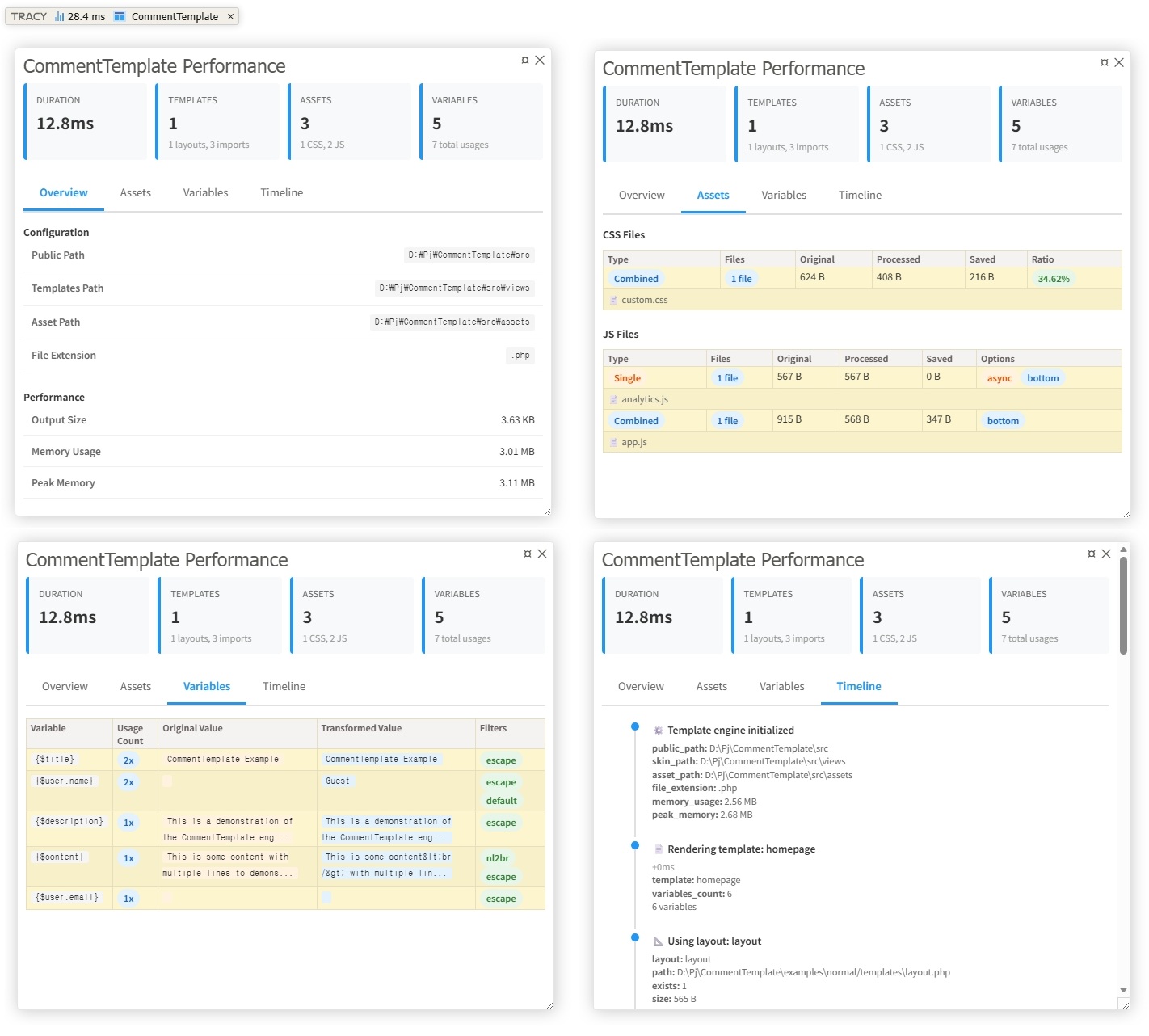
composer require tracy/tracy<?phpuseKnifeLemon\CommentTemplate\Engine;
useTracy\Debugger;
// Enable Tracy (must be called before any output)
Debugger::enable(Debugger::DEVELOPMENT);
// Use CommentTemplate as normal - logging happens automatically$template = newEngine();
$template->setPublicPath(__DIR__);
$template->setSkinPath('templates');
$template->setAssetPath('assets');
$template->render('homepage', ['title' => 'Hello World']);CommentTemplate adds a custom panel to Tracy's debug bar with four tabs:
- Overview: Configuration, performance metrics, and counts
- Assets: CSS/JS compilation details with compression ratios
- Variables: Original and transformed values with applied filters
- Timeline: Chronological view of all template operations
- Template rendering (start/end, duration, layouts, imports)
- Asset compilation (CSS/JS files, sizes, compression ratios)
- Variable processing (original/transformed values, filters)
- Asset operations (base64 encoding, file copying)
- Performance metrics (duration, memory usage)
Note: Zero performance impact when Tracy is not installed or disabled.
See examples/tracy/ and examples/flightphp/ for complete working examples.
MIT License. See LICENSE file for details.
- Fork the repository
- Create a feature branch
- Make your changes
- Add tests
- Submit a pull request