
StateProgressBar is an Android library to realize the various states and transitions in a ProgressBar.
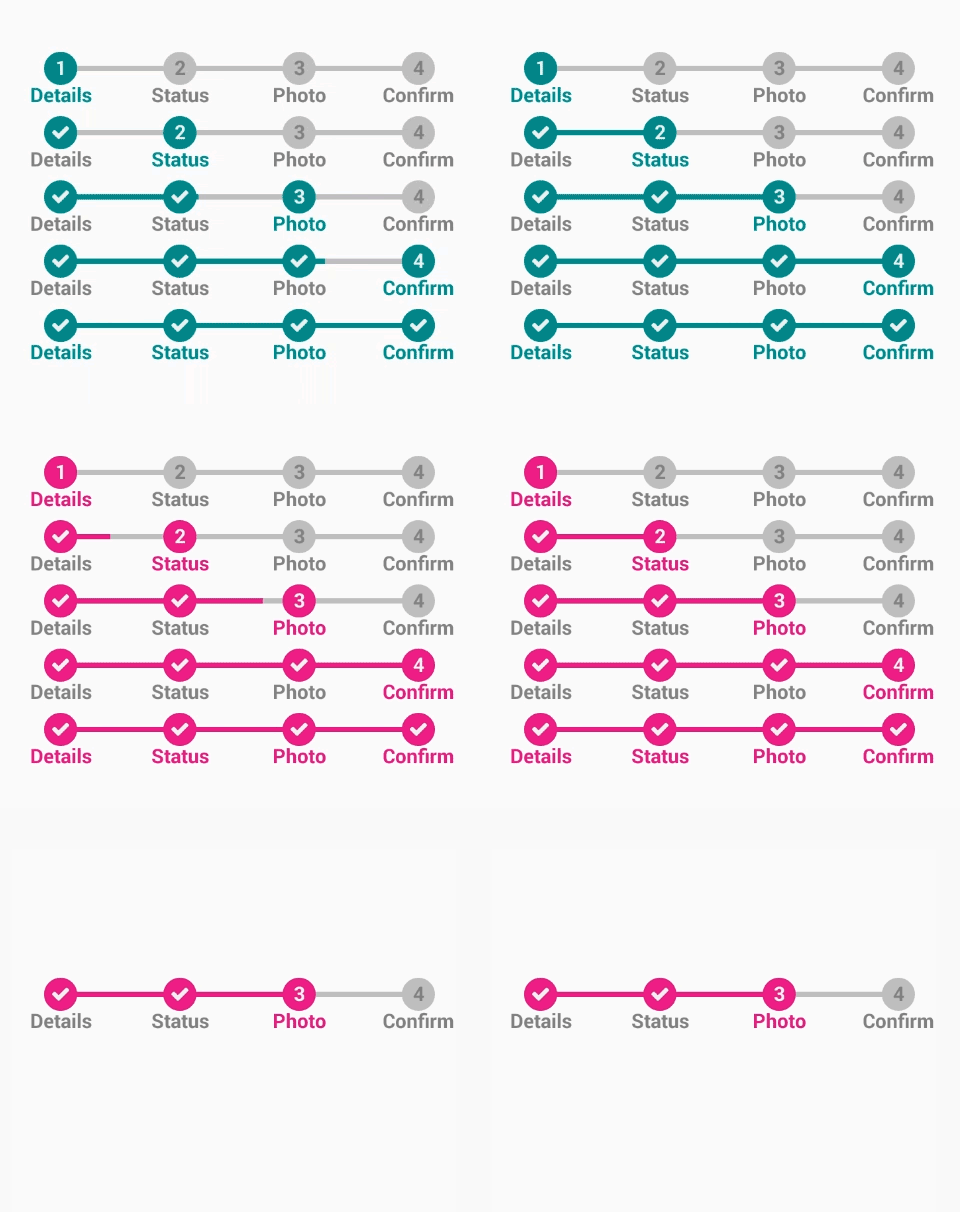
Get a feel of how it works:

Check the wiki for detailed documentation.
Add the following dependency to your build.gradle :
dependencies {
implementation 'com.kofigyan.stateprogressbar:stateprogressbar:1.0.0'
}
<com.kofigyan.stateprogressbar.StateProgressBar
android:id="@+id/your_state_progress_bar_id"
android:layout_width="wrap_content"
android:layout_height="wrap_content"
app:spb_currentStateNumber="three"
app:spb_maxStateNumber="four"
app:spb_stateBackgroundColor="#BDBDBD"
app:spb_stateForegroundColor="#009688"
app:spb_stateNumberBackgroundColor="#808080"
app:spb_stateNumberForegroundColor="#eeeeee"
app:spb_currentStateDescriptionColor="#009688"
app:spb_stateDescriptionColor="#808080"
app:spb_animateToCurrentProgressState="true"
app:spb_checkStateCompleted="true"/>
To add description data to StateProgressBar :
String[] descriptionData = {"Details", "Status", "Photo", "Confirm"};
@Override
protected void onCreate(Bundle savedInstanceState) {
super.onCreate(savedInstanceState);
setContentView(R.layout.your_layout);
StateProgressBar stateProgressBar = (StateProgressBar) findViewById(R.id.your_state_progress_bar_id);
stateProgressBar.setStateDescriptionData(descriptionData);
}
 spb_currentStateNumber => Current state number. Must be one of the following constant values : one , two , three , four .
Related method : setCurrentStateNumber(StateNumber)
spb_maxStateNumber => Maximum state number. Must be one of the following constant values : one , two , three , four .
Related method : setMaxStateNumber(StateNumber)
spb_stateBackgroundColor => State background color. Should be a color value. Possible forms are "#rgb", "#argb", "#rrggbb", or "#aarrggbb".
Related method : setBackgroundColor(int)
spb_stateForegroundColor => State foreground color. Should be a color value. Possible forms are "#rgb", "#argb", "#rrggbb", or "#aarrggbb".
Related method : setForegroundColor(int)
spb_stateNumberBackgroundColor => State number background color. Should be a color value. Possible forms are "#rgb", "#argb", "#rrggbb", or "#aarrggbb".
Related method : setStateNumberBackgroundColor(int)
spb_stateNumberForegroundColor => State number foreground color. Should be a color value. Possible forms are "#rgb", "#argb", "#rrggbb", or "#aarrggbb".
Related method : setStateNumberForegroundColor(int)
spb_currentStateDescriptionColor => Current state description color. Should be a color value. Possible forms are "#rgb", "#argb", "#rrggbb", or "#aarrggbb".
Related method : setCurrentStateDescriptionColor(int)
spb_stateDescriptionColor => State description color. Should be a color value. Possible forms are "#rgb", "#argb", "#rrggbb", or "#aarrggbb".
Related method : setStateDescriptionColor(int)
spb_stateSize => State size . Must be a dimension value with preferrable unit of dp eg. 25dp
Related method : setStateSize(float)
spb_stateTextSize => State text(number) size . Must be a dimension value with preferrable unit of sp eg. 15sp
Related method : setStateNumberTextSize(float)
spb_stateDescriptionSize => State description size . Must be a dimension value with preferrable unit of dp eg. 20dp
Related method : setStateDescriptionSize(float) spb_stateLineThickness => State joining line size(thickness) . Must be a dimension value with preferrable unit of dp eg. 10dp
Related method : setStateLineThickness(float)
spb_checkStateCompleted => Check completed states . Must be a boolean value,either "true" or "false"
Related method : checkStateCompleted(boolean) spb_animateToCurrentProgressState => Animate joining line to current progress state . Must be a boolean value,either "true" or "false"
Related method : enableAnimationToCurrentState(boolean) spb_enableAllStatesCompleted => Check all states . Must be a boolean value,either "true" or "false"
Related method : setAllStatesCompleted(boolean) spb_descriptionTopSpaceDecrementer => Space between state and description decrementer . Must be a dimension value with preferrable unit of dp eg. 10dp
Related method : setDescriptionTopSpaceDecrementer(float)
spb_descriptionTopSpaceIncrementer => Space between state and description incrementer . Must be a dimension value with preferrable unit of dp eg. 10dp
Related method : setDescriptionTopSpaceIncrementer(float)
spb_animationDuration => State joining line animation duration . Must be an integer value eg. "500" , "1000" , "2000" , "5000" , "10000" etc
Related method : setAnimationDuration(int)
spb_animationStartDelay => State joining line animation start delay . Must be an integer value eg. "500" , "1000" , "2000" , "5000" , "10000" etc
Related method : setAnimationStartDelay(int)
spb_descriptionLinesSpacing => State description multiline spacing . Must be a dimension value with preferrable unit of dp eg. 20dp
Related method : setDescriptionLinesSpacing(float)
spb_justifyMultilineDescription => Justify multiline description. Must be a boolean value,either "true" or "false"
Related method : setJustifyMultilineDescription(boolean)
spb_maxDescriptionLines => Maximum number of line for multiline description . Must be an integer value eg. "2" , "3" , "4" , "5" , "6" etc
Related method : setMaxDescriptionLine(int)
spb_stateNumberIsDescending => Rtl Language support. Must be a boolean value,either "true" or "false"
Related method : setStateNumberIsDescending(boolean)
StateProgressBar stateProgressBar = (StateProgressBar) findViewById(R.id.state_progress_bar);
stateProgressBar.setForegroundColor(ContextCompat.getColor(this, R.color.demo_state_foreground_color));
stateProgressBar.setBackgroundColor(ContextCompat.getColor(this, android.R.color.darker_gray));
stateProgressBar.setStateNumberForegroundColor(ContextCompat.getColor(this, android.R.color.white));
stateProgressBar.setStateNumberBackgroundColor(ContextCompat.getColor(this, android.R.color.background_dark));
stateProgressBar.setStateSize(40f);
stateProgressBar.setStateNumberTextSize(20f);
stateProgressBar.setStateLineThickness(10f);
stateProgressBar.enableAnimationToCurrentState(true);
stateProgressBar.setDescriptionTopSpaceIncrementer(10f);
stateProgressBar.setStateDescriptionSize(18f);
stateProgressBar.setCurrentStateDescriptionColor(ContextCompat.getColor(this, R.color.description_foreground_color));
stateProgressBar.setStateDescriptionColor(ContextCompat.getColor(this, R.color.description_background_color));
stateProgressBar.setStateDescriptionTypeface("fonts/RobotoSlab-Light.ttf");
stateProgressBar.setStateNumberTypeface("fonts/Questrial-Regular.ttf");
stateProgressBar.setMaxDescriptionLine(2);
stateProgressBar.setJustifyMultilineDescription(true);
stateProgressBar.setDescriptionLinesSpacing(5f);
stateProgressBar.setStateNumberIsDescending(true);
- A Two-State StateProgressBar

<com.kofigyan.stateprogressbar.StateProgressBar
android:layout_width="wrap_content"
android:layout_height="wrap_content"
app:spb_currentStateNumber="one"
app:spb_maxStateNumber="two"/>
- A Three-State StateProgressBar

 <com.kofigyan.stateprogressbar.StateProgressBar
android:layout_width="wrap_content"
android:layout_height="wrap_content"
app:spb_currentStateNumber="two"
app:spb_maxStateNumber="three"/>
- A Four-State StateProgressBar

 <com.kofigyan.stateprogressbar.StateProgressBar
android:layout_width="wrap_content"
android:layout_height="wrap_content"
app:spb_currentStateNumber="three"
app:spb_maxStateNumber="four"/>
- A Five-State StateProgressBar
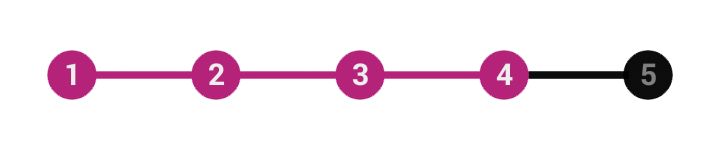
 <com.kofigyan.stateprogressbar.StateProgressBar
android:layout_width="wrap_content"
android:layout_height="wrap_content"
app:spb_currentStateNumber="four"
app:spb_maxStateNumber="five"/>
- A Five-State StateProgressBar(Descending/Rtl Languages Support)
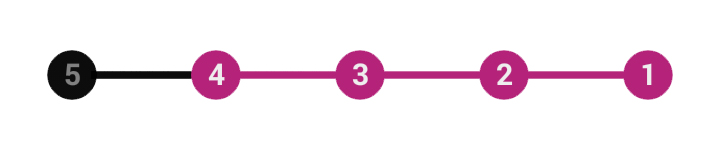
 <com.kofigyan.stateprogressbar.StateProgressBar
android:layout_width="wrap_content"
android:layout_height="wrap_content"
app:spb_currentStateNumber="four"
app:spb_maxStateNumber="five"
app:spb_stateNumberIsDescending="true"/>
- Check States Completed

 <com.kofigyan.stateprogressbar.StateProgressBar
android:layout_width="wrap_content"
android:layout_height="wrap_content"
app:spb_currentStateNumber="three"
app:spb_maxStateNumber="four"
app:spb_checkStateCompleted="true"/>
- Check All States

 <com.kofigyan.stateprogressbar.StateProgressBar
android:layout_width="wrap_content"
android:layout_height="wrap_content"
app:spb_currentStateNumber="three"
app:spb_maxStateNumber="four"
app:spb_enableAllStatesCompleted="true"/>
- Animate to Current State

 <com.kofigyan.stateprogressbar.StateProgressBar
android:layout_width="wrap_content"
android:layout_height="wrap_content"
app:spb_currentStateNumber="three"
app:spb_maxStateNumber="four"
app:spb_stateBackgroundColor="#BDBDBD"
app:spb_stateForegroundColor="#DB0082"
app:spb_stateNumberBackgroundColor="#808080"
app:spb_stateNumberForegroundColor="#eeeeee"
app:spb_currentStateDescriptionColor="#DB0082"
app:spb_stateDescriptionColor="#808080"
app:spb_animateToCurrentProgressState="true"
app:spb_checkStateCompleted="true"/> - Add Click Listener to State Items
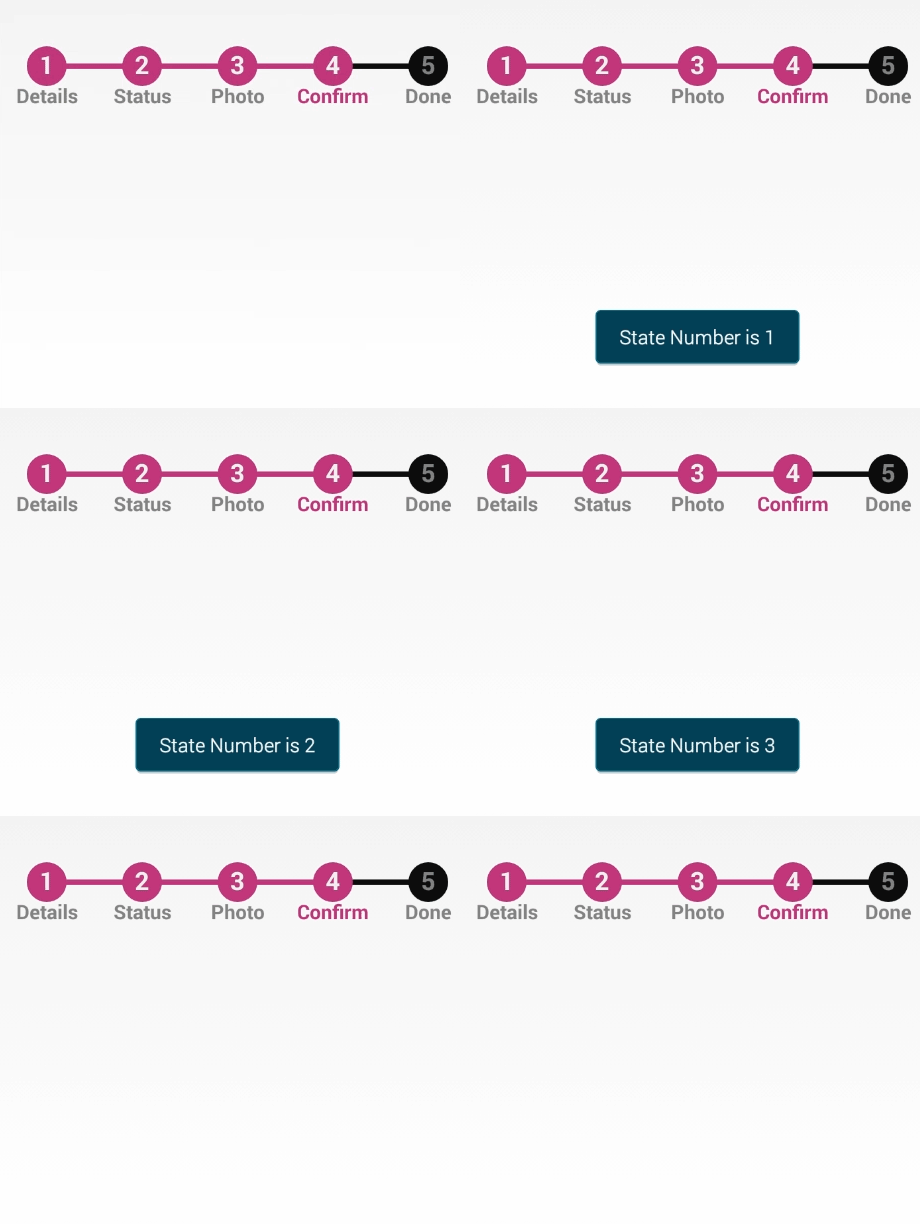
 stateProgressBar.setOnStateItemClickListener(new OnStateItemClickListener() {
@Override
public void onStateItemClick(StateProgressBar stateProgressBar, StateItem stateItem, int stateNumber, boolean isCurrentState) {
Toast.makeText(getApplicationContext(), "state Clicked Number is " + stateNumber, Toast.LENGTH_LONG).show();
}
});
- Add Description Data to StateProgressBar

 <com.kofigyan.stateprogressbar.StateProgressBar
android:id="@+id/your_state_progress_bar_id"
android:layout_width="wrap_content"
android:layout_height="wrap_content"
app:spb_currentStateNumber="two"
app:spb_maxStateNumber="four"/>
String[] descriptionData = {"Details", "Status", "Photo", "Confirm"};
@Override
protected void onCreate(Bundle savedInstanceState) {
super.onCreate(savedInstanceState);
setContentView(R.layout.your_layout);
StateProgressBar stateProgressBar = (StateProgressBar) findViewById(R.id.your_state_progress_bar_id);
stateProgressBar.setStateDescriptionData(descriptionData);
}
- Add Custom Font to State Items and State Description Data
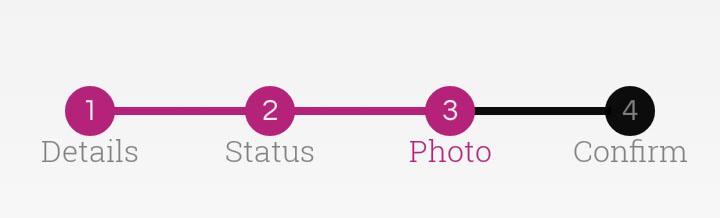
 String[] descriptionData = {"Details", "Status", "Photo", "Confirm"};
@Override
protected void onCreate(Bundle savedInstanceState) {
super.onCreate(savedInstanceState);
setContentView(R.layout.your_layout);
StateProgressBar stateProgressBar = (StateProgressBar) findViewById(R.id.your_state_progress_bar_id);
stateProgressBar.setStateDescriptionData(descriptionData);
stateProgressBar.setStateDescriptionTypeface("fonts/RobotoSlab-Light.ttf");
stateProgressBar.setStateNumberTypeface("fonts/Questrial-Regular.ttf");
}
- Change Colors (State Background , State Foreground, State Number Background ,State Number Foreground, Current State Description, State Description)

<com.kofigyan.stateprogressbar.StateProgressBar
android:layout_width="wrap_content"
android:layout_height="wrap_content"
app:spb_currentStateNumber="three"
app:spb_maxStateNumber="four"
app:spb_stateBackgroundColor="#BDBDBD"
app:spb_stateForegroundColor="#009688"
app:spb_stateNumberBackgroundColor="#808080"
app:spb_stateNumberForegroundColor="#eeeeee"
app:spb_currentStateDescriptionColor="#009688"
app:spb_stateDescriptionColor="#808080"
app:spb_checkStateCompleted="true"/>
- Description Top Spacing

<com.kofigyan.stateprogressbar.StateProgressBar
android:layout_width="wrap_content"
android:layout_height="wrap_content"
app:spb_descriptionTopSpaceIncrementer="5dp"/>
String[] descriptionData = {"Details", "Status", "Photo", "Confirm"};
@Override
protected void onCreate(Bundle savedInstanceState) {
super.onCreate(savedInstanceState);
setContentView(R.layout.your_layout);
StateProgressBar stateProgressBar = (StateProgressBar) findViewById(R.id.your_state_progress_bar_id);
stateProgressBar.setStateDescriptionData(descriptionData);
}
- Change Dimensions (State, State Number ,State Line and State Description sizes)
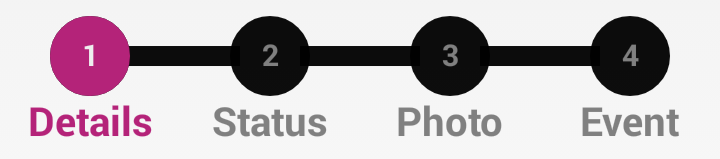
<com.kofigyan.stateprogressbar.StateProgressBar
android:layout_width="wrap_content"
android:layout_height="wrap_content"
app:spb_descriptionTopSpaceIncrementer="2dp"
app:spb_stateDescriptionSize="20sp"
app:spb_stateLineThickness="10dp"
app:spb_stateSize="40dp"
app:spb_stateTextSize="15sp" />
- Add Multiline Description Data to StateProgressBar
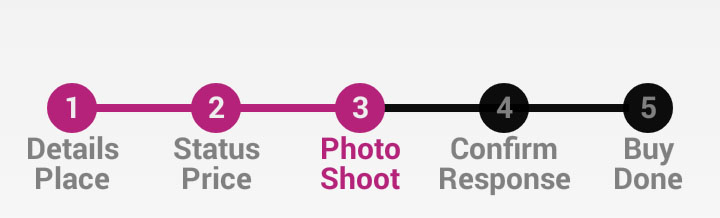
 <com.kofigyan.stateprogressbar.StateProgressBar
android:id="@+id/your_state_progress_bar_id"
android:layout_width="wrap_content"
android:layout_height="wrap_content"
app:spb_currentStateNumber="three"
app:spb_maxStateNumber="five"/>
String[] descriptionData = {"Details\nPlace", "Status\nPrice", "Photo\nShoot", "Confirm\nResponse" , "Buy\nDone"};
@Override
protected void onCreate(Bundle savedInstanceState) {
super.onCreate(savedInstanceState);
setContentView(R.layout.your_layout);
StateProgressBar stateProgressBar = (StateProgressBar) findViewById(R.id.your_state_progress_bar_id);
stateProgressBar.setStateDescriptionData(descriptionData);
}
- Justify and Spacing for Multiline Description Data
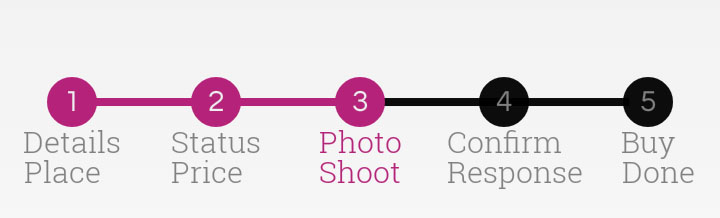
 <com.kofigyan.stateprogressbar.StateProgressBar
android:id="@+id/your_state_progress_bar_id"
android:layout_width="wrap_content"
android:layout_height="wrap_content"
app:spb_currentStateNumber="three"
app:spb_maxStateNumber="five"
app:spb_justifyMultilineDescription="true"
app:spb_descriptionLinesSpacing="5dp"/>
String[] descriptionData = {"Details\nPlace", "Status\nPrice", "Photo\nShoot", "Confirm\nResponse" , "Buy\nDone"};
@Override
protected void onCreate(Bundle savedInstanceState) {
super.onCreate(savedInstanceState);
setContentView(R.layout.your_layout);
StateProgressBar stateProgressBar = (StateProgressBar) findViewById(R.id.your_state_progress_bar_id);
stateProgressBar.setStateDescriptionData(descriptionData);
}
Kofi Gyan (kofigyan2011@gmail.com) Currently opened to Android engineer position(remote/relocation)
Copyright 2016 Kofi Gyan.
Licensed under the Apache License, Version 2.0 (the "License"); you may not use this file except in compliance with the License. You may obtain a copy of the License at
http://www.apache.org/licenses/LICENSE-2.0
Unless required by applicable law or agreed to in writing, software distributed under the License is distributed on an "AS IS" BASIS, WITHOUT WARRANTIES OR CONDITIONS OF ANY KIND, either express or implied. See the License for the specific language governing permissions and limitations under the License.