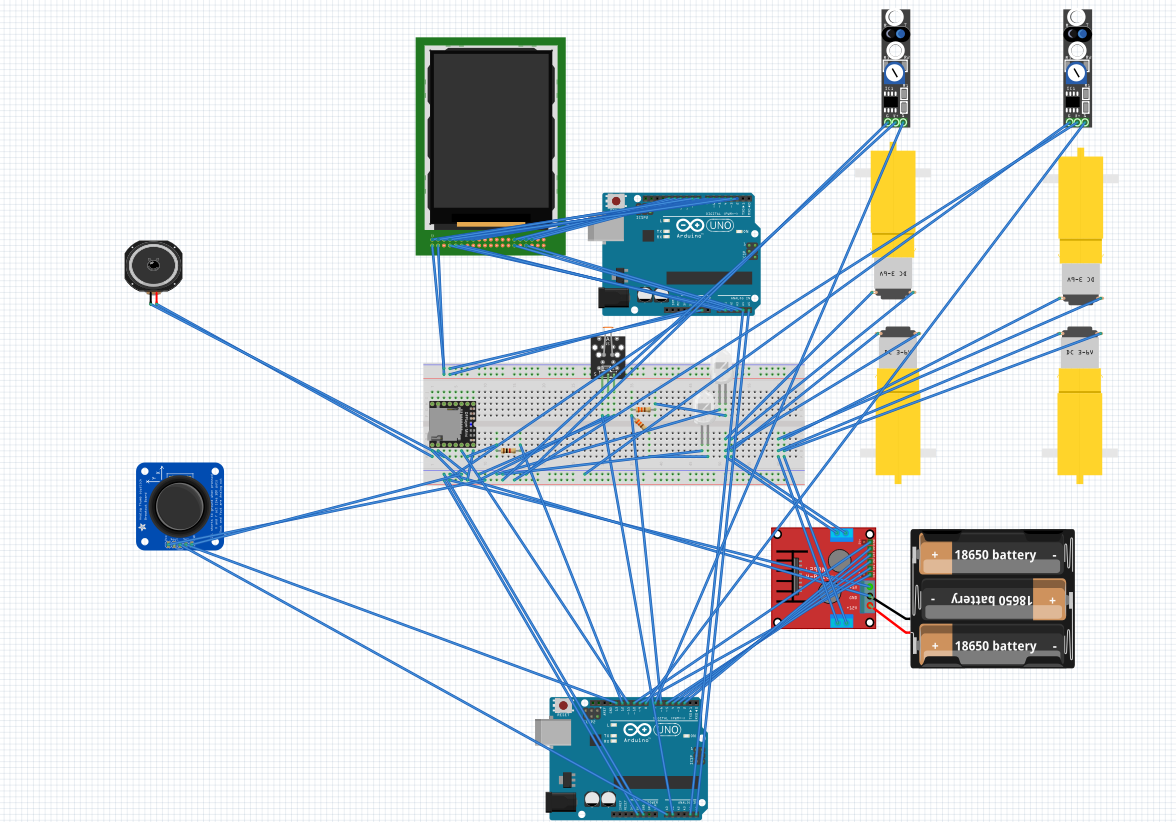
This project involves implementing various safety and entertainment features for a vehicle using two Arduino Uno and the FreeRTOS real-time operating system. The safety features include a lane-keeping assist system that uses sensors to detect if the vehicle is drifting out of its lane and gently steers it back. The entertainment features include a control indicators system that displays the current gear on an LCD TFT screen and adjusts the car's headlights according to the surrounding light intensity and a sound system that plays MP3 files through a speaker and can be controlled through a touch screen. The control indicators system and sound system can be controlled through a joystick and LCD TFT with a touch screen, respectively. In this project, the approach taken was to prioritize the implementation of the lane-keeping assist feature over the other features, as safety features are considered more important than entertainment features. To accomplish this, the lane-keeping assist feature was implemented first, followed by the gear shift feature, and finally the remaining components. To facilitate communication between the various components, two Arduino boards were used and connected through an I2C bus in a master-slave configuration. This allowed for efficient communication and coordination between the different features, enabling the project to function as intended. In this project, a range of components was used to implement the various features. These included an L298 H-Bridge to control and provide power to the motors, four DC motors and wheels to enable the movement of the car, two Arduino Uno boards for controlling the system and screen shield, an MP3 TF 16P V3.0 module for reading and controlling MP3 files from an SD card, a 4-pin photoresistor LDR module for providing analog readings of the surrounding light intensity, an analog joystick breakout module for controlling the gear shifting, two LEDs for the headlights, an LCD TFT 3.5-inch screen for switching between songs and displaying the shifting gears and song number, two black and white line trackers for tracking the lines of the lanes and checking if the car has strayed off course, two 330 ohm resistors for operating the LEDs, a 1K ohm resistor for transmitting signals from the MP3 module, three 3.1V rechargeable batteries and housing for them to provide power to the H-Bridge and the Arduino boards.
The circuit connection looks as follows in the breadboard view in Fritzing
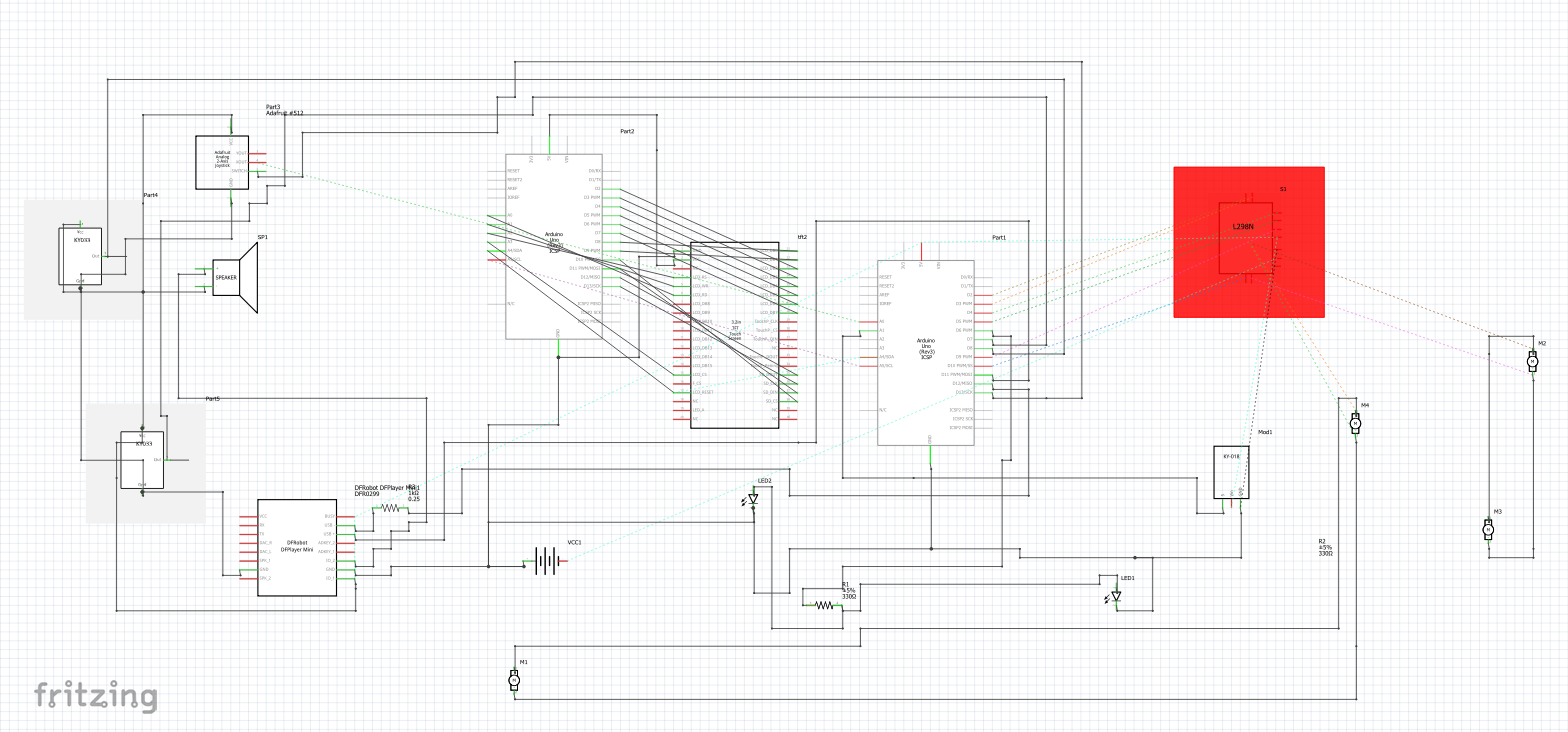
The circuit connection looks as follows in the schematic view in Fritzing:
- Arduino_FreeRTOS: This is a library that allows users to run multiple concurrent tasks in an Arduino environment. It utilizes the FreeRTOS kernel to implement real-time multitasking capabilities.
- Wire: This is a library that provides functions for communicating with I2C devices. It allows users to send and receive data between different devices using I2C communication protocols.
- DFRobotDFPlayerMini: This is a library specifically designed for use with the DFRobot DFPlayer Mini MP3 player. It provides functions for controlling the playback of audio files and managing the player's internal memory.
- SoftwareSerial: This is a library that provides functions for implementing serial communication using software rather than hardware serial ports. It can be used to establish serial communication between two devices using any available digital pins on the Arduino.
- Arduino: This is the official Arduino library, which provides a wide range of functions and APIs for interacting with the Arduino hardware and programming environment.
- Adafruit_GFX: This is a library that provides functions for drawing graphics on a display. It can be used to create custom graphics, text, and shapes on a display screen.
- MCUFRIEND_kbv: This is a library that provides functions for interacting with TFT displays that are compatible with the MCUFRIEND_kbv library. It allows users to draw graphics, text, and shapes on the display and manage the display's memory.
- TouchScreen: This is a library that provides functions for interacting with touchscreen displays. It allows users to detect touch input and track finger movements on the screen.
- LCDWIKI_GUI: This is a library that provides a graphical user interface (GUI) for LCDs. It allows users to create custom buttons, sliders, and other interactive GUI elements on the display.
- LCDWIKI_KBV: This is a library that provides functions for interacting with TFT displays that are compatible with the LCDWIKI_KBV library. It allows users to draw graphics, text, and shapes on the display and manage the display's memory.
The input for lane collision detection in this project is provided by a line tracker sensor, which sends a digital signal of either 0 or 1 to the system. A value of 0 indicates that the line is not being stepped on, while a value of 1 indicates that the line is being stepped on. The input for gear transitions is provided by a joystick, which detects user interaction through movement in different directions. The system can recognize these movements and use them to control the gear transitions of the car. The input for the adaptive headlights is provided by a light-dependent resistor (LDR) photoresistor sensor, which measures the surrounding light intensity and sends a corresponding analog signal to the system. The system can adjust the brightness of the headlights based on this input. The input for music controls is received through a liquid crystal display (LCD) TFT screen on a separate Arduino board, which is connected to the main system through an I2C bus wiring setup utilizing the master-slave concept. This allows the user to control the music playback through the TFT screen. The motion of the car is powered by three 3.1 lithium-ion batteries, which are connected to an H-bridge motor driver. The H-bridge allows the system to control the direction and speed of the car's movement through the application of voltage to the motors.
The output of the H-bridge in this project is directed to the four motors of the car, which control its motion. The H-bridge can adjust the voltage applied to the motors, allowing the system to control the speed and direction of the car's movement. The output of the MP3 module is manifested as music playback through a speaker that is attached to the system. The module can play audio files stored on its internal memory or a connected SD card. The output of the adaptive headlights is controlled through two LEDs, which can produce three levels of lighting: off, low, and high. The brightness of the LEDs is adjusted based on the input received from the LDR photoresistor sensor, which measures the surrounding light intensity. The output of the gear controls is displayed on an LCD TFT screen on a separate Arduino board, which is connected to the main system through an I2C bus wiring setup utilizing the masterslave concept. This allows the user to see the current gear setting of the car and make adjustments as needed.
In the freeRTOS system, the checkForLaneCollisionTask has the highest priority with a priority level of 3. Its primary function is to detect lanes and navigate the car through them. The CITask has the second highest priority with a priority level of 2 and is responsible for adaptive headlights and gear handling. The mp3PlayerTask has the lowest priority with a priority level of 1 and is responsible for music control. The screenTask, located on a separate Arduino, has a priority level of 1 and is responsible for both user interaction with the touch screen to control music and display shift gears on the screen.
Some several potential problems or limitations may be faced during the implementation of this project:
- Limited resources: The two Arduino Uno boards may not have the sufficient processing power or memory to handle all of the tasks concurrently, which could lead to performance issues.
- Sensor accuracy: The accuracy of the sensors used for detecting lanes and light intensity may vary, which could impact the performance of the LKA and CI features.
- Interference: The various tasks and components of the project may interfere with one another, leading to unintended behaviour or system instability.
- Compatibility issues: There may be compatibility issues between the different hardware and software components of the project, requiring additional time and effort to troubleshoot and resolve.
- Cost: The cost of purchasing and implementing all of the necessary hardware and software components may be prohibitive for some users.
- User interface: The touchscreen interface for the SS feature may be complex or confusing for some users, leading to difficulty in controlling the sound system.
- External factors: External factors such as weather conditions or road conditions may impact the performance of the LKA and CI features, leading to potentially unsafe driving conditions.
1.Connect the circuit as in the diagrams
2.Upload the screen.ino code on the arduino uno with shield screen
3.Upload the master.ino code on the other arduino
4.Put the Car on white track with black lanes
5.ENJOY ;)