

Control your Flutter app with natural language. Let AI agents understand and interact with your UI.
Flutter UI Agent lets users control your app using natural language instead of traditional UI interactions. Wrap your widgets with AiActionWidget and they become AI-controllable.
Example Commands:
"Change my bio to 'Flutter Developer'"
"Find red products and add them to cart"
"Navigate to settings and enable dark mode"
"Increment the counter 5 times"
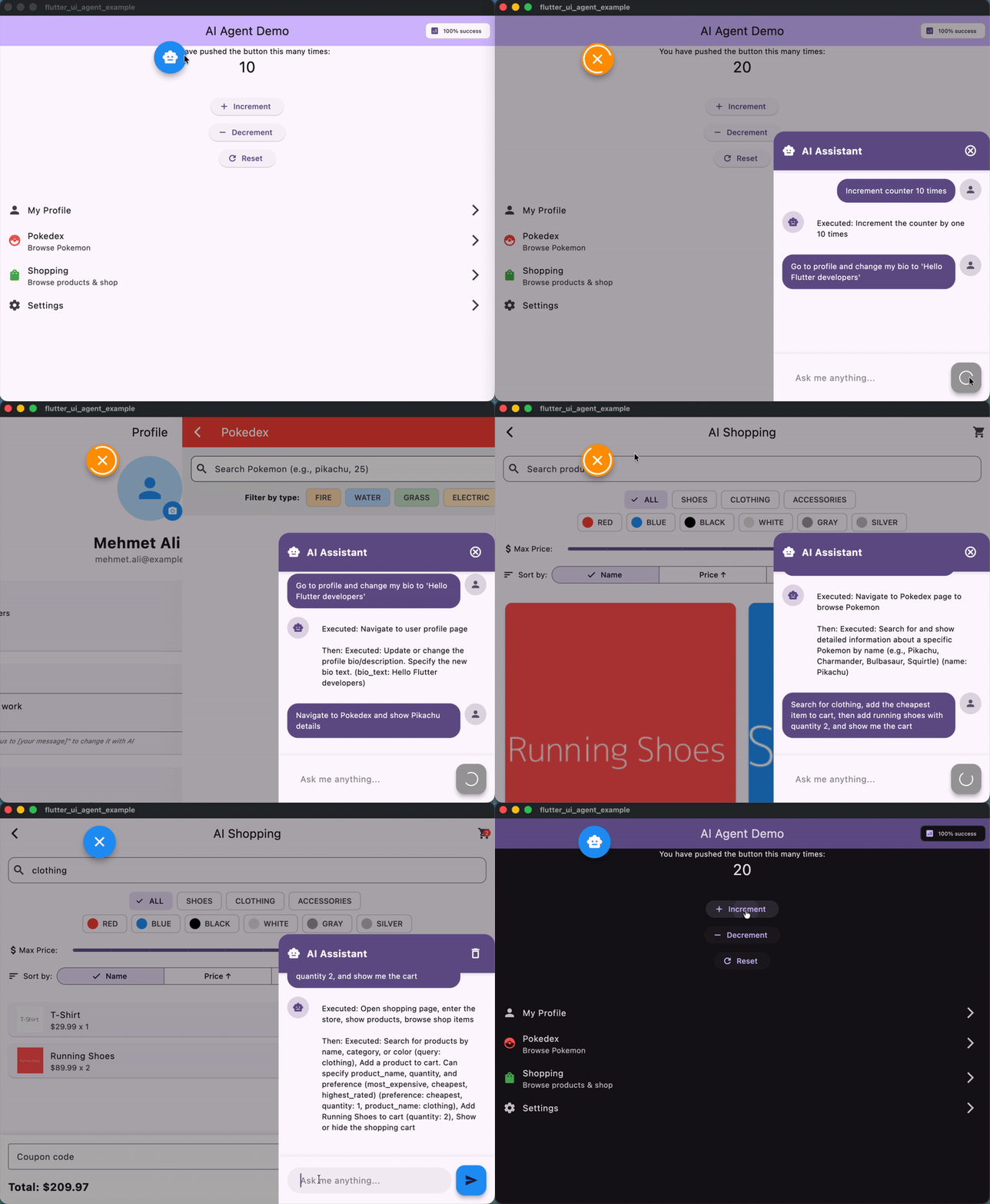
AI Agent controlling a Flutter app with natural language commands
- 🧠 LLM-Agnostic - Works with Gemini, HuggingFace, OpenAI, Claude, or any LLM
- 🎯 Dynamic Actions - Wrap any widget to make it AI-controllable
- 🧭 Enhanced Smart Navigation - Automatic page tracking with intelligent continuation after navigation for complex commands
- ⚡ Async Support - Handle navigation and async operations seamlessly
- 🔄 Multi-Step Commands - Execute complex action sequences
- 📊 Analytics - Track action usage and performance
- 🎨 Customizable - Flexible configuration and logging
dependencies:
flutter_ui_agent: ^1.1.0Implement the LlmProvider interface for your chosen LLM:
import'package:flutter_ui_agent/flutter_ui_agent.dart';
classGeminiProviderimplementsLlmProvider {
lateString apiKey;
lateString modelName;
@overrideFuture<void> configure({requiredString apiKey, String? modelName}) async {
this.apiKey = apiKey;
this.modelName = modelName ??'gemini-2.0-flash-exp';
}
@overrideFuture<LlmResponse> send({
requiredString systemPrompt,
requiredString userMessage,
requiredList<Map<String, dynamic>> tools,
requiredList<ConversationMessage> history,
}) async {
// Call your LLM API here with your chosen SDK// Return LlmResponse with functionCalls or text response
}
}The LlmProvider is an abstract interface that allows Flutter UI Agent to work with any LLM. It has two main methods:
configure({required String apiKey, String? modelName}): Optional setup method for providers that need API keys or model configuration. Called once during initialization.send(...): The core method that sends messages to your LLM. It receives:systemPrompt: System-level instructions for the AIuserMessage: The composed user message with context and available actionstools: List of function/tool definitions in JSON schema formathistory: Recent conversation messages for context
Returns an
LlmResponsecontaining either:text: Plain text response (for conversational replies)functionCalls: List ofLlmFunctionCallobjects representing actions to execute
See the example implementations for Gemini and HuggingFace providers.
voidmain() async {
final agentService =AgentService();
final llmProvider =GeminiProvider();
await llmProvider.configure(
apiKey:'YOUR_API_KEY',
modelName:'gemini-2.0-flash-exp',
);
agentService.setLlmProvider(
llmProvider,
config:constAgentConfig(
logLevel:AgentLogLevel.info,
enableAnalytics:true,
debugMode:true,
),
);
runApp(
AgentHost(
agentService: agentService,
child:MyApp(),
),
);
}AiActionWidget(
actionId:'increment_counter',
description:'Increment the counter by 1',
onExecute: () {
setState(() => counter++);
},
child:ElevatedButton(
onPressed: () =>setState(() => counter++),
child:Text('Increment'),
),
)MaterialApp(
navigatorObservers: [
AgentNavigatorObserver(agentService),
],
// ...
)await agentService.processUserMessage('Increment the counter 5 times');Try these natural language commands in your app:
Simple Actions:
- "Increment counter 5 times"
- "Set counter to 100"
- "Reset counter"
Navigation + Actions:
- "Go to settings and enable dark mode"
- "Navigate to profile and change my bio to 'Flutter Developer'"
- "Open shopping page and search for shoes"
Multi-Step:
- "Set counter to 50, increment 10 times, then go to profile"
- "Go to settings, enable dark mode, then go to shopping"
Natural Language:
- "Can you increase the counter by 7?"
- "I want to see my profile"
- "Turn off notifications and update my status"
See the example app for a complete demo with shopping, profile, and settings pages.
This package is experimental and should be used with caution in production environments.
🚫 DO NOT use for sensitive operations without user confirmation:
- Payment processing (NO automatic payments)
- Financial transactions
- Data deletion
- Security-critical actions
✅ SAFE use cases:
- Generate summaries for user review
- Create draft content for approval
- Assist with form filling (with confirmation)
- Navigate and display information
- Filter and search data
Best Practice: For sensitive operations, use AI to prepare the action (e.g., calculate total, create order summary), then require explicit user confirmation before execution.
Example - Safe Payment Flow:
// ✅ GOOD: AI prepares, user confirmsAiActionWidget(
actionId:'prepare_checkout',
description:'Prepare checkout summary for user review',
onExecuteWithParams: (params) {
// AI calculates total, applies discounts, etc.showCheckoutSummary(); // User must tap "Confirm Payment" button
},
)
// ❌ BAD: Direct payment automationAiActionWidget(
actionId:'process_payment', // NEVER DO THIS
description:'Process payment immediately',
onExecute: () =>processPayment(), // Dangerous!
)Wraps any widget to make it AI-controllable:
// Simple actionAiActionWidget(
actionId:'like_post',
description:'Like the post',
onExecute: () =>likePost(),
child:IconButton(icon:Icon(Icons.favorite)),
)
// Action with parametersAiActionWidget(
actionId:'update_bio',
description:'Update user bio text',
parameters:const [
AgentActionParameter.string(
name:'bio_text',
description:'New bio value to save',
),
],
onExecuteWithParams: (params) {
final bio = params['bio_text'] asString;
updateBio(bio);
},
child:TextField(),
)
// Action that can run multiple times per request (count parameter exposed)AiActionWidget(
actionId:'tap_increment',
description:'Tap increment button',
allowRepeats:true,
onExecute: increment,
child:IconButton(icon:Icon(Icons.exposure_plus_1)),
)
// Async actionAiActionWidget(
actionId:'navigate_settings',
description:'Navigate to settings page',
onExecuteAsync: () async {
Navigator.pushNamed(context, '/settings');
awaitFuture.delayed(Duration(milliseconds:100));
},
child:ListTile(title:Text('Settings')),
)Central service managing AI actions:
// Process commandsawait agentService.processUserMessage('your command');
// Cancel in-progress requests
agentService.cancelCurrentRequest();
// Access statisticsfinal stats = agentService.statistics;
print('API Calls: ${stats['apiCalls']}');
print('Success Rate: ${stats['successRate']}%');
// Get current pageprint('Current page: ${agentService.currentPage}');
// Clear conversation history
agentService.clearHistory();Track page changes automatically:
MaterialApp(
navigatorObservers: [
AgentNavigatorObserver(agentService),
],
onGenerateRoute: (settings) {
// Your routing logic
},
)AgentConfig(
// Logging
logLevel:AgentLogLevel.info, // none, error, warning, info, verbose, debug
useEmojis:true,
logPrefix:'[FlutterUIAgent]',
// Behavior
enableRetry:true,
maxRetries:3,
retryBackoffStrategy:RetryBackoffStrategy.exponential,
retryBaseDelayMs:1000,
// History & Analytics
enableHistory:true,
maxHistoryLength:10,
enableAnalytics:true,
onActionExecuted: (actionId, duration) {
print('$actionId took ${duration.inMilliseconds}ms');
},
// Development
debugMode:true,
fallbackToMock:false,
)| Level | Use Case | Output |
|---|---|---|
none | Production (silent) | No logs |
error | Production (errors only) | Errors only |
warning | Production (important) | Errors + warnings |
info | Default | Errors + warnings + info |
verbose | Development | All above + verbose details |
debug | Debugging | Everything including debug info |
Check out the example/ folder for a complete demo featuring:
- Counter Page - Simple increment/decrement actions
- Profile Page - Bio and status updates
- Data Browser - Search and filtering
- Shopping Page - Product browsing and cart management
- Settings Page - Theme and configuration changes
- Floating Chat UI - Natural language command interface
Run the example:
cd example
cp lib/app/config/app_config.dart.example lib/app/config/app_config.dart
# Add your API key to app_config.dart
flutter run
Try these commands in the example:
"Increment counter 3 times"
"Change my bio to 'Flutter enthusiast'"
"Find red products"
"Navigate to settings and enable dark mode"
"Add running shoes to cart"
These models have been tested and work well with Flutter UI Agent:
modelName:'gemini-2.0-flash-exp'// Fast, reliablemodelName:'Qwen/Qwen3-235B-A22B-Instruct-2507'// High quality, open-sourceImplement LlmProvider for any LLM with function calling support (OpenAI GPT-4, Claude, etc.)
agentService.setSystemPrompt('''You are a helpful assistant for a shopping app.Focus on helping users find and purchase products.Be concise and action-oriented.''');Test without API keys:
// Don't call setLlmProvider()// AgentService will use keyword-based matchingawait agentService.processUserMessage('increment counter');try {
await agentService.processUserMessage('your command');
} catch (e) {
print('Command failed: $e');
// Handle error
}// Actions are automatically registered when AiActionWidget builds// Access all registered actions:final actions = agentService.actions;
print('Available actions: ${actions.keys}');AgentConfig(
enableAnalytics:true,
onActionExecuted: (actionId, duration) {
analytics.logEvent(
name:'ai_action',
parameters: {
'action_id': actionId,
'duration_ms': duration.inMilliseconds,
},
);
},
)final stats = agentService.statistics;
print('Total API calls: ${stats['apiCalls']}');
print('Failed calls: ${stats['failures']}');
print('Success rate: ${stats['successRate']}%');// ✅ Good: Use environment variables or secure storage
apiKey:Platform.environment['GEMINI_API_KEY']
// ❌ Bad: Hardcoded in source
apiKey:'actual-api-key-here'**/app_config.dart**/*.envAlways validate and sanitize parameters before executing actions:
AiActionWidget(
actionId:'update_profile',
parameters:const [
AgentActionParameter.string(
name:'bio',
description:'New profile bio text',
),
],
onExecuteWithParams: (params) {
final bio = params['bio'] asString;
// ✅ Validate inputif (bio.length >500) {
throwException('Bio too long');
}
if (_containsProfanity(bio)) {
throwException('Invalid content');
}
updateBio(bio);
},
)Never allow AI to directly execute:
- Payments or purchases
- Account deletion
- Password changes
- Data exports
- Sharing private information
Instead, use a confirmation flow:
// AI prepares the actionAiActionWidget(
actionId:'prepare_delete_account',
description:'Show account deletion confirmation dialog',
onExecute: () {
showDialog(
context: context,
builder: (context) =>AlertDialog(
title:Text('Delete Account?'),
content:Text('This action cannot be undone.'),
actions: [
TextButton(
onPressed: () =>Navigator.pop(context),
child:Text('Cancel'),
),
TextButton(
onPressed: () {
_actuallyDeleteAccount(); // User explicitly confirmedNavigator.pop(context);
},
child:Text('Delete'),
),
],
),
);
},
)Implement rate limiting to prevent abuse:
// Limit AI requests per user/sessionclassRateLimiter {
final _timestamps =<DateTime>[];
final maxRequests =10;
final timeWindow =Duration(minutes:1);
boolallowRequest() {
final now =DateTime.now();
_timestamps.removeWhere(
(t) => now.difference(t) > timeWindow,
);
if (_timestamps.length >= maxRequests) {
returnfalse; // Rate limit exceeded
}
_timestamps.add(now);
returntrue;
}
}Track all AI actions for security auditing:
AgentConfig(
enableAnalytics:true,
onActionExecuted: (actionId, duration) {
securityLog.record(
action: actionId,
timestamp:DateTime.now(),
userId: currentUser.id,
duration: duration,
);
},
)Contributions are welcome! Please feel free to submit a Pull Request.
- Fork the repository
- Create your feature branch (
git checkout -b feature/amazing-feature) - Commit your changes (
git commit -m 'Add amazing feature') - Push to the branch (
git push origin feature/amazing-feature) - Open a Pull Request
This project is licensed under the MIT License - see the LICENSE file for details.
- Issues: GitHub Issues
- Discussions: GitHub Discussions
Made with ❤️ for the Flutter community