Converts ipython/Google Colab Notebooks into runable Python code and vice versa
- converts files: .ipynb to .py and .py to .ipynb.
- converts ipython/colab magic % and ! to regular python code
- Supported magic commands (%)
- %pwd, %ls, %cd, %cp, %mv, %mkdir, %rm, %rmdir, %cat, %pip, %conda, %env, %setenv
- comments out unsupported ipython magic
- creates new import blocks for converted code
- logs all changes to a log file for review
- converted magic commands are appended with
#<cc-cm> - commented magic commands are prefixed with
#<cc-ac> - multi-lingual support to detect system language and let users choose
- Arabic, Dutch, English, German,
- consider helping expand translations by adding your langauge in the
/langfolder
- consider helping expand translations by adding your langauge in the
- Arabic, Dutch, English, German,
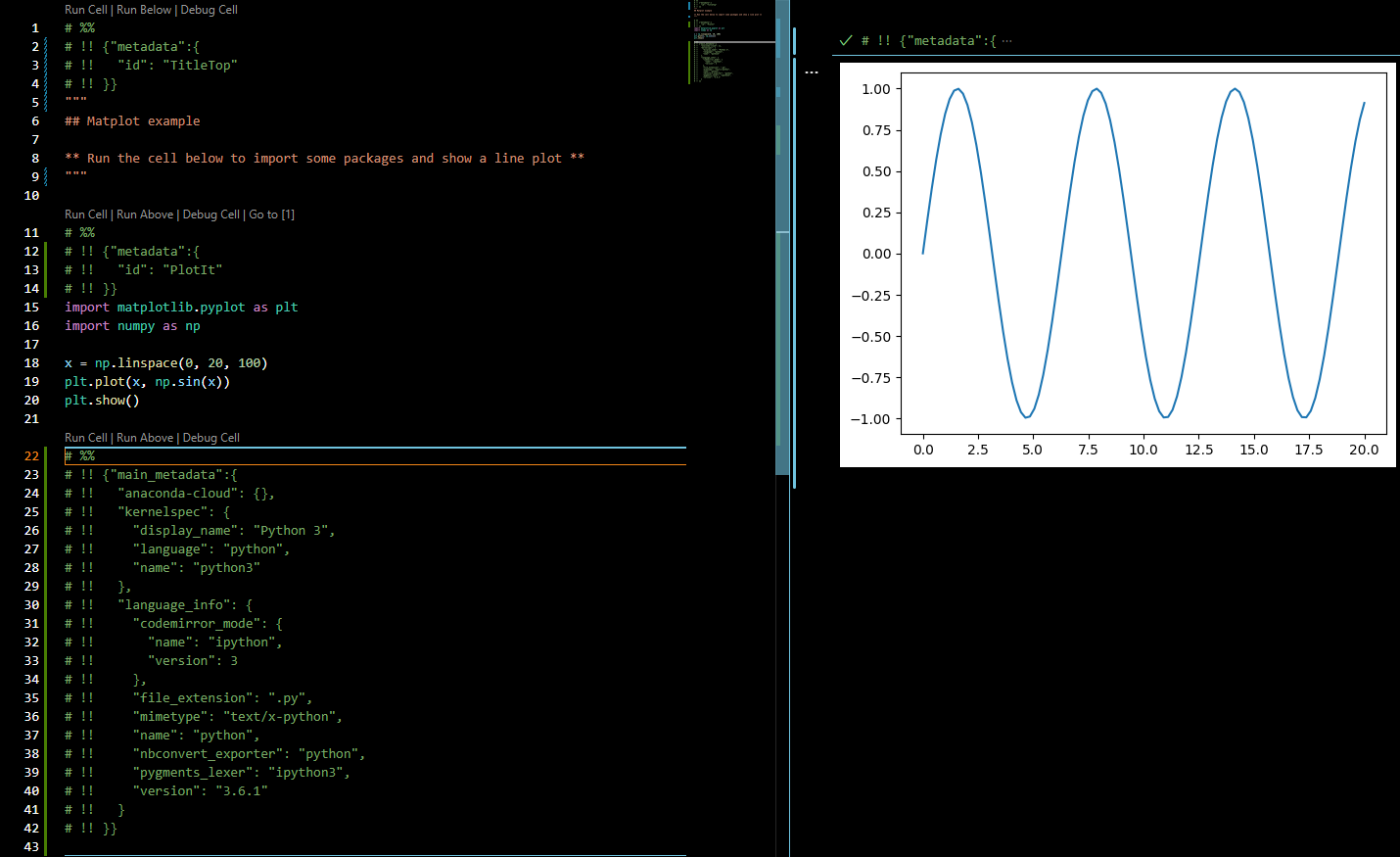
Atom/Hydrogen or VSCode/Python allows creating a python file split into cells with # %% separators having the ability to run cells via the backend of a Jupyter session and interactively show results back.
VSCode
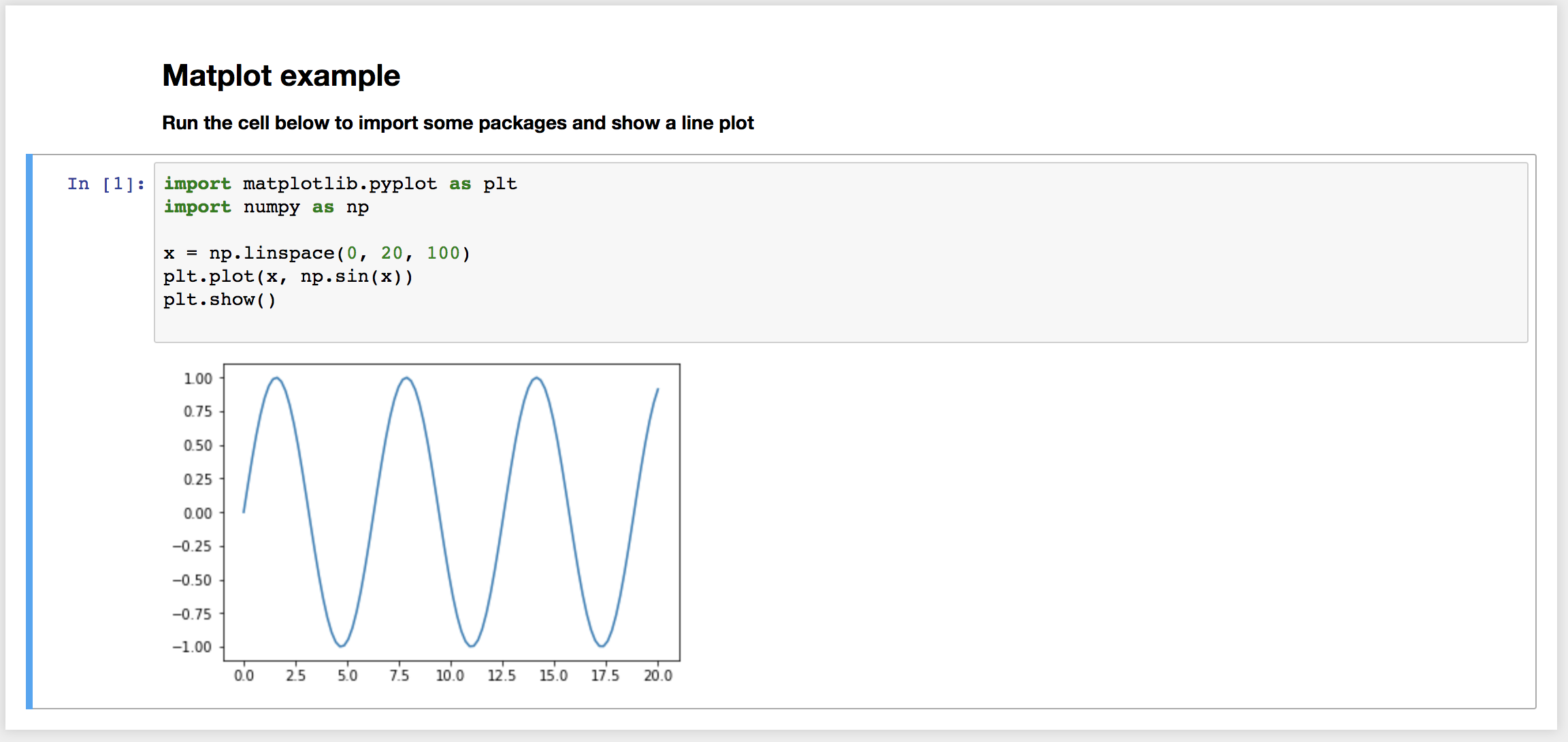
Jupyter ipynb notebook
pip install colab-convertUsage: colab-convert <input_file> <output_file> <flags><input_file>: input file to convert<output_file>: output file to write to<flags>: extra flags to pass to the converterall flags are optional and have set defaults for best resultsuse flags to enable or disable certain functions on/off by defaultcolab-convert in.ipynb out.py -nc -rm -oDefault Flags Set (defaults are determined by input file) ipynb input file: [YES] convert magic , [YES] auto comment , [YES] imports , [NO] Outputs py input file: [NO] convert magic , [NO] auto comment , [NO] imports , [NO] OutputsAvailable Flags toggle certain items on or off --retain-magic (-rm) : Keep magic commands in the output .py default [ON] .ipynb default [OFF] --convert-magic (-cm) : Convert magic commands to python code .py default [OFF] .ipynb default [ON] --auto-comment (-ac) : Convert unsupported magic commands to comments .py default [OFF] .ipynb default [ON] --no-comment (-nc) : Keep unsupported magic commands .py default [ON] .ipynb default [OFF] --no-imports (-ni) : Do not add imports from converted magic commands .py default [OFF] .ipynb default [OFF] --outputs (-o) : Outputs to console of conversions and commented lines. .py default [OFF] .ipynb default [OFF] --lang= (-l=) : Language to change output messages to default [English] --lang=en_US en_US, en, english, eng, nl_NL, nl, dutch, dut, nlt, nederlands>click me to see code<
for this particular magic we send the command to the subprocess system and print the results
# !git clone https://test.com/test/test.gitsub_p_res=subprocess.run(['git', 'clone' ,'https://test.com/test/test.git'], stdout=subprocess.PIPE).stdout.decode('utf-8')
print(sub_p_res)%pwd - get current working directory
# %pwdos.getcwd()%ls - list items in directory
# %lsos.listdir()# %ls folderName/subFolderos.listdir('folderName/subFolder')%cd - change directory
# %cd test-directoryos.chdir('test-directory')%mkdir - make a new directory
# %mkdir test/newFolderos.makedirs('test/newFolder')%mv - move file from one location to another
# %mv testFile.txt testFolder/shutil.move('testFile.txt', 'testFolder/testFile.txt')%cp - copy file from one location to another
# %cp testFolder/testFile.txt newFolder/newTestFile.txtshutil.copy('testFolder/testFile.txt', 'newFolder/newTestFile.txt')%cat - show the output of a file in standard format
# %cat testFolder/testFile.txtcat_read_file=open('testFolder/testFile.txt', 'r')
cat_read_text=cat_read_file.read()
print(cat_read_text)
cat_read_file.close()
%env & %set_env - get, set or list environmental variables
this command actually has 5 ways to be used
%env lists all environment variables/values%env var get value for var[%env or %set_env] var val set value for var[%env or %set_env] var=val set value for var[%env or %set_env] var=$val set value for var, using python expansion if possible# %envfork, vinos.environ.items():
print(f'{k}={v}')# %env varos.environ['var']# %env var value# %set_env var valueos.environ['var'] ='value'# %env var=value# %set_env var=valueos.environ['var'] ='value'# %env var=$value# %set_env var=$valueos.environ['var'] ='$value'%pip - install a pip package or other pip functions
# %pip install colab-convertpip_sub_p_res=subprocess.run(['pip', 'install', 'colab-convert'], stdout=subprocess.PIPE).stdout.decode('utf-8')
print(pip_sub_p_res)
%conda - install a conda package or other conda functions
# %conda install colab-convertconda_sub_p_res=subprocess.run(['conda', 'install', 'colab-convert'], stdout=subprocess.PIPE).stdout.decode('utf-8')
print(conda_sub_p_res)these will be commented out
# %quickref#<cc-cm> %quickrefcolab-convert examples/plot.py examples/plot.ipynb
or
colab-convert examples/plot.ipynb examples/plot.py
Markdown cells are converted to python multiline strings '''. Code cells are left as is.
eg. will render header section
"""## Matplot example** Run the cell below to import some packages and show a line plot **"""# %% is used by vscode as the cell marker on which 'Run Cell' action is available.
eg. will render a code cell
# %%importmatplotlib.pyplotaspltMetadata is converted from notebooks into .py and vise versa using # !! to denote the meta data lines in the .py files
eg.
# %%# !! {"metadata":{# !! "id": "PlotIt"# !! }}importmatplotlib.pyplotasplteg. final code block must include atleast this
# %%# !! {"main_metadata":{# !! "anaconda-cloud": {},# !! "kernelspec": {# !! "display_name": "Python 3",# !! "language": "python",# !! "name": "python3"# !! },# !! "language_info": {# !! "codemirror_mode": {# !! "name": "ipython",# !! "version": 3# !! },# !! "file_extension": ".py",# !! "mimetype": "text/x-python",# !! "name": "python",# !! "nbconvert_exporter": "python",# !! "pygments_lexer": "ipython3",# !! "version": "3.6.1"# !! }# !! }}- If encoding problems on Windows try using
python>=3.7, settingset PYTHONUTF8=1in Windows console and usecolab-convertfor UTF-8 files only. If using Git-Bash on Windows setting:
export LANG=C.UTF-8export PYTHONIOENCODING=utf-8export PYTHONUTF8=1should be enough. Also try setting default Bash settings to UTF-8: [Options] - [Text] - [Locale / Character set] - [C / UTF-8]. It might affect all Bash runs so there would be no need to setting encoding every time.
colab-convert is a fork of the ipynb-py-convert.