

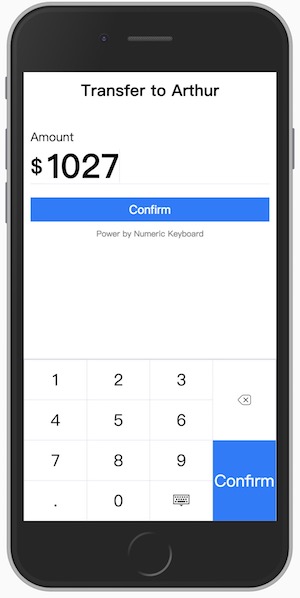
A custom virtual numeric keyboard works in mobile browsers. It contains a virtual input box which would invoke the numeric keyboard instead of system keyboard, the virtual input box supports many html5 standard properties and also has a nice cursor to make it behaves like native input element as much as possible. Besides, the numeric keyboard is a pluggable component can be used together with other input interfaces.
The numeric keyboard is created respectively for Vanilla JavaScript, React, Angular and Vue.
for React, Angular and Vue, only the latest version is supported.
🎥 Watch the demo video ☀️
🇨🇳 中文说明 🇨🇳 🇨🇳 🇨🇳 🇨🇳
You can install it via Yarn
yarn add numeric-keyboardConfig Webpack to use the right version
resolve: {alias: {// use Vue component for example'numeric-keyboard$': 'numeric-keyboard/dist/numeric_keyboard.vue.js'}},import{NumericInput}from'numeric-keyboard'newNumericInput('.input',{type: 'number',placeholder: 'touch to input',onInput(value){
...
}})import{NumericInput}from'numeric-keyboard'classAppextendsReact.Component{input(val){
...
},render(){return<divclassName="input"><label>Amount: </label><NumericInputtype="number"placeholder="touch to input"onInput={this.input.bind(this)}/></div>}}import{Component}from'@angular/core';
@Component({selector: 'app-root',template: ` <div className="input"> <label>Amount: </label> <numeric-input type="number" placeholder="touch to input" [(ngModel)]="amount"></numeric-input> </div> `,})exportclassAppComponent{publicamount: number}<template>
<divclass="input">
<label>Amount: </label>
<NumericInput placeholder="touch to input" v-model="amount" />
</div>
</template>
<script>import { NumericInput } from'numeric-keyboard'exportdefault { components: { NumericInput },data() {return { amount:null } } }</script>
As a substitute for native input element, the input box supports most of the standard attributes, you can refer the HTML spec for details.
// There are only two types: number and tel// The layout property for keyboard is inherited from it
type: {type:String,default: 'number'},autofocus: {type: Boolean,default: false},disabled: {type: Boolean,default: false},maxlength: {type: Number},name: {type: String},placeholder: {type: String},readonly: {type: Boolean,default: false},value: {type: [String,Number]},// Passs a regexp string or function to limit the input.format: {type: [String,Function]},// change the layout of keyboardlayout: {type: [String,Array],default: 'number'},// change the label of keyboard enter key, this is used for specific context and languageentertext: {type: String,default: 'enter'}The input event is emitted when the value of input changes. The first argument for the callback is the value of the input box rather than an event object from a native input element. A onInput() callback is used in vanilla javascript version.
The enterpress event is emitted when the enter key of keyboard is pressed.
The keyboard is a pluggable component which supports custom layout. In order to be able to work properly in a real scene, it usually needs to match an output interface.
import{NumericKeyboard}from'numeric-keyboard'newNumericKeyboard('.keyboard',{layout: 'tel',onPress(key){
...
}})import{NumericKeyboard}from'numeric-keyboard'classAppextendsReact.Component{press(key){
...
}render(){return<divclassName="keyboard"><NumericKeyboardlayout="tel"onPress={this.press.bind(this)}/></div>}}import{Component}from'@angular/core';
@Component({selector: 'app-root',template: ` <div class="keyboard"> <numeric-keyboard layout="tel" (onPress)="press($event)"></numeric-keyboard> </div> `,})exportclassAppComponent{press(key){
...
}}<template>
<divclass="keyboard">
<NumericKeyboard layout="tel" @press="press" />
</div>
</template>
<script>import { NumericKeyboard } from'numeric-keyboard'exportdefault { components: { NumericKeyboard }, methods: {press(key) {... } } }</script>// change the layout of keyboard
layout: {type: [String,Array],default: 'number'},// change the label of keyboard enter key, this is used for specific context and languageentertext: {type: String,default: 'enter'}There are two built-in layouts called number and tel which can be used as a replacement of system keyboard. You can still rearrange all the keys to create your own layout. The layout object is a two-dimension array which constructs a table layout, you can make table-specific operations like merging cells.
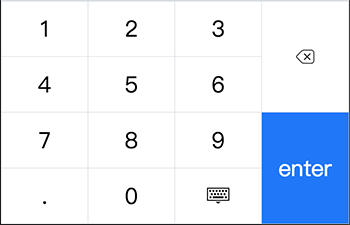
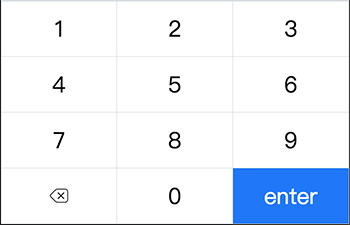
// code sample for the build-in number layoutimport{keys}from'numeric-keyboard'[[{key: keys.ONE},{key: keys.TWO},{key: keys.THREE},{key: keys.DEL,rowspan: 2,},],[{key: keys.FOUR},{key: keys.FIVE},{key: keys.SIX},],[{key: keys.SEVEN},{key: keys.EIGHT},{key: keys.NINE},{key: keys.ENTER,rowspan: 2,},],[{key: keys.DOT},{key: keys.ZERO},{key: keys.ESC},],]the press event is emitted with a key code when the key is pressed. The argument for the callback is the key just pressed. A onPress() callback is used in vanilla javascript version.
The enterpress event is emitted when the enter key of keyboard is pressed.
Welcome to contributing, the guidelines are being drafted.
Licensed under the MIT license.