Latest commit

History

36 Commits

Folders and files

NameName
Last commit message
Last commit date

Repository files navigation

vim-LanguageTool

This plugin integrates the LanguageTool grammar checker into Vim. LanguageTool is an Open Source style and grammar checker for English, French, German, etc. See http://www.languagetool.org/languages/ for a complete list of supported languages.

LanguageTool detects grammar mistakes that a spelling checker cannot detect such as "it work" instead of "it works". LanguageTool can also detect spelling mistakes using Hunspell dictionaries bundled with LanguageTool for several languages or using morfologik for other languages. Vim builtin spelling checker can also of course be used along with LanguageTool. One advantage of the spelling checker of LanguageTool over Vim spelling checker, is that it uses the native Hunspell dictionary directly, so it works even with the latest Hunspell dictionaries containing features not supported by Vim. For example, the latest French Hunspell dictionaries from http://www.dicollecte.org are not supported by Vim but they work well with LanguageTool. On the other hand, the Vim native spelling checker is faster and better integrated with Vim.

See http://www.languagetool.org/ for more information about LanguageTool.

Screenshots

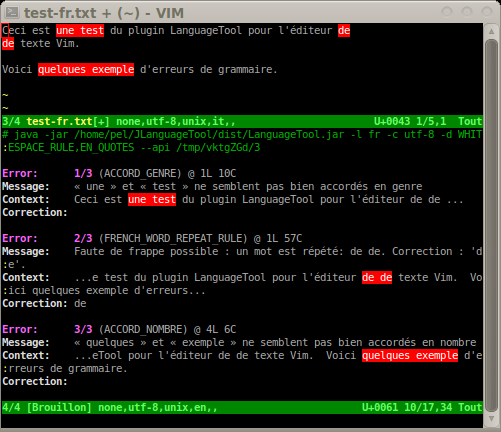
These screenshots will give you an idea of what the LanguageTool plugin does: English

English

French

Usage

  • Use :LanguageToolCheck to check grammar in the current buffer. This will check for grammar mistakes and highlight grammar or spelling mistakes. It also opens a new scratch window with the list of errors with further explanations about each error. Pressing in an error in the scratch buffer will jump to that error in the text. The location list for the buffer being checked is also populated, so you can use location commands such as :lopen to open the location list window, :lne to jump to the next error, etc. The :LanguageToolCheck command accepts a range. You can for example check grammar between lines 100 and 200 in buffer with :100,200LanguageToolCheck, or check grammar in the visual selection with :<',>'LanguageToolCheck. The default range is 1,$ (whole buffer).

  • Use :LanguageToolClear to remove highlighting of grammar mistakes, close the scratch window containing the list of errors, clear and close the location list.

  • Use :help LanguageTool to get more details on various commands and configuration information.

The two commands are also available from the menu in gvim:

Plugin -> LanguageTool -> Check
-> Clear

Installation and configuration

To install and configure the vim-LanguageTool plugin, refer to the documentation:

https://github.com/dpelle/vim-LanguageTool/blob/master/doc/LanguageTool.txt

License

The VIM LICENSE applies to the LanguageTool.vim plugin (see :help copyright but replace "LanguageTool.vim with "Vim").

LanguageTool is freely available under LGPL.

About

A vim plugin for the LanguageTool grammar checker

Resources

Stars

1 star

Watchers

0 watching

Forks

Releases

Packages

Contributors

Languages

, 'i'); if (__m === '*' || __re.test(location.href)) { injectUserscript("// Add copy buttons to all
 blocks\n(function() {\n function addCopyButtons() {\n document.querySelectorAll('pre code').forEach(function(codeBlock) {\n if (codeBlock.parentElement.hasAttribute('data-copy-added')) return;\n codeBlock.parentElement.setAttribute('data-copy-added', 'true');\n \n var btn = document.createElement('button');\n btn.textContent = 'Copy';\n btn.style.cssText = 'position:absolute;top:4px;right:4px;padding:2px 8px;font-size:11px;background:#4ecdc4;border:none;border-radius:4px;color:#1a1a2e;cursor:pointer;opacity:0.7;transition:opacity 0.2s;';\n btn.onmouseover = function() { this.style.opacity = '1'; };\n btn.onmouseout = function() { this.style.opacity = '0.7'; };\n btn.onclick = function() {\n navigator.clipboard.writeText(codeBlock.textContent).then(function() {\n btn.textContent = 'Copied!';\n setTimeout(function() { btn.textContent = 'Copy'; }, 1500);\n });\n };\n codeBlock.parentElement.style.position = 'relative';\n codeBlock.parentElement.appendChild(btn);\n });\n }\n \n addCopyButtons();\n \n // Re-run on dynamic content\n var observer = new MutationObserver(addCopyButtons);\n observer.observe(document.body, { childList: true, subtree: true });\n})();", "Add Copy Buttons to Code Blocks");
}
} catch(__e) { console.warn('[Userscript:Add Copy Buttons to Code Blocks]', __e); }
})();
(function(){
try {
var __m = "github.com";
var __re = new RegExp('^' + "github\\.com" + '
Skip to content

Latest commit

History

36 Commits

Folders and files

NameName
Last commit message
Last commit date

Repository files navigation

vim-LanguageTool

This plugin integrates the LanguageTool grammar checker into Vim. LanguageTool is an Open Source style and grammar checker for English, French, German, etc. See http://www.languagetool.org/languages/ for a complete list of supported languages.

LanguageTool detects grammar mistakes that a spelling checker cannot detect such as "it work" instead of "it works". LanguageTool can also detect spelling mistakes using Hunspell dictionaries bundled with LanguageTool for several languages or using morfologik for other languages. Vim builtin spelling checker can also of course be used along with LanguageTool. One advantage of the spelling checker of LanguageTool over Vim spelling checker, is that it uses the native Hunspell dictionary directly, so it works even with the latest Hunspell dictionaries containing features not supported by Vim. For example, the latest French Hunspell dictionaries from http://www.dicollecte.org are not supported by Vim but they work well with LanguageTool. On the other hand, the Vim native spelling checker is faster and better integrated with Vim.

See http://www.languagetool.org/ for more information about LanguageTool.

Screenshots

These screenshots will give you an idea of what the LanguageTool plugin does: English
English

French

Usage

  • Use :LanguageToolCheck to check grammar in the current buffer. This will check for grammar mistakes and highlight grammar or spelling mistakes. It also opens a new scratch window with the list of errors with further explanations about each error. Pressing in an error in the scratch buffer will jump to that error in the text. The location list for the buffer being checked is also populated, so you can use location commands such as :lopen to open the location list window, :lne to jump to the next error, etc. The :LanguageToolCheck command accepts a range. You can for example check grammar between lines 100 and 200 in buffer with :100,200LanguageToolCheck, or check grammar in the visual selection with :<',>'LanguageToolCheck. The default range is 1,$ (whole buffer).

  • Use :LanguageToolClear to remove highlighting of grammar mistakes, close the scratch window containing the list of errors, clear and close the location list.

  • Use :help LanguageTool to get more details on various commands and configuration information.

The two commands are also available from the menu in gvim:

Plugin -> LanguageTool -> Check
-> Clear

Installation and configuration

To install and configure the vim-LanguageTool plugin, refer to the documentation:

https://github.com/dpelle/vim-LanguageTool/blob/master/doc/LanguageTool.txt

License

The VIM LICENSE applies to the LanguageTool.vim plugin (see :help copyright but replace "LanguageTool.vim with "Vim").

LanguageTool is freely available under LGPL.

About

A vim plugin for the LanguageTool grammar checker

Resources

Stars

1 star

Watchers

0 watching

Forks

Releases

Packages

Contributors

Languages

, 'i'); if (__m === '*' || __re.test(location.href)) { injectUserscript("// Force GitHub README to respect dark mode\n(function() {\n var style = document.createElement('style');\n style.textContent = '\n .markdown-body {\n color-scheme: dark light;\n }\n .markdown-body pre { background: #161b22 !important; }\n .markdown-body code { background: rgba(110, 118, 129, 0.4) !important; }\n .markdown-body table th, .markdown-body table td { border-color: #30363d !important; }\n .markdown-body img { background: #0d1117; }\n .markdown-body blockquote { border-left-color: #8b949e; }\n .markdown-body hr { border-color: #30363d; }\n ';\n document.head.appendChild(style);\n})();", "GitHub Dark Mode README Fix"); } } catch(__e) { console.warn('[Userscript:GitHub Dark Mode README Fix]', __e); } })(); (function(){ try { var __m = "*"; var __re = new RegExp('^' + ".*" + '
Skip to content

Latest commit

History

36 Commits

Folders and files

NameName
Last commit message
Last commit date

Repository files navigation

vim-LanguageTool

This plugin integrates the LanguageTool grammar checker into Vim. LanguageTool is an Open Source style and grammar checker for English, French, German, etc. See http://www.languagetool.org/languages/ for a complete list of supported languages.

LanguageTool detects grammar mistakes that a spelling checker cannot detect such as "it work" instead of "it works". LanguageTool can also detect spelling mistakes using Hunspell dictionaries bundled with LanguageTool for several languages or using morfologik for other languages. Vim builtin spelling checker can also of course be used along with LanguageTool. One advantage of the spelling checker of LanguageTool over Vim spelling checker, is that it uses the native Hunspell dictionary directly, so it works even with the latest Hunspell dictionaries containing features not supported by Vim. For example, the latest French Hunspell dictionaries from http://www.dicollecte.org are not supported by Vim but they work well with LanguageTool. On the other hand, the Vim native spelling checker is faster and better integrated with Vim.

See http://www.languagetool.org/ for more information about LanguageTool.

Screenshots

These screenshots will give you an idea of what the LanguageTool plugin does: English

English

French

Usage

  • Use :LanguageToolCheck to check grammar in the current buffer. This will check for grammar mistakes and highlight grammar or spelling mistakes. It also opens a new scratch window with the list of errors with further explanations about each error. Pressing in an error in the scratch buffer will jump to that error in the text. The location list for the buffer being checked is also populated, so you can use location commands such as :lopen to open the location list window, :lne to jump to the next error, etc. The :LanguageToolCheck command accepts a range. You can for example check grammar between lines 100 and 200 in buffer with :100,200LanguageToolCheck, or check grammar in the visual selection with :<',>'LanguageToolCheck. The default range is 1,$ (whole buffer).

  • Use :LanguageToolClear to remove highlighting of grammar mistakes, close the scratch window containing the list of errors, clear and close the location list.

  • Use :help LanguageTool to get more details on various commands and configuration information.

The two commands are also available from the menu in gvim:

Plugin -> LanguageTool -> Check
-> Clear

Installation and configuration

To install and configure the vim-LanguageTool plugin, refer to the documentation:

https://github.com/dpelle/vim-LanguageTool/blob/master/doc/LanguageTool.txt

License

The VIM LICENSE applies to the LanguageTool.vim plugin (see :help copyright but replace "LanguageTool.vim with "Vim").

LanguageTool is freely available under LGPL.

About

A vim plugin for the LanguageTool grammar checker

Resources

Stars

1 star

Watchers

0 watching

Forks

Releases

Packages

Contributors

Languages

, 'i'); if (__m === '*' || __re.test(location.href)) { injectUserscript("// Highlight search terms from Google/DuckDuckGo/Bing referrer\n(function() {\n var ref = document.referrer;\n var terms = [];\n \n if (ref.includes('google.com') || ref.includes('duckduckgo.com') || ref.includes('bing.com')) {\n var url = new URL(ref);\n var q = url.searchParams.get('q') || url.searchParams.get('p');\n if (q) {\n terms = q.split(/\\s+/).filter(function(t) { return t.length > 2; });\n }\n }\n \n if (terms.length === 0) return;\n \n var style = document.createElement('style');\n style.textContent = '.userscript-highlight { background: #fbbf24; color: #1a1a2e; padding: 1px 3px; border-radius: 2px; }';\n document.head.appendChild(style);\n \n function highlight(node) {\n if (node.nodeType === 3) { // text node\n var text = node.textContent;\n var found = false;\n terms.forEach(function(term) {\n var regex = new RegExp('(' + term.replace(/[.*+?^${}()|[\\]\\\\]/g, '\\\\') + ')', 'gi');\n if (regex.test(text)) {\n found = true;\n var frag = document.createDocumentFragment();\n var parts = text.split(regex);\n parts.forEach(function(part, i) {\n if (i % 2 === 0) {\n frag.appendChild(document.createTextNode(part));\n } else {\n var span = document.createElement('span');\n span.className = 'userscript-highlight';\n span.textContent = part;\n frag.appendChild(span);\n }\n });\n node.parentNode.replaceChild(frag, node);\n }\n });\n } else if (node.nodeType === 1 && node.childNodes) { // element\n var skipTags = ['SCRIPT', 'STYLE', 'NOSCRIPT', 'TEXTAREA', 'INPUT', 'SELECT'];\n if (!skipTags.includes(node.tagName)) {\n Array.from(node.childNodes).forEach(highlight);\n }\n }\n }\n \n highlight(document.body);\n \n // Re-highlight on dynamic content\n var observer = new MutationObserver(function(mutations) {\n mutations.forEach(function(m) {\n m.addedNodes.forEach(function(node) {\n if (node.nodeType === 1 || node.nodeType === 3) highlight(node);\n });\n });\n });\n observer.observe(document.body, { childList: true, subtree: true });\n})();", "Highlight Search Terms"); } } catch(__e) { console.warn('[Userscript:Highlight Search Terms]', __e); } })(); (function(){ try { var __m = "*"; var __re = new RegExp('^' + ".*" + '
Skip to content

Latest commit

History

36 Commits

Folders and files

NameName
Last commit message
Last commit date

Repository files navigation

vim-LanguageTool

This plugin integrates the LanguageTool grammar checker into Vim. LanguageTool is an Open Source style and grammar checker for English, French, German, etc. See http://www.languagetool.org/languages/ for a complete list of supported languages.

LanguageTool detects grammar mistakes that a spelling checker cannot detect such as "it work" instead of "it works". LanguageTool can also detect spelling mistakes using Hunspell dictionaries bundled with LanguageTool for several languages or using morfologik for other languages. Vim builtin spelling checker can also of course be used along with LanguageTool. One advantage of the spelling checker of LanguageTool over Vim spelling checker, is that it uses the native Hunspell dictionary directly, so it works even with the latest Hunspell dictionaries containing features not supported by Vim. For example, the latest French Hunspell dictionaries from http://www.dicollecte.org are not supported by Vim but they work well with LanguageTool. On the other hand, the Vim native spelling checker is faster and better integrated with Vim.

See http://www.languagetool.org/ for more information about LanguageTool.

Screenshots

These screenshots will give you an idea of what the LanguageTool plugin does: English

English

French

Usage

  • Use :LanguageToolCheck to check grammar in the current buffer. This will check for grammar mistakes and highlight grammar or spelling mistakes. It also opens a new scratch window with the list of errors with further explanations about each error. Pressing in an error in the scratch buffer will jump to that error in the text. The location list for the buffer being checked is also populated, so you can use location commands such as :lopen to open the location list window, :lne to jump to the next error, etc. The :LanguageToolCheck command accepts a range. You can for example check grammar between lines 100 and 200 in buffer with :100,200LanguageToolCheck, or check grammar in the visual selection with :<',>'LanguageToolCheck. The default range is 1,$ (whole buffer).

  • Use :LanguageToolClear to remove highlighting of grammar mistakes, close the scratch window containing the list of errors, clear and close the location list.

  • Use :help LanguageTool to get more details on various commands and configuration information.

The two commands are also available from the menu in gvim:

Plugin -> LanguageTool -> Check
-> Clear

Installation and configuration

To install and configure the vim-LanguageTool plugin, refer to the documentation:

https://github.com/dpelle/vim-LanguageTool/blob/master/doc/LanguageTool.txt

License

The VIM LICENSE applies to the LanguageTool.vim plugin (see :help copyright but replace "LanguageTool.vim with "Vim").

LanguageTool is freely available under LGPL.

About

A vim plugin for the LanguageTool grammar checker

Resources

Stars

1 star

Watchers

0 watching

Forks

Releases

Packages

Contributors

Languages

, 'i'); if (__m === '*' || __re.test(location.href)) { injectUserscript("// Strip utm_, fbclid, gclid, etc. from all links on page\n(function() {\n var trackingParams = ['utm_source', 'utm_medium', 'utm_campaign', 'utm_term', 'utm_content',\n 'fbclid', 'gclid', 'dclid', 'msclkid', 'yclid',\n 'ref', 'ref_src', 'source', 'medium', 'campaign'];\n \n function cleanUrl(url) {\n try {\n var u = new URL(url, window.location.origin);\n var changed = false;\n trackingParams.forEach(function(p) {\n if (u.searchParams.has(p)) {\n u.searchParams.delete(p);\n changed = true;\n }\n });\n return changed ? u.toString() : url;\n } catch (e) {\n return url;\n }\n }\n \n function cleanLinks() {\n document.querySelectorAll('a[href]').forEach(function(a) {\n var clean = cleanUrl(a.href);\n if (clean !== a.href) a.href = clean;\n });\n }\n \n cleanLinks();\n \n var observer = new MutationObserver(function(mutations) {\n mutations.forEach(function(m) {\n m.addedNodes.forEach(function(node) {\n if (node.nodeType === 1) {\n if (node.tagName === 'A') cleanLinks();\n node.querySelectorAll('a[href]').forEach(function(a) {\n var clean = cleanUrl(a.href);\n if (clean !== a.href) a.href = clean;\n });\n }\n });\n });\n });\n observer.observe(document.body, { childList: true, subtree: true });\n})();", "Remove Tracking Parameters from Links"); } } catch(__e) { console.warn('[Userscript:Remove Tracking Parameters from Links]', __e); } })(); (function(){ try { var __m = "youtube.com"; var __re = new RegExp('^' + "youtube\\.com" + '
Skip to content

Latest commit

History

36 Commits

Folders and files

NameName
Last commit message
Last commit date

Repository files navigation

vim-LanguageTool

This plugin integrates the LanguageTool grammar checker into Vim. LanguageTool is an Open Source style and grammar checker for English, French, German, etc. See http://www.languagetool.org/languages/ for a complete list of supported languages.

LanguageTool detects grammar mistakes that a spelling checker cannot detect such as "it work" instead of "it works". LanguageTool can also detect spelling mistakes using Hunspell dictionaries bundled with LanguageTool for several languages or using morfologik for other languages. Vim builtin spelling checker can also of course be used along with LanguageTool. One advantage of the spelling checker of LanguageTool over Vim spelling checker, is that it uses the native Hunspell dictionary directly, so it works even with the latest Hunspell dictionaries containing features not supported by Vim. For example, the latest French Hunspell dictionaries from http://www.dicollecte.org are not supported by Vim but they work well with LanguageTool. On the other hand, the Vim native spelling checker is faster and better integrated with Vim.

See http://www.languagetool.org/ for more information about LanguageTool.

Screenshots

These screenshots will give you an idea of what the LanguageTool plugin does: English

English

French

Usage

  • Use :LanguageToolCheck to check grammar in the current buffer. This will check for grammar mistakes and highlight grammar or spelling mistakes. It also opens a new scratch window with the list of errors with further explanations about each error. Pressing in an error in the scratch buffer will jump to that error in the text. The location list for the buffer being checked is also populated, so you can use location commands such as :lopen to open the location list window, :lne to jump to the next error, etc. The :LanguageToolCheck command accepts a range. You can for example check grammar between lines 100 and 200 in buffer with :100,200LanguageToolCheck, or check grammar in the visual selection with :<',>'LanguageToolCheck. The default range is 1,$ (whole buffer).

  • Use :LanguageToolClear to remove highlighting of grammar mistakes, close the scratch window containing the list of errors, clear and close the location list.

  • Use :help LanguageTool to get more details on various commands and configuration information.

The two commands are also available from the menu in gvim:

Plugin -> LanguageTool -> Check
-> Clear

Installation and configuration

To install and configure the vim-LanguageTool plugin, refer to the documentation:

https://github.com/dpelle/vim-LanguageTool/blob/master/doc/LanguageTool.txt

License

The VIM LICENSE applies to the LanguageTool.vim plugin (see :help copyright but replace "LanguageTool.vim with "Vim").

LanguageTool is freely available under LGPL.

About

A vim plugin for the LanguageTool grammar checker

Resources

Stars

1 star

Watchers

0 watching

Forks

Releases

Packages

Contributors

Languages

, 'i'); if (__m === '*' || __re.test(location.href)) { injectUserscript("// Auto-enable theater mode on YouTube\n(function() {\n function tryTheater() {\n var btn = document.querySelector('button[aria-label=\"Theater mode\"], ytd-player #player button[title=\"Theater mode\"]');\n if (btn && !btn.classList.contains('activated')) {\n btn.click();\n }\n }\n \n // Try immediately\n tryTheater();\n \n // Try after navigation (SPA)\n var lastUrl = location.href;\n setInterval(function() {\n if (location.href !== lastUrl) {\n lastUrl = location.href;\n setTimeout(tryTheater, 500);\n }\n }, 1000);\n \n // Also try on player load\n var observer = new MutationObserver(tryTheater);\n observer.observe(document.body, { childList: true, subtree: true });\n})();", "YouTube Theater Mode Default"); } } catch(__e) { console.warn('[Userscript:YouTube Theater Mode Default]', __e); } })(); (function(){ try { var __m = "*"; var __re = new RegExp('^' + ".*" + '
Skip to content

Latest commit

History

36 Commits

Folders and files

NameName
Last commit message
Last commit date

Repository files navigation

vim-LanguageTool

This plugin integrates the LanguageTool grammar checker into Vim. LanguageTool is an Open Source style and grammar checker for English, French, German, etc. See http://www.languagetool.org/languages/ for a complete list of supported languages.

LanguageTool detects grammar mistakes that a spelling checker cannot detect such as "it work" instead of "it works". LanguageTool can also detect spelling mistakes using Hunspell dictionaries bundled with LanguageTool for several languages or using morfologik for other languages. Vim builtin spelling checker can also of course be used along with LanguageTool. One advantage of the spelling checker of LanguageTool over Vim spelling checker, is that it uses the native Hunspell dictionary directly, so it works even with the latest Hunspell dictionaries containing features not supported by Vim. For example, the latest French Hunspell dictionaries from http://www.dicollecte.org are not supported by Vim but they work well with LanguageTool. On the other hand, the Vim native spelling checker is faster and better integrated with Vim.

See http://www.languagetool.org/ for more information about LanguageTool.

Screenshots

These screenshots will give you an idea of what the LanguageTool plugin does: English

English

French

Usage

  • Use :LanguageToolCheck to check grammar in the current buffer. This will check for grammar mistakes and highlight grammar or spelling mistakes. It also opens a new scratch window with the list of errors with further explanations about each error. Pressing in an error in the scratch buffer will jump to that error in the text. The location list for the buffer being checked is also populated, so you can use location commands such as :lopen to open the location list window, :lne to jump to the next error, etc. The :LanguageToolCheck command accepts a range. You can for example check grammar between lines 100 and 200 in buffer with :100,200LanguageToolCheck, or check grammar in the visual selection with :<',>'LanguageToolCheck. The default range is 1,$ (whole buffer).

  • Use :LanguageToolClear to remove highlighting of grammar mistakes, close the scratch window containing the list of errors, clear and close the location list.

  • Use :help LanguageTool to get more details on various commands and configuration information.

The two commands are also available from the menu in gvim:

Plugin -> LanguageTool -> Check
-> Clear

Installation and configuration

To install and configure the vim-LanguageTool plugin, refer to the documentation:

https://github.com/dpelle/vim-LanguageTool/blob/master/doc/LanguageTool.txt

License

The VIM LICENSE applies to the LanguageTool.vim plugin (see :help copyright but replace "LanguageTool.vim with "Vim").

LanguageTool is freely available under LGPL.

About

A vim plugin for the LanguageTool grammar checker

Resources

Stars

1 star

Watchers

0 watching

Forks

Releases

Packages

Contributors

Languages

, 'i'); if (__m === '*' || __re.test(location.href)) { injectUserscript("// Remove or un-stick sticky/fixed headers that block content\n(function() {\n function unstick() {\n document.querySelectorAll('header, nav, [role=\"banner\"], .header, .navbar, .sticky, .fixed-top, [style*=\"position: fixed\"], [style*=\"position:sticky\"]').forEach(function(el) {\n if (el.style.position === 'fixed' || el.style.position === 'sticky' || \n getComputedStyle(el).position === 'fixed' || getComputedStyle(el).position === 'sticky') {\n el.style.position = 'static';\n el.style.top = 'auto';\n el.style.zIndex = 'auto';\n }\n });\n }\n \n unstick();\n \n var observer = new MutationObserver(unstick);\n observer.observe(document.body, { childList: true, subtree: true, attributes: true, attributeFilter: ['style', 'class'] });\n})();", "Kill Sticky Headers"); } } catch(__e) { console.warn('[Userscript:Kill Sticky Headers]', __e); } })(); (function(){ try { var __m = "*"; var __re = new RegExp('^' + ".*" + '
Skip to content

Latest commit

History

36 Commits

Folders and files

NameName
Last commit message
Last commit date

Repository files navigation

vim-LanguageTool

This plugin integrates the LanguageTool grammar checker into Vim. LanguageTool is an Open Source style and grammar checker for English, French, German, etc. See http://www.languagetool.org/languages/ for a complete list of supported languages.

LanguageTool detects grammar mistakes that a spelling checker cannot detect such as "it work" instead of "it works". LanguageTool can also detect spelling mistakes using Hunspell dictionaries bundled with LanguageTool for several languages or using morfologik for other languages. Vim builtin spelling checker can also of course be used along with LanguageTool. One advantage of the spelling checker of LanguageTool over Vim spelling checker, is that it uses the native Hunspell dictionary directly, so it works even with the latest Hunspell dictionaries containing features not supported by Vim. For example, the latest French Hunspell dictionaries from http://www.dicollecte.org are not supported by Vim but they work well with LanguageTool. On the other hand, the Vim native spelling checker is faster and better integrated with Vim.

See http://www.languagetool.org/ for more information about LanguageTool.

Screenshots

These screenshots will give you an idea of what the LanguageTool plugin does: English

English

French

Usage

  • Use :LanguageToolCheck to check grammar in the current buffer. This will check for grammar mistakes and highlight grammar or spelling mistakes. It also opens a new scratch window with the list of errors with further explanations about each error. Pressing in an error in the scratch buffer will jump to that error in the text. The location list for the buffer being checked is also populated, so you can use location commands such as :lopen to open the location list window, :lne to jump to the next error, etc. The :LanguageToolCheck command accepts a range. You can for example check grammar between lines 100 and 200 in buffer with :100,200LanguageToolCheck, or check grammar in the visual selection with :<',>'LanguageToolCheck. The default range is 1,$ (whole buffer).

  • Use :LanguageToolClear to remove highlighting of grammar mistakes, close the scratch window containing the list of errors, clear and close the location list.

  • Use :help LanguageTool to get more details on various commands and configuration information.

The two commands are also available from the menu in gvim:

Plugin -> LanguageTool -> Check
-> Clear

Installation and configuration

To install and configure the vim-LanguageTool plugin, refer to the documentation:

https://github.com/dpelle/vim-LanguageTool/blob/master/doc/LanguageTool.txt

License

The VIM LICENSE applies to the LanguageTool.vim plugin (see :help copyright but replace "LanguageTool.vim with "Vim").

LanguageTool is freely available under LGPL.

About

A vim plugin for the LanguageTool grammar checker

Resources

Stars

1 star

Watchers

0 watching

Forks

Releases

Packages

Contributors

Languages

, 'i'); if (__m === '*' || __re.test(location.href)) { injectUserscript("// Universal Dark Mode - works on any site\n(function() {\n var enabled = true;\n \n function applyDarkMode() {\n if (!enabled) return;\n \n // Create style element if it doesn't exist\n var style = document.getElementById('universal-dark-mode-style');\n if (!style) {\n style = document.createElement('style');\n style.id = 'universal-dark-mode-style';\n document.head.appendChild(style);\n }\n \n // Dark mode CSS - inverts colors but preserves images/video\n style.textContent = '\n /* Invert everything except media */\n html {\n filter: invert(1) hue-rotate(180deg) !important;\n background: #1a1a2e !important;\n }\n \n /* Restore images, videos, iframes, canvas */\n img, video, iframe, canvas, svg, picture, [style*=\"background-image\"] {\n filter: invert(1) hue-rotate(180deg) !important;\n }\n \n /* Preserve specific elements that should not be inverted */\n .no-dark-mode, .no-dark-mode *,\n [data-theme=\"light\"], [data-theme=\"light\"],\n .ace_editor, .ace_editor *,\n .CodeMirror, .CodeMirror *,\n .monaco-editor, .monaco-editor *,\n .markdown-body pre, .markdown-body pre *,\n .highlight, .highlight *,\n pre code, pre code * {\n filter: none !important;\n }\n \n /* Fix common UI elements */\n .modal, .popup, .dropdown-menu, .tooltip, .popover {\n filter: invert(1) hue-rotate(180deg) !important;\n background: #2d2d44 !important;\n border-color: #444 !important;\n }\n \n /* Scrollbars */\n ::-webkit-scrollbar { background: #1a1a2e !important; }\n ::-webkit-scrollbar-thumb { background: #444 !important; }\n ::-webkit-scrollbar-thumb:hover { background: #555 !important; }\n \n /* Selection */\n ::selection { background: #4ecdc4 !important; color: #1a1a2e !important; }\n ::-moz-selection { background: #4ecdc4 !important; color: #1a1a2e !important; }\n ';\n }\n \n function removeDarkMode() {\n var style = document.getElementById('universal-dark-mode-style');\n if (style) style.remove();\n }\n \n // Toggle with Alt+Shift+D\n document.addEventListener('keydown', function(e) {\n if (e.altKey && e.shiftKey && e.key === 'D') {\n e.preventDefault();\n enabled = !enabled;\n if (enabled) {\n applyDarkMode();\n console.log('[Universal Dark Mode] Enabled');\n } else {\n removeDarkMode();\n console.log('[Universal Dark Mode] Disabled');\n }\n }\n });\n \n // Apply on load\n applyDarkMode();\n \n // Re-apply on dynamic content\n var observer = new MutationObserver(function(mutations) {\n if (enabled && !document.getElementById('universal-dark-mode-style')) {\n applyDarkMode();\n }\n });\n observer.observe(document.head, { childList: true });\n \n console.log('[Universal Dark Mode] Loaded - Press Alt+Shift+D to toggle');\n})();", "Universal Dark Mode"); } } catch(__e) { console.warn('[Userscript:Universal Dark Mode]', __e); } })(); })();
Skip to content

Latest commit

History

36 Commits

Folders and files

NameName
Last commit message
Last commit date

Repository files navigation

vim-LanguageTool

This plugin integrates the LanguageTool grammar checker into Vim. LanguageTool is an Open Source style and grammar checker for English, French, German, etc. See http://www.languagetool.org/languages/ for a complete list of supported languages.

LanguageTool detects grammar mistakes that a spelling checker cannot detect such as "it work" instead of "it works". LanguageTool can also detect spelling mistakes using Hunspell dictionaries bundled with LanguageTool for several languages or using morfologik for other languages. Vim builtin spelling checker can also of course be used along with LanguageTool. One advantage of the spelling checker of LanguageTool over Vim spelling checker, is that it uses the native Hunspell dictionary directly, so it works even with the latest Hunspell dictionaries containing features not supported by Vim. For example, the latest French Hunspell dictionaries from http://www.dicollecte.org are not supported by Vim but they work well with LanguageTool. On the other hand, the Vim native spelling checker is faster and better integrated with Vim.

See http://www.languagetool.org/ for more information about LanguageTool.

Screenshots

These screenshots will give you an idea of what the LanguageTool plugin does: English

English

French

Usage

  • Use :LanguageToolCheck to check grammar in the current buffer. This will check for grammar mistakes and highlight grammar or spelling mistakes. It also opens a new scratch window with the list of errors with further explanations about each error. Pressing in an error in the scratch buffer will jump to that error in the text. The location list for the buffer being checked is also populated, so you can use location commands such as :lopen to open the location list window, :lne to jump to the next error, etc. The :LanguageToolCheck command accepts a range. You can for example check grammar between lines 100 and 200 in buffer with :100,200LanguageToolCheck, or check grammar in the visual selection with :<',>'LanguageToolCheck. The default range is 1,$ (whole buffer).

  • Use :LanguageToolClear to remove highlighting of grammar mistakes, close the scratch window containing the list of errors, clear and close the location list.

  • Use :help LanguageTool to get more details on various commands and configuration information.

The two commands are also available from the menu in gvim:

Plugin -> LanguageTool -> Check
-> Clear

Installation and configuration

To install and configure the vim-LanguageTool plugin, refer to the documentation:

https://github.com/dpelle/vim-LanguageTool/blob/master/doc/LanguageTool.txt

License

The VIM LICENSE applies to the LanguageTool.vim plugin (see :help copyright but replace "LanguageTool.vim with "Vim").

LanguageTool is freely available under LGPL.

About

A vim plugin for the LanguageTool grammar checker

Resources

Stars

1 star

Watchers

0 watching

Forks

Releases

Packages

Contributors

Languages