You signed in with another tab or window. Reload to refresh your session.You signed out in another tab or window. Reload to refresh your session.You switched accounts on another tab or window. Reload to refresh your session.Dismiss alert
Place "copy" buttons for code blocks inside a custom container (in order to provide room for more buttons with different functionalities).
Add a "wrap text" button plugin for code blocks.
Anything you'd like to highlight / discuss:
Modifications were made for markbind.css; thus, frontend bundles should be updated for the best results.
In case the first line of the code block is long, the button will appear overlaid on the code like so:
Note: the original implementation of the "copy" button also had this issue.
Thus, a change in the positioning/design of the buttons might be preferred. Here's an example:
Feel free to suggest more designs. EDIT: A design similar to the example above was implemented:
Testing instructions:
Since there doesn't seem to be any automated tests for the basis of this feature (i.e., the "copy" code block plugin), this feature also does not have such tests. If there are automated tests for the "copy" code block button that I might have missed, please let me know; otherwise, feel free to ask me to write automated tests for both plugins.
With that said, here are some steps to test this feature manually:
Initialize a new MarkBind project (if none exist).
Add codeBlockWrapButtons to the plugins array in the root's site.json.
If site.json does not have a plugins attribute, copy and paste the following before the last closing curly brace at the end of the file:
"plugins": [
"codeBlockWrapButtons"
],
Add a code block to some page in the project (if none exist).
Write a long line of code inside the code block.
E.g., This is a very very very very very very very very very very very very very very very very very very very very very very very very very very very very very long line of code.
Serve the project using markbind serve -d.
The button should appear on the top-right corner (EDIT: right-hand side) of any code block.
Click the button to enable line wrapping.
Click the button again to disable line wrapping. The code block should return to its original state.
Note: other scenarios can also be tested similarly, such as using both codeBlockCopyButtons and codeBlockWrapButtons plugins or using the "wrap text" button with code block consisting of short lines.
Proposed commit message: (wrap lines at 72 characters)
Wrap fenced code blocks on-demand
Fenced code blocks are displayed without text wrapping and do not offer
a way of doing so.
In some cases, viewing a code snippet with text wrapping is preferred,
since it allows the readers to read the code without the need to scroll
sideways for long lines.
Let's add a button, in the form of a plugin, that allows the readers to
toggle text-wrapping for code blocks.
Implementing this button as a plugin can simplify the addition of this
feature in MarkBind websites due to its similarity with the "copy" code
block button feature.
Checklist: ☑️
Updated the documentation for feature additions and enhancements
Added tests for bug fixes or features
Linked all related issues
No unrelated changes
Some changes to the original codeBlockCopyButton code were made in order to allow for the implementation of more buttons with different functions.
The reason will be displayed to describe this comment to others. Learn more.
Thanks for working on this @riyadh-h. The implementation looks good 👍
In case the first line of the code block is long, the button will appear overlaid on the code like so
Yup agree that the positioning of the buttons should be shifted. I'm fine with the suggested design.
One more thing I would like to add:
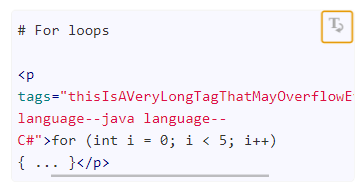
What do you think about having word-break as well? Although we currently do not have any issues in our docs, there may be instances of users having a long single word (function names, tags etc).
No problem, and thank you for the feedback, @jonahtanjz! 😄
Yup agree that the positioning of the buttons should be shifted. I'm fine with the suggested design.
Alright, I'll try implementing that design with some modifications to give it a better look 👍.
What do you think about having word-break as well? Although we currently do not have any issues in our docs, there may be instances of users having a long single word (function names, tags etc).
I agree, because in such cases the wrapping feature would be of no use.
I'll try implementing it as well, though it might take me a bit longer to do so (due to some experimenting).
This file contains hidden or bidirectional Unicode text that may be interpreted or compiled differently than what appears below. To review, open the file in an editor that reveals hidden Unicode characters.
Learn more about bidirectional Unicode characters
Add this suggestion to a batch that can be applied as a single commit.This suggestion is invalid because no changes were made to the code.Suggestions cannot be applied while the pull request is closed.Suggestions cannot be applied while viewing a subset of changes.Only one suggestion per line can be applied in a batch.Add this suggestion to a batch that can be applied as a single commit.Applying suggestions on deleted lines is not supported.You must change the existing code in this line in order to create a valid suggestion.Outdated suggestions cannot be applied.This suggestion has been applied or marked resolved.Suggestions cannot be applied from pending reviews.Suggestions cannot be applied on multi-line comments.Suggestions cannot be applied while the pull request is queued to merge.Suggestion cannot be applied right now. Please check back later.
What is the purpose of this pull request?
Resolves#1289
Overview of changes:
Anything you'd like to highlight / discuss:
Modifications were made for
markbind.css; thus, frontend bundles should be updated for the best results.In case the first line of the code block is long, the button will appear overlaid on the code like so:

Feel free to suggest more designs.
EDIT: A design similar to the example above was implemented:
Testing instructions:
Since there doesn't seem to be any automated tests for the basis of this feature (i.e., the "copy" code block plugin), this feature also does not have such tests. If there are automated tests for the "copy" code block button that I might have missed, please let me know; otherwise, feel free to ask me to write automated tests for both plugins.
With that said, here are some steps to test this feature manually:
codeBlockWrapButtonsto thepluginsarray in the root'ssite.json.site.jsondoes not have apluginsattribute, copy and paste the following before the last closing curly brace at the end of the file:This is a very very very very very very very very very very very very very very very very very very very very very very very very very very very very very long line of code.markbind serve -d.codeBlockCopyButtonsandcodeBlockWrapButtonsplugins or using the "wrap text" button with code block consisting of short lines.Proposed commit message: (wrap lines at 72 characters)
Checklist: ☑️
codeBlockCopyButtoncode were made in order to allow for the implementation of more buttons with different functions.