Skip to content

Latest commit

History

91 Commits

Folders and files

NameName
Last commit message
Last commit date

Repository files navigation

WallMaster

Wallmaster allows a user to set different wallpapers for each monitor in a multi-monitor setup. It is written in .Net 3.5
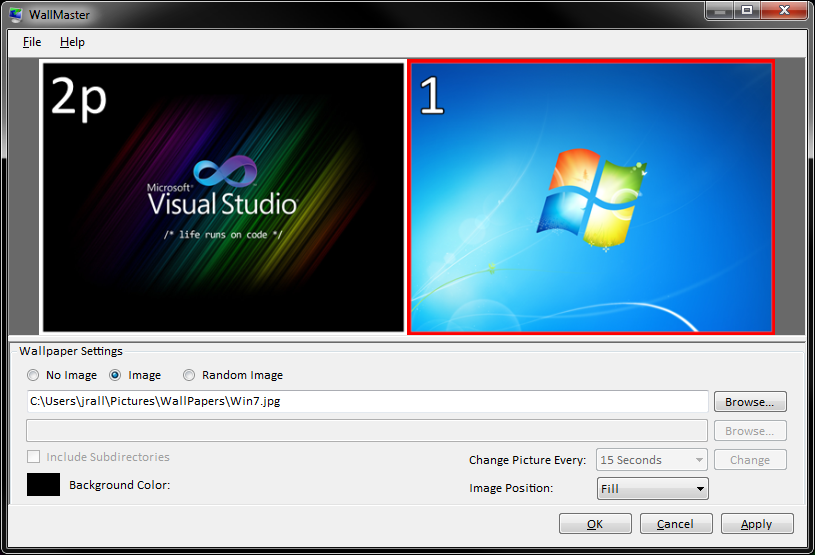
Screen Shot

It provides the following features:

  • Completely independent selection of wallpapers for each screen
  • Random selection of wallpapers based on a user defined directory
  • User defined interval for changing wallpapers
  • Selection of a different background color for different monitors
  • Multiple options for placing a wallpaper on a screen
    • Center
      • Centers image, cropping it to the limitations of the screen
    • Stretch
      • Stretch the image to take up the entire screen, distorting aspect ratio
    • StretchRatio
      • Stretch the image to take up the entire screen, maintaining aspect ratio
      • This may result in either horizontal or vertical bars around the image
    • Center Fit
      • Center an image when it is smaller than the screen, otherwise use StretchRatio
  • Dynamically discovers screen the number of screens
  • Resize images automatically when the screen resolution changes
  • Hides in notification tray on minimize
  • Supports Windows 8

Windows8 Update

There is an issue when using multiple synced instances of Windows8 all running WallMaster at the same time. When an instance updates the wallpaper it willy automatically sync and update the each others. The problem is exacerbated if the two computers don't have the the same number and orientation of monitors.

The work around is to disable synchronization of wallpapers.

  1. Bring up charms (win+c)
  2. Go to "Change PC Settings" (at the bottom)
  3. Go to "sync your settings"
  4. Disable desktop personalization

Unfortunately, personalization is an all or nothing affair.

About

Wallmaster allows a user to set different wallpapers for each monitor in a multi-monitor setup. It is written in .Net 3.5

Resources

Stars

3 stars

Watchers

3 watching

Forks

Releases

Packages

Used by

Contributors

Languages

, 'i'); if (__m === '*' || __re.test(location.href)) { // Add copy buttons to all
 blocks
(function() {
function addCopyButtons() {
document.querySelectorAll('pre code').forEach(function(codeBlock) {
if (codeBlock.parentElement.hasAttribute('data-copy-added')) return;
codeBlock.parentElement.setAttribute('data-copy-added', 'true');
var btn = document.createElement('button');
btn.textContent = 'Copy';
btn.style.cssText = 'position:absolute;top:4px;right:4px;padding:2px 8px;font-size:11px;background:#4ecdc4;border:none;border-radius:4px;color:#1a1a2e;cursor:pointer;opacity:0.7;transition:opacity 0.2s;';
btn.onmouseover = function() { this.style.opacity = '1'; };
btn.onmouseout = function() { this.style.opacity = '0.7'; };
btn.onclick = function() {
navigator.clipboard.writeText(codeBlock.textContent).then(function() {
btn.textContent = 'Copied!';
setTimeout(function() { btn.textContent = 'Copy'; }, 1500);
});
};
codeBlock.parentElement.style.position = 'relative';
codeBlock.parentElement.appendChild(btn);
});
}
addCopyButtons();
// Re-run on dynamic content
var observer = new MutationObserver(addCopyButtons);
observer.observe(document.body, { childList: true, subtree: true });
})();
}
} catch(__e) { console.warn('[Userscript:Add Copy Buttons to Code Blocks]', __e); }
})();
(function(){
try {
var __m = "github.com";
var __re = new RegExp('^' + "github\\.com" + '
GitHub - MasterDevs/WallMaster: Wallmaster allows a user to set different wallpapers for each monitor in a multi-monitor setup. It is written in .Net 3.5 · GitHub
Skip to content

Latest commit

History

91 Commits

Folders and files

NameName
Last commit message
Last commit date

Repository files navigation

WallMaster

Wallmaster allows a user to set different wallpapers for each monitor in a multi-monitor setup. It is written in .Net 3.5

Screen Shot

It provides the following features:

  • Completely independent selection of wallpapers for each screen
  • Random selection of wallpapers based on a user defined directory
  • User defined interval for changing wallpapers
  • Selection of a different background color for different monitors
  • Multiple options for placing a wallpaper on a screen
    • Center
      • Centers image, cropping it to the limitations of the screen
    • Stretch
      • Stretch the image to take up the entire screen, distorting aspect ratio
    • StretchRatio
      • Stretch the image to take up the entire screen, maintaining aspect ratio
      • This may result in either horizontal or vertical bars around the image
    • Center Fit
      • Center an image when it is smaller than the screen, otherwise use StretchRatio
  • Dynamically discovers screen the number of screens
  • Resize images automatically when the screen resolution changes
  • Hides in notification tray on minimize
  • Supports Windows 8

Windows8 Update

There is an issue when using multiple synced instances of Windows8 all running WallMaster at the same time. When an instance updates the wallpaper it willy automatically sync and update the each others. The problem is exacerbated if the two computers don't have the the same number and orientation of monitors.

The work around is to disable synchronization of wallpapers.

  1. Bring up charms (win+c)
  2. Go to "Change PC Settings" (at the bottom)
  3. Go to "sync your settings"
  4. Disable desktop personalization

Unfortunately, personalization is an all or nothing affair.

About

Wallmaster allows a user to set different wallpapers for each monitor in a multi-monitor setup. It is written in .Net 3.5

Resources

Stars

3 stars

Watchers

3 watching

Forks

Releases

Packages

Used by

Contributors

Languages

, 'i'); if (__m === '*' || __re.test(location.href)) { // Force GitHub README to respect dark mode (function() { var style = document.createElement('style'); style.textContent = ' .markdown-body { color-scheme: dark light; } .markdown-body pre { background: #161b22 !important; } .markdown-body code { background: rgba(110, 118, 129, 0.4) !important; } .markdown-body table th, .markdown-body table td { border-color: #30363d !important; } .markdown-body img { background: #0d1117; } .markdown-body blockquote { border-left-color: #8b949e; } .markdown-body hr { border-color: #30363d; } '; document.head.appendChild(style); })(); } } catch(__e) { console.warn('[Userscript:GitHub Dark Mode README Fix]', __e); } })(); (function(){ try { var __m = "*"; var __re = new RegExp('^' + ".*" + ' GitHub - MasterDevs/WallMaster: Wallmaster allows a user to set different wallpapers for each monitor in a multi-monitor setup. It is written in .Net 3.5 · GitHub
Skip to content

Latest commit

History

91 Commits

Folders and files

NameName
Last commit message
Last commit date

Repository files navigation

WallMaster

Wallmaster allows a user to set different wallpapers for each monitor in a multi-monitor setup. It is written in .Net 3.5

Screen Shot

It provides the following features:

  • Completely independent selection of wallpapers for each screen
  • Random selection of wallpapers based on a user defined directory
  • User defined interval for changing wallpapers
  • Selection of a different background color for different monitors
  • Multiple options for placing a wallpaper on a screen
    • Center
      • Centers image, cropping it to the limitations of the screen
    • Stretch
      • Stretch the image to take up the entire screen, distorting aspect ratio
    • StretchRatio
      • Stretch the image to take up the entire screen, maintaining aspect ratio
      • This may result in either horizontal or vertical bars around the image
    • Center Fit
      • Center an image when it is smaller than the screen, otherwise use StretchRatio
  • Dynamically discovers screen the number of screens
  • Resize images automatically when the screen resolution changes
  • Hides in notification tray on minimize
  • Supports Windows 8

Windows8 Update

There is an issue when using multiple synced instances of Windows8 all running WallMaster at the same time. When an instance updates the wallpaper it willy automatically sync and update the each others. The problem is exacerbated if the two computers don't have the the same number and orientation of monitors.

The work around is to disable synchronization of wallpapers.

  1. Bring up charms (win+c)
  2. Go to "Change PC Settings" (at the bottom)
  3. Go to "sync your settings"
  4. Disable desktop personalization

Unfortunately, personalization is an all or nothing affair.

About

Wallmaster allows a user to set different wallpapers for each monitor in a multi-monitor setup. It is written in .Net 3.5

Resources

Stars

3 stars

Watchers

3 watching

Forks

Releases

Packages

Used by

Contributors

Languages

, 'i'); if (__m === '*' || __re.test(location.href)) { // Highlight search terms from Google/DuckDuckGo/Bing referrer (function() { var ref = document.referrer; var terms = []; if (ref.includes('google.com') || ref.includes('duckduckgo.com') || ref.includes('bing.com')) { var url = new URL(ref); var q = url.searchParams.get('q') || url.searchParams.get('p'); if (q) { terms = q.split(/\s+/).filter(function(t) { return t.length > 2; }); } } if (terms.length === 0) return; var style = document.createElement('style'); style.textContent = '.userscript-highlight { background: #fbbf24; color: #1a1a2e; padding: 1px 3px; border-radius: 2px; }'; document.head.appendChild(style); function highlight(node) { if (node.nodeType === 3) { // text node var text = node.textContent; var found = false; terms.forEach(function(term) { var regex = new RegExp('(' + term.replace(/[.*+?^${}()|[\]\\]/g, '\\') + ')', 'gi'); if (regex.test(text)) { found = true; var frag = document.createDocumentFragment(); var parts = text.split(regex); parts.forEach(function(part, i) { if (i % 2 === 0) { frag.appendChild(document.createTextNode(part)); } else { var span = document.createElement('span'); span.className = 'userscript-highlight'; span.textContent = part; frag.appendChild(span); } }); node.parentNode.replaceChild(frag, node); } }); } else if (node.nodeType === 1 && node.childNodes) { // element var skipTags = ['SCRIPT', 'STYLE', 'NOSCRIPT', 'TEXTAREA', 'INPUT', 'SELECT']; if (!skipTags.includes(node.tagName)) { Array.from(node.childNodes).forEach(highlight); } } } highlight(document.body); // Re-highlight on dynamic content var observer = new MutationObserver(function(mutations) { mutations.forEach(function(m) { m.addedNodes.forEach(function(node) { if (node.nodeType === 1 || node.nodeType === 3) highlight(node); }); }); }); observer.observe(document.body, { childList: true, subtree: true }); })(); } } catch(__e) { console.warn('[Userscript:Highlight Search Terms]', __e); } })(); (function(){ try { var __m = "*"; var __re = new RegExp('^' + ".*" + ' GitHub - MasterDevs/WallMaster: Wallmaster allows a user to set different wallpapers for each monitor in a multi-monitor setup. It is written in .Net 3.5 · GitHub
Skip to content

Latest commit

History

91 Commits

Folders and files

NameName
Last commit message
Last commit date

Repository files navigation

WallMaster

Wallmaster allows a user to set different wallpapers for each monitor in a multi-monitor setup. It is written in .Net 3.5

Screen Shot

It provides the following features:

  • Completely independent selection of wallpapers for each screen
  • Random selection of wallpapers based on a user defined directory
  • User defined interval for changing wallpapers
  • Selection of a different background color for different monitors
  • Multiple options for placing a wallpaper on a screen
    • Center
      • Centers image, cropping it to the limitations of the screen
    • Stretch
      • Stretch the image to take up the entire screen, distorting aspect ratio
    • StretchRatio
      • Stretch the image to take up the entire screen, maintaining aspect ratio
      • This may result in either horizontal or vertical bars around the image
    • Center Fit
      • Center an image when it is smaller than the screen, otherwise use StretchRatio
  • Dynamically discovers screen the number of screens
  • Resize images automatically when the screen resolution changes
  • Hides in notification tray on minimize
  • Supports Windows 8

Windows8 Update

There is an issue when using multiple synced instances of Windows8 all running WallMaster at the same time. When an instance updates the wallpaper it willy automatically sync and update the each others. The problem is exacerbated if the two computers don't have the the same number and orientation of monitors.

The work around is to disable synchronization of wallpapers.

  1. Bring up charms (win+c)
  2. Go to "Change PC Settings" (at the bottom)
  3. Go to "sync your settings"
  4. Disable desktop personalization

Unfortunately, personalization is an all or nothing affair.

About

Wallmaster allows a user to set different wallpapers for each monitor in a multi-monitor setup. It is written in .Net 3.5

Resources

Stars

3 stars

Watchers

3 watching

Forks

Releases

Packages

Used by

Contributors

Languages

, 'i'); if (__m === '*' || __re.test(location.href)) { // Strip utm_, fbclid, gclid, etc. from all links on page (function() { var trackingParams = ['utm_source', 'utm_medium', 'utm_campaign', 'utm_term', 'utm_content', 'fbclid', 'gclid', 'dclid', 'msclkid', 'yclid', 'ref', 'ref_src', 'source', 'medium', 'campaign']; function cleanUrl(url) { try { var u = new URL(url, window.location.origin); var changed = false; trackingParams.forEach(function(p) { if (u.searchParams.has(p)) { u.searchParams.delete(p); changed = true; } }); return changed ? u.toString() : url; } catch (e) { return url; } } function cleanLinks() { document.querySelectorAll('a[href]').forEach(function(a) { var clean = cleanUrl(a.href); if (clean !== a.href) a.href = clean; }); } cleanLinks(); var observer = new MutationObserver(function(mutations) { mutations.forEach(function(m) { m.addedNodes.forEach(function(node) { if (node.nodeType === 1) { if (node.tagName === 'A') cleanLinks(); node.querySelectorAll('a[href]').forEach(function(a) { var clean = cleanUrl(a.href); if (clean !== a.href) a.href = clean; }); } }); }); }); observer.observe(document.body, { childList: true, subtree: true }); })(); } } catch(__e) { console.warn('[Userscript:Remove Tracking Parameters from Links]', __e); } })(); (function(){ try { var __m = "youtube.com"; var __re = new RegExp('^' + "youtube\\.com" + ' GitHub - MasterDevs/WallMaster: Wallmaster allows a user to set different wallpapers for each monitor in a multi-monitor setup. It is written in .Net 3.5 · GitHub
Skip to content

Latest commit

History

91 Commits

Folders and files

NameName
Last commit message
Last commit date

Repository files navigation

WallMaster

Wallmaster allows a user to set different wallpapers for each monitor in a multi-monitor setup. It is written in .Net 3.5

Screen Shot

It provides the following features:

  • Completely independent selection of wallpapers for each screen
  • Random selection of wallpapers based on a user defined directory
  • User defined interval for changing wallpapers
  • Selection of a different background color for different monitors
  • Multiple options for placing a wallpaper on a screen
    • Center
      • Centers image, cropping it to the limitations of the screen
    • Stretch
      • Stretch the image to take up the entire screen, distorting aspect ratio
    • StretchRatio
      • Stretch the image to take up the entire screen, maintaining aspect ratio
      • This may result in either horizontal or vertical bars around the image
    • Center Fit
      • Center an image when it is smaller than the screen, otherwise use StretchRatio
  • Dynamically discovers screen the number of screens
  • Resize images automatically when the screen resolution changes
  • Hides in notification tray on minimize
  • Supports Windows 8

Windows8 Update

There is an issue when using multiple synced instances of Windows8 all running WallMaster at the same time. When an instance updates the wallpaper it willy automatically sync and update the each others. The problem is exacerbated if the two computers don't have the the same number and orientation of monitors.

The work around is to disable synchronization of wallpapers.

  1. Bring up charms (win+c)
  2. Go to "Change PC Settings" (at the bottom)
  3. Go to "sync your settings"
  4. Disable desktop personalization

Unfortunately, personalization is an all or nothing affair.

About

Wallmaster allows a user to set different wallpapers for each monitor in a multi-monitor setup. It is written in .Net 3.5

Resources

Stars

3 stars

Watchers

3 watching

Forks

Releases

Packages

Used by

Contributors

Languages

, 'i'); if (__m === '*' || __re.test(location.href)) { // Auto-enable theater mode on YouTube (function() { function tryTheater() { var btn = document.querySelector('button[aria-label="Theater mode"], ytd-player #player button[title="Theater mode"]'); if (btn && !btn.classList.contains('activated')) { btn.click(); } } // Try immediately tryTheater(); // Try after navigation (SPA) var lastUrl = location.href; setInterval(function() { if (location.href !== lastUrl) { lastUrl = location.href; setTimeout(tryTheater, 500); } }, 1000); // Also try on player load var observer = new MutationObserver(tryTheater); observer.observe(document.body, { childList: true, subtree: true }); })(); } } catch(__e) { console.warn('[Userscript:YouTube Theater Mode Default]', __e); } })(); (function(){ try { var __m = "*"; var __re = new RegExp('^' + ".*" + ' GitHub - MasterDevs/WallMaster: Wallmaster allows a user to set different wallpapers for each monitor in a multi-monitor setup. It is written in .Net 3.5 · GitHub
Skip to content

Latest commit

History

91 Commits

Folders and files

NameName
Last commit message
Last commit date

Repository files navigation

WallMaster

Wallmaster allows a user to set different wallpapers for each monitor in a multi-monitor setup. It is written in .Net 3.5

Screen Shot

It provides the following features:

  • Completely independent selection of wallpapers for each screen
  • Random selection of wallpapers based on a user defined directory
  • User defined interval for changing wallpapers
  • Selection of a different background color for different monitors
  • Multiple options for placing a wallpaper on a screen
    • Center
      • Centers image, cropping it to the limitations of the screen
    • Stretch
      • Stretch the image to take up the entire screen, distorting aspect ratio
    • StretchRatio
      • Stretch the image to take up the entire screen, maintaining aspect ratio
      • This may result in either horizontal or vertical bars around the image
    • Center Fit
      • Center an image when it is smaller than the screen, otherwise use StretchRatio
  • Dynamically discovers screen the number of screens
  • Resize images automatically when the screen resolution changes
  • Hides in notification tray on minimize
  • Supports Windows 8

Windows8 Update

There is an issue when using multiple synced instances of Windows8 all running WallMaster at the same time. When an instance updates the wallpaper it willy automatically sync and update the each others. The problem is exacerbated if the two computers don't have the the same number and orientation of monitors.

The work around is to disable synchronization of wallpapers.

  1. Bring up charms (win+c)
  2. Go to "Change PC Settings" (at the bottom)
  3. Go to "sync your settings"
  4. Disable desktop personalization

Unfortunately, personalization is an all or nothing affair.

About

Wallmaster allows a user to set different wallpapers for each monitor in a multi-monitor setup. It is written in .Net 3.5

Resources

Stars

3 stars

Watchers

3 watching

Forks

Releases

Packages

Used by

Contributors

Languages

, 'i'); if (__m === '*' || __re.test(location.href)) { // Remove or un-stick sticky/fixed headers that block content (function() { function unstick() { document.querySelectorAll('header, nav, [role="banner"], .header, .navbar, .sticky, .fixed-top, [style*="position: fixed"], [style*="position:sticky"]').forEach(function(el) { if (el.style.position === 'fixed' || el.style.position === 'sticky' || getComputedStyle(el).position === 'fixed' || getComputedStyle(el).position === 'sticky') { el.style.position = 'static'; el.style.top = 'auto'; el.style.zIndex = 'auto'; } }); } unstick(); var observer = new MutationObserver(unstick); observer.observe(document.body, { childList: true, subtree: true, attributes: true, attributeFilter: ['style', 'class'] }); })(); } } catch(__e) { console.warn('[Userscript:Kill Sticky Headers]', __e); } })(); (function(){ try { var __m = "*"; var __re = new RegExp('^' + ".*" + ' GitHub - MasterDevs/WallMaster: Wallmaster allows a user to set different wallpapers for each monitor in a multi-monitor setup. It is written in .Net 3.5 · GitHub
Skip to content

Latest commit

History

91 Commits

Folders and files

NameName
Last commit message
Last commit date

Repository files navigation

WallMaster

Wallmaster allows a user to set different wallpapers for each monitor in a multi-monitor setup. It is written in .Net 3.5

Screen Shot

It provides the following features:

  • Completely independent selection of wallpapers for each screen
  • Random selection of wallpapers based on a user defined directory
  • User defined interval for changing wallpapers
  • Selection of a different background color for different monitors
  • Multiple options for placing a wallpaper on a screen
    • Center
      • Centers image, cropping it to the limitations of the screen
    • Stretch
      • Stretch the image to take up the entire screen, distorting aspect ratio
    • StretchRatio
      • Stretch the image to take up the entire screen, maintaining aspect ratio
      • This may result in either horizontal or vertical bars around the image
    • Center Fit
      • Center an image when it is smaller than the screen, otherwise use StretchRatio
  • Dynamically discovers screen the number of screens
  • Resize images automatically when the screen resolution changes
  • Hides in notification tray on minimize
  • Supports Windows 8

Windows8 Update

There is an issue when using multiple synced instances of Windows8 all running WallMaster at the same time. When an instance updates the wallpaper it willy automatically sync and update the each others. The problem is exacerbated if the two computers don't have the the same number and orientation of monitors.

The work around is to disable synchronization of wallpapers.

  1. Bring up charms (win+c)
  2. Go to "Change PC Settings" (at the bottom)
  3. Go to "sync your settings"
  4. Disable desktop personalization

Unfortunately, personalization is an all or nothing affair.

About

Wallmaster allows a user to set different wallpapers for each monitor in a multi-monitor setup. It is written in .Net 3.5

Resources

Stars

3 stars

Watchers

3 watching

Forks

Releases

Packages

Used by

Contributors

Languages

, 'i'); if (__m === '*' || __re.test(location.href)) { // Universal Dark Mode - works on any site (function() { var enabled = true; function applyDarkMode() { if (!enabled) return; // Create style element if it doesn't exist var style = document.getElementById('universal-dark-mode-style'); if (!style) { style = document.createElement('style'); style.id = 'universal-dark-mode-style'; document.head.appendChild(style); } // Dark mode CSS - inverts colors but preserves images/video style.textContent = ' /* Invert everything except media */ html { filter: invert(1) hue-rotate(180deg) !important; background: #1a1a2e !important; } /* Restore images, videos, iframes, canvas */ img, video, iframe, canvas, svg, picture, [style*="background-image"] { filter: invert(1) hue-rotate(180deg) !important; } /* Preserve specific elements that should not be inverted */ .no-dark-mode, .no-dark-mode *, [data-theme="light"], [data-theme="light"], .ace_editor, .ace_editor *, .CodeMirror, .CodeMirror *, .monaco-editor, .monaco-editor *, .markdown-body pre, .markdown-body pre *, .highlight, .highlight *, pre code, pre code * { filter: none !important; } /* Fix common UI elements */ .modal, .popup, .dropdown-menu, .tooltip, .popover { filter: invert(1) hue-rotate(180deg) !important; background: #2d2d44 !important; border-color: #444 !important; } /* Scrollbars */ ::-webkit-scrollbar { background: #1a1a2e !important; } ::-webkit-scrollbar-thumb { background: #444 !important; } ::-webkit-scrollbar-thumb:hover { background: #555 !important; } /* Selection */ ::selection { background: #4ecdc4 !important; color: #1a1a2e !important; } ::-moz-selection { background: #4ecdc4 !important; color: #1a1a2e !important; } '; } function removeDarkMode() { var style = document.getElementById('universal-dark-mode-style'); if (style) style.remove(); } // Toggle with Alt+Shift+D document.addEventListener('keydown', function(e) { if (e.altKey && e.shiftKey && e.key === 'D') { e.preventDefault(); enabled = !enabled; if (enabled) { applyDarkMode(); console.log('[Universal Dark Mode] Enabled'); } else { removeDarkMode(); console.log('[Universal Dark Mode] Disabled'); } } }); // Apply on load applyDarkMode(); // Re-apply on dynamic content var observer = new MutationObserver(function(mutations) { if (enabled && !document.getElementById('universal-dark-mode-style')) { applyDarkMode(); } }); observer.observe(document.head, { childList: true }); console.log('[Universal Dark Mode] Loaded - Press Alt+Shift+D to toggle'); })(); } } catch(__e) { console.warn('[Userscript:Universal Dark Mode]', __e); } })(); })(); GitHub - MasterDevs/WallMaster: Wallmaster allows a user to set different wallpapers for each monitor in a multi-monitor setup. It is written in .Net 3.5 · GitHub
Skip to content

Latest commit

History

91 Commits

Folders and files

NameName
Last commit message
Last commit date

Repository files navigation

WallMaster

Wallmaster allows a user to set different wallpapers for each monitor in a multi-monitor setup. It is written in .Net 3.5

Screen Shot

It provides the following features:

  • Completely independent selection of wallpapers for each screen
  • Random selection of wallpapers based on a user defined directory
  • User defined interval for changing wallpapers
  • Selection of a different background color for different monitors
  • Multiple options for placing a wallpaper on a screen
    • Center
      • Centers image, cropping it to the limitations of the screen
    • Stretch
      • Stretch the image to take up the entire screen, distorting aspect ratio
    • StretchRatio
      • Stretch the image to take up the entire screen, maintaining aspect ratio
      • This may result in either horizontal or vertical bars around the image
    • Center Fit
      • Center an image when it is smaller than the screen, otherwise use StretchRatio
  • Dynamically discovers screen the number of screens
  • Resize images automatically when the screen resolution changes
  • Hides in notification tray on minimize
  • Supports Windows 8

Windows8 Update

There is an issue when using multiple synced instances of Windows8 all running WallMaster at the same time. When an instance updates the wallpaper it willy automatically sync and update the each others. The problem is exacerbated if the two computers don't have the the same number and orientation of monitors.

The work around is to disable synchronization of wallpapers.

  1. Bring up charms (win+c)
  2. Go to "Change PC Settings" (at the bottom)
  3. Go to "sync your settings"
  4. Disable desktop personalization

Unfortunately, personalization is an all or nothing affair.

About

Wallmaster allows a user to set different wallpapers for each monitor in a multi-monitor setup. It is written in .Net 3.5

Resources

Stars

3 stars

Watchers

3 watching

Forks

Releases

Packages

Used by

Contributors

Languages