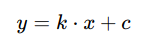
Display math expressions with KaTeX and React.

(based on the https://github.com/talyssonoc/react-katex)
(the readme and the demo are "forked" from https://github.com/talyssonoc/react-katex)
Comparison with react-katex: talyssonoc/react-katex#49.

 $ npm install katex @matejmazur/react-katex
# or
$ yarn add katex @matejmazur/react-kateximport'katex/dist/katex.min.css';importTeXfrom'@matejmazur/react-katex';Display math in the middle of the text.
ReactDOM.render(<TeXmath="\int_0^\infty x^2 dx"/>,document.getElementById('math'));// orReactDOM.render(<TeX>\int_0^\infty x^2 dx</TeX>,document.getElementById('math'));It will be rendered like this:

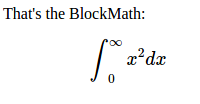
Display math in a separated block, with larger font and symbols.
ReactDOM.render(<TeXmath="\int_0^\infty x^2 dx"block/>,document.getElementById('math'));// orReactDOM.render(<TeXblock>\int_0^\infty x^2 dx</TeX>,document.getElementById('math'));It will be rendered like this:
Note:
Don't forget to import KaTeX CSS file.
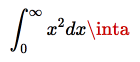
import'katex/dist/katex.min.css';By default the error rendering is handled by KaTeX. You can optionally pass errorColor (defaults to #cc0000) as a prop:
ReactDOM.render(<TeXmath={'\\int_0^\\infty x^2 dx \\inta'}errorColor={'#cc0000'}/>,document.getElementById('math'));This will be rendered like so:
It's possible to handle parse errors using the prop renderError. This prop must be a function that receives the error object and returns what should be rendered when parsing fails:
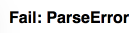
ReactDOM.render(<TeXmath="\\int_{"renderError={(error)=>{return<b>Fail: {error.name}</b>;}}/>,document.getElementById('math'));// The code above will render '<b>Fail: ParseError</b>' because it's the value returned from `renderError`.This will render <b>Fail: ParseError</b>:
You can change the wrapper component (block math uses div and inline uses span) by whatever you want via props.as attribute.
ReactDOM.render(<TeXmath="y = x^2"as="figcaption"/>,document.getElementById('math'));In addition to using the math property, you can also quote as a child allowing the use of { } in your expression.
ReactDOM.render(<TeX>{'\\frac{\\text{m}}{\\text{s}^2}'}</TeX>,document.getElementById('math'));Or Multiline
ReactDOM.render(<TeX>{`\\frac{\\text{m}}{\\text{s}^2}`}</TeX>,document.getElementById('math'));However, it can be annoying to escape backslashes. This can be circumvented with the String.raw tag on a template literal when using ES6.
ReactDOM.render(<TeX>{String.raw`\frac{\text{m}}{\text{s}^2}`}</TeX>,document.getElementById('math'));Backticks must be escaped with a backslash but would be passed to KaTeX as \`. A tag can be created to replace \` with `
constlatex=(...a)=>String.raw(...a).replace('\\`','`');ReactDOM.render(<TeX>{latex`\``}</TeX>,document.getElementById('math'));You can even do variable substitution
consttop='m';constbottom='s';ReactDOM.render(<TeX>{String.raw`\frac{\text{${top}}}{\text{${bottom}}^2}`}</TeX>,document.getElementById('math'));You can change directly all KaTeX options via props.settings:
Example of adding a custom macro:
ReactDOM.render(<TeXsettings={{macros: {'*': '\\cdot'}}}>y = k * x + c</TeX>);Result: