hugo new site mysite
cd mysitegit submodule add git@github.com:MeiK2333/github-style.git themes/github-styleIf you just installed the theme, it is already in the latest version. If not, you can update using the below commands
cd themes/github-style
git pull
Then, you need to rename the previous posts folder to post
cd<you-project-folder>
mv content/posts content/posthugo new readme.md
echo'`Hello World!`'> content/readme.md---
pin: true
---
Hugo will create a post with draft: true, change it to false in order for it to show in the website.
hugo new post/title_of_the_post.md
---
title: "title"
date: 2019-10-22T18:46:47+08:00
draft: false
summary: "The summary content"
---
Use <!--more--> to separate content that will display in the posts page as abstraction and the rest of the content. This is different from summary, as summary will not appear in the post.
---
title: "title"
date: 2019-10-22T18:46:47+08:00
draft: false
---
abstraction show in the post page
<!--more-->
other content
add to config.toml
lastmod = true
[frontmatter]
lastmod = ["lastmod", ":fileModTime", ":default"]
Use gitalk to support comments
add to config.toml
enableGitalk = true
[params.gitalk]
clientID = "Your client ID"clientSecret = "Your client secret"repo = "repo"owner = "Your Github username"admin = "Your Github username"id = "location.pathname"labels = "gitalk"perPage = 30pagerDirection = "last"createIssueManually = truedistractionFreeMode = falseIn you post add math: true to front matter
---
katex: math
---
Then the katex script will auto render the string enclosed by delimiters.
# replace ... with latex formula
display inline \\( ... \\)
display block $$ ... $$
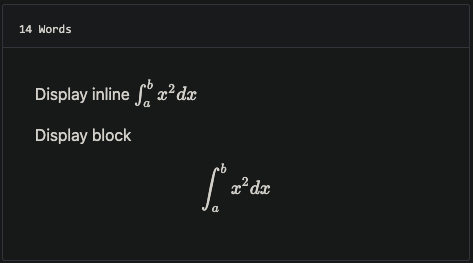
you can add MathJax:true to frontmatter
mathJax: true
Add your files in the static folder and list them in the custom_css and custom_js parameters
For example, with static/css/custom.css and static/js/custom.js, add to config.toml
[params]
custom_css = ["css/custom.css"]
custom_js = ["js/custom.js"]
# custom script with defer attributedefer_custom_js = ["js/defer_custom.js"]baseURL = "https://meik2333.com/"languageCode = "zh-cn"title = "MeiK's blog"theme = "github-style"pygmentsCodeFences = truepygmentsUseClasses = true
[params]
author = "MeiK"description = "In solitude, where we are least alone."github = "MeiK2333"facebook = "MeiK2333"twitter = "MeiK2333"linkedin = "MeiK2333"instagram = "MeiK2333"tumblr = "MeiK2333"email = "meik2333@gmail.com"url = "https://meik2333.com"keywords = "blog, google analytics"rss = truelastmod = trueuserStatusEmoji = "😀"favicon = "/images/github.png"avatar = "/images/avatar.png"headerIcon = "/images/GitHub-Mark-Light-32px.png"location = "China"enableGitalk = truecustom_css = ["css/custom.css"]
custom_js = ["js/custom.js"]
[params.gitalk]
clientID = "Your client ID"clientSecret = "Your client secret"repo = "repo"owner = "MeiK2333"admin = "MeiK2333"id = "location.pathname"labels = "gitalk"perPage = 15pagerDirection = "last"createIssueManually = truedistractionFreeMode = false
[[params.links]]
title = "Link"href = "https://github.com/meik2333"
[[params.links]]
title = "Link2"href = "https://meik2333.com"icon = "https://meik2333.com/images/avatar.png"
[frontmatter]
lastmod = ["lastmod", ":fileModTime", ":default"]
[services]
[services.googleAnalytics]
ID = "UA-123456-789"You can create a collapsible block like this:
{{<details "summary title">}}
block content
{{</details>}}
And it will show like this:
summary title
block content
add to config.toml
[params]
enableSearch = true
[outputs]
home = ["html", "json"]
[outputFormats.json]
mediaType = "application/json"baseName = "index"isPlainText = false
We can do local search now, it is implemented by fuse.js.
There are various way to deploy to github, here is a link to official document.
Here is an sample. Note line 22 have env HUGO_ENV="production", makes sure googleAnalysis is loaded during production, but is not loaded when we are testing it in localhost.
#!/bin/shif [ "`git status -s`" ]
thenecho"The working directory is dirty. Please commit any pending changes."exit 1;fiecho"Deleting old publication"
rm -rf public
mkdir public
git worktree prune
rm -rf .git/worktrees/public/
echo"Checking out gh-pages branch into public"
git worktree add -B gh-pages public origin/gh-pages
echo"Removing existing files"
rm -rf public/*echo"Generating site"
env HUGO_ENV="production" hugo -t github-style
echo"Updating gh-pages branch"cd public && git add --all && git commit -m "Publishing to gh-pages (publish.sh)"#echo "Pushing to github"#git push --all
Then you can verify the site is working and use git push --all to push the change to github. If you don't want to check again every time, you can uncomment the #git push --all in the script.
- 重写标题导航,那玩意儿引入的 JS 在控制台报错。