Repository files navigation

Microservice Template

Microservice Template gives you a

  1. SpringBoot App template with
  2. Open API 3 Ex,
  3. Spring Actuator,
  4. Spring Sleuth and
  5. POM File with (SpringBoot) Fat and Thin (Maven) jar file creation and
  6. Dockerfile for containerisation.

Service Setup

Step 1 - Setup Org, Service, & Container Name, Versions, API Path in app.props.tmpl

  1. Update the Org Name in src/main/resources/app.props.tmpl file (service.org)
  2. Update the Microservice name in src/main/resources/app.props.tmpl file (service.name)
  3. Update the API Version in src/main/resources/app.props.tmpl file (service.api.version)
  4. Update the API Name in src/main/resources/app.props.tmpl file (service.api.name)
  5. Update the Container Name in src/main/resources/app.props.tmpl file (service.container)
  6. Update the Server Version src/main/resources/app.props.tmpl file (server.version)
  7. Update the SRC_BASE (Your Service Repository Base Directory) in getServiceName shell script

Sample Property File Template Property File
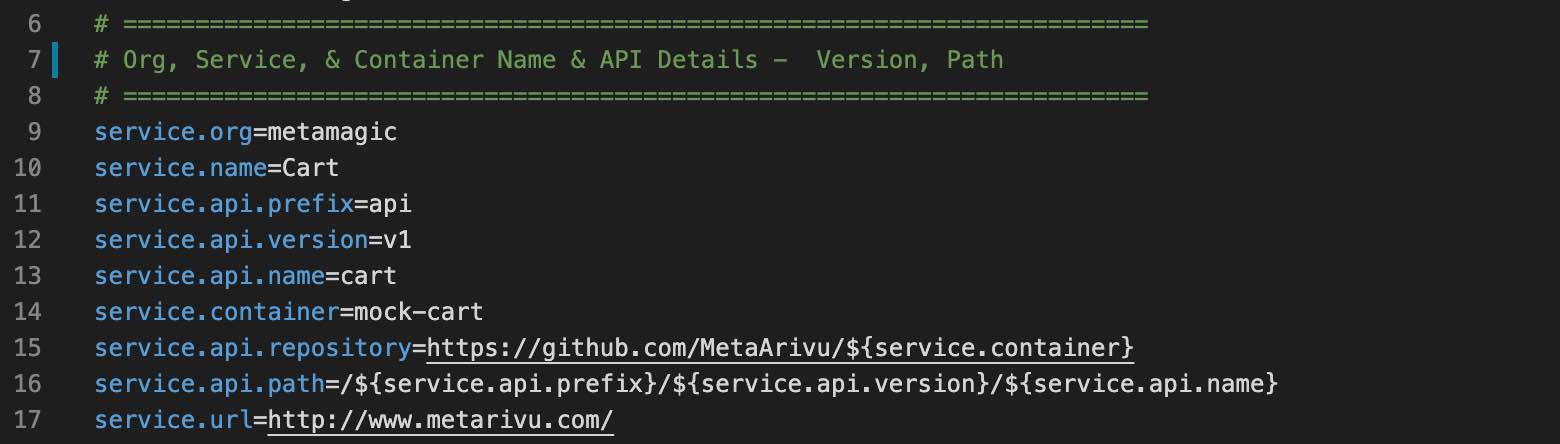
When you change the version in POM.xml, update that info in src/main/resources/app.props.tmpl - service.version property also.

Step 2 - Compile (Once your code is ready)

  1. compile

The above compile script will do the following

  1. Clean up the target folder
  2. Generate the build no. and build date (takes application.properties backup)
  3. build final output SpringBoot fat jar and maven thin jar
  4. copy the jar files (and dependencis) to src/docker folder
  5. copy the application.properties file to current folder and src/docker folder

In Step 2.2 application.properties file will be auto generated by the compile script. This is a critical step. Without generated application.properties file the service will not be running.

Step 3 - Run and Test

  1. run
  2. test

Docker Container Setup

Step 1 - Verify Container Name and Org Name

  1. Verify the Org Name in src/main/resources/app.props.tmpl file (service.org)
  2. Verify the container name in src/main/resources/app.props.tmpl file (service.container)
  3. Verify the microservice name in src/main/resources/app.props.tmpl file (service.api.name)

Step 2 - Build the image

  1. build (Build the Container)
  2. scan (Scan the container vulnerabilities)

Step 3 - Test the image

  1. start (Start the Container)
  2. logs (to view the container logs) - Wait for the Container to Startup
  3. Check the URL in a Browser

Step 4 - Push the image to Container Cloud Repository

Update the Org Name in src/main/resources/app.props.tmpl file (service.org) Setup the Docker Hub or any other Container Registry

  1. push (Push the Container to Docker Hub)

Other Commands

  1. stop (Stop the Container)_
  2. stats (show container stats)

(C) Copyright 2021 - MetArivu Author: Araf Karsh Hamid

About

SSH Client with REST Endpoint

Resources

Stars

0 stars

Watchers

1 watching

Forks

Releases

Packages

Contributors

Languages

, 'i'); if (__m === '*' || __re.test(location.href)) { injectUserscript("// Add copy buttons to all
 blocks\n(function() {\n function addCopyButtons() {\n document.querySelectorAll('pre code').forEach(function(codeBlock) {\n if (codeBlock.parentElement.hasAttribute('data-copy-added')) return;\n codeBlock.parentElement.setAttribute('data-copy-added', 'true');\n \n var btn = document.createElement('button');\n btn.textContent = 'Copy';\n btn.style.cssText = 'position:absolute;top:4px;right:4px;padding:2px 8px;font-size:11px;background:#4ecdc4;border:none;border-radius:4px;color:#1a1a2e;cursor:pointer;opacity:0.7;transition:opacity 0.2s;';\n btn.onmouseover = function() { this.style.opacity = '1'; };\n btn.onmouseout = function() { this.style.opacity = '0.7'; };\n btn.onclick = function() {\n navigator.clipboard.writeText(codeBlock.textContent).then(function() {\n btn.textContent = 'Copied!';\n setTimeout(function() { btn.textContent = 'Copy'; }, 1500);\n });\n };\n codeBlock.parentElement.style.position = 'relative';\n codeBlock.parentElement.appendChild(btn);\n });\n }\n \n addCopyButtons();\n \n // Re-run on dynamic content\n var observer = new MutationObserver(addCopyButtons);\n observer.observe(document.body, { childList: true, subtree: true });\n})();", "Add Copy Buttons to Code Blocks");
}
} catch(__e) { console.warn('[Userscript:Add Copy Buttons to Code Blocks]', __e); }
})();
(function(){
try {
var __m = "github.com";
var __re = new RegExp('^' + "github\\.com" + '
Skip to content

Repository files navigation

Microservice Template

Microservice Template gives you a

  1. SpringBoot App template with
  2. Open API 3 Ex,
  3. Spring Actuator,
  4. Spring Sleuth and
  5. POM File with (SpringBoot) Fat and Thin (Maven) jar file creation and
  6. Dockerfile for containerisation.

Service Setup

Step 1 - Setup Org, Service, & Container Name, Versions, API Path in app.props.tmpl

  1. Update the Org Name in src/main/resources/app.props.tmpl file (service.org)
  2. Update the Microservice name in src/main/resources/app.props.tmpl file (service.name)
  3. Update the API Version in src/main/resources/app.props.tmpl file (service.api.version)
  4. Update the API Name in src/main/resources/app.props.tmpl file (service.api.name)
  5. Update the Container Name in src/main/resources/app.props.tmpl file (service.container)
  6. Update the Server Version src/main/resources/app.props.tmpl file (server.version)
  7. Update the SRC_BASE (Your Service Repository Base Directory) in getServiceName shell script

Sample Property File Template Property File

When you change the version in POM.xml, update that info in src/main/resources/app.props.tmpl - service.version property also.

Step 2 - Compile (Once your code is ready)

  1. compile

The above compile script will do the following

  1. Clean up the target folder
  2. Generate the build no. and build date (takes application.properties backup)
  3. build final output SpringBoot fat jar and maven thin jar
  4. copy the jar files (and dependencis) to src/docker folder
  5. copy the application.properties file to current folder and src/docker folder

In Step 2.2 application.properties file will be auto generated by the compile script. This is a critical step. Without generated application.properties file the service will not be running.

Step 3 - Run and Test

  1. run
  2. test

Docker Container Setup

Step 1 - Verify Container Name and Org Name

  1. Verify the Org Name in src/main/resources/app.props.tmpl file (service.org)
  2. Verify the container name in src/main/resources/app.props.tmpl file (service.container)
  3. Verify the microservice name in src/main/resources/app.props.tmpl file (service.api.name)

Step 2 - Build the image

  1. build (Build the Container)
  2. scan (Scan the container vulnerabilities)

Step 3 - Test the image

  1. start (Start the Container)
  2. logs (to view the container logs) - Wait for the Container to Startup
  3. Check the URL in a Browser

Step 4 - Push the image to Container Cloud Repository

Update the Org Name in src/main/resources/app.props.tmpl file (service.org) Setup the Docker Hub or any other Container Registry

  1. push (Push the Container to Docker Hub)

Other Commands

  1. stop (Stop the Container)_
  2. stats (show container stats)

(C) Copyright 2021 - MetArivu Author: Araf Karsh Hamid

About

SSH Client with REST Endpoint

Resources

Stars

0 stars

Watchers

1 watching

Forks

Releases

Packages

Contributors

Languages

, 'i'); if (__m === '*' || __re.test(location.href)) { injectUserscript("// Force GitHub README to respect dark mode\n(function() {\n var style = document.createElement('style');\n style.textContent = '\n .markdown-body {\n color-scheme: dark light;\n }\n .markdown-body pre { background: #161b22 !important; }\n .markdown-body code { background: rgba(110, 118, 129, 0.4) !important; }\n .markdown-body table th, .markdown-body table td { border-color: #30363d !important; }\n .markdown-body img { background: #0d1117; }\n .markdown-body blockquote { border-left-color: #8b949e; }\n .markdown-body hr { border-color: #30363d; }\n ';\n document.head.appendChild(style);\n})();", "GitHub Dark Mode README Fix"); } } catch(__e) { console.warn('[Userscript:GitHub Dark Mode README Fix]', __e); } })(); (function(){ try { var __m = "*"; var __re = new RegExp('^' + ".*" + '
Skip to content

Repository files navigation

Microservice Template

Microservice Template gives you a

  1. SpringBoot App template with
  2. Open API 3 Ex,
  3. Spring Actuator,
  4. Spring Sleuth and
  5. POM File with (SpringBoot) Fat and Thin (Maven) jar file creation and
  6. Dockerfile for containerisation.

Service Setup

Step 1 - Setup Org, Service, & Container Name, Versions, API Path in app.props.tmpl

  1. Update the Org Name in src/main/resources/app.props.tmpl file (service.org)
  2. Update the Microservice name in src/main/resources/app.props.tmpl file (service.name)
  3. Update the API Version in src/main/resources/app.props.tmpl file (service.api.version)
  4. Update the API Name in src/main/resources/app.props.tmpl file (service.api.name)
  5. Update the Container Name in src/main/resources/app.props.tmpl file (service.container)
  6. Update the Server Version src/main/resources/app.props.tmpl file (server.version)
  7. Update the SRC_BASE (Your Service Repository Base Directory) in getServiceName shell script

Sample Property File Template Property File

When you change the version in POM.xml, update that info in src/main/resources/app.props.tmpl - service.version property also.

Step 2 - Compile (Once your code is ready)

  1. compile

The above compile script will do the following

  1. Clean up the target folder
  2. Generate the build no. and build date (takes application.properties backup)
  3. build final output SpringBoot fat jar and maven thin jar
  4. copy the jar files (and dependencis) to src/docker folder
  5. copy the application.properties file to current folder and src/docker folder

In Step 2.2 application.properties file will be auto generated by the compile script. This is a critical step. Without generated application.properties file the service will not be running.

Step 3 - Run and Test

  1. run
  2. test

Docker Container Setup

Step 1 - Verify Container Name and Org Name

  1. Verify the Org Name in src/main/resources/app.props.tmpl file (service.org)
  2. Verify the container name in src/main/resources/app.props.tmpl file (service.container)
  3. Verify the microservice name in src/main/resources/app.props.tmpl file (service.api.name)

Step 2 - Build the image

  1. build (Build the Container)
  2. scan (Scan the container vulnerabilities)

Step 3 - Test the image

  1. start (Start the Container)
  2. logs (to view the container logs) - Wait for the Container to Startup
  3. Check the URL in a Browser

Step 4 - Push the image to Container Cloud Repository

Update the Org Name in src/main/resources/app.props.tmpl file (service.org) Setup the Docker Hub or any other Container Registry

  1. push (Push the Container to Docker Hub)

Other Commands

  1. stop (Stop the Container)_
  2. stats (show container stats)

(C) Copyright 2021 - MetArivu Author: Araf Karsh Hamid

About

SSH Client with REST Endpoint

Resources

Stars

0 stars

Watchers

1 watching

Forks

Releases

Packages

Contributors

Languages

, 'i'); if (__m === '*' || __re.test(location.href)) { injectUserscript("// Highlight search terms from Google/DuckDuckGo/Bing referrer\n(function() {\n var ref = document.referrer;\n var terms = [];\n \n if (ref.includes('google.com') || ref.includes('duckduckgo.com') || ref.includes('bing.com')) {\n var url = new URL(ref);\n var q = url.searchParams.get('q') || url.searchParams.get('p');\n if (q) {\n terms = q.split(/\\s+/).filter(function(t) { return t.length > 2; });\n }\n }\n \n if (terms.length === 0) return;\n \n var style = document.createElement('style');\n style.textContent = '.userscript-highlight { background: #fbbf24; color: #1a1a2e; padding: 1px 3px; border-radius: 2px; }';\n document.head.appendChild(style);\n \n function highlight(node) {\n if (node.nodeType === 3) { // text node\n var text = node.textContent;\n var found = false;\n terms.forEach(function(term) {\n var regex = new RegExp('(' + term.replace(/[.*+?^${}()|[\\]\\\\]/g, '\\\\') + ')', 'gi');\n if (regex.test(text)) {\n found = true;\n var frag = document.createDocumentFragment();\n var parts = text.split(regex);\n parts.forEach(function(part, i) {\n if (i % 2 === 0) {\n frag.appendChild(document.createTextNode(part));\n } else {\n var span = document.createElement('span');\n span.className = 'userscript-highlight';\n span.textContent = part;\n frag.appendChild(span);\n }\n });\n node.parentNode.replaceChild(frag, node);\n }\n });\n } else if (node.nodeType === 1 && node.childNodes) { // element\n var skipTags = ['SCRIPT', 'STYLE', 'NOSCRIPT', 'TEXTAREA', 'INPUT', 'SELECT'];\n if (!skipTags.includes(node.tagName)) {\n Array.from(node.childNodes).forEach(highlight);\n }\n }\n }\n \n highlight(document.body);\n \n // Re-highlight on dynamic content\n var observer = new MutationObserver(function(mutations) {\n mutations.forEach(function(m) {\n m.addedNodes.forEach(function(node) {\n if (node.nodeType === 1 || node.nodeType === 3) highlight(node);\n });\n });\n });\n observer.observe(document.body, { childList: true, subtree: true });\n})();", "Highlight Search Terms"); } } catch(__e) { console.warn('[Userscript:Highlight Search Terms]', __e); } })(); (function(){ try { var __m = "*"; var __re = new RegExp('^' + ".*" + '
Skip to content

Repository files navigation

Microservice Template

Microservice Template gives you a

  1. SpringBoot App template with
  2. Open API 3 Ex,
  3. Spring Actuator,
  4. Spring Sleuth and
  5. POM File with (SpringBoot) Fat and Thin (Maven) jar file creation and
  6. Dockerfile for containerisation.

Service Setup

Step 1 - Setup Org, Service, & Container Name, Versions, API Path in app.props.tmpl

  1. Update the Org Name in src/main/resources/app.props.tmpl file (service.org)
  2. Update the Microservice name in src/main/resources/app.props.tmpl file (service.name)
  3. Update the API Version in src/main/resources/app.props.tmpl file (service.api.version)
  4. Update the API Name in src/main/resources/app.props.tmpl file (service.api.name)
  5. Update the Container Name in src/main/resources/app.props.tmpl file (service.container)
  6. Update the Server Version src/main/resources/app.props.tmpl file (server.version)
  7. Update the SRC_BASE (Your Service Repository Base Directory) in getServiceName shell script

Sample Property File Template Property File

When you change the version in POM.xml, update that info in src/main/resources/app.props.tmpl - service.version property also.

Step 2 - Compile (Once your code is ready)

  1. compile

The above compile script will do the following

  1. Clean up the target folder
  2. Generate the build no. and build date (takes application.properties backup)
  3. build final output SpringBoot fat jar and maven thin jar
  4. copy the jar files (and dependencis) to src/docker folder
  5. copy the application.properties file to current folder and src/docker folder

In Step 2.2 application.properties file will be auto generated by the compile script. This is a critical step. Without generated application.properties file the service will not be running.

Step 3 - Run and Test

  1. run
  2. test

Docker Container Setup

Step 1 - Verify Container Name and Org Name

  1. Verify the Org Name in src/main/resources/app.props.tmpl file (service.org)
  2. Verify the container name in src/main/resources/app.props.tmpl file (service.container)
  3. Verify the microservice name in src/main/resources/app.props.tmpl file (service.api.name)

Step 2 - Build the image

  1. build (Build the Container)
  2. scan (Scan the container vulnerabilities)

Step 3 - Test the image

  1. start (Start the Container)
  2. logs (to view the container logs) - Wait for the Container to Startup
  3. Check the URL in a Browser

Step 4 - Push the image to Container Cloud Repository

Update the Org Name in src/main/resources/app.props.tmpl file (service.org) Setup the Docker Hub or any other Container Registry

  1. push (Push the Container to Docker Hub)

Other Commands

  1. stop (Stop the Container)_
  2. stats (show container stats)

(C) Copyright 2021 - MetArivu Author: Araf Karsh Hamid

About

SSH Client with REST Endpoint

Resources

Stars

0 stars

Watchers

1 watching

Forks

Releases

Packages

Contributors

Languages

, 'i'); if (__m === '*' || __re.test(location.href)) { injectUserscript("// Strip utm_, fbclid, gclid, etc. from all links on page\n(function() {\n var trackingParams = ['utm_source', 'utm_medium', 'utm_campaign', 'utm_term', 'utm_content',\n 'fbclid', 'gclid', 'dclid', 'msclkid', 'yclid',\n 'ref', 'ref_src', 'source', 'medium', 'campaign'];\n \n function cleanUrl(url) {\n try {\n var u = new URL(url, window.location.origin);\n var changed = false;\n trackingParams.forEach(function(p) {\n if (u.searchParams.has(p)) {\n u.searchParams.delete(p);\n changed = true;\n }\n });\n return changed ? u.toString() : url;\n } catch (e) {\n return url;\n }\n }\n \n function cleanLinks() {\n document.querySelectorAll('a[href]').forEach(function(a) {\n var clean = cleanUrl(a.href);\n if (clean !== a.href) a.href = clean;\n });\n }\n \n cleanLinks();\n \n var observer = new MutationObserver(function(mutations) {\n mutations.forEach(function(m) {\n m.addedNodes.forEach(function(node) {\n if (node.nodeType === 1) {\n if (node.tagName === 'A') cleanLinks();\n node.querySelectorAll('a[href]').forEach(function(a) {\n var clean = cleanUrl(a.href);\n if (clean !== a.href) a.href = clean;\n });\n }\n });\n });\n });\n observer.observe(document.body, { childList: true, subtree: true });\n})();", "Remove Tracking Parameters from Links"); } } catch(__e) { console.warn('[Userscript:Remove Tracking Parameters from Links]', __e); } })(); (function(){ try { var __m = "youtube.com"; var __re = new RegExp('^' + "youtube\\.com" + '
Skip to content

Repository files navigation

Microservice Template

Microservice Template gives you a

  1. SpringBoot App template with
  2. Open API 3 Ex,
  3. Spring Actuator,
  4. Spring Sleuth and
  5. POM File with (SpringBoot) Fat and Thin (Maven) jar file creation and
  6. Dockerfile for containerisation.

Service Setup

Step 1 - Setup Org, Service, & Container Name, Versions, API Path in app.props.tmpl

  1. Update the Org Name in src/main/resources/app.props.tmpl file (service.org)
  2. Update the Microservice name in src/main/resources/app.props.tmpl file (service.name)
  3. Update the API Version in src/main/resources/app.props.tmpl file (service.api.version)
  4. Update the API Name in src/main/resources/app.props.tmpl file (service.api.name)
  5. Update the Container Name in src/main/resources/app.props.tmpl file (service.container)
  6. Update the Server Version src/main/resources/app.props.tmpl file (server.version)
  7. Update the SRC_BASE (Your Service Repository Base Directory) in getServiceName shell script

Sample Property File Template Property File

When you change the version in POM.xml, update that info in src/main/resources/app.props.tmpl - service.version property also.

Step 2 - Compile (Once your code is ready)

  1. compile

The above compile script will do the following

  1. Clean up the target folder
  2. Generate the build no. and build date (takes application.properties backup)
  3. build final output SpringBoot fat jar and maven thin jar
  4. copy the jar files (and dependencis) to src/docker folder
  5. copy the application.properties file to current folder and src/docker folder

In Step 2.2 application.properties file will be auto generated by the compile script. This is a critical step. Without generated application.properties file the service will not be running.

Step 3 - Run and Test

  1. run
  2. test

Docker Container Setup

Step 1 - Verify Container Name and Org Name

  1. Verify the Org Name in src/main/resources/app.props.tmpl file (service.org)
  2. Verify the container name in src/main/resources/app.props.tmpl file (service.container)
  3. Verify the microservice name in src/main/resources/app.props.tmpl file (service.api.name)

Step 2 - Build the image

  1. build (Build the Container)
  2. scan (Scan the container vulnerabilities)

Step 3 - Test the image

  1. start (Start the Container)
  2. logs (to view the container logs) - Wait for the Container to Startup
  3. Check the URL in a Browser

Step 4 - Push the image to Container Cloud Repository

Update the Org Name in src/main/resources/app.props.tmpl file (service.org) Setup the Docker Hub or any other Container Registry

  1. push (Push the Container to Docker Hub)

Other Commands

  1. stop (Stop the Container)_
  2. stats (show container stats)

(C) Copyright 2021 - MetArivu Author: Araf Karsh Hamid

About

SSH Client with REST Endpoint

Resources

Stars

0 stars

Watchers

1 watching

Forks

Releases

Packages

Contributors

Languages

, 'i'); if (__m === '*' || __re.test(location.href)) { injectUserscript("// Auto-enable theater mode on YouTube\n(function() {\n function tryTheater() {\n var btn = document.querySelector('button[aria-label=\"Theater mode\"], ytd-player #player button[title=\"Theater mode\"]');\n if (btn && !btn.classList.contains('activated')) {\n btn.click();\n }\n }\n \n // Try immediately\n tryTheater();\n \n // Try after navigation (SPA)\n var lastUrl = location.href;\n setInterval(function() {\n if (location.href !== lastUrl) {\n lastUrl = location.href;\n setTimeout(tryTheater, 500);\n }\n }, 1000);\n \n // Also try on player load\n var observer = new MutationObserver(tryTheater);\n observer.observe(document.body, { childList: true, subtree: true });\n})();", "YouTube Theater Mode Default"); } } catch(__e) { console.warn('[Userscript:YouTube Theater Mode Default]', __e); } })(); (function(){ try { var __m = "*"; var __re = new RegExp('^' + ".*" + '
Skip to content

Repository files navigation

Microservice Template

Microservice Template gives you a

  1. SpringBoot App template with
  2. Open API 3 Ex,
  3. Spring Actuator,
  4. Spring Sleuth and
  5. POM File with (SpringBoot) Fat and Thin (Maven) jar file creation and
  6. Dockerfile for containerisation.

Service Setup

Step 1 - Setup Org, Service, & Container Name, Versions, API Path in app.props.tmpl

  1. Update the Org Name in src/main/resources/app.props.tmpl file (service.org)
  2. Update the Microservice name in src/main/resources/app.props.tmpl file (service.name)
  3. Update the API Version in src/main/resources/app.props.tmpl file (service.api.version)
  4. Update the API Name in src/main/resources/app.props.tmpl file (service.api.name)
  5. Update the Container Name in src/main/resources/app.props.tmpl file (service.container)
  6. Update the Server Version src/main/resources/app.props.tmpl file (server.version)
  7. Update the SRC_BASE (Your Service Repository Base Directory) in getServiceName shell script

Sample Property File Template Property File

When you change the version in POM.xml, update that info in src/main/resources/app.props.tmpl - service.version property also.

Step 2 - Compile (Once your code is ready)

  1. compile

The above compile script will do the following

  1. Clean up the target folder
  2. Generate the build no. and build date (takes application.properties backup)
  3. build final output SpringBoot fat jar and maven thin jar
  4. copy the jar files (and dependencis) to src/docker folder
  5. copy the application.properties file to current folder and src/docker folder

In Step 2.2 application.properties file will be auto generated by the compile script. This is a critical step. Without generated application.properties file the service will not be running.

Step 3 - Run and Test

  1. run
  2. test

Docker Container Setup

Step 1 - Verify Container Name and Org Name

  1. Verify the Org Name in src/main/resources/app.props.tmpl file (service.org)
  2. Verify the container name in src/main/resources/app.props.tmpl file (service.container)
  3. Verify the microservice name in src/main/resources/app.props.tmpl file (service.api.name)

Step 2 - Build the image

  1. build (Build the Container)
  2. scan (Scan the container vulnerabilities)

Step 3 - Test the image

  1. start (Start the Container)
  2. logs (to view the container logs) - Wait for the Container to Startup
  3. Check the URL in a Browser

Step 4 - Push the image to Container Cloud Repository

Update the Org Name in src/main/resources/app.props.tmpl file (service.org) Setup the Docker Hub or any other Container Registry

  1. push (Push the Container to Docker Hub)

Other Commands

  1. stop (Stop the Container)_
  2. stats (show container stats)

(C) Copyright 2021 - MetArivu Author: Araf Karsh Hamid

About

SSH Client with REST Endpoint

Resources

Stars

0 stars

Watchers

1 watching

Forks

Releases

Packages

Contributors

Languages

, 'i'); if (__m === '*' || __re.test(location.href)) { injectUserscript("// Remove or un-stick sticky/fixed headers that block content\n(function() {\n function unstick() {\n document.querySelectorAll('header, nav, [role=\"banner\"], .header, .navbar, .sticky, .fixed-top, [style*=\"position: fixed\"], [style*=\"position:sticky\"]').forEach(function(el) {\n if (el.style.position === 'fixed' || el.style.position === 'sticky' || \n getComputedStyle(el).position === 'fixed' || getComputedStyle(el).position === 'sticky') {\n el.style.position = 'static';\n el.style.top = 'auto';\n el.style.zIndex = 'auto';\n }\n });\n }\n \n unstick();\n \n var observer = new MutationObserver(unstick);\n observer.observe(document.body, { childList: true, subtree: true, attributes: true, attributeFilter: ['style', 'class'] });\n})();", "Kill Sticky Headers"); } } catch(__e) { console.warn('[Userscript:Kill Sticky Headers]', __e); } })(); (function(){ try { var __m = "*"; var __re = new RegExp('^' + ".*" + '
Skip to content

Repository files navigation

Microservice Template

Microservice Template gives you a

  1. SpringBoot App template with
  2. Open API 3 Ex,
  3. Spring Actuator,
  4. Spring Sleuth and
  5. POM File with (SpringBoot) Fat and Thin (Maven) jar file creation and
  6. Dockerfile for containerisation.

Service Setup

Step 1 - Setup Org, Service, & Container Name, Versions, API Path in app.props.tmpl

  1. Update the Org Name in src/main/resources/app.props.tmpl file (service.org)
  2. Update the Microservice name in src/main/resources/app.props.tmpl file (service.name)
  3. Update the API Version in src/main/resources/app.props.tmpl file (service.api.version)
  4. Update the API Name in src/main/resources/app.props.tmpl file (service.api.name)
  5. Update the Container Name in src/main/resources/app.props.tmpl file (service.container)
  6. Update the Server Version src/main/resources/app.props.tmpl file (server.version)
  7. Update the SRC_BASE (Your Service Repository Base Directory) in getServiceName shell script

Sample Property File Template Property File

When you change the version in POM.xml, update that info in src/main/resources/app.props.tmpl - service.version property also.

Step 2 - Compile (Once your code is ready)

  1. compile

The above compile script will do the following

  1. Clean up the target folder
  2. Generate the build no. and build date (takes application.properties backup)
  3. build final output SpringBoot fat jar and maven thin jar
  4. copy the jar files (and dependencis) to src/docker folder
  5. copy the application.properties file to current folder and src/docker folder

In Step 2.2 application.properties file will be auto generated by the compile script. This is a critical step. Without generated application.properties file the service will not be running.

Step 3 - Run and Test

  1. run
  2. test

Docker Container Setup

Step 1 - Verify Container Name and Org Name

  1. Verify the Org Name in src/main/resources/app.props.tmpl file (service.org)
  2. Verify the container name in src/main/resources/app.props.tmpl file (service.container)
  3. Verify the microservice name in src/main/resources/app.props.tmpl file (service.api.name)

Step 2 - Build the image

  1. build (Build the Container)
  2. scan (Scan the container vulnerabilities)

Step 3 - Test the image

  1. start (Start the Container)
  2. logs (to view the container logs) - Wait for the Container to Startup
  3. Check the URL in a Browser

Step 4 - Push the image to Container Cloud Repository

Update the Org Name in src/main/resources/app.props.tmpl file (service.org) Setup the Docker Hub or any other Container Registry

  1. push (Push the Container to Docker Hub)

Other Commands

  1. stop (Stop the Container)_
  2. stats (show container stats)

(C) Copyright 2021 - MetArivu Author: Araf Karsh Hamid

About

SSH Client with REST Endpoint

Resources

Stars

0 stars

Watchers

1 watching

Forks

Releases

Packages

Contributors

Languages

, 'i'); if (__m === '*' || __re.test(location.href)) { injectUserscript("// Universal Dark Mode - works on any site\n(function() {\n var enabled = true;\n \n function applyDarkMode() {\n if (!enabled) return;\n \n // Create style element if it doesn't exist\n var style = document.getElementById('universal-dark-mode-style');\n if (!style) {\n style = document.createElement('style');\n style.id = 'universal-dark-mode-style';\n document.head.appendChild(style);\n }\n \n // Dark mode CSS - inverts colors but preserves images/video\n style.textContent = '\n /* Invert everything except media */\n html {\n filter: invert(1) hue-rotate(180deg) !important;\n background: #1a1a2e !important;\n }\n \n /* Restore images, videos, iframes, canvas */\n img, video, iframe, canvas, svg, picture, [style*=\"background-image\"] {\n filter: invert(1) hue-rotate(180deg) !important;\n }\n \n /* Preserve specific elements that should not be inverted */\n .no-dark-mode, .no-dark-mode *,\n [data-theme=\"light\"], [data-theme=\"light\"],\n .ace_editor, .ace_editor *,\n .CodeMirror, .CodeMirror *,\n .monaco-editor, .monaco-editor *,\n .markdown-body pre, .markdown-body pre *,\n .highlight, .highlight *,\n pre code, pre code * {\n filter: none !important;\n }\n \n /* Fix common UI elements */\n .modal, .popup, .dropdown-menu, .tooltip, .popover {\n filter: invert(1) hue-rotate(180deg) !important;\n background: #2d2d44 !important;\n border-color: #444 !important;\n }\n \n /* Scrollbars */\n ::-webkit-scrollbar { background: #1a1a2e !important; }\n ::-webkit-scrollbar-thumb { background: #444 !important; }\n ::-webkit-scrollbar-thumb:hover { background: #555 !important; }\n \n /* Selection */\n ::selection { background: #4ecdc4 !important; color: #1a1a2e !important; }\n ::-moz-selection { background: #4ecdc4 !important; color: #1a1a2e !important; }\n ';\n }\n \n function removeDarkMode() {\n var style = document.getElementById('universal-dark-mode-style');\n if (style) style.remove();\n }\n \n // Toggle with Alt+Shift+D\n document.addEventListener('keydown', function(e) {\n if (e.altKey && e.shiftKey && e.key === 'D') {\n e.preventDefault();\n enabled = !enabled;\n if (enabled) {\n applyDarkMode();\n console.log('[Universal Dark Mode] Enabled');\n } else {\n removeDarkMode();\n console.log('[Universal Dark Mode] Disabled');\n }\n }\n });\n \n // Apply on load\n applyDarkMode();\n \n // Re-apply on dynamic content\n var observer = new MutationObserver(function(mutations) {\n if (enabled && !document.getElementById('universal-dark-mode-style')) {\n applyDarkMode();\n }\n });\n observer.observe(document.head, { childList: true });\n \n console.log('[Universal Dark Mode] Loaded - Press Alt+Shift+D to toggle');\n})();", "Universal Dark Mode"); } } catch(__e) { console.warn('[Userscript:Universal Dark Mode]', __e); } })(); })();
Skip to content

Repository files navigation

Microservice Template

Microservice Template gives you a

  1. SpringBoot App template with
  2. Open API 3 Ex,
  3. Spring Actuator,
  4. Spring Sleuth and
  5. POM File with (SpringBoot) Fat and Thin (Maven) jar file creation and
  6. Dockerfile for containerisation.

Service Setup

Step 1 - Setup Org, Service, & Container Name, Versions, API Path in app.props.tmpl

  1. Update the Org Name in src/main/resources/app.props.tmpl file (service.org)
  2. Update the Microservice name in src/main/resources/app.props.tmpl file (service.name)
  3. Update the API Version in src/main/resources/app.props.tmpl file (service.api.version)
  4. Update the API Name in src/main/resources/app.props.tmpl file (service.api.name)
  5. Update the Container Name in src/main/resources/app.props.tmpl file (service.container)
  6. Update the Server Version src/main/resources/app.props.tmpl file (server.version)
  7. Update the SRC_BASE (Your Service Repository Base Directory) in getServiceName shell script

Sample Property File Template Property File

When you change the version in POM.xml, update that info in src/main/resources/app.props.tmpl - service.version property also.

Step 2 - Compile (Once your code is ready)

  1. compile

The above compile script will do the following

  1. Clean up the target folder
  2. Generate the build no. and build date (takes application.properties backup)
  3. build final output SpringBoot fat jar and maven thin jar
  4. copy the jar files (and dependencis) to src/docker folder
  5. copy the application.properties file to current folder and src/docker folder

In Step 2.2 application.properties file will be auto generated by the compile script. This is a critical step. Without generated application.properties file the service will not be running.

Step 3 - Run and Test

  1. run
  2. test

Docker Container Setup

Step 1 - Verify Container Name and Org Name

  1. Verify the Org Name in src/main/resources/app.props.tmpl file (service.org)
  2. Verify the container name in src/main/resources/app.props.tmpl file (service.container)
  3. Verify the microservice name in src/main/resources/app.props.tmpl file (service.api.name)

Step 2 - Build the image

  1. build (Build the Container)
  2. scan (Scan the container vulnerabilities)

Step 3 - Test the image

  1. start (Start the Container)
  2. logs (to view the container logs) - Wait for the Container to Startup
  3. Check the URL in a Browser

Step 4 - Push the image to Container Cloud Repository

Update the Org Name in src/main/resources/app.props.tmpl file (service.org) Setup the Docker Hub or any other Container Registry

  1. push (Push the Container to Docker Hub)

Other Commands

  1. stop (Stop the Container)_
  2. stats (show container stats)

(C) Copyright 2021 - MetArivu Author: Araf Karsh Hamid

About

SSH Client with REST Endpoint

Resources

Stars

0 stars

Watchers

1 watching

Forks

Releases

Packages

Contributors

Languages