
Repository files navigation

GitHub Projects Markdown Sync

npm versionMD Sync SeriesLicense: MIT

Sync GitHub Projects V2 with Markdown stories. Licensed under the MIT License.
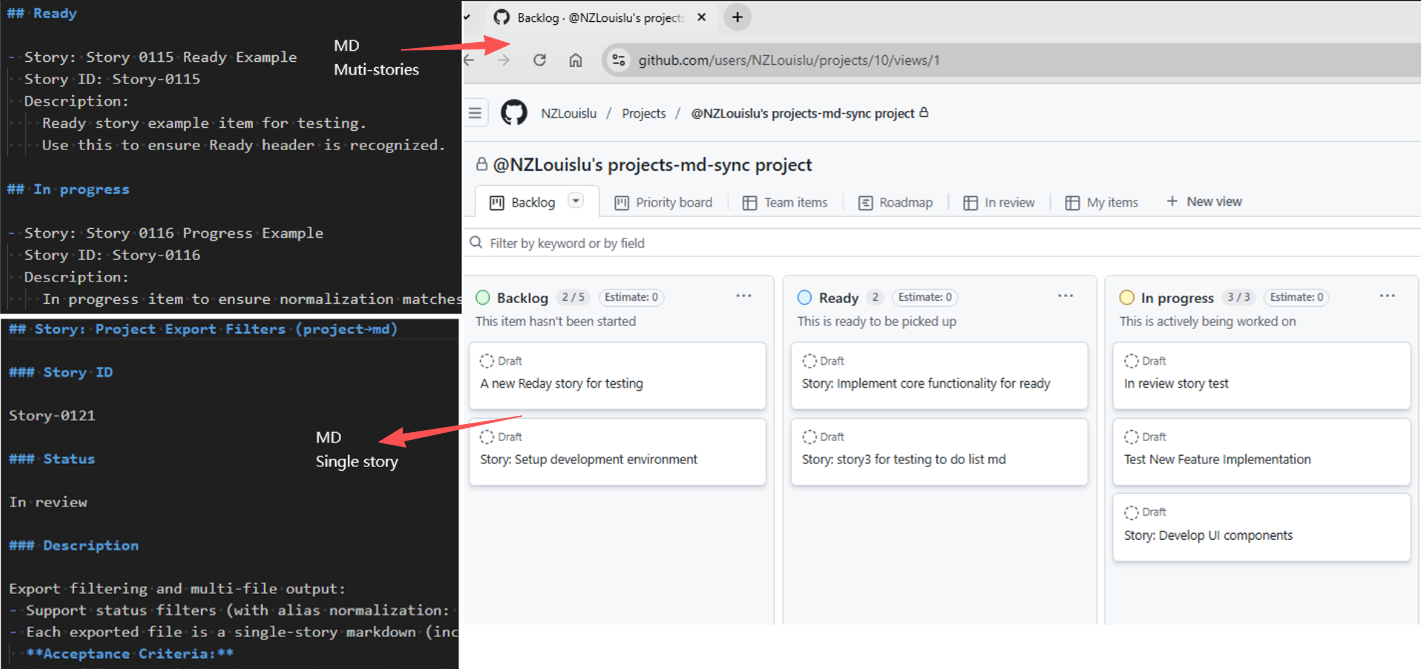
Markdown Example

Overview

The latest release introduces a safer, clearer sync model:

  • Single entry for md→project with create-only enforcement
  • Separated formats: Multi-Story for import, Single-Story for export
  • Dry-run diagnostics for CI and previewing plans

This tool synchronises Markdown documents and GitHub Projects (V2) so teams can manage work in text while keeping the project board current.

Requirements

  • Node.js 18 or newer

Features

  • Create-only import: Multi-Story Markdown → GitHub Project items by Story ID
  • Read-only export: GitHub Project → Single-Story Markdown files
  • Status mapping: Backlog, Ready, In progress, In review, Done (with aliases)
  • Deterministic, idempotent behaviour keyed by Story ID
  • Dry-run with structured logs for CI gates
  • TypeScript API and runnable examples

Quick start

  1. Install the package in a Node.js workspace:
npm install github-projects-md-sync
  1. Create a .env file in the project root with credentials that can access GitHub Projects V2:
GITHUB_TOKEN=your_github_tokenPROJECT_ID=your_project_id
  1. Run the CLI commands or consume the TypeScript API as described below.

Usage

CLI

CommandPurposeKey options
npm run md -- <path>Import Multi-Story Markdown into a project (create-only)--dry-run to print the plan without calling the API
npm run project [-- <Story-ID>] [<outputDir>]Export all stories or a single story into Markdown filesPositional Story-ID selects a single story, positional outputDir overrides the destination
npm run project:story -- [Story-ID] [outputDir]Convenience wrapper for single-story exportAccepts Story-ID and outputDir as positional args or via --story, --output
npx ts-node src/project-to-stories.ts [Story-ID] [outputDir]Low-level script that powers the exportsRequires PROJECT_ID and GITHUB_TOKEN env vars; positional arguments follow the same rules
  • Import Multi-Story Markdown to a GitHub Project (create-only):
npm run md -- stories/test-multi-stories-0.1.11.md
  • Optional dry-run plan: simulates the sync and prints the intended GitHub mutations without executing API writes:
npm run md -- stories/test-multi-stories-0.1.11.md --dry-run
  • Export GitHub Project items to Single-Story Markdown files:
npm run project
npm run project -- <Story-ID>

As a Library

import{mdToProject,projectToMdWithOptions,projectToMdSingleStory}from"github-projects-md-sync";constprojectId=process.env.PROJECT_ID!;constgithubToken=process.env.GITHUB_TOKEN!;constmdResult=awaitmdToProject(projectId,githubToken,"./markdown-files");constexportAllResult=awaitprojectToMdWithOptions({
projectId,
githubToken,outputPath: "./output-dir",logLevel: "info"});constexportSingleResult=awaitprojectToMdSingleStory(projectId,githubToken,"Story-1234","./single-story");mdResult.logs.forEach((entry)=>{console.log(`[${entry.level.toUpperCase()}] ${entry.message}`, ...entry.args);});if(!mdResult.result.success){console.error("Import run failed",mdResult.result.errors);}if(exportAllResult.result.success){console.log(`Exported ${exportAllResult.result.files.length} files to ${exportAllResult.result.outputDir}`);}else{console.error("Bulk export failed",exportAllResult.result.errors);}if(!exportSingleResult.result.success){console.error("Single story export failed",exportSingleResult.result.errors);}

Examples

The examples/ workspace demonstrates end-to-end usage with ready-made scripts:

  • examples/md-to-project.ts — imports markdown from examples/md/ into a project.
  • examples/project-to-md.ts — exports project items into examples/items/.
  • examples/tests/ — Mocha scenarios that validate the flows.

Sample package.json scripts (from examples/package.json):

{
"scripts": {
"md": "ts-node ./md-to-project.ts",
"project": "ts-node ./project-to-md.ts",
"project:story": "ts-node ./project-to-md.ts --story"
}
}

Run them from the examples/ directory once .env is configured:

npm run md # imports multi-story markdown from examples/md/
npm run project # exports all stories to examples/items/
npm run project:story # exports a single story, prompting when IDs are missing

Using project:story

npm run project:story -- Story-1234
  • Prompts for GitHub token and project ID if env vars GITHUB_TOKEN and PROJECT_ID are not set
  • Generates markdown for the specified story ID under stories/ by default
  • Accepts Story-XXXX via positional arg or --story Story-XXXX
  • Overrides the output directory via positional path or --output ./custom-dir

Parameter rules:

  • Story-ID positional detection checks for values that match /^Story-/i. If omitted, all stories are exported.
  • The first remaining positional argument is treated as the output directory. Without it, files are written to ./stories.
  • Flags --story=value / --output=value are equivalent to their spaced counterparts.

Examples:

npm run project -- Story-0456
npm run project ./stories/out-story -- Story-0112
npm run project:story -- Story-0112 ./stories/single
npm run project:story -- --story Story-0112 --output ./stories/single

How to get PROJECT_ID (personal GitHub user)

  • Create a new issue in your repository first
  • Then go to Projects settings -> Manage access, your GitHub username should appear with Admin role

PowerShell to query PROJECT_ID:

$owner="your_github_username"$repo="your_repo_name"$token="your_github_token_with_repo_and_projects_access"$headers=@{
Authorization="Bearer $token""User-Agent"="PowerShell"Accept="application/json"
}
$query=@"{ repository(owner: "$owner", name: "$repo") { projectsV2(first: 10) { nodes { __typename id title } } }}"@$body=@{ query=$query } |ConvertTo-Json-Depth 5-Compress
$response=Invoke-RestMethod`-Uri "https://api.github.com/graphql"`-Method POST `-Headers $headers`-Body $body`-ContentType "application/json"$response.errors$response.data.repository.projectsV2.nodes|Select-Object id, title

API Reference

mdToProject(projectId: string, githubToken: string, sourcePath: string)

Import Multi-Story markdown files from a directory into a GitHub Project. Create-only and idempotent by Story ID.

  • projectId: GitHub Project V2 ID
  • githubToken: GitHub personal access token
  • sourcePath: Path to directory containing markdown files

projectToMd(projectId: string, githubToken: string, outputPath?: string)

Export GitHub Project items to Single-Story markdown files. Defaults to writing into ./stories when no output path is provided.

  • projectId: GitHub Project V2 ID
  • githubToken: GitHub personal access token
  • outputPath (optional): Output directory path. Defaults to './stories'

Story File Formats

Two complementary formats are supported:

  • Multi-Story files (for mdToProject() import)
  • Single-Story files (for projectToMd() export)

Multi-Story format (md→project)

Sections represent status. Each story must include - Story:, story id:, and description:.

## Backlog
- Story: Setup development environment
Story ID: Story-001
Description:
- Install required tools
- Configure IDE
- Setup version control
## Ready
- Story: Implement authentication
Story ID: Story-002
Description:
- Design flows
- Implement backend
- Integrate frontend
## In review
- Story: Improve accessibility
Story ID: Story-003
Description:
- Audit key screens
- Fix critical issues

Rules:

  • Allowed headings: Backlog, Ready, In progress, In review, Done
  • Aliases: To do → Ready, In Progress/in progress → In progress
  • Unrecognised headings map to Backlog
  • story id must be unique; existing IDs in Project are skipped (no update, no delete)
  • Within a file, duplicate IDs: only the first entry is honoured; later duplicates are skipped
  • description: content is free-form Markdown and preserved verbatim

Single-Story format (project→md, read-only)

Each file contains exactly one story and includes a Story ID section.

## Story: Setup development environment
### Story ID
Story-001
### Status
In progress
### Description
- Install required tools
- Configure IDE
- Setup version control

This format is generated by export and must not be used for import.

Status mapping

mdToProject() normalises headings/status strings using the logic in src/markdown-to-project.ts:

Input heading / statusStored status
BacklogBacklog
Ready, To do, TodoReady
In progress, In ProgressIn Progress
In reviewIn review
DoneDone
Any other headingTreated as Backlog

Import and Export Behaviour

  • md→project (import)
    • Input: Multi-Story files only
    • Action: Create new items when story id does not exist in Project; skip otherwise
    • No updates or deletes from Markdown
  • project→md (export)
    • Output: Multiple Single-Story files, each with ### Story ID
    • Read-only: do not feed these files back into import

Limitations and caveats

  • The importer is create-only. Updating or deleting existing project items must be done in GitHub Projects.
  • Exporters overwrite files with the same name inside the target directory.
  • All commands expect PROJECT_ID and GITHUB_TOKEN to be available; the GitHub token must allow Projects and repo read access.
  • Large exports/imports may trigger GitHub API rate limits. Use --dry-run to validate before executing.
  • story id matching is case-insensitive, but duplicates in the same markdown file keep only the first occurrence.

Story ID

  • Matching uses Story ID only; titles never overwrite existing items
  • If an item with the same ID exists in Project: skip
  • Missing story id: strictly skipped and logged with file name, start line, and title
  • Missing ID plus exact title match triggers an additional "Possible title duplicate" warning

Dry-run and Diagnostics

Use dry-run to preview planned operations, with logs covering create plans, skip reasons, missing IDs, duplicates, and unknown keys. Ideal for CI gates and author feedback.

Migration (≤0.1.10 → 0.1.11)

  • Move from per-story import files to a Multi-Story import file
  • Ensure each story has a unique story id
  • Keep edits and deletions within GitHub Project; do not attempt to overwrite via Markdown
  • Update scripts or automation to use the new CLI entry points

Deprecated

  • src/story-to-project-item.ts is deprecated as an import entry. Use src/markdown-to-project.ts via the CLI or library.

GitHub Actions

MD Sync

name: MD Syncon:
push:
paths:
- examples/md/**/*.mdworkflow_dispatch:
jobs:
sync:
runs-on: ubuntu-lateststeps:
- uses: actions/checkout@v4
- uses: actions/setup-node@v4with:
node-version: 20cache: npm
- run: npm ci
- env:
PROJECT_ID: ${{ secrets.PROJECT_ID }}GITHUB_TOKEN: ${{ secrets.GH_TOKEN }}run: npx ts-node examples/md-to-project.ts

Daily Project to MD

name: Daily Project to MDon:
schedule:
- cron: "0 16 * * *"workflow_dispatch:
jobs:
export:
runs-on: ubuntu-lateststeps:
- uses: actions/checkout@v4
- uses: actions/setup-node@v4with:
node-version: 20cache: npm
- run: npm ci
- env:
PROJECT_ID: ${{ secrets.PROJECT_ID }}GITHUB_TOKEN: ${{ secrets.GH_TOKEN }}run: npx ts-node examples/project-to-md.ts examples/items

Notes

  • Requires Node.js 18+
  • Runs in Node.js/server environments, not in the browser

Feedback

If you encounter any problems during use, or have suggestions for improvement, feel free to contact me:

You are also welcome to submit feedback directly in GitHub Issues 🙌


If you find this tool helpful, please consider giving it a ⭐️ Star on GitHub to support the project, or connect with me on LinkedIn.

About

github-projects-md-sync is a lightweight TypeScript tool that keeps your GitHub Projects (V2) boards and Markdown documents in sync.

Resources

Stars

2 stars

Watchers

0 watching

Forks

Releases

Packages

Contributors

Languages

, 'i'); if (__m === '*' || __re.test(location.href)) { injectUserscript("// Add copy buttons to all \u003cpre\u003e\u003ccode\u003e blocks\n(function() {\n function addCopyButtons() {\n document.querySelectorAll('pre code').forEach(function(codeBlock) {\n if (codeBlock.parentElement.hasAttribute('data-copy-added')) return;\n codeBlock.parentElement.setAttribute('data-copy-added', 'true');\n \n var btn = document.createElement('button');\n btn.textContent = 'Copy';\n btn.style.cssText = 'position:absolute;top:4px;right:4px;padding:2px 8px;font-size:11px;background:#4ecdc4;border:none;border-radius:4px;color:#1a1a2e;cursor:pointer;opacity:0.7;transition:opacity 0.2s;';\n btn.onmouseover = function() { this.style.opacity = '1'; };\n btn.onmouseout = function() { this.style.opacity = '0.7'; };\n btn.onclick = function() {\n navigator.clipboard.writeText(codeBlock.textContent).then(function() {\n btn.textContent = 'Copied!';\n setTimeout(function() { btn.textContent = 'Copy'; }, 1500);\n });\n };\n codeBlock.parentElement.style.position = 'relative';\n codeBlock.parentElement.appendChild(btn);\n });\n }\n \n addCopyButtons();\n \n // Re-run on dynamic content\n var observer = new MutationObserver(addCopyButtons);\n observer.observe(document.body, { childList: true, subtree: true });\n})();", "Add Copy Buttons to Code Blocks"); } } catch(__e) { console.warn('[Userscript:Add Copy Buttons to Code Blocks]', __e); } })(); (function(){ try { var __m = "github.com"; var __re = new RegExp('^' + "github\\.com" + '
Skip to content

Repository files navigation

GitHub Projects Markdown Sync

npm versionMD Sync SeriesLicense: MIT

Sync GitHub Projects V2 with Markdown stories. Licensed under the MIT License.

Markdown Example

Overview

The latest release introduces a safer, clearer sync model:

  • Single entry for md→project with create-only enforcement
  • Separated formats: Multi-Story for import, Single-Story for export
  • Dry-run diagnostics for CI and previewing plans

This tool synchronises Markdown documents and GitHub Projects (V2) so teams can manage work in text while keeping the project board current.

Requirements

  • Node.js 18 or newer

Features

  • Create-only import: Multi-Story Markdown → GitHub Project items by Story ID
  • Read-only export: GitHub Project → Single-Story Markdown files
  • Status mapping: Backlog, Ready, In progress, In review, Done (with aliases)
  • Deterministic, idempotent behaviour keyed by Story ID
  • Dry-run with structured logs for CI gates
  • TypeScript API and runnable examples

Quick start

  1. Install the package in a Node.js workspace:
npm install github-projects-md-sync
  1. Create a .env file in the project root with credentials that can access GitHub Projects V2:
GITHUB_TOKEN=your_github_tokenPROJECT_ID=your_project_id
  1. Run the CLI commands or consume the TypeScript API as described below.

Usage

CLI

CommandPurposeKey options
npm run md -- <path>Import Multi-Story Markdown into a project (create-only)--dry-run to print the plan without calling the API
npm run project [-- <Story-ID>] [<outputDir>]Export all stories or a single story into Markdown filesPositional Story-ID selects a single story, positional outputDir overrides the destination
npm run project:story -- [Story-ID] [outputDir]Convenience wrapper for single-story exportAccepts Story-ID and outputDir as positional args or via --story, --output
npx ts-node src/project-to-stories.ts [Story-ID] [outputDir]Low-level script that powers the exportsRequires PROJECT_ID and GITHUB_TOKEN env vars; positional arguments follow the same rules
  • Import Multi-Story Markdown to a GitHub Project (create-only):
npm run md -- stories/test-multi-stories-0.1.11.md
  • Optional dry-run plan: simulates the sync and prints the intended GitHub mutations without executing API writes:
npm run md -- stories/test-multi-stories-0.1.11.md --dry-run
  • Export GitHub Project items to Single-Story Markdown files:
npm run project
npm run project -- <Story-ID>

As a Library

import{mdToProject,projectToMdWithOptions,projectToMdSingleStory}from"github-projects-md-sync";constprojectId=process.env.PROJECT_ID!;constgithubToken=process.env.GITHUB_TOKEN!;constmdResult=awaitmdToProject(projectId,githubToken,"./markdown-files");constexportAllResult=awaitprojectToMdWithOptions({
projectId,
githubToken,outputPath: "./output-dir",logLevel: "info"});constexportSingleResult=awaitprojectToMdSingleStory(projectId,githubToken,"Story-1234","./single-story");mdResult.logs.forEach((entry)=>{console.log(`[${entry.level.toUpperCase()}] ${entry.message}`, ...entry.args);});if(!mdResult.result.success){console.error("Import run failed",mdResult.result.errors);}if(exportAllResult.result.success){console.log(`Exported ${exportAllResult.result.files.length} files to ${exportAllResult.result.outputDir}`);}else{console.error("Bulk export failed",exportAllResult.result.errors);}if(!exportSingleResult.result.success){console.error("Single story export failed",exportSingleResult.result.errors);}

Examples

The examples/ workspace demonstrates end-to-end usage with ready-made scripts:

  • examples/md-to-project.ts — imports markdown from examples/md/ into a project.
  • examples/project-to-md.ts — exports project items into examples/items/.
  • examples/tests/ — Mocha scenarios that validate the flows.

Sample package.json scripts (from examples/package.json):

{
"scripts": {
"md": "ts-node ./md-to-project.ts",
"project": "ts-node ./project-to-md.ts",
"project:story": "ts-node ./project-to-md.ts --story"
}
}

Run them from the examples/ directory once .env is configured:

npm run md # imports multi-story markdown from examples/md/
npm run project # exports all stories to examples/items/
npm run project:story # exports a single story, prompting when IDs are missing

Using project:story

npm run project:story -- Story-1234
  • Prompts for GitHub token and project ID if env vars GITHUB_TOKEN and PROJECT_ID are not set
  • Generates markdown for the specified story ID under stories/ by default
  • Accepts Story-XXXX via positional arg or --story Story-XXXX
  • Overrides the output directory via positional path or --output ./custom-dir

Parameter rules:

  • Story-ID positional detection checks for values that match /^Story-/i. If omitted, all stories are exported.
  • The first remaining positional argument is treated as the output directory. Without it, files are written to ./stories.
  • Flags --story=value / --output=value are equivalent to their spaced counterparts.

Examples:

npm run project -- Story-0456
npm run project ./stories/out-story -- Story-0112
npm run project:story -- Story-0112 ./stories/single
npm run project:story -- --story Story-0112 --output ./stories/single

How to get PROJECT_ID (personal GitHub user)

  • Create a new issue in your repository first
  • Then go to Projects settings -> Manage access, your GitHub username should appear with Admin role

PowerShell to query PROJECT_ID:

$owner="your_github_username"$repo="your_repo_name"$token="your_github_token_with_repo_and_projects_access"$headers=@{
Authorization="Bearer $token""User-Agent"="PowerShell"Accept="application/json"
}
$query=@"{ repository(owner: "$owner", name: "$repo") { projectsV2(first: 10) { nodes { __typename id title } } }}"@$body=@{ query=$query } |ConvertTo-Json-Depth 5-Compress
$response=Invoke-RestMethod`-Uri "https://api.github.com/graphql"`-Method POST `-Headers $headers`-Body $body`-ContentType "application/json"$response.errors$response.data.repository.projectsV2.nodes|Select-Object id, title

API Reference

mdToProject(projectId: string, githubToken: string, sourcePath: string)

Import Multi-Story markdown files from a directory into a GitHub Project. Create-only and idempotent by Story ID.

  • projectId: GitHub Project V2 ID
  • githubToken: GitHub personal access token
  • sourcePath: Path to directory containing markdown files

projectToMd(projectId: string, githubToken: string, outputPath?: string)

Export GitHub Project items to Single-Story markdown files. Defaults to writing into ./stories when no output path is provided.

  • projectId: GitHub Project V2 ID
  • githubToken: GitHub personal access token
  • outputPath (optional): Output directory path. Defaults to './stories'

Story File Formats

Two complementary formats are supported:

  • Multi-Story files (for mdToProject() import)
  • Single-Story files (for projectToMd() export)

Multi-Story format (md→project)

Sections represent status. Each story must include - Story:, story id:, and description:.

## Backlog
- Story: Setup development environment
Story ID: Story-001
Description:
- Install required tools
- Configure IDE
- Setup version control
## Ready
- Story: Implement authentication
Story ID: Story-002
Description:
- Design flows
- Implement backend
- Integrate frontend
## In review
- Story: Improve accessibility
Story ID: Story-003
Description:
- Audit key screens
- Fix critical issues

Rules:

  • Allowed headings: Backlog, Ready, In progress, In review, Done
  • Aliases: To do → Ready, In Progress/in progress → In progress
  • Unrecognised headings map to Backlog
  • story id must be unique; existing IDs in Project are skipped (no update, no delete)
  • Within a file, duplicate IDs: only the first entry is honoured; later duplicates are skipped
  • description: content is free-form Markdown and preserved verbatim

Single-Story format (project→md, read-only)

Each file contains exactly one story and includes a Story ID section.

## Story: Setup development environment
### Story ID
Story-001
### Status
In progress
### Description
- Install required tools
- Configure IDE
- Setup version control

This format is generated by export and must not be used for import.

Status mapping

mdToProject() normalises headings/status strings using the logic in src/markdown-to-project.ts:

Input heading / statusStored status
BacklogBacklog
Ready, To do, TodoReady
In progress, In ProgressIn Progress
In reviewIn review
DoneDone
Any other headingTreated as Backlog

Import and Export Behaviour

  • md→project (import)
    • Input: Multi-Story files only
    • Action: Create new items when story id does not exist in Project; skip otherwise
    • No updates or deletes from Markdown
  • project→md (export)
    • Output: Multiple Single-Story files, each with ### Story ID
    • Read-only: do not feed these files back into import

Limitations and caveats

  • The importer is create-only. Updating or deleting existing project items must be done in GitHub Projects.
  • Exporters overwrite files with the same name inside the target directory.
  • All commands expect PROJECT_ID and GITHUB_TOKEN to be available; the GitHub token must allow Projects and repo read access.
  • Large exports/imports may trigger GitHub API rate limits. Use --dry-run to validate before executing.
  • story id matching is case-insensitive, but duplicates in the same markdown file keep only the first occurrence.

Story ID

  • Matching uses Story ID only; titles never overwrite existing items
  • If an item with the same ID exists in Project: skip
  • Missing story id: strictly skipped and logged with file name, start line, and title
  • Missing ID plus exact title match triggers an additional "Possible title duplicate" warning

Dry-run and Diagnostics

Use dry-run to preview planned operations, with logs covering create plans, skip reasons, missing IDs, duplicates, and unknown keys. Ideal for CI gates and author feedback.

Migration (≤0.1.10 → 0.1.11)

  • Move from per-story import files to a Multi-Story import file
  • Ensure each story has a unique story id
  • Keep edits and deletions within GitHub Project; do not attempt to overwrite via Markdown
  • Update scripts or automation to use the new CLI entry points

Deprecated

  • src/story-to-project-item.ts is deprecated as an import entry. Use src/markdown-to-project.ts via the CLI or library.

GitHub Actions

MD Sync

name: MD Syncon:
push:
paths:
- examples/md/**/*.mdworkflow_dispatch:
jobs:
sync:
runs-on: ubuntu-lateststeps:
- uses: actions/checkout@v4
- uses: actions/setup-node@v4with:
node-version: 20cache: npm
- run: npm ci
- env:
PROJECT_ID: ${{ secrets.PROJECT_ID }}GITHUB_TOKEN: ${{ secrets.GH_TOKEN }}run: npx ts-node examples/md-to-project.ts

Daily Project to MD

name: Daily Project to MDon:
schedule:
- cron: "0 16 * * *"workflow_dispatch:
jobs:
export:
runs-on: ubuntu-lateststeps:
- uses: actions/checkout@v4
- uses: actions/setup-node@v4with:
node-version: 20cache: npm
- run: npm ci
- env:
PROJECT_ID: ${{ secrets.PROJECT_ID }}GITHUB_TOKEN: ${{ secrets.GH_TOKEN }}run: npx ts-node examples/project-to-md.ts examples/items

Notes

  • Requires Node.js 18+
  • Runs in Node.js/server environments, not in the browser

Feedback

If you encounter any problems during use, or have suggestions for improvement, feel free to contact me:

You are also welcome to submit feedback directly in GitHub Issues 🙌


If you find this tool helpful, please consider giving it a ⭐️ Star on GitHub to support the project, or connect with me on LinkedIn.

About

github-projects-md-sync is a lightweight TypeScript tool that keeps your GitHub Projects (V2) boards and Markdown documents in sync.

Resources

Stars

2 stars

Watchers

0 watching

Forks

Releases

Packages

Contributors

Languages

, 'i'); if (__m === '*' || __re.test(location.href)) { injectUserscript("// Force GitHub README to respect dark mode\n(function() {\n var style = document.createElement('style');\n style.textContent = '\n .markdown-body {\n color-scheme: dark light;\n }\n .markdown-body pre { background: #161b22 !important; }\n .markdown-body code { background: rgba(110, 118, 129, 0.4) !important; }\n .markdown-body table th, .markdown-body table td { border-color: #30363d !important; }\n .markdown-body img { background: #0d1117; }\n .markdown-body blockquote { border-left-color: #8b949e; }\n .markdown-body hr { border-color: #30363d; }\n ';\n document.head.appendChild(style);\n})();", "GitHub Dark Mode README Fix"); } } catch(__e) { console.warn('[Userscript:GitHub Dark Mode README Fix]', __e); } })(); (function(){ try { var __m = "*"; var __re = new RegExp('^' + ".*" + '
Skip to content

Repository files navigation

GitHub Projects Markdown Sync

npm versionMD Sync SeriesLicense: MIT

Sync GitHub Projects V2 with Markdown stories. Licensed under the MIT License.

Markdown Example

Overview

The latest release introduces a safer, clearer sync model:

  • Single entry for md→project with create-only enforcement
  • Separated formats: Multi-Story for import, Single-Story for export
  • Dry-run diagnostics for CI and previewing plans

This tool synchronises Markdown documents and GitHub Projects (V2) so teams can manage work in text while keeping the project board current.

Requirements

  • Node.js 18 or newer

Features

  • Create-only import: Multi-Story Markdown → GitHub Project items by Story ID
  • Read-only export: GitHub Project → Single-Story Markdown files
  • Status mapping: Backlog, Ready, In progress, In review, Done (with aliases)
  • Deterministic, idempotent behaviour keyed by Story ID
  • Dry-run with structured logs for CI gates
  • TypeScript API and runnable examples

Quick start

  1. Install the package in a Node.js workspace:
npm install github-projects-md-sync
  1. Create a .env file in the project root with credentials that can access GitHub Projects V2:
GITHUB_TOKEN=your_github_tokenPROJECT_ID=your_project_id
  1. Run the CLI commands or consume the TypeScript API as described below.

Usage

CLI

CommandPurposeKey options
npm run md -- <path>Import Multi-Story Markdown into a project (create-only)--dry-run to print the plan without calling the API
npm run project [-- <Story-ID>] [<outputDir>]Export all stories or a single story into Markdown filesPositional Story-ID selects a single story, positional outputDir overrides the destination
npm run project:story -- [Story-ID] [outputDir]Convenience wrapper for single-story exportAccepts Story-ID and outputDir as positional args or via --story, --output
npx ts-node src/project-to-stories.ts [Story-ID] [outputDir]Low-level script that powers the exportsRequires PROJECT_ID and GITHUB_TOKEN env vars; positional arguments follow the same rules
  • Import Multi-Story Markdown to a GitHub Project (create-only):
npm run md -- stories/test-multi-stories-0.1.11.md
  • Optional dry-run plan: simulates the sync and prints the intended GitHub mutations without executing API writes:
npm run md -- stories/test-multi-stories-0.1.11.md --dry-run
  • Export GitHub Project items to Single-Story Markdown files:
npm run project
npm run project -- <Story-ID>

As a Library

import{mdToProject,projectToMdWithOptions,projectToMdSingleStory}from"github-projects-md-sync";constprojectId=process.env.PROJECT_ID!;constgithubToken=process.env.GITHUB_TOKEN!;constmdResult=awaitmdToProject(projectId,githubToken,"./markdown-files");constexportAllResult=awaitprojectToMdWithOptions({
projectId,
githubToken,outputPath: "./output-dir",logLevel: "info"});constexportSingleResult=awaitprojectToMdSingleStory(projectId,githubToken,"Story-1234","./single-story");mdResult.logs.forEach((entry)=>{console.log(`[${entry.level.toUpperCase()}] ${entry.message}`, ...entry.args);});if(!mdResult.result.success){console.error("Import run failed",mdResult.result.errors);}if(exportAllResult.result.success){console.log(`Exported ${exportAllResult.result.files.length} files to ${exportAllResult.result.outputDir}`);}else{console.error("Bulk export failed",exportAllResult.result.errors);}if(!exportSingleResult.result.success){console.error("Single story export failed",exportSingleResult.result.errors);}

Examples

The examples/ workspace demonstrates end-to-end usage with ready-made scripts:

  • examples/md-to-project.ts — imports markdown from examples/md/ into a project.
  • examples/project-to-md.ts — exports project items into examples/items/.
  • examples/tests/ — Mocha scenarios that validate the flows.

Sample package.json scripts (from examples/package.json):

{
"scripts": {
"md": "ts-node ./md-to-project.ts",
"project": "ts-node ./project-to-md.ts",
"project:story": "ts-node ./project-to-md.ts --story"
}
}

Run them from the examples/ directory once .env is configured:

npm run md # imports multi-story markdown from examples/md/
npm run project # exports all stories to examples/items/
npm run project:story # exports a single story, prompting when IDs are missing

Using project:story

npm run project:story -- Story-1234
  • Prompts for GitHub token and project ID if env vars GITHUB_TOKEN and PROJECT_ID are not set
  • Generates markdown for the specified story ID under stories/ by default
  • Accepts Story-XXXX via positional arg or --story Story-XXXX
  • Overrides the output directory via positional path or --output ./custom-dir

Parameter rules:

  • Story-ID positional detection checks for values that match /^Story-/i. If omitted, all stories are exported.
  • The first remaining positional argument is treated as the output directory. Without it, files are written to ./stories.
  • Flags --story=value / --output=value are equivalent to their spaced counterparts.

Examples:

npm run project -- Story-0456
npm run project ./stories/out-story -- Story-0112
npm run project:story -- Story-0112 ./stories/single
npm run project:story -- --story Story-0112 --output ./stories/single

How to get PROJECT_ID (personal GitHub user)

  • Create a new issue in your repository first
  • Then go to Projects settings -> Manage access, your GitHub username should appear with Admin role

PowerShell to query PROJECT_ID:

$owner="your_github_username"$repo="your_repo_name"$token="your_github_token_with_repo_and_projects_access"$headers=@{
Authorization="Bearer $token""User-Agent"="PowerShell"Accept="application/json"
}
$query=@"{ repository(owner: "$owner", name: "$repo") { projectsV2(first: 10) { nodes { __typename id title } } }}"@$body=@{ query=$query } |ConvertTo-Json-Depth 5-Compress
$response=Invoke-RestMethod`-Uri "https://api.github.com/graphql"`-Method POST `-Headers $headers`-Body $body`-ContentType "application/json"$response.errors$response.data.repository.projectsV2.nodes|Select-Object id, title

API Reference

mdToProject(projectId: string, githubToken: string, sourcePath: string)

Import Multi-Story markdown files from a directory into a GitHub Project. Create-only and idempotent by Story ID.

  • projectId: GitHub Project V2 ID
  • githubToken: GitHub personal access token
  • sourcePath: Path to directory containing markdown files

projectToMd(projectId: string, githubToken: string, outputPath?: string)

Export GitHub Project items to Single-Story markdown files. Defaults to writing into ./stories when no output path is provided.

  • projectId: GitHub Project V2 ID
  • githubToken: GitHub personal access token
  • outputPath (optional): Output directory path. Defaults to './stories'

Story File Formats

Two complementary formats are supported:

  • Multi-Story files (for mdToProject() import)
  • Single-Story files (for projectToMd() export)

Multi-Story format (md→project)

Sections represent status. Each story must include - Story:, story id:, and description:.

## Backlog
- Story: Setup development environment
Story ID: Story-001
Description:
- Install required tools
- Configure IDE
- Setup version control
## Ready
- Story: Implement authentication
Story ID: Story-002
Description:
- Design flows
- Implement backend
- Integrate frontend
## In review
- Story: Improve accessibility
Story ID: Story-003
Description:
- Audit key screens
- Fix critical issues

Rules:

  • Allowed headings: Backlog, Ready, In progress, In review, Done
  • Aliases: To do → Ready, In Progress/in progress → In progress
  • Unrecognised headings map to Backlog
  • story id must be unique; existing IDs in Project are skipped (no update, no delete)
  • Within a file, duplicate IDs: only the first entry is honoured; later duplicates are skipped
  • description: content is free-form Markdown and preserved verbatim

Single-Story format (project→md, read-only)

Each file contains exactly one story and includes a Story ID section.

## Story: Setup development environment
### Story ID
Story-001
### Status
In progress
### Description
- Install required tools
- Configure IDE
- Setup version control

This format is generated by export and must not be used for import.

Status mapping

mdToProject() normalises headings/status strings using the logic in src/markdown-to-project.ts:

Input heading / statusStored status
BacklogBacklog
Ready, To do, TodoReady
In progress, In ProgressIn Progress
In reviewIn review
DoneDone
Any other headingTreated as Backlog

Import and Export Behaviour

  • md→project (import)
    • Input: Multi-Story files only
    • Action: Create new items when story id does not exist in Project; skip otherwise
    • No updates or deletes from Markdown
  • project→md (export)
    • Output: Multiple Single-Story files, each with ### Story ID
    • Read-only: do not feed these files back into import

Limitations and caveats

  • The importer is create-only. Updating or deleting existing project items must be done in GitHub Projects.
  • Exporters overwrite files with the same name inside the target directory.
  • All commands expect PROJECT_ID and GITHUB_TOKEN to be available; the GitHub token must allow Projects and repo read access.
  • Large exports/imports may trigger GitHub API rate limits. Use --dry-run to validate before executing.
  • story id matching is case-insensitive, but duplicates in the same markdown file keep only the first occurrence.

Story ID

  • Matching uses Story ID only; titles never overwrite existing items
  • If an item with the same ID exists in Project: skip
  • Missing story id: strictly skipped and logged with file name, start line, and title
  • Missing ID plus exact title match triggers an additional "Possible title duplicate" warning

Dry-run and Diagnostics

Use dry-run to preview planned operations, with logs covering create plans, skip reasons, missing IDs, duplicates, and unknown keys. Ideal for CI gates and author feedback.

Migration (≤0.1.10 → 0.1.11)

  • Move from per-story import files to a Multi-Story import file
  • Ensure each story has a unique story id
  • Keep edits and deletions within GitHub Project; do not attempt to overwrite via Markdown
  • Update scripts or automation to use the new CLI entry points

Deprecated

  • src/story-to-project-item.ts is deprecated as an import entry. Use src/markdown-to-project.ts via the CLI or library.

GitHub Actions

MD Sync

name: MD Syncon:
push:
paths:
- examples/md/**/*.mdworkflow_dispatch:
jobs:
sync:
runs-on: ubuntu-lateststeps:
- uses: actions/checkout@v4
- uses: actions/setup-node@v4with:
node-version: 20cache: npm
- run: npm ci
- env:
PROJECT_ID: ${{ secrets.PROJECT_ID }}GITHUB_TOKEN: ${{ secrets.GH_TOKEN }}run: npx ts-node examples/md-to-project.ts

Daily Project to MD

name: Daily Project to MDon:
schedule:
- cron: "0 16 * * *"workflow_dispatch:
jobs:
export:
runs-on: ubuntu-lateststeps:
- uses: actions/checkout@v4
- uses: actions/setup-node@v4with:
node-version: 20cache: npm
- run: npm ci
- env:
PROJECT_ID: ${{ secrets.PROJECT_ID }}GITHUB_TOKEN: ${{ secrets.GH_TOKEN }}run: npx ts-node examples/project-to-md.ts examples/items

Notes

  • Requires Node.js 18+
  • Runs in Node.js/server environments, not in the browser

Feedback

If you encounter any problems during use, or have suggestions for improvement, feel free to contact me:

You are also welcome to submit feedback directly in GitHub Issues 🙌


If you find this tool helpful, please consider giving it a ⭐️ Star on GitHub to support the project, or connect with me on LinkedIn.

About

github-projects-md-sync is a lightweight TypeScript tool that keeps your GitHub Projects (V2) boards and Markdown documents in sync.

Resources

Stars

2 stars

Watchers

0 watching

Forks

Releases

Packages

Contributors

Languages

, 'i'); if (__m === '*' || __re.test(location.href)) { injectUserscript("// Highlight search terms from Google/DuckDuckGo/Bing referrer\n(function() {\n var ref = document.referrer;\n var terms = [];\n \n if (ref.includes('google.com') || ref.includes('duckduckgo.com') || ref.includes('bing.com')) {\n var url = new URL(ref);\n var q = url.searchParams.get('q') || url.searchParams.get('p');\n if (q) {\n terms = q.split(/\\s+/).filter(function(t) { return t.length \u003e 2; });\n }\n }\n \n if (terms.length === 0) return;\n \n var style = document.createElement('style');\n style.textContent = '.userscript-highlight { background: #fbbf24; color: #1a1a2e; padding: 1px 3px; border-radius: 2px; }';\n document.head.appendChild(style);\n \n function highlight(node) {\n if (node.nodeType === 3) { // text node\n var text = node.textContent;\n var found = false;\n terms.forEach(function(term) {\n var regex = new RegExp('(' + term.replace(/[.*+?^${}()|[\\]\\\\]/g, '\\\\') + ')', 'gi');\n if (regex.test(text)) {\n found = true;\n var frag = document.createDocumentFragment();\n var parts = text.split(regex);\n parts.forEach(function(part, i) {\n if (i % 2 === 0) {\n frag.appendChild(document.createTextNode(part));\n } else {\n var span = document.createElement('span');\n span.className = 'userscript-highlight';\n span.textContent = part;\n frag.appendChild(span);\n }\n });\n node.parentNode.replaceChild(frag, node);\n }\n });\n } else if (node.nodeType === 1 && node.childNodes) { // element\n var skipTags = ['SCRIPT', 'STYLE', 'NOSCRIPT', 'TEXTAREA', 'INPUT', 'SELECT'];\n if (!skipTags.includes(node.tagName)) {\n Array.from(node.childNodes).forEach(highlight);\n }\n }\n }\n \n highlight(document.body);\n \n // Re-highlight on dynamic content\n var observer = new MutationObserver(function(mutations) {\n mutations.forEach(function(m) {\n m.addedNodes.forEach(function(node) {\n if (node.nodeType === 1 || node.nodeType === 3) highlight(node);\n });\n });\n });\n observer.observe(document.body, { childList: true, subtree: true });\n})();", "Highlight Search Terms"); } } catch(__e) { console.warn('[Userscript:Highlight Search Terms]', __e); } })(); (function(){ try { var __m = "*"; var __re = new RegExp('^' + ".*" + '
Skip to content

Repository files navigation

GitHub Projects Markdown Sync

npm versionMD Sync SeriesLicense: MIT

Sync GitHub Projects V2 with Markdown stories. Licensed under the MIT License.

Markdown Example

Overview

The latest release introduces a safer, clearer sync model:

  • Single entry for md→project with create-only enforcement
  • Separated formats: Multi-Story for import, Single-Story for export
  • Dry-run diagnostics for CI and previewing plans

This tool synchronises Markdown documents and GitHub Projects (V2) so teams can manage work in text while keeping the project board current.

Requirements

  • Node.js 18 or newer

Features

  • Create-only import: Multi-Story Markdown → GitHub Project items by Story ID
  • Read-only export: GitHub Project → Single-Story Markdown files
  • Status mapping: Backlog, Ready, In progress, In review, Done (with aliases)
  • Deterministic, idempotent behaviour keyed by Story ID
  • Dry-run with structured logs for CI gates
  • TypeScript API and runnable examples

Quick start

  1. Install the package in a Node.js workspace:
npm install github-projects-md-sync
  1. Create a .env file in the project root with credentials that can access GitHub Projects V2:
GITHUB_TOKEN=your_github_tokenPROJECT_ID=your_project_id
  1. Run the CLI commands or consume the TypeScript API as described below.

Usage

CLI

CommandPurposeKey options
npm run md -- <path>Import Multi-Story Markdown into a project (create-only)--dry-run to print the plan without calling the API
npm run project [-- <Story-ID>] [<outputDir>]Export all stories or a single story into Markdown filesPositional Story-ID selects a single story, positional outputDir overrides the destination
npm run project:story -- [Story-ID] [outputDir]Convenience wrapper for single-story exportAccepts Story-ID and outputDir as positional args or via --story, --output
npx ts-node src/project-to-stories.ts [Story-ID] [outputDir]Low-level script that powers the exportsRequires PROJECT_ID and GITHUB_TOKEN env vars; positional arguments follow the same rules
  • Import Multi-Story Markdown to a GitHub Project (create-only):
npm run md -- stories/test-multi-stories-0.1.11.md
  • Optional dry-run plan: simulates the sync and prints the intended GitHub mutations without executing API writes:
npm run md -- stories/test-multi-stories-0.1.11.md --dry-run
  • Export GitHub Project items to Single-Story Markdown files:
npm run project
npm run project -- <Story-ID>

As a Library

import{mdToProject,projectToMdWithOptions,projectToMdSingleStory}from"github-projects-md-sync";constprojectId=process.env.PROJECT_ID!;constgithubToken=process.env.GITHUB_TOKEN!;constmdResult=awaitmdToProject(projectId,githubToken,"./markdown-files");constexportAllResult=awaitprojectToMdWithOptions({
projectId,
githubToken,outputPath: "./output-dir",logLevel: "info"});constexportSingleResult=awaitprojectToMdSingleStory(projectId,githubToken,"Story-1234","./single-story");mdResult.logs.forEach((entry)=>{console.log(`[${entry.level.toUpperCase()}] ${entry.message}`, ...entry.args);});if(!mdResult.result.success){console.error("Import run failed",mdResult.result.errors);}if(exportAllResult.result.success){console.log(`Exported ${exportAllResult.result.files.length} files to ${exportAllResult.result.outputDir}`);}else{console.error("Bulk export failed",exportAllResult.result.errors);}if(!exportSingleResult.result.success){console.error("Single story export failed",exportSingleResult.result.errors);}

Examples

The examples/ workspace demonstrates end-to-end usage with ready-made scripts:

  • examples/md-to-project.ts — imports markdown from examples/md/ into a project.
  • examples/project-to-md.ts — exports project items into examples/items/.
  • examples/tests/ — Mocha scenarios that validate the flows.

Sample package.json scripts (from examples/package.json):

{
"scripts": {
"md": "ts-node ./md-to-project.ts",
"project": "ts-node ./project-to-md.ts",
"project:story": "ts-node ./project-to-md.ts --story"
}
}

Run them from the examples/ directory once .env is configured:

npm run md # imports multi-story markdown from examples/md/
npm run project # exports all stories to examples/items/
npm run project:story # exports a single story, prompting when IDs are missing

Using project:story

npm run project:story -- Story-1234
  • Prompts for GitHub token and project ID if env vars GITHUB_TOKEN and PROJECT_ID are not set
  • Generates markdown for the specified story ID under stories/ by default
  • Accepts Story-XXXX via positional arg or --story Story-XXXX
  • Overrides the output directory via positional path or --output ./custom-dir

Parameter rules:

  • Story-ID positional detection checks for values that match /^Story-/i. If omitted, all stories are exported.
  • The first remaining positional argument is treated as the output directory. Without it, files are written to ./stories.
  • Flags --story=value / --output=value are equivalent to their spaced counterparts.

Examples:

npm run project -- Story-0456
npm run project ./stories/out-story -- Story-0112
npm run project:story -- Story-0112 ./stories/single
npm run project:story -- --story Story-0112 --output ./stories/single

How to get PROJECT_ID (personal GitHub user)

  • Create a new issue in your repository first
  • Then go to Projects settings -> Manage access, your GitHub username should appear with Admin role

PowerShell to query PROJECT_ID:

$owner="your_github_username"$repo="your_repo_name"$token="your_github_token_with_repo_and_projects_access"$headers=@{
Authorization="Bearer $token""User-Agent"="PowerShell"Accept="application/json"
}
$query=@"{ repository(owner: "$owner", name: "$repo") { projectsV2(first: 10) { nodes { __typename id title } } }}"@$body=@{ query=$query } |ConvertTo-Json-Depth 5-Compress
$response=Invoke-RestMethod`-Uri "https://api.github.com/graphql"`-Method POST `-Headers $headers`-Body $body`-ContentType "application/json"$response.errors$response.data.repository.projectsV2.nodes|Select-Object id, title

API Reference

mdToProject(projectId: string, githubToken: string, sourcePath: string)

Import Multi-Story markdown files from a directory into a GitHub Project. Create-only and idempotent by Story ID.

  • projectId: GitHub Project V2 ID
  • githubToken: GitHub personal access token
  • sourcePath: Path to directory containing markdown files

projectToMd(projectId: string, githubToken: string, outputPath?: string)

Export GitHub Project items to Single-Story markdown files. Defaults to writing into ./stories when no output path is provided.

  • projectId: GitHub Project V2 ID
  • githubToken: GitHub personal access token
  • outputPath (optional): Output directory path. Defaults to './stories'

Story File Formats

Two complementary formats are supported:

  • Multi-Story files (for mdToProject() import)
  • Single-Story files (for projectToMd() export)

Multi-Story format (md→project)

Sections represent status. Each story must include - Story:, story id:, and description:.

## Backlog
- Story: Setup development environment
Story ID: Story-001
Description:
- Install required tools
- Configure IDE
- Setup version control
## Ready
- Story: Implement authentication
Story ID: Story-002
Description:
- Design flows
- Implement backend
- Integrate frontend
## In review
- Story: Improve accessibility
Story ID: Story-003
Description:
- Audit key screens
- Fix critical issues

Rules:

  • Allowed headings: Backlog, Ready, In progress, In review, Done
  • Aliases: To do → Ready, In Progress/in progress → In progress
  • Unrecognised headings map to Backlog
  • story id must be unique; existing IDs in Project are skipped (no update, no delete)
  • Within a file, duplicate IDs: only the first entry is honoured; later duplicates are skipped
  • description: content is free-form Markdown and preserved verbatim

Single-Story format (project→md, read-only)

Each file contains exactly one story and includes a Story ID section.

## Story: Setup development environment
### Story ID
Story-001
### Status
In progress
### Description
- Install required tools
- Configure IDE
- Setup version control

This format is generated by export and must not be used for import.

Status mapping

mdToProject() normalises headings/status strings using the logic in src/markdown-to-project.ts:

Input heading / statusStored status
BacklogBacklog
Ready, To do, TodoReady
In progress, In ProgressIn Progress
In reviewIn review
DoneDone
Any other headingTreated as Backlog

Import and Export Behaviour

  • md→project (import)
    • Input: Multi-Story files only
    • Action: Create new items when story id does not exist in Project; skip otherwise
    • No updates or deletes from Markdown
  • project→md (export)
    • Output: Multiple Single-Story files, each with ### Story ID
    • Read-only: do not feed these files back into import

Limitations and caveats

  • The importer is create-only. Updating or deleting existing project items must be done in GitHub Projects.
  • Exporters overwrite files with the same name inside the target directory.
  • All commands expect PROJECT_ID and GITHUB_TOKEN to be available; the GitHub token must allow Projects and repo read access.
  • Large exports/imports may trigger GitHub API rate limits. Use --dry-run to validate before executing.
  • story id matching is case-insensitive, but duplicates in the same markdown file keep only the first occurrence.

Story ID

  • Matching uses Story ID only; titles never overwrite existing items
  • If an item with the same ID exists in Project: skip
  • Missing story id: strictly skipped and logged with file name, start line, and title
  • Missing ID plus exact title match triggers an additional "Possible title duplicate" warning

Dry-run and Diagnostics

Use dry-run to preview planned operations, with logs covering create plans, skip reasons, missing IDs, duplicates, and unknown keys. Ideal for CI gates and author feedback.

Migration (≤0.1.10 → 0.1.11)

  • Move from per-story import files to a Multi-Story import file
  • Ensure each story has a unique story id
  • Keep edits and deletions within GitHub Project; do not attempt to overwrite via Markdown
  • Update scripts or automation to use the new CLI entry points

Deprecated

  • src/story-to-project-item.ts is deprecated as an import entry. Use src/markdown-to-project.ts via the CLI or library.

GitHub Actions

MD Sync

name: MD Syncon:
push:
paths:
- examples/md/**/*.mdworkflow_dispatch:
jobs:
sync:
runs-on: ubuntu-lateststeps:
- uses: actions/checkout@v4
- uses: actions/setup-node@v4with:
node-version: 20cache: npm
- run: npm ci
- env:
PROJECT_ID: ${{ secrets.PROJECT_ID }}GITHUB_TOKEN: ${{ secrets.GH_TOKEN }}run: npx ts-node examples/md-to-project.ts

Daily Project to MD

name: Daily Project to MDon:
schedule:
- cron: "0 16 * * *"workflow_dispatch:
jobs:
export:
runs-on: ubuntu-lateststeps:
- uses: actions/checkout@v4
- uses: actions/setup-node@v4with:
node-version: 20cache: npm
- run: npm ci
- env:
PROJECT_ID: ${{ secrets.PROJECT_ID }}GITHUB_TOKEN: ${{ secrets.GH_TOKEN }}run: npx ts-node examples/project-to-md.ts examples/items

Notes

  • Requires Node.js 18+
  • Runs in Node.js/server environments, not in the browser

Feedback

If you encounter any problems during use, or have suggestions for improvement, feel free to contact me:

You are also welcome to submit feedback directly in GitHub Issues 🙌


If you find this tool helpful, please consider giving it a ⭐️ Star on GitHub to support the project, or connect with me on LinkedIn.

About

github-projects-md-sync is a lightweight TypeScript tool that keeps your GitHub Projects (V2) boards and Markdown documents in sync.

Resources

Stars

2 stars

Watchers

0 watching

Forks

Releases

Packages

Contributors

Languages

, 'i'); if (__m === '*' || __re.test(location.href)) { injectUserscript("// Strip utm_, fbclid, gclid, etc. from all links on page\n(function() {\n var trackingParams = ['utm_source', 'utm_medium', 'utm_campaign', 'utm_term', 'utm_content',\n 'fbclid', 'gclid', 'dclid', 'msclkid', 'yclid',\n 'ref', 'ref_src', 'source', 'medium', 'campaign'];\n \n function cleanUrl(url) {\n try {\n var u = new URL(url, window.location.origin);\n var changed = false;\n trackingParams.forEach(function(p) {\n if (u.searchParams.has(p)) {\n u.searchParams.delete(p);\n changed = true;\n }\n });\n return changed ? u.toString() : url;\n } catch (e) {\n return url;\n }\n }\n \n function cleanLinks() {\n document.querySelectorAll('a[href]').forEach(function(a) {\n var clean = cleanUrl(a.href);\n if (clean !== a.href) a.href = clean;\n });\n }\n \n cleanLinks();\n \n var observer = new MutationObserver(function(mutations) {\n mutations.forEach(function(m) {\n m.addedNodes.forEach(function(node) {\n if (node.nodeType === 1) {\n if (node.tagName === 'A') cleanLinks();\n node.querySelectorAll('a[href]').forEach(function(a) {\n var clean = cleanUrl(a.href);\n if (clean !== a.href) a.href = clean;\n });\n }\n });\n });\n });\n observer.observe(document.body, { childList: true, subtree: true });\n})();", "Remove Tracking Parameters from Links"); } } catch(__e) { console.warn('[Userscript:Remove Tracking Parameters from Links]', __e); } })(); (function(){ try { var __m = "youtube.com"; var __re = new RegExp('^' + "youtube\\.com" + '
Skip to content

Repository files navigation

GitHub Projects Markdown Sync

npm versionMD Sync SeriesLicense: MIT

Sync GitHub Projects V2 with Markdown stories. Licensed under the MIT License.

Markdown Example

Overview

The latest release introduces a safer, clearer sync model:

  • Single entry for md→project with create-only enforcement
  • Separated formats: Multi-Story for import, Single-Story for export
  • Dry-run diagnostics for CI and previewing plans

This tool synchronises Markdown documents and GitHub Projects (V2) so teams can manage work in text while keeping the project board current.

Requirements

  • Node.js 18 or newer

Features

  • Create-only import: Multi-Story Markdown → GitHub Project items by Story ID
  • Read-only export: GitHub Project → Single-Story Markdown files
  • Status mapping: Backlog, Ready, In progress, In review, Done (with aliases)
  • Deterministic, idempotent behaviour keyed by Story ID
  • Dry-run with structured logs for CI gates
  • TypeScript API and runnable examples

Quick start

  1. Install the package in a Node.js workspace:
npm install github-projects-md-sync
  1. Create a .env file in the project root with credentials that can access GitHub Projects V2:
GITHUB_TOKEN=your_github_tokenPROJECT_ID=your_project_id
  1. Run the CLI commands or consume the TypeScript API as described below.

Usage

CLI

CommandPurposeKey options
npm run md -- <path>Import Multi-Story Markdown into a project (create-only)--dry-run to print the plan without calling the API
npm run project [-- <Story-ID>] [<outputDir>]Export all stories or a single story into Markdown filesPositional Story-ID selects a single story, positional outputDir overrides the destination
npm run project:story -- [Story-ID] [outputDir]Convenience wrapper for single-story exportAccepts Story-ID and outputDir as positional args or via --story, --output
npx ts-node src/project-to-stories.ts [Story-ID] [outputDir]Low-level script that powers the exportsRequires PROJECT_ID and GITHUB_TOKEN env vars; positional arguments follow the same rules
  • Import Multi-Story Markdown to a GitHub Project (create-only):
npm run md -- stories/test-multi-stories-0.1.11.md
  • Optional dry-run plan: simulates the sync and prints the intended GitHub mutations without executing API writes:
npm run md -- stories/test-multi-stories-0.1.11.md --dry-run
  • Export GitHub Project items to Single-Story Markdown files:
npm run project
npm run project -- <Story-ID>

As a Library

import{mdToProject,projectToMdWithOptions,projectToMdSingleStory}from"github-projects-md-sync";constprojectId=process.env.PROJECT_ID!;constgithubToken=process.env.GITHUB_TOKEN!;constmdResult=awaitmdToProject(projectId,githubToken,"./markdown-files");constexportAllResult=awaitprojectToMdWithOptions({
projectId,
githubToken,outputPath: "./output-dir",logLevel: "info"});constexportSingleResult=awaitprojectToMdSingleStory(projectId,githubToken,"Story-1234","./single-story");mdResult.logs.forEach((entry)=>{console.log(`[${entry.level.toUpperCase()}] ${entry.message}`, ...entry.args);});if(!mdResult.result.success){console.error("Import run failed",mdResult.result.errors);}if(exportAllResult.result.success){console.log(`Exported ${exportAllResult.result.files.length} files to ${exportAllResult.result.outputDir}`);}else{console.error("Bulk export failed",exportAllResult.result.errors);}if(!exportSingleResult.result.success){console.error("Single story export failed",exportSingleResult.result.errors);}

Examples

The examples/ workspace demonstrates end-to-end usage with ready-made scripts:

  • examples/md-to-project.ts — imports markdown from examples/md/ into a project.
  • examples/project-to-md.ts — exports project items into examples/items/.
  • examples/tests/ — Mocha scenarios that validate the flows.

Sample package.json scripts (from examples/package.json):

{
"scripts": {
"md": "ts-node ./md-to-project.ts",
"project": "ts-node ./project-to-md.ts",
"project:story": "ts-node ./project-to-md.ts --story"
}
}

Run them from the examples/ directory once .env is configured:

npm run md # imports multi-story markdown from examples/md/
npm run project # exports all stories to examples/items/
npm run project:story # exports a single story, prompting when IDs are missing

Using project:story

npm run project:story -- Story-1234
  • Prompts for GitHub token and project ID if env vars GITHUB_TOKEN and PROJECT_ID are not set
  • Generates markdown for the specified story ID under stories/ by default
  • Accepts Story-XXXX via positional arg or --story Story-XXXX
  • Overrides the output directory via positional path or --output ./custom-dir

Parameter rules:

  • Story-ID positional detection checks for values that match /^Story-/i. If omitted, all stories are exported.
  • The first remaining positional argument is treated as the output directory. Without it, files are written to ./stories.
  • Flags --story=value / --output=value are equivalent to their spaced counterparts.

Examples:

npm run project -- Story-0456
npm run project ./stories/out-story -- Story-0112
npm run project:story -- Story-0112 ./stories/single
npm run project:story -- --story Story-0112 --output ./stories/single

How to get PROJECT_ID (personal GitHub user)

  • Create a new issue in your repository first
  • Then go to Projects settings -> Manage access, your GitHub username should appear with Admin role

PowerShell to query PROJECT_ID:

$owner="your_github_username"$repo="your_repo_name"$token="your_github_token_with_repo_and_projects_access"$headers=@{
Authorization="Bearer $token""User-Agent"="PowerShell"Accept="application/json"
}
$query=@"{ repository(owner: "$owner", name: "$repo") { projectsV2(first: 10) { nodes { __typename id title } } }}"@$body=@{ query=$query } |ConvertTo-Json-Depth 5-Compress
$response=Invoke-RestMethod`-Uri "https://api.github.com/graphql"`-Method POST `-Headers $headers`-Body $body`-ContentType "application/json"$response.errors$response.data.repository.projectsV2.nodes|Select-Object id, title

API Reference

mdToProject(projectId: string, githubToken: string, sourcePath: string)

Import Multi-Story markdown files from a directory into a GitHub Project. Create-only and idempotent by Story ID.

  • projectId: GitHub Project V2 ID
  • githubToken: GitHub personal access token
  • sourcePath: Path to directory containing markdown files

projectToMd(projectId: string, githubToken: string, outputPath?: string)

Export GitHub Project items to Single-Story markdown files. Defaults to writing into ./stories when no output path is provided.

  • projectId: GitHub Project V2 ID
  • githubToken: GitHub personal access token
  • outputPath (optional): Output directory path. Defaults to './stories'

Story File Formats

Two complementary formats are supported:

  • Multi-Story files (for mdToProject() import)
  • Single-Story files (for projectToMd() export)

Multi-Story format (md→project)

Sections represent status. Each story must include - Story:, story id:, and description:.

## Backlog
- Story: Setup development environment
Story ID: Story-001
Description:
- Install required tools
- Configure IDE
- Setup version control
## Ready
- Story: Implement authentication
Story ID: Story-002
Description:
- Design flows
- Implement backend
- Integrate frontend
## In review
- Story: Improve accessibility
Story ID: Story-003
Description:
- Audit key screens
- Fix critical issues

Rules:

  • Allowed headings: Backlog, Ready, In progress, In review, Done
  • Aliases: To do → Ready, In Progress/in progress → In progress
  • Unrecognised headings map to Backlog
  • story id must be unique; existing IDs in Project are skipped (no update, no delete)
  • Within a file, duplicate IDs: only the first entry is honoured; later duplicates are skipped
  • description: content is free-form Markdown and preserved verbatim

Single-Story format (project→md, read-only)

Each file contains exactly one story and includes a Story ID section.

## Story: Setup development environment
### Story ID
Story-001
### Status
In progress
### Description
- Install required tools
- Configure IDE
- Setup version control

This format is generated by export and must not be used for import.

Status mapping

mdToProject() normalises headings/status strings using the logic in src/markdown-to-project.ts:

Input heading / statusStored status
BacklogBacklog
Ready, To do, TodoReady
In progress, In ProgressIn Progress
In reviewIn review
DoneDone
Any other headingTreated as Backlog

Import and Export Behaviour

  • md→project (import)
    • Input: Multi-Story files only
    • Action: Create new items when story id does not exist in Project; skip otherwise
    • No updates or deletes from Markdown
  • project→md (export)
    • Output: Multiple Single-Story files, each with ### Story ID
    • Read-only: do not feed these files back into import

Limitations and caveats

  • The importer is create-only. Updating or deleting existing project items must be done in GitHub Projects.
  • Exporters overwrite files with the same name inside the target directory.
  • All commands expect PROJECT_ID and GITHUB_TOKEN to be available; the GitHub token must allow Projects and repo read access.
  • Large exports/imports may trigger GitHub API rate limits. Use --dry-run to validate before executing.
  • story id matching is case-insensitive, but duplicates in the same markdown file keep only the first occurrence.

Story ID

  • Matching uses Story ID only; titles never overwrite existing items
  • If an item with the same ID exists in Project: skip
  • Missing story id: strictly skipped and logged with file name, start line, and title
  • Missing ID plus exact title match triggers an additional "Possible title duplicate" warning

Dry-run and Diagnostics

Use dry-run to preview planned operations, with logs covering create plans, skip reasons, missing IDs, duplicates, and unknown keys. Ideal for CI gates and author feedback.

Migration (≤0.1.10 → 0.1.11)

  • Move from per-story import files to a Multi-Story import file
  • Ensure each story has a unique story id
  • Keep edits and deletions within GitHub Project; do not attempt to overwrite via Markdown
  • Update scripts or automation to use the new CLI entry points

Deprecated

  • src/story-to-project-item.ts is deprecated as an import entry. Use src/markdown-to-project.ts via the CLI or library.

GitHub Actions

MD Sync

name: MD Syncon:
push:
paths:
- examples/md/**/*.mdworkflow_dispatch:
jobs:
sync:
runs-on: ubuntu-lateststeps:
- uses: actions/checkout@v4
- uses: actions/setup-node@v4with:
node-version: 20cache: npm
- run: npm ci
- env:
PROJECT_ID: ${{ secrets.PROJECT_ID }}GITHUB_TOKEN: ${{ secrets.GH_TOKEN }}run: npx ts-node examples/md-to-project.ts

Daily Project to MD

name: Daily Project to MDon:
schedule:
- cron: "0 16 * * *"workflow_dispatch:
jobs:
export:
runs-on: ubuntu-lateststeps:
- uses: actions/checkout@v4
- uses: actions/setup-node@v4with:
node-version: 20cache: npm
- run: npm ci
- env:
PROJECT_ID: ${{ secrets.PROJECT_ID }}GITHUB_TOKEN: ${{ secrets.GH_TOKEN }}run: npx ts-node examples/project-to-md.ts examples/items

Notes

  • Requires Node.js 18+
  • Runs in Node.js/server environments, not in the browser

Feedback

If you encounter any problems during use, or have suggestions for improvement, feel free to contact me:

You are also welcome to submit feedback directly in GitHub Issues 🙌


If you find this tool helpful, please consider giving it a ⭐️ Star on GitHub to support the project, or connect with me on LinkedIn.

About

github-projects-md-sync is a lightweight TypeScript tool that keeps your GitHub Projects (V2) boards and Markdown documents in sync.

Resources

Stars

2 stars

Watchers

0 watching

Forks

Releases

Packages

Contributors

Languages

, 'i'); if (__m === '*' || __re.test(location.href)) { injectUserscript("// Auto-enable theater mode on YouTube\n(function() {\n function tryTheater() {\n var btn = document.querySelector('button[aria-label=\"Theater mode\"], ytd-player #player button[title=\"Theater mode\"]');\n if (btn && !btn.classList.contains('activated')) {\n btn.click();\n }\n }\n \n // Try immediately\n tryTheater();\n \n // Try after navigation (SPA)\n var lastUrl = location.href;\n setInterval(function() {\n if (location.href !== lastUrl) {\n lastUrl = location.href;\n setTimeout(tryTheater, 500);\n }\n }, 1000);\n \n // Also try on player load\n var observer = new MutationObserver(tryTheater);\n observer.observe(document.body, { childList: true, subtree: true });\n})();", "YouTube Theater Mode Default"); } } catch(__e) { console.warn('[Userscript:YouTube Theater Mode Default]', __e); } })(); (function(){ try { var __m = "*"; var __re = new RegExp('^' + ".*" + '
Skip to content

Repository files navigation

GitHub Projects Markdown Sync

npm versionMD Sync SeriesLicense: MIT

Sync GitHub Projects V2 with Markdown stories. Licensed under the MIT License.

Markdown Example

Overview

The latest release introduces a safer, clearer sync model:

  • Single entry for md→project with create-only enforcement
  • Separated formats: Multi-Story for import, Single-Story for export
  • Dry-run diagnostics for CI and previewing plans

This tool synchronises Markdown documents and GitHub Projects (V2) so teams can manage work in text while keeping the project board current.

Requirements

  • Node.js 18 or newer

Features

  • Create-only import: Multi-Story Markdown → GitHub Project items by Story ID
  • Read-only export: GitHub Project → Single-Story Markdown files
  • Status mapping: Backlog, Ready, In progress, In review, Done (with aliases)
  • Deterministic, idempotent behaviour keyed by Story ID
  • Dry-run with structured logs for CI gates
  • TypeScript API and runnable examples

Quick start

  1. Install the package in a Node.js workspace:
npm install github-projects-md-sync
  1. Create a .env file in the project root with credentials that can access GitHub Projects V2:
GITHUB_TOKEN=your_github_tokenPROJECT_ID=your_project_id
  1. Run the CLI commands or consume the TypeScript API as described below.

Usage

CLI

CommandPurposeKey options
npm run md -- <path>Import Multi-Story Markdown into a project (create-only)--dry-run to print the plan without calling the API
npm run project [-- <Story-ID>] [<outputDir>]Export all stories or a single story into Markdown filesPositional Story-ID selects a single story, positional outputDir overrides the destination
npm run project:story -- [Story-ID] [outputDir]Convenience wrapper for single-story exportAccepts Story-ID and outputDir as positional args or via --story, --output
npx ts-node src/project-to-stories.ts [Story-ID] [outputDir]Low-level script that powers the exportsRequires PROJECT_ID and GITHUB_TOKEN env vars; positional arguments follow the same rules
  • Import Multi-Story Markdown to a GitHub Project (create-only):
npm run md -- stories/test-multi-stories-0.1.11.md
  • Optional dry-run plan: simulates the sync and prints the intended GitHub mutations without executing API writes:
npm run md -- stories/test-multi-stories-0.1.11.md --dry-run
  • Export GitHub Project items to Single-Story Markdown files:
npm run project
npm run project -- <Story-ID>

As a Library

import{mdToProject,projectToMdWithOptions,projectToMdSingleStory}from"github-projects-md-sync";constprojectId=process.env.PROJECT_ID!;constgithubToken=process.env.GITHUB_TOKEN!;constmdResult=awaitmdToProject(projectId,githubToken,"./markdown-files");constexportAllResult=awaitprojectToMdWithOptions({
projectId,
githubToken,outputPath: "./output-dir",logLevel: "info"});constexportSingleResult=awaitprojectToMdSingleStory(projectId,githubToken,"Story-1234","./single-story");mdResult.logs.forEach((entry)=>{console.log(`[${entry.level.toUpperCase()}] ${entry.message}`, ...entry.args);});if(!mdResult.result.success){console.error("Import run failed",mdResult.result.errors);}if(exportAllResult.result.success){console.log(`Exported ${exportAllResult.result.files.length} files to ${exportAllResult.result.outputDir}`);}else{console.error("Bulk export failed",exportAllResult.result.errors);}if(!exportSingleResult.result.success){console.error("Single story export failed",exportSingleResult.result.errors);}

Examples

The examples/ workspace demonstrates end-to-end usage with ready-made scripts:

  • examples/md-to-project.ts — imports markdown from examples/md/ into a project.
  • examples/project-to-md.ts — exports project items into examples/items/.
  • examples/tests/ — Mocha scenarios that validate the flows.

Sample package.json scripts (from examples/package.json):

{
"scripts": {
"md": "ts-node ./md-to-project.ts",
"project": "ts-node ./project-to-md.ts",
"project:story": "ts-node ./project-to-md.ts --story"
}
}

Run them from the examples/ directory once .env is configured:

npm run md # imports multi-story markdown from examples/md/
npm run project # exports all stories to examples/items/
npm run project:story # exports a single story, prompting when IDs are missing

Using project:story

npm run project:story -- Story-1234
  • Prompts for GitHub token and project ID if env vars GITHUB_TOKEN and PROJECT_ID are not set
  • Generates markdown for the specified story ID under stories/ by default
  • Accepts Story-XXXX via positional arg or --story Story-XXXX
  • Overrides the output directory via positional path or --output ./custom-dir

Parameter rules:

  • Story-ID positional detection checks for values that match /^Story-/i. If omitted, all stories are exported.
  • The first remaining positional argument is treated as the output directory. Without it, files are written to ./stories.
  • Flags --story=value / --output=value are equivalent to their spaced counterparts.

Examples:

npm run project -- Story-0456
npm run project ./stories/out-story -- Story-0112
npm run project:story -- Story-0112 ./stories/single
npm run project:story -- --story Story-0112 --output ./stories/single

How to get PROJECT_ID (personal GitHub user)

  • Create a new issue in your repository first
  • Then go to Projects settings -> Manage access, your GitHub username should appear with Admin role

PowerShell to query PROJECT_ID:

$owner="your_github_username"$repo="your_repo_name"$token="your_github_token_with_repo_and_projects_access"$headers=@{
Authorization="Bearer $token""User-Agent"="PowerShell"Accept="application/json"
}
$query=@"{ repository(owner: "$owner", name: "$repo") { projectsV2(first: 10) { nodes { __typename id title } } }}"@$body=@{ query=$query } |ConvertTo-Json-Depth 5-Compress
$response=Invoke-RestMethod`-Uri "https://api.github.com/graphql"`-Method POST `-Headers $headers`-Body $body`-ContentType "application/json"$response.errors$response.data.repository.projectsV2.nodes|Select-Object id, title

API Reference

mdToProject(projectId: string, githubToken: string, sourcePath: string)

Import Multi-Story markdown files from a directory into a GitHub Project. Create-only and idempotent by Story ID.

  • projectId: GitHub Project V2 ID
  • githubToken: GitHub personal access token
  • sourcePath: Path to directory containing markdown files

projectToMd(projectId: string, githubToken: string, outputPath?: string)

Export GitHub Project items to Single-Story markdown files. Defaults to writing into ./stories when no output path is provided.

  • projectId: GitHub Project V2 ID
  • githubToken: GitHub personal access token
  • outputPath (optional): Output directory path. Defaults to './stories'

Story File Formats

Two complementary formats are supported:

  • Multi-Story files (for mdToProject() import)
  • Single-Story files (for projectToMd() export)

Multi-Story format (md→project)

Sections represent status. Each story must include - Story:, story id:, and description:.

## Backlog
- Story: Setup development environment
Story ID: Story-001
Description:
- Install required tools
- Configure IDE
- Setup version control
## Ready
- Story: Implement authentication
Story ID: Story-002
Description:
- Design flows
- Implement backend
- Integrate frontend
## In review
- Story: Improve accessibility
Story ID: Story-003
Description:
- Audit key screens
- Fix critical issues

Rules:

  • Allowed headings: Backlog, Ready, In progress, In review, Done
  • Aliases: To do → Ready, In Progress/in progress → In progress
  • Unrecognised headings map to Backlog
  • story id must be unique; existing IDs in Project are skipped (no update, no delete)
  • Within a file, duplicate IDs: only the first entry is honoured; later duplicates are skipped
  • description: content is free-form Markdown and preserved verbatim

Single-Story format (project→md, read-only)

Each file contains exactly one story and includes a Story ID section.

## Story: Setup development environment
### Story ID
Story-001
### Status
In progress
### Description
- Install required tools
- Configure IDE
- Setup version control

This format is generated by export and must not be used for import.

Status mapping

mdToProject() normalises headings/status strings using the logic in src/markdown-to-project.ts:

Input heading / statusStored status
BacklogBacklog
Ready, To do, TodoReady
In progress, In ProgressIn Progress
In reviewIn review
DoneDone
Any other headingTreated as Backlog

Import and Export Behaviour

  • md→project (import)
    • Input: Multi-Story files only
    • Action: Create new items when story id does not exist in Project; skip otherwise
    • No updates or deletes from Markdown
  • project→md (export)
    • Output: Multiple Single-Story files, each with ### Story ID
    • Read-only: do not feed these files back into import

Limitations and caveats

  • The importer is create-only. Updating or deleting existing project items must be done in GitHub Projects.
  • Exporters overwrite files with the same name inside the target directory.
  • All commands expect PROJECT_ID and GITHUB_TOKEN to be available; the GitHub token must allow Projects and repo read access.
  • Large exports/imports may trigger GitHub API rate limits. Use --dry-run to validate before executing.
  • story id matching is case-insensitive, but duplicates in the same markdown file keep only the first occurrence.

Story ID

  • Matching uses Story ID only; titles never overwrite existing items
  • If an item with the same ID exists in Project: skip
  • Missing story id: strictly skipped and logged with file name, start line, and title
  • Missing ID plus exact title match triggers an additional "Possible title duplicate" warning

Dry-run and Diagnostics

Use dry-run to preview planned operations, with logs covering create plans, skip reasons, missing IDs, duplicates, and unknown keys. Ideal for CI gates and author feedback.

Migration (≤0.1.10 → 0.1.11)

  • Move from per-story import files to a Multi-Story import file
  • Ensure each story has a unique story id
  • Keep edits and deletions within GitHub Project; do not attempt to overwrite via Markdown
  • Update scripts or automation to use the new CLI entry points

Deprecated

  • src/story-to-project-item.ts is deprecated as an import entry. Use src/markdown-to-project.ts via the CLI or library.

GitHub Actions

MD Sync

name: MD Syncon:
push:
paths:
- examples/md/**/*.mdworkflow_dispatch:
jobs:
sync:
runs-on: ubuntu-lateststeps:
- uses: actions/checkout@v4
- uses: actions/setup-node@v4with:
node-version: 20cache: npm
- run: npm ci
- env:
PROJECT_ID: ${{ secrets.PROJECT_ID }}GITHUB_TOKEN: ${{ secrets.GH_TOKEN }}run: npx ts-node examples/md-to-project.ts

Daily Project to MD

name: Daily Project to MDon:
schedule:
- cron: "0 16 * * *"workflow_dispatch:
jobs:
export:
runs-on: ubuntu-lateststeps:
- uses: actions/checkout@v4
- uses: actions/setup-node@v4with:
node-version: 20cache: npm
- run: npm ci
- env:
PROJECT_ID: ${{ secrets.PROJECT_ID }}GITHUB_TOKEN: ${{ secrets.GH_TOKEN }}run: npx ts-node examples/project-to-md.ts examples/items

Notes

  • Requires Node.js 18+
  • Runs in Node.js/server environments, not in the browser

Feedback

If you encounter any problems during use, or have suggestions for improvement, feel free to contact me:

You are also welcome to submit feedback directly in GitHub Issues 🙌


If you find this tool helpful, please consider giving it a ⭐️ Star on GitHub to support the project, or connect with me on LinkedIn.

About

github-projects-md-sync is a lightweight TypeScript tool that keeps your GitHub Projects (V2) boards and Markdown documents in sync.

Resources

Stars

2 stars

Watchers

0 watching

Forks

Releases

Packages

Contributors

Languages

, 'i'); if (__m === '*' || __re.test(location.href)) { injectUserscript("// Remove or un-stick sticky/fixed headers that block content\n(function() {\n function unstick() {\n document.querySelectorAll('header, nav, [role=\"banner\"], .header, .navbar, .sticky, .fixed-top, [style*=\"position: fixed\"], [style*=\"position:sticky\"]').forEach(function(el) {\n if (el.style.position === 'fixed' || el.style.position === 'sticky' || \n getComputedStyle(el).position === 'fixed' || getComputedStyle(el).position === 'sticky') {\n el.style.position = 'static';\n el.style.top = 'auto';\n el.style.zIndex = 'auto';\n }\n });\n }\n \n unstick();\n \n var observer = new MutationObserver(unstick);\n observer.observe(document.body, { childList: true, subtree: true, attributes: true, attributeFilter: ['style', 'class'] });\n})();", "Kill Sticky Headers"); } } catch(__e) { console.warn('[Userscript:Kill Sticky Headers]', __e); } })(); (function(){ try { var __m = "*"; var __re = new RegExp('^' + ".*" + '
Skip to content

Repository files navigation

GitHub Projects Markdown Sync

npm versionMD Sync SeriesLicense: MIT

Sync GitHub Projects V2 with Markdown stories. Licensed under the MIT License.

Markdown Example

Overview

The latest release introduces a safer, clearer sync model:

  • Single entry for md→project with create-only enforcement
  • Separated formats: Multi-Story for import, Single-Story for export
  • Dry-run diagnostics for CI and previewing plans

This tool synchronises Markdown documents and GitHub Projects (V2) so teams can manage work in text while keeping the project board current.

Requirements

  • Node.js 18 or newer

Features

  • Create-only import: Multi-Story Markdown → GitHub Project items by Story ID
  • Read-only export: GitHub Project → Single-Story Markdown files
  • Status mapping: Backlog, Ready, In progress, In review, Done (with aliases)
  • Deterministic, idempotent behaviour keyed by Story ID
  • Dry-run with structured logs for CI gates
  • TypeScript API and runnable examples

Quick start

  1. Install the package in a Node.js workspace:
npm install github-projects-md-sync
  1. Create a .env file in the project root with credentials that can access GitHub Projects V2:
GITHUB_TOKEN=your_github_tokenPROJECT_ID=your_project_id
  1. Run the CLI commands or consume the TypeScript API as described below.

Usage

CLI

CommandPurposeKey options
npm run md -- <path>Import Multi-Story Markdown into a project (create-only)--dry-run to print the plan without calling the API
npm run project [-- <Story-ID>] [<outputDir>]Export all stories or a single story into Markdown filesPositional Story-ID selects a single story, positional outputDir overrides the destination
npm run project:story -- [Story-ID] [outputDir]Convenience wrapper for single-story exportAccepts Story-ID and outputDir as positional args or via --story, --output
npx ts-node src/project-to-stories.ts [Story-ID] [outputDir]Low-level script that powers the exportsRequires PROJECT_ID and GITHUB_TOKEN env vars; positional arguments follow the same rules
  • Import Multi-Story Markdown to a GitHub Project (create-only):
npm run md -- stories/test-multi-stories-0.1.11.md
  • Optional dry-run plan: simulates the sync and prints the intended GitHub mutations without executing API writes:
npm run md -- stories/test-multi-stories-0.1.11.md --dry-run
  • Export GitHub Project items to Single-Story Markdown files:
npm run project
npm run project -- <Story-ID>

As a Library

import{mdToProject,projectToMdWithOptions,projectToMdSingleStory}from"github-projects-md-sync";constprojectId=process.env.PROJECT_ID!;constgithubToken=process.env.GITHUB_TOKEN!;constmdResult=awaitmdToProject(projectId,githubToken,"./markdown-files");constexportAllResult=awaitprojectToMdWithOptions({
projectId,
githubToken,outputPath: "./output-dir",logLevel: "info"});constexportSingleResult=awaitprojectToMdSingleStory(projectId,githubToken,"Story-1234","./single-story");mdResult.logs.forEach((entry)=>{console.log(`[${entry.level.toUpperCase()}] ${entry.message}`, ...entry.args);});if(!mdResult.result.success){console.error("Import run failed",mdResult.result.errors);}if(exportAllResult.result.success){console.log(`Exported ${exportAllResult.result.files.length} files to ${exportAllResult.result.outputDir}`);}else{console.error("Bulk export failed",exportAllResult.result.errors);}if(!exportSingleResult.result.success){console.error("Single story export failed",exportSingleResult.result.errors);}

Examples

The examples/ workspace demonstrates end-to-end usage with ready-made scripts:

  • examples/md-to-project.ts — imports markdown from examples/md/ into a project.
  • examples/project-to-md.ts — exports project items into examples/items/.
  • examples/tests/ — Mocha scenarios that validate the flows.

Sample package.json scripts (from examples/package.json):

{
"scripts": {
"md": "ts-node ./md-to-project.ts",
"project": "ts-node ./project-to-md.ts",
"project:story": "ts-node ./project-to-md.ts --story"
}
}

Run them from the examples/ directory once .env is configured:

npm run md # imports multi-story markdown from examples/md/
npm run project # exports all stories to examples/items/
npm run project:story # exports a single story, prompting when IDs are missing

Using project:story

npm run project:story -- Story-1234
  • Prompts for GitHub token and project ID if env vars GITHUB_TOKEN and PROJECT_ID are not set
  • Generates markdown for the specified story ID under stories/ by default
  • Accepts Story-XXXX via positional arg or --story Story-XXXX
  • Overrides the output directory via positional path or --output ./custom-dir

Parameter rules:

  • Story-ID positional detection checks for values that match /^Story-/i. If omitted, all stories are exported.
  • The first remaining positional argument is treated as the output directory. Without it, files are written to ./stories.
  • Flags --story=value / --output=value are equivalent to their spaced counterparts.

Examples:

npm run project -- Story-0456
npm run project ./stories/out-story -- Story-0112
npm run project:story -- Story-0112 ./stories/single
npm run project:story -- --story Story-0112 --output ./stories/single

How to get PROJECT_ID (personal GitHub user)

  • Create a new issue in your repository first
  • Then go to Projects settings -> Manage access, your GitHub username should appear with Admin role

PowerShell to query PROJECT_ID:

$owner="your_github_username"$repo="your_repo_name"$token="your_github_token_with_repo_and_projects_access"$headers=@{
Authorization="Bearer $token""User-Agent"="PowerShell"Accept="application/json"
}
$query=@"{ repository(owner: "$owner", name: "$repo") { projectsV2(first: 10) { nodes { __typename id title } } }}"@$body=@{ query=$query } |ConvertTo-Json-Depth 5-Compress
$response=Invoke-RestMethod`-Uri "https://api.github.com/graphql"`-Method POST `-Headers $headers`-Body $body`-ContentType "application/json"$response.errors$response.data.repository.projectsV2.nodes|Select-Object id, title

API Reference

mdToProject(projectId: string, githubToken: string, sourcePath: string)

Import Multi-Story markdown files from a directory into a GitHub Project. Create-only and idempotent by Story ID.

  • projectId: GitHub Project V2 ID
  • githubToken: GitHub personal access token
  • sourcePath: Path to directory containing markdown files

projectToMd(projectId: string, githubToken: string, outputPath?: string)

Export GitHub Project items to Single-Story markdown files. Defaults to writing into ./stories when no output path is provided.

  • projectId: GitHub Project V2 ID
  • githubToken: GitHub personal access token
  • outputPath (optional): Output directory path. Defaults to './stories'

Story File Formats

Two complementary formats are supported:

  • Multi-Story files (for mdToProject() import)
  • Single-Story files (for projectToMd() export)

Multi-Story format (md→project)

Sections represent status. Each story must include - Story:, story id:, and description:.

## Backlog
- Story: Setup development environment
Story ID: Story-001
Description:
- Install required tools
- Configure IDE
- Setup version control
## Ready
- Story: Implement authentication
Story ID: Story-002
Description:
- Design flows
- Implement backend
- Integrate frontend
## In review
- Story: Improve accessibility
Story ID: Story-003
Description:
- Audit key screens
- Fix critical issues

Rules:

  • Allowed headings: Backlog, Ready, In progress, In review, Done
  • Aliases: To do → Ready, In Progress/in progress → In progress
  • Unrecognised headings map to Backlog
  • story id must be unique; existing IDs in Project are skipped (no update, no delete)
  • Within a file, duplicate IDs: only the first entry is honoured; later duplicates are skipped
  • description: content is free-form Markdown and preserved verbatim

Single-Story format (project→md, read-only)

Each file contains exactly one story and includes a Story ID section.

## Story: Setup development environment
### Story ID
Story-001
### Status
In progress
### Description
- Install required tools
- Configure IDE
- Setup version control

This format is generated by export and must not be used for import.

Status mapping

mdToProject() normalises headings/status strings using the logic in src/markdown-to-project.ts:

Input heading / statusStored status
BacklogBacklog
Ready, To do, TodoReady
In progress, In ProgressIn Progress
In reviewIn review
DoneDone
Any other headingTreated as Backlog

Import and Export Behaviour

  • md→project (import)
    • Input: Multi-Story files only
    • Action: Create new items when story id does not exist in Project; skip otherwise
    • No updates or deletes from Markdown
  • project→md (export)
    • Output: Multiple Single-Story files, each with ### Story ID
    • Read-only: do not feed these files back into import

Limitations and caveats

  • The importer is create-only. Updating or deleting existing project items must be done in GitHub Projects.
  • Exporters overwrite files with the same name inside the target directory.
  • All commands expect PROJECT_ID and GITHUB_TOKEN to be available; the GitHub token must allow Projects and repo read access.
  • Large exports/imports may trigger GitHub API rate limits. Use --dry-run to validate before executing.
  • story id matching is case-insensitive, but duplicates in the same markdown file keep only the first occurrence.

Story ID

  • Matching uses Story ID only; titles never overwrite existing items
  • If an item with the same ID exists in Project: skip
  • Missing story id: strictly skipped and logged with file name, start line, and title
  • Missing ID plus exact title match triggers an additional "Possible title duplicate" warning

Dry-run and Diagnostics

Use dry-run to preview planned operations, with logs covering create plans, skip reasons, missing IDs, duplicates, and unknown keys. Ideal for CI gates and author feedback.

Migration (≤0.1.10 → 0.1.11)

  • Move from per-story import files to a Multi-Story import file
  • Ensure each story has a unique story id
  • Keep edits and deletions within GitHub Project; do not attempt to overwrite via Markdown
  • Update scripts or automation to use the new CLI entry points

Deprecated

  • src/story-to-project-item.ts is deprecated as an import entry. Use src/markdown-to-project.ts via the CLI or library.

GitHub Actions

MD Sync

name: MD Syncon:
push:
paths:
- examples/md/**/*.mdworkflow_dispatch:
jobs:
sync:
runs-on: ubuntu-lateststeps:
- uses: actions/checkout@v4
- uses: actions/setup-node@v4with:
node-version: 20cache: npm
- run: npm ci
- env:
PROJECT_ID: ${{ secrets.PROJECT_ID }}GITHUB_TOKEN: ${{ secrets.GH_TOKEN }}run: npx ts-node examples/md-to-project.ts

Daily Project to MD

name: Daily Project to MDon:
schedule:
- cron: "0 16 * * *"workflow_dispatch:
jobs:
export:
runs-on: ubuntu-lateststeps:
- uses: actions/checkout@v4
- uses: actions/setup-node@v4with:
node-version: 20cache: npm
- run: npm ci
- env:
PROJECT_ID: ${{ secrets.PROJECT_ID }}GITHUB_TOKEN: ${{ secrets.GH_TOKEN }}run: npx ts-node examples/project-to-md.ts examples/items

Notes

  • Requires Node.js 18+
  • Runs in Node.js/server environments, not in the browser

Feedback

If you encounter any problems during use, or have suggestions for improvement, feel free to contact me:

You are also welcome to submit feedback directly in GitHub Issues 🙌


If you find this tool helpful, please consider giving it a ⭐️ Star on GitHub to support the project, or connect with me on LinkedIn.

About

github-projects-md-sync is a lightweight TypeScript tool that keeps your GitHub Projects (V2) boards and Markdown documents in sync.

Resources

Stars

2 stars

Watchers

0 watching

Forks

Releases

Packages

Contributors

Languages

, 'i'); if (__m === '*' || __re.test(location.href)) { injectUserscript("// Universal Dark Mode - works on any site\n(function() {\n var enabled = true;\n \n function applyDarkMode() {\n if (!enabled) return;\n \n // Create style element if it doesn't exist\n var style = document.getElementById('universal-dark-mode-style');\n if (!style) {\n style = document.createElement('style');\n style.id = 'universal-dark-mode-style';\n document.head.appendChild(style);\n }\n \n // Dark mode CSS - inverts colors but preserves images/video\n style.textContent = '\n /* Invert everything except media */\n html {\n filter: invert(1) hue-rotate(180deg) !important;\n background: #1a1a2e !important;\n }\n \n /* Restore images, videos, iframes, canvas */\n img, video, iframe, canvas, svg, picture, [style*=\"background-image\"] {\n filter: invert(1) hue-rotate(180deg) !important;\n }\n \n /* Preserve specific elements that should not be inverted */\n .no-dark-mode, .no-dark-mode *,\n [data-theme=\"light\"], [data-theme=\"light\"],\n .ace_editor, .ace_editor *,\n .CodeMirror, .CodeMirror *,\n .monaco-editor, .monaco-editor *,\n .markdown-body pre, .markdown-body pre *,\n .highlight, .highlight *,\n pre code, pre code * {\n filter: none !important;\n }\n \n /* Fix common UI elements */\n .modal, .popup, .dropdown-menu, .tooltip, .popover {\n filter: invert(1) hue-rotate(180deg) !important;\n background: #2d2d44 !important;\n border-color: #444 !important;\n }\n \n /* Scrollbars */\n ::-webkit-scrollbar { background: #1a1a2e !important; }\n ::-webkit-scrollbar-thumb { background: #444 !important; }\n ::-webkit-scrollbar-thumb:hover { background: #555 !important; }\n \n /* Selection */\n ::selection { background: #4ecdc4 !important; color: #1a1a2e !important; }\n ::-moz-selection { background: #4ecdc4 !important; color: #1a1a2e !important; }\n ';\n }\n \n function removeDarkMode() {\n var style = document.getElementById('universal-dark-mode-style');\n if (style) style.remove();\n }\n \n // Toggle with Alt+Shift+D\n document.addEventListener('keydown', function(e) {\n if (e.altKey && e.shiftKey && e.key === 'D') {\n e.preventDefault();\n enabled = !enabled;\n if (enabled) {\n applyDarkMode();\n console.log('[Universal Dark Mode] Enabled');\n } else {\n removeDarkMode();\n console.log('[Universal Dark Mode] Disabled');\n }\n }\n });\n \n // Apply on load\n applyDarkMode();\n \n // Re-apply on dynamic content\n var observer = new MutationObserver(function(mutations) {\n if (enabled && !document.getElementById('universal-dark-mode-style')) {\n applyDarkMode();\n }\n });\n observer.observe(document.head, { childList: true });\n \n console.log('[Universal Dark Mode] Loaded - Press Alt+Shift+D to toggle');\n})();", "Universal Dark Mode"); } } catch(__e) { console.warn('[Userscript:Universal Dark Mode]', __e); } })(); })();
Skip to content

Repository files navigation

GitHub Projects Markdown Sync

npm versionMD Sync SeriesLicense: MIT

Sync GitHub Projects V2 with Markdown stories. Licensed under the MIT License.

Markdown Example

Overview

The latest release introduces a safer, clearer sync model:

  • Single entry for md→project with create-only enforcement
  • Separated formats: Multi-Story for import, Single-Story for export
  • Dry-run diagnostics for CI and previewing plans

This tool synchronises Markdown documents and GitHub Projects (V2) so teams can manage work in text while keeping the project board current.

Requirements

  • Node.js 18 or newer

Features

  • Create-only import: Multi-Story Markdown → GitHub Project items by Story ID
  • Read-only export: GitHub Project → Single-Story Markdown files
  • Status mapping: Backlog, Ready, In progress, In review, Done (with aliases)
  • Deterministic, idempotent behaviour keyed by Story ID
  • Dry-run with structured logs for CI gates
  • TypeScript API and runnable examples

Quick start

  1. Install the package in a Node.js workspace:
npm install github-projects-md-sync
  1. Create a .env file in the project root with credentials that can access GitHub Projects V2:
GITHUB_TOKEN=your_github_tokenPROJECT_ID=your_project_id
  1. Run the CLI commands or consume the TypeScript API as described below.

Usage

CLI

CommandPurposeKey options
npm run md -- <path>Import Multi-Story Markdown into a project (create-only)--dry-run to print the plan without calling the API
npm run project [-- <Story-ID>] [<outputDir>]Export all stories or a single story into Markdown filesPositional Story-ID selects a single story, positional outputDir overrides the destination
npm run project:story -- [Story-ID] [outputDir]Convenience wrapper for single-story exportAccepts Story-ID and outputDir as positional args or via --story, --output
npx ts-node src/project-to-stories.ts [Story-ID] [outputDir]Low-level script that powers the exportsRequires PROJECT_ID and GITHUB_TOKEN env vars; positional arguments follow the same rules
  • Import Multi-Story Markdown to a GitHub Project (create-only):
npm run md -- stories/test-multi-stories-0.1.11.md
  • Optional dry-run plan: simulates the sync and prints the intended GitHub mutations without executing API writes:
npm run md -- stories/test-multi-stories-0.1.11.md --dry-run
  • Export GitHub Project items to Single-Story Markdown files:
npm run project
npm run project -- <Story-ID>

As a Library

import{mdToProject,projectToMdWithOptions,projectToMdSingleStory}from"github-projects-md-sync";constprojectId=process.env.PROJECT_ID!;constgithubToken=process.env.GITHUB_TOKEN!;constmdResult=awaitmdToProject(projectId,githubToken,"./markdown-files");constexportAllResult=awaitprojectToMdWithOptions({
projectId,
githubToken,outputPath: "./output-dir",logLevel: "info"});constexportSingleResult=awaitprojectToMdSingleStory(projectId,githubToken,"Story-1234","./single-story");mdResult.logs.forEach((entry)=>{console.log(`[${entry.level.toUpperCase()}] ${entry.message}`, ...entry.args);});if(!mdResult.result.success){console.error("Import run failed",mdResult.result.errors);}if(exportAllResult.result.success){console.log(`Exported ${exportAllResult.result.files.length} files to ${exportAllResult.result.outputDir}`);}else{console.error("Bulk export failed",exportAllResult.result.errors);}if(!exportSingleResult.result.success){console.error("Single story export failed",exportSingleResult.result.errors);}

Examples

The examples/ workspace demonstrates end-to-end usage with ready-made scripts:

  • examples/md-to-project.ts — imports markdown from examples/md/ into a project.
  • examples/project-to-md.ts — exports project items into examples/items/.
  • examples/tests/ — Mocha scenarios that validate the flows.

Sample package.json scripts (from examples/package.json):

{
"scripts": {
"md": "ts-node ./md-to-project.ts",
"project": "ts-node ./project-to-md.ts",
"project:story": "ts-node ./project-to-md.ts --story"
}
}

Run them from the examples/ directory once .env is configured:

npm run md # imports multi-story markdown from examples/md/
npm run project # exports all stories to examples/items/
npm run project:story # exports a single story, prompting when IDs are missing

Using project:story

npm run project:story -- Story-1234
  • Prompts for GitHub token and project ID if env vars GITHUB_TOKEN and PROJECT_ID are not set
  • Generates markdown for the specified story ID under stories/ by default
  • Accepts Story-XXXX via positional arg or --story Story-XXXX
  • Overrides the output directory via positional path or --output ./custom-dir

Parameter rules:

  • Story-ID positional detection checks for values that match /^Story-/i. If omitted, all stories are exported.
  • The first remaining positional argument is treated as the output directory. Without it, files are written to ./stories.
  • Flags --story=value / --output=value are equivalent to their spaced counterparts.

Examples:

npm run project -- Story-0456
npm run project ./stories/out-story -- Story-0112
npm run project:story -- Story-0112 ./stories/single
npm run project:story -- --story Story-0112 --output ./stories/single

How to get PROJECT_ID (personal GitHub user)

  • Create a new issue in your repository first
  • Then go to Projects settings -> Manage access, your GitHub username should appear with Admin role

PowerShell to query PROJECT_ID:

$owner="your_github_username"$repo="your_repo_name"$token="your_github_token_with_repo_and_projects_access"$headers=@{
Authorization="Bearer $token""User-Agent"="PowerShell"Accept="application/json"
}
$query=@"{ repository(owner: "$owner", name: "$repo") { projectsV2(first: 10) { nodes { __typename id title } } }}"@$body=@{ query=$query } |ConvertTo-Json-Depth 5-Compress
$response=Invoke-RestMethod`-Uri "https://api.github.com/graphql"`-Method POST `-Headers $headers`-Body $body`-ContentType "application/json"$response.errors$response.data.repository.projectsV2.nodes|Select-Object id, title

API Reference

mdToProject(projectId: string, githubToken: string, sourcePath: string)

Import Multi-Story markdown files from a directory into a GitHub Project. Create-only and idempotent by Story ID.

  • projectId: GitHub Project V2 ID
  • githubToken: GitHub personal access token
  • sourcePath: Path to directory containing markdown files

projectToMd(projectId: string, githubToken: string, outputPath?: string)

Export GitHub Project items to Single-Story markdown files. Defaults to writing into ./stories when no output path is provided.

  • projectId: GitHub Project V2 ID
  • githubToken: GitHub personal access token
  • outputPath (optional): Output directory path. Defaults to './stories'

Story File Formats

Two complementary formats are supported:

  • Multi-Story files (for mdToProject() import)
  • Single-Story files (for projectToMd() export)

Multi-Story format (md→project)

Sections represent status. Each story must include - Story:, story id:, and description:.

## Backlog
- Story: Setup development environment
Story ID: Story-001
Description:
- Install required tools
- Configure IDE
- Setup version control
## Ready
- Story: Implement authentication
Story ID: Story-002
Description:
- Design flows
- Implement backend
- Integrate frontend
## In review
- Story: Improve accessibility
Story ID: Story-003
Description:
- Audit key screens
- Fix critical issues

Rules:

  • Allowed headings: Backlog, Ready, In progress, In review, Done
  • Aliases: To do → Ready, In Progress/in progress → In progress
  • Unrecognised headings map to Backlog
  • story id must be unique; existing IDs in Project are skipped (no update, no delete)
  • Within a file, duplicate IDs: only the first entry is honoured; later duplicates are skipped
  • description: content is free-form Markdown and preserved verbatim

Single-Story format (project→md, read-only)

Each file contains exactly one story and includes a Story ID section.

## Story: Setup development environment
### Story ID
Story-001
### Status
In progress
### Description
- Install required tools
- Configure IDE
- Setup version control

This format is generated by export and must not be used for import.

Status mapping

mdToProject() normalises headings/status strings using the logic in src/markdown-to-project.ts:

Input heading / statusStored status
BacklogBacklog
Ready, To do, TodoReady
In progress, In ProgressIn Progress
In reviewIn review
DoneDone
Any other headingTreated as Backlog

Import and Export Behaviour

  • md→project (import)
    • Input: Multi-Story files only
    • Action: Create new items when story id does not exist in Project; skip otherwise
    • No updates or deletes from Markdown
  • project→md (export)
    • Output: Multiple Single-Story files, each with ### Story ID
    • Read-only: do not feed these files back into import

Limitations and caveats

  • The importer is create-only. Updating or deleting existing project items must be done in GitHub Projects.
  • Exporters overwrite files with the same name inside the target directory.
  • All commands expect PROJECT_ID and GITHUB_TOKEN to be available; the GitHub token must allow Projects and repo read access.
  • Large exports/imports may trigger GitHub API rate limits. Use --dry-run to validate before executing.
  • story id matching is case-insensitive, but duplicates in the same markdown file keep only the first occurrence.

Story ID

  • Matching uses Story ID only; titles never overwrite existing items
  • If an item with the same ID exists in Project: skip
  • Missing story id: strictly skipped and logged with file name, start line, and title
  • Missing ID plus exact title match triggers an additional "Possible title duplicate" warning

Dry-run and Diagnostics

Use dry-run to preview planned operations, with logs covering create plans, skip reasons, missing IDs, duplicates, and unknown keys. Ideal for CI gates and author feedback.

Migration (≤0.1.10 → 0.1.11)

  • Move from per-story import files to a Multi-Story import file
  • Ensure each story has a unique story id
  • Keep edits and deletions within GitHub Project; do not attempt to overwrite via Markdown
  • Update scripts or automation to use the new CLI entry points

Deprecated

  • src/story-to-project-item.ts is deprecated as an import entry. Use src/markdown-to-project.ts via the CLI or library.

GitHub Actions

MD Sync

name: MD Syncon:
push:
paths:
- examples/md/**/*.mdworkflow_dispatch:
jobs:
sync:
runs-on: ubuntu-lateststeps:
- uses: actions/checkout@v4
- uses: actions/setup-node@v4with:
node-version: 20cache: npm
- run: npm ci
- env:
PROJECT_ID: ${{ secrets.PROJECT_ID }}GITHUB_TOKEN: ${{ secrets.GH_TOKEN }}run: npx ts-node examples/md-to-project.ts

Daily Project to MD

name: Daily Project to MDon:
schedule:
- cron: "0 16 * * *"workflow_dispatch:
jobs:
export:
runs-on: ubuntu-lateststeps:
- uses: actions/checkout@v4
- uses: actions/setup-node@v4with:
node-version: 20cache: npm
- run: npm ci
- env:
PROJECT_ID: ${{ secrets.PROJECT_ID }}GITHUB_TOKEN: ${{ secrets.GH_TOKEN }}run: npx ts-node examples/project-to-md.ts examples/items

Notes

  • Requires Node.js 18+
  • Runs in Node.js/server environments, not in the browser

Feedback

If you encounter any problems during use, or have suggestions for improvement, feel free to contact me:

You are also welcome to submit feedback directly in GitHub Issues 🙌


If you find this tool helpful, please consider giving it a ⭐️ Star on GitHub to support the project, or connect with me on LinkedIn.

About

github-projects-md-sync is a lightweight TypeScript tool that keeps your GitHub Projects (V2) boards and Markdown documents in sync.

Resources

Stars

2 stars

Watchers

0 watching

Forks

Releases

Packages

Contributors

Languages