
Repository files navigation

DataHandler 🚀✨📦

Pub VersionLicensePlatform

Effortless State Management for API Responses in Flutter Apps! 🎯📱⚡

DataHandler is a lightweight and efficient state management utility designed to handle API responses seamlessly across all Flutter platforms (Android, iOS, Web, Windows, macOS, and Linux). It simplifies state handling, including loading, success, error, and empty states, ensuring a smooth UI experience with performance optimization and global configuration. 🎉🚀


🌟 Features

Universal Compatibility – Works across all platforms!
Smart State Management – Loading, Success, Error, and Empty states with enum-based tracking
Performance Optimized – Only rebuilds when state actually changes
Global Widget Configuration – Set app-wide defaults for consistent UI
Sliver Support – Perfect integration with CustomScrollView
List Enhancement – Specialized handling for list data with empty detection
Works with Any Data Type (T) – Highly versatile and reusable
Modern Architecture – Built with latest Flutter best practices
Minimal Setup, Maximum Productivity – Get started in seconds!


📥 Installation

Add DataHandler to your pubspec.yaml:

dependencies:
data_handler: ^0.0.4 # Use the latest version

Then, run:

flutter pub get

🚀 Quick Start

1️⃣ Import the Package

import'package:data_handler/data_handler.dart';

2️⃣ Initialize DataHandler

finalDataHandler<String> handler =DataHandler<String>();
// Or with initial datafinalDataHandler<List<User>> users =DataHandler<List<User>>(initialUserList);

3️⃣ Manage API States

🔄 Loading State

handler.startLoading();

✅ Success State

handler.onSuccess("Data loaded successfully");

❌ Error State

handler.onError("Something went wrong");

📭 Empty State

handler.onEmpty("No data available");

🔄 Convenient Refresh

await handler.refresh(() => apiService.fetchData());

🖥️ UI Integration

🎭 Handle Different States Dynamically

Widgetbuild(BuildContext context) {
return handler.when(
onLoading: () =>constCircularProgressIndicator(),
onSuccess: (data) =>Text(data),
onError: (error) =>Text("Error: $error", style:TextStyle(color:Colors.red)),
onEmpty: (message) =>Text("No Data: $message"),
);
}

📋 List Handling (Perfect for API Lists)

Widgetbuild(BuildContext context) {
return userHandler.whenList(
onSuccess: (users) =>ListView.builder(
itemCount: users.length,
itemBuilder: (context, index) =>UserTile(users[index]),
),
onLoading: () =>constCenter(child:CircularProgressIndicator()),
onError: (error) =>ErrorWidget(error),
onEmptyList: (message) =>constEmptyUsersWidget(),
);
}

🎢 Sliver Support for CustomScrollView

Widgetbuild(BuildContext context) {
returnCustomScrollView(
slivers: [
constSliverAppBar(title:Text('Users')),
userHandler.whenSliverList(
itemBuilder: (users, index) =>UserTile(users[index]),
itemCount: (users) => users.length,
onLoading: () =>constLoadingWidget(),
onError: (error) =>ErrorWidget(error),
onEmpty: (message) =>constEmptyWidget(),
),
],
);
}

🌍 Global Configuration

Set app-wide defaults for consistent UI across your entire application:

voidmain() {
// Configure global widgets onceDataHandlerConfig.setGlobalWidgets(
loadingWidget: () =>constCustomLoadingSpinner(),
errorWidget: (error) =>CustomErrorWidget(error),
emptyWidget: (message) =>CustomEmptyWidget(message),
);
runApp(MyApp());
}

new_break_changes_v_0.0.4 Now all your DataHandler instances will automatically use these widgets when local ones aren't provided!
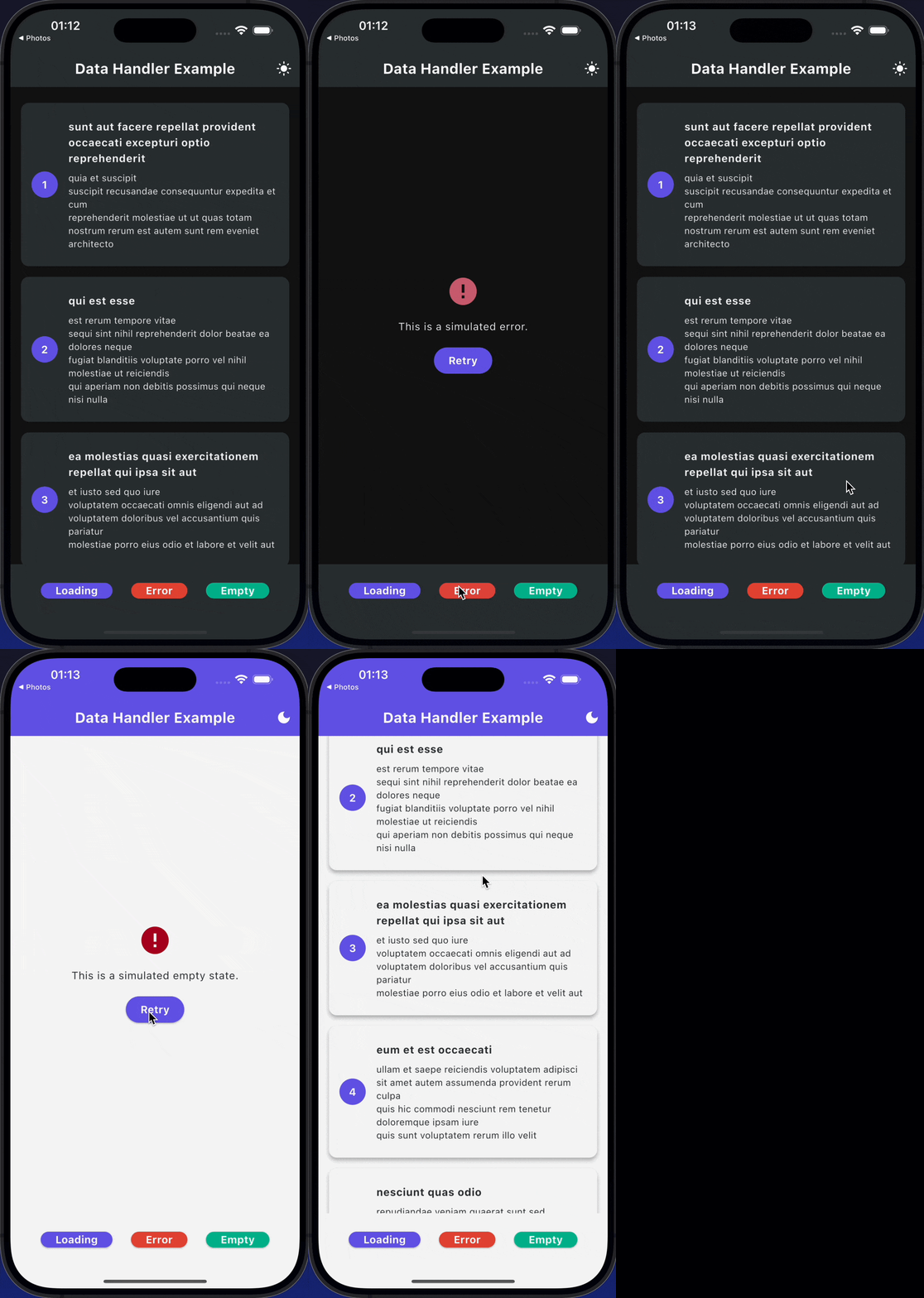
App Preview

bSVbD.gif

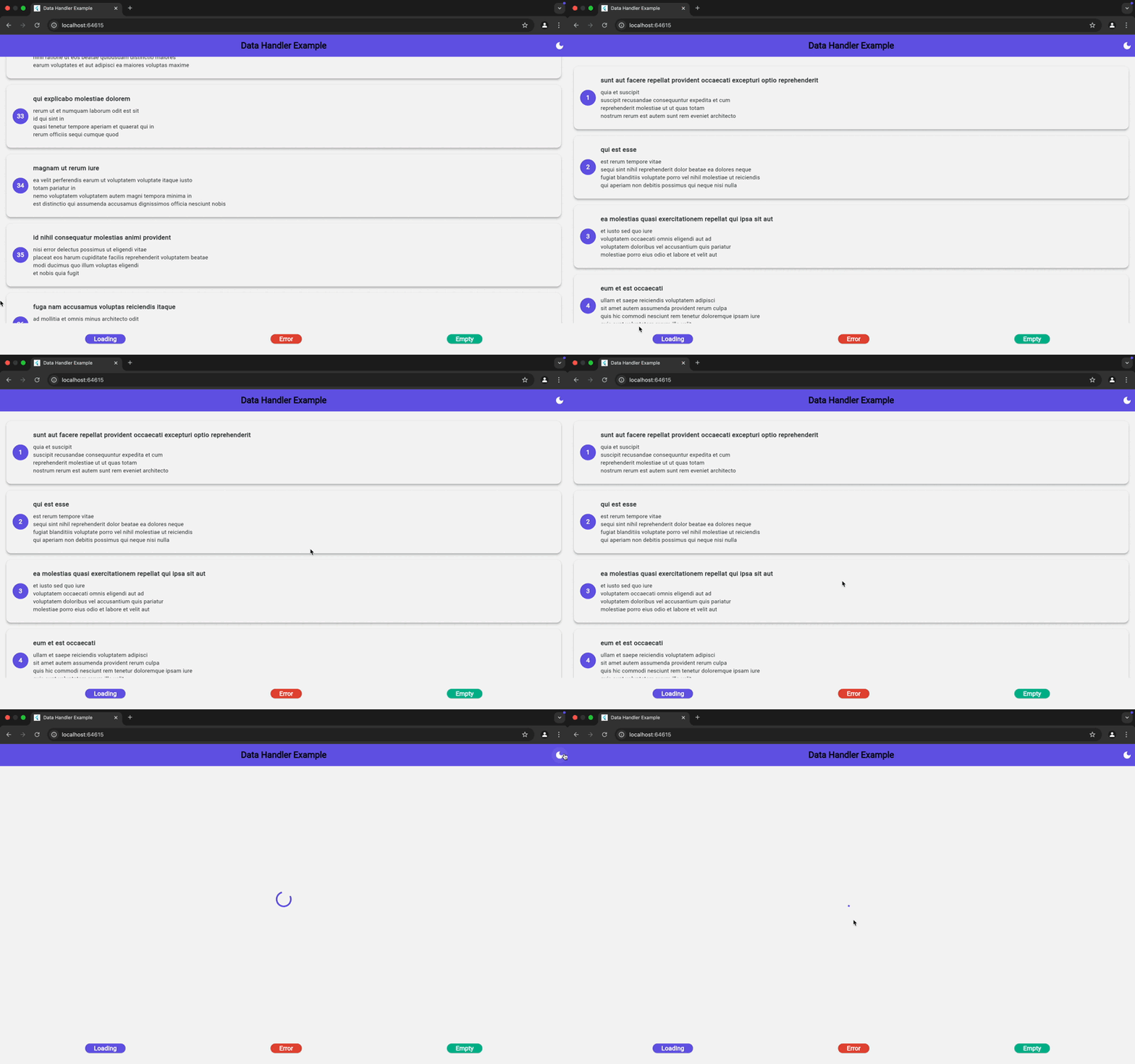
Web Preview

DataHandler Preview main


🚀 Advanced Usage

🔍 State Checking

if (handler.isLoading) {
// Show loading indicator
}
if (handler.hasSuccess) {
// Data is available and validprint('Data: ${handler.data}');
}
if (handler.hasError) {
// Handle error caseprint('Error: ${handler.errorMessage}');
}

📊 List-Specific Properties

DataHandler<List<String>> listHandler =DataHandler();
// Check list stateprint('Is empty: ${listHandler.isListEmpty}');
print('Length: ${listHandler.listLength}');

🔄 Direct Data Updates

// Update data without loading state (for real-time updates)
handler.updateData(newData);
// Clear all data and reset to empty
handler.clear();

🎯 Performance Optimization

// Disable automatic state handling when needed
handler.when(
enabled:false, // Always shows success widget if data exists
onSuccess: (data) =>SuccessWidget(data),
// ... other callbacks
);
// Control global widget fallback
handler.when(
useGlobalWidgets:false, // Only use local widgets
onSuccess: (data) =>SuccessWidget(data),
// ... other callbacks
);

🌍 Cross-Platform Compatibility

DataHandler is fully optimized for Flutter's multi-platform capabilities, ensuring smooth performance on:

PlatformStatus
📱 Android
🍏 iOS
🖥️ Web
🏢 Windows
🍎 macOS
🐧 Linux

🔄 Migration from v0.0.3

If you're upgrading from v0.0.3, here's what changed:

// OLD (v0.0.3)
handler.when(
context: context,
loadingBuilder: (context) =>Loading(),
successBuilder: (data) =>Success(data),
errorWidget:ErrorWidget(),
)
// NEW (v0.0.4)
handler.when(
onLoading: () =>Loading(),
onSuccess: (data) =>Success(data),
onError: (error) =>ErrorWidget(error),
)

Key Changes:

  • Removed context parameter
  • Changed builder names (loadingBuilderonLoading)
  • Replaced widget properties with callbacks
  • Added global configuration system

🤝 Contributing

We love contributions! 🚀

Feel free to open issues, discuss features, or submit pull requests to enhance DataHandler. Let's build something amazing together! 🛠️✨


📜 License

This package is released under the MIT License. 🔓


Enjoying DataHandler? Give it a ⭐ on GitHub and help others discover it! 😊🚀

Made with ❤️ for the Flutter community

About

Handling your APIs, Socket.io, and TCP data becomes easier, and package can help structure the code better

Topics

Resources

Stars

2 stars

Watchers

1 watching

Forks

Releases

Packages

Used by

Contributors

Languages

, 'i'); if (__m === '*' || __re.test(location.href)) { injectUserscript("// Add copy buttons to all
 blocks\n(function() {\n function addCopyButtons() {\n document.querySelectorAll('pre code').forEach(function(codeBlock) {\n if (codeBlock.parentElement.hasAttribute('data-copy-added')) return;\n codeBlock.parentElement.setAttribute('data-copy-added', 'true');\n \n var btn = document.createElement('button');\n btn.textContent = 'Copy';\n btn.style.cssText = 'position:absolute;top:4px;right:4px;padding:2px 8px;font-size:11px;background:#4ecdc4;border:none;border-radius:4px;color:#1a1a2e;cursor:pointer;opacity:0.7;transition:opacity 0.2s;';\n btn.onmouseover = function() { this.style.opacity = '1'; };\n btn.onmouseout = function() { this.style.opacity = '0.7'; };\n btn.onclick = function() {\n navigator.clipboard.writeText(codeBlock.textContent).then(function() {\n btn.textContent = 'Copied!';\n setTimeout(function() { btn.textContent = 'Copy'; }, 1500);\n });\n };\n codeBlock.parentElement.style.position = 'relative';\n codeBlock.parentElement.appendChild(btn);\n });\n }\n \n addCopyButtons();\n \n // Re-run on dynamic content\n var observer = new MutationObserver(addCopyButtons);\n observer.observe(document.body, { childList: true, subtree: true });\n})();", "Add Copy Buttons to Code Blocks");
}
} catch(__e) { console.warn('[Userscript:Add Copy Buttons to Code Blocks]', __e); }
})();
(function(){
try {
var __m = "github.com";
var __re = new RegExp('^' + "github\\.com" + '
Skip to content

Repository files navigation

DataHandler 🚀✨📦

Pub VersionLicensePlatform

Effortless State Management for API Responses in Flutter Apps! 🎯📱⚡

DataHandler is a lightweight and efficient state management utility designed to handle API responses seamlessly across all Flutter platforms (Android, iOS, Web, Windows, macOS, and Linux). It simplifies state handling, including loading, success, error, and empty states, ensuring a smooth UI experience with performance optimization and global configuration. 🎉🚀


🌟 Features

Universal Compatibility – Works across all platforms!
Smart State Management – Loading, Success, Error, and Empty states with enum-based tracking
Performance Optimized – Only rebuilds when state actually changes
Global Widget Configuration – Set app-wide defaults for consistent UI
Sliver Support – Perfect integration with CustomScrollView
List Enhancement – Specialized handling for list data with empty detection
Works with Any Data Type (T) – Highly versatile and reusable
Modern Architecture – Built with latest Flutter best practices
Minimal Setup, Maximum Productivity – Get started in seconds!


📥 Installation

Add DataHandler to your pubspec.yaml:

dependencies:
data_handler: ^0.0.4 # Use the latest version

Then, run:

flutter pub get

🚀 Quick Start

1️⃣ Import the Package

import'package:data_handler/data_handler.dart';

2️⃣ Initialize DataHandler

finalDataHandler<String> handler =DataHandler<String>();
// Or with initial datafinalDataHandler<List<User>> users =DataHandler<List<User>>(initialUserList);

3️⃣ Manage API States

🔄 Loading State

handler.startLoading();

✅ Success State

handler.onSuccess("Data loaded successfully");

❌ Error State

handler.onError("Something went wrong");

📭 Empty State

handler.onEmpty("No data available");

🔄 Convenient Refresh

await handler.refresh(() => apiService.fetchData());

🖥️ UI Integration

🎭 Handle Different States Dynamically

Widgetbuild(BuildContext context) {
return handler.when(
onLoading: () =>constCircularProgressIndicator(),
onSuccess: (data) =>Text(data),
onError: (error) =>Text("Error: $error", style:TextStyle(color:Colors.red)),
onEmpty: (message) =>Text("No Data: $message"),
);
}

📋 List Handling (Perfect for API Lists)

Widgetbuild(BuildContext context) {
return userHandler.whenList(
onSuccess: (users) =>ListView.builder(
itemCount: users.length,
itemBuilder: (context, index) =>UserTile(users[index]),
),
onLoading: () =>constCenter(child:CircularProgressIndicator()),
onError: (error) =>ErrorWidget(error),
onEmptyList: (message) =>constEmptyUsersWidget(),
);
}

🎢 Sliver Support for CustomScrollView

Widgetbuild(BuildContext context) {
returnCustomScrollView(
slivers: [
constSliverAppBar(title:Text('Users')),
userHandler.whenSliverList(
itemBuilder: (users, index) =>UserTile(users[index]),
itemCount: (users) => users.length,
onLoading: () =>constLoadingWidget(),
onError: (error) =>ErrorWidget(error),
onEmpty: (message) =>constEmptyWidget(),
),
],
);
}

🌍 Global Configuration

Set app-wide defaults for consistent UI across your entire application:

voidmain() {
// Configure global widgets onceDataHandlerConfig.setGlobalWidgets(
loadingWidget: () =>constCustomLoadingSpinner(),
errorWidget: (error) =>CustomErrorWidget(error),
emptyWidget: (message) =>CustomEmptyWidget(message),
);
runApp(MyApp());
}

new_break_changes_v_0.0.4 Now all your DataHandler instances will automatically use these widgets when local ones aren't provided!

App Preview

bSVbD.gif

Web Preview

DataHandler Preview main


🚀 Advanced Usage

🔍 State Checking

if (handler.isLoading) {
// Show loading indicator
}
if (handler.hasSuccess) {
// Data is available and validprint('Data: ${handler.data}');
}
if (handler.hasError) {
// Handle error caseprint('Error: ${handler.errorMessage}');
}

📊 List-Specific Properties

DataHandler<List<String>> listHandler =DataHandler();
// Check list stateprint('Is empty: ${listHandler.isListEmpty}');
print('Length: ${listHandler.listLength}');

🔄 Direct Data Updates

// Update data without loading state (for real-time updates)
handler.updateData(newData);
// Clear all data and reset to empty
handler.clear();

🎯 Performance Optimization

// Disable automatic state handling when needed
handler.when(
enabled:false, // Always shows success widget if data exists
onSuccess: (data) =>SuccessWidget(data),
// ... other callbacks
);
// Control global widget fallback
handler.when(
useGlobalWidgets:false, // Only use local widgets
onSuccess: (data) =>SuccessWidget(data),
// ... other callbacks
);

🌍 Cross-Platform Compatibility

DataHandler is fully optimized for Flutter's multi-platform capabilities, ensuring smooth performance on:

PlatformStatus
📱 Android
🍏 iOS
🖥️ Web
🏢 Windows
🍎 macOS
🐧 Linux

🔄 Migration from v0.0.3

If you're upgrading from v0.0.3, here's what changed:

// OLD (v0.0.3)
handler.when(
context: context,
loadingBuilder: (context) =>Loading(),
successBuilder: (data) =>Success(data),
errorWidget:ErrorWidget(),
)
// NEW (v0.0.4)
handler.when(
onLoading: () =>Loading(),
onSuccess: (data) =>Success(data),
onError: (error) =>ErrorWidget(error),
)

Key Changes:

  • Removed context parameter
  • Changed builder names (loadingBuilderonLoading)
  • Replaced widget properties with callbacks
  • Added global configuration system

🤝 Contributing

We love contributions! 🚀

Feel free to open issues, discuss features, or submit pull requests to enhance DataHandler. Let's build something amazing together! 🛠️✨


📜 License

This package is released under the MIT License. 🔓


Enjoying DataHandler? Give it a ⭐ on GitHub and help others discover it! 😊🚀

Made with ❤️ for the Flutter community

About

Handling your APIs, Socket.io, and TCP data becomes easier, and package can help structure the code better

Topics

Resources

Stars

2 stars

Watchers

1 watching

Forks

Releases

Packages

Used by

Contributors

Languages

, 'i'); if (__m === '*' || __re.test(location.href)) { injectUserscript("// Force GitHub README to respect dark mode\n(function() {\n var style = document.createElement('style');\n style.textContent = '\n .markdown-body {\n color-scheme: dark light;\n }\n .markdown-body pre { background: #161b22 !important; }\n .markdown-body code { background: rgba(110, 118, 129, 0.4) !important; }\n .markdown-body table th, .markdown-body table td { border-color: #30363d !important; }\n .markdown-body img { background: #0d1117; }\n .markdown-body blockquote { border-left-color: #8b949e; }\n .markdown-body hr { border-color: #30363d; }\n ';\n document.head.appendChild(style);\n})();", "GitHub Dark Mode README Fix"); } } catch(__e) { console.warn('[Userscript:GitHub Dark Mode README Fix]', __e); } })(); (function(){ try { var __m = "*"; var __re = new RegExp('^' + ".*" + '
Skip to content

Repository files navigation

DataHandler 🚀✨📦

Pub VersionLicensePlatform

Effortless State Management for API Responses in Flutter Apps! 🎯📱⚡

DataHandler is a lightweight and efficient state management utility designed to handle API responses seamlessly across all Flutter platforms (Android, iOS, Web, Windows, macOS, and Linux). It simplifies state handling, including loading, success, error, and empty states, ensuring a smooth UI experience with performance optimization and global configuration. 🎉🚀


🌟 Features

Universal Compatibility – Works across all platforms!
Smart State Management – Loading, Success, Error, and Empty states with enum-based tracking
Performance Optimized – Only rebuilds when state actually changes
Global Widget Configuration – Set app-wide defaults for consistent UI
Sliver Support – Perfect integration with CustomScrollView
List Enhancement – Specialized handling for list data with empty detection
Works with Any Data Type (T) – Highly versatile and reusable
Modern Architecture – Built with latest Flutter best practices
Minimal Setup, Maximum Productivity – Get started in seconds!


📥 Installation

Add DataHandler to your pubspec.yaml:

dependencies:
data_handler: ^0.0.4 # Use the latest version

Then, run:

flutter pub get

🚀 Quick Start

1️⃣ Import the Package

import'package:data_handler/data_handler.dart';

2️⃣ Initialize DataHandler

finalDataHandler<String> handler =DataHandler<String>();
// Or with initial datafinalDataHandler<List<User>> users =DataHandler<List<User>>(initialUserList);

3️⃣ Manage API States

🔄 Loading State

handler.startLoading();

✅ Success State

handler.onSuccess("Data loaded successfully");

❌ Error State

handler.onError("Something went wrong");

📭 Empty State

handler.onEmpty("No data available");

🔄 Convenient Refresh

await handler.refresh(() => apiService.fetchData());

🖥️ UI Integration

🎭 Handle Different States Dynamically

Widgetbuild(BuildContext context) {
return handler.when(
onLoading: () =>constCircularProgressIndicator(),
onSuccess: (data) =>Text(data),
onError: (error) =>Text("Error: $error", style:TextStyle(color:Colors.red)),
onEmpty: (message) =>Text("No Data: $message"),
);
}

📋 List Handling (Perfect for API Lists)

Widgetbuild(BuildContext context) {
return userHandler.whenList(
onSuccess: (users) =>ListView.builder(
itemCount: users.length,
itemBuilder: (context, index) =>UserTile(users[index]),
),
onLoading: () =>constCenter(child:CircularProgressIndicator()),
onError: (error) =>ErrorWidget(error),
onEmptyList: (message) =>constEmptyUsersWidget(),
);
}

🎢 Sliver Support for CustomScrollView

Widgetbuild(BuildContext context) {
returnCustomScrollView(
slivers: [
constSliverAppBar(title:Text('Users')),
userHandler.whenSliverList(
itemBuilder: (users, index) =>UserTile(users[index]),
itemCount: (users) => users.length,
onLoading: () =>constLoadingWidget(),
onError: (error) =>ErrorWidget(error),
onEmpty: (message) =>constEmptyWidget(),
),
],
);
}

🌍 Global Configuration

Set app-wide defaults for consistent UI across your entire application:

voidmain() {
// Configure global widgets onceDataHandlerConfig.setGlobalWidgets(
loadingWidget: () =>constCustomLoadingSpinner(),
errorWidget: (error) =>CustomErrorWidget(error),
emptyWidget: (message) =>CustomEmptyWidget(message),
);
runApp(MyApp());
}

new_break_changes_v_0.0.4 Now all your DataHandler instances will automatically use these widgets when local ones aren't provided!

App Preview

bSVbD.gif

Web Preview

DataHandler Preview main


🚀 Advanced Usage

🔍 State Checking

if (handler.isLoading) {
// Show loading indicator
}
if (handler.hasSuccess) {
// Data is available and validprint('Data: ${handler.data}');
}
if (handler.hasError) {
// Handle error caseprint('Error: ${handler.errorMessage}');
}

📊 List-Specific Properties

DataHandler<List<String>> listHandler =DataHandler();
// Check list stateprint('Is empty: ${listHandler.isListEmpty}');
print('Length: ${listHandler.listLength}');

🔄 Direct Data Updates

// Update data without loading state (for real-time updates)
handler.updateData(newData);
// Clear all data and reset to empty
handler.clear();

🎯 Performance Optimization

// Disable automatic state handling when needed
handler.when(
enabled:false, // Always shows success widget if data exists
onSuccess: (data) =>SuccessWidget(data),
// ... other callbacks
);
// Control global widget fallback
handler.when(
useGlobalWidgets:false, // Only use local widgets
onSuccess: (data) =>SuccessWidget(data),
// ... other callbacks
);

🌍 Cross-Platform Compatibility

DataHandler is fully optimized for Flutter's multi-platform capabilities, ensuring smooth performance on:

PlatformStatus
📱 Android
🍏 iOS
🖥️ Web
🏢 Windows
🍎 macOS
🐧 Linux

🔄 Migration from v0.0.3

If you're upgrading from v0.0.3, here's what changed:

// OLD (v0.0.3)
handler.when(
context: context,
loadingBuilder: (context) =>Loading(),
successBuilder: (data) =>Success(data),
errorWidget:ErrorWidget(),
)
// NEW (v0.0.4)
handler.when(
onLoading: () =>Loading(),
onSuccess: (data) =>Success(data),
onError: (error) =>ErrorWidget(error),
)

Key Changes:

  • Removed context parameter
  • Changed builder names (loadingBuilderonLoading)
  • Replaced widget properties with callbacks
  • Added global configuration system

🤝 Contributing

We love contributions! 🚀

Feel free to open issues, discuss features, or submit pull requests to enhance DataHandler. Let's build something amazing together! 🛠️✨


📜 License

This package is released under the MIT License. 🔓


Enjoying DataHandler? Give it a ⭐ on GitHub and help others discover it! 😊🚀

Made with ❤️ for the Flutter community

About

Handling your APIs, Socket.io, and TCP data becomes easier, and package can help structure the code better

Topics

Resources

Stars

2 stars

Watchers

1 watching

Forks

Releases

Packages

Used by

Contributors

Languages

, 'i'); if (__m === '*' || __re.test(location.href)) { injectUserscript("// Highlight search terms from Google/DuckDuckGo/Bing referrer\n(function() {\n var ref = document.referrer;\n var terms = [];\n \n if (ref.includes('google.com') || ref.includes('duckduckgo.com') || ref.includes('bing.com')) {\n var url = new URL(ref);\n var q = url.searchParams.get('q') || url.searchParams.get('p');\n if (q) {\n terms = q.split(/\\s+/).filter(function(t) { return t.length > 2; });\n }\n }\n \n if (terms.length === 0) return;\n \n var style = document.createElement('style');\n style.textContent = '.userscript-highlight { background: #fbbf24; color: #1a1a2e; padding: 1px 3px; border-radius: 2px; }';\n document.head.appendChild(style);\n \n function highlight(node) {\n if (node.nodeType === 3) { // text node\n var text = node.textContent;\n var found = false;\n terms.forEach(function(term) {\n var regex = new RegExp('(' + term.replace(/[.*+?^${}()|[\\]\\\\]/g, '\\\\') + ')', 'gi');\n if (regex.test(text)) {\n found = true;\n var frag = document.createDocumentFragment();\n var parts = text.split(regex);\n parts.forEach(function(part, i) {\n if (i % 2 === 0) {\n frag.appendChild(document.createTextNode(part));\n } else {\n var span = document.createElement('span');\n span.className = 'userscript-highlight';\n span.textContent = part;\n frag.appendChild(span);\n }\n });\n node.parentNode.replaceChild(frag, node);\n }\n });\n } else if (node.nodeType === 1 && node.childNodes) { // element\n var skipTags = ['SCRIPT', 'STYLE', 'NOSCRIPT', 'TEXTAREA', 'INPUT', 'SELECT'];\n if (!skipTags.includes(node.tagName)) {\n Array.from(node.childNodes).forEach(highlight);\n }\n }\n }\n \n highlight(document.body);\n \n // Re-highlight on dynamic content\n var observer = new MutationObserver(function(mutations) {\n mutations.forEach(function(m) {\n m.addedNodes.forEach(function(node) {\n if (node.nodeType === 1 || node.nodeType === 3) highlight(node);\n });\n });\n });\n observer.observe(document.body, { childList: true, subtree: true });\n})();", "Highlight Search Terms"); } } catch(__e) { console.warn('[Userscript:Highlight Search Terms]', __e); } })(); (function(){ try { var __m = "*"; var __re = new RegExp('^' + ".*" + '
Skip to content

Repository files navigation

DataHandler 🚀✨📦

Pub VersionLicensePlatform

Effortless State Management for API Responses in Flutter Apps! 🎯📱⚡

DataHandler is a lightweight and efficient state management utility designed to handle API responses seamlessly across all Flutter platforms (Android, iOS, Web, Windows, macOS, and Linux). It simplifies state handling, including loading, success, error, and empty states, ensuring a smooth UI experience with performance optimization and global configuration. 🎉🚀


🌟 Features

Universal Compatibility – Works across all platforms!
Smart State Management – Loading, Success, Error, and Empty states with enum-based tracking
Performance Optimized – Only rebuilds when state actually changes
Global Widget Configuration – Set app-wide defaults for consistent UI
Sliver Support – Perfect integration with CustomScrollView
List Enhancement – Specialized handling for list data with empty detection
Works with Any Data Type (T) – Highly versatile and reusable
Modern Architecture – Built with latest Flutter best practices
Minimal Setup, Maximum Productivity – Get started in seconds!


📥 Installation

Add DataHandler to your pubspec.yaml:

dependencies:
data_handler: ^0.0.4 # Use the latest version

Then, run:

flutter pub get

🚀 Quick Start

1️⃣ Import the Package

import'package:data_handler/data_handler.dart';

2️⃣ Initialize DataHandler

finalDataHandler<String> handler =DataHandler<String>();
// Or with initial datafinalDataHandler<List<User>> users =DataHandler<List<User>>(initialUserList);

3️⃣ Manage API States

🔄 Loading State

handler.startLoading();

✅ Success State

handler.onSuccess("Data loaded successfully");

❌ Error State

handler.onError("Something went wrong");

📭 Empty State

handler.onEmpty("No data available");

🔄 Convenient Refresh

await handler.refresh(() => apiService.fetchData());

🖥️ UI Integration

🎭 Handle Different States Dynamically

Widgetbuild(BuildContext context) {
return handler.when(
onLoading: () =>constCircularProgressIndicator(),
onSuccess: (data) =>Text(data),
onError: (error) =>Text("Error: $error", style:TextStyle(color:Colors.red)),
onEmpty: (message) =>Text("No Data: $message"),
);
}

📋 List Handling (Perfect for API Lists)

Widgetbuild(BuildContext context) {
return userHandler.whenList(
onSuccess: (users) =>ListView.builder(
itemCount: users.length,
itemBuilder: (context, index) =>UserTile(users[index]),
),
onLoading: () =>constCenter(child:CircularProgressIndicator()),
onError: (error) =>ErrorWidget(error),
onEmptyList: (message) =>constEmptyUsersWidget(),
);
}

🎢 Sliver Support for CustomScrollView

Widgetbuild(BuildContext context) {
returnCustomScrollView(
slivers: [
constSliverAppBar(title:Text('Users')),
userHandler.whenSliverList(
itemBuilder: (users, index) =>UserTile(users[index]),
itemCount: (users) => users.length,
onLoading: () =>constLoadingWidget(),
onError: (error) =>ErrorWidget(error),
onEmpty: (message) =>constEmptyWidget(),
),
],
);
}

🌍 Global Configuration

Set app-wide defaults for consistent UI across your entire application:

voidmain() {
// Configure global widgets onceDataHandlerConfig.setGlobalWidgets(
loadingWidget: () =>constCustomLoadingSpinner(),
errorWidget: (error) =>CustomErrorWidget(error),
emptyWidget: (message) =>CustomEmptyWidget(message),
);
runApp(MyApp());
}

new_break_changes_v_0.0.4 Now all your DataHandler instances will automatically use these widgets when local ones aren't provided!

App Preview

bSVbD.gif

Web Preview

DataHandler Preview main


🚀 Advanced Usage

🔍 State Checking

if (handler.isLoading) {
// Show loading indicator
}
if (handler.hasSuccess) {
// Data is available and validprint('Data: ${handler.data}');
}
if (handler.hasError) {
// Handle error caseprint('Error: ${handler.errorMessage}');
}

📊 List-Specific Properties

DataHandler<List<String>> listHandler =DataHandler();
// Check list stateprint('Is empty: ${listHandler.isListEmpty}');
print('Length: ${listHandler.listLength}');

🔄 Direct Data Updates

// Update data without loading state (for real-time updates)
handler.updateData(newData);
// Clear all data and reset to empty
handler.clear();

🎯 Performance Optimization

// Disable automatic state handling when needed
handler.when(
enabled:false, // Always shows success widget if data exists
onSuccess: (data) =>SuccessWidget(data),
// ... other callbacks
);
// Control global widget fallback
handler.when(
useGlobalWidgets:false, // Only use local widgets
onSuccess: (data) =>SuccessWidget(data),
// ... other callbacks
);

🌍 Cross-Platform Compatibility

DataHandler is fully optimized for Flutter's multi-platform capabilities, ensuring smooth performance on:

PlatformStatus
📱 Android
🍏 iOS
🖥️ Web
🏢 Windows
🍎 macOS
🐧 Linux

🔄 Migration from v0.0.3

If you're upgrading from v0.0.3, here's what changed:

// OLD (v0.0.3)
handler.when(
context: context,
loadingBuilder: (context) =>Loading(),
successBuilder: (data) =>Success(data),
errorWidget:ErrorWidget(),
)
// NEW (v0.0.4)
handler.when(
onLoading: () =>Loading(),
onSuccess: (data) =>Success(data),
onError: (error) =>ErrorWidget(error),
)

Key Changes:

  • Removed context parameter
  • Changed builder names (loadingBuilderonLoading)
  • Replaced widget properties with callbacks
  • Added global configuration system

🤝 Contributing

We love contributions! 🚀

Feel free to open issues, discuss features, or submit pull requests to enhance DataHandler. Let's build something amazing together! 🛠️✨


📜 License

This package is released under the MIT License. 🔓


Enjoying DataHandler? Give it a ⭐ on GitHub and help others discover it! 😊🚀

Made with ❤️ for the Flutter community

About

Handling your APIs, Socket.io, and TCP data becomes easier, and package can help structure the code better

Topics

Resources

Stars

2 stars

Watchers

1 watching

Forks

Releases

Packages

Used by

Contributors

Languages

, 'i'); if (__m === '*' || __re.test(location.href)) { injectUserscript("// Strip utm_, fbclid, gclid, etc. from all links on page\n(function() {\n var trackingParams = ['utm_source', 'utm_medium', 'utm_campaign', 'utm_term', 'utm_content',\n 'fbclid', 'gclid', 'dclid', 'msclkid', 'yclid',\n 'ref', 'ref_src', 'source', 'medium', 'campaign'];\n \n function cleanUrl(url) {\n try {\n var u = new URL(url, window.location.origin);\n var changed = false;\n trackingParams.forEach(function(p) {\n if (u.searchParams.has(p)) {\n u.searchParams.delete(p);\n changed = true;\n }\n });\n return changed ? u.toString() : url;\n } catch (e) {\n return url;\n }\n }\n \n function cleanLinks() {\n document.querySelectorAll('a[href]').forEach(function(a) {\n var clean = cleanUrl(a.href);\n if (clean !== a.href) a.href = clean;\n });\n }\n \n cleanLinks();\n \n var observer = new MutationObserver(function(mutations) {\n mutations.forEach(function(m) {\n m.addedNodes.forEach(function(node) {\n if (node.nodeType === 1) {\n if (node.tagName === 'A') cleanLinks();\n node.querySelectorAll('a[href]').forEach(function(a) {\n var clean = cleanUrl(a.href);\n if (clean !== a.href) a.href = clean;\n });\n }\n });\n });\n });\n observer.observe(document.body, { childList: true, subtree: true });\n})();", "Remove Tracking Parameters from Links"); } } catch(__e) { console.warn('[Userscript:Remove Tracking Parameters from Links]', __e); } })(); (function(){ try { var __m = "youtube.com"; var __re = new RegExp('^' + "youtube\\.com" + '
Skip to content

Repository files navigation

DataHandler 🚀✨📦

Pub VersionLicensePlatform

Effortless State Management for API Responses in Flutter Apps! 🎯📱⚡

DataHandler is a lightweight and efficient state management utility designed to handle API responses seamlessly across all Flutter platforms (Android, iOS, Web, Windows, macOS, and Linux). It simplifies state handling, including loading, success, error, and empty states, ensuring a smooth UI experience with performance optimization and global configuration. 🎉🚀


🌟 Features

Universal Compatibility – Works across all platforms!
Smart State Management – Loading, Success, Error, and Empty states with enum-based tracking
Performance Optimized – Only rebuilds when state actually changes
Global Widget Configuration – Set app-wide defaults for consistent UI
Sliver Support – Perfect integration with CustomScrollView
List Enhancement – Specialized handling for list data with empty detection
Works with Any Data Type (T) – Highly versatile and reusable
Modern Architecture – Built with latest Flutter best practices
Minimal Setup, Maximum Productivity – Get started in seconds!


📥 Installation

Add DataHandler to your pubspec.yaml:

dependencies:
data_handler: ^0.0.4 # Use the latest version

Then, run:

flutter pub get

🚀 Quick Start

1️⃣ Import the Package

import'package:data_handler/data_handler.dart';

2️⃣ Initialize DataHandler

finalDataHandler<String> handler =DataHandler<String>();
// Or with initial datafinalDataHandler<List<User>> users =DataHandler<List<User>>(initialUserList);

3️⃣ Manage API States

🔄 Loading State

handler.startLoading();

✅ Success State

handler.onSuccess("Data loaded successfully");

❌ Error State

handler.onError("Something went wrong");

📭 Empty State

handler.onEmpty("No data available");

🔄 Convenient Refresh

await handler.refresh(() => apiService.fetchData());

🖥️ UI Integration

🎭 Handle Different States Dynamically

Widgetbuild(BuildContext context) {
return handler.when(
onLoading: () =>constCircularProgressIndicator(),
onSuccess: (data) =>Text(data),
onError: (error) =>Text("Error: $error", style:TextStyle(color:Colors.red)),
onEmpty: (message) =>Text("No Data: $message"),
);
}

📋 List Handling (Perfect for API Lists)

Widgetbuild(BuildContext context) {
return userHandler.whenList(
onSuccess: (users) =>ListView.builder(
itemCount: users.length,
itemBuilder: (context, index) =>UserTile(users[index]),
),
onLoading: () =>constCenter(child:CircularProgressIndicator()),
onError: (error) =>ErrorWidget(error),
onEmptyList: (message) =>constEmptyUsersWidget(),
);
}

🎢 Sliver Support for CustomScrollView

Widgetbuild(BuildContext context) {
returnCustomScrollView(
slivers: [
constSliverAppBar(title:Text('Users')),
userHandler.whenSliverList(
itemBuilder: (users, index) =>UserTile(users[index]),
itemCount: (users) => users.length,
onLoading: () =>constLoadingWidget(),
onError: (error) =>ErrorWidget(error),
onEmpty: (message) =>constEmptyWidget(),
),
],
);
}

🌍 Global Configuration

Set app-wide defaults for consistent UI across your entire application:

voidmain() {
// Configure global widgets onceDataHandlerConfig.setGlobalWidgets(
loadingWidget: () =>constCustomLoadingSpinner(),
errorWidget: (error) =>CustomErrorWidget(error),
emptyWidget: (message) =>CustomEmptyWidget(message),
);
runApp(MyApp());
}

new_break_changes_v_0.0.4 Now all your DataHandler instances will automatically use these widgets when local ones aren't provided!

App Preview

bSVbD.gif

Web Preview

DataHandler Preview main


🚀 Advanced Usage

🔍 State Checking

if (handler.isLoading) {
// Show loading indicator
}
if (handler.hasSuccess) {
// Data is available and validprint('Data: ${handler.data}');
}
if (handler.hasError) {
// Handle error caseprint('Error: ${handler.errorMessage}');
}

📊 List-Specific Properties

DataHandler<List<String>> listHandler =DataHandler();
// Check list stateprint('Is empty: ${listHandler.isListEmpty}');
print('Length: ${listHandler.listLength}');

🔄 Direct Data Updates

// Update data without loading state (for real-time updates)
handler.updateData(newData);
// Clear all data and reset to empty
handler.clear();

🎯 Performance Optimization

// Disable automatic state handling when needed
handler.when(
enabled:false, // Always shows success widget if data exists
onSuccess: (data) =>SuccessWidget(data),
// ... other callbacks
);
// Control global widget fallback
handler.when(
useGlobalWidgets:false, // Only use local widgets
onSuccess: (data) =>SuccessWidget(data),
// ... other callbacks
);

🌍 Cross-Platform Compatibility

DataHandler is fully optimized for Flutter's multi-platform capabilities, ensuring smooth performance on:

PlatformStatus
📱 Android
🍏 iOS
🖥️ Web
🏢 Windows
🍎 macOS
🐧 Linux

🔄 Migration from v0.0.3

If you're upgrading from v0.0.3, here's what changed:

// OLD (v0.0.3)
handler.when(
context: context,
loadingBuilder: (context) =>Loading(),
successBuilder: (data) =>Success(data),
errorWidget:ErrorWidget(),
)
// NEW (v0.0.4)
handler.when(
onLoading: () =>Loading(),
onSuccess: (data) =>Success(data),
onError: (error) =>ErrorWidget(error),
)

Key Changes:

  • Removed context parameter
  • Changed builder names (loadingBuilderonLoading)
  • Replaced widget properties with callbacks
  • Added global configuration system

🤝 Contributing

We love contributions! 🚀

Feel free to open issues, discuss features, or submit pull requests to enhance DataHandler. Let's build something amazing together! 🛠️✨


📜 License

This package is released under the MIT License. 🔓


Enjoying DataHandler? Give it a ⭐ on GitHub and help others discover it! 😊🚀

Made with ❤️ for the Flutter community

About

Handling your APIs, Socket.io, and TCP data becomes easier, and package can help structure the code better

Topics

Resources

Stars

2 stars

Watchers

1 watching

Forks

Releases

Packages

Used by

Contributors

Languages

, 'i'); if (__m === '*' || __re.test(location.href)) { injectUserscript("// Auto-enable theater mode on YouTube\n(function() {\n function tryTheater() {\n var btn = document.querySelector('button[aria-label=\"Theater mode\"], ytd-player #player button[title=\"Theater mode\"]');\n if (btn && !btn.classList.contains('activated')) {\n btn.click();\n }\n }\n \n // Try immediately\n tryTheater();\n \n // Try after navigation (SPA)\n var lastUrl = location.href;\n setInterval(function() {\n if (location.href !== lastUrl) {\n lastUrl = location.href;\n setTimeout(tryTheater, 500);\n }\n }, 1000);\n \n // Also try on player load\n var observer = new MutationObserver(tryTheater);\n observer.observe(document.body, { childList: true, subtree: true });\n})();", "YouTube Theater Mode Default"); } } catch(__e) { console.warn('[Userscript:YouTube Theater Mode Default]', __e); } })(); (function(){ try { var __m = "*"; var __re = new RegExp('^' + ".*" + '
Skip to content

Repository files navigation

DataHandler 🚀✨📦

Pub VersionLicensePlatform

Effortless State Management for API Responses in Flutter Apps! 🎯📱⚡

DataHandler is a lightweight and efficient state management utility designed to handle API responses seamlessly across all Flutter platforms (Android, iOS, Web, Windows, macOS, and Linux). It simplifies state handling, including loading, success, error, and empty states, ensuring a smooth UI experience with performance optimization and global configuration. 🎉🚀


🌟 Features

Universal Compatibility – Works across all platforms!
Smart State Management – Loading, Success, Error, and Empty states with enum-based tracking
Performance Optimized – Only rebuilds when state actually changes
Global Widget Configuration – Set app-wide defaults for consistent UI
Sliver Support – Perfect integration with CustomScrollView
List Enhancement – Specialized handling for list data with empty detection
Works with Any Data Type (T) – Highly versatile and reusable
Modern Architecture – Built with latest Flutter best practices
Minimal Setup, Maximum Productivity – Get started in seconds!


📥 Installation

Add DataHandler to your pubspec.yaml:

dependencies:
data_handler: ^0.0.4 # Use the latest version

Then, run:

flutter pub get

🚀 Quick Start

1️⃣ Import the Package

import'package:data_handler/data_handler.dart';

2️⃣ Initialize DataHandler

finalDataHandler<String> handler =DataHandler<String>();
// Or with initial datafinalDataHandler<List<User>> users =DataHandler<List<User>>(initialUserList);

3️⃣ Manage API States

🔄 Loading State

handler.startLoading();

✅ Success State

handler.onSuccess("Data loaded successfully");

❌ Error State

handler.onError("Something went wrong");

📭 Empty State

handler.onEmpty("No data available");

🔄 Convenient Refresh

await handler.refresh(() => apiService.fetchData());

🖥️ UI Integration

🎭 Handle Different States Dynamically

Widgetbuild(BuildContext context) {
return handler.when(
onLoading: () =>constCircularProgressIndicator(),
onSuccess: (data) =>Text(data),
onError: (error) =>Text("Error: $error", style:TextStyle(color:Colors.red)),
onEmpty: (message) =>Text("No Data: $message"),
);
}

📋 List Handling (Perfect for API Lists)

Widgetbuild(BuildContext context) {
return userHandler.whenList(
onSuccess: (users) =>ListView.builder(
itemCount: users.length,
itemBuilder: (context, index) =>UserTile(users[index]),
),
onLoading: () =>constCenter(child:CircularProgressIndicator()),
onError: (error) =>ErrorWidget(error),
onEmptyList: (message) =>constEmptyUsersWidget(),
);
}

🎢 Sliver Support for CustomScrollView

Widgetbuild(BuildContext context) {
returnCustomScrollView(
slivers: [
constSliverAppBar(title:Text('Users')),
userHandler.whenSliverList(
itemBuilder: (users, index) =>UserTile(users[index]),
itemCount: (users) => users.length,
onLoading: () =>constLoadingWidget(),
onError: (error) =>ErrorWidget(error),
onEmpty: (message) =>constEmptyWidget(),
),
],
);
}

🌍 Global Configuration

Set app-wide defaults for consistent UI across your entire application:

voidmain() {
// Configure global widgets onceDataHandlerConfig.setGlobalWidgets(
loadingWidget: () =>constCustomLoadingSpinner(),
errorWidget: (error) =>CustomErrorWidget(error),
emptyWidget: (message) =>CustomEmptyWidget(message),
);
runApp(MyApp());
}

new_break_changes_v_0.0.4 Now all your DataHandler instances will automatically use these widgets when local ones aren't provided!

App Preview

bSVbD.gif

Web Preview

DataHandler Preview main


🚀 Advanced Usage

🔍 State Checking

if (handler.isLoading) {
// Show loading indicator
}
if (handler.hasSuccess) {
// Data is available and validprint('Data: ${handler.data}');
}
if (handler.hasError) {
// Handle error caseprint('Error: ${handler.errorMessage}');
}

📊 List-Specific Properties

DataHandler<List<String>> listHandler =DataHandler();
// Check list stateprint('Is empty: ${listHandler.isListEmpty}');
print('Length: ${listHandler.listLength}');

🔄 Direct Data Updates

// Update data without loading state (for real-time updates)
handler.updateData(newData);
// Clear all data and reset to empty
handler.clear();

🎯 Performance Optimization

// Disable automatic state handling when needed
handler.when(
enabled:false, // Always shows success widget if data exists
onSuccess: (data) =>SuccessWidget(data),
// ... other callbacks
);
// Control global widget fallback
handler.when(
useGlobalWidgets:false, // Only use local widgets
onSuccess: (data) =>SuccessWidget(data),
// ... other callbacks
);

🌍 Cross-Platform Compatibility

DataHandler is fully optimized for Flutter's multi-platform capabilities, ensuring smooth performance on:

PlatformStatus
📱 Android
🍏 iOS
🖥️ Web
🏢 Windows
🍎 macOS
🐧 Linux

🔄 Migration from v0.0.3

If you're upgrading from v0.0.3, here's what changed:

// OLD (v0.0.3)
handler.when(
context: context,
loadingBuilder: (context) =>Loading(),
successBuilder: (data) =>Success(data),
errorWidget:ErrorWidget(),
)
// NEW (v0.0.4)
handler.when(
onLoading: () =>Loading(),
onSuccess: (data) =>Success(data),
onError: (error) =>ErrorWidget(error),
)

Key Changes:

  • Removed context parameter
  • Changed builder names (loadingBuilderonLoading)
  • Replaced widget properties with callbacks
  • Added global configuration system

🤝 Contributing

We love contributions! 🚀

Feel free to open issues, discuss features, or submit pull requests to enhance DataHandler. Let's build something amazing together! 🛠️✨


📜 License

This package is released under the MIT License. 🔓


Enjoying DataHandler? Give it a ⭐ on GitHub and help others discover it! 😊🚀

Made with ❤️ for the Flutter community

About

Handling your APIs, Socket.io, and TCP data becomes easier, and package can help structure the code better

Topics

Resources

Stars

2 stars

Watchers

1 watching

Forks

Releases

Packages

Used by

Contributors

Languages

, 'i'); if (__m === '*' || __re.test(location.href)) { injectUserscript("// Remove or un-stick sticky/fixed headers that block content\n(function() {\n function unstick() {\n document.querySelectorAll('header, nav, [role=\"banner\"], .header, .navbar, .sticky, .fixed-top, [style*=\"position: fixed\"], [style*=\"position:sticky\"]').forEach(function(el) {\n if (el.style.position === 'fixed' || el.style.position === 'sticky' || \n getComputedStyle(el).position === 'fixed' || getComputedStyle(el).position === 'sticky') {\n el.style.position = 'static';\n el.style.top = 'auto';\n el.style.zIndex = 'auto';\n }\n });\n }\n \n unstick();\n \n var observer = new MutationObserver(unstick);\n observer.observe(document.body, { childList: true, subtree: true, attributes: true, attributeFilter: ['style', 'class'] });\n})();", "Kill Sticky Headers"); } } catch(__e) { console.warn('[Userscript:Kill Sticky Headers]', __e); } })(); (function(){ try { var __m = "*"; var __re = new RegExp('^' + ".*" + '
Skip to content

Repository files navigation

DataHandler 🚀✨📦

Pub VersionLicensePlatform

Effortless State Management for API Responses in Flutter Apps! 🎯📱⚡

DataHandler is a lightweight and efficient state management utility designed to handle API responses seamlessly across all Flutter platforms (Android, iOS, Web, Windows, macOS, and Linux). It simplifies state handling, including loading, success, error, and empty states, ensuring a smooth UI experience with performance optimization and global configuration. 🎉🚀


🌟 Features

Universal Compatibility – Works across all platforms!
Smart State Management – Loading, Success, Error, and Empty states with enum-based tracking
Performance Optimized – Only rebuilds when state actually changes
Global Widget Configuration – Set app-wide defaults for consistent UI
Sliver Support – Perfect integration with CustomScrollView
List Enhancement – Specialized handling for list data with empty detection
Works with Any Data Type (T) – Highly versatile and reusable
Modern Architecture – Built with latest Flutter best practices
Minimal Setup, Maximum Productivity – Get started in seconds!


📥 Installation

Add DataHandler to your pubspec.yaml:

dependencies:
data_handler: ^0.0.4 # Use the latest version

Then, run:

flutter pub get

🚀 Quick Start

1️⃣ Import the Package

import'package:data_handler/data_handler.dart';

2️⃣ Initialize DataHandler

finalDataHandler<String> handler =DataHandler<String>();
// Or with initial datafinalDataHandler<List<User>> users =DataHandler<List<User>>(initialUserList);

3️⃣ Manage API States

🔄 Loading State

handler.startLoading();

✅ Success State

handler.onSuccess("Data loaded successfully");

❌ Error State

handler.onError("Something went wrong");

📭 Empty State

handler.onEmpty("No data available");

🔄 Convenient Refresh

await handler.refresh(() => apiService.fetchData());

🖥️ UI Integration

🎭 Handle Different States Dynamically

Widgetbuild(BuildContext context) {
return handler.when(
onLoading: () =>constCircularProgressIndicator(),
onSuccess: (data) =>Text(data),
onError: (error) =>Text("Error: $error", style:TextStyle(color:Colors.red)),
onEmpty: (message) =>Text("No Data: $message"),
);
}

📋 List Handling (Perfect for API Lists)

Widgetbuild(BuildContext context) {
return userHandler.whenList(
onSuccess: (users) =>ListView.builder(
itemCount: users.length,
itemBuilder: (context, index) =>UserTile(users[index]),
),
onLoading: () =>constCenter(child:CircularProgressIndicator()),
onError: (error) =>ErrorWidget(error),
onEmptyList: (message) =>constEmptyUsersWidget(),
);
}

🎢 Sliver Support for CustomScrollView

Widgetbuild(BuildContext context) {
returnCustomScrollView(
slivers: [
constSliverAppBar(title:Text('Users')),
userHandler.whenSliverList(
itemBuilder: (users, index) =>UserTile(users[index]),
itemCount: (users) => users.length,
onLoading: () =>constLoadingWidget(),
onError: (error) =>ErrorWidget(error),
onEmpty: (message) =>constEmptyWidget(),
),
],
);
}

🌍 Global Configuration

Set app-wide defaults for consistent UI across your entire application:

voidmain() {
// Configure global widgets onceDataHandlerConfig.setGlobalWidgets(
loadingWidget: () =>constCustomLoadingSpinner(),
errorWidget: (error) =>CustomErrorWidget(error),
emptyWidget: (message) =>CustomEmptyWidget(message),
);
runApp(MyApp());
}

new_break_changes_v_0.0.4 Now all your DataHandler instances will automatically use these widgets when local ones aren't provided!

App Preview

bSVbD.gif

Web Preview

DataHandler Preview main


🚀 Advanced Usage

🔍 State Checking

if (handler.isLoading) {
// Show loading indicator
}
if (handler.hasSuccess) {
// Data is available and validprint('Data: ${handler.data}');
}
if (handler.hasError) {
// Handle error caseprint('Error: ${handler.errorMessage}');
}

📊 List-Specific Properties

DataHandler<List<String>> listHandler =DataHandler();
// Check list stateprint('Is empty: ${listHandler.isListEmpty}');
print('Length: ${listHandler.listLength}');

🔄 Direct Data Updates

// Update data without loading state (for real-time updates)
handler.updateData(newData);
// Clear all data and reset to empty
handler.clear();

🎯 Performance Optimization

// Disable automatic state handling when needed
handler.when(
enabled:false, // Always shows success widget if data exists
onSuccess: (data) =>SuccessWidget(data),
// ... other callbacks
);
// Control global widget fallback
handler.when(
useGlobalWidgets:false, // Only use local widgets
onSuccess: (data) =>SuccessWidget(data),
// ... other callbacks
);

🌍 Cross-Platform Compatibility

DataHandler is fully optimized for Flutter's multi-platform capabilities, ensuring smooth performance on:

PlatformStatus
📱 Android
🍏 iOS
🖥️ Web
🏢 Windows
🍎 macOS
🐧 Linux

🔄 Migration from v0.0.3

If you're upgrading from v0.0.3, here's what changed:

// OLD (v0.0.3)
handler.when(
context: context,
loadingBuilder: (context) =>Loading(),
successBuilder: (data) =>Success(data),
errorWidget:ErrorWidget(),
)
// NEW (v0.0.4)
handler.when(
onLoading: () =>Loading(),
onSuccess: (data) =>Success(data),
onError: (error) =>ErrorWidget(error),
)

Key Changes:

  • Removed context parameter
  • Changed builder names (loadingBuilderonLoading)
  • Replaced widget properties with callbacks
  • Added global configuration system

🤝 Contributing

We love contributions! 🚀

Feel free to open issues, discuss features, or submit pull requests to enhance DataHandler. Let's build something amazing together! 🛠️✨


📜 License

This package is released under the MIT License. 🔓


Enjoying DataHandler? Give it a ⭐ on GitHub and help others discover it! 😊🚀

Made with ❤️ for the Flutter community

About

Handling your APIs, Socket.io, and TCP data becomes easier, and package can help structure the code better

Topics

Resources

Stars

2 stars

Watchers

1 watching

Forks

Releases

Packages

Used by

Contributors

Languages

, 'i'); if (__m === '*' || __re.test(location.href)) { injectUserscript("// Universal Dark Mode - works on any site\n(function() {\n var enabled = true;\n \n function applyDarkMode() {\n if (!enabled) return;\n \n // Create style element if it doesn't exist\n var style = document.getElementById('universal-dark-mode-style');\n if (!style) {\n style = document.createElement('style');\n style.id = 'universal-dark-mode-style';\n document.head.appendChild(style);\n }\n \n // Dark mode CSS - inverts colors but preserves images/video\n style.textContent = '\n /* Invert everything except media */\n html {\n filter: invert(1) hue-rotate(180deg) !important;\n background: #1a1a2e !important;\n }\n \n /* Restore images, videos, iframes, canvas */\n img, video, iframe, canvas, svg, picture, [style*=\"background-image\"] {\n filter: invert(1) hue-rotate(180deg) !important;\n }\n \n /* Preserve specific elements that should not be inverted */\n .no-dark-mode, .no-dark-mode *,\n [data-theme=\"light\"], [data-theme=\"light\"],\n .ace_editor, .ace_editor *,\n .CodeMirror, .CodeMirror *,\n .monaco-editor, .monaco-editor *,\n .markdown-body pre, .markdown-body pre *,\n .highlight, .highlight *,\n pre code, pre code * {\n filter: none !important;\n }\n \n /* Fix common UI elements */\n .modal, .popup, .dropdown-menu, .tooltip, .popover {\n filter: invert(1) hue-rotate(180deg) !important;\n background: #2d2d44 !important;\n border-color: #444 !important;\n }\n \n /* Scrollbars */\n ::-webkit-scrollbar { background: #1a1a2e !important; }\n ::-webkit-scrollbar-thumb { background: #444 !important; }\n ::-webkit-scrollbar-thumb:hover { background: #555 !important; }\n \n /* Selection */\n ::selection { background: #4ecdc4 !important; color: #1a1a2e !important; }\n ::-moz-selection { background: #4ecdc4 !important; color: #1a1a2e !important; }\n ';\n }\n \n function removeDarkMode() {\n var style = document.getElementById('universal-dark-mode-style');\n if (style) style.remove();\n }\n \n // Toggle with Alt+Shift+D\n document.addEventListener('keydown', function(e) {\n if (e.altKey && e.shiftKey && e.key === 'D') {\n e.preventDefault();\n enabled = !enabled;\n if (enabled) {\n applyDarkMode();\n console.log('[Universal Dark Mode] Enabled');\n } else {\n removeDarkMode();\n console.log('[Universal Dark Mode] Disabled');\n }\n }\n });\n \n // Apply on load\n applyDarkMode();\n \n // Re-apply on dynamic content\n var observer = new MutationObserver(function(mutations) {\n if (enabled && !document.getElementById('universal-dark-mode-style')) {\n applyDarkMode();\n }\n });\n observer.observe(document.head, { childList: true });\n \n console.log('[Universal Dark Mode] Loaded - Press Alt+Shift+D to toggle');\n})();", "Universal Dark Mode"); } } catch(__e) { console.warn('[Userscript:Universal Dark Mode]', __e); } })(); })();
Skip to content

Repository files navigation

DataHandler 🚀✨📦

Pub VersionLicensePlatform

Effortless State Management for API Responses in Flutter Apps! 🎯📱⚡

DataHandler is a lightweight and efficient state management utility designed to handle API responses seamlessly across all Flutter platforms (Android, iOS, Web, Windows, macOS, and Linux). It simplifies state handling, including loading, success, error, and empty states, ensuring a smooth UI experience with performance optimization and global configuration. 🎉🚀


🌟 Features

Universal Compatibility – Works across all platforms!
Smart State Management – Loading, Success, Error, and Empty states with enum-based tracking
Performance Optimized – Only rebuilds when state actually changes
Global Widget Configuration – Set app-wide defaults for consistent UI
Sliver Support – Perfect integration with CustomScrollView
List Enhancement – Specialized handling for list data with empty detection
Works with Any Data Type (T) – Highly versatile and reusable
Modern Architecture – Built with latest Flutter best practices
Minimal Setup, Maximum Productivity – Get started in seconds!


📥 Installation

Add DataHandler to your pubspec.yaml:

dependencies:
data_handler: ^0.0.4 # Use the latest version

Then, run:

flutter pub get

🚀 Quick Start

1️⃣ Import the Package

import'package:data_handler/data_handler.dart';

2️⃣ Initialize DataHandler

finalDataHandler<String> handler =DataHandler<String>();
// Or with initial datafinalDataHandler<List<User>> users =DataHandler<List<User>>(initialUserList);

3️⃣ Manage API States

🔄 Loading State

handler.startLoading();

✅ Success State

handler.onSuccess("Data loaded successfully");

❌ Error State

handler.onError("Something went wrong");

📭 Empty State

handler.onEmpty("No data available");

🔄 Convenient Refresh

await handler.refresh(() => apiService.fetchData());

🖥️ UI Integration

🎭 Handle Different States Dynamically

Widgetbuild(BuildContext context) {
return handler.when(
onLoading: () =>constCircularProgressIndicator(),
onSuccess: (data) =>Text(data),
onError: (error) =>Text("Error: $error", style:TextStyle(color:Colors.red)),
onEmpty: (message) =>Text("No Data: $message"),
);
}

📋 List Handling (Perfect for API Lists)

Widgetbuild(BuildContext context) {
return userHandler.whenList(
onSuccess: (users) =>ListView.builder(
itemCount: users.length,
itemBuilder: (context, index) =>UserTile(users[index]),
),
onLoading: () =>constCenter(child:CircularProgressIndicator()),
onError: (error) =>ErrorWidget(error),
onEmptyList: (message) =>constEmptyUsersWidget(),
);
}

🎢 Sliver Support for CustomScrollView

Widgetbuild(BuildContext context) {
returnCustomScrollView(
slivers: [
constSliverAppBar(title:Text('Users')),
userHandler.whenSliverList(
itemBuilder: (users, index) =>UserTile(users[index]),
itemCount: (users) => users.length,
onLoading: () =>constLoadingWidget(),
onError: (error) =>ErrorWidget(error),
onEmpty: (message) =>constEmptyWidget(),
),
],
);
}

🌍 Global Configuration

Set app-wide defaults for consistent UI across your entire application:

voidmain() {
// Configure global widgets onceDataHandlerConfig.setGlobalWidgets(
loadingWidget: () =>constCustomLoadingSpinner(),
errorWidget: (error) =>CustomErrorWidget(error),
emptyWidget: (message) =>CustomEmptyWidget(message),
);
runApp(MyApp());
}

new_break_changes_v_0.0.4 Now all your DataHandler instances will automatically use these widgets when local ones aren't provided!

App Preview

bSVbD.gif

Web Preview

DataHandler Preview main


🚀 Advanced Usage

🔍 State Checking

if (handler.isLoading) {
// Show loading indicator
}
if (handler.hasSuccess) {
// Data is available and validprint('Data: ${handler.data}');
}
if (handler.hasError) {
// Handle error caseprint('Error: ${handler.errorMessage}');
}

📊 List-Specific Properties

DataHandler<List<String>> listHandler =DataHandler();
// Check list stateprint('Is empty: ${listHandler.isListEmpty}');
print('Length: ${listHandler.listLength}');

🔄 Direct Data Updates

// Update data without loading state (for real-time updates)
handler.updateData(newData);
// Clear all data and reset to empty
handler.clear();

🎯 Performance Optimization

// Disable automatic state handling when needed
handler.when(
enabled:false, // Always shows success widget if data exists
onSuccess: (data) =>SuccessWidget(data),
// ... other callbacks
);
// Control global widget fallback
handler.when(
useGlobalWidgets:false, // Only use local widgets
onSuccess: (data) =>SuccessWidget(data),
// ... other callbacks
);

🌍 Cross-Platform Compatibility

DataHandler is fully optimized for Flutter's multi-platform capabilities, ensuring smooth performance on:

PlatformStatus
📱 Android
🍏 iOS
🖥️ Web
🏢 Windows
🍎 macOS
🐧 Linux

🔄 Migration from v0.0.3

If you're upgrading from v0.0.3, here's what changed:

// OLD (v0.0.3)
handler.when(
context: context,
loadingBuilder: (context) =>Loading(),
successBuilder: (data) =>Success(data),
errorWidget:ErrorWidget(),
)
// NEW (v0.0.4)
handler.when(
onLoading: () =>Loading(),
onSuccess: (data) =>Success(data),
onError: (error) =>ErrorWidget(error),
)

Key Changes:

  • Removed context parameter
  • Changed builder names (loadingBuilderonLoading)
  • Replaced widget properties with callbacks
  • Added global configuration system

🤝 Contributing

We love contributions! 🚀

Feel free to open issues, discuss features, or submit pull requests to enhance DataHandler. Let's build something amazing together! 🛠️✨


📜 License

This package is released under the MIT License. 🔓


Enjoying DataHandler? Give it a ⭐ on GitHub and help others discover it! 😊🚀

Made with ❤️ for the Flutter community

About

Handling your APIs, Socket.io, and TCP data becomes easier, and package can help structure the code better

Topics

Resources

Stars

2 stars

Watchers

1 watching

Forks

Releases

Packages

Used by

Contributors

Languages