


You can find the associated blog post here.
To run the example project, clone the repo, and run pod install from the Example directory first.
- iOS 9.0+
- Swift 4.2
AttributedStringStyle is available through CocoaPods. To install it, simply add the following line to your Podfile:
pod'AttributedStringStyle'Define some abstract style anywhere in your app. For instance.
enumStyle{case regular
case highlighted
}
Once your style is defined we have two tools at your disposal:
AttributedStringBuilderthat is helpful to create attributed string with styles for range of charactersAttributedStringStylerthat defines which visual attributes to apply for each style
To create your attributed string and focus on the semantic and not the display, use the builder like so:
letcontent="A simple string"letbuilder=AttributedStringBuilder<Style>(string: content)
builder.setStyle(.regular)letrange=NSString(string: content).range(of:"simple")
builder.addStyle(.highlighted, range: range)letsemanticAttributedString= builder.build()
The attributed string has no visual attributes but semantics ones.
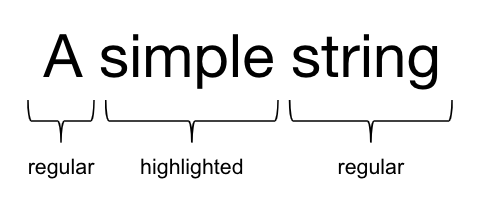
Once your semantic content is defined, you can use the styler to create a new attributed string with visual attributes.
letstyler=AttributedStringStyler<Style>()
styler.register(
attributes:[.font:UIFont.systemFont(ofSize:14),.foregroundColor:UIColor.gray
],
forStyle:.regular
)
styler.register(
attributes:[.font:UIFont.boldSystemFont(ofSize:14),.foregroundColor:UIColor.black
],
forStyle:.highlighted
)letvisualAttributedString= semanticAttributedString.styled(with: styler)
This time the result is visual.

AttributedStringStyle is available under the MIT license. See the LICENSE file for more info.