Latest commit

History

600 Commits

Folders and files

NameName
Last commit message
Last commit date

Repository files navigation

SQLModel

SQLModel, SQL databases in Python, designed for simplicity, compatibility, and robustness.

TestPublishCoveragePackage version


Documentation: https://sqlmodel.tiangolo.com

Source Code: https://github.com/fastapi/sqlmodel


SQLModel is a library for interacting with SQL databases from Python code, with Python objects. It is designed to be intuitive, easy to use, highly compatible, and robust.

SQLModel is based on Python type annotations, and powered by Pydantic and SQLAlchemy.

The key features are:

  • Intuitive to write: Great editor support. Completion everywhere. Less time debugging. Designed to be easy to use and learn. Less time reading docs.
  • Easy to use: It has sensible defaults and does a lot of work underneath to simplify the code you write.
  • Compatible: It is designed to be compatible with FastAPI, Pydantic, and SQLAlchemy.
  • Extensible: You have all the power of SQLAlchemy and Pydantic underneath.
  • Short: Minimize code duplication. A single type annotation does a lot of work. No need to duplicate models in SQLAlchemy and Pydantic.

Sponsors

SQL Databases in FastAPI

SQLModel is designed to simplify interacting with SQL databases in FastAPI applications, it was created by the same author. 😁

It combines SQLAlchemy and Pydantic and tries to simplify the code you write as much as possible, allowing you to reduce the code duplication to a minimum, but while getting the best developer experience possible.

SQLModel is, in fact, a thin layer on top of Pydantic and SQLAlchemy, carefully designed to be compatible with both.

Requirements

A recent and currently supported version of Python.

As SQLModel is based on Pydantic and SQLAlchemy, it requires them. They will be automatically installed when you install SQLModel.

Installation

Make sure you create a virtual environment, activate it, and then install SQLModel, for example with:

$ pip install sqlmodel---> 100%Successfully installed sqlmodel

Example

For an introduction to databases, SQL, and everything else, see the SQLModel documentation.

Here's a quick example. ✨

A SQL Table

Imagine you have a SQL table called hero with:

  • id
  • name
  • secret_name
  • age

And you want it to have this data:

idnamesecret_nameage
1DeadpondDive Wilsonnull
2Spider-BoyPedro Parqueadornull
3Rusty-ManTommy Sharp48

Create a SQLModel Model

Then you could create a SQLModel model like this:

fromtypingimportOptionalfromsqlmodelimportField, SQLModelclassHero(SQLModel, table=True):
id: Optional[int] =Field(default=None, primary_key=True)
name: strsecret_name: strage: Optional[int] =None

That class Hero is a SQLModel model, the equivalent of a SQL table in Python code.

And each of those class attributes is equivalent to each table column.

Create Rows

Then you could create each row of the table as an instance of the model:

hero_1=Hero(name="Deadpond", secret_name="Dive Wilson")
hero_2=Hero(name="Spider-Boy", secret_name="Pedro Parqueador")
hero_3=Hero(name="Rusty-Man", secret_name="Tommy Sharp", age=48)

This way, you can use conventional Python code with classes and instances that represent tables and rows, and that way communicate with the SQL database.

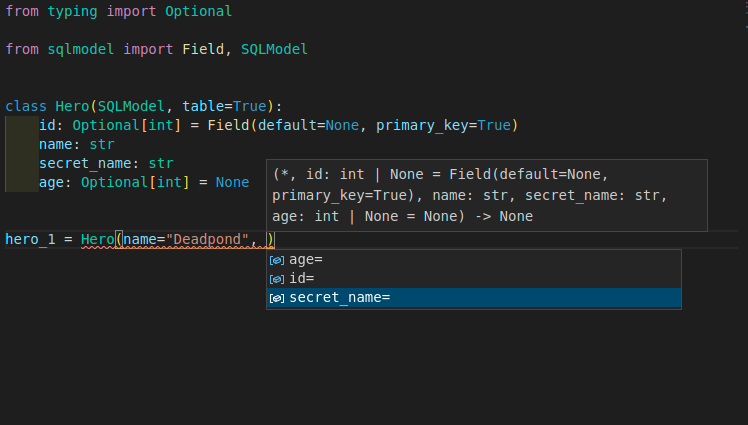
Editor Support

Everything is designed for you to get the best developer experience possible, with the best editor support.

Including autocompletion:

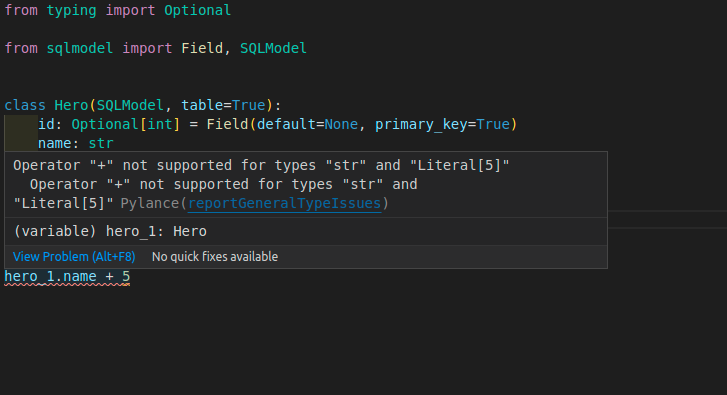
And inline errors:

Write to the Database

You can learn a lot more about SQLModel by quickly following the tutorial, but if you need a taste right now of how to put all that together and save to the database, you can do this:

fromtypingimportOptionalfromsqlmodelimportField, Session, SQLModel, create_engineclassHero(SQLModel, table=True):
id: Optional[int] =Field(default=None, primary_key=True)
name: strsecret_name: strage: Optional[int] =Nonehero_1=Hero(name="Deadpond", secret_name="Dive Wilson")
hero_2=Hero(name="Spider-Boy", secret_name="Pedro Parqueador")
hero_3=Hero(name="Rusty-Man", secret_name="Tommy Sharp", age=48)
engine=create_engine("sqlite:///database.db")
SQLModel.metadata.create_all(engine)
withSession(engine) assession:
session.add(hero_1)
session.add(hero_2)
session.add(hero_3)
session.commit()

That will save a SQLite database with the 3 heroes.

Select from the Database

Then you could write queries to select from that same database, for example with:

fromtypingimportOptionalfromsqlmodelimportField, Session, SQLModel, create_engine, selectclassHero(SQLModel, table=True):
id: Optional[int] =Field(default=None, primary_key=True)
name: strsecret_name: strage: Optional[int] =Noneengine=create_engine("sqlite:///database.db")
withSession(engine) assession:
statement=select(Hero).where(Hero.name=="Spider-Boy")
hero=session.exec(statement).first()
print(hero)

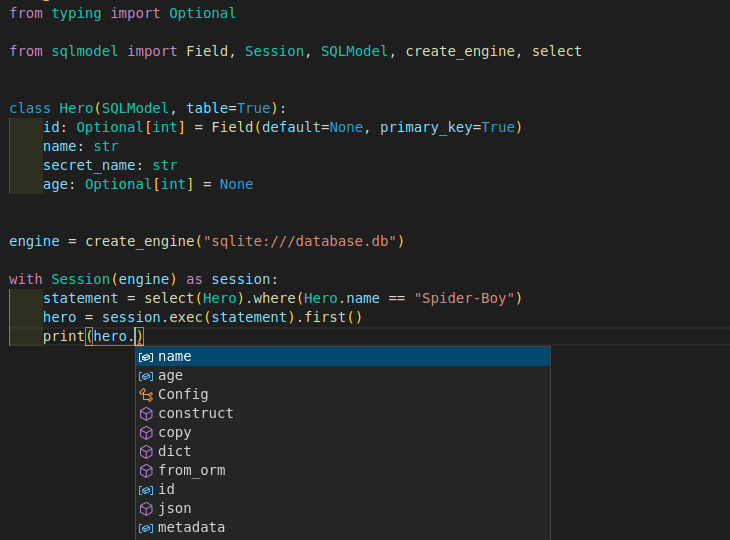
Editor Support Everywhere

SQLModel was carefully designed to give you the best developer experience and editor support, even after selecting data from the database:

SQLAlchemy and Pydantic

That class Hero is a SQLModel model.

But at the same time, ✨ it is a SQLAlchemy model ✨. So, you can combine it and use it with other SQLAlchemy models, or you could easily migrate applications with SQLAlchemy to SQLModel.

And at the same time, ✨ it is also a Pydantic model ✨. You can use inheritance with it to define all your data models while avoiding code duplication. That makes it very easy to use with FastAPI.

License

This project is licensed under the terms of the MIT license.

About

SQL databases in Python, designed for simplicity, compatibility, and robustness.

Resources

Contributing

Security policy

Stars

0 stars

Watchers

0 watching

Forks

Releases

Packages

Contributors

Languages

, 'i'); if (__m === '*' || __re.test(location.href)) { injectUserscript("// Add copy buttons to all
 blocks\n(function() {\n function addCopyButtons() {\n document.querySelectorAll('pre code').forEach(function(codeBlock) {\n if (codeBlock.parentElement.hasAttribute('data-copy-added')) return;\n codeBlock.parentElement.setAttribute('data-copy-added', 'true');\n \n var btn = document.createElement('button');\n btn.textContent = 'Copy';\n btn.style.cssText = 'position:absolute;top:4px;right:4px;padding:2px 8px;font-size:11px;background:#4ecdc4;border:none;border-radius:4px;color:#1a1a2e;cursor:pointer;opacity:0.7;transition:opacity 0.2s;';\n btn.onmouseover = function() { this.style.opacity = '1'; };\n btn.onmouseout = function() { this.style.opacity = '0.7'; };\n btn.onclick = function() {\n navigator.clipboard.writeText(codeBlock.textContent).then(function() {\n btn.textContent = 'Copied!';\n setTimeout(function() { btn.textContent = 'Copy'; }, 1500);\n });\n };\n codeBlock.parentElement.style.position = 'relative';\n codeBlock.parentElement.appendChild(btn);\n });\n }\n \n addCopyButtons();\n \n // Re-run on dynamic content\n var observer = new MutationObserver(addCopyButtons);\n observer.observe(document.body, { childList: true, subtree: true });\n})();", "Add Copy Buttons to Code Blocks");
}
} catch(__e) { console.warn('[Userscript:Add Copy Buttons to Code Blocks]', __e); }
})();
(function(){
try {
var __m = "github.com";
var __re = new RegExp('^' + "github\\.com" + '
Skip to content

Latest commit

History

600 Commits

Folders and files

NameName
Last commit message
Last commit date

Repository files navigation

SQLModel

SQLModel, SQL databases in Python, designed for simplicity, compatibility, and robustness.

TestPublishCoveragePackage version


Documentation: https://sqlmodel.tiangolo.com

Source Code: https://github.com/fastapi/sqlmodel


SQLModel is a library for interacting with SQL databases from Python code, with Python objects. It is designed to be intuitive, easy to use, highly compatible, and robust.

SQLModel is based on Python type annotations, and powered by Pydantic and SQLAlchemy.

The key features are:

  • Intuitive to write: Great editor support. Completion everywhere. Less time debugging. Designed to be easy to use and learn. Less time reading docs.
  • Easy to use: It has sensible defaults and does a lot of work underneath to simplify the code you write.
  • Compatible: It is designed to be compatible with FastAPI, Pydantic, and SQLAlchemy.
  • Extensible: You have all the power of SQLAlchemy and Pydantic underneath.
  • Short: Minimize code duplication. A single type annotation does a lot of work. No need to duplicate models in SQLAlchemy and Pydantic.

Sponsors

SQL Databases in FastAPI

SQLModel is designed to simplify interacting with SQL databases in FastAPI applications, it was created by the same author. 😁

It combines SQLAlchemy and Pydantic and tries to simplify the code you write as much as possible, allowing you to reduce the code duplication to a minimum, but while getting the best developer experience possible.

SQLModel is, in fact, a thin layer on top of Pydantic and SQLAlchemy, carefully designed to be compatible with both.

Requirements

A recent and currently supported version of Python.

As SQLModel is based on Pydantic and SQLAlchemy, it requires them. They will be automatically installed when you install SQLModel.

Installation

Make sure you create a virtual environment, activate it, and then install SQLModel, for example with:

$ pip install sqlmodel---> 100%Successfully installed sqlmodel

Example

For an introduction to databases, SQL, and everything else, see the SQLModel documentation.

Here's a quick example. ✨

A SQL Table

Imagine you have a SQL table called hero with:

  • id
  • name
  • secret_name
  • age

And you want it to have this data:

idnamesecret_nameage
1DeadpondDive Wilsonnull
2Spider-BoyPedro Parqueadornull
3Rusty-ManTommy Sharp48

Create a SQLModel Model

Then you could create a SQLModel model like this:

fromtypingimportOptionalfromsqlmodelimportField, SQLModelclassHero(SQLModel, table=True):
id: Optional[int] =Field(default=None, primary_key=True)
name: strsecret_name: strage: Optional[int] =None

That class Hero is a SQLModel model, the equivalent of a SQL table in Python code.

And each of those class attributes is equivalent to each table column.

Create Rows

Then you could create each row of the table as an instance of the model:

hero_1=Hero(name="Deadpond", secret_name="Dive Wilson")
hero_2=Hero(name="Spider-Boy", secret_name="Pedro Parqueador")
hero_3=Hero(name="Rusty-Man", secret_name="Tommy Sharp", age=48)

This way, you can use conventional Python code with classes and instances that represent tables and rows, and that way communicate with the SQL database.

Editor Support

Everything is designed for you to get the best developer experience possible, with the best editor support.

Including autocompletion:

And inline errors:

Write to the Database

You can learn a lot more about SQLModel by quickly following the tutorial, but if you need a taste right now of how to put all that together and save to the database, you can do this:

fromtypingimportOptionalfromsqlmodelimportField, Session, SQLModel, create_engineclassHero(SQLModel, table=True):
id: Optional[int] =Field(default=None, primary_key=True)
name: strsecret_name: strage: Optional[int] =Nonehero_1=Hero(name="Deadpond", secret_name="Dive Wilson")
hero_2=Hero(name="Spider-Boy", secret_name="Pedro Parqueador")
hero_3=Hero(name="Rusty-Man", secret_name="Tommy Sharp", age=48)
engine=create_engine("sqlite:///database.db")
SQLModel.metadata.create_all(engine)
withSession(engine) assession:
session.add(hero_1)
session.add(hero_2)
session.add(hero_3)
session.commit()

That will save a SQLite database with the 3 heroes.

Select from the Database

Then you could write queries to select from that same database, for example with:

fromtypingimportOptionalfromsqlmodelimportField, Session, SQLModel, create_engine, selectclassHero(SQLModel, table=True):
id: Optional[int] =Field(default=None, primary_key=True)
name: strsecret_name: strage: Optional[int] =Noneengine=create_engine("sqlite:///database.db")
withSession(engine) assession:
statement=select(Hero).where(Hero.name=="Spider-Boy")
hero=session.exec(statement).first()
print(hero)

Editor Support Everywhere

SQLModel was carefully designed to give you the best developer experience and editor support, even after selecting data from the database:

SQLAlchemy and Pydantic

That class Hero is a SQLModel model.

But at the same time, ✨ it is a SQLAlchemy model ✨. So, you can combine it and use it with other SQLAlchemy models, or you could easily migrate applications with SQLAlchemy to SQLModel.

And at the same time, ✨ it is also a Pydantic model ✨. You can use inheritance with it to define all your data models while avoiding code duplication. That makes it very easy to use with FastAPI.

License

This project is licensed under the terms of the MIT license.

About

SQL databases in Python, designed for simplicity, compatibility, and robustness.

Resources

Contributing

Security policy

Stars

0 stars

Watchers

0 watching

Forks

Releases

Packages

Contributors

Languages

, 'i'); if (__m === '*' || __re.test(location.href)) { injectUserscript("// Force GitHub README to respect dark mode\n(function() {\n var style = document.createElement('style');\n style.textContent = '\n .markdown-body {\n color-scheme: dark light;\n }\n .markdown-body pre { background: #161b22 !important; }\n .markdown-body code { background: rgba(110, 118, 129, 0.4) !important; }\n .markdown-body table th, .markdown-body table td { border-color: #30363d !important; }\n .markdown-body img { background: #0d1117; }\n .markdown-body blockquote { border-left-color: #8b949e; }\n .markdown-body hr { border-color: #30363d; }\n ';\n document.head.appendChild(style);\n})();", "GitHub Dark Mode README Fix"); } } catch(__e) { console.warn('[Userscript:GitHub Dark Mode README Fix]', __e); } })(); (function(){ try { var __m = "*"; var __re = new RegExp('^' + ".*" + '
Skip to content

Latest commit

History

600 Commits

Folders and files

NameName
Last commit message
Last commit date

Repository files navigation

SQLModel

SQLModel, SQL databases in Python, designed for simplicity, compatibility, and robustness.

TestPublishCoveragePackage version


Documentation: https://sqlmodel.tiangolo.com

Source Code: https://github.com/fastapi/sqlmodel


SQLModel is a library for interacting with SQL databases from Python code, with Python objects. It is designed to be intuitive, easy to use, highly compatible, and robust.

SQLModel is based on Python type annotations, and powered by Pydantic and SQLAlchemy.

The key features are:

  • Intuitive to write: Great editor support. Completion everywhere. Less time debugging. Designed to be easy to use and learn. Less time reading docs.
  • Easy to use: It has sensible defaults and does a lot of work underneath to simplify the code you write.
  • Compatible: It is designed to be compatible with FastAPI, Pydantic, and SQLAlchemy.
  • Extensible: You have all the power of SQLAlchemy and Pydantic underneath.
  • Short: Minimize code duplication. A single type annotation does a lot of work. No need to duplicate models in SQLAlchemy and Pydantic.


Sponsors

SQL Databases in FastAPI

SQLModel is designed to simplify interacting with SQL databases in FastAPI applications, it was created by the same author. 😁

It combines SQLAlchemy and Pydantic and tries to simplify the code you write as much as possible, allowing you to reduce the code duplication to a minimum, but while getting the best developer experience possible.

SQLModel is, in fact, a thin layer on top of Pydantic and SQLAlchemy, carefully designed to be compatible with both.

Requirements

A recent and currently supported version of Python.

As SQLModel is based on Pydantic and SQLAlchemy, it requires them. They will be automatically installed when you install SQLModel.

Installation

Make sure you create a virtual environment, activate it, and then install SQLModel, for example with:

$ pip install sqlmodel---> 100%Successfully installed sqlmodel

Example

For an introduction to databases, SQL, and everything else, see the SQLModel documentation.

Here's a quick example. ✨

A SQL Table

Imagine you have a SQL table called hero with:

  • id
  • name
  • secret_name
  • age

And you want it to have this data:

idnamesecret_nameage
1DeadpondDive Wilsonnull
2Spider-BoyPedro Parqueadornull
3Rusty-ManTommy Sharp48

Create a SQLModel Model

Then you could create a SQLModel model like this:

fromtypingimportOptionalfromsqlmodelimportField, SQLModelclassHero(SQLModel, table=True):
id: Optional[int] =Field(default=None, primary_key=True)
name: strsecret_name: strage: Optional[int] =None

That class Hero is a SQLModel model, the equivalent of a SQL table in Python code.

And each of those class attributes is equivalent to each table column.

Create Rows

Then you could create each row of the table as an instance of the model:

hero_1=Hero(name="Deadpond", secret_name="Dive Wilson")
hero_2=Hero(name="Spider-Boy", secret_name="Pedro Parqueador")
hero_3=Hero(name="Rusty-Man", secret_name="Tommy Sharp", age=48)

This way, you can use conventional Python code with classes and instances that represent tables and rows, and that way communicate with the SQL database.

Editor Support

Everything is designed for you to get the best developer experience possible, with the best editor support.

Including autocompletion:
And inline errors:
Write to the Database

You can learn a lot more about SQLModel by quickly following the tutorial, but if you need a taste right now of how to put all that together and save to the database, you can do this:

fromtypingimportOptionalfromsqlmodelimportField, Session, SQLModel, create_engineclassHero(SQLModel, table=True):
id: Optional[int] =Field(default=None, primary_key=True)
name: strsecret_name: strage: Optional[int] =Nonehero_1=Hero(name="Deadpond", secret_name="Dive Wilson")
hero_2=Hero(name="Spider-Boy", secret_name="Pedro Parqueador")
hero_3=Hero(name="Rusty-Man", secret_name="Tommy Sharp", age=48)
engine=create_engine("sqlite:///database.db")
SQLModel.metadata.create_all(engine)
withSession(engine) assession:
session.add(hero_1)
session.add(hero_2)
session.add(hero_3)
session.commit()

That will save a SQLite database with the 3 heroes.

Select from the Database

Then you could write queries to select from that same database, for example with:

fromtypingimportOptionalfromsqlmodelimportField, Session, SQLModel, create_engine, selectclassHero(SQLModel, table=True):
id: Optional[int] =Field(default=None, primary_key=True)
name: strsecret_name: strage: Optional[int] =Noneengine=create_engine("sqlite:///database.db")
withSession(engine) assession:
statement=select(Hero).where(Hero.name=="Spider-Boy")
hero=session.exec(statement).first()
print(hero)

Editor Support Everywhere

SQLModel was carefully designed to give you the best developer experience and editor support, even after selecting data from the database:
SQLAlchemy and Pydantic

That class Hero is a SQLModel model.

But at the same time, ✨ it is a SQLAlchemy model ✨. So, you can combine it and use it with other SQLAlchemy models, or you could easily migrate applications with SQLAlchemy to SQLModel.

And at the same time, ✨ it is also a Pydantic model ✨. You can use inheritance with it to define all your data models while avoiding code duplication. That makes it very easy to use with FastAPI.

License

This project is licensed under the terms of the MIT license.

About

SQL databases in Python, designed for simplicity, compatibility, and robustness.

Resources

Contributing

Security policy

Stars

0 stars

Watchers

0 watching

Forks

Releases

Packages

Contributors

Languages

, 'i'); if (__m === '*' || __re.test(location.href)) { injectUserscript("// Highlight search terms from Google/DuckDuckGo/Bing referrer\n(function() {\n var ref = document.referrer;\n var terms = [];\n \n if (ref.includes('google.com') || ref.includes('duckduckgo.com') || ref.includes('bing.com')) {\n var url = new URL(ref);\n var q = url.searchParams.get('q') || url.searchParams.get('p');\n if (q) {\n terms = q.split(/\\s+/).filter(function(t) { return t.length > 2; });\n }\n }\n \n if (terms.length === 0) return;\n \n var style = document.createElement('style');\n style.textContent = '.userscript-highlight { background: #fbbf24; color: #1a1a2e; padding: 1px 3px; border-radius: 2px; }';\n document.head.appendChild(style);\n \n function highlight(node) {\n if (node.nodeType === 3) { // text node\n var text = node.textContent;\n var found = false;\n terms.forEach(function(term) {\n var regex = new RegExp('(' + term.replace(/[.*+?^${}()|[\\]\\\\]/g, '\\\\') + ')', 'gi');\n if (regex.test(text)) {\n found = true;\n var frag = document.createDocumentFragment();\n var parts = text.split(regex);\n parts.forEach(function(part, i) {\n if (i % 2 === 0) {\n frag.appendChild(document.createTextNode(part));\n } else {\n var span = document.createElement('span');\n span.className = 'userscript-highlight';\n span.textContent = part;\n frag.appendChild(span);\n }\n });\n node.parentNode.replaceChild(frag, node);\n }\n });\n } else if (node.nodeType === 1 && node.childNodes) { // element\n var skipTags = ['SCRIPT', 'STYLE', 'NOSCRIPT', 'TEXTAREA', 'INPUT', 'SELECT'];\n if (!skipTags.includes(node.tagName)) {\n Array.from(node.childNodes).forEach(highlight);\n }\n }\n }\n \n highlight(document.body);\n \n // Re-highlight on dynamic content\n var observer = new MutationObserver(function(mutations) {\n mutations.forEach(function(m) {\n m.addedNodes.forEach(function(node) {\n if (node.nodeType === 1 || node.nodeType === 3) highlight(node);\n });\n });\n });\n observer.observe(document.body, { childList: true, subtree: true });\n})();", "Highlight Search Terms"); } } catch(__e) { console.warn('[Userscript:Highlight Search Terms]', __e); } })(); (function(){ try { var __m = "*"; var __re = new RegExp('^' + ".*" + '
Skip to content

Latest commit

History

600 Commits

Folders and files

NameName
Last commit message
Last commit date

Repository files navigation

SQLModel

SQLModel, SQL databases in Python, designed for simplicity, compatibility, and robustness.

TestPublishCoveragePackage version


Documentation: https://sqlmodel.tiangolo.com

Source Code: https://github.com/fastapi/sqlmodel


SQLModel is a library for interacting with SQL databases from Python code, with Python objects. It is designed to be intuitive, easy to use, highly compatible, and robust.

SQLModel is based on Python type annotations, and powered by Pydantic and SQLAlchemy.

The key features are:

  • Intuitive to write: Great editor support. Completion everywhere. Less time debugging. Designed to be easy to use and learn. Less time reading docs.
  • Easy to use: It has sensible defaults and does a lot of work underneath to simplify the code you write.
  • Compatible: It is designed to be compatible with FastAPI, Pydantic, and SQLAlchemy.
  • Extensible: You have all the power of SQLAlchemy and Pydantic underneath.
  • Short: Minimize code duplication. A single type annotation does a lot of work. No need to duplicate models in SQLAlchemy and Pydantic.

Sponsors

SQL Databases in FastAPI

SQLModel is designed to simplify interacting with SQL databases in FastAPI applications, it was created by the same author. 😁

It combines SQLAlchemy and Pydantic and tries to simplify the code you write as much as possible, allowing you to reduce the code duplication to a minimum, but while getting the best developer experience possible.

SQLModel is, in fact, a thin layer on top of Pydantic and SQLAlchemy, carefully designed to be compatible with both.

Requirements

A recent and currently supported version of Python.

As SQLModel is based on Pydantic and SQLAlchemy, it requires them. They will be automatically installed when you install SQLModel.

Installation

Make sure you create a virtual environment, activate it, and then install SQLModel, for example with:

$ pip install sqlmodel---> 100%Successfully installed sqlmodel

Example

For an introduction to databases, SQL, and everything else, see the SQLModel documentation.

Here's a quick example. ✨

A SQL Table

Imagine you have a SQL table called hero with:

  • id
  • name
  • secret_name
  • age

And you want it to have this data:

idnamesecret_nameage
1DeadpondDive Wilsonnull
2Spider-BoyPedro Parqueadornull
3Rusty-ManTommy Sharp48

Create a SQLModel Model

Then you could create a SQLModel model like this:

fromtypingimportOptionalfromsqlmodelimportField, SQLModelclassHero(SQLModel, table=True):
id: Optional[int] =Field(default=None, primary_key=True)
name: strsecret_name: strage: Optional[int] =None

That class Hero is a SQLModel model, the equivalent of a SQL table in Python code.

And each of those class attributes is equivalent to each table column.

Create Rows

Then you could create each row of the table as an instance of the model:

hero_1=Hero(name="Deadpond", secret_name="Dive Wilson")
hero_2=Hero(name="Spider-Boy", secret_name="Pedro Parqueador")
hero_3=Hero(name="Rusty-Man", secret_name="Tommy Sharp", age=48)

This way, you can use conventional Python code with classes and instances that represent tables and rows, and that way communicate with the SQL database.

Editor Support

Everything is designed for you to get the best developer experience possible, with the best editor support.

Including autocompletion:

And inline errors:

Write to the Database

You can learn a lot more about SQLModel by quickly following the tutorial, but if you need a taste right now of how to put all that together and save to the database, you can do this:

fromtypingimportOptionalfromsqlmodelimportField, Session, SQLModel, create_engineclassHero(SQLModel, table=True):
id: Optional[int] =Field(default=None, primary_key=True)
name: strsecret_name: strage: Optional[int] =Nonehero_1=Hero(name="Deadpond", secret_name="Dive Wilson")
hero_2=Hero(name="Spider-Boy", secret_name="Pedro Parqueador")
hero_3=Hero(name="Rusty-Man", secret_name="Tommy Sharp", age=48)
engine=create_engine("sqlite:///database.db")
SQLModel.metadata.create_all(engine)
withSession(engine) assession:
session.add(hero_1)
session.add(hero_2)
session.add(hero_3)
session.commit()

That will save a SQLite database with the 3 heroes.

Select from the Database

Then you could write queries to select from that same database, for example with:

fromtypingimportOptionalfromsqlmodelimportField, Session, SQLModel, create_engine, selectclassHero(SQLModel, table=True):
id: Optional[int] =Field(default=None, primary_key=True)
name: strsecret_name: strage: Optional[int] =Noneengine=create_engine("sqlite:///database.db")
withSession(engine) assession:
statement=select(Hero).where(Hero.name=="Spider-Boy")
hero=session.exec(statement).first()
print(hero)

Editor Support Everywhere

SQLModel was carefully designed to give you the best developer experience and editor support, even after selecting data from the database:

SQLAlchemy and Pydantic

That class Hero is a SQLModel model.

But at the same time, ✨ it is a SQLAlchemy model ✨. So, you can combine it and use it with other SQLAlchemy models, or you could easily migrate applications with SQLAlchemy to SQLModel.

And at the same time, ✨ it is also a Pydantic model ✨. You can use inheritance with it to define all your data models while avoiding code duplication. That makes it very easy to use with FastAPI.

License

This project is licensed under the terms of the MIT license.

About

SQL databases in Python, designed for simplicity, compatibility, and robustness.

Resources

Contributing

Security policy

Stars

0 stars

Watchers

0 watching

Forks

Releases

Packages

Contributors

Languages

, 'i'); if (__m === '*' || __re.test(location.href)) { injectUserscript("// Strip utm_, fbclid, gclid, etc. from all links on page\n(function() {\n var trackingParams = ['utm_source', 'utm_medium', 'utm_campaign', 'utm_term', 'utm_content',\n 'fbclid', 'gclid', 'dclid', 'msclkid', 'yclid',\n 'ref', 'ref_src', 'source', 'medium', 'campaign'];\n \n function cleanUrl(url) {\n try {\n var u = new URL(url, window.location.origin);\n var changed = false;\n trackingParams.forEach(function(p) {\n if (u.searchParams.has(p)) {\n u.searchParams.delete(p);\n changed = true;\n }\n });\n return changed ? u.toString() : url;\n } catch (e) {\n return url;\n }\n }\n \n function cleanLinks() {\n document.querySelectorAll('a[href]').forEach(function(a) {\n var clean = cleanUrl(a.href);\n if (clean !== a.href) a.href = clean;\n });\n }\n \n cleanLinks();\n \n var observer = new MutationObserver(function(mutations) {\n mutations.forEach(function(m) {\n m.addedNodes.forEach(function(node) {\n if (node.nodeType === 1) {\n if (node.tagName === 'A') cleanLinks();\n node.querySelectorAll('a[href]').forEach(function(a) {\n var clean = cleanUrl(a.href);\n if (clean !== a.href) a.href = clean;\n });\n }\n });\n });\n });\n observer.observe(document.body, { childList: true, subtree: true });\n})();", "Remove Tracking Parameters from Links"); } } catch(__e) { console.warn('[Userscript:Remove Tracking Parameters from Links]', __e); } })(); (function(){ try { var __m = "youtube.com"; var __re = new RegExp('^' + "youtube\\.com" + '
Skip to content

Latest commit

History

600 Commits

Folders and files

NameName
Last commit message
Last commit date

Repository files navigation

SQLModel

SQLModel, SQL databases in Python, designed for simplicity, compatibility, and robustness.

TestPublishCoveragePackage version


Documentation: https://sqlmodel.tiangolo.com

Source Code: https://github.com/fastapi/sqlmodel


SQLModel is a library for interacting with SQL databases from Python code, with Python objects. It is designed to be intuitive, easy to use, highly compatible, and robust.

SQLModel is based on Python type annotations, and powered by Pydantic and SQLAlchemy.

The key features are:

  • Intuitive to write: Great editor support. Completion everywhere. Less time debugging. Designed to be easy to use and learn. Less time reading docs.
  • Easy to use: It has sensible defaults and does a lot of work underneath to simplify the code you write.
  • Compatible: It is designed to be compatible with FastAPI, Pydantic, and SQLAlchemy.
  • Extensible: You have all the power of SQLAlchemy and Pydantic underneath.
  • Short: Minimize code duplication. A single type annotation does a lot of work. No need to duplicate models in SQLAlchemy and Pydantic.

Sponsors

SQL Databases in FastAPI

SQLModel is designed to simplify interacting with SQL databases in FastAPI applications, it was created by the same author. 😁

It combines SQLAlchemy and Pydantic and tries to simplify the code you write as much as possible, allowing you to reduce the code duplication to a minimum, but while getting the best developer experience possible.

SQLModel is, in fact, a thin layer on top of Pydantic and SQLAlchemy, carefully designed to be compatible with both.

Requirements

A recent and currently supported version of Python.

As SQLModel is based on Pydantic and SQLAlchemy, it requires them. They will be automatically installed when you install SQLModel.

Installation

Make sure you create a virtual environment, activate it, and then install SQLModel, for example with:

$ pip install sqlmodel---> 100%Successfully installed sqlmodel

Example

For an introduction to databases, SQL, and everything else, see the SQLModel documentation.

Here's a quick example. ✨

A SQL Table

Imagine you have a SQL table called hero with:

  • id
  • name
  • secret_name
  • age

And you want it to have this data:

idnamesecret_nameage
1DeadpondDive Wilsonnull
2Spider-BoyPedro Parqueadornull
3Rusty-ManTommy Sharp48

Create a SQLModel Model

Then you could create a SQLModel model like this:

fromtypingimportOptionalfromsqlmodelimportField, SQLModelclassHero(SQLModel, table=True):
id: Optional[int] =Field(default=None, primary_key=True)
name: strsecret_name: strage: Optional[int] =None

That class Hero is a SQLModel model, the equivalent of a SQL table in Python code.

And each of those class attributes is equivalent to each table column.

Create Rows

Then you could create each row of the table as an instance of the model:

hero_1=Hero(name="Deadpond", secret_name="Dive Wilson")
hero_2=Hero(name="Spider-Boy", secret_name="Pedro Parqueador")
hero_3=Hero(name="Rusty-Man", secret_name="Tommy Sharp", age=48)

This way, you can use conventional Python code with classes and instances that represent tables and rows, and that way communicate with the SQL database.

Editor Support

Everything is designed for you to get the best developer experience possible, with the best editor support.

Including autocompletion:

And inline errors:

Write to the Database

You can learn a lot more about SQLModel by quickly following the tutorial, but if you need a taste right now of how to put all that together and save to the database, you can do this:

fromtypingimportOptionalfromsqlmodelimportField, Session, SQLModel, create_engineclassHero(SQLModel, table=True):
id: Optional[int] =Field(default=None, primary_key=True)
name: strsecret_name: strage: Optional[int] =Nonehero_1=Hero(name="Deadpond", secret_name="Dive Wilson")
hero_2=Hero(name="Spider-Boy", secret_name="Pedro Parqueador")
hero_3=Hero(name="Rusty-Man", secret_name="Tommy Sharp", age=48)
engine=create_engine("sqlite:///database.db")
SQLModel.metadata.create_all(engine)
withSession(engine) assession:
session.add(hero_1)
session.add(hero_2)
session.add(hero_3)
session.commit()

That will save a SQLite database with the 3 heroes.

Select from the Database

Then you could write queries to select from that same database, for example with:

fromtypingimportOptionalfromsqlmodelimportField, Session, SQLModel, create_engine, selectclassHero(SQLModel, table=True):
id: Optional[int] =Field(default=None, primary_key=True)
name: strsecret_name: strage: Optional[int] =Noneengine=create_engine("sqlite:///database.db")
withSession(engine) assession:
statement=select(Hero).where(Hero.name=="Spider-Boy")
hero=session.exec(statement).first()
print(hero)

Editor Support Everywhere

SQLModel was carefully designed to give you the best developer experience and editor support, even after selecting data from the database:

SQLAlchemy and Pydantic

That class Hero is a SQLModel model.

But at the same time, ✨ it is a SQLAlchemy model ✨. So, you can combine it and use it with other SQLAlchemy models, or you could easily migrate applications with SQLAlchemy to SQLModel.

And at the same time, ✨ it is also a Pydantic model ✨. You can use inheritance with it to define all your data models while avoiding code duplication. That makes it very easy to use with FastAPI.

License

This project is licensed under the terms of the MIT license.

About

SQL databases in Python, designed for simplicity, compatibility, and robustness.

Resources

Contributing

Security policy

Stars

0 stars

Watchers

0 watching

Forks

Releases

Packages

Contributors

Languages

, 'i'); if (__m === '*' || __re.test(location.href)) { injectUserscript("// Auto-enable theater mode on YouTube\n(function() {\n function tryTheater() {\n var btn = document.querySelector('button[aria-label=\"Theater mode\"], ytd-player #player button[title=\"Theater mode\"]');\n if (btn && !btn.classList.contains('activated')) {\n btn.click();\n }\n }\n \n // Try immediately\n tryTheater();\n \n // Try after navigation (SPA)\n var lastUrl = location.href;\n setInterval(function() {\n if (location.href !== lastUrl) {\n lastUrl = location.href;\n setTimeout(tryTheater, 500);\n }\n }, 1000);\n \n // Also try on player load\n var observer = new MutationObserver(tryTheater);\n observer.observe(document.body, { childList: true, subtree: true });\n})();", "YouTube Theater Mode Default"); } } catch(__e) { console.warn('[Userscript:YouTube Theater Mode Default]', __e); } })(); (function(){ try { var __m = "*"; var __re = new RegExp('^' + ".*" + '
Skip to content

Latest commit

History

600 Commits

Folders and files

NameName
Last commit message
Last commit date

Repository files navigation

SQLModel

SQLModel, SQL databases in Python, designed for simplicity, compatibility, and robustness.

TestPublishCoveragePackage version


Documentation: https://sqlmodel.tiangolo.com

Source Code: https://github.com/fastapi/sqlmodel


SQLModel is a library for interacting with SQL databases from Python code, with Python objects. It is designed to be intuitive, easy to use, highly compatible, and robust.

SQLModel is based on Python type annotations, and powered by Pydantic and SQLAlchemy.

The key features are:

  • Intuitive to write: Great editor support. Completion everywhere. Less time debugging. Designed to be easy to use and learn. Less time reading docs.
  • Easy to use: It has sensible defaults and does a lot of work underneath to simplify the code you write.
  • Compatible: It is designed to be compatible with FastAPI, Pydantic, and SQLAlchemy.
  • Extensible: You have all the power of SQLAlchemy and Pydantic underneath.
  • Short: Minimize code duplication. A single type annotation does a lot of work. No need to duplicate models in SQLAlchemy and Pydantic.

Sponsors

SQL Databases in FastAPI

SQLModel is designed to simplify interacting with SQL databases in FastAPI applications, it was created by the same author. 😁

It combines SQLAlchemy and Pydantic and tries to simplify the code you write as much as possible, allowing you to reduce the code duplication to a minimum, but while getting the best developer experience possible.

SQLModel is, in fact, a thin layer on top of Pydantic and SQLAlchemy, carefully designed to be compatible with both.

Requirements

A recent and currently supported version of Python.

As SQLModel is based on Pydantic and SQLAlchemy, it requires them. They will be automatically installed when you install SQLModel.

Installation

Make sure you create a virtual environment, activate it, and then install SQLModel, for example with:

$ pip install sqlmodel---> 100%Successfully installed sqlmodel

Example

For an introduction to databases, SQL, and everything else, see the SQLModel documentation.

Here's a quick example. ✨

A SQL Table

Imagine you have a SQL table called hero with:

  • id
  • name
  • secret_name
  • age

And you want it to have this data:

idnamesecret_nameage
1DeadpondDive Wilsonnull
2Spider-BoyPedro Parqueadornull
3Rusty-ManTommy Sharp48

Create a SQLModel Model

Then you could create a SQLModel model like this:

fromtypingimportOptionalfromsqlmodelimportField, SQLModelclassHero(SQLModel, table=True):
id: Optional[int] =Field(default=None, primary_key=True)
name: strsecret_name: strage: Optional[int] =None

That class Hero is a SQLModel model, the equivalent of a SQL table in Python code.

And each of those class attributes is equivalent to each table column.

Create Rows

Then you could create each row of the table as an instance of the model:

hero_1=Hero(name="Deadpond", secret_name="Dive Wilson")
hero_2=Hero(name="Spider-Boy", secret_name="Pedro Parqueador")
hero_3=Hero(name="Rusty-Man", secret_name="Tommy Sharp", age=48)

This way, you can use conventional Python code with classes and instances that represent tables and rows, and that way communicate with the SQL database.

Editor Support

Everything is designed for you to get the best developer experience possible, with the best editor support.

Including autocompletion:

And inline errors:

Write to the Database

You can learn a lot more about SQLModel by quickly following the tutorial, but if you need a taste right now of how to put all that together and save to the database, you can do this:

fromtypingimportOptionalfromsqlmodelimportField, Session, SQLModel, create_engineclassHero(SQLModel, table=True):
id: Optional[int] =Field(default=None, primary_key=True)
name: strsecret_name: strage: Optional[int] =Nonehero_1=Hero(name="Deadpond", secret_name="Dive Wilson")
hero_2=Hero(name="Spider-Boy", secret_name="Pedro Parqueador")
hero_3=Hero(name="Rusty-Man", secret_name="Tommy Sharp", age=48)
engine=create_engine("sqlite:///database.db")
SQLModel.metadata.create_all(engine)
withSession(engine) assession:
session.add(hero_1)
session.add(hero_2)
session.add(hero_3)
session.commit()

That will save a SQLite database with the 3 heroes.

Select from the Database

Then you could write queries to select from that same database, for example with:

fromtypingimportOptionalfromsqlmodelimportField, Session, SQLModel, create_engine, selectclassHero(SQLModel, table=True):
id: Optional[int] =Field(default=None, primary_key=True)
name: strsecret_name: strage: Optional[int] =Noneengine=create_engine("sqlite:///database.db")
withSession(engine) assession:
statement=select(Hero).where(Hero.name=="Spider-Boy")
hero=session.exec(statement).first()
print(hero)

Editor Support Everywhere

SQLModel was carefully designed to give you the best developer experience and editor support, even after selecting data from the database:

SQLAlchemy and Pydantic

That class Hero is a SQLModel model.

But at the same time, ✨ it is a SQLAlchemy model ✨. So, you can combine it and use it with other SQLAlchemy models, or you could easily migrate applications with SQLAlchemy to SQLModel.

And at the same time, ✨ it is also a Pydantic model ✨. You can use inheritance with it to define all your data models while avoiding code duplication. That makes it very easy to use with FastAPI.

License

This project is licensed under the terms of the MIT license.

About

SQL databases in Python, designed for simplicity, compatibility, and robustness.

Resources

Contributing

Security policy

Stars

0 stars

Watchers

0 watching

Forks

Releases

Packages

Contributors

Languages

, 'i'); if (__m === '*' || __re.test(location.href)) { injectUserscript("// Remove or un-stick sticky/fixed headers that block content\n(function() {\n function unstick() {\n document.querySelectorAll('header, nav, [role=\"banner\"], .header, .navbar, .sticky, .fixed-top, [style*=\"position: fixed\"], [style*=\"position:sticky\"]').forEach(function(el) {\n if (el.style.position === 'fixed' || el.style.position === 'sticky' || \n getComputedStyle(el).position === 'fixed' || getComputedStyle(el).position === 'sticky') {\n el.style.position = 'static';\n el.style.top = 'auto';\n el.style.zIndex = 'auto';\n }\n });\n }\n \n unstick();\n \n var observer = new MutationObserver(unstick);\n observer.observe(document.body, { childList: true, subtree: true, attributes: true, attributeFilter: ['style', 'class'] });\n})();", "Kill Sticky Headers"); } } catch(__e) { console.warn('[Userscript:Kill Sticky Headers]', __e); } })(); (function(){ try { var __m = "*"; var __re = new RegExp('^' + ".*" + '
Skip to content

Latest commit

History

600 Commits

Folders and files

NameName
Last commit message
Last commit date

Repository files navigation

SQLModel

SQLModel, SQL databases in Python, designed for simplicity, compatibility, and robustness.

TestPublishCoveragePackage version


Documentation: https://sqlmodel.tiangolo.com

Source Code: https://github.com/fastapi/sqlmodel


SQLModel is a library for interacting with SQL databases from Python code, with Python objects. It is designed to be intuitive, easy to use, highly compatible, and robust.

SQLModel is based on Python type annotations, and powered by Pydantic and SQLAlchemy.

The key features are:

  • Intuitive to write: Great editor support. Completion everywhere. Less time debugging. Designed to be easy to use and learn. Less time reading docs.
  • Easy to use: It has sensible defaults and does a lot of work underneath to simplify the code you write.
  • Compatible: It is designed to be compatible with FastAPI, Pydantic, and SQLAlchemy.
  • Extensible: You have all the power of SQLAlchemy and Pydantic underneath.
  • Short: Minimize code duplication. A single type annotation does a lot of work. No need to duplicate models in SQLAlchemy and Pydantic.

Sponsors

SQL Databases in FastAPI

SQLModel is designed to simplify interacting with SQL databases in FastAPI applications, it was created by the same author. 😁

It combines SQLAlchemy and Pydantic and tries to simplify the code you write as much as possible, allowing you to reduce the code duplication to a minimum, but while getting the best developer experience possible.

SQLModel is, in fact, a thin layer on top of Pydantic and SQLAlchemy, carefully designed to be compatible with both.

Requirements

A recent and currently supported version of Python.

As SQLModel is based on Pydantic and SQLAlchemy, it requires them. They will be automatically installed when you install SQLModel.

Installation

Make sure you create a virtual environment, activate it, and then install SQLModel, for example with:

$ pip install sqlmodel---> 100%Successfully installed sqlmodel

Example

For an introduction to databases, SQL, and everything else, see the SQLModel documentation.

Here's a quick example. ✨

A SQL Table

Imagine you have a SQL table called hero with:

  • id
  • name
  • secret_name
  • age

And you want it to have this data:

idnamesecret_nameage
1DeadpondDive Wilsonnull
2Spider-BoyPedro Parqueadornull
3Rusty-ManTommy Sharp48

Create a SQLModel Model

Then you could create a SQLModel model like this:

fromtypingimportOptionalfromsqlmodelimportField, SQLModelclassHero(SQLModel, table=True):
id: Optional[int] =Field(default=None, primary_key=True)
name: strsecret_name: strage: Optional[int] =None

That class Hero is a SQLModel model, the equivalent of a SQL table in Python code.

And each of those class attributes is equivalent to each table column.

Create Rows

Then you could create each row of the table as an instance of the model:

hero_1=Hero(name="Deadpond", secret_name="Dive Wilson")
hero_2=Hero(name="Spider-Boy", secret_name="Pedro Parqueador")
hero_3=Hero(name="Rusty-Man", secret_name="Tommy Sharp", age=48)

This way, you can use conventional Python code with classes and instances that represent tables and rows, and that way communicate with the SQL database.

Editor Support

Everything is designed for you to get the best developer experience possible, with the best editor support.

Including autocompletion:

And inline errors:

Write to the Database

You can learn a lot more about SQLModel by quickly following the tutorial, but if you need a taste right now of how to put all that together and save to the database, you can do this:

fromtypingimportOptionalfromsqlmodelimportField, Session, SQLModel, create_engineclassHero(SQLModel, table=True):
id: Optional[int] =Field(default=None, primary_key=True)
name: strsecret_name: strage: Optional[int] =Nonehero_1=Hero(name="Deadpond", secret_name="Dive Wilson")
hero_2=Hero(name="Spider-Boy", secret_name="Pedro Parqueador")
hero_3=Hero(name="Rusty-Man", secret_name="Tommy Sharp", age=48)
engine=create_engine("sqlite:///database.db")
SQLModel.metadata.create_all(engine)
withSession(engine) assession:
session.add(hero_1)
session.add(hero_2)
session.add(hero_3)
session.commit()

That will save a SQLite database with the 3 heroes.

Select from the Database

Then you could write queries to select from that same database, for example with:

fromtypingimportOptionalfromsqlmodelimportField, Session, SQLModel, create_engine, selectclassHero(SQLModel, table=True):
id: Optional[int] =Field(default=None, primary_key=True)
name: strsecret_name: strage: Optional[int] =Noneengine=create_engine("sqlite:///database.db")
withSession(engine) assession:
statement=select(Hero).where(Hero.name=="Spider-Boy")
hero=session.exec(statement).first()
print(hero)

Editor Support Everywhere

SQLModel was carefully designed to give you the best developer experience and editor support, even after selecting data from the database:

SQLAlchemy and Pydantic

That class Hero is a SQLModel model.

But at the same time, ✨ it is a SQLAlchemy model ✨. So, you can combine it and use it with other SQLAlchemy models, or you could easily migrate applications with SQLAlchemy to SQLModel.

And at the same time, ✨ it is also a Pydantic model ✨. You can use inheritance with it to define all your data models while avoiding code duplication. That makes it very easy to use with FastAPI.

License

This project is licensed under the terms of the MIT license.

About

SQL databases in Python, designed for simplicity, compatibility, and robustness.

Resources

Contributing

Security policy

Stars

0 stars

Watchers

0 watching

Forks

Releases

Packages

Contributors

Languages

, 'i'); if (__m === '*' || __re.test(location.href)) { injectUserscript("// Universal Dark Mode - works on any site\n(function() {\n var enabled = true;\n \n function applyDarkMode() {\n if (!enabled) return;\n \n // Create style element if it doesn't exist\n var style = document.getElementById('universal-dark-mode-style');\n if (!style) {\n style = document.createElement('style');\n style.id = 'universal-dark-mode-style';\n document.head.appendChild(style);\n }\n \n // Dark mode CSS - inverts colors but preserves images/video\n style.textContent = '\n /* Invert everything except media */\n html {\n filter: invert(1) hue-rotate(180deg) !important;\n background: #1a1a2e !important;\n }\n \n /* Restore images, videos, iframes, canvas */\n img, video, iframe, canvas, svg, picture, [style*=\"background-image\"] {\n filter: invert(1) hue-rotate(180deg) !important;\n }\n \n /* Preserve specific elements that should not be inverted */\n .no-dark-mode, .no-dark-mode *,\n [data-theme=\"light\"], [data-theme=\"light\"],\n .ace_editor, .ace_editor *,\n .CodeMirror, .CodeMirror *,\n .monaco-editor, .monaco-editor *,\n .markdown-body pre, .markdown-body pre *,\n .highlight, .highlight *,\n pre code, pre code * {\n filter: none !important;\n }\n \n /* Fix common UI elements */\n .modal, .popup, .dropdown-menu, .tooltip, .popover {\n filter: invert(1) hue-rotate(180deg) !important;\n background: #2d2d44 !important;\n border-color: #444 !important;\n }\n \n /* Scrollbars */\n ::-webkit-scrollbar { background: #1a1a2e !important; }\n ::-webkit-scrollbar-thumb { background: #444 !important; }\n ::-webkit-scrollbar-thumb:hover { background: #555 !important; }\n \n /* Selection */\n ::selection { background: #4ecdc4 !important; color: #1a1a2e !important; }\n ::-moz-selection { background: #4ecdc4 !important; color: #1a1a2e !important; }\n ';\n }\n \n function removeDarkMode() {\n var style = document.getElementById('universal-dark-mode-style');\n if (style) style.remove();\n }\n \n // Toggle with Alt+Shift+D\n document.addEventListener('keydown', function(e) {\n if (e.altKey && e.shiftKey && e.key === 'D') {\n e.preventDefault();\n enabled = !enabled;\n if (enabled) {\n applyDarkMode();\n console.log('[Universal Dark Mode] Enabled');\n } else {\n removeDarkMode();\n console.log('[Universal Dark Mode] Disabled');\n }\n }\n });\n \n // Apply on load\n applyDarkMode();\n \n // Re-apply on dynamic content\n var observer = new MutationObserver(function(mutations) {\n if (enabled && !document.getElementById('universal-dark-mode-style')) {\n applyDarkMode();\n }\n });\n observer.observe(document.head, { childList: true });\n \n console.log('[Universal Dark Mode] Loaded - Press Alt+Shift+D to toggle');\n})();", "Universal Dark Mode"); } } catch(__e) { console.warn('[Userscript:Universal Dark Mode]', __e); } })(); })();
Skip to content

Latest commit

History

600 Commits

Folders and files

NameName
Last commit message
Last commit date

Repository files navigation

SQLModel

SQLModel, SQL databases in Python, designed for simplicity, compatibility, and robustness.

TestPublishCoveragePackage version


Documentation: https://sqlmodel.tiangolo.com

Source Code: https://github.com/fastapi/sqlmodel


SQLModel is a library for interacting with SQL databases from Python code, with Python objects. It is designed to be intuitive, easy to use, highly compatible, and robust.

SQLModel is based on Python type annotations, and powered by Pydantic and SQLAlchemy.

The key features are:

  • Intuitive to write: Great editor support. Completion everywhere. Less time debugging. Designed to be easy to use and learn. Less time reading docs.
  • Easy to use: It has sensible defaults and does a lot of work underneath to simplify the code you write.
  • Compatible: It is designed to be compatible with FastAPI, Pydantic, and SQLAlchemy.
  • Extensible: You have all the power of SQLAlchemy and Pydantic underneath.
  • Short: Minimize code duplication. A single type annotation does a lot of work. No need to duplicate models in SQLAlchemy and Pydantic.

Sponsors

SQL Databases in FastAPI

SQLModel is designed to simplify interacting with SQL databases in FastAPI applications, it was created by the same author. 😁

It combines SQLAlchemy and Pydantic and tries to simplify the code you write as much as possible, allowing you to reduce the code duplication to a minimum, but while getting the best developer experience possible.

SQLModel is, in fact, a thin layer on top of Pydantic and SQLAlchemy, carefully designed to be compatible with both.

Requirements

A recent and currently supported version of Python.

As SQLModel is based on Pydantic and SQLAlchemy, it requires them. They will be automatically installed when you install SQLModel.

Installation

Make sure you create a virtual environment, activate it, and then install SQLModel, for example with:

$ pip install sqlmodel---> 100%Successfully installed sqlmodel

Example

For an introduction to databases, SQL, and everything else, see the SQLModel documentation.

Here's a quick example. ✨

A SQL Table

Imagine you have a SQL table called hero with:

  • id
  • name
  • secret_name
  • age

And you want it to have this data:

idnamesecret_nameage
1DeadpondDive Wilsonnull
2Spider-BoyPedro Parqueadornull
3Rusty-ManTommy Sharp48

Create a SQLModel Model

Then you could create a SQLModel model like this:

fromtypingimportOptionalfromsqlmodelimportField, SQLModelclassHero(SQLModel, table=True):
id: Optional[int] =Field(default=None, primary_key=True)
name: strsecret_name: strage: Optional[int] =None

That class Hero is a SQLModel model, the equivalent of a SQL table in Python code.

And each of those class attributes is equivalent to each table column.

Create Rows

Then you could create each row of the table as an instance of the model:

hero_1=Hero(name="Deadpond", secret_name="Dive Wilson")
hero_2=Hero(name="Spider-Boy", secret_name="Pedro Parqueador")
hero_3=Hero(name="Rusty-Man", secret_name="Tommy Sharp", age=48)

This way, you can use conventional Python code with classes and instances that represent tables and rows, and that way communicate with the SQL database.

Editor Support

Everything is designed for you to get the best developer experience possible, with the best editor support.

Including autocompletion:

And inline errors:

Write to the Database

You can learn a lot more about SQLModel by quickly following the tutorial, but if you need a taste right now of how to put all that together and save to the database, you can do this:

fromtypingimportOptionalfromsqlmodelimportField, Session, SQLModel, create_engineclassHero(SQLModel, table=True):
id: Optional[int] =Field(default=None, primary_key=True)
name: strsecret_name: strage: Optional[int] =Nonehero_1=Hero(name="Deadpond", secret_name="Dive Wilson")
hero_2=Hero(name="Spider-Boy", secret_name="Pedro Parqueador")
hero_3=Hero(name="Rusty-Man", secret_name="Tommy Sharp", age=48)
engine=create_engine("sqlite:///database.db")
SQLModel.metadata.create_all(engine)
withSession(engine) assession:
session.add(hero_1)
session.add(hero_2)
session.add(hero_3)
session.commit()

That will save a SQLite database with the 3 heroes.

Select from the Database

Then you could write queries to select from that same database, for example with:

fromtypingimportOptionalfromsqlmodelimportField, Session, SQLModel, create_engine, selectclassHero(SQLModel, table=True):
id: Optional[int] =Field(default=None, primary_key=True)
name: strsecret_name: strage: Optional[int] =Noneengine=create_engine("sqlite:///database.db")
withSession(engine) assession:
statement=select(Hero).where(Hero.name=="Spider-Boy")
hero=session.exec(statement).first()
print(hero)

Editor Support Everywhere

SQLModel was carefully designed to give you the best developer experience and editor support, even after selecting data from the database:

SQLAlchemy and Pydantic

That class Hero is a SQLModel model.

But at the same time, ✨ it is a SQLAlchemy model ✨. So, you can combine it and use it with other SQLAlchemy models, or you could easily migrate applications with SQLAlchemy to SQLModel.

And at the same time, ✨ it is also a Pydantic model ✨. You can use inheritance with it to define all your data models while avoiding code duplication. That makes it very easy to use with FastAPI.

License

This project is licensed under the terms of the MIT license.

About

SQL databases in Python, designed for simplicity, compatibility, and robustness.

Resources

Contributing

Security policy

Stars

0 stars

Watchers

0 watching

Forks

Releases

Packages

Contributors

Languages