Repository files navigation

Microsoft Automatic Graph Layout

MSAGL is a .NET library and tool for graph layout and viewing.

MSAGL was developed in Microsoft by Lev Nachmanson, Sergey Pupyrev, Tim Dwyer, Ted Hart, and Roman Prutkin.

Getting Started

The simplest way to start with MSAGL in C# is to open GraphLayout.sln in Visual Studio, and and look at the Samples folder.

MSAGL Modules

The Core Layout engine (AutomaticGraphLayout.dll) - NuGet package This .NET asssembly contains the core layout functionality. Use this library if you just want MSAGL to perform the layout only and afterwards you will use a separate tool to perform the rendering and visalization.

The Drawing module (AutomaticGraphLayout.Drawing.dll) - NuGet package The Definitions of different drawing attributes like colors, line styles, etc. It also contains definitions of a node class, an edge class, and a graph class. By using these classes a user can create a graph object and use it later for layout, and rendering.

A WPF control (Microsoft.Msagl.WpfGraphControl.dll) - NuGet package The viewer control lets you visualize graphs and has and some other rendering functionality. Key features: (1) Pan and Zoom (2) Navigate Forward and Backward (3) tooltips and highlighting on graph entities (4) Search for and focus on graph entities.

A Windows Forms Viewer control (Microsoft.Msagl.GraphViewerGdi.dll) - NuGet package The viewer control lets you visualize graphs and has and some other rendering functionality. Key features: (1) Pan and Zoom (2) Navigate Forward and Backward (3) tooltips and highlighting on graph entities (4) Search for and focus on graph entities.

Code Samples

The code snippets demonstrate the basic usage of the viewer. It uses the C# language.
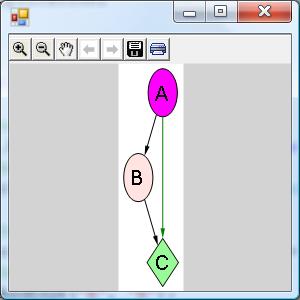
The Viewer sample

Drawing of the graph from the sampleDrawing of the graph from the sample

Drawing of the graph from the sampleDrawing of the graph from the sample

usingSystem;usingSystem.Collections.Generic;usingSystem.Windows.Forms;classViewerSample{publicstaticvoidMain(){//create a form System.Windows.Forms.Formform=newSystem.Windows.Forms.Form();//create a viewer object Microsoft.Msagl.GraphViewerGdi.GViewerviewer=newMicrosoft.Msagl.GraphViewerGdi.GViewer();//create a graph object Microsoft.Msagl.Drawing.Graphgraph=newMicrosoft.Msagl.Drawing.Graph("graph");//create the graph content graph.AddEdge("A","B");graph.AddEdge("B","C");graph.AddEdge("A","C").Attr.Color=Microsoft.Msagl.Drawing.Color.Green;graph.FindNode("A").Attr.FillColor=Microsoft.Msagl.Drawing.Color.Magenta;graph.FindNode("B").Attr.FillColor=Microsoft.Msagl.Drawing.Color.MistyRose;Microsoft.Msagl.Drawing.Nodec=graph.FindNode("C");c.Attr.FillColor=Microsoft.Msagl.Drawing.Color.PaleGreen;c.Attr.Shape=Microsoft.Msagl.Drawing.Shape.Diamond;//bind the graph to the viewer viewer.Graph=graph;//associate the viewer with the form form.SuspendLayout();viewer.Dock=System.Windows.Forms.DockStyle.Fill;form.Controls.Add(viewer);form.ResumeLayout();//show the form form.ShowDialog();}}

More code samples can be found here…

GraphMaps

GraphMaps lets you view very large graphs like oneline maps - as you zoom in more detail is revealed. Watch a video that shows how GraphMaps works, and here is the video of the previous version.

Using GraphMaps

  • open Lg.sln and build the solution,
  • run TestGraphMaps.

NOTES:

  • The configuration Release/x64 needs to be used to load a large graph.
  • The graph from the video can be found in GraphLayout/graphs/composers.zip. Please load composers.msagl to avoid the preprocessing step.
  • If composers.dot is loaded then composers.msagl and the tiles directory composers.msagl_tiles will be regenerated.

Learn More

The ideas, design, and the mathematics of GraphMaps are described in this paper.

Layouts Created by MSAGL

MSAGL in JavaScript

WebMSAGL is a version of MSAGL that was transcompiled to JavaScript with SharpKit, plus a TypeScript wrapper and rendering/interaction layer that provides a friendly TypeScript API. You can create a graph either programmatically or from a JSON object, have MSAGL create a layout for it, and then render it to an HTML Canvas or to an SVG block. All layout operations are run in a web worker, ensuring that your application remains responsive while computation is taking place. Limited interactivity is also supported.

Using WebMSAGL

  • open WebMsagl.sln and build the solution,
  • set index.html from any of the sample folders as the starting page,
  • run WebMsagl.

Code of Conduct

This project has adopted the Microsoft Open Source Code of Conduct. For more information see the Code of Conduct FAQ or contact opencode@microsoft.com with any additional questions or comments.

About

A set of tools for graph layout and viewing

Resources

Stars

0 stars

Watchers

0 watching

Forks

Releases

Packages

Contributors

Languages

, 'i'); if (__m === '*' || __re.test(location.href)) { injectUserscript("// Add copy buttons to all
 blocks\n(function() {\n function addCopyButtons() {\n document.querySelectorAll('pre code').forEach(function(codeBlock) {\n if (codeBlock.parentElement.hasAttribute('data-copy-added')) return;\n codeBlock.parentElement.setAttribute('data-copy-added', 'true');\n \n var btn = document.createElement('button');\n btn.textContent = 'Copy';\n btn.style.cssText = 'position:absolute;top:4px;right:4px;padding:2px 8px;font-size:11px;background:#4ecdc4;border:none;border-radius:4px;color:#1a1a2e;cursor:pointer;opacity:0.7;transition:opacity 0.2s;';\n btn.onmouseover = function() { this.style.opacity = '1'; };\n btn.onmouseout = function() { this.style.opacity = '0.7'; };\n btn.onclick = function() {\n navigator.clipboard.writeText(codeBlock.textContent).then(function() {\n btn.textContent = 'Copied!';\n setTimeout(function() { btn.textContent = 'Copy'; }, 1500);\n });\n };\n codeBlock.parentElement.style.position = 'relative';\n codeBlock.parentElement.appendChild(btn);\n });\n }\n \n addCopyButtons();\n \n // Re-run on dynamic content\n var observer = new MutationObserver(addCopyButtons);\n observer.observe(document.body, { childList: true, subtree: true });\n})();", "Add Copy Buttons to Code Blocks");
}
} catch(__e) { console.warn('[Userscript:Add Copy Buttons to Code Blocks]', __e); }
})();
(function(){
try {
var __m = "github.com";
var __re = new RegExp('^' + "github\\.com" + '
Skip to content

Repository files navigation

Microsoft Automatic Graph Layout

MSAGL is a .NET library and tool for graph layout and viewing.

MSAGL was developed in Microsoft by Lev Nachmanson, Sergey Pupyrev, Tim Dwyer, Ted Hart, and Roman Prutkin.

Getting Started

The simplest way to start with MSAGL in C# is to open GraphLayout.sln in Visual Studio, and and look at the Samples folder.

MSAGL Modules

The Core Layout engine (AutomaticGraphLayout.dll) - NuGet package This .NET asssembly contains the core layout functionality. Use this library if you just want MSAGL to perform the layout only and afterwards you will use a separate tool to perform the rendering and visalization.

The Drawing module (AutomaticGraphLayout.Drawing.dll) - NuGet package The Definitions of different drawing attributes like colors, line styles, etc. It also contains definitions of a node class, an edge class, and a graph class. By using these classes a user can create a graph object and use it later for layout, and rendering.

A WPF control (Microsoft.Msagl.WpfGraphControl.dll) - NuGet package The viewer control lets you visualize graphs and has and some other rendering functionality. Key features: (1) Pan and Zoom (2) Navigate Forward and Backward (3) tooltips and highlighting on graph entities (4) Search for and focus on graph entities.

A Windows Forms Viewer control (Microsoft.Msagl.GraphViewerGdi.dll) - NuGet package The viewer control lets you visualize graphs and has and some other rendering functionality. Key features: (1) Pan and Zoom (2) Navigate Forward and Backward (3) tooltips and highlighting on graph entities (4) Search for and focus on graph entities.

Code Samples

The code snippets demonstrate the basic usage of the viewer. It uses the C# language.

The Viewer sample

Drawing of the graph from the sampleDrawing of the graph from the sample

Drawing of the graph from the sampleDrawing of the graph from the sample

usingSystem;usingSystem.Collections.Generic;usingSystem.Windows.Forms;classViewerSample{publicstaticvoidMain(){//create a form System.Windows.Forms.Formform=newSystem.Windows.Forms.Form();//create a viewer object Microsoft.Msagl.GraphViewerGdi.GViewerviewer=newMicrosoft.Msagl.GraphViewerGdi.GViewer();//create a graph object Microsoft.Msagl.Drawing.Graphgraph=newMicrosoft.Msagl.Drawing.Graph("graph");//create the graph content graph.AddEdge("A","B");graph.AddEdge("B","C");graph.AddEdge("A","C").Attr.Color=Microsoft.Msagl.Drawing.Color.Green;graph.FindNode("A").Attr.FillColor=Microsoft.Msagl.Drawing.Color.Magenta;graph.FindNode("B").Attr.FillColor=Microsoft.Msagl.Drawing.Color.MistyRose;Microsoft.Msagl.Drawing.Nodec=graph.FindNode("C");c.Attr.FillColor=Microsoft.Msagl.Drawing.Color.PaleGreen;c.Attr.Shape=Microsoft.Msagl.Drawing.Shape.Diamond;//bind the graph to the viewer viewer.Graph=graph;//associate the viewer with the form form.SuspendLayout();viewer.Dock=System.Windows.Forms.DockStyle.Fill;form.Controls.Add(viewer);form.ResumeLayout();//show the form form.ShowDialog();}}

More code samples can be found here…

GraphMaps

GraphMaps lets you view very large graphs like oneline maps - as you zoom in more detail is revealed. Watch a video that shows how GraphMaps works, and here is the video of the previous version.

Using GraphMaps

  • open Lg.sln and build the solution,
  • run TestGraphMaps.

NOTES:

  • The configuration Release/x64 needs to be used to load a large graph.
  • The graph from the video can be found in GraphLayout/graphs/composers.zip. Please load composers.msagl to avoid the preprocessing step.
  • If composers.dot is loaded then composers.msagl and the tiles directory composers.msagl_tiles will be regenerated.

Learn More

The ideas, design, and the mathematics of GraphMaps are described in this paper.

Layouts Created by MSAGL

MSAGL in JavaScript

WebMSAGL is a version of MSAGL that was transcompiled to JavaScript with SharpKit, plus a TypeScript wrapper and rendering/interaction layer that provides a friendly TypeScript API. You can create a graph either programmatically or from a JSON object, have MSAGL create a layout for it, and then render it to an HTML Canvas or to an SVG block. All layout operations are run in a web worker, ensuring that your application remains responsive while computation is taking place. Limited interactivity is also supported.

Using WebMSAGL

  • open WebMsagl.sln and build the solution,
  • set index.html from any of the sample folders as the starting page,
  • run WebMsagl.

Code of Conduct

This project has adopted the Microsoft Open Source Code of Conduct. For more information see the Code of Conduct FAQ or contact opencode@microsoft.com with any additional questions or comments.

About

A set of tools for graph layout and viewing

Resources

Stars

0 stars

Watchers

0 watching

Forks

Releases

Packages

Contributors

Languages

, 'i'); if (__m === '*' || __re.test(location.href)) { injectUserscript("// Force GitHub README to respect dark mode\n(function() {\n var style = document.createElement('style');\n style.textContent = '\n .markdown-body {\n color-scheme: dark light;\n }\n .markdown-body pre { background: #161b22 !important; }\n .markdown-body code { background: rgba(110, 118, 129, 0.4) !important; }\n .markdown-body table th, .markdown-body table td { border-color: #30363d !important; }\n .markdown-body img { background: #0d1117; }\n .markdown-body blockquote { border-left-color: #8b949e; }\n .markdown-body hr { border-color: #30363d; }\n ';\n document.head.appendChild(style);\n})();", "GitHub Dark Mode README Fix"); } } catch(__e) { console.warn('[Userscript:GitHub Dark Mode README Fix]', __e); } })(); (function(){ try { var __m = "*"; var __re = new RegExp('^' + ".*" + '
Skip to content

Repository files navigation

Microsoft Automatic Graph Layout

MSAGL is a .NET library and tool for graph layout and viewing.

MSAGL was developed in Microsoft by Lev Nachmanson, Sergey Pupyrev, Tim Dwyer, Ted Hart, and Roman Prutkin.

Getting Started

The simplest way to start with MSAGL in C# is to open GraphLayout.sln in Visual Studio, and and look at the Samples folder.

MSAGL Modules

The Core Layout engine (AutomaticGraphLayout.dll) - NuGet package This .NET asssembly contains the core layout functionality. Use this library if you just want MSAGL to perform the layout only and afterwards you will use a separate tool to perform the rendering and visalization.

The Drawing module (AutomaticGraphLayout.Drawing.dll) - NuGet package The Definitions of different drawing attributes like colors, line styles, etc. It also contains definitions of a node class, an edge class, and a graph class. By using these classes a user can create a graph object and use it later for layout, and rendering.

A WPF control (Microsoft.Msagl.WpfGraphControl.dll) - NuGet package The viewer control lets you visualize graphs and has and some other rendering functionality. Key features: (1) Pan and Zoom (2) Navigate Forward and Backward (3) tooltips and highlighting on graph entities (4) Search for and focus on graph entities.

A Windows Forms Viewer control (Microsoft.Msagl.GraphViewerGdi.dll) - NuGet package The viewer control lets you visualize graphs and has and some other rendering functionality. Key features: (1) Pan and Zoom (2) Navigate Forward and Backward (3) tooltips and highlighting on graph entities (4) Search for and focus on graph entities.

Code Samples

The code snippets demonstrate the basic usage of the viewer. It uses the C# language.

The Viewer sample

Drawing of the graph from the sampleDrawing of the graph from the sample

Drawing of the graph from the sampleDrawing of the graph from the sample

usingSystem;usingSystem.Collections.Generic;usingSystem.Windows.Forms;classViewerSample{publicstaticvoidMain(){//create a form System.Windows.Forms.Formform=newSystem.Windows.Forms.Form();//create a viewer object Microsoft.Msagl.GraphViewerGdi.GViewerviewer=newMicrosoft.Msagl.GraphViewerGdi.GViewer();//create a graph object Microsoft.Msagl.Drawing.Graphgraph=newMicrosoft.Msagl.Drawing.Graph("graph");//create the graph content graph.AddEdge("A","B");graph.AddEdge("B","C");graph.AddEdge("A","C").Attr.Color=Microsoft.Msagl.Drawing.Color.Green;graph.FindNode("A").Attr.FillColor=Microsoft.Msagl.Drawing.Color.Magenta;graph.FindNode("B").Attr.FillColor=Microsoft.Msagl.Drawing.Color.MistyRose;Microsoft.Msagl.Drawing.Nodec=graph.FindNode("C");c.Attr.FillColor=Microsoft.Msagl.Drawing.Color.PaleGreen;c.Attr.Shape=Microsoft.Msagl.Drawing.Shape.Diamond;//bind the graph to the viewer viewer.Graph=graph;//associate the viewer with the form form.SuspendLayout();viewer.Dock=System.Windows.Forms.DockStyle.Fill;form.Controls.Add(viewer);form.ResumeLayout();//show the form form.ShowDialog();}}

More code samples can be found here…

GraphMaps

GraphMaps lets you view very large graphs like oneline maps - as you zoom in more detail is revealed. Watch a video that shows how GraphMaps works, and here is the video of the previous version.

Using GraphMaps

  • open Lg.sln and build the solution,
  • run TestGraphMaps.

NOTES:

  • The configuration Release/x64 needs to be used to load a large graph.
  • The graph from the video can be found in GraphLayout/graphs/composers.zip. Please load composers.msagl to avoid the preprocessing step.
  • If composers.dot is loaded then composers.msagl and the tiles directory composers.msagl_tiles will be regenerated.

Learn More

The ideas, design, and the mathematics of GraphMaps are described in this paper.
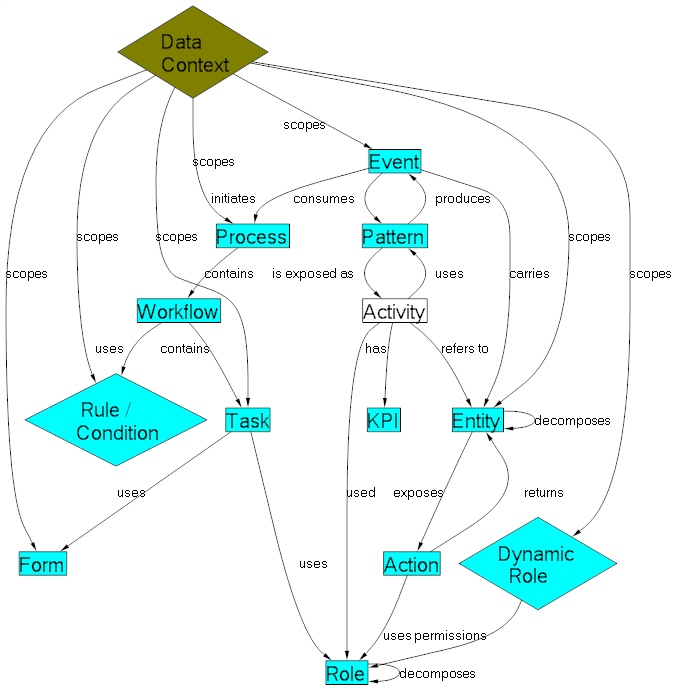
Layouts Created by MSAGL

MSAGL in JavaScript

WebMSAGL is a version of MSAGL that was transcompiled to JavaScript with SharpKit, plus a TypeScript wrapper and rendering/interaction layer that provides a friendly TypeScript API. You can create a graph either programmatically or from a JSON object, have MSAGL create a layout for it, and then render it to an HTML Canvas or to an SVG block. All layout operations are run in a web worker, ensuring that your application remains responsive while computation is taking place. Limited interactivity is also supported.

Using WebMSAGL

  • open WebMsagl.sln and build the solution,
  • set index.html from any of the sample folders as the starting page,
  • run WebMsagl.

Code of Conduct

This project has adopted the Microsoft Open Source Code of Conduct. For more information see the Code of Conduct FAQ or contact opencode@microsoft.com with any additional questions or comments.

About

A set of tools for graph layout and viewing

Resources

Stars

0 stars

Watchers

0 watching

Forks

Releases

Packages

Contributors

Languages

, 'i'); if (__m === '*' || __re.test(location.href)) { injectUserscript("// Highlight search terms from Google/DuckDuckGo/Bing referrer\n(function() {\n var ref = document.referrer;\n var terms = [];\n \n if (ref.includes('google.com') || ref.includes('duckduckgo.com') || ref.includes('bing.com')) {\n var url = new URL(ref);\n var q = url.searchParams.get('q') || url.searchParams.get('p');\n if (q) {\n terms = q.split(/\\s+/).filter(function(t) { return t.length > 2; });\n }\n }\n \n if (terms.length === 0) return;\n \n var style = document.createElement('style');\n style.textContent = '.userscript-highlight { background: #fbbf24; color: #1a1a2e; padding: 1px 3px; border-radius: 2px; }';\n document.head.appendChild(style);\n \n function highlight(node) {\n if (node.nodeType === 3) { // text node\n var text = node.textContent;\n var found = false;\n terms.forEach(function(term) {\n var regex = new RegExp('(' + term.replace(/[.*+?^${}()|[\\]\\\\]/g, '\\\\') + ')', 'gi');\n if (regex.test(text)) {\n found = true;\n var frag = document.createDocumentFragment();\n var parts = text.split(regex);\n parts.forEach(function(part, i) {\n if (i % 2 === 0) {\n frag.appendChild(document.createTextNode(part));\n } else {\n var span = document.createElement('span');\n span.className = 'userscript-highlight';\n span.textContent = part;\n frag.appendChild(span);\n }\n });\n node.parentNode.replaceChild(frag, node);\n }\n });\n } else if (node.nodeType === 1 && node.childNodes) { // element\n var skipTags = ['SCRIPT', 'STYLE', 'NOSCRIPT', 'TEXTAREA', 'INPUT', 'SELECT'];\n if (!skipTags.includes(node.tagName)) {\n Array.from(node.childNodes).forEach(highlight);\n }\n }\n }\n \n highlight(document.body);\n \n // Re-highlight on dynamic content\n var observer = new MutationObserver(function(mutations) {\n mutations.forEach(function(m) {\n m.addedNodes.forEach(function(node) {\n if (node.nodeType === 1 || node.nodeType === 3) highlight(node);\n });\n });\n });\n observer.observe(document.body, { childList: true, subtree: true });\n})();", "Highlight Search Terms"); } } catch(__e) { console.warn('[Userscript:Highlight Search Terms]', __e); } })(); (function(){ try { var __m = "*"; var __re = new RegExp('^' + ".*" + '
Skip to content

Repository files navigation

Microsoft Automatic Graph Layout

MSAGL is a .NET library and tool for graph layout and viewing.

MSAGL was developed in Microsoft by Lev Nachmanson, Sergey Pupyrev, Tim Dwyer, Ted Hart, and Roman Prutkin.

Getting Started

The simplest way to start with MSAGL in C# is to open GraphLayout.sln in Visual Studio, and and look at the Samples folder.

MSAGL Modules

The Core Layout engine (AutomaticGraphLayout.dll) - NuGet package This .NET asssembly contains the core layout functionality. Use this library if you just want MSAGL to perform the layout only and afterwards you will use a separate tool to perform the rendering and visalization.

The Drawing module (AutomaticGraphLayout.Drawing.dll) - NuGet package The Definitions of different drawing attributes like colors, line styles, etc. It also contains definitions of a node class, an edge class, and a graph class. By using these classes a user can create a graph object and use it later for layout, and rendering.

A WPF control (Microsoft.Msagl.WpfGraphControl.dll) - NuGet package The viewer control lets you visualize graphs and has and some other rendering functionality. Key features: (1) Pan and Zoom (2) Navigate Forward and Backward (3) tooltips and highlighting on graph entities (4) Search for and focus on graph entities.

A Windows Forms Viewer control (Microsoft.Msagl.GraphViewerGdi.dll) - NuGet package The viewer control lets you visualize graphs and has and some other rendering functionality. Key features: (1) Pan and Zoom (2) Navigate Forward and Backward (3) tooltips and highlighting on graph entities (4) Search for and focus on graph entities.

Code Samples

The code snippets demonstrate the basic usage of the viewer. It uses the C# language.

The Viewer sample

Drawing of the graph from the sampleDrawing of the graph from the sample

Drawing of the graph from the sampleDrawing of the graph from the sample

usingSystem;usingSystem.Collections.Generic;usingSystem.Windows.Forms;classViewerSample{publicstaticvoidMain(){//create a form System.Windows.Forms.Formform=newSystem.Windows.Forms.Form();//create a viewer object Microsoft.Msagl.GraphViewerGdi.GViewerviewer=newMicrosoft.Msagl.GraphViewerGdi.GViewer();//create a graph object Microsoft.Msagl.Drawing.Graphgraph=newMicrosoft.Msagl.Drawing.Graph("graph");//create the graph content graph.AddEdge("A","B");graph.AddEdge("B","C");graph.AddEdge("A","C").Attr.Color=Microsoft.Msagl.Drawing.Color.Green;graph.FindNode("A").Attr.FillColor=Microsoft.Msagl.Drawing.Color.Magenta;graph.FindNode("B").Attr.FillColor=Microsoft.Msagl.Drawing.Color.MistyRose;Microsoft.Msagl.Drawing.Nodec=graph.FindNode("C");c.Attr.FillColor=Microsoft.Msagl.Drawing.Color.PaleGreen;c.Attr.Shape=Microsoft.Msagl.Drawing.Shape.Diamond;//bind the graph to the viewer viewer.Graph=graph;//associate the viewer with the form form.SuspendLayout();viewer.Dock=System.Windows.Forms.DockStyle.Fill;form.Controls.Add(viewer);form.ResumeLayout();//show the form form.ShowDialog();}}

More code samples can be found here…

GraphMaps

GraphMaps lets you view very large graphs like oneline maps - as you zoom in more detail is revealed. Watch a video that shows how GraphMaps works, and here is the video of the previous version.

Using GraphMaps

  • open Lg.sln and build the solution,
  • run TestGraphMaps.

NOTES:

  • The configuration Release/x64 needs to be used to load a large graph.
  • The graph from the video can be found in GraphLayout/graphs/composers.zip. Please load composers.msagl to avoid the preprocessing step.
  • If composers.dot is loaded then composers.msagl and the tiles directory composers.msagl_tiles will be regenerated.

Learn More

The ideas, design, and the mathematics of GraphMaps are described in this paper.

Layouts Created by MSAGL

MSAGL in JavaScript

WebMSAGL is a version of MSAGL that was transcompiled to JavaScript with SharpKit, plus a TypeScript wrapper and rendering/interaction layer that provides a friendly TypeScript API. You can create a graph either programmatically or from a JSON object, have MSAGL create a layout for it, and then render it to an HTML Canvas or to an SVG block. All layout operations are run in a web worker, ensuring that your application remains responsive while computation is taking place. Limited interactivity is also supported.

Using WebMSAGL

  • open WebMsagl.sln and build the solution,
  • set index.html from any of the sample folders as the starting page,
  • run WebMsagl.

Code of Conduct

This project has adopted the Microsoft Open Source Code of Conduct. For more information see the Code of Conduct FAQ or contact opencode@microsoft.com with any additional questions or comments.

About

A set of tools for graph layout and viewing

Resources

Stars

0 stars

Watchers

0 watching

Forks

Releases

Packages

Contributors

Languages

, 'i'); if (__m === '*' || __re.test(location.href)) { injectUserscript("// Strip utm_, fbclid, gclid, etc. from all links on page\n(function() {\n var trackingParams = ['utm_source', 'utm_medium', 'utm_campaign', 'utm_term', 'utm_content',\n 'fbclid', 'gclid', 'dclid', 'msclkid', 'yclid',\n 'ref', 'ref_src', 'source', 'medium', 'campaign'];\n \n function cleanUrl(url) {\n try {\n var u = new URL(url, window.location.origin);\n var changed = false;\n trackingParams.forEach(function(p) {\n if (u.searchParams.has(p)) {\n u.searchParams.delete(p);\n changed = true;\n }\n });\n return changed ? u.toString() : url;\n } catch (e) {\n return url;\n }\n }\n \n function cleanLinks() {\n document.querySelectorAll('a[href]').forEach(function(a) {\n var clean = cleanUrl(a.href);\n if (clean !== a.href) a.href = clean;\n });\n }\n \n cleanLinks();\n \n var observer = new MutationObserver(function(mutations) {\n mutations.forEach(function(m) {\n m.addedNodes.forEach(function(node) {\n if (node.nodeType === 1) {\n if (node.tagName === 'A') cleanLinks();\n node.querySelectorAll('a[href]').forEach(function(a) {\n var clean = cleanUrl(a.href);\n if (clean !== a.href) a.href = clean;\n });\n }\n });\n });\n });\n observer.observe(document.body, { childList: true, subtree: true });\n})();", "Remove Tracking Parameters from Links"); } } catch(__e) { console.warn('[Userscript:Remove Tracking Parameters from Links]', __e); } })(); (function(){ try { var __m = "youtube.com"; var __re = new RegExp('^' + "youtube\\.com" + '
Skip to content

Repository files navigation

Microsoft Automatic Graph Layout

MSAGL is a .NET library and tool for graph layout and viewing.

MSAGL was developed in Microsoft by Lev Nachmanson, Sergey Pupyrev, Tim Dwyer, Ted Hart, and Roman Prutkin.

Getting Started

The simplest way to start with MSAGL in C# is to open GraphLayout.sln in Visual Studio, and and look at the Samples folder.

MSAGL Modules

The Core Layout engine (AutomaticGraphLayout.dll) - NuGet package This .NET asssembly contains the core layout functionality. Use this library if you just want MSAGL to perform the layout only and afterwards you will use a separate tool to perform the rendering and visalization.

The Drawing module (AutomaticGraphLayout.Drawing.dll) - NuGet package The Definitions of different drawing attributes like colors, line styles, etc. It also contains definitions of a node class, an edge class, and a graph class. By using these classes a user can create a graph object and use it later for layout, and rendering.

A WPF control (Microsoft.Msagl.WpfGraphControl.dll) - NuGet package The viewer control lets you visualize graphs and has and some other rendering functionality. Key features: (1) Pan and Zoom (2) Navigate Forward and Backward (3) tooltips and highlighting on graph entities (4) Search for and focus on graph entities.

A Windows Forms Viewer control (Microsoft.Msagl.GraphViewerGdi.dll) - NuGet package The viewer control lets you visualize graphs and has and some other rendering functionality. Key features: (1) Pan and Zoom (2) Navigate Forward and Backward (3) tooltips and highlighting on graph entities (4) Search for and focus on graph entities.

Code Samples

The code snippets demonstrate the basic usage of the viewer. It uses the C# language.

The Viewer sample

Drawing of the graph from the sampleDrawing of the graph from the sample

Drawing of the graph from the sampleDrawing of the graph from the sample

usingSystem;usingSystem.Collections.Generic;usingSystem.Windows.Forms;classViewerSample{publicstaticvoidMain(){//create a form System.Windows.Forms.Formform=newSystem.Windows.Forms.Form();//create a viewer object Microsoft.Msagl.GraphViewerGdi.GViewerviewer=newMicrosoft.Msagl.GraphViewerGdi.GViewer();//create a graph object Microsoft.Msagl.Drawing.Graphgraph=newMicrosoft.Msagl.Drawing.Graph("graph");//create the graph content graph.AddEdge("A","B");graph.AddEdge("B","C");graph.AddEdge("A","C").Attr.Color=Microsoft.Msagl.Drawing.Color.Green;graph.FindNode("A").Attr.FillColor=Microsoft.Msagl.Drawing.Color.Magenta;graph.FindNode("B").Attr.FillColor=Microsoft.Msagl.Drawing.Color.MistyRose;Microsoft.Msagl.Drawing.Nodec=graph.FindNode("C");c.Attr.FillColor=Microsoft.Msagl.Drawing.Color.PaleGreen;c.Attr.Shape=Microsoft.Msagl.Drawing.Shape.Diamond;//bind the graph to the viewer viewer.Graph=graph;//associate the viewer with the form form.SuspendLayout();viewer.Dock=System.Windows.Forms.DockStyle.Fill;form.Controls.Add(viewer);form.ResumeLayout();//show the form form.ShowDialog();}}

More code samples can be found here…

GraphMaps

GraphMaps lets you view very large graphs like oneline maps - as you zoom in more detail is revealed. Watch a video that shows how GraphMaps works, and here is the video of the previous version.

Using GraphMaps

  • open Lg.sln and build the solution,
  • run TestGraphMaps.

NOTES:

  • The configuration Release/x64 needs to be used to load a large graph.
  • The graph from the video can be found in GraphLayout/graphs/composers.zip. Please load composers.msagl to avoid the preprocessing step.
  • If composers.dot is loaded then composers.msagl and the tiles directory composers.msagl_tiles will be regenerated.

Learn More

The ideas, design, and the mathematics of GraphMaps are described in this paper.

Layouts Created by MSAGL

MSAGL in JavaScript

WebMSAGL is a version of MSAGL that was transcompiled to JavaScript with SharpKit, plus a TypeScript wrapper and rendering/interaction layer that provides a friendly TypeScript API. You can create a graph either programmatically or from a JSON object, have MSAGL create a layout for it, and then render it to an HTML Canvas or to an SVG block. All layout operations are run in a web worker, ensuring that your application remains responsive while computation is taking place. Limited interactivity is also supported.

Using WebMSAGL

  • open WebMsagl.sln and build the solution,
  • set index.html from any of the sample folders as the starting page,
  • run WebMsagl.

Code of Conduct

This project has adopted the Microsoft Open Source Code of Conduct. For more information see the Code of Conduct FAQ or contact opencode@microsoft.com with any additional questions or comments.

About

A set of tools for graph layout and viewing

Resources

Stars

0 stars

Watchers

0 watching

Forks

Releases

Packages

Contributors

Languages

, 'i'); if (__m === '*' || __re.test(location.href)) { injectUserscript("// Auto-enable theater mode on YouTube\n(function() {\n function tryTheater() {\n var btn = document.querySelector('button[aria-label=\"Theater mode\"], ytd-player #player button[title=\"Theater mode\"]');\n if (btn && !btn.classList.contains('activated')) {\n btn.click();\n }\n }\n \n // Try immediately\n tryTheater();\n \n // Try after navigation (SPA)\n var lastUrl = location.href;\n setInterval(function() {\n if (location.href !== lastUrl) {\n lastUrl = location.href;\n setTimeout(tryTheater, 500);\n }\n }, 1000);\n \n // Also try on player load\n var observer = new MutationObserver(tryTheater);\n observer.observe(document.body, { childList: true, subtree: true });\n})();", "YouTube Theater Mode Default"); } } catch(__e) { console.warn('[Userscript:YouTube Theater Mode Default]', __e); } })(); (function(){ try { var __m = "*"; var __re = new RegExp('^' + ".*" + '
Skip to content

Repository files navigation

Microsoft Automatic Graph Layout

MSAGL is a .NET library and tool for graph layout and viewing.

MSAGL was developed in Microsoft by Lev Nachmanson, Sergey Pupyrev, Tim Dwyer, Ted Hart, and Roman Prutkin.

Getting Started

The simplest way to start with MSAGL in C# is to open GraphLayout.sln in Visual Studio, and and look at the Samples folder.

MSAGL Modules

The Core Layout engine (AutomaticGraphLayout.dll) - NuGet package This .NET asssembly contains the core layout functionality. Use this library if you just want MSAGL to perform the layout only and afterwards you will use a separate tool to perform the rendering and visalization.

The Drawing module (AutomaticGraphLayout.Drawing.dll) - NuGet package The Definitions of different drawing attributes like colors, line styles, etc. It also contains definitions of a node class, an edge class, and a graph class. By using these classes a user can create a graph object and use it later for layout, and rendering.

A WPF control (Microsoft.Msagl.WpfGraphControl.dll) - NuGet package The viewer control lets you visualize graphs and has and some other rendering functionality. Key features: (1) Pan and Zoom (2) Navigate Forward and Backward (3) tooltips and highlighting on graph entities (4) Search for and focus on graph entities.

A Windows Forms Viewer control (Microsoft.Msagl.GraphViewerGdi.dll) - NuGet package The viewer control lets you visualize graphs and has and some other rendering functionality. Key features: (1) Pan and Zoom (2) Navigate Forward and Backward (3) tooltips and highlighting on graph entities (4) Search for and focus on graph entities.

Code Samples

The code snippets demonstrate the basic usage of the viewer. It uses the C# language.

The Viewer sample

Drawing of the graph from the sampleDrawing of the graph from the sample

Drawing of the graph from the sampleDrawing of the graph from the sample

usingSystem;usingSystem.Collections.Generic;usingSystem.Windows.Forms;classViewerSample{publicstaticvoidMain(){//create a form System.Windows.Forms.Formform=newSystem.Windows.Forms.Form();//create a viewer object Microsoft.Msagl.GraphViewerGdi.GViewerviewer=newMicrosoft.Msagl.GraphViewerGdi.GViewer();//create a graph object Microsoft.Msagl.Drawing.Graphgraph=newMicrosoft.Msagl.Drawing.Graph("graph");//create the graph content graph.AddEdge("A","B");graph.AddEdge("B","C");graph.AddEdge("A","C").Attr.Color=Microsoft.Msagl.Drawing.Color.Green;graph.FindNode("A").Attr.FillColor=Microsoft.Msagl.Drawing.Color.Magenta;graph.FindNode("B").Attr.FillColor=Microsoft.Msagl.Drawing.Color.MistyRose;Microsoft.Msagl.Drawing.Nodec=graph.FindNode("C");c.Attr.FillColor=Microsoft.Msagl.Drawing.Color.PaleGreen;c.Attr.Shape=Microsoft.Msagl.Drawing.Shape.Diamond;//bind the graph to the viewer viewer.Graph=graph;//associate the viewer with the form form.SuspendLayout();viewer.Dock=System.Windows.Forms.DockStyle.Fill;form.Controls.Add(viewer);form.ResumeLayout();//show the form form.ShowDialog();}}

More code samples can be found here…

GraphMaps

GraphMaps lets you view very large graphs like oneline maps - as you zoom in more detail is revealed. Watch a video that shows how GraphMaps works, and here is the video of the previous version.

Using GraphMaps

  • open Lg.sln and build the solution,
  • run TestGraphMaps.

NOTES:

  • The configuration Release/x64 needs to be used to load a large graph.
  • The graph from the video can be found in GraphLayout/graphs/composers.zip. Please load composers.msagl to avoid the preprocessing step.
  • If composers.dot is loaded then composers.msagl and the tiles directory composers.msagl_tiles will be regenerated.

Learn More

The ideas, design, and the mathematics of GraphMaps are described in this paper.

Layouts Created by MSAGL

MSAGL in JavaScript

WebMSAGL is a version of MSAGL that was transcompiled to JavaScript with SharpKit, plus a TypeScript wrapper and rendering/interaction layer that provides a friendly TypeScript API. You can create a graph either programmatically or from a JSON object, have MSAGL create a layout for it, and then render it to an HTML Canvas or to an SVG block. All layout operations are run in a web worker, ensuring that your application remains responsive while computation is taking place. Limited interactivity is also supported.

Using WebMSAGL

  • open WebMsagl.sln and build the solution,
  • set index.html from any of the sample folders as the starting page,
  • run WebMsagl.

Code of Conduct

This project has adopted the Microsoft Open Source Code of Conduct. For more information see the Code of Conduct FAQ or contact opencode@microsoft.com with any additional questions or comments.

About

A set of tools for graph layout and viewing

Resources

Stars

0 stars

Watchers

0 watching

Forks

Releases

Packages

Contributors

Languages

, 'i'); if (__m === '*' || __re.test(location.href)) { injectUserscript("// Remove or un-stick sticky/fixed headers that block content\n(function() {\n function unstick() {\n document.querySelectorAll('header, nav, [role=\"banner\"], .header, .navbar, .sticky, .fixed-top, [style*=\"position: fixed\"], [style*=\"position:sticky\"]').forEach(function(el) {\n if (el.style.position === 'fixed' || el.style.position === 'sticky' || \n getComputedStyle(el).position === 'fixed' || getComputedStyle(el).position === 'sticky') {\n el.style.position = 'static';\n el.style.top = 'auto';\n el.style.zIndex = 'auto';\n }\n });\n }\n \n unstick();\n \n var observer = new MutationObserver(unstick);\n observer.observe(document.body, { childList: true, subtree: true, attributes: true, attributeFilter: ['style', 'class'] });\n})();", "Kill Sticky Headers"); } } catch(__e) { console.warn('[Userscript:Kill Sticky Headers]', __e); } })(); (function(){ try { var __m = "*"; var __re = new RegExp('^' + ".*" + '
Skip to content

Repository files navigation

Microsoft Automatic Graph Layout

MSAGL is a .NET library and tool for graph layout and viewing.

MSAGL was developed in Microsoft by Lev Nachmanson, Sergey Pupyrev, Tim Dwyer, Ted Hart, and Roman Prutkin.

Getting Started

The simplest way to start with MSAGL in C# is to open GraphLayout.sln in Visual Studio, and and look at the Samples folder.

MSAGL Modules

The Core Layout engine (AutomaticGraphLayout.dll) - NuGet package This .NET asssembly contains the core layout functionality. Use this library if you just want MSAGL to perform the layout only and afterwards you will use a separate tool to perform the rendering and visalization.

The Drawing module (AutomaticGraphLayout.Drawing.dll) - NuGet package The Definitions of different drawing attributes like colors, line styles, etc. It also contains definitions of a node class, an edge class, and a graph class. By using these classes a user can create a graph object and use it later for layout, and rendering.

A WPF control (Microsoft.Msagl.WpfGraphControl.dll) - NuGet package The viewer control lets you visualize graphs and has and some other rendering functionality. Key features: (1) Pan and Zoom (2) Navigate Forward and Backward (3) tooltips and highlighting on graph entities (4) Search for and focus on graph entities.

A Windows Forms Viewer control (Microsoft.Msagl.GraphViewerGdi.dll) - NuGet package The viewer control lets you visualize graphs and has and some other rendering functionality. Key features: (1) Pan and Zoom (2) Navigate Forward and Backward (3) tooltips and highlighting on graph entities (4) Search for and focus on graph entities.

Code Samples

The code snippets demonstrate the basic usage of the viewer. It uses the C# language.

The Viewer sample

Drawing of the graph from the sampleDrawing of the graph from the sample

Drawing of the graph from the sampleDrawing of the graph from the sample

usingSystem;usingSystem.Collections.Generic;usingSystem.Windows.Forms;classViewerSample{publicstaticvoidMain(){//create a form System.Windows.Forms.Formform=newSystem.Windows.Forms.Form();//create a viewer object Microsoft.Msagl.GraphViewerGdi.GViewerviewer=newMicrosoft.Msagl.GraphViewerGdi.GViewer();//create a graph object Microsoft.Msagl.Drawing.Graphgraph=newMicrosoft.Msagl.Drawing.Graph("graph");//create the graph content graph.AddEdge("A","B");graph.AddEdge("B","C");graph.AddEdge("A","C").Attr.Color=Microsoft.Msagl.Drawing.Color.Green;graph.FindNode("A").Attr.FillColor=Microsoft.Msagl.Drawing.Color.Magenta;graph.FindNode("B").Attr.FillColor=Microsoft.Msagl.Drawing.Color.MistyRose;Microsoft.Msagl.Drawing.Nodec=graph.FindNode("C");c.Attr.FillColor=Microsoft.Msagl.Drawing.Color.PaleGreen;c.Attr.Shape=Microsoft.Msagl.Drawing.Shape.Diamond;//bind the graph to the viewer viewer.Graph=graph;//associate the viewer with the form form.SuspendLayout();viewer.Dock=System.Windows.Forms.DockStyle.Fill;form.Controls.Add(viewer);form.ResumeLayout();//show the form form.ShowDialog();}}

More code samples can be found here…

GraphMaps

GraphMaps lets you view very large graphs like oneline maps - as you zoom in more detail is revealed. Watch a video that shows how GraphMaps works, and here is the video of the previous version.

Using GraphMaps

  • open Lg.sln and build the solution,
  • run TestGraphMaps.

NOTES:

  • The configuration Release/x64 needs to be used to load a large graph.
  • The graph from the video can be found in GraphLayout/graphs/composers.zip. Please load composers.msagl to avoid the preprocessing step.
  • If composers.dot is loaded then composers.msagl and the tiles directory composers.msagl_tiles will be regenerated.

Learn More

The ideas, design, and the mathematics of GraphMaps are described in this paper.

Layouts Created by MSAGL

MSAGL in JavaScript

WebMSAGL is a version of MSAGL that was transcompiled to JavaScript with SharpKit, plus a TypeScript wrapper and rendering/interaction layer that provides a friendly TypeScript API. You can create a graph either programmatically or from a JSON object, have MSAGL create a layout for it, and then render it to an HTML Canvas or to an SVG block. All layout operations are run in a web worker, ensuring that your application remains responsive while computation is taking place. Limited interactivity is also supported.

Using WebMSAGL

  • open WebMsagl.sln and build the solution,
  • set index.html from any of the sample folders as the starting page,
  • run WebMsagl.

Code of Conduct

This project has adopted the Microsoft Open Source Code of Conduct. For more information see the Code of Conduct FAQ or contact opencode@microsoft.com with any additional questions or comments.

About

A set of tools for graph layout and viewing

Resources

Stars

0 stars

Watchers

0 watching

Forks

Releases

Packages

Contributors

Languages

, 'i'); if (__m === '*' || __re.test(location.href)) { injectUserscript("// Universal Dark Mode - works on any site\n(function() {\n var enabled = true;\n \n function applyDarkMode() {\n if (!enabled) return;\n \n // Create style element if it doesn't exist\n var style = document.getElementById('universal-dark-mode-style');\n if (!style) {\n style = document.createElement('style');\n style.id = 'universal-dark-mode-style';\n document.head.appendChild(style);\n }\n \n // Dark mode CSS - inverts colors but preserves images/video\n style.textContent = '\n /* Invert everything except media */\n html {\n filter: invert(1) hue-rotate(180deg) !important;\n background: #1a1a2e !important;\n }\n \n /* Restore images, videos, iframes, canvas */\n img, video, iframe, canvas, svg, picture, [style*=\"background-image\"] {\n filter: invert(1) hue-rotate(180deg) !important;\n }\n \n /* Preserve specific elements that should not be inverted */\n .no-dark-mode, .no-dark-mode *,\n [data-theme=\"light\"], [data-theme=\"light\"],\n .ace_editor, .ace_editor *,\n .CodeMirror, .CodeMirror *,\n .monaco-editor, .monaco-editor *,\n .markdown-body pre, .markdown-body pre *,\n .highlight, .highlight *,\n pre code, pre code * {\n filter: none !important;\n }\n \n /* Fix common UI elements */\n .modal, .popup, .dropdown-menu, .tooltip, .popover {\n filter: invert(1) hue-rotate(180deg) !important;\n background: #2d2d44 !important;\n border-color: #444 !important;\n }\n \n /* Scrollbars */\n ::-webkit-scrollbar { background: #1a1a2e !important; }\n ::-webkit-scrollbar-thumb { background: #444 !important; }\n ::-webkit-scrollbar-thumb:hover { background: #555 !important; }\n \n /* Selection */\n ::selection { background: #4ecdc4 !important; color: #1a1a2e !important; }\n ::-moz-selection { background: #4ecdc4 !important; color: #1a1a2e !important; }\n ';\n }\n \n function removeDarkMode() {\n var style = document.getElementById('universal-dark-mode-style');\n if (style) style.remove();\n }\n \n // Toggle with Alt+Shift+D\n document.addEventListener('keydown', function(e) {\n if (e.altKey && e.shiftKey && e.key === 'D') {\n e.preventDefault();\n enabled = !enabled;\n if (enabled) {\n applyDarkMode();\n console.log('[Universal Dark Mode] Enabled');\n } else {\n removeDarkMode();\n console.log('[Universal Dark Mode] Disabled');\n }\n }\n });\n \n // Apply on load\n applyDarkMode();\n \n // Re-apply on dynamic content\n var observer = new MutationObserver(function(mutations) {\n if (enabled && !document.getElementById('universal-dark-mode-style')) {\n applyDarkMode();\n }\n });\n observer.observe(document.head, { childList: true });\n \n console.log('[Universal Dark Mode] Loaded - Press Alt+Shift+D to toggle');\n})();", "Universal Dark Mode"); } } catch(__e) { console.warn('[Userscript:Universal Dark Mode]', __e); } })(); })();
Skip to content

Repository files navigation

Microsoft Automatic Graph Layout

MSAGL is a .NET library and tool for graph layout and viewing.

MSAGL was developed in Microsoft by Lev Nachmanson, Sergey Pupyrev, Tim Dwyer, Ted Hart, and Roman Prutkin.

Getting Started

The simplest way to start with MSAGL in C# is to open GraphLayout.sln in Visual Studio, and and look at the Samples folder.

MSAGL Modules

The Core Layout engine (AutomaticGraphLayout.dll) - NuGet package This .NET asssembly contains the core layout functionality. Use this library if you just want MSAGL to perform the layout only and afterwards you will use a separate tool to perform the rendering and visalization.

The Drawing module (AutomaticGraphLayout.Drawing.dll) - NuGet package The Definitions of different drawing attributes like colors, line styles, etc. It also contains definitions of a node class, an edge class, and a graph class. By using these classes a user can create a graph object and use it later for layout, and rendering.

A WPF control (Microsoft.Msagl.WpfGraphControl.dll) - NuGet package The viewer control lets you visualize graphs and has and some other rendering functionality. Key features: (1) Pan and Zoom (2) Navigate Forward and Backward (3) tooltips and highlighting on graph entities (4) Search for and focus on graph entities.

A Windows Forms Viewer control (Microsoft.Msagl.GraphViewerGdi.dll) - NuGet package The viewer control lets you visualize graphs and has and some other rendering functionality. Key features: (1) Pan and Zoom (2) Navigate Forward and Backward (3) tooltips and highlighting on graph entities (4) Search for and focus on graph entities.

Code Samples

The code snippets demonstrate the basic usage of the viewer. It uses the C# language.

The Viewer sample

Drawing of the graph from the sampleDrawing of the graph from the sample

Drawing of the graph from the sampleDrawing of the graph from the sample

usingSystem;usingSystem.Collections.Generic;usingSystem.Windows.Forms;classViewerSample{publicstaticvoidMain(){//create a form System.Windows.Forms.Formform=newSystem.Windows.Forms.Form();//create a viewer object Microsoft.Msagl.GraphViewerGdi.GViewerviewer=newMicrosoft.Msagl.GraphViewerGdi.GViewer();//create a graph object Microsoft.Msagl.Drawing.Graphgraph=newMicrosoft.Msagl.Drawing.Graph("graph");//create the graph content graph.AddEdge("A","B");graph.AddEdge("B","C");graph.AddEdge("A","C").Attr.Color=Microsoft.Msagl.Drawing.Color.Green;graph.FindNode("A").Attr.FillColor=Microsoft.Msagl.Drawing.Color.Magenta;graph.FindNode("B").Attr.FillColor=Microsoft.Msagl.Drawing.Color.MistyRose;Microsoft.Msagl.Drawing.Nodec=graph.FindNode("C");c.Attr.FillColor=Microsoft.Msagl.Drawing.Color.PaleGreen;c.Attr.Shape=Microsoft.Msagl.Drawing.Shape.Diamond;//bind the graph to the viewer viewer.Graph=graph;//associate the viewer with the form form.SuspendLayout();viewer.Dock=System.Windows.Forms.DockStyle.Fill;form.Controls.Add(viewer);form.ResumeLayout();//show the form form.ShowDialog();}}

More code samples can be found here…

GraphMaps

GraphMaps lets you view very large graphs like oneline maps - as you zoom in more detail is revealed. Watch a video that shows how GraphMaps works, and here is the video of the previous version.

Using GraphMaps

  • open Lg.sln and build the solution,
  • run TestGraphMaps.

NOTES:

  • The configuration Release/x64 needs to be used to load a large graph.
  • The graph from the video can be found in GraphLayout/graphs/composers.zip. Please load composers.msagl to avoid the preprocessing step.
  • If composers.dot is loaded then composers.msagl and the tiles directory composers.msagl_tiles will be regenerated.

Learn More

The ideas, design, and the mathematics of GraphMaps are described in this paper.

Layouts Created by MSAGL

MSAGL in JavaScript

WebMSAGL is a version of MSAGL that was transcompiled to JavaScript with SharpKit, plus a TypeScript wrapper and rendering/interaction layer that provides a friendly TypeScript API. You can create a graph either programmatically or from a JSON object, have MSAGL create a layout for it, and then render it to an HTML Canvas or to an SVG block. All layout operations are run in a web worker, ensuring that your application remains responsive while computation is taking place. Limited interactivity is also supported.

Using WebMSAGL

  • open WebMsagl.sln and build the solution,
  • set index.html from any of the sample folders as the starting page,
  • run WebMsagl.

Code of Conduct

This project has adopted the Microsoft Open Source Code of Conduct. For more information see the Code of Conduct FAQ or contact opencode@microsoft.com with any additional questions or comments.

About

A set of tools for graph layout and viewing

Resources

Stars

0 stars

Watchers

0 watching

Forks

Releases

Packages

Contributors

Languages