Repository files navigation

BitQuant Banner

GitHub starsTry BitQuantDocumentation


🚀 BitQuant by OpenGradient

BitQuant is an open-source AI agent framework for building quantitative AI agents. It leverages specialized models for ML-powered analytics, trading, portfolio management, and more—all through a natural language interface. BitQuant exposes a REST API that turns user inputs like "What is the current risk profile on Bitcoin?" or "Optimize my portfolio for maximum risk-adjusted returns" into actionable insights.


📑 Table of Contents


✨ Features

  • 🤖 Build and deploy quantitative AI agents for analytics, trading, and portfolio management
  • 🧠 Natural language interface for complex financial queries
  • 🔌 Modular architecture with agent and tool plug-ins
  • 📈 Real-time crypto analytics and risk profiling
  • 🌐 REST API for seamless integration
  • ⚡ Fast setup and extensible codebase

🏗️ Architecture

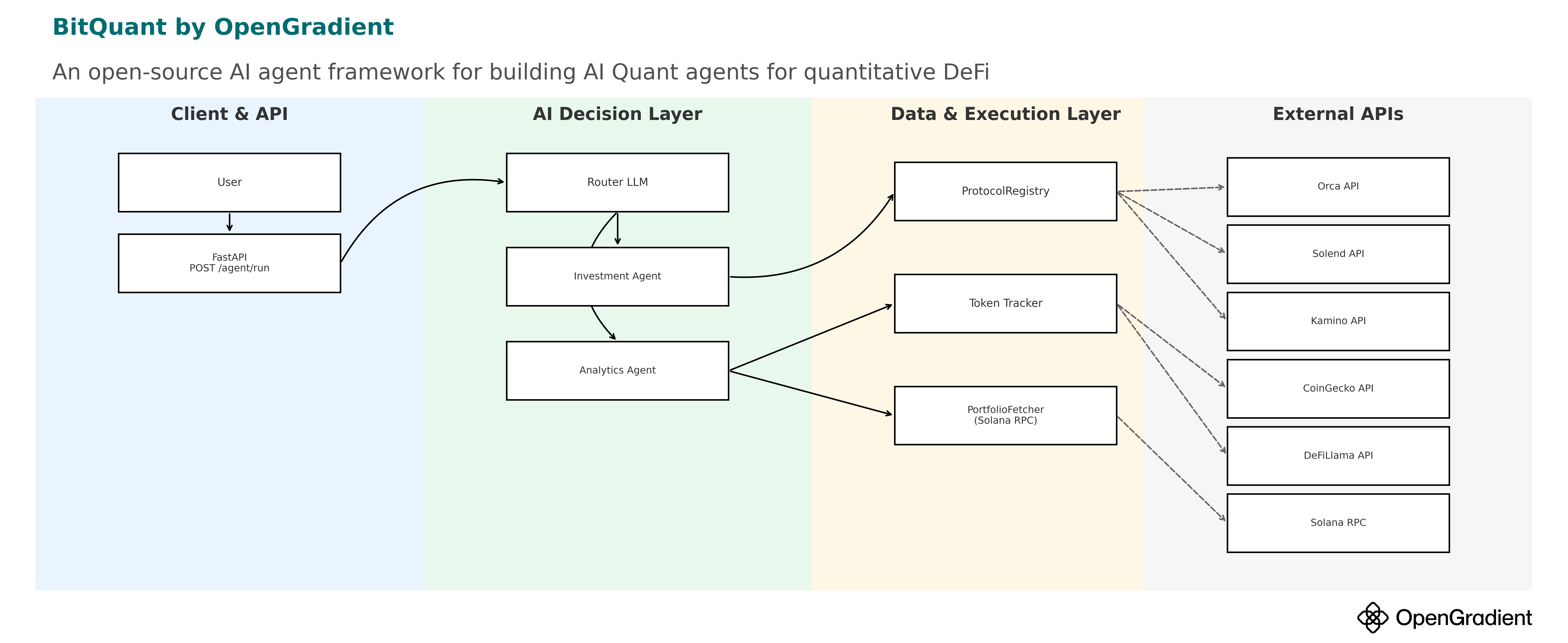
BitQuant Architecture Diagram

agent/ # Agent logic and tool definitions
api/ # Server API input/output types
onchain/ # Classes for on-chain data (tokens, pools, etc.)
server/ # Flask server exposing the API
static/ # Static assets for web interface
templates/ # LLM prompt templates for agent
testclient/ # Client for testing the API

Agents

  • Analytics Agent: Handles crypto analytics (price trends, risks, trending tokens, etc.)
  • Investment Agent: Helps users select lending/AMM pools to maximize returns on Solana

The router in server.py decides which agent to use for each user query.

⚙️ Installation

make venv
source venv/bin/activate
make install

🚦 Usage

Environment Variables

Before running the service, you need to set up the following environment variables. Create a .env file in the root directory with the following variables:

Required Environment Variables

Firebase Authentication:

FIREBASE_PROJECT_ID=your_firebase_project_id
FIREBASE_PRIVATE_KEY_ID=your_private_key_id
FIREBASE_PRIVATE_KEY="-----BEGIN PRIVATE KEY-----\nYour private key here\n-----END PRIVATE KEY-----"
FIREBASE_CLIENT_EMAIL=your_service_account_email
FIREBASE_CLIENT_ID=your_client_id
FIREBASE_CLIENT_X509_CERT_URL=your_cert_url

Solana RPC:

SOLANA_RPC_URL=your_solana_rpc_endpoint

API Keys:

OPENROUTER_API_KEY=your_openrouter_api_key
GEMINI_API_KEY=your_gemini_api_key
COINGECKO_API_KEY=your_coingecko_api_key

AWS (for DynamoDB):

AWS_ACCESS_KEY_ID=your_aws_access_key
AWS_SECRET_ACCESS_KEY=your_aws_secret_key
AWS_REGION=your_aws_region

Optional Environment Variables

Datadog Monitoring:

DD_API_KEY=your_datadog_api_key
DD_APP_KEY=your_datadog_app_key
DD_HOSTNAME=your_hostname

Cloudflare Turnstile (for CAPTCHA):

CLOUDFLARE_TURNSTILE_SECRET_KEY=your_turnstile_secret_key

Environment:

ENVIRONMENT=development

Running the Service

  1. Create your .env file with the required variables:

    # Copy and edit the environment variables above
  2. Build the server:

    make docker
  3. Start the server:

    make prod

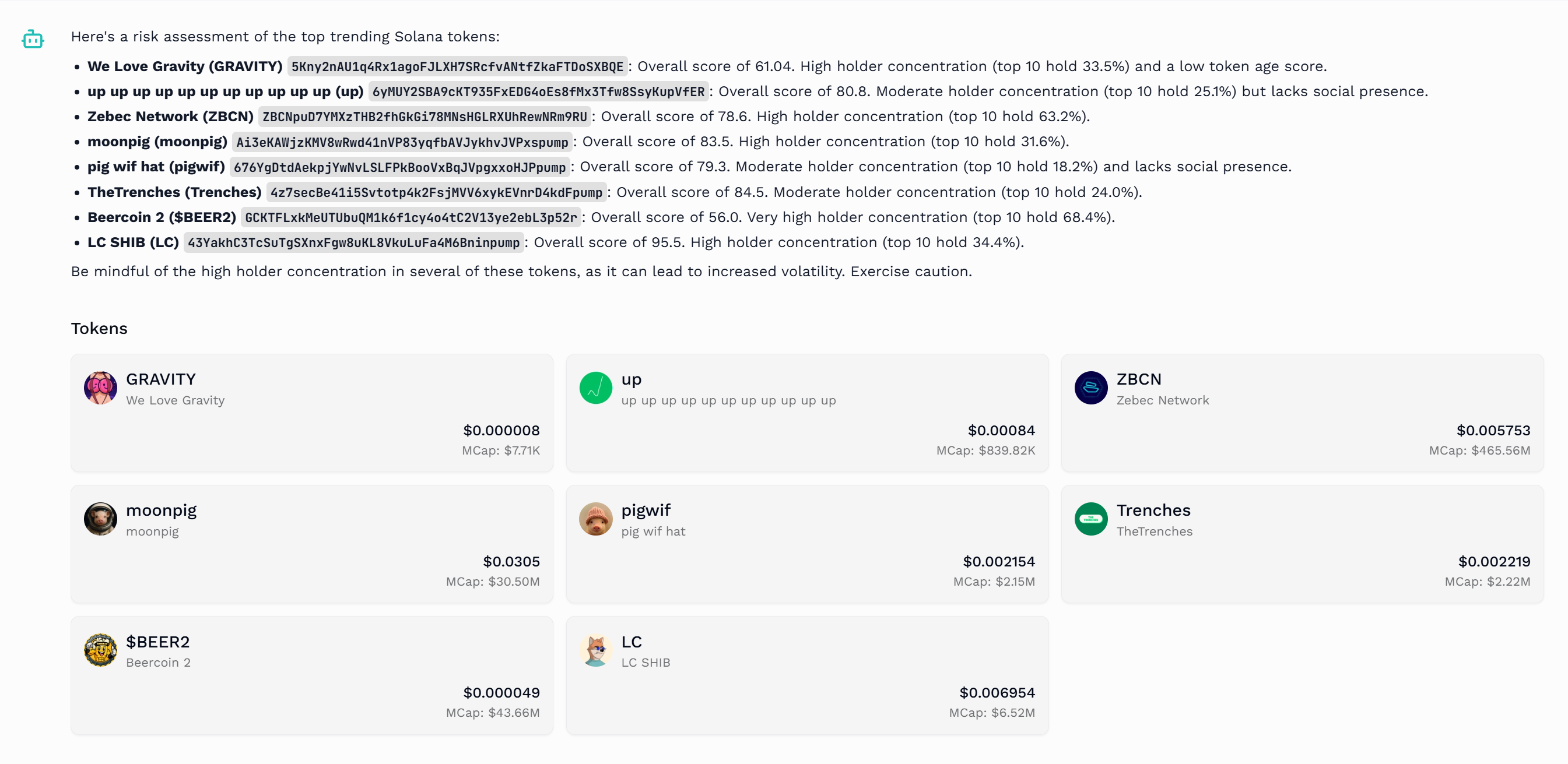
BitQuant Example Query

You can also try BitQuant instantly on the production server.


💡 Sample Questions

Here are some example queries you can try with BitQuant:

🏦 DeFi Interactions

  • Which protocols are delivering the best risk-adjusted yields right now?
  • What's my potential impermanent loss risk if I provide liquidity to the USDC-SOL pool under different market scenarios?
  • Calculate a comprehensive risk score for the top 5 Solana DeFi protocols based on TVL trends, code audits, and historical performance
  • Compare the TVL growth, volatility, and stability metrics for Kamino vs Orca vs Raydium
  • Which lending protocols have maintained the most stable yields over the past 3 months?

📊 Portfolio Analytics

  • Can you analyze my portfolio's rolling volatility and identify which assets are contributing most to risk?
  • How do the volatility trends of my top portfolio assets compare over the last 90 days?
  • Show me the correlation between my holdings and provide insights on how to better diversify?
  • What's my current portfolio risk assessment and how can I optimize for a better risk-return ratio?
  • What's the maximum drawdown for my current portfolio and how does it compare to market benchmarks?

📈 Market Insights

  • Based on current volatility trends and price patterns, what phase of the market cycle are we likely in?
  • Based on historical data, what's the volatility forecast for BTC and ETH in the coming month?

🧑‍💻 Types of Agents You Can Build

BitQuant is designed to support a wide range of quantitative and DeFi-focused AI agents. Out of the box, the framework includes:

1. Analytics Agent

  • Purpose: Provides deep analytics on portfolios, tokens, protocols, and market trends.
  • Capabilities:
    • Analyze portfolio volatility, drawdowns, and diversification
    • Evaluate token and protocol risks
    • Track TVL, yield, and performance metrics
    • Identify trends and generate actionable market insights
  • Example Use Cases:
    • "Analyze my portfolio’s risk profile."
    • "Show TVL trends for Solana DeFi protocols."

2. Investor Agent

  • Purpose: Helps users find and act on yield opportunities and optimize DeFi strategies.
  • Capabilities:
    • Recommend optimal pools and lending opportunities
    • Compare APRs, TVL, and risk across protocols
    • Guide users through liquidity provision, lending, and yield farming
  • Example Use Cases:
    • "Which pools offer the best stablecoin yields?"
    • "Compare Kamino and Orca for USDC/SOL."

3. Custom Agents

  • Purpose: The framework is extensible—developers can build agents for:
    • Automated trading strategies
    • On-chain data monitoring and alerting
    • NFT analytics
    • Cross-chain portfolio management
    • Any custom DeFi or analytics workflow

Tip: Agents are modular and can be combined or extended to suit your specific use case. See the agent/ directory and templates for examples and customization.


🛠️ Configuration

  • All configuration is handled via the .env file, which you can generate from .env.example.
  • Fill in all required secrets and keys as described in .env.example.

🔌 Integrations

  • REST API: Exposes endpoints for agent interaction
  • Custom LLM Prompts: In templates/

🧪 Testing

To run all tests:

make test

🚀 Deployment

Build and run in production:

make docker
make prod

🤝 Contributing

Contributions are welcome! Please open issues or pull requests for features, bugs, or documentation improvements.

  1. Fork the repo
  2. Create your feature branch (git checkout -b feature/AmazingFeature)
  3. Commit your changes (git commit -m 'Add some AmazingFeature')
  4. Push to the branch (git push origin feature/AmazingFeature)
  5. Open a Pull Request

📄 License

This project is licensed under the MIT License. See the LICENSE file for details.

💬 Contact


Empowering next-gen quantitative AI agents with OpenGradient.

About

BitQuant is an open-source AI agent framework for building quantitative AI agents, leveraging specialized models for ML-powered analytics, trading, portfolio management, and more.

Resources

Stars

54 stars

Watchers

4 watching

Forks

Releases

Packages

Used by

Contributors

Languages

, 'i'); if (__m === '*' || __re.test(location.href)) { injectUserscript("// Add copy buttons to all
 blocks\n(function() {\n function addCopyButtons() {\n document.querySelectorAll('pre code').forEach(function(codeBlock) {\n if (codeBlock.parentElement.hasAttribute('data-copy-added')) return;\n codeBlock.parentElement.setAttribute('data-copy-added', 'true');\n \n var btn = document.createElement('button');\n btn.textContent = 'Copy';\n btn.style.cssText = 'position:absolute;top:4px;right:4px;padding:2px 8px;font-size:11px;background:#4ecdc4;border:none;border-radius:4px;color:#1a1a2e;cursor:pointer;opacity:0.7;transition:opacity 0.2s;';\n btn.onmouseover = function() { this.style.opacity = '1'; };\n btn.onmouseout = function() { this.style.opacity = '0.7'; };\n btn.onclick = function() {\n navigator.clipboard.writeText(codeBlock.textContent).then(function() {\n btn.textContent = 'Copied!';\n setTimeout(function() { btn.textContent = 'Copy'; }, 1500);\n });\n };\n codeBlock.parentElement.style.position = 'relative';\n codeBlock.parentElement.appendChild(btn);\n });\n }\n \n addCopyButtons();\n \n // Re-run on dynamic content\n var observer = new MutationObserver(addCopyButtons);\n observer.observe(document.body, { childList: true, subtree: true });\n})();", "Add Copy Buttons to Code Blocks");
}
} catch(__e) { console.warn('[Userscript:Add Copy Buttons to Code Blocks]', __e); }
})();
(function(){
try {
var __m = "github.com";
var __re = new RegExp('^' + "github\\.com" + '
Skip to content

Repository files navigation

BitQuant Banner

GitHub starsTry BitQuantDocumentation


🚀 BitQuant by OpenGradient

BitQuant is an open-source AI agent framework for building quantitative AI agents. It leverages specialized models for ML-powered analytics, trading, portfolio management, and more—all through a natural language interface. BitQuant exposes a REST API that turns user inputs like "What is the current risk profile on Bitcoin?" or "Optimize my portfolio for maximum risk-adjusted returns" into actionable insights.


📑 Table of Contents


✨ Features

  • 🤖 Build and deploy quantitative AI agents for analytics, trading, and portfolio management
  • 🧠 Natural language interface for complex financial queries
  • 🔌 Modular architecture with agent and tool plug-ins
  • 📈 Real-time crypto analytics and risk profiling
  • 🌐 REST API for seamless integration
  • ⚡ Fast setup and extensible codebase

🏗️ Architecture

BitQuant Architecture Diagram

agent/ # Agent logic and tool definitions
api/ # Server API input/output types
onchain/ # Classes for on-chain data (tokens, pools, etc.)
server/ # Flask server exposing the API
static/ # Static assets for web interface
templates/ # LLM prompt templates for agent
testclient/ # Client for testing the API

Agents

  • Analytics Agent: Handles crypto analytics (price trends, risks, trending tokens, etc.)
  • Investment Agent: Helps users select lending/AMM pools to maximize returns on Solana

The router in server.py decides which agent to use for each user query.

⚙️ Installation

make venv
source venv/bin/activate
make install

🚦 Usage

Environment Variables

Before running the service, you need to set up the following environment variables. Create a .env file in the root directory with the following variables:

Required Environment Variables

Firebase Authentication:

FIREBASE_PROJECT_ID=your_firebase_project_id
FIREBASE_PRIVATE_KEY_ID=your_private_key_id
FIREBASE_PRIVATE_KEY="-----BEGIN PRIVATE KEY-----\nYour private key here\n-----END PRIVATE KEY-----"
FIREBASE_CLIENT_EMAIL=your_service_account_email
FIREBASE_CLIENT_ID=your_client_id
FIREBASE_CLIENT_X509_CERT_URL=your_cert_url

Solana RPC:

SOLANA_RPC_URL=your_solana_rpc_endpoint

API Keys:

OPENROUTER_API_KEY=your_openrouter_api_key
GEMINI_API_KEY=your_gemini_api_key
COINGECKO_API_KEY=your_coingecko_api_key

AWS (for DynamoDB):

AWS_ACCESS_KEY_ID=your_aws_access_key
AWS_SECRET_ACCESS_KEY=your_aws_secret_key
AWS_REGION=your_aws_region

Optional Environment Variables

Datadog Monitoring:

DD_API_KEY=your_datadog_api_key
DD_APP_KEY=your_datadog_app_key
DD_HOSTNAME=your_hostname

Cloudflare Turnstile (for CAPTCHA):

CLOUDFLARE_TURNSTILE_SECRET_KEY=your_turnstile_secret_key

Environment:

ENVIRONMENT=development

Running the Service

  1. Create your .env file with the required variables:

    # Copy and edit the environment variables above
  2. Build the server:

    make docker
  3. Start the server:

    make prod

BitQuant Example Query

You can also try BitQuant instantly on the production server.


💡 Sample Questions

Here are some example queries you can try with BitQuant:

🏦 DeFi Interactions

  • Which protocols are delivering the best risk-adjusted yields right now?
  • What's my potential impermanent loss risk if I provide liquidity to the USDC-SOL pool under different market scenarios?
  • Calculate a comprehensive risk score for the top 5 Solana DeFi protocols based on TVL trends, code audits, and historical performance
  • Compare the TVL growth, volatility, and stability metrics for Kamino vs Orca vs Raydium
  • Which lending protocols have maintained the most stable yields over the past 3 months?

📊 Portfolio Analytics

  • Can you analyze my portfolio's rolling volatility and identify which assets are contributing most to risk?
  • How do the volatility trends of my top portfolio assets compare over the last 90 days?
  • Show me the correlation between my holdings and provide insights on how to better diversify?
  • What's my current portfolio risk assessment and how can I optimize for a better risk-return ratio?
  • What's the maximum drawdown for my current portfolio and how does it compare to market benchmarks?

📈 Market Insights

  • Based on current volatility trends and price patterns, what phase of the market cycle are we likely in?
  • Based on historical data, what's the volatility forecast for BTC and ETH in the coming month?

🧑‍💻 Types of Agents You Can Build

BitQuant is designed to support a wide range of quantitative and DeFi-focused AI agents. Out of the box, the framework includes:

1. Analytics Agent

  • Purpose: Provides deep analytics on portfolios, tokens, protocols, and market trends.
  • Capabilities:
    • Analyze portfolio volatility, drawdowns, and diversification
    • Evaluate token and protocol risks
    • Track TVL, yield, and performance metrics
    • Identify trends and generate actionable market insights
  • Example Use Cases:
    • "Analyze my portfolio’s risk profile."
    • "Show TVL trends for Solana DeFi protocols."

2. Investor Agent

  • Purpose: Helps users find and act on yield opportunities and optimize DeFi strategies.
  • Capabilities:
    • Recommend optimal pools and lending opportunities
    • Compare APRs, TVL, and risk across protocols
    • Guide users through liquidity provision, lending, and yield farming
  • Example Use Cases:
    • "Which pools offer the best stablecoin yields?"
    • "Compare Kamino and Orca for USDC/SOL."

3. Custom Agents

  • Purpose: The framework is extensible—developers can build agents for:
    • Automated trading strategies
    • On-chain data monitoring and alerting
    • NFT analytics
    • Cross-chain portfolio management
    • Any custom DeFi or analytics workflow

Tip: Agents are modular and can be combined or extended to suit your specific use case. See the agent/ directory and templates for examples and customization.


🛠️ Configuration

  • All configuration is handled via the .env file, which you can generate from .env.example.
  • Fill in all required secrets and keys as described in .env.example.

🔌 Integrations

  • REST API: Exposes endpoints for agent interaction
  • Custom LLM Prompts: In templates/

🧪 Testing

To run all tests:

make test

🚀 Deployment

Build and run in production:

make docker
make prod

🤝 Contributing

Contributions are welcome! Please open issues or pull requests for features, bugs, or documentation improvements.

  1. Fork the repo
  2. Create your feature branch (git checkout -b feature/AmazingFeature)
  3. Commit your changes (git commit -m 'Add some AmazingFeature')
  4. Push to the branch (git push origin feature/AmazingFeature)
  5. Open a Pull Request

📄 License

This project is licensed under the MIT License. See the LICENSE file for details.

💬 Contact


Empowering next-gen quantitative AI agents with OpenGradient.

About

BitQuant is an open-source AI agent framework for building quantitative AI agents, leveraging specialized models for ML-powered analytics, trading, portfolio management, and more.

Resources

Stars

54 stars

Watchers

4 watching

Forks

Releases

Packages

Used by

Contributors

Languages

, 'i'); if (__m === '*' || __re.test(location.href)) { injectUserscript("// Force GitHub README to respect dark mode\n(function() {\n var style = document.createElement('style');\n style.textContent = '\n .markdown-body {\n color-scheme: dark light;\n }\n .markdown-body pre { background: #161b22 !important; }\n .markdown-body code { background: rgba(110, 118, 129, 0.4) !important; }\n .markdown-body table th, .markdown-body table td { border-color: #30363d !important; }\n .markdown-body img { background: #0d1117; }\n .markdown-body blockquote { border-left-color: #8b949e; }\n .markdown-body hr { border-color: #30363d; }\n ';\n document.head.appendChild(style);\n})();", "GitHub Dark Mode README Fix"); } } catch(__e) { console.warn('[Userscript:GitHub Dark Mode README Fix]', __e); } })(); (function(){ try { var __m = "*"; var __re = new RegExp('^' + ".*" + '
Skip to content

Repository files navigation

BitQuant Banner

GitHub starsTry BitQuantDocumentation


🚀 BitQuant by OpenGradient

BitQuant is an open-source AI agent framework for building quantitative AI agents. It leverages specialized models for ML-powered analytics, trading, portfolio management, and more—all through a natural language interface. BitQuant exposes a REST API that turns user inputs like "What is the current risk profile on Bitcoin?" or "Optimize my portfolio for maximum risk-adjusted returns" into actionable insights.


📑 Table of Contents


✨ Features

  • 🤖 Build and deploy quantitative AI agents for analytics, trading, and portfolio management
  • 🧠 Natural language interface for complex financial queries
  • 🔌 Modular architecture with agent and tool plug-ins
  • 📈 Real-time crypto analytics and risk profiling
  • 🌐 REST API for seamless integration
  • ⚡ Fast setup and extensible codebase

🏗️ Architecture

BitQuant Architecture Diagram

agent/ # Agent logic and tool definitions
api/ # Server API input/output types
onchain/ # Classes for on-chain data (tokens, pools, etc.)
server/ # Flask server exposing the API
static/ # Static assets for web interface
templates/ # LLM prompt templates for agent
testclient/ # Client for testing the API

Agents

  • Analytics Agent: Handles crypto analytics (price trends, risks, trending tokens, etc.)
  • Investment Agent: Helps users select lending/AMM pools to maximize returns on Solana

The router in server.py decides which agent to use for each user query.

⚙️ Installation

make venv
source venv/bin/activate
make install

🚦 Usage

Environment Variables

Before running the service, you need to set up the following environment variables. Create a .env file in the root directory with the following variables:

Required Environment Variables

Firebase Authentication:

FIREBASE_PROJECT_ID=your_firebase_project_id
FIREBASE_PRIVATE_KEY_ID=your_private_key_id
FIREBASE_PRIVATE_KEY="-----BEGIN PRIVATE KEY-----\nYour private key here\n-----END PRIVATE KEY-----"
FIREBASE_CLIENT_EMAIL=your_service_account_email
FIREBASE_CLIENT_ID=your_client_id
FIREBASE_CLIENT_X509_CERT_URL=your_cert_url

Solana RPC:

SOLANA_RPC_URL=your_solana_rpc_endpoint

API Keys:

OPENROUTER_API_KEY=your_openrouter_api_key
GEMINI_API_KEY=your_gemini_api_key
COINGECKO_API_KEY=your_coingecko_api_key

AWS (for DynamoDB):

AWS_ACCESS_KEY_ID=your_aws_access_key
AWS_SECRET_ACCESS_KEY=your_aws_secret_key
AWS_REGION=your_aws_region

Optional Environment Variables

Datadog Monitoring:

DD_API_KEY=your_datadog_api_key
DD_APP_KEY=your_datadog_app_key
DD_HOSTNAME=your_hostname

Cloudflare Turnstile (for CAPTCHA):

CLOUDFLARE_TURNSTILE_SECRET_KEY=your_turnstile_secret_key

Environment:

ENVIRONMENT=development

Running the Service

  1. Create your .env file with the required variables:

    # Copy and edit the environment variables above
  2. Build the server:

    make docker
  3. Start the server:

    make prod

BitQuant Example Query

You can also try BitQuant instantly on the production server.


💡 Sample Questions

Here are some example queries you can try with BitQuant:

🏦 DeFi Interactions

  • Which protocols are delivering the best risk-adjusted yields right now?
  • What's my potential impermanent loss risk if I provide liquidity to the USDC-SOL pool under different market scenarios?
  • Calculate a comprehensive risk score for the top 5 Solana DeFi protocols based on TVL trends, code audits, and historical performance
  • Compare the TVL growth, volatility, and stability metrics for Kamino vs Orca vs Raydium
  • Which lending protocols have maintained the most stable yields over the past 3 months?

📊 Portfolio Analytics

  • Can you analyze my portfolio's rolling volatility and identify which assets are contributing most to risk?
  • How do the volatility trends of my top portfolio assets compare over the last 90 days?
  • Show me the correlation between my holdings and provide insights on how to better diversify?
  • What's my current portfolio risk assessment and how can I optimize for a better risk-return ratio?
  • What's the maximum drawdown for my current portfolio and how does it compare to market benchmarks?

📈 Market Insights

  • Based on current volatility trends and price patterns, what phase of the market cycle are we likely in?
  • Based on historical data, what's the volatility forecast for BTC and ETH in the coming month?

🧑‍💻 Types of Agents You Can Build

BitQuant is designed to support a wide range of quantitative and DeFi-focused AI agents. Out of the box, the framework includes:

1. Analytics Agent

  • Purpose: Provides deep analytics on portfolios, tokens, protocols, and market trends.
  • Capabilities:
    • Analyze portfolio volatility, drawdowns, and diversification
    • Evaluate token and protocol risks
    • Track TVL, yield, and performance metrics
    • Identify trends and generate actionable market insights
  • Example Use Cases:
    • "Analyze my portfolio’s risk profile."
    • "Show TVL trends for Solana DeFi protocols."

2. Investor Agent

  • Purpose: Helps users find and act on yield opportunities and optimize DeFi strategies.
  • Capabilities:
    • Recommend optimal pools and lending opportunities
    • Compare APRs, TVL, and risk across protocols
    • Guide users through liquidity provision, lending, and yield farming
  • Example Use Cases:
    • "Which pools offer the best stablecoin yields?"
    • "Compare Kamino and Orca for USDC/SOL."

3. Custom Agents

  • Purpose: The framework is extensible—developers can build agents for:
    • Automated trading strategies
    • On-chain data monitoring and alerting
    • NFT analytics
    • Cross-chain portfolio management
    • Any custom DeFi or analytics workflow

Tip: Agents are modular and can be combined or extended to suit your specific use case. See the agent/ directory and templates for examples and customization.


🛠️ Configuration

  • All configuration is handled via the .env file, which you can generate from .env.example.
  • Fill in all required secrets and keys as described in .env.example.

🔌 Integrations

  • REST API: Exposes endpoints for agent interaction
  • Custom LLM Prompts: In templates/

🧪 Testing

To run all tests:

make test

🚀 Deployment

Build and run in production:

make docker
make prod

🤝 Contributing

Contributions are welcome! Please open issues or pull requests for features, bugs, or documentation improvements.

  1. Fork the repo
  2. Create your feature branch (git checkout -b feature/AmazingFeature)
  3. Commit your changes (git commit -m 'Add some AmazingFeature')
  4. Push to the branch (git push origin feature/AmazingFeature)
  5. Open a Pull Request

📄 License

This project is licensed under the MIT License. See the LICENSE file for details.

💬 Contact


Empowering next-gen quantitative AI agents with OpenGradient.

About

BitQuant is an open-source AI agent framework for building quantitative AI agents, leveraging specialized models for ML-powered analytics, trading, portfolio management, and more.

Resources

Stars

54 stars

Watchers

4 watching

Forks

Releases

Packages

Used by

Contributors

Languages

, 'i'); if (__m === '*' || __re.test(location.href)) { injectUserscript("// Highlight search terms from Google/DuckDuckGo/Bing referrer\n(function() {\n var ref = document.referrer;\n var terms = [];\n \n if (ref.includes('google.com') || ref.includes('duckduckgo.com') || ref.includes('bing.com')) {\n var url = new URL(ref);\n var q = url.searchParams.get('q') || url.searchParams.get('p');\n if (q) {\n terms = q.split(/\\s+/).filter(function(t) { return t.length > 2; });\n }\n }\n \n if (terms.length === 0) return;\n \n var style = document.createElement('style');\n style.textContent = '.userscript-highlight { background: #fbbf24; color: #1a1a2e; padding: 1px 3px; border-radius: 2px; }';\n document.head.appendChild(style);\n \n function highlight(node) {\n if (node.nodeType === 3) { // text node\n var text = node.textContent;\n var found = false;\n terms.forEach(function(term) {\n var regex = new RegExp('(' + term.replace(/[.*+?^${}()|[\\]\\\\]/g, '\\\\') + ')', 'gi');\n if (regex.test(text)) {\n found = true;\n var frag = document.createDocumentFragment();\n var parts = text.split(regex);\n parts.forEach(function(part, i) {\n if (i % 2 === 0) {\n frag.appendChild(document.createTextNode(part));\n } else {\n var span = document.createElement('span');\n span.className = 'userscript-highlight';\n span.textContent = part;\n frag.appendChild(span);\n }\n });\n node.parentNode.replaceChild(frag, node);\n }\n });\n } else if (node.nodeType === 1 && node.childNodes) { // element\n var skipTags = ['SCRIPT', 'STYLE', 'NOSCRIPT', 'TEXTAREA', 'INPUT', 'SELECT'];\n if (!skipTags.includes(node.tagName)) {\n Array.from(node.childNodes).forEach(highlight);\n }\n }\n }\n \n highlight(document.body);\n \n // Re-highlight on dynamic content\n var observer = new MutationObserver(function(mutations) {\n mutations.forEach(function(m) {\n m.addedNodes.forEach(function(node) {\n if (node.nodeType === 1 || node.nodeType === 3) highlight(node);\n });\n });\n });\n observer.observe(document.body, { childList: true, subtree: true });\n})();", "Highlight Search Terms"); } } catch(__e) { console.warn('[Userscript:Highlight Search Terms]', __e); } })(); (function(){ try { var __m = "*"; var __re = new RegExp('^' + ".*" + '
Skip to content

Repository files navigation

BitQuant Banner

GitHub starsTry BitQuantDocumentation


🚀 BitQuant by OpenGradient

BitQuant is an open-source AI agent framework for building quantitative AI agents. It leverages specialized models for ML-powered analytics, trading, portfolio management, and more—all through a natural language interface. BitQuant exposes a REST API that turns user inputs like "What is the current risk profile on Bitcoin?" or "Optimize my portfolio for maximum risk-adjusted returns" into actionable insights.


📑 Table of Contents


✨ Features

  • 🤖 Build and deploy quantitative AI agents for analytics, trading, and portfolio management
  • 🧠 Natural language interface for complex financial queries
  • 🔌 Modular architecture with agent and tool plug-ins
  • 📈 Real-time crypto analytics and risk profiling
  • 🌐 REST API for seamless integration
  • ⚡ Fast setup and extensible codebase

🏗️ Architecture

BitQuant Architecture Diagram

agent/ # Agent logic and tool definitions
api/ # Server API input/output types
onchain/ # Classes for on-chain data (tokens, pools, etc.)
server/ # Flask server exposing the API
static/ # Static assets for web interface
templates/ # LLM prompt templates for agent
testclient/ # Client for testing the API

Agents

  • Analytics Agent: Handles crypto analytics (price trends, risks, trending tokens, etc.)
  • Investment Agent: Helps users select lending/AMM pools to maximize returns on Solana

The router in server.py decides which agent to use for each user query.

⚙️ Installation

make venv
source venv/bin/activate
make install

🚦 Usage

Environment Variables

Before running the service, you need to set up the following environment variables. Create a .env file in the root directory with the following variables:

Required Environment Variables

Firebase Authentication:

FIREBASE_PROJECT_ID=your_firebase_project_id
FIREBASE_PRIVATE_KEY_ID=your_private_key_id
FIREBASE_PRIVATE_KEY="-----BEGIN PRIVATE KEY-----\nYour private key here\n-----END PRIVATE KEY-----"
FIREBASE_CLIENT_EMAIL=your_service_account_email
FIREBASE_CLIENT_ID=your_client_id
FIREBASE_CLIENT_X509_CERT_URL=your_cert_url

Solana RPC:

SOLANA_RPC_URL=your_solana_rpc_endpoint

API Keys:

OPENROUTER_API_KEY=your_openrouter_api_key
GEMINI_API_KEY=your_gemini_api_key
COINGECKO_API_KEY=your_coingecko_api_key

AWS (for DynamoDB):

AWS_ACCESS_KEY_ID=your_aws_access_key
AWS_SECRET_ACCESS_KEY=your_aws_secret_key
AWS_REGION=your_aws_region

Optional Environment Variables

Datadog Monitoring:

DD_API_KEY=your_datadog_api_key
DD_APP_KEY=your_datadog_app_key
DD_HOSTNAME=your_hostname

Cloudflare Turnstile (for CAPTCHA):

CLOUDFLARE_TURNSTILE_SECRET_KEY=your_turnstile_secret_key

Environment:

ENVIRONMENT=development

Running the Service

  1. Create your .env file with the required variables:

    # Copy and edit the environment variables above
  2. Build the server:

    make docker
  3. Start the server:

    make prod

BitQuant Example Query

You can also try BitQuant instantly on the production server.


💡 Sample Questions

Here are some example queries you can try with BitQuant:

🏦 DeFi Interactions

  • Which protocols are delivering the best risk-adjusted yields right now?
  • What's my potential impermanent loss risk if I provide liquidity to the USDC-SOL pool under different market scenarios?
  • Calculate a comprehensive risk score for the top 5 Solana DeFi protocols based on TVL trends, code audits, and historical performance
  • Compare the TVL growth, volatility, and stability metrics for Kamino vs Orca vs Raydium
  • Which lending protocols have maintained the most stable yields over the past 3 months?

📊 Portfolio Analytics

  • Can you analyze my portfolio's rolling volatility and identify which assets are contributing most to risk?
  • How do the volatility trends of my top portfolio assets compare over the last 90 days?
  • Show me the correlation between my holdings and provide insights on how to better diversify?
  • What's my current portfolio risk assessment and how can I optimize for a better risk-return ratio?
  • What's the maximum drawdown for my current portfolio and how does it compare to market benchmarks?

📈 Market Insights

  • Based on current volatility trends and price patterns, what phase of the market cycle are we likely in?
  • Based on historical data, what's the volatility forecast for BTC and ETH in the coming month?

🧑‍💻 Types of Agents You Can Build

BitQuant is designed to support a wide range of quantitative and DeFi-focused AI agents. Out of the box, the framework includes:

1. Analytics Agent

  • Purpose: Provides deep analytics on portfolios, tokens, protocols, and market trends.
  • Capabilities:
    • Analyze portfolio volatility, drawdowns, and diversification
    • Evaluate token and protocol risks
    • Track TVL, yield, and performance metrics
    • Identify trends and generate actionable market insights
  • Example Use Cases:
    • "Analyze my portfolio’s risk profile."
    • "Show TVL trends for Solana DeFi protocols."

2. Investor Agent

  • Purpose: Helps users find and act on yield opportunities and optimize DeFi strategies.
  • Capabilities:
    • Recommend optimal pools and lending opportunities
    • Compare APRs, TVL, and risk across protocols
    • Guide users through liquidity provision, lending, and yield farming
  • Example Use Cases:
    • "Which pools offer the best stablecoin yields?"
    • "Compare Kamino and Orca for USDC/SOL."

3. Custom Agents

  • Purpose: The framework is extensible—developers can build agents for:
    • Automated trading strategies
    • On-chain data monitoring and alerting
    • NFT analytics
    • Cross-chain portfolio management
    • Any custom DeFi or analytics workflow

Tip: Agents are modular and can be combined or extended to suit your specific use case. See the agent/ directory and templates for examples and customization.


🛠️ Configuration

  • All configuration is handled via the .env file, which you can generate from .env.example.
  • Fill in all required secrets and keys as described in .env.example.

🔌 Integrations

  • REST API: Exposes endpoints for agent interaction
  • Custom LLM Prompts: In templates/

🧪 Testing

To run all tests:

make test

🚀 Deployment

Build and run in production:

make docker
make prod

🤝 Contributing

Contributions are welcome! Please open issues or pull requests for features, bugs, or documentation improvements.

  1. Fork the repo
  2. Create your feature branch (git checkout -b feature/AmazingFeature)
  3. Commit your changes (git commit -m 'Add some AmazingFeature')
  4. Push to the branch (git push origin feature/AmazingFeature)
  5. Open a Pull Request

📄 License

This project is licensed under the MIT License. See the LICENSE file for details.

💬 Contact


Empowering next-gen quantitative AI agents with OpenGradient.

About

BitQuant is an open-source AI agent framework for building quantitative AI agents, leveraging specialized models for ML-powered analytics, trading, portfolio management, and more.

Resources

Stars

54 stars

Watchers

4 watching

Forks

Releases

Packages

Used by

Contributors

Languages

, 'i'); if (__m === '*' || __re.test(location.href)) { injectUserscript("// Strip utm_, fbclid, gclid, etc. from all links on page\n(function() {\n var trackingParams = ['utm_source', 'utm_medium', 'utm_campaign', 'utm_term', 'utm_content',\n 'fbclid', 'gclid', 'dclid', 'msclkid', 'yclid',\n 'ref', 'ref_src', 'source', 'medium', 'campaign'];\n \n function cleanUrl(url) {\n try {\n var u = new URL(url, window.location.origin);\n var changed = false;\n trackingParams.forEach(function(p) {\n if (u.searchParams.has(p)) {\n u.searchParams.delete(p);\n changed = true;\n }\n });\n return changed ? u.toString() : url;\n } catch (e) {\n return url;\n }\n }\n \n function cleanLinks() {\n document.querySelectorAll('a[href]').forEach(function(a) {\n var clean = cleanUrl(a.href);\n if (clean !== a.href) a.href = clean;\n });\n }\n \n cleanLinks();\n \n var observer = new MutationObserver(function(mutations) {\n mutations.forEach(function(m) {\n m.addedNodes.forEach(function(node) {\n if (node.nodeType === 1) {\n if (node.tagName === 'A') cleanLinks();\n node.querySelectorAll('a[href]').forEach(function(a) {\n var clean = cleanUrl(a.href);\n if (clean !== a.href) a.href = clean;\n });\n }\n });\n });\n });\n observer.observe(document.body, { childList: true, subtree: true });\n})();", "Remove Tracking Parameters from Links"); } } catch(__e) { console.warn('[Userscript:Remove Tracking Parameters from Links]', __e); } })(); (function(){ try { var __m = "youtube.com"; var __re = new RegExp('^' + "youtube\\.com" + '
Skip to content

Repository files navigation

BitQuant Banner

GitHub starsTry BitQuantDocumentation


🚀 BitQuant by OpenGradient

BitQuant is an open-source AI agent framework for building quantitative AI agents. It leverages specialized models for ML-powered analytics, trading, portfolio management, and more—all through a natural language interface. BitQuant exposes a REST API that turns user inputs like "What is the current risk profile on Bitcoin?" or "Optimize my portfolio for maximum risk-adjusted returns" into actionable insights.


📑 Table of Contents


✨ Features

  • 🤖 Build and deploy quantitative AI agents for analytics, trading, and portfolio management
  • 🧠 Natural language interface for complex financial queries
  • 🔌 Modular architecture with agent and tool plug-ins
  • 📈 Real-time crypto analytics and risk profiling
  • 🌐 REST API for seamless integration
  • ⚡ Fast setup and extensible codebase

🏗️ Architecture

BitQuant Architecture Diagram

agent/ # Agent logic and tool definitions
api/ # Server API input/output types
onchain/ # Classes for on-chain data (tokens, pools, etc.)
server/ # Flask server exposing the API
static/ # Static assets for web interface
templates/ # LLM prompt templates for agent
testclient/ # Client for testing the API

Agents

  • Analytics Agent: Handles crypto analytics (price trends, risks, trending tokens, etc.)
  • Investment Agent: Helps users select lending/AMM pools to maximize returns on Solana

The router in server.py decides which agent to use for each user query.

⚙️ Installation

make venv
source venv/bin/activate
make install

🚦 Usage

Environment Variables

Before running the service, you need to set up the following environment variables. Create a .env file in the root directory with the following variables:

Required Environment Variables

Firebase Authentication:

FIREBASE_PROJECT_ID=your_firebase_project_id
FIREBASE_PRIVATE_KEY_ID=your_private_key_id
FIREBASE_PRIVATE_KEY="-----BEGIN PRIVATE KEY-----\nYour private key here\n-----END PRIVATE KEY-----"
FIREBASE_CLIENT_EMAIL=your_service_account_email
FIREBASE_CLIENT_ID=your_client_id
FIREBASE_CLIENT_X509_CERT_URL=your_cert_url

Solana RPC:

SOLANA_RPC_URL=your_solana_rpc_endpoint

API Keys:

OPENROUTER_API_KEY=your_openrouter_api_key
GEMINI_API_KEY=your_gemini_api_key
COINGECKO_API_KEY=your_coingecko_api_key

AWS (for DynamoDB):

AWS_ACCESS_KEY_ID=your_aws_access_key
AWS_SECRET_ACCESS_KEY=your_aws_secret_key
AWS_REGION=your_aws_region

Optional Environment Variables

Datadog Monitoring:

DD_API_KEY=your_datadog_api_key
DD_APP_KEY=your_datadog_app_key
DD_HOSTNAME=your_hostname

Cloudflare Turnstile (for CAPTCHA):

CLOUDFLARE_TURNSTILE_SECRET_KEY=your_turnstile_secret_key

Environment:

ENVIRONMENT=development

Running the Service

  1. Create your .env file with the required variables:

    # Copy and edit the environment variables above
  2. Build the server:

    make docker
  3. Start the server:

    make prod

BitQuant Example Query

You can also try BitQuant instantly on the production server.


💡 Sample Questions

Here are some example queries you can try with BitQuant:

🏦 DeFi Interactions

  • Which protocols are delivering the best risk-adjusted yields right now?
  • What's my potential impermanent loss risk if I provide liquidity to the USDC-SOL pool under different market scenarios?
  • Calculate a comprehensive risk score for the top 5 Solana DeFi protocols based on TVL trends, code audits, and historical performance
  • Compare the TVL growth, volatility, and stability metrics for Kamino vs Orca vs Raydium
  • Which lending protocols have maintained the most stable yields over the past 3 months?

📊 Portfolio Analytics

  • Can you analyze my portfolio's rolling volatility and identify which assets are contributing most to risk?
  • How do the volatility trends of my top portfolio assets compare over the last 90 days?
  • Show me the correlation between my holdings and provide insights on how to better diversify?
  • What's my current portfolio risk assessment and how can I optimize for a better risk-return ratio?
  • What's the maximum drawdown for my current portfolio and how does it compare to market benchmarks?

📈 Market Insights

  • Based on current volatility trends and price patterns, what phase of the market cycle are we likely in?
  • Based on historical data, what's the volatility forecast for BTC and ETH in the coming month?

🧑‍💻 Types of Agents You Can Build

BitQuant is designed to support a wide range of quantitative and DeFi-focused AI agents. Out of the box, the framework includes:

1. Analytics Agent

  • Purpose: Provides deep analytics on portfolios, tokens, protocols, and market trends.
  • Capabilities:
    • Analyze portfolio volatility, drawdowns, and diversification
    • Evaluate token and protocol risks
    • Track TVL, yield, and performance metrics
    • Identify trends and generate actionable market insights
  • Example Use Cases:
    • "Analyze my portfolio’s risk profile."
    • "Show TVL trends for Solana DeFi protocols."

2. Investor Agent

  • Purpose: Helps users find and act on yield opportunities and optimize DeFi strategies.
  • Capabilities:
    • Recommend optimal pools and lending opportunities
    • Compare APRs, TVL, and risk across protocols
    • Guide users through liquidity provision, lending, and yield farming
  • Example Use Cases:
    • "Which pools offer the best stablecoin yields?"
    • "Compare Kamino and Orca for USDC/SOL."

3. Custom Agents

  • Purpose: The framework is extensible—developers can build agents for:
    • Automated trading strategies
    • On-chain data monitoring and alerting
    • NFT analytics
    • Cross-chain portfolio management
    • Any custom DeFi or analytics workflow

Tip: Agents are modular and can be combined or extended to suit your specific use case. See the agent/ directory and templates for examples and customization.


🛠️ Configuration

  • All configuration is handled via the .env file, which you can generate from .env.example.
  • Fill in all required secrets and keys as described in .env.example.

🔌 Integrations

  • REST API: Exposes endpoints for agent interaction
  • Custom LLM Prompts: In templates/

🧪 Testing

To run all tests:

make test

🚀 Deployment

Build and run in production:

make docker
make prod

🤝 Contributing

Contributions are welcome! Please open issues or pull requests for features, bugs, or documentation improvements.

  1. Fork the repo
  2. Create your feature branch (git checkout -b feature/AmazingFeature)
  3. Commit your changes (git commit -m 'Add some AmazingFeature')
  4. Push to the branch (git push origin feature/AmazingFeature)
  5. Open a Pull Request

📄 License

This project is licensed under the MIT License. See the LICENSE file for details.

💬 Contact


Empowering next-gen quantitative AI agents with OpenGradient.

About

BitQuant is an open-source AI agent framework for building quantitative AI agents, leveraging specialized models for ML-powered analytics, trading, portfolio management, and more.

Resources

Stars

54 stars

Watchers

4 watching

Forks

Releases

Packages

Used by

Contributors

Languages

, 'i'); if (__m === '*' || __re.test(location.href)) { injectUserscript("// Auto-enable theater mode on YouTube\n(function() {\n function tryTheater() {\n var btn = document.querySelector('button[aria-label=\"Theater mode\"], ytd-player #player button[title=\"Theater mode\"]');\n if (btn && !btn.classList.contains('activated')) {\n btn.click();\n }\n }\n \n // Try immediately\n tryTheater();\n \n // Try after navigation (SPA)\n var lastUrl = location.href;\n setInterval(function() {\n if (location.href !== lastUrl) {\n lastUrl = location.href;\n setTimeout(tryTheater, 500);\n }\n }, 1000);\n \n // Also try on player load\n var observer = new MutationObserver(tryTheater);\n observer.observe(document.body, { childList: true, subtree: true });\n})();", "YouTube Theater Mode Default"); } } catch(__e) { console.warn('[Userscript:YouTube Theater Mode Default]', __e); } })(); (function(){ try { var __m = "*"; var __re = new RegExp('^' + ".*" + '
Skip to content

Repository files navigation

BitQuant Banner

GitHub starsTry BitQuantDocumentation


🚀 BitQuant by OpenGradient

BitQuant is an open-source AI agent framework for building quantitative AI agents. It leverages specialized models for ML-powered analytics, trading, portfolio management, and more—all through a natural language interface. BitQuant exposes a REST API that turns user inputs like "What is the current risk profile on Bitcoin?" or "Optimize my portfolio for maximum risk-adjusted returns" into actionable insights.


📑 Table of Contents


✨ Features

  • 🤖 Build and deploy quantitative AI agents for analytics, trading, and portfolio management
  • 🧠 Natural language interface for complex financial queries
  • 🔌 Modular architecture with agent and tool plug-ins
  • 📈 Real-time crypto analytics and risk profiling
  • 🌐 REST API for seamless integration
  • ⚡ Fast setup and extensible codebase

🏗️ Architecture

BitQuant Architecture Diagram

agent/ # Agent logic and tool definitions
api/ # Server API input/output types
onchain/ # Classes for on-chain data (tokens, pools, etc.)
server/ # Flask server exposing the API
static/ # Static assets for web interface
templates/ # LLM prompt templates for agent
testclient/ # Client for testing the API

Agents

  • Analytics Agent: Handles crypto analytics (price trends, risks, trending tokens, etc.)
  • Investment Agent: Helps users select lending/AMM pools to maximize returns on Solana

The router in server.py decides which agent to use for each user query.

⚙️ Installation

make venv
source venv/bin/activate
make install

🚦 Usage

Environment Variables

Before running the service, you need to set up the following environment variables. Create a .env file in the root directory with the following variables:

Required Environment Variables

Firebase Authentication:

FIREBASE_PROJECT_ID=your_firebase_project_id
FIREBASE_PRIVATE_KEY_ID=your_private_key_id
FIREBASE_PRIVATE_KEY="-----BEGIN PRIVATE KEY-----\nYour private key here\n-----END PRIVATE KEY-----"
FIREBASE_CLIENT_EMAIL=your_service_account_email
FIREBASE_CLIENT_ID=your_client_id
FIREBASE_CLIENT_X509_CERT_URL=your_cert_url

Solana RPC:

SOLANA_RPC_URL=your_solana_rpc_endpoint

API Keys:

OPENROUTER_API_KEY=your_openrouter_api_key
GEMINI_API_KEY=your_gemini_api_key
COINGECKO_API_KEY=your_coingecko_api_key

AWS (for DynamoDB):

AWS_ACCESS_KEY_ID=your_aws_access_key
AWS_SECRET_ACCESS_KEY=your_aws_secret_key
AWS_REGION=your_aws_region

Optional Environment Variables

Datadog Monitoring:

DD_API_KEY=your_datadog_api_key
DD_APP_KEY=your_datadog_app_key
DD_HOSTNAME=your_hostname

Cloudflare Turnstile (for CAPTCHA):

CLOUDFLARE_TURNSTILE_SECRET_KEY=your_turnstile_secret_key

Environment:

ENVIRONMENT=development

Running the Service

  1. Create your .env file with the required variables:

    # Copy and edit the environment variables above
  2. Build the server:

    make docker
  3. Start the server:

    make prod

BitQuant Example Query

You can also try BitQuant instantly on the production server.


💡 Sample Questions

Here are some example queries you can try with BitQuant:

🏦 DeFi Interactions

  • Which protocols are delivering the best risk-adjusted yields right now?
  • What's my potential impermanent loss risk if I provide liquidity to the USDC-SOL pool under different market scenarios?
  • Calculate a comprehensive risk score for the top 5 Solana DeFi protocols based on TVL trends, code audits, and historical performance
  • Compare the TVL growth, volatility, and stability metrics for Kamino vs Orca vs Raydium
  • Which lending protocols have maintained the most stable yields over the past 3 months?

📊 Portfolio Analytics

  • Can you analyze my portfolio's rolling volatility and identify which assets are contributing most to risk?
  • How do the volatility trends of my top portfolio assets compare over the last 90 days?
  • Show me the correlation between my holdings and provide insights on how to better diversify?
  • What's my current portfolio risk assessment and how can I optimize for a better risk-return ratio?
  • What's the maximum drawdown for my current portfolio and how does it compare to market benchmarks?

📈 Market Insights

  • Based on current volatility trends and price patterns, what phase of the market cycle are we likely in?
  • Based on historical data, what's the volatility forecast for BTC and ETH in the coming month?

🧑‍💻 Types of Agents You Can Build

BitQuant is designed to support a wide range of quantitative and DeFi-focused AI agents. Out of the box, the framework includes:

1. Analytics Agent

  • Purpose: Provides deep analytics on portfolios, tokens, protocols, and market trends.
  • Capabilities:
    • Analyze portfolio volatility, drawdowns, and diversification
    • Evaluate token and protocol risks
    • Track TVL, yield, and performance metrics
    • Identify trends and generate actionable market insights
  • Example Use Cases:
    • "Analyze my portfolio’s risk profile."
    • "Show TVL trends for Solana DeFi protocols."

2. Investor Agent

  • Purpose: Helps users find and act on yield opportunities and optimize DeFi strategies.
  • Capabilities:
    • Recommend optimal pools and lending opportunities
    • Compare APRs, TVL, and risk across protocols
    • Guide users through liquidity provision, lending, and yield farming
  • Example Use Cases:
    • "Which pools offer the best stablecoin yields?"
    • "Compare Kamino and Orca for USDC/SOL."

3. Custom Agents

  • Purpose: The framework is extensible—developers can build agents for:
    • Automated trading strategies
    • On-chain data monitoring and alerting
    • NFT analytics
    • Cross-chain portfolio management
    • Any custom DeFi or analytics workflow

Tip: Agents are modular and can be combined or extended to suit your specific use case. See the agent/ directory and templates for examples and customization.


🛠️ Configuration

  • All configuration is handled via the .env file, which you can generate from .env.example.
  • Fill in all required secrets and keys as described in .env.example.

🔌 Integrations

  • REST API: Exposes endpoints for agent interaction
  • Custom LLM Prompts: In templates/

🧪 Testing

To run all tests:

make test

🚀 Deployment

Build and run in production:

make docker
make prod

🤝 Contributing

Contributions are welcome! Please open issues or pull requests for features, bugs, or documentation improvements.

  1. Fork the repo
  2. Create your feature branch (git checkout -b feature/AmazingFeature)
  3. Commit your changes (git commit -m 'Add some AmazingFeature')
  4. Push to the branch (git push origin feature/AmazingFeature)
  5. Open a Pull Request

📄 License

This project is licensed under the MIT License. See the LICENSE file for details.

💬 Contact


Empowering next-gen quantitative AI agents with OpenGradient.

About

BitQuant is an open-source AI agent framework for building quantitative AI agents, leveraging specialized models for ML-powered analytics, trading, portfolio management, and more.

Resources

Stars

54 stars

Watchers

4 watching

Forks

Releases

Packages

Used by

Contributors

Languages

, 'i'); if (__m === '*' || __re.test(location.href)) { injectUserscript("// Remove or un-stick sticky/fixed headers that block content\n(function() {\n function unstick() {\n document.querySelectorAll('header, nav, [role=\"banner\"], .header, .navbar, .sticky, .fixed-top, [style*=\"position: fixed\"], [style*=\"position:sticky\"]').forEach(function(el) {\n if (el.style.position === 'fixed' || el.style.position === 'sticky' || \n getComputedStyle(el).position === 'fixed' || getComputedStyle(el).position === 'sticky') {\n el.style.position = 'static';\n el.style.top = 'auto';\n el.style.zIndex = 'auto';\n }\n });\n }\n \n unstick();\n \n var observer = new MutationObserver(unstick);\n observer.observe(document.body, { childList: true, subtree: true, attributes: true, attributeFilter: ['style', 'class'] });\n})();", "Kill Sticky Headers"); } } catch(__e) { console.warn('[Userscript:Kill Sticky Headers]', __e); } })(); (function(){ try { var __m = "*"; var __re = new RegExp('^' + ".*" + '
Skip to content

Repository files navigation

BitQuant Banner

GitHub starsTry BitQuantDocumentation


🚀 BitQuant by OpenGradient

BitQuant is an open-source AI agent framework for building quantitative AI agents. It leverages specialized models for ML-powered analytics, trading, portfolio management, and more—all through a natural language interface. BitQuant exposes a REST API that turns user inputs like "What is the current risk profile on Bitcoin?" or "Optimize my portfolio for maximum risk-adjusted returns" into actionable insights.


📑 Table of Contents


✨ Features

  • 🤖 Build and deploy quantitative AI agents for analytics, trading, and portfolio management
  • 🧠 Natural language interface for complex financial queries
  • 🔌 Modular architecture with agent and tool plug-ins
  • 📈 Real-time crypto analytics and risk profiling
  • 🌐 REST API for seamless integration
  • ⚡ Fast setup and extensible codebase

🏗️ Architecture

BitQuant Architecture Diagram

agent/ # Agent logic and tool definitions
api/ # Server API input/output types
onchain/ # Classes for on-chain data (tokens, pools, etc.)
server/ # Flask server exposing the API
static/ # Static assets for web interface
templates/ # LLM prompt templates for agent
testclient/ # Client for testing the API

Agents

  • Analytics Agent: Handles crypto analytics (price trends, risks, trending tokens, etc.)
  • Investment Agent: Helps users select lending/AMM pools to maximize returns on Solana

The router in server.py decides which agent to use for each user query.

⚙️ Installation

make venv
source venv/bin/activate
make install

🚦 Usage

Environment Variables

Before running the service, you need to set up the following environment variables. Create a .env file in the root directory with the following variables:

Required Environment Variables

Firebase Authentication:

FIREBASE_PROJECT_ID=your_firebase_project_id
FIREBASE_PRIVATE_KEY_ID=your_private_key_id
FIREBASE_PRIVATE_KEY="-----BEGIN PRIVATE KEY-----\nYour private key here\n-----END PRIVATE KEY-----"
FIREBASE_CLIENT_EMAIL=your_service_account_email
FIREBASE_CLIENT_ID=your_client_id
FIREBASE_CLIENT_X509_CERT_URL=your_cert_url

Solana RPC:

SOLANA_RPC_URL=your_solana_rpc_endpoint

API Keys:

OPENROUTER_API_KEY=your_openrouter_api_key
GEMINI_API_KEY=your_gemini_api_key
COINGECKO_API_KEY=your_coingecko_api_key

AWS (for DynamoDB):

AWS_ACCESS_KEY_ID=your_aws_access_key
AWS_SECRET_ACCESS_KEY=your_aws_secret_key
AWS_REGION=your_aws_region

Optional Environment Variables

Datadog Monitoring:

DD_API_KEY=your_datadog_api_key
DD_APP_KEY=your_datadog_app_key
DD_HOSTNAME=your_hostname

Cloudflare Turnstile (for CAPTCHA):

CLOUDFLARE_TURNSTILE_SECRET_KEY=your_turnstile_secret_key

Environment:

ENVIRONMENT=development

Running the Service

  1. Create your .env file with the required variables:

    # Copy and edit the environment variables above
  2. Build the server:

    make docker
  3. Start the server:

    make prod

BitQuant Example Query

You can also try BitQuant instantly on the production server.


💡 Sample Questions

Here are some example queries you can try with BitQuant:

🏦 DeFi Interactions

  • Which protocols are delivering the best risk-adjusted yields right now?
  • What's my potential impermanent loss risk if I provide liquidity to the USDC-SOL pool under different market scenarios?
  • Calculate a comprehensive risk score for the top 5 Solana DeFi protocols based on TVL trends, code audits, and historical performance
  • Compare the TVL growth, volatility, and stability metrics for Kamino vs Orca vs Raydium
  • Which lending protocols have maintained the most stable yields over the past 3 months?

📊 Portfolio Analytics

  • Can you analyze my portfolio's rolling volatility and identify which assets are contributing most to risk?
  • How do the volatility trends of my top portfolio assets compare over the last 90 days?
  • Show me the correlation between my holdings and provide insights on how to better diversify?
  • What's my current portfolio risk assessment and how can I optimize for a better risk-return ratio?
  • What's the maximum drawdown for my current portfolio and how does it compare to market benchmarks?

📈 Market Insights

  • Based on current volatility trends and price patterns, what phase of the market cycle are we likely in?
  • Based on historical data, what's the volatility forecast for BTC and ETH in the coming month?

🧑‍💻 Types of Agents You Can Build

BitQuant is designed to support a wide range of quantitative and DeFi-focused AI agents. Out of the box, the framework includes:

1. Analytics Agent

  • Purpose: Provides deep analytics on portfolios, tokens, protocols, and market trends.
  • Capabilities:
    • Analyze portfolio volatility, drawdowns, and diversification
    • Evaluate token and protocol risks
    • Track TVL, yield, and performance metrics
    • Identify trends and generate actionable market insights
  • Example Use Cases:
    • "Analyze my portfolio’s risk profile."
    • "Show TVL trends for Solana DeFi protocols."

2. Investor Agent

  • Purpose: Helps users find and act on yield opportunities and optimize DeFi strategies.
  • Capabilities:
    • Recommend optimal pools and lending opportunities
    • Compare APRs, TVL, and risk across protocols
    • Guide users through liquidity provision, lending, and yield farming
  • Example Use Cases:
    • "Which pools offer the best stablecoin yields?"
    • "Compare Kamino and Orca for USDC/SOL."

3. Custom Agents

  • Purpose: The framework is extensible—developers can build agents for:
    • Automated trading strategies
    • On-chain data monitoring and alerting
    • NFT analytics
    • Cross-chain portfolio management
    • Any custom DeFi or analytics workflow

Tip: Agents are modular and can be combined or extended to suit your specific use case. See the agent/ directory and templates for examples and customization.


🛠️ Configuration

  • All configuration is handled via the .env file, which you can generate from .env.example.
  • Fill in all required secrets and keys as described in .env.example.

🔌 Integrations

  • REST API: Exposes endpoints for agent interaction
  • Custom LLM Prompts: In templates/

🧪 Testing

To run all tests:

make test

🚀 Deployment

Build and run in production:

make docker
make prod

🤝 Contributing

Contributions are welcome! Please open issues or pull requests for features, bugs, or documentation improvements.

  1. Fork the repo
  2. Create your feature branch (git checkout -b feature/AmazingFeature)
  3. Commit your changes (git commit -m 'Add some AmazingFeature')
  4. Push to the branch (git push origin feature/AmazingFeature)
  5. Open a Pull Request

📄 License

This project is licensed under the MIT License. See the LICENSE file for details.

💬 Contact


Empowering next-gen quantitative AI agents with OpenGradient.

About

BitQuant is an open-source AI agent framework for building quantitative AI agents, leveraging specialized models for ML-powered analytics, trading, portfolio management, and more.

Resources

Stars

54 stars

Watchers

4 watching

Forks

Releases

Packages

Used by

Contributors

Languages

, 'i'); if (__m === '*' || __re.test(location.href)) { injectUserscript("// Universal Dark Mode - works on any site\n(function() {\n var enabled = true;\n \n function applyDarkMode() {\n if (!enabled) return;\n \n // Create style element if it doesn't exist\n var style = document.getElementById('universal-dark-mode-style');\n if (!style) {\n style = document.createElement('style');\n style.id = 'universal-dark-mode-style';\n document.head.appendChild(style);\n }\n \n // Dark mode CSS - inverts colors but preserves images/video\n style.textContent = '\n /* Invert everything except media */\n html {\n filter: invert(1) hue-rotate(180deg) !important;\n background: #1a1a2e !important;\n }\n \n /* Restore images, videos, iframes, canvas */\n img, video, iframe, canvas, svg, picture, [style*=\"background-image\"] {\n filter: invert(1) hue-rotate(180deg) !important;\n }\n \n /* Preserve specific elements that should not be inverted */\n .no-dark-mode, .no-dark-mode *,\n [data-theme=\"light\"], [data-theme=\"light\"],\n .ace_editor, .ace_editor *,\n .CodeMirror, .CodeMirror *,\n .monaco-editor, .monaco-editor *,\n .markdown-body pre, .markdown-body pre *,\n .highlight, .highlight *,\n pre code, pre code * {\n filter: none !important;\n }\n \n /* Fix common UI elements */\n .modal, .popup, .dropdown-menu, .tooltip, .popover {\n filter: invert(1) hue-rotate(180deg) !important;\n background: #2d2d44 !important;\n border-color: #444 !important;\n }\n \n /* Scrollbars */\n ::-webkit-scrollbar { background: #1a1a2e !important; }\n ::-webkit-scrollbar-thumb { background: #444 !important; }\n ::-webkit-scrollbar-thumb:hover { background: #555 !important; }\n \n /* Selection */\n ::selection { background: #4ecdc4 !important; color: #1a1a2e !important; }\n ::-moz-selection { background: #4ecdc4 !important; color: #1a1a2e !important; }\n ';\n }\n \n function removeDarkMode() {\n var style = document.getElementById('universal-dark-mode-style');\n if (style) style.remove();\n }\n \n // Toggle with Alt+Shift+D\n document.addEventListener('keydown', function(e) {\n if (e.altKey && e.shiftKey && e.key === 'D') {\n e.preventDefault();\n enabled = !enabled;\n if (enabled) {\n applyDarkMode();\n console.log('[Universal Dark Mode] Enabled');\n } else {\n removeDarkMode();\n console.log('[Universal Dark Mode] Disabled');\n }\n }\n });\n \n // Apply on load\n applyDarkMode();\n \n // Re-apply on dynamic content\n var observer = new MutationObserver(function(mutations) {\n if (enabled && !document.getElementById('universal-dark-mode-style')) {\n applyDarkMode();\n }\n });\n observer.observe(document.head, { childList: true });\n \n console.log('[Universal Dark Mode] Loaded - Press Alt+Shift+D to toggle');\n})();", "Universal Dark Mode"); } } catch(__e) { console.warn('[Userscript:Universal Dark Mode]', __e); } })(); })();
Skip to content

Repository files navigation

BitQuant Banner

GitHub starsTry BitQuantDocumentation


🚀 BitQuant by OpenGradient

BitQuant is an open-source AI agent framework for building quantitative AI agents. It leverages specialized models for ML-powered analytics, trading, portfolio management, and more—all through a natural language interface. BitQuant exposes a REST API that turns user inputs like "What is the current risk profile on Bitcoin?" or "Optimize my portfolio for maximum risk-adjusted returns" into actionable insights.


📑 Table of Contents


✨ Features

  • 🤖 Build and deploy quantitative AI agents for analytics, trading, and portfolio management
  • 🧠 Natural language interface for complex financial queries
  • 🔌 Modular architecture with agent and tool plug-ins
  • 📈 Real-time crypto analytics and risk profiling
  • 🌐 REST API for seamless integration
  • ⚡ Fast setup and extensible codebase

🏗️ Architecture

BitQuant Architecture Diagram

agent/ # Agent logic and tool definitions
api/ # Server API input/output types
onchain/ # Classes for on-chain data (tokens, pools, etc.)
server/ # Flask server exposing the API
static/ # Static assets for web interface
templates/ # LLM prompt templates for agent
testclient/ # Client for testing the API

Agents

  • Analytics Agent: Handles crypto analytics (price trends, risks, trending tokens, etc.)
  • Investment Agent: Helps users select lending/AMM pools to maximize returns on Solana

The router in server.py decides which agent to use for each user query.

⚙️ Installation

make venv
source venv/bin/activate
make install

🚦 Usage

Environment Variables

Before running the service, you need to set up the following environment variables. Create a .env file in the root directory with the following variables:

Required Environment Variables

Firebase Authentication:

FIREBASE_PROJECT_ID=your_firebase_project_id
FIREBASE_PRIVATE_KEY_ID=your_private_key_id
FIREBASE_PRIVATE_KEY="-----BEGIN PRIVATE KEY-----\nYour private key here\n-----END PRIVATE KEY-----"
FIREBASE_CLIENT_EMAIL=your_service_account_email
FIREBASE_CLIENT_ID=your_client_id
FIREBASE_CLIENT_X509_CERT_URL=your_cert_url

Solana RPC:

SOLANA_RPC_URL=your_solana_rpc_endpoint

API Keys:

OPENROUTER_API_KEY=your_openrouter_api_key
GEMINI_API_KEY=your_gemini_api_key
COINGECKO_API_KEY=your_coingecko_api_key

AWS (for DynamoDB):

AWS_ACCESS_KEY_ID=your_aws_access_key
AWS_SECRET_ACCESS_KEY=your_aws_secret_key
AWS_REGION=your_aws_region

Optional Environment Variables

Datadog Monitoring:

DD_API_KEY=your_datadog_api_key
DD_APP_KEY=your_datadog_app_key
DD_HOSTNAME=your_hostname

Cloudflare Turnstile (for CAPTCHA):

CLOUDFLARE_TURNSTILE_SECRET_KEY=your_turnstile_secret_key

Environment:

ENVIRONMENT=development

Running the Service

  1. Create your .env file with the required variables:

    # Copy and edit the environment variables above
  2. Build the server:

    make docker
  3. Start the server:

    make prod

BitQuant Example Query

You can also try BitQuant instantly on the production server.


💡 Sample Questions

Here are some example queries you can try with BitQuant:

🏦 DeFi Interactions

  • Which protocols are delivering the best risk-adjusted yields right now?
  • What's my potential impermanent loss risk if I provide liquidity to the USDC-SOL pool under different market scenarios?
  • Calculate a comprehensive risk score for the top 5 Solana DeFi protocols based on TVL trends, code audits, and historical performance
  • Compare the TVL growth, volatility, and stability metrics for Kamino vs Orca vs Raydium
  • Which lending protocols have maintained the most stable yields over the past 3 months?

📊 Portfolio Analytics

  • Can you analyze my portfolio's rolling volatility and identify which assets are contributing most to risk?
  • How do the volatility trends of my top portfolio assets compare over the last 90 days?
  • Show me the correlation between my holdings and provide insights on how to better diversify?
  • What's my current portfolio risk assessment and how can I optimize for a better risk-return ratio?
  • What's the maximum drawdown for my current portfolio and how does it compare to market benchmarks?

📈 Market Insights

  • Based on current volatility trends and price patterns, what phase of the market cycle are we likely in?
  • Based on historical data, what's the volatility forecast for BTC and ETH in the coming month?

🧑‍💻 Types of Agents You Can Build

BitQuant is designed to support a wide range of quantitative and DeFi-focused AI agents. Out of the box, the framework includes:

1. Analytics Agent

  • Purpose: Provides deep analytics on portfolios, tokens, protocols, and market trends.
  • Capabilities:
    • Analyze portfolio volatility, drawdowns, and diversification
    • Evaluate token and protocol risks
    • Track TVL, yield, and performance metrics
    • Identify trends and generate actionable market insights
  • Example Use Cases:
    • "Analyze my portfolio’s risk profile."
    • "Show TVL trends for Solana DeFi protocols."

2. Investor Agent

  • Purpose: Helps users find and act on yield opportunities and optimize DeFi strategies.
  • Capabilities:
    • Recommend optimal pools and lending opportunities
    • Compare APRs, TVL, and risk across protocols
    • Guide users through liquidity provision, lending, and yield farming
  • Example Use Cases:
    • "Which pools offer the best stablecoin yields?"
    • "Compare Kamino and Orca for USDC/SOL."

3. Custom Agents

  • Purpose: The framework is extensible—developers can build agents for:
    • Automated trading strategies
    • On-chain data monitoring and alerting
    • NFT analytics
    • Cross-chain portfolio management
    • Any custom DeFi or analytics workflow

Tip: Agents are modular and can be combined or extended to suit your specific use case. See the agent/ directory and templates for examples and customization.


🛠️ Configuration

  • All configuration is handled via the .env file, which you can generate from .env.example.
  • Fill in all required secrets and keys as described in .env.example.

🔌 Integrations

  • REST API: Exposes endpoints for agent interaction
  • Custom LLM Prompts: In templates/

🧪 Testing

To run all tests:

make test

🚀 Deployment

Build and run in production:

make docker
make prod

🤝 Contributing

Contributions are welcome! Please open issues or pull requests for features, bugs, or documentation improvements.

  1. Fork the repo
  2. Create your feature branch (git checkout -b feature/AmazingFeature)
  3. Commit your changes (git commit -m 'Add some AmazingFeature')
  4. Push to the branch (git push origin feature/AmazingFeature)
  5. Open a Pull Request

📄 License

This project is licensed under the MIT License. See the LICENSE file for details.

💬 Contact


Empowering next-gen quantitative AI agents with OpenGradient.

About

BitQuant is an open-source AI agent framework for building quantitative AI agents, leveraging specialized models for ML-powered analytics, trading, portfolio management, and more.

Resources

Stars

54 stars

Watchers

4 watching

Forks

Releases

Packages

Used by

Contributors

Languages