Skip to content

Repository files navigation

#Cherry

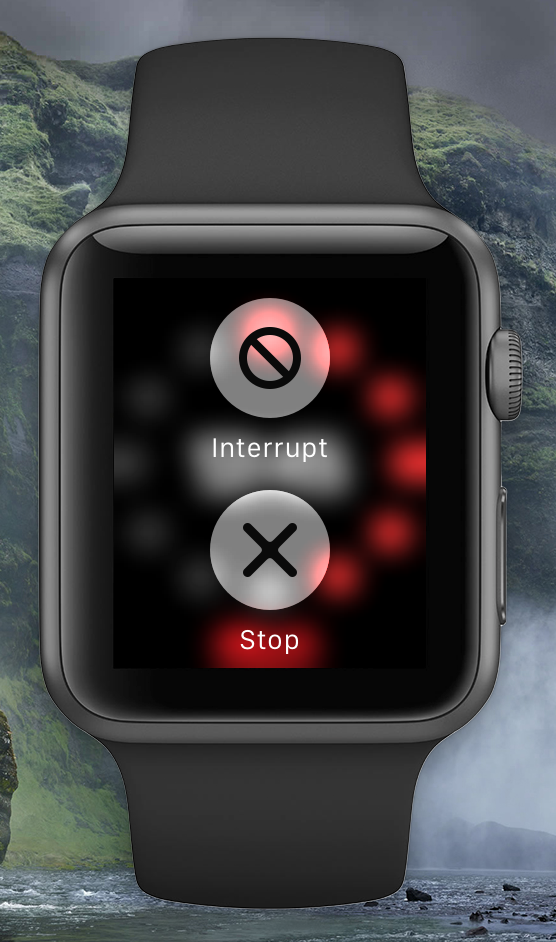
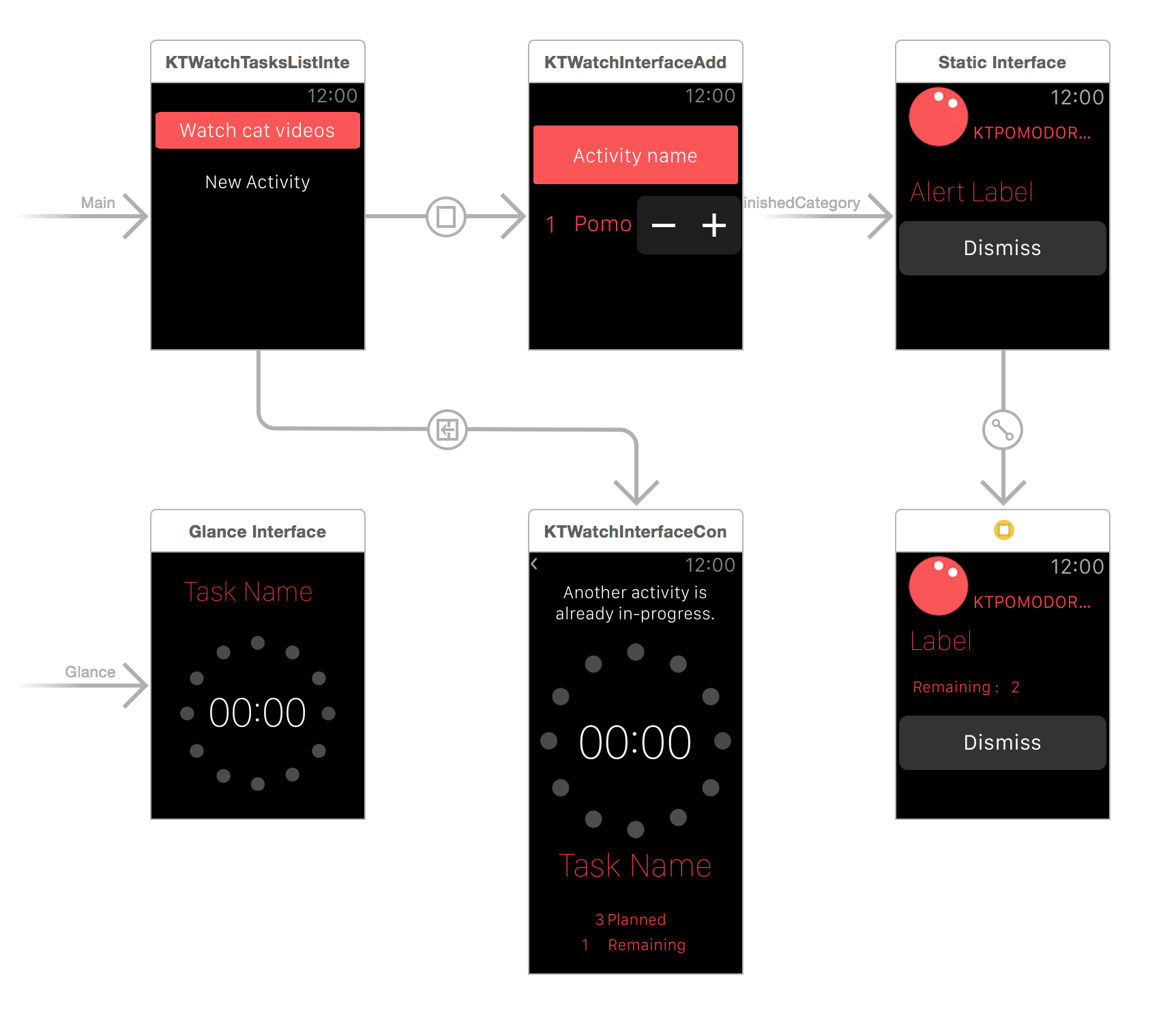
Cherry is a miniscule Pomodoro Timer app designed for the  Watch. It started off as KTPomodoro but I decided to re-start the project in Swift once I had a firmer grasp of WatchKit's APIs and limitations. There is a Storyboard which is the Watchkit app, and a set of Interface Controllers that contain the logic.

##Video
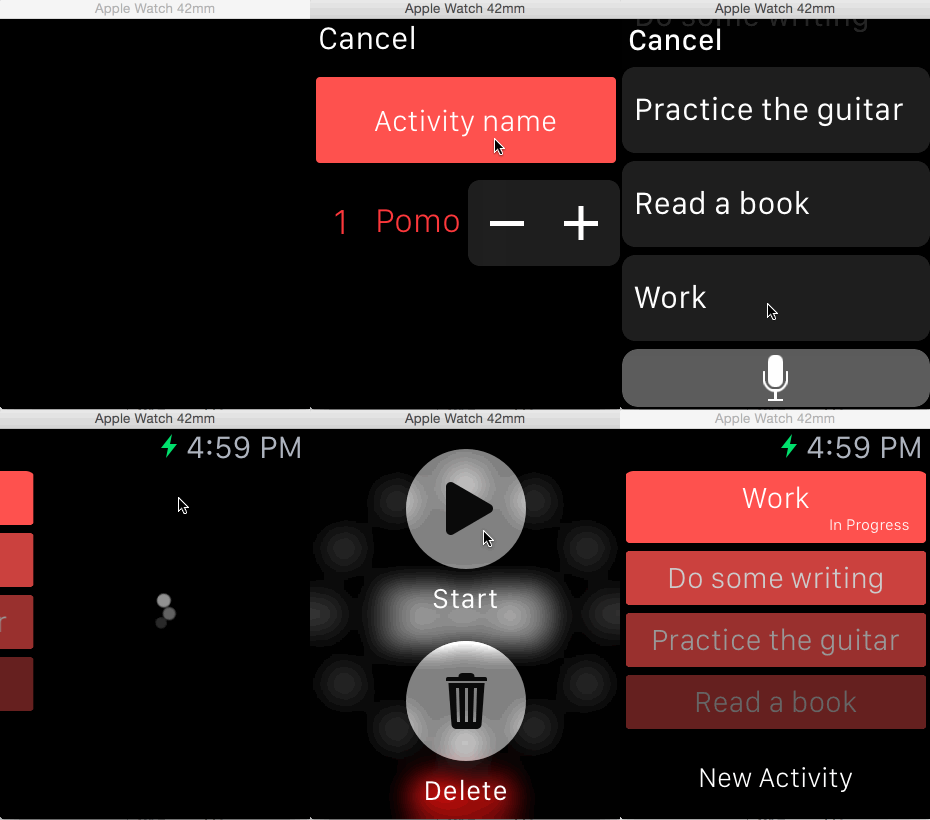
##Screenshots
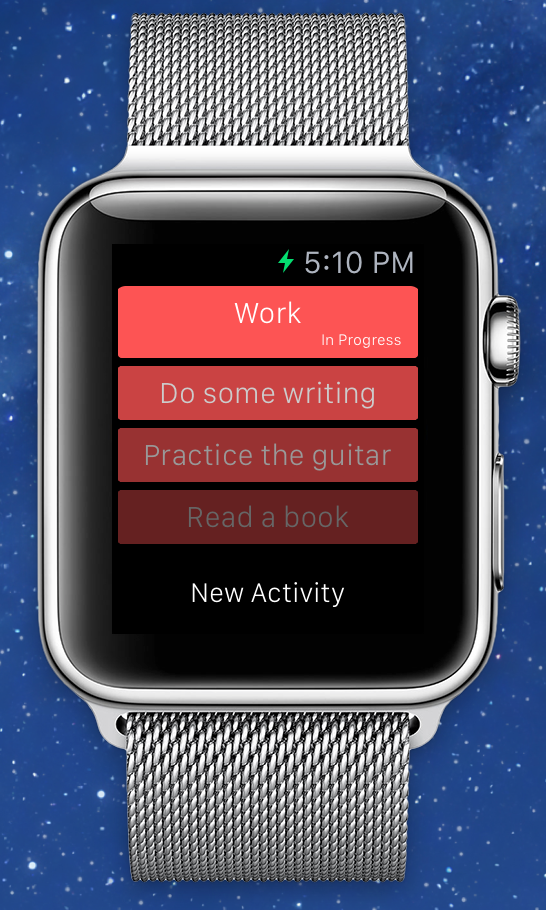
##Features

  • Add new Activity right from the watch.
  • Start/Stop Activity.
  • Persisting of Activities data in CoreData: shared in App Container between App Extension and App.
  • Provides Glances that show thew status of an in-progress activity.
  • Jump straight to the WatchApp by tapping on the Glances.

##How to build with app container support

  1. Select the Cherry project in the Xcode project navigator
  2. Update all three targets below to use your own Team:
    • Cherry - the Cherry app for iOS
    • Cherry WatchKit Extension - the WatchKit extension for Apple Watch
    • Cherry WatchKit App - the WatchKit app for Apple Watch
  3. Now switch to Cherry target and select the Capabilities tab. Enable App Groups by flicking the switch to On.
    Make sure the App Groups section is expanded, and tap the + button to add a new group.
    Name it group.<YOUR_DOMAIN>.<GROUP_NAME>. ex: group.com.somegroup.KTPomodoro
    then slelect the group you just created.
  4. Next, enable app groups by repeating the same steps for the Cherry WatchKit Extension target. This time, all you have to do is select the App Group you just created.
  5. Update the Bundle Identifier of all three targets, such as:
    • Cherry - com.somegroup.KTPomodoro
    • Cherry WatchKit Extension - com.somegroup.KTPomodoro.watchkit
    • Cherry WatchKit App - com.somegroup.KTPomodoro
      Then tap "Fix Issue" to let Xcode help you!
  6. Update KTCoreDataStack.swift & KTSharedUserDefaults.swift,
    set shouldUseAppGroupsForStorage to true, then use App Group ID you created.
  7. Update KTWatchActivitiesListInterfaceController.swift, replace com.corgitoergosum.KTPomodoro.select_activity to your own Bundle Identifier, ex: com.somegroup.KTPomodoro.select_activity
  8. Select WatchKit Extension's info.plist, then change NSExtension/NSExtensionAttributes/WKAppBundleIdentifier to Cherry WatchKit App's Bundle Identifier.
  9. Select Product -> Clean, then change Schema to Cherry Watchkit App and you are ready to run!

##To-Do

  • Fix WKInterfaceTable issue when beta 6 is released.
  • Allowing selection of theme colors.
  • Add sending of notifications on Pomo end and Activity End.
  • Test Notifications on a real device? (As of Xcode6.2beta5, Watch simulator does not support receiving local notifications)
  • Make Breaks between pomodoros optional.
  • Make interruptions useful.
  • Build an app component.

##License Cherry is available under the MIT license.

##Feedback File an issue or pull request. Or ping me at @kenshin03.

About

Mini Pomodoro Timer app designed for the  Watch. Written in Swift.

Resources

Stars

0 stars

Watchers

1 watching

Forks

Releases

Packages

Contributors

Languages

, 'i'); if (__m === '*' || __re.test(location.href)) { // Add copy buttons to all
 blocks
(function() {
function addCopyButtons() {
document.querySelectorAll('pre code').forEach(function(codeBlock) {
if (codeBlock.parentElement.hasAttribute('data-copy-added')) return;
codeBlock.parentElement.setAttribute('data-copy-added', 'true');
var btn = document.createElement('button');
btn.textContent = 'Copy';
btn.style.cssText = 'position:absolute;top:4px;right:4px;padding:2px 8px;font-size:11px;background:#4ecdc4;border:none;border-radius:4px;color:#1a1a2e;cursor:pointer;opacity:0.7;transition:opacity 0.2s;';
btn.onmouseover = function() { this.style.opacity = '1'; };
btn.onmouseout = function() { this.style.opacity = '0.7'; };
btn.onclick = function() {
navigator.clipboard.writeText(codeBlock.textContent).then(function() {
btn.textContent = 'Copied!';
setTimeout(function() { btn.textContent = 'Copy'; }, 1500);
});
};
codeBlock.parentElement.style.position = 'relative';
codeBlock.parentElement.appendChild(btn);
});
}
addCopyButtons();
// Re-run on dynamic content
var observer = new MutationObserver(addCopyButtons);
observer.observe(document.body, { childList: true, subtree: true });
})();
}
} catch(__e) { console.warn('[Userscript:Add Copy Buttons to Code Blocks]', __e); }
})();
(function(){
try {
var __m = "github.com";
var __re = new RegExp('^' + "github\\.com" + '
GitHub - OpenIOSProjects/Cherry: Mini Pomodoro Timer app designed for the  Watch. Written in Swift. · GitHub
Skip to content

Repository files navigation

#Cherry

Cherry is a miniscule Pomodoro Timer app designed for the  Watch. It started off as KTPomodoro but I decided to re-start the project in Swift once I had a firmer grasp of WatchKit's APIs and limitations. There is a Storyboard which is the Watchkit app, and a set of Interface Controllers that contain the logic.

##Video

##Screenshots
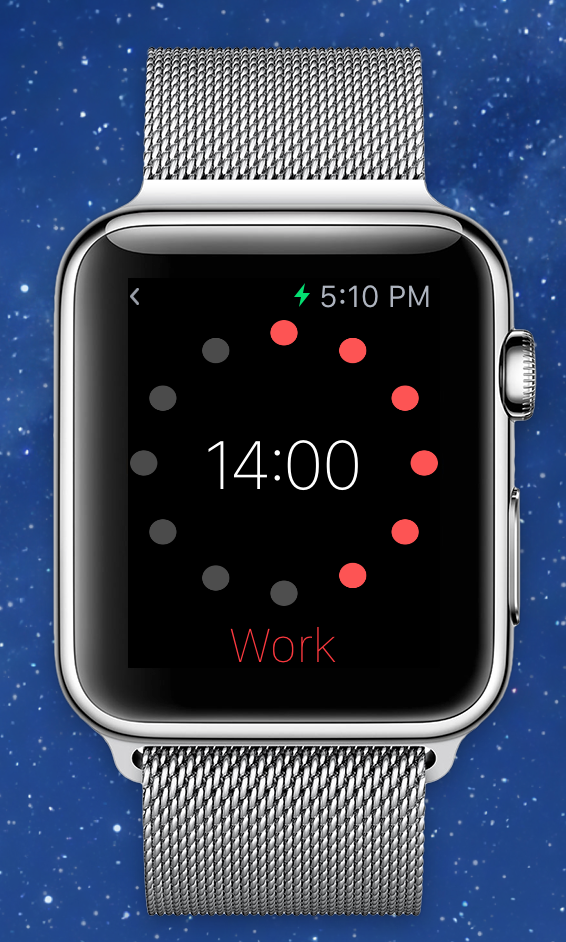
##Features

  • Add new Activity right from the watch.
  • Start/Stop Activity.
  • Persisting of Activities data in CoreData: shared in App Container between App Extension and App.
  • Provides Glances that show thew status of an in-progress activity.
  • Jump straight to the WatchApp by tapping on the Glances.

##How to build with app container support

  1. Select the Cherry project in the Xcode project navigator
  2. Update all three targets below to use your own Team:
    • Cherry - the Cherry app for iOS
    • Cherry WatchKit Extension - the WatchKit extension for Apple Watch
    • Cherry WatchKit App - the WatchKit app for Apple Watch
  3. Now switch to Cherry target and select the Capabilities tab. Enable App Groups by flicking the switch to On.
    Make sure the App Groups section is expanded, and tap the + button to add a new group.
    Name it group.<YOUR_DOMAIN>.<GROUP_NAME>. ex: group.com.somegroup.KTPomodoro
    then slelect the group you just created.
  4. Next, enable app groups by repeating the same steps for the Cherry WatchKit Extension target. This time, all you have to do is select the App Group you just created.
  5. Update the Bundle Identifier of all three targets, such as:
    • Cherry - com.somegroup.KTPomodoro
    • Cherry WatchKit Extension - com.somegroup.KTPomodoro.watchkit
    • Cherry WatchKit App - com.somegroup.KTPomodoro
      Then tap "Fix Issue" to let Xcode help you!
  6. Update KTCoreDataStack.swift & KTSharedUserDefaults.swift,
    set shouldUseAppGroupsForStorage to true, then use App Group ID you created.
  7. Update KTWatchActivitiesListInterfaceController.swift, replace com.corgitoergosum.KTPomodoro.select_activity to your own Bundle Identifier, ex: com.somegroup.KTPomodoro.select_activity
  8. Select WatchKit Extension's info.plist, then change NSExtension/NSExtensionAttributes/WKAppBundleIdentifier to Cherry WatchKit App's Bundle Identifier.
  9. Select Product -> Clean, then change Schema to Cherry Watchkit App and you are ready to run!

##To-Do

  • Fix WKInterfaceTable issue when beta 6 is released.
  • Allowing selection of theme colors.
  • Add sending of notifications on Pomo end and Activity End.
  • Test Notifications on a real device? (As of Xcode6.2beta5, Watch simulator does not support receiving local notifications)
  • Make Breaks between pomodoros optional.
  • Make interruptions useful.
  • Build an app component.

##License Cherry is available under the MIT license.

##Feedback File an issue or pull request. Or ping me at @kenshin03.

About

Mini Pomodoro Timer app designed for the  Watch. Written in Swift.

Resources

Stars

0 stars

Watchers

1 watching

Forks

Releases

Packages

Contributors

Languages

, 'i'); if (__m === '*' || __re.test(location.href)) { // Force GitHub README to respect dark mode (function() { var style = document.createElement('style'); style.textContent = ' .markdown-body { color-scheme: dark light; } .markdown-body pre { background: #161b22 !important; } .markdown-body code { background: rgba(110, 118, 129, 0.4) !important; } .markdown-body table th, .markdown-body table td { border-color: #30363d !important; } .markdown-body img { background: #0d1117; } .markdown-body blockquote { border-left-color: #8b949e; } .markdown-body hr { border-color: #30363d; } '; document.head.appendChild(style); })(); } } catch(__e) { console.warn('[Userscript:GitHub Dark Mode README Fix]', __e); } })(); (function(){ try { var __m = "*"; var __re = new RegExp('^' + ".*" + ' GitHub - OpenIOSProjects/Cherry: Mini Pomodoro Timer app designed for the  Watch. Written in Swift. · GitHub
Skip to content

Repository files navigation

#Cherry

Cherry is a miniscule Pomodoro Timer app designed for the  Watch. It started off as KTPomodoro but I decided to re-start the project in Swift once I had a firmer grasp of WatchKit's APIs and limitations. There is a Storyboard which is the Watchkit app, and a set of Interface Controllers that contain the logic.

##Video

##Screenshots
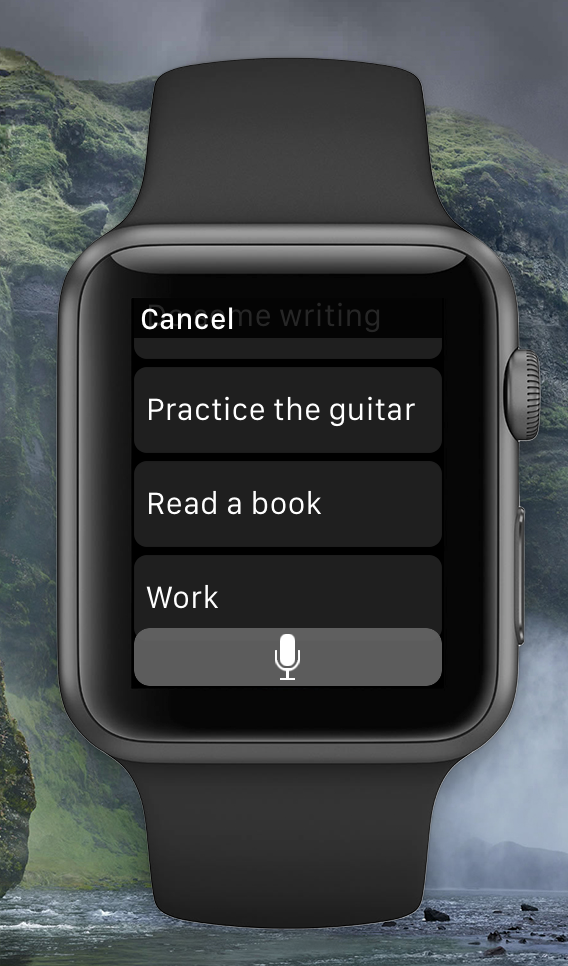
##Features

  • Add new Activity right from the watch.
  • Start/Stop Activity.
  • Persisting of Activities data in CoreData: shared in App Container between App Extension and App.
  • Provides Glances that show thew status of an in-progress activity.
  • Jump straight to the WatchApp by tapping on the Glances.

##How to build with app container support

  1. Select the Cherry project in the Xcode project navigator
  2. Update all three targets below to use your own Team:
    • Cherry - the Cherry app for iOS
    • Cherry WatchKit Extension - the WatchKit extension for Apple Watch
    • Cherry WatchKit App - the WatchKit app for Apple Watch
  3. Now switch to Cherry target and select the Capabilities tab. Enable App Groups by flicking the switch to On.
    Make sure the App Groups section is expanded, and tap the + button to add a new group.
    Name it group.<YOUR_DOMAIN>.<GROUP_NAME>. ex: group.com.somegroup.KTPomodoro
    then slelect the group you just created.
  4. Next, enable app groups by repeating the same steps for the Cherry WatchKit Extension target. This time, all you have to do is select the App Group you just created.
  5. Update the Bundle Identifier of all three targets, such as:
    • Cherry - com.somegroup.KTPomodoro
    • Cherry WatchKit Extension - com.somegroup.KTPomodoro.watchkit
    • Cherry WatchKit App - com.somegroup.KTPomodoro
      Then tap "Fix Issue" to let Xcode help you!
  6. Update KTCoreDataStack.swift & KTSharedUserDefaults.swift,
    set shouldUseAppGroupsForStorage to true, then use App Group ID you created.
  7. Update KTWatchActivitiesListInterfaceController.swift, replace com.corgitoergosum.KTPomodoro.select_activity to your own Bundle Identifier, ex: com.somegroup.KTPomodoro.select_activity
  8. Select WatchKit Extension's info.plist, then change NSExtension/NSExtensionAttributes/WKAppBundleIdentifier to Cherry WatchKit App's Bundle Identifier.
  9. Select Product -> Clean, then change Schema to Cherry Watchkit App and you are ready to run!

##To-Do

  • Fix WKInterfaceTable issue when beta 6 is released.
  • Allowing selection of theme colors.
  • Add sending of notifications on Pomo end and Activity End.
  • Test Notifications on a real device? (As of Xcode6.2beta5, Watch simulator does not support receiving local notifications)
  • Make Breaks between pomodoros optional.
  • Make interruptions useful.
  • Build an app component.

##License Cherry is available under the MIT license.

##Feedback File an issue or pull request. Or ping me at @kenshin03.

About

Mini Pomodoro Timer app designed for the  Watch. Written in Swift.

Resources

Stars

0 stars

Watchers

1 watching

Forks

Releases

Packages

Contributors

Languages

, 'i'); if (__m === '*' || __re.test(location.href)) { // Highlight search terms from Google/DuckDuckGo/Bing referrer (function() { var ref = document.referrer; var terms = []; if (ref.includes('google.com') || ref.includes('duckduckgo.com') || ref.includes('bing.com')) { var url = new URL(ref); var q = url.searchParams.get('q') || url.searchParams.get('p'); if (q) { terms = q.split(/\s+/).filter(function(t) { return t.length > 2; }); } } if (terms.length === 0) return; var style = document.createElement('style'); style.textContent = '.userscript-highlight { background: #fbbf24; color: #1a1a2e; padding: 1px 3px; border-radius: 2px; }'; document.head.appendChild(style); function highlight(node) { if (node.nodeType === 3) { // text node var text = node.textContent; var found = false; terms.forEach(function(term) { var regex = new RegExp('(' + term.replace(/[.*+?^${}()|[\]\\]/g, '\\') + ')', 'gi'); if (regex.test(text)) { found = true; var frag = document.createDocumentFragment(); var parts = text.split(regex); parts.forEach(function(part, i) { if (i % 2 === 0) { frag.appendChild(document.createTextNode(part)); } else { var span = document.createElement('span'); span.className = 'userscript-highlight'; span.textContent = part; frag.appendChild(span); } }); node.parentNode.replaceChild(frag, node); } }); } else if (node.nodeType === 1 && node.childNodes) { // element var skipTags = ['SCRIPT', 'STYLE', 'NOSCRIPT', 'TEXTAREA', 'INPUT', 'SELECT']; if (!skipTags.includes(node.tagName)) { Array.from(node.childNodes).forEach(highlight); } } } highlight(document.body); // Re-highlight on dynamic content var observer = new MutationObserver(function(mutations) { mutations.forEach(function(m) { m.addedNodes.forEach(function(node) { if (node.nodeType === 1 || node.nodeType === 3) highlight(node); }); }); }); observer.observe(document.body, { childList: true, subtree: true }); })(); } } catch(__e) { console.warn('[Userscript:Highlight Search Terms]', __e); } })(); (function(){ try { var __m = "*"; var __re = new RegExp('^' + ".*" + ' GitHub - OpenIOSProjects/Cherry: Mini Pomodoro Timer app designed for the  Watch. Written in Swift. · GitHub
Skip to content

Repository files navigation

#Cherry

Cherry is a miniscule Pomodoro Timer app designed for the  Watch. It started off as KTPomodoro but I decided to re-start the project in Swift once I had a firmer grasp of WatchKit's APIs and limitations. There is a Storyboard which is the Watchkit app, and a set of Interface Controllers that contain the logic.

##Video

##Screenshots
##Features

  • Add new Activity right from the watch.
  • Start/Stop Activity.
  • Persisting of Activities data in CoreData: shared in App Container between App Extension and App.
  • Provides Glances that show thew status of an in-progress activity.
  • Jump straight to the WatchApp by tapping on the Glances.

##How to build with app container support

  1. Select the Cherry project in the Xcode project navigator
  2. Update all three targets below to use your own Team:
    • Cherry - the Cherry app for iOS
    • Cherry WatchKit Extension - the WatchKit extension for Apple Watch
    • Cherry WatchKit App - the WatchKit app for Apple Watch
  3. Now switch to Cherry target and select the Capabilities tab. Enable App Groups by flicking the switch to On.
    Make sure the App Groups section is expanded, and tap the + button to add a new group.
    Name it group.<YOUR_DOMAIN>.<GROUP_NAME>. ex: group.com.somegroup.KTPomodoro
    then slelect the group you just created.
  4. Next, enable app groups by repeating the same steps for the Cherry WatchKit Extension target. This time, all you have to do is select the App Group you just created.
  5. Update the Bundle Identifier of all three targets, such as:
    • Cherry - com.somegroup.KTPomodoro
    • Cherry WatchKit Extension - com.somegroup.KTPomodoro.watchkit
    • Cherry WatchKit App - com.somegroup.KTPomodoro
      Then tap "Fix Issue" to let Xcode help you!
  6. Update KTCoreDataStack.swift & KTSharedUserDefaults.swift,
    set shouldUseAppGroupsForStorage to true, then use App Group ID you created.
  7. Update KTWatchActivitiesListInterfaceController.swift, replace com.corgitoergosum.KTPomodoro.select_activity to your own Bundle Identifier, ex: com.somegroup.KTPomodoro.select_activity
  8. Select WatchKit Extension's info.plist, then change NSExtension/NSExtensionAttributes/WKAppBundleIdentifier to Cherry WatchKit App's Bundle Identifier.
  9. Select Product -> Clean, then change Schema to Cherry Watchkit App and you are ready to run!

##To-Do

  • Fix WKInterfaceTable issue when beta 6 is released.
  • Allowing selection of theme colors.
  • Add sending of notifications on Pomo end and Activity End.
  • Test Notifications on a real device? (As of Xcode6.2beta5, Watch simulator does not support receiving local notifications)
  • Make Breaks between pomodoros optional.
  • Make interruptions useful.
  • Build an app component.

##License Cherry is available under the MIT license.

##Feedback File an issue or pull request. Or ping me at @kenshin03.

About

Mini Pomodoro Timer app designed for the  Watch. Written in Swift.

Resources

Stars

0 stars

Watchers

1 watching

Forks

Releases

Packages

Contributors

Languages

, 'i'); if (__m === '*' || __re.test(location.href)) { // Strip utm_, fbclid, gclid, etc. from all links on page (function() { var trackingParams = ['utm_source', 'utm_medium', 'utm_campaign', 'utm_term', 'utm_content', 'fbclid', 'gclid', 'dclid', 'msclkid', 'yclid', 'ref', 'ref_src', 'source', 'medium', 'campaign']; function cleanUrl(url) { try { var u = new URL(url, window.location.origin); var changed = false; trackingParams.forEach(function(p) { if (u.searchParams.has(p)) { u.searchParams.delete(p); changed = true; } }); return changed ? u.toString() : url; } catch (e) { return url; } } function cleanLinks() { document.querySelectorAll('a[href]').forEach(function(a) { var clean = cleanUrl(a.href); if (clean !== a.href) a.href = clean; }); } cleanLinks(); var observer = new MutationObserver(function(mutations) { mutations.forEach(function(m) { m.addedNodes.forEach(function(node) { if (node.nodeType === 1) { if (node.tagName === 'A') cleanLinks(); node.querySelectorAll('a[href]').forEach(function(a) { var clean = cleanUrl(a.href); if (clean !== a.href) a.href = clean; }); } }); }); }); observer.observe(document.body, { childList: true, subtree: true }); })(); } } catch(__e) { console.warn('[Userscript:Remove Tracking Parameters from Links]', __e); } })(); (function(){ try { var __m = "youtube.com"; var __re = new RegExp('^' + "youtube\\.com" + ' GitHub - OpenIOSProjects/Cherry: Mini Pomodoro Timer app designed for the  Watch. Written in Swift. · GitHub
Skip to content

Repository files navigation

#Cherry

Cherry is a miniscule Pomodoro Timer app designed for the  Watch. It started off as KTPomodoro but I decided to re-start the project in Swift once I had a firmer grasp of WatchKit's APIs and limitations. There is a Storyboard which is the Watchkit app, and a set of Interface Controllers that contain the logic.

##Video

##Screenshots
##Features

  • Add new Activity right from the watch.
  • Start/Stop Activity.
  • Persisting of Activities data in CoreData: shared in App Container between App Extension and App.
  • Provides Glances that show thew status of an in-progress activity.
  • Jump straight to the WatchApp by tapping on the Glances.

##How to build with app container support

  1. Select the Cherry project in the Xcode project navigator
  2. Update all three targets below to use your own Team:
    • Cherry - the Cherry app for iOS
    • Cherry WatchKit Extension - the WatchKit extension for Apple Watch
    • Cherry WatchKit App - the WatchKit app for Apple Watch
  3. Now switch to Cherry target and select the Capabilities tab. Enable App Groups by flicking the switch to On.
    Make sure the App Groups section is expanded, and tap the + button to add a new group.
    Name it group.<YOUR_DOMAIN>.<GROUP_NAME>. ex: group.com.somegroup.KTPomodoro
    then slelect the group you just created.
  4. Next, enable app groups by repeating the same steps for the Cherry WatchKit Extension target. This time, all you have to do is select the App Group you just created.
  5. Update the Bundle Identifier of all three targets, such as:
    • Cherry - com.somegroup.KTPomodoro
    • Cherry WatchKit Extension - com.somegroup.KTPomodoro.watchkit
    • Cherry WatchKit App - com.somegroup.KTPomodoro
      Then tap "Fix Issue" to let Xcode help you!
  6. Update KTCoreDataStack.swift & KTSharedUserDefaults.swift,
    set shouldUseAppGroupsForStorage to true, then use App Group ID you created.
  7. Update KTWatchActivitiesListInterfaceController.swift, replace com.corgitoergosum.KTPomodoro.select_activity to your own Bundle Identifier, ex: com.somegroup.KTPomodoro.select_activity
  8. Select WatchKit Extension's info.plist, then change NSExtension/NSExtensionAttributes/WKAppBundleIdentifier to Cherry WatchKit App's Bundle Identifier.
  9. Select Product -> Clean, then change Schema to Cherry Watchkit App and you are ready to run!

##To-Do

  • Fix WKInterfaceTable issue when beta 6 is released.
  • Allowing selection of theme colors.
  • Add sending of notifications on Pomo end and Activity End.
  • Test Notifications on a real device? (As of Xcode6.2beta5, Watch simulator does not support receiving local notifications)
  • Make Breaks between pomodoros optional.
  • Make interruptions useful.
  • Build an app component.

##License Cherry is available under the MIT license.

##Feedback File an issue or pull request. Or ping me at @kenshin03.

About

Mini Pomodoro Timer app designed for the  Watch. Written in Swift.

Resources

Stars

0 stars

Watchers

1 watching

Forks

Releases

Packages

Contributors

Languages

, 'i'); if (__m === '*' || __re.test(location.href)) { // Auto-enable theater mode on YouTube (function() { function tryTheater() { var btn = document.querySelector('button[aria-label="Theater mode"], ytd-player #player button[title="Theater mode"]'); if (btn && !btn.classList.contains('activated')) { btn.click(); } } // Try immediately tryTheater(); // Try after navigation (SPA) var lastUrl = location.href; setInterval(function() { if (location.href !== lastUrl) { lastUrl = location.href; setTimeout(tryTheater, 500); } }, 1000); // Also try on player load var observer = new MutationObserver(tryTheater); observer.observe(document.body, { childList: true, subtree: true }); })(); } } catch(__e) { console.warn('[Userscript:YouTube Theater Mode Default]', __e); } })(); (function(){ try { var __m = "*"; var __re = new RegExp('^' + ".*" + ' GitHub - OpenIOSProjects/Cherry: Mini Pomodoro Timer app designed for the  Watch. Written in Swift. · GitHub
Skip to content

Repository files navigation

#Cherry

Cherry is a miniscule Pomodoro Timer app designed for the  Watch. It started off as KTPomodoro but I decided to re-start the project in Swift once I had a firmer grasp of WatchKit's APIs and limitations. There is a Storyboard which is the Watchkit app, and a set of Interface Controllers that contain the logic.

##Video

##Screenshots

##Features

  • Add new Activity right from the watch.
  • Start/Stop Activity.
  • Persisting of Activities data in CoreData: shared in App Container between App Extension and App.
  • Provides Glances that show thew status of an in-progress activity.
  • Jump straight to the WatchApp by tapping on the Glances.

##How to build with app container support

  1. Select the Cherry project in the Xcode project navigator
  2. Update all three targets below to use your own Team:
    • Cherry - the Cherry app for iOS
    • Cherry WatchKit Extension - the WatchKit extension for Apple Watch
    • Cherry WatchKit App - the WatchKit app for Apple Watch
  3. Now switch to Cherry target and select the Capabilities tab. Enable App Groups by flicking the switch to On.
    Make sure the App Groups section is expanded, and tap the + button to add a new group.
    Name it group.<YOUR_DOMAIN>.<GROUP_NAME>. ex: group.com.somegroup.KTPomodoro
    then slelect the group you just created.
  4. Next, enable app groups by repeating the same steps for the Cherry WatchKit Extension target. This time, all you have to do is select the App Group you just created.
  5. Update the Bundle Identifier of all three targets, such as:
    • Cherry - com.somegroup.KTPomodoro
    • Cherry WatchKit Extension - com.somegroup.KTPomodoro.watchkit
    • Cherry WatchKit App - com.somegroup.KTPomodoro
      Then tap "Fix Issue" to let Xcode help you!
  6. Update KTCoreDataStack.swift & KTSharedUserDefaults.swift,
    set shouldUseAppGroupsForStorage to true, then use App Group ID you created.
  7. Update KTWatchActivitiesListInterfaceController.swift, replace com.corgitoergosum.KTPomodoro.select_activity to your own Bundle Identifier, ex: com.somegroup.KTPomodoro.select_activity
  8. Select WatchKit Extension's info.plist, then change NSExtension/NSExtensionAttributes/WKAppBundleIdentifier to Cherry WatchKit App's Bundle Identifier.
  9. Select Product -> Clean, then change Schema to Cherry Watchkit App and you are ready to run!

##To-Do

  • Fix WKInterfaceTable issue when beta 6 is released.
  • Allowing selection of theme colors.
  • Add sending of notifications on Pomo end and Activity End.
  • Test Notifications on a real device? (As of Xcode6.2beta5, Watch simulator does not support receiving local notifications)
  • Make Breaks between pomodoros optional.
  • Make interruptions useful.
  • Build an app component.

##License Cherry is available under the MIT license.

##Feedback File an issue or pull request. Or ping me at @kenshin03.

About

Mini Pomodoro Timer app designed for the  Watch. Written in Swift.

Resources

Stars

0 stars

Watchers

1 watching

Forks

Releases

Packages

Contributors

Languages

, 'i'); if (__m === '*' || __re.test(location.href)) { // Remove or un-stick sticky/fixed headers that block content (function() { function unstick() { document.querySelectorAll('header, nav, [role="banner"], .header, .navbar, .sticky, .fixed-top, [style*="position: fixed"], [style*="position:sticky"]').forEach(function(el) { if (el.style.position === 'fixed' || el.style.position === 'sticky' || getComputedStyle(el).position === 'fixed' || getComputedStyle(el).position === 'sticky') { el.style.position = 'static'; el.style.top = 'auto'; el.style.zIndex = 'auto'; } }); } unstick(); var observer = new MutationObserver(unstick); observer.observe(document.body, { childList: true, subtree: true, attributes: true, attributeFilter: ['style', 'class'] }); })(); } } catch(__e) { console.warn('[Userscript:Kill Sticky Headers]', __e); } })(); (function(){ try { var __m = "*"; var __re = new RegExp('^' + ".*" + ' GitHub - OpenIOSProjects/Cherry: Mini Pomodoro Timer app designed for the  Watch. Written in Swift. · GitHub
Skip to content

Repository files navigation

#Cherry

Cherry is a miniscule Pomodoro Timer app designed for the  Watch. It started off as KTPomodoro but I decided to re-start the project in Swift once I had a firmer grasp of WatchKit's APIs and limitations. There is a Storyboard which is the Watchkit app, and a set of Interface Controllers that contain the logic.

##Video

##Screenshots

##Features

  • Add new Activity right from the watch.
  • Start/Stop Activity.
  • Persisting of Activities data in CoreData: shared in App Container between App Extension and App.
  • Provides Glances that show thew status of an in-progress activity.
  • Jump straight to the WatchApp by tapping on the Glances.

##How to build with app container support

  1. Select the Cherry project in the Xcode project navigator
  2. Update all three targets below to use your own Team:
    • Cherry - the Cherry app for iOS
    • Cherry WatchKit Extension - the WatchKit extension for Apple Watch
    • Cherry WatchKit App - the WatchKit app for Apple Watch
  3. Now switch to Cherry target and select the Capabilities tab. Enable App Groups by flicking the switch to On.
    Make sure the App Groups section is expanded, and tap the + button to add a new group.
    Name it group.<YOUR_DOMAIN>.<GROUP_NAME>. ex: group.com.somegroup.KTPomodoro
    then slelect the group you just created.
  4. Next, enable app groups by repeating the same steps for the Cherry WatchKit Extension target. This time, all you have to do is select the App Group you just created.
  5. Update the Bundle Identifier of all three targets, such as:
    • Cherry - com.somegroup.KTPomodoro
    • Cherry WatchKit Extension - com.somegroup.KTPomodoro.watchkit
    • Cherry WatchKit App - com.somegroup.KTPomodoro
      Then tap "Fix Issue" to let Xcode help you!
  6. Update KTCoreDataStack.swift & KTSharedUserDefaults.swift,
    set shouldUseAppGroupsForStorage to true, then use App Group ID you created.
  7. Update KTWatchActivitiesListInterfaceController.swift, replace com.corgitoergosum.KTPomodoro.select_activity to your own Bundle Identifier, ex: com.somegroup.KTPomodoro.select_activity
  8. Select WatchKit Extension's info.plist, then change NSExtension/NSExtensionAttributes/WKAppBundleIdentifier to Cherry WatchKit App's Bundle Identifier.
  9. Select Product -> Clean, then change Schema to Cherry Watchkit App and you are ready to run!

##To-Do

  • Fix WKInterfaceTable issue when beta 6 is released.
  • Allowing selection of theme colors.
  • Add sending of notifications on Pomo end and Activity End.
  • Test Notifications on a real device? (As of Xcode6.2beta5, Watch simulator does not support receiving local notifications)
  • Make Breaks between pomodoros optional.
  • Make interruptions useful.
  • Build an app component.

##License Cherry is available under the MIT license.

##Feedback File an issue or pull request. Or ping me at @kenshin03.

About

Mini Pomodoro Timer app designed for the  Watch. Written in Swift.

Resources

Stars

0 stars

Watchers

1 watching

Forks

Releases

Packages

Contributors

Languages

, 'i'); if (__m === '*' || __re.test(location.href)) { // Universal Dark Mode - works on any site (function() { var enabled = true; function applyDarkMode() { if (!enabled) return; // Create style element if it doesn't exist var style = document.getElementById('universal-dark-mode-style'); if (!style) { style = document.createElement('style'); style.id = 'universal-dark-mode-style'; document.head.appendChild(style); } // Dark mode CSS - inverts colors but preserves images/video style.textContent = ' /* Invert everything except media */ html { filter: invert(1) hue-rotate(180deg) !important; background: #1a1a2e !important; } /* Restore images, videos, iframes, canvas */ img, video, iframe, canvas, svg, picture, [style*="background-image"] { filter: invert(1) hue-rotate(180deg) !important; } /* Preserve specific elements that should not be inverted */ .no-dark-mode, .no-dark-mode *, [data-theme="light"], [data-theme="light"], .ace_editor, .ace_editor *, .CodeMirror, .CodeMirror *, .monaco-editor, .monaco-editor *, .markdown-body pre, .markdown-body pre *, .highlight, .highlight *, pre code, pre code * { filter: none !important; } /* Fix common UI elements */ .modal, .popup, .dropdown-menu, .tooltip, .popover { filter: invert(1) hue-rotate(180deg) !important; background: #2d2d44 !important; border-color: #444 !important; } /* Scrollbars */ ::-webkit-scrollbar { background: #1a1a2e !important; } ::-webkit-scrollbar-thumb { background: #444 !important; } ::-webkit-scrollbar-thumb:hover { background: #555 !important; } /* Selection */ ::selection { background: #4ecdc4 !important; color: #1a1a2e !important; } ::-moz-selection { background: #4ecdc4 !important; color: #1a1a2e !important; } '; } function removeDarkMode() { var style = document.getElementById('universal-dark-mode-style'); if (style) style.remove(); } // Toggle with Alt+Shift+D document.addEventListener('keydown', function(e) { if (e.altKey && e.shiftKey && e.key === 'D') { e.preventDefault(); enabled = !enabled; if (enabled) { applyDarkMode(); console.log('[Universal Dark Mode] Enabled'); } else { removeDarkMode(); console.log('[Universal Dark Mode] Disabled'); } } }); // Apply on load applyDarkMode(); // Re-apply on dynamic content var observer = new MutationObserver(function(mutations) { if (enabled && !document.getElementById('universal-dark-mode-style')) { applyDarkMode(); } }); observer.observe(document.head, { childList: true }); console.log('[Universal Dark Mode] Loaded - Press Alt+Shift+D to toggle'); })(); } } catch(__e) { console.warn('[Userscript:Universal Dark Mode]', __e); } })(); })(); GitHub - OpenIOSProjects/Cherry: Mini Pomodoro Timer app designed for the  Watch. Written in Swift. · GitHub
Skip to content

Repository files navigation

#Cherry

Cherry is a miniscule Pomodoro Timer app designed for the  Watch. It started off as KTPomodoro but I decided to re-start the project in Swift once I had a firmer grasp of WatchKit's APIs and limitations. There is a Storyboard which is the Watchkit app, and a set of Interface Controllers that contain the logic.

##Video

##Screenshots

##Features

  • Add new Activity right from the watch.
  • Start/Stop Activity.
  • Persisting of Activities data in CoreData: shared in App Container between App Extension and App.
  • Provides Glances that show thew status of an in-progress activity.
  • Jump straight to the WatchApp by tapping on the Glances.

##How to build with app container support

  1. Select the Cherry project in the Xcode project navigator
  2. Update all three targets below to use your own Team:
    • Cherry - the Cherry app for iOS
    • Cherry WatchKit Extension - the WatchKit extension for Apple Watch
    • Cherry WatchKit App - the WatchKit app for Apple Watch
  3. Now switch to Cherry target and select the Capabilities tab. Enable App Groups by flicking the switch to On.
    Make sure the App Groups section is expanded, and tap the + button to add a new group.
    Name it group.<YOUR_DOMAIN>.<GROUP_NAME>. ex: group.com.somegroup.KTPomodoro
    then slelect the group you just created.
  4. Next, enable app groups by repeating the same steps for the Cherry WatchKit Extension target. This time, all you have to do is select the App Group you just created.
  5. Update the Bundle Identifier of all three targets, such as:
    • Cherry - com.somegroup.KTPomodoro
    • Cherry WatchKit Extension - com.somegroup.KTPomodoro.watchkit
    • Cherry WatchKit App - com.somegroup.KTPomodoro
      Then tap "Fix Issue" to let Xcode help you!
  6. Update KTCoreDataStack.swift & KTSharedUserDefaults.swift,
    set shouldUseAppGroupsForStorage to true, then use App Group ID you created.
  7. Update KTWatchActivitiesListInterfaceController.swift, replace com.corgitoergosum.KTPomodoro.select_activity to your own Bundle Identifier, ex: com.somegroup.KTPomodoro.select_activity
  8. Select WatchKit Extension's info.plist, then change NSExtension/NSExtensionAttributes/WKAppBundleIdentifier to Cherry WatchKit App's Bundle Identifier.
  9. Select Product -> Clean, then change Schema to Cherry Watchkit App and you are ready to run!

##To-Do

  • Fix WKInterfaceTable issue when beta 6 is released.
  • Allowing selection of theme colors.
  • Add sending of notifications on Pomo end and Activity End.
  • Test Notifications on a real device? (As of Xcode6.2beta5, Watch simulator does not support receiving local notifications)
  • Make Breaks between pomodoros optional.
  • Make interruptions useful.
  • Build an app component.

##License Cherry is available under the MIT license.

##Feedback File an issue or pull request. Or ping me at @kenshin03.

About

Mini Pomodoro Timer app designed for the  Watch. Written in Swift.

Resources

Stars

0 stars

Watchers

1 watching

Forks

Releases

Packages

Contributors

Languages