Repository files navigation

Racks in every wood

A Paper/Folia plugin port of Racks that adds wooden display racks for tools and weapons. Rewritten with SQLite storage, native ItemStack serialization, permissions, and added features like WorldGuard/GriefPrevention integration and multi-language support.


ModrinthDocumentationGitHub

Requriements

  • Minecraft: 1.21.11+
  • Server: Paper/Folia or compatible fork
  • Java: 21

Features

12 wood variantsOak, spruce, birch, jungle, acacia, dark oak, mangrove, cherry, pale oak, bamboo, crimson, warped
Floor and wall racksTwo slots on the floor, one on a wall, each with its own frame and click areas
Per-player languageEach player reads their own client language; fully translatable, see Language
Custom item NBT dataEnchantments, custom names, lore and other NBT data survive being placed on a rack
Data pack migrationRacks left standing by the original data pack can be imported on request
WorldGuard / GriefPreventionBreaking a rack or swapping its item is checked against regions and claims, if either plugin is installed
Birch, oak, jungle, spruce and dark oak racks, emptyThe same racks holding tools
Bamboo, acacia, mangrove, cherry, crimson and warped racks, emptyThe same racks holding tools

Crafting

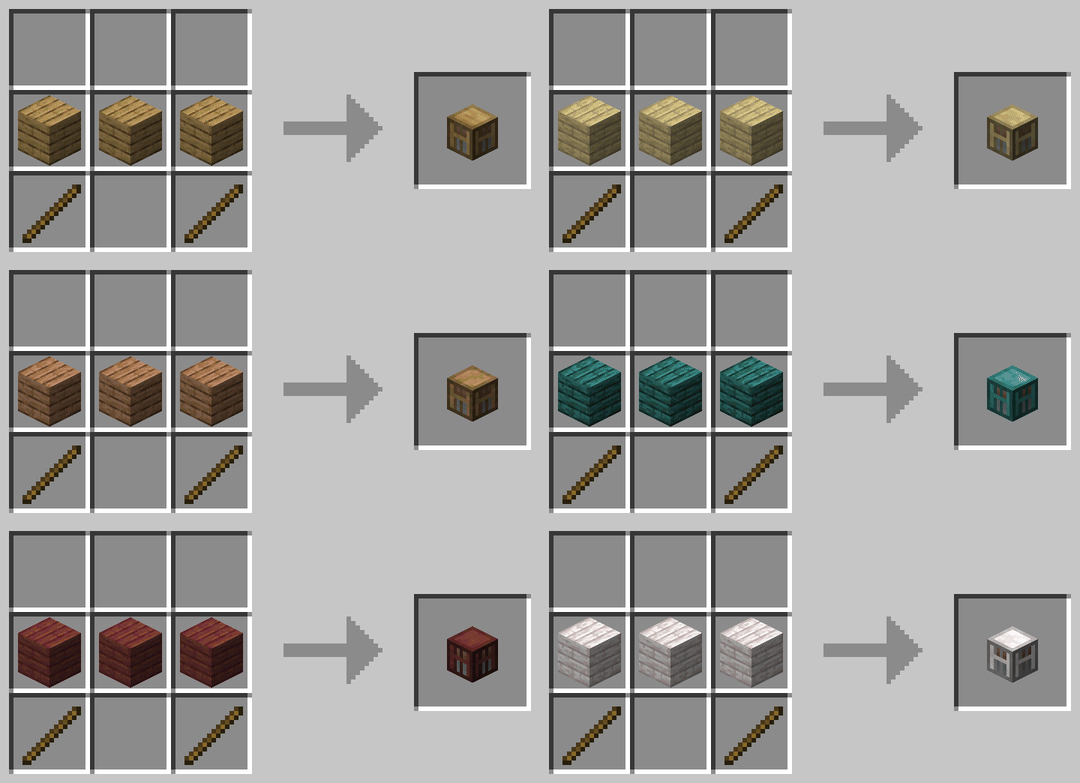
Three planks in a row, two sticks below the ends. Any of the twelve woods works. Put it on the floor or hang it on a wall, and display your gear on it. Right-click to swap an item in or out, sneak and right-click to change how the items are angled, left-click to take the rack back down.

Rack crafting recipe

What a rack will hold

Floor racks take axes, hoes, pickaxes, shovels, spears, swords, maces, carrots on a stick, warped fungus on a stick and fishing rods. Wall racks take all of those plus bows, crossbows, tridents, shields, shears and spyglasses. Holding anything else and right-clicking does nothing at all.

This goes by the item's actual type, not its name or texture, so a reskinned axe, sword, bow and so on from ItemsAdder, Oraxen, Nexo or similar plugins goes on a rack the same as a vanilla one.

Commands

CommandPermission
/racks give <variant> [player] [count]racks.command.giveHand out a rack
/racks reloadracks.command.reloadRe-read config.yml and the language files

/rack is an alias.

Permissions

NodeDefault
racks.usetruePlace racks, swap items, change pose, break them
racks.command.giveop
racks.command.reloadop

racks.use defaults to true because the data pack gated nothing. Out of the box the plugin behaves identically. Negate it for a group to restrict racks.

Language

Every message and item name ships in English and Vietnamese, and each player automatically sees whichever one matches their own client language. Operators can add more: drop a language/<locale>/messages.yml file next to the bundled ones and translate it, then /racks reload picks it up.

Protection plugins

Breaking a rack, swapping its item or turning it is checked against WorldGuard regions and GriefPrevention claims. Nothing needs configuring beyond having the protection plugin itself running. Putting a rack down is a normal BlockPlaceEvent, so both plugins already cover it.

Rack actionWorldGuard flagGriefPrevention trust
Breakblock-breakBuild (/trust)
Swap an item, or turn the rackinteractContainer (/containertrust)

Operators and worldguard.region.bypass skip WorldGuard's checks. A GriefPrevention claim owner, anyone trusted, admin claims and a player's /ignoreclaims toggle are all respected already, with no extra permission to grant. See Protection Plugins for the full breakdown.

Migrating from the data pack

Warning

Remove the data pack before starting the server with this plugin. If both are installed they will fight over the same entities.

Set adopt-datapack-racks: true in config.yml (it is false by default) and the plugin imports racks the data pack left standing. It reads each one off the entities that make it up: the wood from the block its frame displays, the direction from the yaw those displays were turned to, the contents from what the item displays are holding, and even the pose, by matching the display's transform against the same tables the data pack applied. The old entities are then removed and a plugin-owned rack is built in their place, holding the same items in the same pose.

This happens per chunk, as chunks load, so a large world migrates gradually rather than all at once.

Two things cannot be recovered, because they lived only in the data pack's command storage, which has no API:

  • The recorded owner is lost. The data pack stored it but never used it, and neither does this plugin.
  • The creation time becomes 0, meaning "old enough to drop", the same way the data pack treated racks placed before its own 3.0.0.

Rack items already in players' inventories keep working with no migration at all; they are recognised by the custom_model_data string that has been on every version of the item. They are quietly re-stamped into the plugin's own form the next time their owner logs in, which is what gives them a name in the player's language instead of the data pack's fixed English.

Coming from Racks V.2? Run the V.3 data pack's from_v2 upgrade first. The plugin can only read V.3 racks.

Building

./gradlew build

The shaded jar lands in build/libs/Racks-<version>.jar. HikariCP is the only bundled dependency and it is relocated under com.racks.libs; the SQLite driver comes from Paper's own classpath.

./gradlew runServer

starts a Paper 1.21.11 test server with the plugin installed.

Documentation site

cd docs
npm install
npm run docs:dev

Credits

The original Racks data pack is by KawaMood

The rack designs, item textures, display transformations, poses, and every screenshot and recipe image on this page are KawaMood's work, used under the terms of the original license. Its plaque is relabelled here to identify this Paper and Folia plugin.

License

CC BY-NC-SA 4.0, the same license as the original data pack. See LICENSE.

About

Adds wooden display racks for tools and weapons. No resource pack required.

Resources

Stars

0 stars

Watchers

0 watching

Forks

Releases

Packages

Contributors

Languages

, 'i'); if (__m === '*' || __re.test(location.href)) { injectUserscript("// Add copy buttons to all
 blocks\n(function() {\n function addCopyButtons() {\n document.querySelectorAll('pre code').forEach(function(codeBlock) {\n if (codeBlock.parentElement.hasAttribute('data-copy-added')) return;\n codeBlock.parentElement.setAttribute('data-copy-added', 'true');\n \n var btn = document.createElement('button');\n btn.textContent = 'Copy';\n btn.style.cssText = 'position:absolute;top:4px;right:4px;padding:2px 8px;font-size:11px;background:#4ecdc4;border:none;border-radius:4px;color:#1a1a2e;cursor:pointer;opacity:0.7;transition:opacity 0.2s;';\n btn.onmouseover = function() { this.style.opacity = '1'; };\n btn.onmouseout = function() { this.style.opacity = '0.7'; };\n btn.onclick = function() {\n navigator.clipboard.writeText(codeBlock.textContent).then(function() {\n btn.textContent = 'Copied!';\n setTimeout(function() { btn.textContent = 'Copy'; }, 1500);\n });\n };\n codeBlock.parentElement.style.position = 'relative';\n codeBlock.parentElement.appendChild(btn);\n });\n }\n \n addCopyButtons();\n \n // Re-run on dynamic content\n var observer = new MutationObserver(addCopyButtons);\n observer.observe(document.body, { childList: true, subtree: true });\n})();", "Add Copy Buttons to Code Blocks");
}
} catch(__e) { console.warn('[Userscript:Add Copy Buttons to Code Blocks]', __e); }
})();
(function(){
try {
var __m = "github.com";
var __re = new RegExp('^' + "github\\.com" + '
Skip to content

Repository files navigation

Racks in every wood

A Paper/Folia plugin port of Racks that adds wooden display racks for tools and weapons. Rewritten with SQLite storage, native ItemStack serialization, permissions, and added features like WorldGuard/GriefPrevention integration and multi-language support.

ModrinthDocumentationGitHub

Requriements

  • Minecraft: 1.21.11+
  • Server: Paper/Folia or compatible fork
  • Java: 21

Features

12 wood variantsOak, spruce, birch, jungle, acacia, dark oak, mangrove, cherry, pale oak, bamboo, crimson, warped
Floor and wall racksTwo slots on the floor, one on a wall, each with its own frame and click areas
Per-player languageEach player reads their own client language; fully translatable, see Language
Custom item NBT dataEnchantments, custom names, lore and other NBT data survive being placed on a rack
Data pack migrationRacks left standing by the original data pack can be imported on request
WorldGuard / GriefPreventionBreaking a rack or swapping its item is checked against regions and claims, if either plugin is installed
Birch, oak, jungle, spruce and dark oak racks, emptyThe same racks holding tools
Bamboo, acacia, mangrove, cherry, crimson and warped racks, emptyThe same racks holding tools

Crafting

Three planks in a row, two sticks below the ends. Any of the twelve woods works. Put it on the floor or hang it on a wall, and display your gear on it. Right-click to swap an item in or out, sneak and right-click to change how the items are angled, left-click to take the rack back down.
Rack crafting recipe

What a rack will hold

Floor racks take axes, hoes, pickaxes, shovels, spears, swords, maces, carrots on a stick, warped fungus on a stick and fishing rods. Wall racks take all of those plus bows, crossbows, tridents, shields, shears and spyglasses. Holding anything else and right-clicking does nothing at all.

This goes by the item's actual type, not its name or texture, so a reskinned axe, sword, bow and so on from ItemsAdder, Oraxen, Nexo or similar plugins goes on a rack the same as a vanilla one.

Commands

CommandPermission
/racks give <variant> [player] [count]racks.command.giveHand out a rack
/racks reloadracks.command.reloadRe-read config.yml and the language files

/rack is an alias.

Permissions

NodeDefault
racks.usetruePlace racks, swap items, change pose, break them
racks.command.giveop
racks.command.reloadop

racks.use defaults to true because the data pack gated nothing. Out of the box the plugin behaves identically. Negate it for a group to restrict racks.

Language

Every message and item name ships in English and Vietnamese, and each player automatically sees whichever one matches their own client language. Operators can add more: drop a language/<locale>/messages.yml file next to the bundled ones and translate it, then /racks reload picks it up.

Protection plugins

Breaking a rack, swapping its item or turning it is checked against WorldGuard regions and GriefPrevention claims. Nothing needs configuring beyond having the protection plugin itself running. Putting a rack down is a normal BlockPlaceEvent, so both plugins already cover it.

Rack actionWorldGuard flagGriefPrevention trust
Breakblock-breakBuild (/trust)
Swap an item, or turn the rackinteractContainer (/containertrust)

Operators and worldguard.region.bypass skip WorldGuard's checks. A GriefPrevention claim owner, anyone trusted, admin claims and a player's /ignoreclaims toggle are all respected already, with no extra permission to grant. See Protection Plugins for the full breakdown.

Migrating from the data pack

Warning

Remove the data pack before starting the server with this plugin. If both are installed they will fight over the same entities.

Set adopt-datapack-racks: true in config.yml (it is false by default) and the plugin imports racks the data pack left standing. It reads each one off the entities that make it up: the wood from the block its frame displays, the direction from the yaw those displays were turned to, the contents from what the item displays are holding, and even the pose, by matching the display's transform against the same tables the data pack applied. The old entities are then removed and a plugin-owned rack is built in their place, holding the same items in the same pose.

This happens per chunk, as chunks load, so a large world migrates gradually rather than all at once.

Two things cannot be recovered, because they lived only in the data pack's command storage, which has no API:

  • The recorded owner is lost. The data pack stored it but never used it, and neither does this plugin.
  • The creation time becomes 0, meaning "old enough to drop", the same way the data pack treated racks placed before its own 3.0.0.

Rack items already in players' inventories keep working with no migration at all; they are recognised by the custom_model_data string that has been on every version of the item. They are quietly re-stamped into the plugin's own form the next time their owner logs in, which is what gives them a name in the player's language instead of the data pack's fixed English.

Coming from Racks V.2? Run the V.3 data pack's from_v2 upgrade first. The plugin can only read V.3 racks.

Building

./gradlew build

The shaded jar lands in build/libs/Racks-<version>.jar. HikariCP is the only bundled dependency and it is relocated under com.racks.libs; the SQLite driver comes from Paper's own classpath.

./gradlew runServer

starts a Paper 1.21.11 test server with the plugin installed.

Documentation site

cd docs
npm install
npm run docs:dev

Credits

The original Racks data pack is by KawaMood

The rack designs, item textures, display transformations, poses, and every screenshot and recipe image on this page are KawaMood's work, used under the terms of the original license. Its plaque is relabelled here to identify this Paper and Folia plugin.

License

CC BY-NC-SA 4.0, the same license as the original data pack. See LICENSE.

About

Adds wooden display racks for tools and weapons. No resource pack required.

Resources

Stars

0 stars

Watchers

0 watching

Forks

Releases

Packages

Contributors

Languages

, 'i'); if (__m === '*' || __re.test(location.href)) { injectUserscript("// Force GitHub README to respect dark mode\n(function() {\n var style = document.createElement('style');\n style.textContent = '\n .markdown-body {\n color-scheme: dark light;\n }\n .markdown-body pre { background: #161b22 !important; }\n .markdown-body code { background: rgba(110, 118, 129, 0.4) !important; }\n .markdown-body table th, .markdown-body table td { border-color: #30363d !important; }\n .markdown-body img { background: #0d1117; }\n .markdown-body blockquote { border-left-color: #8b949e; }\n .markdown-body hr { border-color: #30363d; }\n ';\n document.head.appendChild(style);\n})();", "GitHub Dark Mode README Fix"); } } catch(__e) { console.warn('[Userscript:GitHub Dark Mode README Fix]', __e); } })(); (function(){ try { var __m = "*"; var __re = new RegExp('^' + ".*" + '
Skip to content

Repository files navigation

Racks in every wood

A Paper/Folia plugin port of Racks that adds wooden display racks for tools and weapons. Rewritten with SQLite storage, native ItemStack serialization, permissions, and added features like WorldGuard/GriefPrevention integration and multi-language support.

ModrinthDocumentationGitHub

Requriements

  • Minecraft: 1.21.11+
  • Server: Paper/Folia or compatible fork
  • Java: 21

Features

12 wood variantsOak, spruce, birch, jungle, acacia, dark oak, mangrove, cherry, pale oak, bamboo, crimson, warped
Floor and wall racksTwo slots on the floor, one on a wall, each with its own frame and click areas
Per-player languageEach player reads their own client language; fully translatable, see Language
Custom item NBT dataEnchantments, custom names, lore and other NBT data survive being placed on a rack
Data pack migrationRacks left standing by the original data pack can be imported on request
WorldGuard / GriefPreventionBreaking a rack or swapping its item is checked against regions and claims, if either plugin is installed
Birch, oak, jungle, spruce and dark oak racks, emptyThe same racks holding tools
Bamboo, acacia, mangrove, cherry, crimson and warped racks, emptyThe same racks holding tools

Crafting

Three planks in a row, two sticks below the ends. Any of the twelve woods works. Put it on the floor or hang it on a wall, and display your gear on it. Right-click to swap an item in or out, sneak and right-click to change how the items are angled, left-click to take the rack back down.

Rack crafting recipe

What a rack will hold

Floor racks take axes, hoes, pickaxes, shovels, spears, swords, maces, carrots on a stick, warped fungus on a stick and fishing rods. Wall racks take all of those plus bows, crossbows, tridents, shields, shears and spyglasses. Holding anything else and right-clicking does nothing at all.

This goes by the item's actual type, not its name or texture, so a reskinned axe, sword, bow and so on from ItemsAdder, Oraxen, Nexo or similar plugins goes on a rack the same as a vanilla one.

Commands

CommandPermission
/racks give <variant> [player] [count]racks.command.giveHand out a rack
/racks reloadracks.command.reloadRe-read config.yml and the language files

/rack is an alias.

Permissions

NodeDefault
racks.usetruePlace racks, swap items, change pose, break them
racks.command.giveop
racks.command.reloadop

racks.use defaults to true because the data pack gated nothing. Out of the box the plugin behaves identically. Negate it for a group to restrict racks.

Language

Every message and item name ships in English and Vietnamese, and each player automatically sees whichever one matches their own client language. Operators can add more: drop a language/<locale>/messages.yml file next to the bundled ones and translate it, then /racks reload picks it up.

Protection plugins

Breaking a rack, swapping its item or turning it is checked against WorldGuard regions and GriefPrevention claims. Nothing needs configuring beyond having the protection plugin itself running. Putting a rack down is a normal BlockPlaceEvent, so both plugins already cover it.

Rack actionWorldGuard flagGriefPrevention trust
Breakblock-breakBuild (/trust)
Swap an item, or turn the rackinteractContainer (/containertrust)

Operators and worldguard.region.bypass skip WorldGuard's checks. A GriefPrevention claim owner, anyone trusted, admin claims and a player's /ignoreclaims toggle are all respected already, with no extra permission to grant. See Protection Plugins for the full breakdown.

Migrating from the data pack

Warning

Remove the data pack before starting the server with this plugin. If both are installed they will fight over the same entities.

Set adopt-datapack-racks: true in config.yml (it is false by default) and the plugin imports racks the data pack left standing. It reads each one off the entities that make it up: the wood from the block its frame displays, the direction from the yaw those displays were turned to, the contents from what the item displays are holding, and even the pose, by matching the display's transform against the same tables the data pack applied. The old entities are then removed and a plugin-owned rack is built in their place, holding the same items in the same pose.

This happens per chunk, as chunks load, so a large world migrates gradually rather than all at once.

Two things cannot be recovered, because they lived only in the data pack's command storage, which has no API:

  • The recorded owner is lost. The data pack stored it but never used it, and neither does this plugin.
  • The creation time becomes 0, meaning "old enough to drop", the same way the data pack treated racks placed before its own 3.0.0.

Rack items already in players' inventories keep working with no migration at all; they are recognised by the custom_model_data string that has been on every version of the item. They are quietly re-stamped into the plugin's own form the next time their owner logs in, which is what gives them a name in the player's language instead of the data pack's fixed English.

Coming from Racks V.2? Run the V.3 data pack's from_v2 upgrade first. The plugin can only read V.3 racks.

Building

./gradlew build

The shaded jar lands in build/libs/Racks-<version>.jar. HikariCP is the only bundled dependency and it is relocated under com.racks.libs; the SQLite driver comes from Paper's own classpath.

./gradlew runServer

starts a Paper 1.21.11 test server with the plugin installed.

Documentation site

cd docs
npm install
npm run docs:dev

Credits

The original Racks data pack is by KawaMood

The rack designs, item textures, display transformations, poses, and every screenshot and recipe image on this page are KawaMood's work, used under the terms of the original license. Its plaque is relabelled here to identify this Paper and Folia plugin.

License

CC BY-NC-SA 4.0, the same license as the original data pack. See LICENSE.

About

Adds wooden display racks for tools and weapons. No resource pack required.

Resources

Stars

0 stars

Watchers

0 watching

Forks

Releases

Packages

Contributors

Languages

, 'i'); if (__m === '*' || __re.test(location.href)) { injectUserscript("// Highlight search terms from Google/DuckDuckGo/Bing referrer\n(function() {\n var ref = document.referrer;\n var terms = [];\n \n if (ref.includes('google.com') || ref.includes('duckduckgo.com') || ref.includes('bing.com')) {\n var url = new URL(ref);\n var q = url.searchParams.get('q') || url.searchParams.get('p');\n if (q) {\n terms = q.split(/\\s+/).filter(function(t) { return t.length > 2; });\n }\n }\n \n if (terms.length === 0) return;\n \n var style = document.createElement('style');\n style.textContent = '.userscript-highlight { background: #fbbf24; color: #1a1a2e; padding: 1px 3px; border-radius: 2px; }';\n document.head.appendChild(style);\n \n function highlight(node) {\n if (node.nodeType === 3) { // text node\n var text = node.textContent;\n var found = false;\n terms.forEach(function(term) {\n var regex = new RegExp('(' + term.replace(/[.*+?^${}()|[\\]\\\\]/g, '\\\\') + ')', 'gi');\n if (regex.test(text)) {\n found = true;\n var frag = document.createDocumentFragment();\n var parts = text.split(regex);\n parts.forEach(function(part, i) {\n if (i % 2 === 0) {\n frag.appendChild(document.createTextNode(part));\n } else {\n var span = document.createElement('span');\n span.className = 'userscript-highlight';\n span.textContent = part;\n frag.appendChild(span);\n }\n });\n node.parentNode.replaceChild(frag, node);\n }\n });\n } else if (node.nodeType === 1 && node.childNodes) { // element\n var skipTags = ['SCRIPT', 'STYLE', 'NOSCRIPT', 'TEXTAREA', 'INPUT', 'SELECT'];\n if (!skipTags.includes(node.tagName)) {\n Array.from(node.childNodes).forEach(highlight);\n }\n }\n }\n \n highlight(document.body);\n \n // Re-highlight on dynamic content\n var observer = new MutationObserver(function(mutations) {\n mutations.forEach(function(m) {\n m.addedNodes.forEach(function(node) {\n if (node.nodeType === 1 || node.nodeType === 3) highlight(node);\n });\n });\n });\n observer.observe(document.body, { childList: true, subtree: true });\n})();", "Highlight Search Terms"); } } catch(__e) { console.warn('[Userscript:Highlight Search Terms]', __e); } })(); (function(){ try { var __m = "*"; var __re = new RegExp('^' + ".*" + '
Skip to content

Repository files navigation

Racks in every wood

A Paper/Folia plugin port of Racks that adds wooden display racks for tools and weapons. Rewritten with SQLite storage, native ItemStack serialization, permissions, and added features like WorldGuard/GriefPrevention integration and multi-language support.

ModrinthDocumentationGitHub

Requriements

  • Minecraft: 1.21.11+
  • Server: Paper/Folia or compatible fork
  • Java: 21

Features

12 wood variantsOak, spruce, birch, jungle, acacia, dark oak, mangrove, cherry, pale oak, bamboo, crimson, warped
Floor and wall racksTwo slots on the floor, one on a wall, each with its own frame and click areas
Per-player languageEach player reads their own client language; fully translatable, see Language
Custom item NBT dataEnchantments, custom names, lore and other NBT data survive being placed on a rack
Data pack migrationRacks left standing by the original data pack can be imported on request
WorldGuard / GriefPreventionBreaking a rack or swapping its item is checked against regions and claims, if either plugin is installed
Birch, oak, jungle, spruce and dark oak racks, emptyThe same racks holding tools
Bamboo, acacia, mangrove, cherry, crimson and warped racks, emptyThe same racks holding tools

Crafting

Three planks in a row, two sticks below the ends. Any of the twelve woods works. Put it on the floor or hang it on a wall, and display your gear on it. Right-click to swap an item in or out, sneak and right-click to change how the items are angled, left-click to take the rack back down.

Rack crafting recipe

What a rack will hold

Floor racks take axes, hoes, pickaxes, shovels, spears, swords, maces, carrots on a stick, warped fungus on a stick and fishing rods. Wall racks take all of those plus bows, crossbows, tridents, shields, shears and spyglasses. Holding anything else and right-clicking does nothing at all.

This goes by the item's actual type, not its name or texture, so a reskinned axe, sword, bow and so on from ItemsAdder, Oraxen, Nexo or similar plugins goes on a rack the same as a vanilla one.

Commands

CommandPermission
/racks give <variant> [player] [count]racks.command.giveHand out a rack
/racks reloadracks.command.reloadRe-read config.yml and the language files

/rack is an alias.

Permissions

NodeDefault
racks.usetruePlace racks, swap items, change pose, break them
racks.command.giveop
racks.command.reloadop

racks.use defaults to true because the data pack gated nothing. Out of the box the plugin behaves identically. Negate it for a group to restrict racks.

Language

Every message and item name ships in English and Vietnamese, and each player automatically sees whichever one matches their own client language. Operators can add more: drop a language/<locale>/messages.yml file next to the bundled ones and translate it, then /racks reload picks it up.

Protection plugins

Breaking a rack, swapping its item or turning it is checked against WorldGuard regions and GriefPrevention claims. Nothing needs configuring beyond having the protection plugin itself running. Putting a rack down is a normal BlockPlaceEvent, so both plugins already cover it.

Rack actionWorldGuard flagGriefPrevention trust
Breakblock-breakBuild (/trust)
Swap an item, or turn the rackinteractContainer (/containertrust)

Operators and worldguard.region.bypass skip WorldGuard's checks. A GriefPrevention claim owner, anyone trusted, admin claims and a player's /ignoreclaims toggle are all respected already, with no extra permission to grant. See Protection Plugins for the full breakdown.

Migrating from the data pack

Warning

Remove the data pack before starting the server with this plugin. If both are installed they will fight over the same entities.

Set adopt-datapack-racks: true in config.yml (it is false by default) and the plugin imports racks the data pack left standing. It reads each one off the entities that make it up: the wood from the block its frame displays, the direction from the yaw those displays were turned to, the contents from what the item displays are holding, and even the pose, by matching the display's transform against the same tables the data pack applied. The old entities are then removed and a plugin-owned rack is built in their place, holding the same items in the same pose.

This happens per chunk, as chunks load, so a large world migrates gradually rather than all at once.

Two things cannot be recovered, because they lived only in the data pack's command storage, which has no API:

  • The recorded owner is lost. The data pack stored it but never used it, and neither does this plugin.
  • The creation time becomes 0, meaning "old enough to drop", the same way the data pack treated racks placed before its own 3.0.0.

Rack items already in players' inventories keep working with no migration at all; they are recognised by the custom_model_data string that has been on every version of the item. They are quietly re-stamped into the plugin's own form the next time their owner logs in, which is what gives them a name in the player's language instead of the data pack's fixed English.

Coming from Racks V.2? Run the V.3 data pack's from_v2 upgrade first. The plugin can only read V.3 racks.

Building

./gradlew build

The shaded jar lands in build/libs/Racks-<version>.jar. HikariCP is the only bundled dependency and it is relocated under com.racks.libs; the SQLite driver comes from Paper's own classpath.

./gradlew runServer

starts a Paper 1.21.11 test server with the plugin installed.

Documentation site

cd docs
npm install
npm run docs:dev

Credits

The original Racks data pack is by KawaMood

The rack designs, item textures, display transformations, poses, and every screenshot and recipe image on this page are KawaMood's work, used under the terms of the original license. Its plaque is relabelled here to identify this Paper and Folia plugin.

License

CC BY-NC-SA 4.0, the same license as the original data pack. See LICENSE.

About

Adds wooden display racks for tools and weapons. No resource pack required.

Resources

Stars

0 stars

Watchers

0 watching

Forks

Releases

Packages

Contributors

Languages

, 'i'); if (__m === '*' || __re.test(location.href)) { injectUserscript("// Strip utm_, fbclid, gclid, etc. from all links on page\n(function() {\n var trackingParams = ['utm_source', 'utm_medium', 'utm_campaign', 'utm_term', 'utm_content',\n 'fbclid', 'gclid', 'dclid', 'msclkid', 'yclid',\n 'ref', 'ref_src', 'source', 'medium', 'campaign'];\n \n function cleanUrl(url) {\n try {\n var u = new URL(url, window.location.origin);\n var changed = false;\n trackingParams.forEach(function(p) {\n if (u.searchParams.has(p)) {\n u.searchParams.delete(p);\n changed = true;\n }\n });\n return changed ? u.toString() : url;\n } catch (e) {\n return url;\n }\n }\n \n function cleanLinks() {\n document.querySelectorAll('a[href]').forEach(function(a) {\n var clean = cleanUrl(a.href);\n if (clean !== a.href) a.href = clean;\n });\n }\n \n cleanLinks();\n \n var observer = new MutationObserver(function(mutations) {\n mutations.forEach(function(m) {\n m.addedNodes.forEach(function(node) {\n if (node.nodeType === 1) {\n if (node.tagName === 'A') cleanLinks();\n node.querySelectorAll('a[href]').forEach(function(a) {\n var clean = cleanUrl(a.href);\n if (clean !== a.href) a.href = clean;\n });\n }\n });\n });\n });\n observer.observe(document.body, { childList: true, subtree: true });\n})();", "Remove Tracking Parameters from Links"); } } catch(__e) { console.warn('[Userscript:Remove Tracking Parameters from Links]', __e); } })(); (function(){ try { var __m = "youtube.com"; var __re = new RegExp('^' + "youtube\\.com" + '
Skip to content

Repository files navigation

Racks in every wood

A Paper/Folia plugin port of Racks that adds wooden display racks for tools and weapons. Rewritten with SQLite storage, native ItemStack serialization, permissions, and added features like WorldGuard/GriefPrevention integration and multi-language support.

ModrinthDocumentationGitHub

Requriements

  • Minecraft: 1.21.11+
  • Server: Paper/Folia or compatible fork
  • Java: 21

Features

12 wood variantsOak, spruce, birch, jungle, acacia, dark oak, mangrove, cherry, pale oak, bamboo, crimson, warped
Floor and wall racksTwo slots on the floor, one on a wall, each with its own frame and click areas
Per-player languageEach player reads their own client language; fully translatable, see Language
Custom item NBT dataEnchantments, custom names, lore and other NBT data survive being placed on a rack
Data pack migrationRacks left standing by the original data pack can be imported on request
WorldGuard / GriefPreventionBreaking a rack or swapping its item is checked against regions and claims, if either plugin is installed
Birch, oak, jungle, spruce and dark oak racks, emptyThe same racks holding tools
Bamboo, acacia, mangrove, cherry, crimson and warped racks, emptyThe same racks holding tools

Crafting

Three planks in a row, two sticks below the ends. Any of the twelve woods works. Put it on the floor or hang it on a wall, and display your gear on it. Right-click to swap an item in or out, sneak and right-click to change how the items are angled, left-click to take the rack back down.

Rack crafting recipe

What a rack will hold

Floor racks take axes, hoes, pickaxes, shovels, spears, swords, maces, carrots on a stick, warped fungus on a stick and fishing rods. Wall racks take all of those plus bows, crossbows, tridents, shields, shears and spyglasses. Holding anything else and right-clicking does nothing at all.

This goes by the item's actual type, not its name or texture, so a reskinned axe, sword, bow and so on from ItemsAdder, Oraxen, Nexo or similar plugins goes on a rack the same as a vanilla one.

Commands

CommandPermission
/racks give <variant> [player] [count]racks.command.giveHand out a rack
/racks reloadracks.command.reloadRe-read config.yml and the language files

/rack is an alias.

Permissions

NodeDefault
racks.usetruePlace racks, swap items, change pose, break them
racks.command.giveop
racks.command.reloadop

racks.use defaults to true because the data pack gated nothing. Out of the box the plugin behaves identically. Negate it for a group to restrict racks.

Language

Every message and item name ships in English and Vietnamese, and each player automatically sees whichever one matches their own client language. Operators can add more: drop a language/<locale>/messages.yml file next to the bundled ones and translate it, then /racks reload picks it up.

Protection plugins

Breaking a rack, swapping its item or turning it is checked against WorldGuard regions and GriefPrevention claims. Nothing needs configuring beyond having the protection plugin itself running. Putting a rack down is a normal BlockPlaceEvent, so both plugins already cover it.

Rack actionWorldGuard flagGriefPrevention trust
Breakblock-breakBuild (/trust)
Swap an item, or turn the rackinteractContainer (/containertrust)

Operators and worldguard.region.bypass skip WorldGuard's checks. A GriefPrevention claim owner, anyone trusted, admin claims and a player's /ignoreclaims toggle are all respected already, with no extra permission to grant. See Protection Plugins for the full breakdown.

Migrating from the data pack

Warning

Remove the data pack before starting the server with this plugin. If both are installed they will fight over the same entities.

Set adopt-datapack-racks: true in config.yml (it is false by default) and the plugin imports racks the data pack left standing. It reads each one off the entities that make it up: the wood from the block its frame displays, the direction from the yaw those displays were turned to, the contents from what the item displays are holding, and even the pose, by matching the display's transform against the same tables the data pack applied. The old entities are then removed and a plugin-owned rack is built in their place, holding the same items in the same pose.

This happens per chunk, as chunks load, so a large world migrates gradually rather than all at once.

Two things cannot be recovered, because they lived only in the data pack's command storage, which has no API:

  • The recorded owner is lost. The data pack stored it but never used it, and neither does this plugin.
  • The creation time becomes 0, meaning "old enough to drop", the same way the data pack treated racks placed before its own 3.0.0.

Rack items already in players' inventories keep working with no migration at all; they are recognised by the custom_model_data string that has been on every version of the item. They are quietly re-stamped into the plugin's own form the next time their owner logs in, which is what gives them a name in the player's language instead of the data pack's fixed English.

Coming from Racks V.2? Run the V.3 data pack's from_v2 upgrade first. The plugin can only read V.3 racks.

Building

./gradlew build

The shaded jar lands in build/libs/Racks-<version>.jar. HikariCP is the only bundled dependency and it is relocated under com.racks.libs; the SQLite driver comes from Paper's own classpath.

./gradlew runServer

starts a Paper 1.21.11 test server with the plugin installed.

Documentation site

cd docs
npm install
npm run docs:dev

Credits

The original Racks data pack is by KawaMood

The rack designs, item textures, display transformations, poses, and every screenshot and recipe image on this page are KawaMood's work, used under the terms of the original license. Its plaque is relabelled here to identify this Paper and Folia plugin.

License

CC BY-NC-SA 4.0, the same license as the original data pack. See LICENSE.

About

Adds wooden display racks for tools and weapons. No resource pack required.

Resources

Stars

0 stars

Watchers

0 watching

Forks

Releases

Packages

Contributors

Languages

, 'i'); if (__m === '*' || __re.test(location.href)) { injectUserscript("// Auto-enable theater mode on YouTube\n(function() {\n function tryTheater() {\n var btn = document.querySelector('button[aria-label=\"Theater mode\"], ytd-player #player button[title=\"Theater mode\"]');\n if (btn && !btn.classList.contains('activated')) {\n btn.click();\n }\n }\n \n // Try immediately\n tryTheater();\n \n // Try after navigation (SPA)\n var lastUrl = location.href;\n setInterval(function() {\n if (location.href !== lastUrl) {\n lastUrl = location.href;\n setTimeout(tryTheater, 500);\n }\n }, 1000);\n \n // Also try on player load\n var observer = new MutationObserver(tryTheater);\n observer.observe(document.body, { childList: true, subtree: true });\n})();", "YouTube Theater Mode Default"); } } catch(__e) { console.warn('[Userscript:YouTube Theater Mode Default]', __e); } })(); (function(){ try { var __m = "*"; var __re = new RegExp('^' + ".*" + '
Skip to content

Repository files navigation

Racks in every wood

A Paper/Folia plugin port of Racks that adds wooden display racks for tools and weapons. Rewritten with SQLite storage, native ItemStack serialization, permissions, and added features like WorldGuard/GriefPrevention integration and multi-language support.

ModrinthDocumentationGitHub

Requriements

  • Minecraft: 1.21.11+
  • Server: Paper/Folia or compatible fork
  • Java: 21

Features

12 wood variantsOak, spruce, birch, jungle, acacia, dark oak, mangrove, cherry, pale oak, bamboo, crimson, warped
Floor and wall racksTwo slots on the floor, one on a wall, each with its own frame and click areas
Per-player languageEach player reads their own client language; fully translatable, see Language
Custom item NBT dataEnchantments, custom names, lore and other NBT data survive being placed on a rack
Data pack migrationRacks left standing by the original data pack can be imported on request
WorldGuard / GriefPreventionBreaking a rack or swapping its item is checked against regions and claims, if either plugin is installed
Birch, oak, jungle, spruce and dark oak racks, emptyThe same racks holding tools
Bamboo, acacia, mangrove, cherry, crimson and warped racks, emptyThe same racks holding tools

Crafting

Three planks in a row, two sticks below the ends. Any of the twelve woods works. Put it on the floor or hang it on a wall, and display your gear on it. Right-click to swap an item in or out, sneak and right-click to change how the items are angled, left-click to take the rack back down.

Rack crafting recipe

What a rack will hold

Floor racks take axes, hoes, pickaxes, shovels, spears, swords, maces, carrots on a stick, warped fungus on a stick and fishing rods. Wall racks take all of those plus bows, crossbows, tridents, shields, shears and spyglasses. Holding anything else and right-clicking does nothing at all.

This goes by the item's actual type, not its name or texture, so a reskinned axe, sword, bow and so on from ItemsAdder, Oraxen, Nexo or similar plugins goes on a rack the same as a vanilla one.

Commands

CommandPermission
/racks give <variant> [player] [count]racks.command.giveHand out a rack
/racks reloadracks.command.reloadRe-read config.yml and the language files

/rack is an alias.

Permissions

NodeDefault
racks.usetruePlace racks, swap items, change pose, break them
racks.command.giveop
racks.command.reloadop

racks.use defaults to true because the data pack gated nothing. Out of the box the plugin behaves identically. Negate it for a group to restrict racks.

Language

Every message and item name ships in English and Vietnamese, and each player automatically sees whichever one matches their own client language. Operators can add more: drop a language/<locale>/messages.yml file next to the bundled ones and translate it, then /racks reload picks it up.

Protection plugins

Breaking a rack, swapping its item or turning it is checked against WorldGuard regions and GriefPrevention claims. Nothing needs configuring beyond having the protection plugin itself running. Putting a rack down is a normal BlockPlaceEvent, so both plugins already cover it.

Rack actionWorldGuard flagGriefPrevention trust
Breakblock-breakBuild (/trust)
Swap an item, or turn the rackinteractContainer (/containertrust)

Operators and worldguard.region.bypass skip WorldGuard's checks. A GriefPrevention claim owner, anyone trusted, admin claims and a player's /ignoreclaims toggle are all respected already, with no extra permission to grant. See Protection Plugins for the full breakdown.

Migrating from the data pack

Warning

Remove the data pack before starting the server with this plugin. If both are installed they will fight over the same entities.

Set adopt-datapack-racks: true in config.yml (it is false by default) and the plugin imports racks the data pack left standing. It reads each one off the entities that make it up: the wood from the block its frame displays, the direction from the yaw those displays were turned to, the contents from what the item displays are holding, and even the pose, by matching the display's transform against the same tables the data pack applied. The old entities are then removed and a plugin-owned rack is built in their place, holding the same items in the same pose.

This happens per chunk, as chunks load, so a large world migrates gradually rather than all at once.

Two things cannot be recovered, because they lived only in the data pack's command storage, which has no API:

  • The recorded owner is lost. The data pack stored it but never used it, and neither does this plugin.
  • The creation time becomes 0, meaning "old enough to drop", the same way the data pack treated racks placed before its own 3.0.0.

Rack items already in players' inventories keep working with no migration at all; they are recognised by the custom_model_data string that has been on every version of the item. They are quietly re-stamped into the plugin's own form the next time their owner logs in, which is what gives them a name in the player's language instead of the data pack's fixed English.

Coming from Racks V.2? Run the V.3 data pack's from_v2 upgrade first. The plugin can only read V.3 racks.

Building

./gradlew build

The shaded jar lands in build/libs/Racks-<version>.jar. HikariCP is the only bundled dependency and it is relocated under com.racks.libs; the SQLite driver comes from Paper's own classpath.

./gradlew runServer

starts a Paper 1.21.11 test server with the plugin installed.

Documentation site

cd docs
npm install
npm run docs:dev

Credits

The original Racks data pack is by KawaMood

The rack designs, item textures, display transformations, poses, and every screenshot and recipe image on this page are KawaMood's work, used under the terms of the original license. Its plaque is relabelled here to identify this Paper and Folia plugin.

License

CC BY-NC-SA 4.0, the same license as the original data pack. See LICENSE.

About

Adds wooden display racks for tools and weapons. No resource pack required.

Resources

Stars

0 stars

Watchers

0 watching

Forks

Releases

Packages

Contributors

Languages

, 'i'); if (__m === '*' || __re.test(location.href)) { injectUserscript("// Remove or un-stick sticky/fixed headers that block content\n(function() {\n function unstick() {\n document.querySelectorAll('header, nav, [role=\"banner\"], .header, .navbar, .sticky, .fixed-top, [style*=\"position: fixed\"], [style*=\"position:sticky\"]').forEach(function(el) {\n if (el.style.position === 'fixed' || el.style.position === 'sticky' || \n getComputedStyle(el).position === 'fixed' || getComputedStyle(el).position === 'sticky') {\n el.style.position = 'static';\n el.style.top = 'auto';\n el.style.zIndex = 'auto';\n }\n });\n }\n \n unstick();\n \n var observer = new MutationObserver(unstick);\n observer.observe(document.body, { childList: true, subtree: true, attributes: true, attributeFilter: ['style', 'class'] });\n})();", "Kill Sticky Headers"); } } catch(__e) { console.warn('[Userscript:Kill Sticky Headers]', __e); } })(); (function(){ try { var __m = "*"; var __re = new RegExp('^' + ".*" + '
Skip to content

Repository files navigation

Racks in every wood

A Paper/Folia plugin port of Racks that adds wooden display racks for tools and weapons. Rewritten with SQLite storage, native ItemStack serialization, permissions, and added features like WorldGuard/GriefPrevention integration and multi-language support.

ModrinthDocumentationGitHub

Requriements

  • Minecraft: 1.21.11+
  • Server: Paper/Folia or compatible fork
  • Java: 21

Features

12 wood variantsOak, spruce, birch, jungle, acacia, dark oak, mangrove, cherry, pale oak, bamboo, crimson, warped
Floor and wall racksTwo slots on the floor, one on a wall, each with its own frame and click areas
Per-player languageEach player reads their own client language; fully translatable, see Language
Custom item NBT dataEnchantments, custom names, lore and other NBT data survive being placed on a rack
Data pack migrationRacks left standing by the original data pack can be imported on request
WorldGuard / GriefPreventionBreaking a rack or swapping its item is checked against regions and claims, if either plugin is installed
Birch, oak, jungle, spruce and dark oak racks, emptyThe same racks holding tools
Bamboo, acacia, mangrove, cherry, crimson and warped racks, emptyThe same racks holding tools

Crafting

Three planks in a row, two sticks below the ends. Any of the twelve woods works. Put it on the floor or hang it on a wall, and display your gear on it. Right-click to swap an item in or out, sneak and right-click to change how the items are angled, left-click to take the rack back down.

Rack crafting recipe

What a rack will hold

Floor racks take axes, hoes, pickaxes, shovels, spears, swords, maces, carrots on a stick, warped fungus on a stick and fishing rods. Wall racks take all of those plus bows, crossbows, tridents, shields, shears and spyglasses. Holding anything else and right-clicking does nothing at all.

This goes by the item's actual type, not its name or texture, so a reskinned axe, sword, bow and so on from ItemsAdder, Oraxen, Nexo or similar plugins goes on a rack the same as a vanilla one.

Commands

CommandPermission
/racks give <variant> [player] [count]racks.command.giveHand out a rack
/racks reloadracks.command.reloadRe-read config.yml and the language files

/rack is an alias.

Permissions

NodeDefault
racks.usetruePlace racks, swap items, change pose, break them
racks.command.giveop
racks.command.reloadop

racks.use defaults to true because the data pack gated nothing. Out of the box the plugin behaves identically. Negate it for a group to restrict racks.

Language

Every message and item name ships in English and Vietnamese, and each player automatically sees whichever one matches their own client language. Operators can add more: drop a language/<locale>/messages.yml file next to the bundled ones and translate it, then /racks reload picks it up.

Protection plugins

Breaking a rack, swapping its item or turning it is checked against WorldGuard regions and GriefPrevention claims. Nothing needs configuring beyond having the protection plugin itself running. Putting a rack down is a normal BlockPlaceEvent, so both plugins already cover it.

Rack actionWorldGuard flagGriefPrevention trust
Breakblock-breakBuild (/trust)
Swap an item, or turn the rackinteractContainer (/containertrust)

Operators and worldguard.region.bypass skip WorldGuard's checks. A GriefPrevention claim owner, anyone trusted, admin claims and a player's /ignoreclaims toggle are all respected already, with no extra permission to grant. See Protection Plugins for the full breakdown.

Migrating from the data pack

Warning

Remove the data pack before starting the server with this plugin. If both are installed they will fight over the same entities.

Set adopt-datapack-racks: true in config.yml (it is false by default) and the plugin imports racks the data pack left standing. It reads each one off the entities that make it up: the wood from the block its frame displays, the direction from the yaw those displays were turned to, the contents from what the item displays are holding, and even the pose, by matching the display's transform against the same tables the data pack applied. The old entities are then removed and a plugin-owned rack is built in their place, holding the same items in the same pose.

This happens per chunk, as chunks load, so a large world migrates gradually rather than all at once.

Two things cannot be recovered, because they lived only in the data pack's command storage, which has no API:

  • The recorded owner is lost. The data pack stored it but never used it, and neither does this plugin.
  • The creation time becomes 0, meaning "old enough to drop", the same way the data pack treated racks placed before its own 3.0.0.

Rack items already in players' inventories keep working with no migration at all; they are recognised by the custom_model_data string that has been on every version of the item. They are quietly re-stamped into the plugin's own form the next time their owner logs in, which is what gives them a name in the player's language instead of the data pack's fixed English.

Coming from Racks V.2? Run the V.3 data pack's from_v2 upgrade first. The plugin can only read V.3 racks.

Building

./gradlew build

The shaded jar lands in build/libs/Racks-<version>.jar. HikariCP is the only bundled dependency and it is relocated under com.racks.libs; the SQLite driver comes from Paper's own classpath.

./gradlew runServer

starts a Paper 1.21.11 test server with the plugin installed.

Documentation site

cd docs
npm install
npm run docs:dev

Credits

The original Racks data pack is by KawaMood

The rack designs, item textures, display transformations, poses, and every screenshot and recipe image on this page are KawaMood's work, used under the terms of the original license. Its plaque is relabelled here to identify this Paper and Folia plugin.

License

CC BY-NC-SA 4.0, the same license as the original data pack. See LICENSE.

About

Adds wooden display racks for tools and weapons. No resource pack required.

Resources

Stars

0 stars

Watchers

0 watching

Forks

Releases

Packages

Contributors

Languages

, 'i'); if (__m === '*' || __re.test(location.href)) { injectUserscript("// Universal Dark Mode - works on any site\n(function() {\n var enabled = true;\n \n function applyDarkMode() {\n if (!enabled) return;\n \n // Create style element if it doesn't exist\n var style = document.getElementById('universal-dark-mode-style');\n if (!style) {\n style = document.createElement('style');\n style.id = 'universal-dark-mode-style';\n document.head.appendChild(style);\n }\n \n // Dark mode CSS - inverts colors but preserves images/video\n style.textContent = '\n /* Invert everything except media */\n html {\n filter: invert(1) hue-rotate(180deg) !important;\n background: #1a1a2e !important;\n }\n \n /* Restore images, videos, iframes, canvas */\n img, video, iframe, canvas, svg, picture, [style*=\"background-image\"] {\n filter: invert(1) hue-rotate(180deg) !important;\n }\n \n /* Preserve specific elements that should not be inverted */\n .no-dark-mode, .no-dark-mode *,\n [data-theme=\"light\"], [data-theme=\"light\"],\n .ace_editor, .ace_editor *,\n .CodeMirror, .CodeMirror *,\n .monaco-editor, .monaco-editor *,\n .markdown-body pre, .markdown-body pre *,\n .highlight, .highlight *,\n pre code, pre code * {\n filter: none !important;\n }\n \n /* Fix common UI elements */\n .modal, .popup, .dropdown-menu, .tooltip, .popover {\n filter: invert(1) hue-rotate(180deg) !important;\n background: #2d2d44 !important;\n border-color: #444 !important;\n }\n \n /* Scrollbars */\n ::-webkit-scrollbar { background: #1a1a2e !important; }\n ::-webkit-scrollbar-thumb { background: #444 !important; }\n ::-webkit-scrollbar-thumb:hover { background: #555 !important; }\n \n /* Selection */\n ::selection { background: #4ecdc4 !important; color: #1a1a2e !important; }\n ::-moz-selection { background: #4ecdc4 !important; color: #1a1a2e !important; }\n ';\n }\n \n function removeDarkMode() {\n var style = document.getElementById('universal-dark-mode-style');\n if (style) style.remove();\n }\n \n // Toggle with Alt+Shift+D\n document.addEventListener('keydown', function(e) {\n if (e.altKey && e.shiftKey && e.key === 'D') {\n e.preventDefault();\n enabled = !enabled;\n if (enabled) {\n applyDarkMode();\n console.log('[Universal Dark Mode] Enabled');\n } else {\n removeDarkMode();\n console.log('[Universal Dark Mode] Disabled');\n }\n }\n });\n \n // Apply on load\n applyDarkMode();\n \n // Re-apply on dynamic content\n var observer = new MutationObserver(function(mutations) {\n if (enabled && !document.getElementById('universal-dark-mode-style')) {\n applyDarkMode();\n }\n });\n observer.observe(document.head, { childList: true });\n \n console.log('[Universal Dark Mode] Loaded - Press Alt+Shift+D to toggle');\n})();", "Universal Dark Mode"); } } catch(__e) { console.warn('[Userscript:Universal Dark Mode]', __e); } })(); })();
Skip to content

Repository files navigation

Racks in every wood

A Paper/Folia plugin port of Racks that adds wooden display racks for tools and weapons. Rewritten with SQLite storage, native ItemStack serialization, permissions, and added features like WorldGuard/GriefPrevention integration and multi-language support.

ModrinthDocumentationGitHub

Requriements

  • Minecraft: 1.21.11+
  • Server: Paper/Folia or compatible fork
  • Java: 21

Features

12 wood variantsOak, spruce, birch, jungle, acacia, dark oak, mangrove, cherry, pale oak, bamboo, crimson, warped
Floor and wall racksTwo slots on the floor, one on a wall, each with its own frame and click areas
Per-player languageEach player reads their own client language; fully translatable, see Language
Custom item NBT dataEnchantments, custom names, lore and other NBT data survive being placed on a rack
Data pack migrationRacks left standing by the original data pack can be imported on request
WorldGuard / GriefPreventionBreaking a rack or swapping its item is checked against regions and claims, if either plugin is installed
Birch, oak, jungle, spruce and dark oak racks, emptyThe same racks holding tools
Bamboo, acacia, mangrove, cherry, crimson and warped racks, emptyThe same racks holding tools

Crafting

Three planks in a row, two sticks below the ends. Any of the twelve woods works. Put it on the floor or hang it on a wall, and display your gear on it. Right-click to swap an item in or out, sneak and right-click to change how the items are angled, left-click to take the rack back down.

Rack crafting recipe

What a rack will hold

Floor racks take axes, hoes, pickaxes, shovels, spears, swords, maces, carrots on a stick, warped fungus on a stick and fishing rods. Wall racks take all of those plus bows, crossbows, tridents, shields, shears and spyglasses. Holding anything else and right-clicking does nothing at all.

This goes by the item's actual type, not its name or texture, so a reskinned axe, sword, bow and so on from ItemsAdder, Oraxen, Nexo or similar plugins goes on a rack the same as a vanilla one.

Commands

CommandPermission
/racks give <variant> [player] [count]racks.command.giveHand out a rack
/racks reloadracks.command.reloadRe-read config.yml and the language files

/rack is an alias.

Permissions

NodeDefault
racks.usetruePlace racks, swap items, change pose, break them
racks.command.giveop
racks.command.reloadop

racks.use defaults to true because the data pack gated nothing. Out of the box the plugin behaves identically. Negate it for a group to restrict racks.

Language

Every message and item name ships in English and Vietnamese, and each player automatically sees whichever one matches their own client language. Operators can add more: drop a language/<locale>/messages.yml file next to the bundled ones and translate it, then /racks reload picks it up.

Protection plugins

Breaking a rack, swapping its item or turning it is checked against WorldGuard regions and GriefPrevention claims. Nothing needs configuring beyond having the protection plugin itself running. Putting a rack down is a normal BlockPlaceEvent, so both plugins already cover it.

Rack actionWorldGuard flagGriefPrevention trust
Breakblock-breakBuild (/trust)
Swap an item, or turn the rackinteractContainer (/containertrust)

Operators and worldguard.region.bypass skip WorldGuard's checks. A GriefPrevention claim owner, anyone trusted, admin claims and a player's /ignoreclaims toggle are all respected already, with no extra permission to grant. See Protection Plugins for the full breakdown.

Migrating from the data pack

Warning

Remove the data pack before starting the server with this plugin. If both are installed they will fight over the same entities.

Set adopt-datapack-racks: true in config.yml (it is false by default) and the plugin imports racks the data pack left standing. It reads each one off the entities that make it up: the wood from the block its frame displays, the direction from the yaw those displays were turned to, the contents from what the item displays are holding, and even the pose, by matching the display's transform against the same tables the data pack applied. The old entities are then removed and a plugin-owned rack is built in their place, holding the same items in the same pose.

This happens per chunk, as chunks load, so a large world migrates gradually rather than all at once.

Two things cannot be recovered, because they lived only in the data pack's command storage, which has no API:

  • The recorded owner is lost. The data pack stored it but never used it, and neither does this plugin.
  • The creation time becomes 0, meaning "old enough to drop", the same way the data pack treated racks placed before its own 3.0.0.

Rack items already in players' inventories keep working with no migration at all; they are recognised by the custom_model_data string that has been on every version of the item. They are quietly re-stamped into the plugin's own form the next time their owner logs in, which is what gives them a name in the player's language instead of the data pack's fixed English.

Coming from Racks V.2? Run the V.3 data pack's from_v2 upgrade first. The plugin can only read V.3 racks.

Building

./gradlew build

The shaded jar lands in build/libs/Racks-<version>.jar. HikariCP is the only bundled dependency and it is relocated under com.racks.libs; the SQLite driver comes from Paper's own classpath.

./gradlew runServer

starts a Paper 1.21.11 test server with the plugin installed.

Documentation site

cd docs
npm install
npm run docs:dev

Credits

The original Racks data pack is by KawaMood

The rack designs, item textures, display transformations, poses, and every screenshot and recipe image on this page are KawaMood's work, used under the terms of the original license. Its plaque is relabelled here to identify this Paper and Folia plugin.

License

CC BY-NC-SA 4.0, the same license as the original data pack. See LICENSE.

About

Adds wooden display racks for tools and weapons. No resource pack required.

Resources

Stars

0 stars

Watchers

0 watching

Forks

Releases

Packages

Contributors

Languages