
Linux



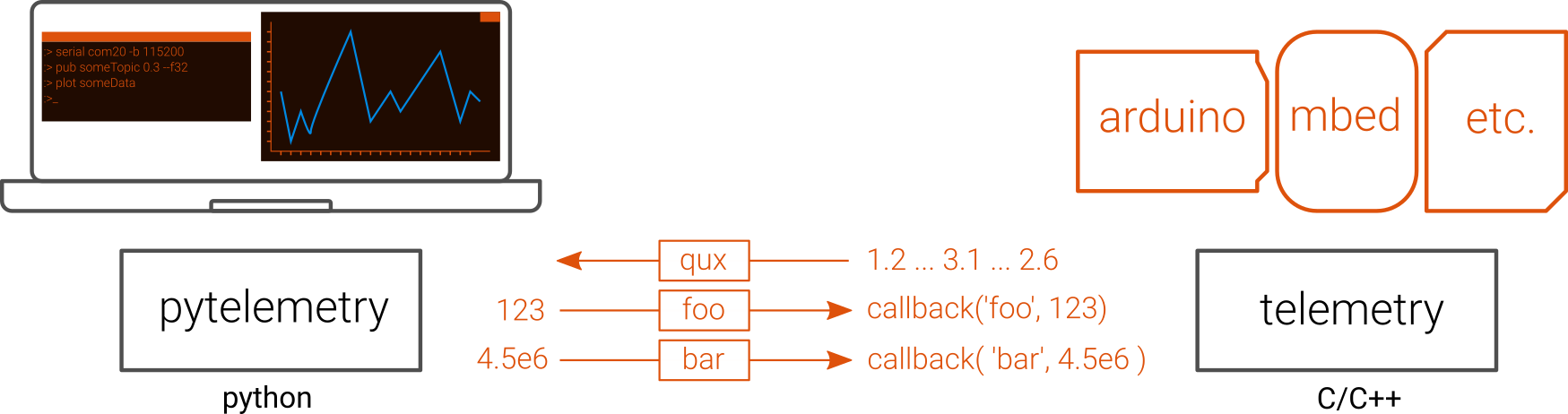
pytelemetryprovides high-level communication with any embedded device for remote control and monitoring. Specifically,pytelemetryimplements a custom communication protocol, based on the PubSub (Publish/Subscribe) messaging pattern.telemetryis the C implementation of the protocol. It can run on any embedded system, along with official distributions for Arduino and ARM Mbed.pytelemetrycliis a powerful command line interface to interact with embedded devices using the protocol. It enables instant data visualization of any received data, full logging of communications, health monitoring of the serial port and much more.

Data is exchanged on named communication channels called topics.
First, instanciate one of the available transport class (Note: so far, only serial transport is implemented) and the Pytelemetry object.
frompytelemetryimportPytelemetryfrompytelemetry.transports.serialtransportimportSerialTransportimporttime# create a transport (Here based on pyserial) to exchange data through serial porttransport=SerialTransport()
# Top level Pytelemetry apitlm=Pytelemetry(transport)
# Connection to serial port `COM20` at `9600` bauds.transport.connect({'port': "com20", 'baudrate': 9600})
Publish once to topic named throttle, sending effectively the value 0.8 of type float to the embedded device.
# publish on a topictlm.publish('throttle',0.8,'float32')Subscribe a printer function to all received topics.
Basically, this function will be called every time a new frame is received.
defprinter(topic, data, options):
print(topic," : ", data)
# subscribe to a topic. Subscribing to None subscribes to alltlm.subscribe(None, printer)
Then, run an update during 3 seconds and disconnect after.
# Update during 3 secondstimeout=time.time() +3whileTrue:
tlm.update()
iftime.time() >timeout:
break# disconnecttransport.disconnect()
print("Done.")
If the embedded device published regularly on topic foo with an incrementing value, you should see in the console:
foo : 34
foo : 35
foo : 36
foo : 37
Done.Python 3.3 and upward is supported. Python 2.x is not supported for now.
pip3 install pytelemetry- Support for arrays and sparse arrays. Send individual array items along with their item using topics like
foo:2. '2' is used here for the index, the value is provided inside the payload.
In the next milestone, it is planned to make topics more meaningful (on the python-implementation only).
- Publishing to topics like
bar\foo, will add group data. This will indicate that there is a group calledbar, with a subtopic calledfoo - Combination :
bar\foobar\foo,bar\foobar\foo:2 - Multiple instances :
bar\12\foowill be understood asfooinstance number 12 (useful if you want to have multiple instances under a same topic name)
For both python and C implementations of the protocol, it is also planned:
- add string compression with Huffman's Algorithm
- replace the byte stuffing algorithm by a consistent-over byte stuffing algorithm
Both will contribute to reduce overhead and frames size.