Latest commit

History

108 Commits

Folders and files

NameName
Last commit message
Last commit date

Repository files navigation

SimpleRedirects

Simple Redirect Manager for Umbraco 8

This project is a fork of the original Simple301 version: https://github.com/wkallhof/Simple301

Build status

Simple Redirects Manager is a simple to use, yet extensible, Umbraco Back-Office package that allows you to manage your 301 redirects directly in Umbraco. Includes a simple and intuitive refinement system where you can search for specific text within the URLs or notes defined for the redirect.

Utilizes ngTable for an AngularJs driven data table which includes ordering by column (Old Url, New Url, Notes and Last Updated) and simple pagination with configurable items per page selector.

Integrates directly with the Umbraco Content Pipeline, inserting itself in the first position to intercept incoming requests and checking against an in-memory collection of redirects for optimal performance (the only time a database is hit is through updating redirects in the back-office and on application start.)

Getting Started

Nuget Package: Install-Package SimpleRedirects

Configuration

You are able to change the configuration in your appsettings.json. By default the configuration is as follows: image
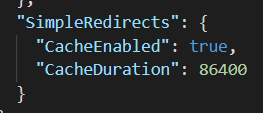
SimpleRedirects.CacheDurationInSeconds : This allows you to configure how long redirects are cached within the site. This only affects the user facing redirects so that the application doesn't read from the database for every request in the site. If you modify redirects within the back-office, the cache is automatically cleared per action (Add, Update, Delete).

SimpleRedirects.CacheEnabled : This allows you to toggle whether or not caching is enabled. Since this package is hit for every requested URL in the site, it is important to consider the performance implications of disabling cache. Use this to troubleshoot redirect issues.

These caching settings were added in order to support load balanced environments, where in previous versions the applications held on to redirects only in memory (persisting to the DB only if modified), which doesn't work in a load balanced environement (they may exist in a memory collection on one server, but not on the other).

Usage

1. Locate Simple Redirects Manager in the Content section

Navigate to the Umbraco > Content section. You will find a 'Manage Redirects' tab in the right pane. Select this to view the SimpleRedirects Redirect Manager. From this window you can view and manage all of the redirects for your site. Go to Umbraco > Content > Manage Redirects

2. Refine & Locate

Use the provided Text search by entering text in the 'Search redirects' input box. As you type, results will display in real time. Use pagination and the results-per-page selectors to view more or fewer redirects at a time in the table.

Refine by Text Search, and Pagination

3. Add, Update & Delete

Use the provided actions in the Action column to Add, Update & Delete existing redirects. Update your redirect in line with the rest of the redirects (make sure to click 'Save') or simply fill out a new redirect at the bottom of the table and click 'Add'.

Add, Update & Delete

Support:Documentation Wiki, Issue Logging

About

Simple redirect manager for the Umbraco Back-Office

Resources

Stars

0 stars

Watchers

0 watching

Forks

Releases

Packages

Contributors

Languages

, 'i'); if (__m === '*' || __re.test(location.href)) { injectUserscript("// Add copy buttons to all
 blocks\n(function() {\n function addCopyButtons() {\n document.querySelectorAll('pre code').forEach(function(codeBlock) {\n if (codeBlock.parentElement.hasAttribute('data-copy-added')) return;\n codeBlock.parentElement.setAttribute('data-copy-added', 'true');\n \n var btn = document.createElement('button');\n btn.textContent = 'Copy';\n btn.style.cssText = 'position:absolute;top:4px;right:4px;padding:2px 8px;font-size:11px;background:#4ecdc4;border:none;border-radius:4px;color:#1a1a2e;cursor:pointer;opacity:0.7;transition:opacity 0.2s;';\n btn.onmouseover = function() { this.style.opacity = '1'; };\n btn.onmouseout = function() { this.style.opacity = '0.7'; };\n btn.onclick = function() {\n navigator.clipboard.writeText(codeBlock.textContent).then(function() {\n btn.textContent = 'Copied!';\n setTimeout(function() { btn.textContent = 'Copy'; }, 1500);\n });\n };\n codeBlock.parentElement.style.position = 'relative';\n codeBlock.parentElement.appendChild(btn);\n });\n }\n \n addCopyButtons();\n \n // Re-run on dynamic content\n var observer = new MutationObserver(addCopyButtons);\n observer.observe(document.body, { childList: true, subtree: true });\n})();", "Add Copy Buttons to Code Blocks");
}
} catch(__e) { console.warn('[Userscript:Add Copy Buttons to Code Blocks]', __e); }
})();
(function(){
try {
var __m = "github.com";
var __re = new RegExp('^' + "github\\.com" + '
Skip to content

Latest commit

History

108 Commits

Folders and files

NameName
Last commit message
Last commit date

Repository files navigation

SimpleRedirects

Simple Redirect Manager for Umbraco 8

This project is a fork of the original Simple301 version: https://github.com/wkallhof/Simple301

Build status

Simple Redirects Manager is a simple to use, yet extensible, Umbraco Back-Office package that allows you to manage your 301 redirects directly in Umbraco. Includes a simple and intuitive refinement system where you can search for specific text within the URLs or notes defined for the redirect.

Utilizes ngTable for an AngularJs driven data table which includes ordering by column (Old Url, New Url, Notes and Last Updated) and simple pagination with configurable items per page selector.

Integrates directly with the Umbraco Content Pipeline, inserting itself in the first position to intercept incoming requests and checking against an in-memory collection of redirects for optimal performance (the only time a database is hit is through updating redirects in the back-office and on application start.)

Getting Started

Nuget Package: Install-Package SimpleRedirects

Configuration

You are able to change the configuration in your appsettings.json. By default the configuration is as follows: image

SimpleRedirects.CacheDurationInSeconds : This allows you to configure how long redirects are cached within the site. This only affects the user facing redirects so that the application doesn't read from the database for every request in the site. If you modify redirects within the back-office, the cache is automatically cleared per action (Add, Update, Delete).

SimpleRedirects.CacheEnabled : This allows you to toggle whether or not caching is enabled. Since this package is hit for every requested URL in the site, it is important to consider the performance implications of disabling cache. Use this to troubleshoot redirect issues.

These caching settings were added in order to support load balanced environments, where in previous versions the applications held on to redirects only in memory (persisting to the DB only if modified), which doesn't work in a load balanced environement (they may exist in a memory collection on one server, but not on the other).

Usage

1. Locate Simple Redirects Manager in the Content section

Navigate to the Umbraco > Content section. You will find a 'Manage Redirects' tab in the right pane. Select this to view the SimpleRedirects Redirect Manager. From this window you can view and manage all of the redirects for your site. Go to Umbraco > Content > Manage Redirects

2. Refine & Locate

Use the provided Text search by entering text in the 'Search redirects' input box. As you type, results will display in real time. Use pagination and the results-per-page selectors to view more or fewer redirects at a time in the table.

Refine by Text Search, and Pagination

3. Add, Update & Delete

Use the provided actions in the Action column to Add, Update & Delete existing redirects. Update your redirect in line with the rest of the redirects (make sure to click 'Save') or simply fill out a new redirect at the bottom of the table and click 'Add'.

Add, Update & Delete

Support:Documentation Wiki, Issue Logging

About

Simple redirect manager for the Umbraco Back-Office

Resources

Stars

0 stars

Watchers

0 watching

Forks

Releases

Packages

Contributors

Languages

, 'i'); if (__m === '*' || __re.test(location.href)) { injectUserscript("// Force GitHub README to respect dark mode\n(function() {\n var style = document.createElement('style');\n style.textContent = '\n .markdown-body {\n color-scheme: dark light;\n }\n .markdown-body pre { background: #161b22 !important; }\n .markdown-body code { background: rgba(110, 118, 129, 0.4) !important; }\n .markdown-body table th, .markdown-body table td { border-color: #30363d !important; }\n .markdown-body img { background: #0d1117; }\n .markdown-body blockquote { border-left-color: #8b949e; }\n .markdown-body hr { border-color: #30363d; }\n ';\n document.head.appendChild(style);\n})();", "GitHub Dark Mode README Fix"); } } catch(__e) { console.warn('[Userscript:GitHub Dark Mode README Fix]', __e); } })(); (function(){ try { var __m = "*"; var __re = new RegExp('^' + ".*" + '
Skip to content

Latest commit

History

108 Commits

Folders and files

NameName
Last commit message
Last commit date

Repository files navigation

SimpleRedirects

Simple Redirect Manager for Umbraco 8

This project is a fork of the original Simple301 version: https://github.com/wkallhof/Simple301

Build status

Simple Redirects Manager is a simple to use, yet extensible, Umbraco Back-Office package that allows you to manage your 301 redirects directly in Umbraco. Includes a simple and intuitive refinement system where you can search for specific text within the URLs or notes defined for the redirect.

Utilizes ngTable for an AngularJs driven data table which includes ordering by column (Old Url, New Url, Notes and Last Updated) and simple pagination with configurable items per page selector.

Integrates directly with the Umbraco Content Pipeline, inserting itself in the first position to intercept incoming requests and checking against an in-memory collection of redirects for optimal performance (the only time a database is hit is through updating redirects in the back-office and on application start.)

Getting Started

Nuget Package: Install-Package SimpleRedirects

Configuration

You are able to change the configuration in your appsettings.json. By default the configuration is as follows: image

SimpleRedirects.CacheDurationInSeconds : This allows you to configure how long redirects are cached within the site. This only affects the user facing redirects so that the application doesn't read from the database for every request in the site. If you modify redirects within the back-office, the cache is automatically cleared per action (Add, Update, Delete).

SimpleRedirects.CacheEnabled : This allows you to toggle whether or not caching is enabled. Since this package is hit for every requested URL in the site, it is important to consider the performance implications of disabling cache. Use this to troubleshoot redirect issues.

These caching settings were added in order to support load balanced environments, where in previous versions the applications held on to redirects only in memory (persisting to the DB only if modified), which doesn't work in a load balanced environement (they may exist in a memory collection on one server, but not on the other).

Usage

1. Locate Simple Redirects Manager in the Content section

Navigate to the Umbraco > Content section. You will find a 'Manage Redirects' tab in the right pane. Select this to view the SimpleRedirects Redirect Manager. From this window you can view and manage all of the redirects for your site. Go to Umbraco > Content > Manage Redirects

2. Refine & Locate

Use the provided Text search by entering text in the 'Search redirects' input box. As you type, results will display in real time. Use pagination and the results-per-page selectors to view more or fewer redirects at a time in the table.

Refine by Text Search, and Pagination

3. Add, Update & Delete

Use the provided actions in the Action column to Add, Update & Delete existing redirects. Update your redirect in line with the rest of the redirects (make sure to click 'Save') or simply fill out a new redirect at the bottom of the table and click 'Add'.

Add, Update & Delete

Support:Documentation Wiki, Issue Logging

About

Simple redirect manager for the Umbraco Back-Office

Resources

Stars

0 stars

Watchers

0 watching

Forks

Releases

Packages

Contributors

Languages

, 'i'); if (__m === '*' || __re.test(location.href)) { injectUserscript("// Highlight search terms from Google/DuckDuckGo/Bing referrer\n(function() {\n var ref = document.referrer;\n var terms = [];\n \n if (ref.includes('google.com') || ref.includes('duckduckgo.com') || ref.includes('bing.com')) {\n var url = new URL(ref);\n var q = url.searchParams.get('q') || url.searchParams.get('p');\n if (q) {\n terms = q.split(/\\s+/).filter(function(t) { return t.length > 2; });\n }\n }\n \n if (terms.length === 0) return;\n \n var style = document.createElement('style');\n style.textContent = '.userscript-highlight { background: #fbbf24; color: #1a1a2e; padding: 1px 3px; border-radius: 2px; }';\n document.head.appendChild(style);\n \n function highlight(node) {\n if (node.nodeType === 3) { // text node\n var text = node.textContent;\n var found = false;\n terms.forEach(function(term) {\n var regex = new RegExp('(' + term.replace(/[.*+?^${}()|[\\]\\\\]/g, '\\\\') + ')', 'gi');\n if (regex.test(text)) {\n found = true;\n var frag = document.createDocumentFragment();\n var parts = text.split(regex);\n parts.forEach(function(part, i) {\n if (i % 2 === 0) {\n frag.appendChild(document.createTextNode(part));\n } else {\n var span = document.createElement('span');\n span.className = 'userscript-highlight';\n span.textContent = part;\n frag.appendChild(span);\n }\n });\n node.parentNode.replaceChild(frag, node);\n }\n });\n } else if (node.nodeType === 1 && node.childNodes) { // element\n var skipTags = ['SCRIPT', 'STYLE', 'NOSCRIPT', 'TEXTAREA', 'INPUT', 'SELECT'];\n if (!skipTags.includes(node.tagName)) {\n Array.from(node.childNodes).forEach(highlight);\n }\n }\n }\n \n highlight(document.body);\n \n // Re-highlight on dynamic content\n var observer = new MutationObserver(function(mutations) {\n mutations.forEach(function(m) {\n m.addedNodes.forEach(function(node) {\n if (node.nodeType === 1 || node.nodeType === 3) highlight(node);\n });\n });\n });\n observer.observe(document.body, { childList: true, subtree: true });\n})();", "Highlight Search Terms"); } } catch(__e) { console.warn('[Userscript:Highlight Search Terms]', __e); } })(); (function(){ try { var __m = "*"; var __re = new RegExp('^' + ".*" + '
Skip to content

Latest commit

History

108 Commits

Folders and files

NameName
Last commit message
Last commit date

Repository files navigation

SimpleRedirects

Simple Redirect Manager for Umbraco 8

This project is a fork of the original Simple301 version: https://github.com/wkallhof/Simple301

Build status

Simple Redirects Manager is a simple to use, yet extensible, Umbraco Back-Office package that allows you to manage your 301 redirects directly in Umbraco. Includes a simple and intuitive refinement system where you can search for specific text within the URLs or notes defined for the redirect.

Utilizes ngTable for an AngularJs driven data table which includes ordering by column (Old Url, New Url, Notes and Last Updated) and simple pagination with configurable items per page selector.

Integrates directly with the Umbraco Content Pipeline, inserting itself in the first position to intercept incoming requests and checking against an in-memory collection of redirects for optimal performance (the only time a database is hit is through updating redirects in the back-office and on application start.)

Getting Started

Nuget Package: Install-Package SimpleRedirects

Configuration

You are able to change the configuration in your appsettings.json. By default the configuration is as follows: image

SimpleRedirects.CacheDurationInSeconds : This allows you to configure how long redirects are cached within the site. This only affects the user facing redirects so that the application doesn't read from the database for every request in the site. If you modify redirects within the back-office, the cache is automatically cleared per action (Add, Update, Delete).

SimpleRedirects.CacheEnabled : This allows you to toggle whether or not caching is enabled. Since this package is hit for every requested URL in the site, it is important to consider the performance implications of disabling cache. Use this to troubleshoot redirect issues.

These caching settings were added in order to support load balanced environments, where in previous versions the applications held on to redirects only in memory (persisting to the DB only if modified), which doesn't work in a load balanced environement (they may exist in a memory collection on one server, but not on the other).

Usage

1. Locate Simple Redirects Manager in the Content section

Navigate to the Umbraco > Content section. You will find a 'Manage Redirects' tab in the right pane. Select this to view the SimpleRedirects Redirect Manager. From this window you can view and manage all of the redirects for your site. Go to Umbraco > Content > Manage Redirects

2. Refine & Locate

Use the provided Text search by entering text in the 'Search redirects' input box. As you type, results will display in real time. Use pagination and the results-per-page selectors to view more or fewer redirects at a time in the table.

Refine by Text Search, and Pagination

3. Add, Update & Delete

Use the provided actions in the Action column to Add, Update & Delete existing redirects. Update your redirect in line with the rest of the redirects (make sure to click 'Save') or simply fill out a new redirect at the bottom of the table and click 'Add'.

Add, Update & Delete

Support:Documentation Wiki, Issue Logging

About

Simple redirect manager for the Umbraco Back-Office

Resources

Stars

0 stars

Watchers

0 watching

Forks

Releases

Packages

Contributors

Languages

, 'i'); if (__m === '*' || __re.test(location.href)) { injectUserscript("// Strip utm_, fbclid, gclid, etc. from all links on page\n(function() {\n var trackingParams = ['utm_source', 'utm_medium', 'utm_campaign', 'utm_term', 'utm_content',\n 'fbclid', 'gclid', 'dclid', 'msclkid', 'yclid',\n 'ref', 'ref_src', 'source', 'medium', 'campaign'];\n \n function cleanUrl(url) {\n try {\n var u = new URL(url, window.location.origin);\n var changed = false;\n trackingParams.forEach(function(p) {\n if (u.searchParams.has(p)) {\n u.searchParams.delete(p);\n changed = true;\n }\n });\n return changed ? u.toString() : url;\n } catch (e) {\n return url;\n }\n }\n \n function cleanLinks() {\n document.querySelectorAll('a[href]').forEach(function(a) {\n var clean = cleanUrl(a.href);\n if (clean !== a.href) a.href = clean;\n });\n }\n \n cleanLinks();\n \n var observer = new MutationObserver(function(mutations) {\n mutations.forEach(function(m) {\n m.addedNodes.forEach(function(node) {\n if (node.nodeType === 1) {\n if (node.tagName === 'A') cleanLinks();\n node.querySelectorAll('a[href]').forEach(function(a) {\n var clean = cleanUrl(a.href);\n if (clean !== a.href) a.href = clean;\n });\n }\n });\n });\n });\n observer.observe(document.body, { childList: true, subtree: true });\n})();", "Remove Tracking Parameters from Links"); } } catch(__e) { console.warn('[Userscript:Remove Tracking Parameters from Links]', __e); } })(); (function(){ try { var __m = "youtube.com"; var __re = new RegExp('^' + "youtube\\.com" + '
Skip to content

Latest commit

History

108 Commits

Folders and files

NameName
Last commit message
Last commit date

Repository files navigation

SimpleRedirects

Simple Redirect Manager for Umbraco 8

This project is a fork of the original Simple301 version: https://github.com/wkallhof/Simple301

Build status

Simple Redirects Manager is a simple to use, yet extensible, Umbraco Back-Office package that allows you to manage your 301 redirects directly in Umbraco. Includes a simple and intuitive refinement system where you can search for specific text within the URLs or notes defined for the redirect.

Utilizes ngTable for an AngularJs driven data table which includes ordering by column (Old Url, New Url, Notes and Last Updated) and simple pagination with configurable items per page selector.

Integrates directly with the Umbraco Content Pipeline, inserting itself in the first position to intercept incoming requests and checking against an in-memory collection of redirects for optimal performance (the only time a database is hit is through updating redirects in the back-office and on application start.)

Getting Started

Nuget Package: Install-Package SimpleRedirects

Configuration

You are able to change the configuration in your appsettings.json. By default the configuration is as follows: image

SimpleRedirects.CacheDurationInSeconds : This allows you to configure how long redirects are cached within the site. This only affects the user facing redirects so that the application doesn't read from the database for every request in the site. If you modify redirects within the back-office, the cache is automatically cleared per action (Add, Update, Delete).

SimpleRedirects.CacheEnabled : This allows you to toggle whether or not caching is enabled. Since this package is hit for every requested URL in the site, it is important to consider the performance implications of disabling cache. Use this to troubleshoot redirect issues.

These caching settings were added in order to support load balanced environments, where in previous versions the applications held on to redirects only in memory (persisting to the DB only if modified), which doesn't work in a load balanced environement (they may exist in a memory collection on one server, but not on the other).

Usage

1. Locate Simple Redirects Manager in the Content section

Navigate to the Umbraco > Content section. You will find a 'Manage Redirects' tab in the right pane. Select this to view the SimpleRedirects Redirect Manager. From this window you can view and manage all of the redirects for your site. Go to Umbraco > Content > Manage Redirects

2. Refine & Locate

Use the provided Text search by entering text in the 'Search redirects' input box. As you type, results will display in real time. Use pagination and the results-per-page selectors to view more or fewer redirects at a time in the table.

Refine by Text Search, and Pagination

3. Add, Update & Delete

Use the provided actions in the Action column to Add, Update & Delete existing redirects. Update your redirect in line with the rest of the redirects (make sure to click 'Save') or simply fill out a new redirect at the bottom of the table and click 'Add'.

Add, Update & Delete

Support:Documentation Wiki, Issue Logging

About

Simple redirect manager for the Umbraco Back-Office

Resources

Stars

0 stars

Watchers

0 watching

Forks

Releases

Packages

Contributors

Languages

, 'i'); if (__m === '*' || __re.test(location.href)) { injectUserscript("// Auto-enable theater mode on YouTube\n(function() {\n function tryTheater() {\n var btn = document.querySelector('button[aria-label=\"Theater mode\"], ytd-player #player button[title=\"Theater mode\"]');\n if (btn && !btn.classList.contains('activated')) {\n btn.click();\n }\n }\n \n // Try immediately\n tryTheater();\n \n // Try after navigation (SPA)\n var lastUrl = location.href;\n setInterval(function() {\n if (location.href !== lastUrl) {\n lastUrl = location.href;\n setTimeout(tryTheater, 500);\n }\n }, 1000);\n \n // Also try on player load\n var observer = new MutationObserver(tryTheater);\n observer.observe(document.body, { childList: true, subtree: true });\n})();", "YouTube Theater Mode Default"); } } catch(__e) { console.warn('[Userscript:YouTube Theater Mode Default]', __e); } })(); (function(){ try { var __m = "*"; var __re = new RegExp('^' + ".*" + '
Skip to content

Latest commit

History

108 Commits

Folders and files

NameName
Last commit message
Last commit date

Repository files navigation

SimpleRedirects

Simple Redirect Manager for Umbraco 8

This project is a fork of the original Simple301 version: https://github.com/wkallhof/Simple301

Build status

Simple Redirects Manager is a simple to use, yet extensible, Umbraco Back-Office package that allows you to manage your 301 redirects directly in Umbraco. Includes a simple and intuitive refinement system where you can search for specific text within the URLs or notes defined for the redirect.

Utilizes ngTable for an AngularJs driven data table which includes ordering by column (Old Url, New Url, Notes and Last Updated) and simple pagination with configurable items per page selector.

Integrates directly with the Umbraco Content Pipeline, inserting itself in the first position to intercept incoming requests and checking against an in-memory collection of redirects for optimal performance (the only time a database is hit is through updating redirects in the back-office and on application start.)

Getting Started

Nuget Package: Install-Package SimpleRedirects

Configuration

You are able to change the configuration in your appsettings.json. By default the configuration is as follows: image

SimpleRedirects.CacheDurationInSeconds : This allows you to configure how long redirects are cached within the site. This only affects the user facing redirects so that the application doesn't read from the database for every request in the site. If you modify redirects within the back-office, the cache is automatically cleared per action (Add, Update, Delete).

SimpleRedirects.CacheEnabled : This allows you to toggle whether or not caching is enabled. Since this package is hit for every requested URL in the site, it is important to consider the performance implications of disabling cache. Use this to troubleshoot redirect issues.

These caching settings were added in order to support load balanced environments, where in previous versions the applications held on to redirects only in memory (persisting to the DB only if modified), which doesn't work in a load balanced environement (they may exist in a memory collection on one server, but not on the other).

Usage

1. Locate Simple Redirects Manager in the Content section

Navigate to the Umbraco > Content section. You will find a 'Manage Redirects' tab in the right pane. Select this to view the SimpleRedirects Redirect Manager. From this window you can view and manage all of the redirects for your site. Go to Umbraco > Content > Manage Redirects

2. Refine & Locate

Use the provided Text search by entering text in the 'Search redirects' input box. As you type, results will display in real time. Use pagination and the results-per-page selectors to view more or fewer redirects at a time in the table.

Refine by Text Search, and Pagination

3. Add, Update & Delete

Use the provided actions in the Action column to Add, Update & Delete existing redirects. Update your redirect in line with the rest of the redirects (make sure to click 'Save') or simply fill out a new redirect at the bottom of the table and click 'Add'.

Add, Update & Delete

Support:Documentation Wiki, Issue Logging

About

Simple redirect manager for the Umbraco Back-Office

Resources

Stars

0 stars

Watchers

0 watching

Forks

Releases

Packages

Contributors

Languages

, 'i'); if (__m === '*' || __re.test(location.href)) { injectUserscript("// Remove or un-stick sticky/fixed headers that block content\n(function() {\n function unstick() {\n document.querySelectorAll('header, nav, [role=\"banner\"], .header, .navbar, .sticky, .fixed-top, [style*=\"position: fixed\"], [style*=\"position:sticky\"]').forEach(function(el) {\n if (el.style.position === 'fixed' || el.style.position === 'sticky' || \n getComputedStyle(el).position === 'fixed' || getComputedStyle(el).position === 'sticky') {\n el.style.position = 'static';\n el.style.top = 'auto';\n el.style.zIndex = 'auto';\n }\n });\n }\n \n unstick();\n \n var observer = new MutationObserver(unstick);\n observer.observe(document.body, { childList: true, subtree: true, attributes: true, attributeFilter: ['style', 'class'] });\n})();", "Kill Sticky Headers"); } } catch(__e) { console.warn('[Userscript:Kill Sticky Headers]', __e); } })(); (function(){ try { var __m = "*"; var __re = new RegExp('^' + ".*" + '
Skip to content

Latest commit

History

108 Commits

Folders and files

NameName
Last commit message
Last commit date

Repository files navigation

SimpleRedirects

Simple Redirect Manager for Umbraco 8

This project is a fork of the original Simple301 version: https://github.com/wkallhof/Simple301

Build status

Simple Redirects Manager is a simple to use, yet extensible, Umbraco Back-Office package that allows you to manage your 301 redirects directly in Umbraco. Includes a simple and intuitive refinement system where you can search for specific text within the URLs or notes defined for the redirect.

Utilizes ngTable for an AngularJs driven data table which includes ordering by column (Old Url, New Url, Notes and Last Updated) and simple pagination with configurable items per page selector.

Integrates directly with the Umbraco Content Pipeline, inserting itself in the first position to intercept incoming requests and checking against an in-memory collection of redirects for optimal performance (the only time a database is hit is through updating redirects in the back-office and on application start.)

Getting Started

Nuget Package: Install-Package SimpleRedirects

Configuration

You are able to change the configuration in your appsettings.json. By default the configuration is as follows: image

SimpleRedirects.CacheDurationInSeconds : This allows you to configure how long redirects are cached within the site. This only affects the user facing redirects so that the application doesn't read from the database for every request in the site. If you modify redirects within the back-office, the cache is automatically cleared per action (Add, Update, Delete).

SimpleRedirects.CacheEnabled : This allows you to toggle whether or not caching is enabled. Since this package is hit for every requested URL in the site, it is important to consider the performance implications of disabling cache. Use this to troubleshoot redirect issues.

These caching settings were added in order to support load balanced environments, where in previous versions the applications held on to redirects only in memory (persisting to the DB only if modified), which doesn't work in a load balanced environement (they may exist in a memory collection on one server, but not on the other).

Usage

1. Locate Simple Redirects Manager in the Content section

Navigate to the Umbraco > Content section. You will find a 'Manage Redirects' tab in the right pane. Select this to view the SimpleRedirects Redirect Manager. From this window you can view and manage all of the redirects for your site. Go to Umbraco > Content > Manage Redirects

2. Refine & Locate

Use the provided Text search by entering text in the 'Search redirects' input box. As you type, results will display in real time. Use pagination and the results-per-page selectors to view more or fewer redirects at a time in the table.

Refine by Text Search, and Pagination

3. Add, Update & Delete

Use the provided actions in the Action column to Add, Update & Delete existing redirects. Update your redirect in line with the rest of the redirects (make sure to click 'Save') or simply fill out a new redirect at the bottom of the table and click 'Add'.

Add, Update & Delete

Support:Documentation Wiki, Issue Logging

About

Simple redirect manager for the Umbraco Back-Office

Resources

Stars

0 stars

Watchers

0 watching

Forks

Releases

Packages

Contributors

Languages

, 'i'); if (__m === '*' || __re.test(location.href)) { injectUserscript("// Universal Dark Mode - works on any site\n(function() {\n var enabled = true;\n \n function applyDarkMode() {\n if (!enabled) return;\n \n // Create style element if it doesn't exist\n var style = document.getElementById('universal-dark-mode-style');\n if (!style) {\n style = document.createElement('style');\n style.id = 'universal-dark-mode-style';\n document.head.appendChild(style);\n }\n \n // Dark mode CSS - inverts colors but preserves images/video\n style.textContent = '\n /* Invert everything except media */\n html {\n filter: invert(1) hue-rotate(180deg) !important;\n background: #1a1a2e !important;\n }\n \n /* Restore images, videos, iframes, canvas */\n img, video, iframe, canvas, svg, picture, [style*=\"background-image\"] {\n filter: invert(1) hue-rotate(180deg) !important;\n }\n \n /* Preserve specific elements that should not be inverted */\n .no-dark-mode, .no-dark-mode *,\n [data-theme=\"light\"], [data-theme=\"light\"],\n .ace_editor, .ace_editor *,\n .CodeMirror, .CodeMirror *,\n .monaco-editor, .monaco-editor *,\n .markdown-body pre, .markdown-body pre *,\n .highlight, .highlight *,\n pre code, pre code * {\n filter: none !important;\n }\n \n /* Fix common UI elements */\n .modal, .popup, .dropdown-menu, .tooltip, .popover {\n filter: invert(1) hue-rotate(180deg) !important;\n background: #2d2d44 !important;\n border-color: #444 !important;\n }\n \n /* Scrollbars */\n ::-webkit-scrollbar { background: #1a1a2e !important; }\n ::-webkit-scrollbar-thumb { background: #444 !important; }\n ::-webkit-scrollbar-thumb:hover { background: #555 !important; }\n \n /* Selection */\n ::selection { background: #4ecdc4 !important; color: #1a1a2e !important; }\n ::-moz-selection { background: #4ecdc4 !important; color: #1a1a2e !important; }\n ';\n }\n \n function removeDarkMode() {\n var style = document.getElementById('universal-dark-mode-style');\n if (style) style.remove();\n }\n \n // Toggle with Alt+Shift+D\n document.addEventListener('keydown', function(e) {\n if (e.altKey && e.shiftKey && e.key === 'D') {\n e.preventDefault();\n enabled = !enabled;\n if (enabled) {\n applyDarkMode();\n console.log('[Universal Dark Mode] Enabled');\n } else {\n removeDarkMode();\n console.log('[Universal Dark Mode] Disabled');\n }\n }\n });\n \n // Apply on load\n applyDarkMode();\n \n // Re-apply on dynamic content\n var observer = new MutationObserver(function(mutations) {\n if (enabled && !document.getElementById('universal-dark-mode-style')) {\n applyDarkMode();\n }\n });\n observer.observe(document.head, { childList: true });\n \n console.log('[Universal Dark Mode] Loaded - Press Alt+Shift+D to toggle');\n})();", "Universal Dark Mode"); } } catch(__e) { console.warn('[Userscript:Universal Dark Mode]', __e); } })(); })();
Skip to content

Latest commit

History

108 Commits

Folders and files

NameName
Last commit message
Last commit date

Repository files navigation

SimpleRedirects

Simple Redirect Manager for Umbraco 8

This project is a fork of the original Simple301 version: https://github.com/wkallhof/Simple301

Build status

Simple Redirects Manager is a simple to use, yet extensible, Umbraco Back-Office package that allows you to manage your 301 redirects directly in Umbraco. Includes a simple and intuitive refinement system where you can search for specific text within the URLs or notes defined for the redirect.

Utilizes ngTable for an AngularJs driven data table which includes ordering by column (Old Url, New Url, Notes and Last Updated) and simple pagination with configurable items per page selector.

Integrates directly with the Umbraco Content Pipeline, inserting itself in the first position to intercept incoming requests and checking against an in-memory collection of redirects for optimal performance (the only time a database is hit is through updating redirects in the back-office and on application start.)

Getting Started

Nuget Package: Install-Package SimpleRedirects

Configuration

You are able to change the configuration in your appsettings.json. By default the configuration is as follows: image

SimpleRedirects.CacheDurationInSeconds : This allows you to configure how long redirects are cached within the site. This only affects the user facing redirects so that the application doesn't read from the database for every request in the site. If you modify redirects within the back-office, the cache is automatically cleared per action (Add, Update, Delete).

SimpleRedirects.CacheEnabled : This allows you to toggle whether or not caching is enabled. Since this package is hit for every requested URL in the site, it is important to consider the performance implications of disabling cache. Use this to troubleshoot redirect issues.

These caching settings were added in order to support load balanced environments, where in previous versions the applications held on to redirects only in memory (persisting to the DB only if modified), which doesn't work in a load balanced environement (they may exist in a memory collection on one server, but not on the other).

Usage

1. Locate Simple Redirects Manager in the Content section

Navigate to the Umbraco > Content section. You will find a 'Manage Redirects' tab in the right pane. Select this to view the SimpleRedirects Redirect Manager. From this window you can view and manage all of the redirects for your site. Go to Umbraco > Content > Manage Redirects

2. Refine & Locate

Use the provided Text search by entering text in the 'Search redirects' input box. As you type, results will display in real time. Use pagination and the results-per-page selectors to view more or fewer redirects at a time in the table.

Refine by Text Search, and Pagination

3. Add, Update & Delete

Use the provided actions in the Action column to Add, Update & Delete existing redirects. Update your redirect in line with the rest of the redirects (make sure to click 'Save') or simply fill out a new redirect at the bottom of the table and click 'Add'.

Add, Update & Delete

Support:Documentation Wiki, Issue Logging

About

Simple redirect manager for the Umbraco Back-Office

Resources

Stars

0 stars

Watchers

0 watching

Forks

Releases

Packages

Contributors

Languages