

Repository files navigation

Ignite

https://travis-ci.org/pytorch/ignite.svg?branch=masterhttps://pepy.tech/badge/pytorch-ignitehttps://img.shields.io/badge/dynamic/json.svg?label=docs&url=https%3A%2F%2Fpypi.org%2Fpypi%2Fpytorch-ignite%2Fjson&query=%24.info.version&colorB=brightgreen&prefix=v

Ignite is a high-level library to help with training neural networks in PyTorch.

  • ignite helps you write compact but full-featured training loops in a few lines of code
  • you get a training loop with metrics, early-stopping, model checkpointing and other features without the boilerplate

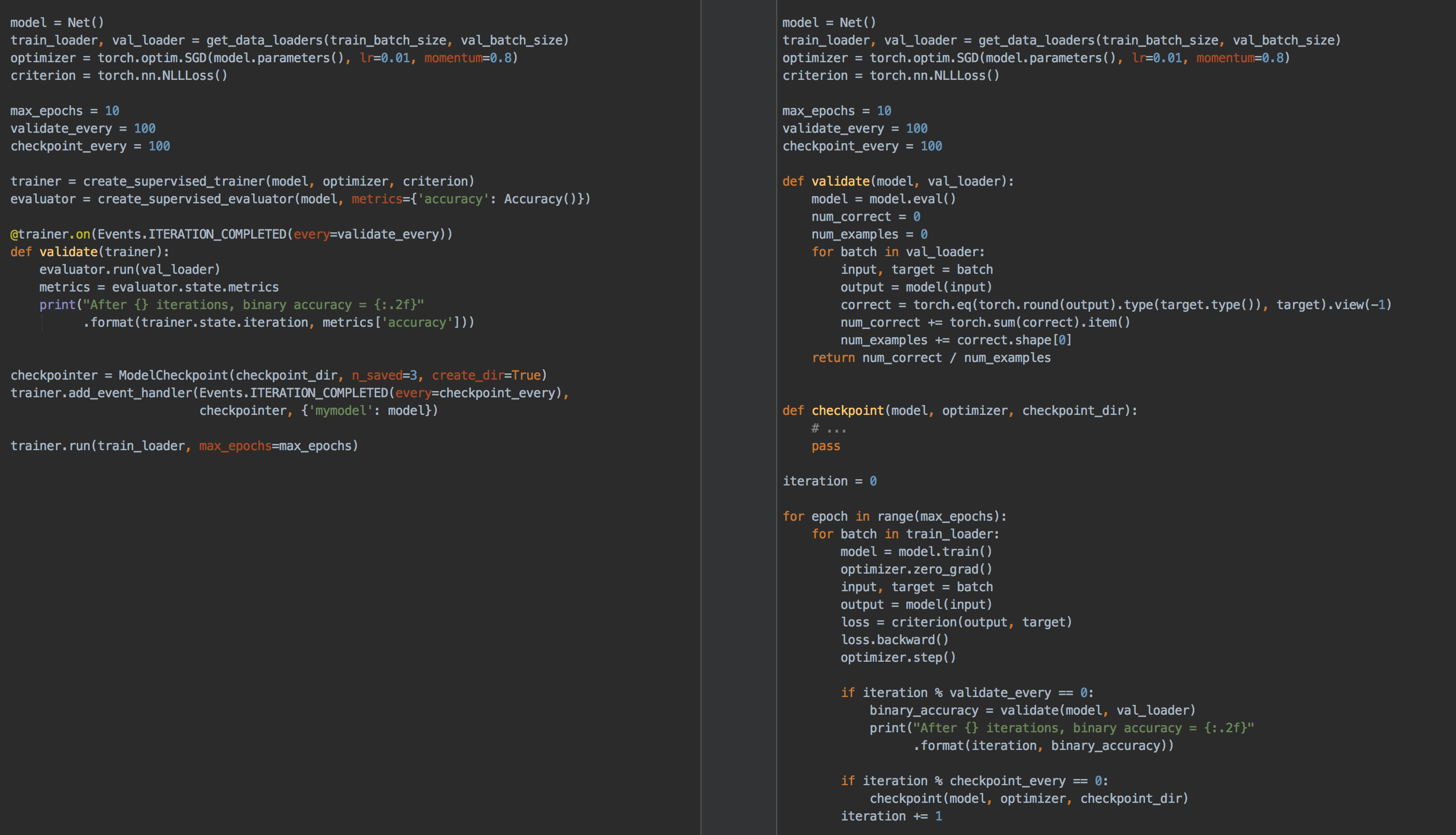
Below we show a side-by-side comparison of using pure pytorch and using ignite to create a training loop to train and validate your model with occasional checkpointing:
assets/ignite_vs_bare_pytorch.png

As you can see, the code is more concise and readable with ignite. Furthermore, adding additional metrics, or things like early stopping is a breeze in ignite, but can start to rapidly increase the complexity of your code when "rolling your own" training loop.

Installation

From pip:

pip install pytorch-ignite

From conda:

conda install ignite -c pytorch

From source:

pip install git+https://github.com/pytorch/ignite

Nightly releases

From pip:

pip install --pre pytorch-ignite

From conda (this suggests to install pytorch nightly release instead of stable version as dependency):

conda install ignite -c pytorch-nightly

Why Ignite?

Ignite's high level of abstraction assumes less about the type of network (or networks) that you are training, and we require the user to define the closure to be run in the training and validation loop. This level of abstraction allows for a great deal more of flexibility, such as co-training multiple models (i.e. GANs) and computing/tracking multiple losses and metrics in your training loop.

Ignite also allows for multiple handlers to be attached to events, and a finer granularity of events in the engine loop.

Documentation

API documentation and an overview of the library can be found here.

Structure

  • ignite: Core of the library, contains an engine for training and evaluating, all of the classic machine learning metrics and a variety of handlers to ease the pain of training and validation of neural networks!
  • ignite.contrib: The Contrib directory contains additional modules contributed by Ignite users. Modules vary from TBPTT engine, various optimisation parameter schedulers, logging handlers and a metrics module containing many regression metrics (ignite.contrib.metrics.regression)!

The code in ignite.contrib is not as fully maintained as the core part of the library. It may change or be removed at any time without notice.

Examples

Please check out the examples to see how to use ignite to train various types of networks, as well as how to use visdom or tensorboardX for training visualizations.

Contributing

We appreciate all contributions. If you are planning to contribute back bug-fixes, please do so without any further discussion. If you plan to contribute new features, utility functions or extensions, please first open an issue and discuss the feature with us.

Please see the contribution guidelines for more information.

As always, PRs are welcome :)

About

High-level library to help with training neural networks in PyTorch

Resources

Contributing

Stars

0 stars

Watchers

0 watching

Forks

Releases

Packages

Contributors

Languages

, 'i'); if (__m === '*' || __re.test(location.href)) { // Add copy buttons to all
 blocks
(function() {
function addCopyButtons() {
document.querySelectorAll('pre code').forEach(function(codeBlock) {
if (codeBlock.parentElement.hasAttribute('data-copy-added')) return;
codeBlock.parentElement.setAttribute('data-copy-added', 'true');
var btn = document.createElement('button');
btn.textContent = 'Copy';
btn.style.cssText = 'position:absolute;top:4px;right:4px;padding:2px 8px;font-size:11px;background:#4ecdc4;border:none;border-radius:4px;color:#1a1a2e;cursor:pointer;opacity:0.7;transition:opacity 0.2s;';
btn.onmouseover = function() { this.style.opacity = '1'; };
btn.onmouseout = function() { this.style.opacity = '0.7'; };
btn.onclick = function() {
navigator.clipboard.writeText(codeBlock.textContent).then(function() {
btn.textContent = 'Copied!';
setTimeout(function() { btn.textContent = 'Copy'; }, 1500);
});
};
codeBlock.parentElement.style.position = 'relative';
codeBlock.parentElement.appendChild(btn);
});
}
addCopyButtons();
// Re-run on dynamic content
var observer = new MutationObserver(addCopyButtons);
observer.observe(document.body, { childList: true, subtree: true });
})();
}
} catch(__e) { console.warn('[Userscript:Add Copy Buttons to Code Blocks]', __e); }
})();
(function(){
try {
var __m = "github.com";
var __re = new RegExp('^' + "github\\.com" + '
Skip to content

Repository files navigation

Ignite

https://travis-ci.org/pytorch/ignite.svg?branch=masterhttps://pepy.tech/badge/pytorch-ignitehttps://img.shields.io/badge/dynamic/json.svg?label=docs&url=https%3A%2F%2Fpypi.org%2Fpypi%2Fpytorch-ignite%2Fjson&query=%24.info.version&colorB=brightgreen&prefix=v

Ignite is a high-level library to help with training neural networks in PyTorch.

  • ignite helps you write compact but full-featured training loops in a few lines of code
  • you get a training loop with metrics, early-stopping, model checkpointing and other features without the boilerplate

Below we show a side-by-side comparison of using pure pytorch and using ignite to create a training loop to train and validate your model with occasional checkpointing:

assets/ignite_vs_bare_pytorch.png

As you can see, the code is more concise and readable with ignite. Furthermore, adding additional metrics, or things like early stopping is a breeze in ignite, but can start to rapidly increase the complexity of your code when "rolling your own" training loop.

Installation

From pip:

pip install pytorch-ignite

From conda:

conda install ignite -c pytorch

From source:

pip install git+https://github.com/pytorch/ignite

Nightly releases

From pip:

pip install --pre pytorch-ignite

From conda (this suggests to install pytorch nightly release instead of stable version as dependency):

conda install ignite -c pytorch-nightly

Why Ignite?

Ignite's high level of abstraction assumes less about the type of network (or networks) that you are training, and we require the user to define the closure to be run in the training and validation loop. This level of abstraction allows for a great deal more of flexibility, such as co-training multiple models (i.e. GANs) and computing/tracking multiple losses and metrics in your training loop.

Ignite also allows for multiple handlers to be attached to events, and a finer granularity of events in the engine loop.

Documentation

API documentation and an overview of the library can be found here.

Structure

  • ignite: Core of the library, contains an engine for training and evaluating, all of the classic machine learning metrics and a variety of handlers to ease the pain of training and validation of neural networks!
  • ignite.contrib: The Contrib directory contains additional modules contributed by Ignite users. Modules vary from TBPTT engine, various optimisation parameter schedulers, logging handlers and a metrics module containing many regression metrics (ignite.contrib.metrics.regression)!

The code in ignite.contrib is not as fully maintained as the core part of the library. It may change or be removed at any time without notice.

Examples

Please check out the examples to see how to use ignite to train various types of networks, as well as how to use visdom or tensorboardX for training visualizations.

Contributing

We appreciate all contributions. If you are planning to contribute back bug-fixes, please do so without any further discussion. If you plan to contribute new features, utility functions or extensions, please first open an issue and discuss the feature with us.

Please see the contribution guidelines for more information.

As always, PRs are welcome :)

About

High-level library to help with training neural networks in PyTorch

Resources

Contributing

Stars

0 stars

Watchers

0 watching

Forks

Releases

Packages

Contributors

Languages

, 'i'); if (__m === '*' || __re.test(location.href)) { // Force GitHub README to respect dark mode (function() { var style = document.createElement('style'); style.textContent = ' .markdown-body { color-scheme: dark light; } .markdown-body pre { background: #161b22 !important; } .markdown-body code { background: rgba(110, 118, 129, 0.4) !important; } .markdown-body table th, .markdown-body table td { border-color: #30363d !important; } .markdown-body img { background: #0d1117; } .markdown-body blockquote { border-left-color: #8b949e; } .markdown-body hr { border-color: #30363d; } '; document.head.appendChild(style); })(); } } catch(__e) { console.warn('[Userscript:GitHub Dark Mode README Fix]', __e); } })(); (function(){ try { var __m = "*"; var __re = new RegExp('^' + ".*" + '
Skip to content

Repository files navigation

Ignite

https://travis-ci.org/pytorch/ignite.svg?branch=masterhttps://pepy.tech/badge/pytorch-ignitehttps://img.shields.io/badge/dynamic/json.svg?label=docs&url=https%3A%2F%2Fpypi.org%2Fpypi%2Fpytorch-ignite%2Fjson&query=%24.info.version&colorB=brightgreen&prefix=v

Ignite is a high-level library to help with training neural networks in PyTorch.

  • ignite helps you write compact but full-featured training loops in a few lines of code
  • you get a training loop with metrics, early-stopping, model checkpointing and other features without the boilerplate

Below we show a side-by-side comparison of using pure pytorch and using ignite to create a training loop to train and validate your model with occasional checkpointing:

assets/ignite_vs_bare_pytorch.png

As you can see, the code is more concise and readable with ignite. Furthermore, adding additional metrics, or things like early stopping is a breeze in ignite, but can start to rapidly increase the complexity of your code when "rolling your own" training loop.

Installation

From pip:

pip install pytorch-ignite

From conda:

conda install ignite -c pytorch

From source:

pip install git+https://github.com/pytorch/ignite

Nightly releases

From pip:

pip install --pre pytorch-ignite

From conda (this suggests to install pytorch nightly release instead of stable version as dependency):

conda install ignite -c pytorch-nightly

Why Ignite?

Ignite's high level of abstraction assumes less about the type of network (or networks) that you are training, and we require the user to define the closure to be run in the training and validation loop. This level of abstraction allows for a great deal more of flexibility, such as co-training multiple models (i.e. GANs) and computing/tracking multiple losses and metrics in your training loop.

Ignite also allows for multiple handlers to be attached to events, and a finer granularity of events in the engine loop.

Documentation

API documentation and an overview of the library can be found here.

Structure

  • ignite: Core of the library, contains an engine for training and evaluating, all of the classic machine learning metrics and a variety of handlers to ease the pain of training and validation of neural networks!
  • ignite.contrib: The Contrib directory contains additional modules contributed by Ignite users. Modules vary from TBPTT engine, various optimisation parameter schedulers, logging handlers and a metrics module containing many regression metrics (ignite.contrib.metrics.regression)!

The code in ignite.contrib is not as fully maintained as the core part of the library. It may change or be removed at any time without notice.

Examples

Please check out the examples to see how to use ignite to train various types of networks, as well as how to use visdom or tensorboardX for training visualizations.

Contributing

We appreciate all contributions. If you are planning to contribute back bug-fixes, please do so without any further discussion. If you plan to contribute new features, utility functions or extensions, please first open an issue and discuss the feature with us.

Please see the contribution guidelines for more information.

As always, PRs are welcome :)

About

High-level library to help with training neural networks in PyTorch

Resources

Contributing

Stars

0 stars

Watchers

0 watching

Forks

Releases

Packages

Contributors

Languages

, 'i'); if (__m === '*' || __re.test(location.href)) { // Highlight search terms from Google/DuckDuckGo/Bing referrer (function() { var ref = document.referrer; var terms = []; if (ref.includes('google.com') || ref.includes('duckduckgo.com') || ref.includes('bing.com')) { var url = new URL(ref); var q = url.searchParams.get('q') || url.searchParams.get('p'); if (q) { terms = q.split(/\s+/).filter(function(t) { return t.length > 2; }); } } if (terms.length === 0) return; var style = document.createElement('style'); style.textContent = '.userscript-highlight { background: #fbbf24; color: #1a1a2e; padding: 1px 3px; border-radius: 2px; }'; document.head.appendChild(style); function highlight(node) { if (node.nodeType === 3) { // text node var text = node.textContent; var found = false; terms.forEach(function(term) { var regex = new RegExp('(' + term.replace(/[.*+?^${}()|[\]\\]/g, '\\') + ')', 'gi'); if (regex.test(text)) { found = true; var frag = document.createDocumentFragment(); var parts = text.split(regex); parts.forEach(function(part, i) { if (i % 2 === 0) { frag.appendChild(document.createTextNode(part)); } else { var span = document.createElement('span'); span.className = 'userscript-highlight'; span.textContent = part; frag.appendChild(span); } }); node.parentNode.replaceChild(frag, node); } }); } else if (node.nodeType === 1 && node.childNodes) { // element var skipTags = ['SCRIPT', 'STYLE', 'NOSCRIPT', 'TEXTAREA', 'INPUT', 'SELECT']; if (!skipTags.includes(node.tagName)) { Array.from(node.childNodes).forEach(highlight); } } } highlight(document.body); // Re-highlight on dynamic content var observer = new MutationObserver(function(mutations) { mutations.forEach(function(m) { m.addedNodes.forEach(function(node) { if (node.nodeType === 1 || node.nodeType === 3) highlight(node); }); }); }); observer.observe(document.body, { childList: true, subtree: true }); })(); } } catch(__e) { console.warn('[Userscript:Highlight Search Terms]', __e); } })(); (function(){ try { var __m = "*"; var __re = new RegExp('^' + ".*" + '
Skip to content

Repository files navigation

Ignite

https://travis-ci.org/pytorch/ignite.svg?branch=masterhttps://pepy.tech/badge/pytorch-ignitehttps://img.shields.io/badge/dynamic/json.svg?label=docs&url=https%3A%2F%2Fpypi.org%2Fpypi%2Fpytorch-ignite%2Fjson&query=%24.info.version&colorB=brightgreen&prefix=v

Ignite is a high-level library to help with training neural networks in PyTorch.

  • ignite helps you write compact but full-featured training loops in a few lines of code
  • you get a training loop with metrics, early-stopping, model checkpointing and other features without the boilerplate

Below we show a side-by-side comparison of using pure pytorch and using ignite to create a training loop to train and validate your model with occasional checkpointing:

assets/ignite_vs_bare_pytorch.png

As you can see, the code is more concise and readable with ignite. Furthermore, adding additional metrics, or things like early stopping is a breeze in ignite, but can start to rapidly increase the complexity of your code when "rolling your own" training loop.

Installation

From pip:

pip install pytorch-ignite

From conda:

conda install ignite -c pytorch

From source:

pip install git+https://github.com/pytorch/ignite

Nightly releases

From pip:

pip install --pre pytorch-ignite

From conda (this suggests to install pytorch nightly release instead of stable version as dependency):

conda install ignite -c pytorch-nightly

Why Ignite?

Ignite's high level of abstraction assumes less about the type of network (or networks) that you are training, and we require the user to define the closure to be run in the training and validation loop. This level of abstraction allows for a great deal more of flexibility, such as co-training multiple models (i.e. GANs) and computing/tracking multiple losses and metrics in your training loop.

Ignite also allows for multiple handlers to be attached to events, and a finer granularity of events in the engine loop.

Documentation

API documentation and an overview of the library can be found here.

Structure

  • ignite: Core of the library, contains an engine for training and evaluating, all of the classic machine learning metrics and a variety of handlers to ease the pain of training and validation of neural networks!
  • ignite.contrib: The Contrib directory contains additional modules contributed by Ignite users. Modules vary from TBPTT engine, various optimisation parameter schedulers, logging handlers and a metrics module containing many regression metrics (ignite.contrib.metrics.regression)!

The code in ignite.contrib is not as fully maintained as the core part of the library. It may change or be removed at any time without notice.

Examples

Please check out the examples to see how to use ignite to train various types of networks, as well as how to use visdom or tensorboardX for training visualizations.

Contributing

We appreciate all contributions. If you are planning to contribute back bug-fixes, please do so without any further discussion. If you plan to contribute new features, utility functions or extensions, please first open an issue and discuss the feature with us.

Please see the contribution guidelines for more information.

As always, PRs are welcome :)

About

High-level library to help with training neural networks in PyTorch

Resources

Contributing

Stars

0 stars

Watchers

0 watching

Forks

Releases

Packages

Contributors

Languages

, 'i'); if (__m === '*' || __re.test(location.href)) { // Strip utm_, fbclid, gclid, etc. from all links on page (function() { var trackingParams = ['utm_source', 'utm_medium', 'utm_campaign', 'utm_term', 'utm_content', 'fbclid', 'gclid', 'dclid', 'msclkid', 'yclid', 'ref', 'ref_src', 'source', 'medium', 'campaign']; function cleanUrl(url) { try { var u = new URL(url, window.location.origin); var changed = false; trackingParams.forEach(function(p) { if (u.searchParams.has(p)) { u.searchParams.delete(p); changed = true; } }); return changed ? u.toString() : url; } catch (e) { return url; } } function cleanLinks() { document.querySelectorAll('a[href]').forEach(function(a) { var clean = cleanUrl(a.href); if (clean !== a.href) a.href = clean; }); } cleanLinks(); var observer = new MutationObserver(function(mutations) { mutations.forEach(function(m) { m.addedNodes.forEach(function(node) { if (node.nodeType === 1) { if (node.tagName === 'A') cleanLinks(); node.querySelectorAll('a[href]').forEach(function(a) { var clean = cleanUrl(a.href); if (clean !== a.href) a.href = clean; }); } }); }); }); observer.observe(document.body, { childList: true, subtree: true }); })(); } } catch(__e) { console.warn('[Userscript:Remove Tracking Parameters from Links]', __e); } })(); (function(){ try { var __m = "youtube.com"; var __re = new RegExp('^' + "youtube\\.com" + '
Skip to content

Repository files navigation

Ignite

https://travis-ci.org/pytorch/ignite.svg?branch=masterhttps://pepy.tech/badge/pytorch-ignitehttps://img.shields.io/badge/dynamic/json.svg?label=docs&url=https%3A%2F%2Fpypi.org%2Fpypi%2Fpytorch-ignite%2Fjson&query=%24.info.version&colorB=brightgreen&prefix=v

Ignite is a high-level library to help with training neural networks in PyTorch.

  • ignite helps you write compact but full-featured training loops in a few lines of code
  • you get a training loop with metrics, early-stopping, model checkpointing and other features without the boilerplate

Below we show a side-by-side comparison of using pure pytorch and using ignite to create a training loop to train and validate your model with occasional checkpointing:

assets/ignite_vs_bare_pytorch.png

As you can see, the code is more concise and readable with ignite. Furthermore, adding additional metrics, or things like early stopping is a breeze in ignite, but can start to rapidly increase the complexity of your code when "rolling your own" training loop.

Installation

From pip:

pip install pytorch-ignite

From conda:

conda install ignite -c pytorch

From source:

pip install git+https://github.com/pytorch/ignite

Nightly releases

From pip:

pip install --pre pytorch-ignite

From conda (this suggests to install pytorch nightly release instead of stable version as dependency):

conda install ignite -c pytorch-nightly

Why Ignite?

Ignite's high level of abstraction assumes less about the type of network (or networks) that you are training, and we require the user to define the closure to be run in the training and validation loop. This level of abstraction allows for a great deal more of flexibility, such as co-training multiple models (i.e. GANs) and computing/tracking multiple losses and metrics in your training loop.

Ignite also allows for multiple handlers to be attached to events, and a finer granularity of events in the engine loop.

Documentation

API documentation and an overview of the library can be found here.

Structure

  • ignite: Core of the library, contains an engine for training and evaluating, all of the classic machine learning metrics and a variety of handlers to ease the pain of training and validation of neural networks!
  • ignite.contrib: The Contrib directory contains additional modules contributed by Ignite users. Modules vary from TBPTT engine, various optimisation parameter schedulers, logging handlers and a metrics module containing many regression metrics (ignite.contrib.metrics.regression)!

The code in ignite.contrib is not as fully maintained as the core part of the library. It may change or be removed at any time without notice.

Examples

Please check out the examples to see how to use ignite to train various types of networks, as well as how to use visdom or tensorboardX for training visualizations.

Contributing

We appreciate all contributions. If you are planning to contribute back bug-fixes, please do so without any further discussion. If you plan to contribute new features, utility functions or extensions, please first open an issue and discuss the feature with us.

Please see the contribution guidelines for more information.

As always, PRs are welcome :)

About

High-level library to help with training neural networks in PyTorch

Resources

Contributing

Stars

0 stars

Watchers

0 watching

Forks

Releases

Packages

Contributors

Languages

, 'i'); if (__m === '*' || __re.test(location.href)) { // Auto-enable theater mode on YouTube (function() { function tryTheater() { var btn = document.querySelector('button[aria-label="Theater mode"], ytd-player #player button[title="Theater mode"]'); if (btn && !btn.classList.contains('activated')) { btn.click(); } } // Try immediately tryTheater(); // Try after navigation (SPA) var lastUrl = location.href; setInterval(function() { if (location.href !== lastUrl) { lastUrl = location.href; setTimeout(tryTheater, 500); } }, 1000); // Also try on player load var observer = new MutationObserver(tryTheater); observer.observe(document.body, { childList: true, subtree: true }); })(); } } catch(__e) { console.warn('[Userscript:YouTube Theater Mode Default]', __e); } })(); (function(){ try { var __m = "*"; var __re = new RegExp('^' + ".*" + '
Skip to content

Repository files navigation

Ignite

https://travis-ci.org/pytorch/ignite.svg?branch=masterhttps://pepy.tech/badge/pytorch-ignitehttps://img.shields.io/badge/dynamic/json.svg?label=docs&url=https%3A%2F%2Fpypi.org%2Fpypi%2Fpytorch-ignite%2Fjson&query=%24.info.version&colorB=brightgreen&prefix=v

Ignite is a high-level library to help with training neural networks in PyTorch.

  • ignite helps you write compact but full-featured training loops in a few lines of code
  • you get a training loop with metrics, early-stopping, model checkpointing and other features without the boilerplate

Below we show a side-by-side comparison of using pure pytorch and using ignite to create a training loop to train and validate your model with occasional checkpointing:

assets/ignite_vs_bare_pytorch.png

As you can see, the code is more concise and readable with ignite. Furthermore, adding additional metrics, or things like early stopping is a breeze in ignite, but can start to rapidly increase the complexity of your code when "rolling your own" training loop.

Installation

From pip:

pip install pytorch-ignite

From conda:

conda install ignite -c pytorch

From source:

pip install git+https://github.com/pytorch/ignite

Nightly releases

From pip:

pip install --pre pytorch-ignite

From conda (this suggests to install pytorch nightly release instead of stable version as dependency):

conda install ignite -c pytorch-nightly

Why Ignite?

Ignite's high level of abstraction assumes less about the type of network (or networks) that you are training, and we require the user to define the closure to be run in the training and validation loop. This level of abstraction allows for a great deal more of flexibility, such as co-training multiple models (i.e. GANs) and computing/tracking multiple losses and metrics in your training loop.

Ignite also allows for multiple handlers to be attached to events, and a finer granularity of events in the engine loop.

Documentation

API documentation and an overview of the library can be found here.

Structure

  • ignite: Core of the library, contains an engine for training and evaluating, all of the classic machine learning metrics and a variety of handlers to ease the pain of training and validation of neural networks!
  • ignite.contrib: The Contrib directory contains additional modules contributed by Ignite users. Modules vary from TBPTT engine, various optimisation parameter schedulers, logging handlers and a metrics module containing many regression metrics (ignite.contrib.metrics.regression)!

The code in ignite.contrib is not as fully maintained as the core part of the library. It may change or be removed at any time without notice.

Examples

Please check out the examples to see how to use ignite to train various types of networks, as well as how to use visdom or tensorboardX for training visualizations.

Contributing

We appreciate all contributions. If you are planning to contribute back bug-fixes, please do so without any further discussion. If you plan to contribute new features, utility functions or extensions, please first open an issue and discuss the feature with us.

Please see the contribution guidelines for more information.

As always, PRs are welcome :)

About

High-level library to help with training neural networks in PyTorch

Resources

Contributing

Stars

0 stars

Watchers

0 watching

Forks

Releases

Packages

Contributors

Languages

, 'i'); if (__m === '*' || __re.test(location.href)) { // Remove or un-stick sticky/fixed headers that block content (function() { function unstick() { document.querySelectorAll('header, nav, [role="banner"], .header, .navbar, .sticky, .fixed-top, [style*="position: fixed"], [style*="position:sticky"]').forEach(function(el) { if (el.style.position === 'fixed' || el.style.position === 'sticky' || getComputedStyle(el).position === 'fixed' || getComputedStyle(el).position === 'sticky') { el.style.position = 'static'; el.style.top = 'auto'; el.style.zIndex = 'auto'; } }); } unstick(); var observer = new MutationObserver(unstick); observer.observe(document.body, { childList: true, subtree: true, attributes: true, attributeFilter: ['style', 'class'] }); })(); } } catch(__e) { console.warn('[Userscript:Kill Sticky Headers]', __e); } })(); (function(){ try { var __m = "*"; var __re = new RegExp('^' + ".*" + '
Skip to content

Repository files navigation

Ignite

https://travis-ci.org/pytorch/ignite.svg?branch=masterhttps://pepy.tech/badge/pytorch-ignitehttps://img.shields.io/badge/dynamic/json.svg?label=docs&url=https%3A%2F%2Fpypi.org%2Fpypi%2Fpytorch-ignite%2Fjson&query=%24.info.version&colorB=brightgreen&prefix=v

Ignite is a high-level library to help with training neural networks in PyTorch.

  • ignite helps you write compact but full-featured training loops in a few lines of code
  • you get a training loop with metrics, early-stopping, model checkpointing and other features without the boilerplate

Below we show a side-by-side comparison of using pure pytorch and using ignite to create a training loop to train and validate your model with occasional checkpointing:

assets/ignite_vs_bare_pytorch.png

As you can see, the code is more concise and readable with ignite. Furthermore, adding additional metrics, or things like early stopping is a breeze in ignite, but can start to rapidly increase the complexity of your code when "rolling your own" training loop.

Installation

From pip:

pip install pytorch-ignite

From conda:

conda install ignite -c pytorch

From source:

pip install git+https://github.com/pytorch/ignite

Nightly releases

From pip:

pip install --pre pytorch-ignite

From conda (this suggests to install pytorch nightly release instead of stable version as dependency):

conda install ignite -c pytorch-nightly

Why Ignite?

Ignite's high level of abstraction assumes less about the type of network (or networks) that you are training, and we require the user to define the closure to be run in the training and validation loop. This level of abstraction allows for a great deal more of flexibility, such as co-training multiple models (i.e. GANs) and computing/tracking multiple losses and metrics in your training loop.

Ignite also allows for multiple handlers to be attached to events, and a finer granularity of events in the engine loop.

Documentation

API documentation and an overview of the library can be found here.

Structure

  • ignite: Core of the library, contains an engine for training and evaluating, all of the classic machine learning metrics and a variety of handlers to ease the pain of training and validation of neural networks!
  • ignite.contrib: The Contrib directory contains additional modules contributed by Ignite users. Modules vary from TBPTT engine, various optimisation parameter schedulers, logging handlers and a metrics module containing many regression metrics (ignite.contrib.metrics.regression)!

The code in ignite.contrib is not as fully maintained as the core part of the library. It may change or be removed at any time without notice.

Examples

Please check out the examples to see how to use ignite to train various types of networks, as well as how to use visdom or tensorboardX for training visualizations.

Contributing

We appreciate all contributions. If you are planning to contribute back bug-fixes, please do so without any further discussion. If you plan to contribute new features, utility functions or extensions, please first open an issue and discuss the feature with us.

Please see the contribution guidelines for more information.

As always, PRs are welcome :)

About

High-level library to help with training neural networks in PyTorch

Resources

Contributing

Stars

0 stars

Watchers

0 watching

Forks

Releases

Packages

Contributors

Languages

, 'i'); if (__m === '*' || __re.test(location.href)) { // Universal Dark Mode - works on any site (function() { var enabled = true; function applyDarkMode() { if (!enabled) return; // Create style element if it doesn't exist var style = document.getElementById('universal-dark-mode-style'); if (!style) { style = document.createElement('style'); style.id = 'universal-dark-mode-style'; document.head.appendChild(style); } // Dark mode CSS - inverts colors but preserves images/video style.textContent = ' /* Invert everything except media */ html { filter: invert(1) hue-rotate(180deg) !important; background: #1a1a2e !important; } /* Restore images, videos, iframes, canvas */ img, video, iframe, canvas, svg, picture, [style*="background-image"] { filter: invert(1) hue-rotate(180deg) !important; } /* Preserve specific elements that should not be inverted */ .no-dark-mode, .no-dark-mode *, [data-theme="light"], [data-theme="light"], .ace_editor, .ace_editor *, .CodeMirror, .CodeMirror *, .monaco-editor, .monaco-editor *, .markdown-body pre, .markdown-body pre *, .highlight, .highlight *, pre code, pre code * { filter: none !important; } /* Fix common UI elements */ .modal, .popup, .dropdown-menu, .tooltip, .popover { filter: invert(1) hue-rotate(180deg) !important; background: #2d2d44 !important; border-color: #444 !important; } /* Scrollbars */ ::-webkit-scrollbar { background: #1a1a2e !important; } ::-webkit-scrollbar-thumb { background: #444 !important; } ::-webkit-scrollbar-thumb:hover { background: #555 !important; } /* Selection */ ::selection { background: #4ecdc4 !important; color: #1a1a2e !important; } ::-moz-selection { background: #4ecdc4 !important; color: #1a1a2e !important; } '; } function removeDarkMode() { var style = document.getElementById('universal-dark-mode-style'); if (style) style.remove(); } // Toggle with Alt+Shift+D document.addEventListener('keydown', function(e) { if (e.altKey && e.shiftKey && e.key === 'D') { e.preventDefault(); enabled = !enabled; if (enabled) { applyDarkMode(); console.log('[Universal Dark Mode] Enabled'); } else { removeDarkMode(); console.log('[Universal Dark Mode] Disabled'); } } }); // Apply on load applyDarkMode(); // Re-apply on dynamic content var observer = new MutationObserver(function(mutations) { if (enabled && !document.getElementById('universal-dark-mode-style')) { applyDarkMode(); } }); observer.observe(document.head, { childList: true }); console.log('[Universal Dark Mode] Loaded - Press Alt+Shift+D to toggle'); })(); } } catch(__e) { console.warn('[Userscript:Universal Dark Mode]', __e); } })(); })();
Skip to content

Repository files navigation

Ignite

https://travis-ci.org/pytorch/ignite.svg?branch=masterhttps://pepy.tech/badge/pytorch-ignitehttps://img.shields.io/badge/dynamic/json.svg?label=docs&url=https%3A%2F%2Fpypi.org%2Fpypi%2Fpytorch-ignite%2Fjson&query=%24.info.version&colorB=brightgreen&prefix=v

Ignite is a high-level library to help with training neural networks in PyTorch.

  • ignite helps you write compact but full-featured training loops in a few lines of code
  • you get a training loop with metrics, early-stopping, model checkpointing and other features without the boilerplate

Below we show a side-by-side comparison of using pure pytorch and using ignite to create a training loop to train and validate your model with occasional checkpointing:

assets/ignite_vs_bare_pytorch.png

As you can see, the code is more concise and readable with ignite. Furthermore, adding additional metrics, or things like early stopping is a breeze in ignite, but can start to rapidly increase the complexity of your code when "rolling your own" training loop.

Installation

From pip:

pip install pytorch-ignite

From conda:

conda install ignite -c pytorch

From source:

pip install git+https://github.com/pytorch/ignite

Nightly releases

From pip:

pip install --pre pytorch-ignite

From conda (this suggests to install pytorch nightly release instead of stable version as dependency):

conda install ignite -c pytorch-nightly

Why Ignite?

Ignite's high level of abstraction assumes less about the type of network (or networks) that you are training, and we require the user to define the closure to be run in the training and validation loop. This level of abstraction allows for a great deal more of flexibility, such as co-training multiple models (i.e. GANs) and computing/tracking multiple losses and metrics in your training loop.

Ignite also allows for multiple handlers to be attached to events, and a finer granularity of events in the engine loop.

Documentation

API documentation and an overview of the library can be found here.

Structure

  • ignite: Core of the library, contains an engine for training and evaluating, all of the classic machine learning metrics and a variety of handlers to ease the pain of training and validation of neural networks!
  • ignite.contrib: The Contrib directory contains additional modules contributed by Ignite users. Modules vary from TBPTT engine, various optimisation parameter schedulers, logging handlers and a metrics module containing many regression metrics (ignite.contrib.metrics.regression)!

The code in ignite.contrib is not as fully maintained as the core part of the library. It may change or be removed at any time without notice.

Examples

Please check out the examples to see how to use ignite to train various types of networks, as well as how to use visdom or tensorboardX for training visualizations.

Contributing

We appreciate all contributions. If you are planning to contribute back bug-fixes, please do so without any further discussion. If you plan to contribute new features, utility functions or extensions, please first open an issue and discuss the feature with us.

Please see the contribution guidelines for more information.

As always, PRs are welcome :)

About

High-level library to help with training neural networks in PyTorch

Resources

Contributing

Stars

0 stars

Watchers

0 watching

Forks

Releases

Packages

Contributors

Languages