Dispatch and alert system for FiveM. Built with Svelte and Lua. Works on QBCore and QBX.
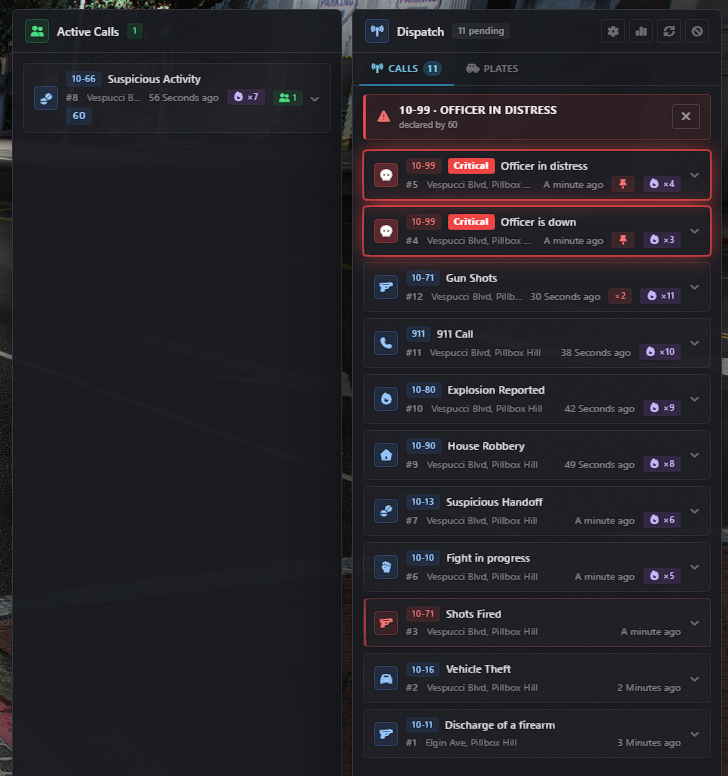
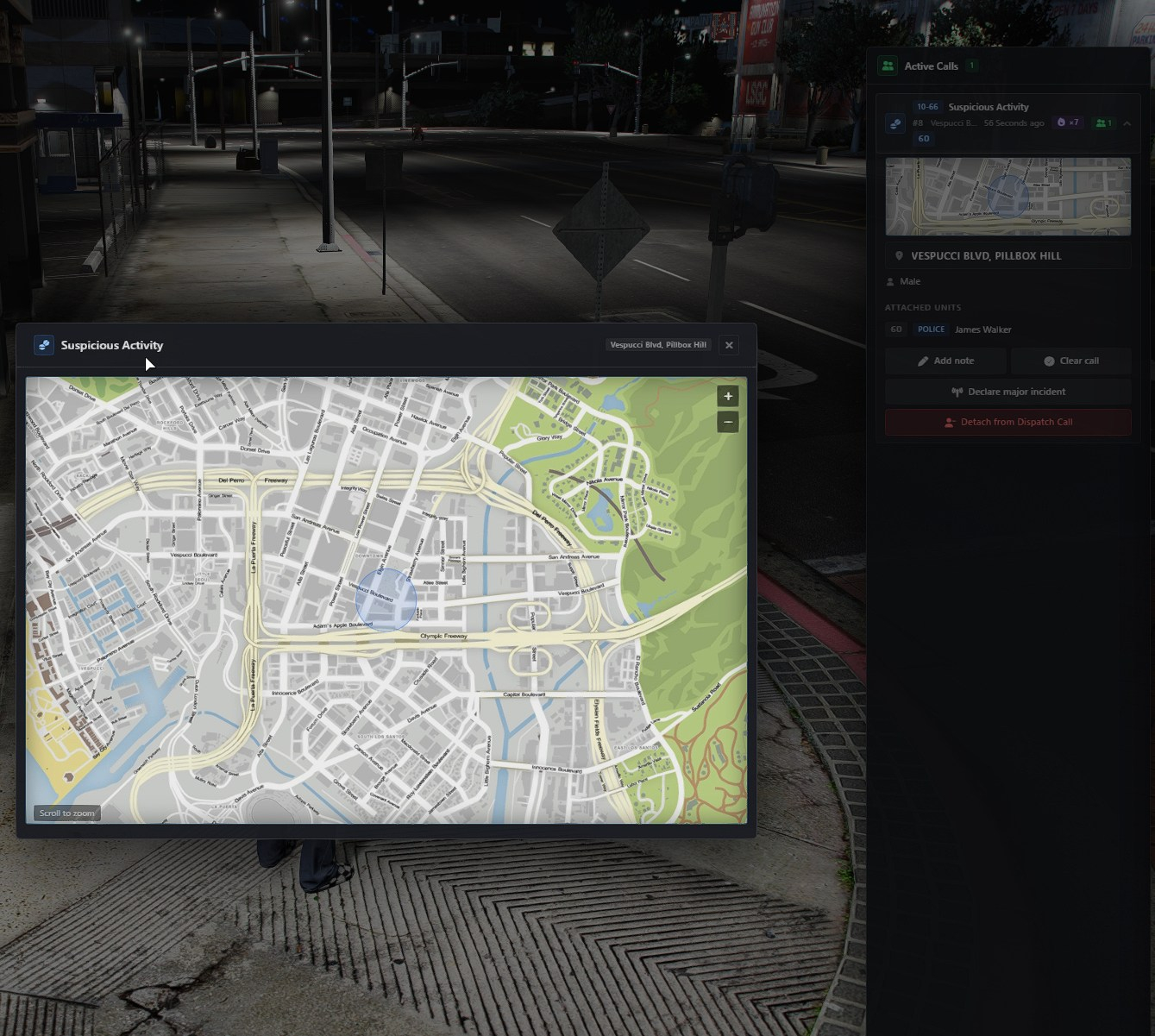
The radio board for your emergency services. Crimes fire alerts, officers respond with a keypress, and the dispatch menu shows every open call with its position, the units on it, and what is known about the suspect and their vehicle.
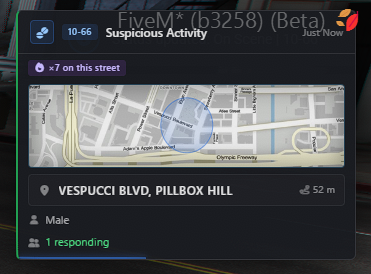
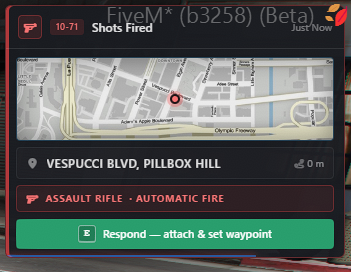
Alerts are more than notifications here. A call carries the vehicle's plate drawn on its real plate design, the weapon graded by how dangerous it is, the caller's identity, a map crop of the scene, and a search radius when the position is only approximate. Supervisors can declare a major incident to pin it for everyone, and each officer keeps a private log of the plate checks they have run.
| Resource | Why |
|---|---|
qb-core or qbx_core | player data, jobs, grades |
ox_lib | callbacks, notifications, locales, keybinds |
lsn-radarDOWNLOAD | Police Radar, Perfect Fit for both ps-mdt and ps-dispatch |
PolyZone | alert zones |
cd ui
npm install
npm run build
The build writes to html/ and empties that folder first. Anything you want served belongs in ui/public/ — that is where the plate images live.
ensure ps-dispatchConfig.Jobs decides who receives alerts at all. Everything else is optional.
Everything lives in shared/config.lua.
Config.Jobs= { 'police', 'ambulance' } -- jobs that receive alertsConfig.OnDutyOnly=true-- off-duty units stay quietConfig.FilterOnDuty=true-- and don't even receive the eventConfig.FilteredBroadcast=true-- send only to eligible playersFilteredBroadcast matters on a busy server: with it off, every alert goes to every player and each client throws away what isn't theirs — bandwidth and event handling that scales with your slot count for no benefit.
Config.RespondKeybind='E' -- attach to the alert on screenConfig.OpenDispatchMenu='O' -- open the boardConfig.TestCommand='dispatchtest'/dispatchsound plays the routine, priority and critical tones in sequence so you can hear them against each other. /dispatchsound <audioName> <audioRef> tries an arbitrary pair.
Config.AlertTime=5-- seconds on screen; per-alert override in alerts.luaConfig.MaxVisibleAlerts=3Config.AlertPosition='right'Config.MaxCallList=25-- calls kept on the boardConfig.CallLifetime=3600-- seconds before a call ages outConfig.UnattendedAfter=120-- seconds before a call is flagged unattendedThree tiers, each a native GTA sound pair:
Config.AlertSounds= {
default= { audioName='Lose_1st', audioRef='GTAO_FM_Events_Soundset' },
priority= { audioName='CHECKPOINT_MISSED', audioRef='HUD_MINI_GAME_SOUNDSET' },
critical= {
audioName='TIMER_STOP',
audioRef='HUD_MINI_GAME_SOUNDSET',
repeats=2,
gapMs=700,
},
}
Only the critical tier takes repeats and gapMs. The repeat matters more than the tone: two unfamiliar beeps are hard to tell apart mid-firefight, but a burst is recognisable even when you can't name the sound. repeats = 1 gives a single hit. 10_SEC_WARNING and 5_SEC_WARNING from the same soundset are drop-in alternatives.
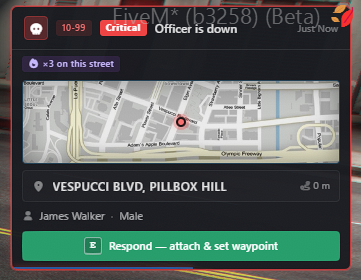
A tier above the existing red, for calls that make every unit drop what it is doing.
Config.CriticalCodes= {
'officerdown', 'officerbackup', 'officerdistress', 'emsdown',
'bankrobbery', 'pacificbankrobbery', 'paletobankrobbery',
'vangelicorobbery', 'humanelabsrobbery', 'unionrobbery', 'prisonbreak',
}
Nothing is renumbered — other resources keep sending priority 1/2/3 and keep their meaning. Only these code names are lifted above them, and the upgrade happens once on the server, so alerts arriving via CustomAlert are covered by their code name alone.
Repeated reports still escalate a routine call to priority 1, but never into this tier: critical is granted, not accumulated. Otherwise noise climbs back to the top over time, which is the problem the tier was added to fix.
Critical calls sort to the top of the board and carry their own treatment — a heavier border and a slow pulse rather than another shade of red, since two reds are hard to tell apart at a glance. The reduced-motion preference drops the pulse and keeps the weight.
Keep the list short. A board where half the calls are critical is the situation this replaced.
Config.CallMerge= { ... } -- identical nearby reports bump one callConfig.Hotspot= { ... } -- repeated incidents on the same streetA repeat report within the merge window bumps the existing call's count instead of creating a new one, and refreshes the fields listed in MERGE_REFRESH_FIELDS in server/main.lua. Fields identifying the same person or vehicle travel together there, so a merged report can't pair one officer's callsign with another's name.
Alerts with offset = true in Config.Blips report an approximate position: officers get a circle to search rather than a pin to drive to.
Config.MinOffset=1Config.MaxOffset=120The displacement is bounded by the circle's own radius, so the incident is always inside the area being searched. It is area-uniform rather than radius-uniform: every point in the circle is equally likely, so the centre is no better a guess than the edge.
Two further rules make the circle mean what it says:
- The offset is fixed per call. Repeat reports move the circle with the incident but reuse the same displacement. Re-randomising each time would let anyone average the jumps and triangulate the true spot.
- The true coordinates never leave the server. Broadcast, targeted alert, call list and menu all strip
coordsfrom an offset alert. Otherwise the approximation is decoration and anything reading the packet sees through it.
Nine alert types report approximately, with a radius sized to what a witness could plausibly narrow down: shootings and vehicle shots 110 m, suspicious activity 130 m, carjacking and vehicle theft 80 m, fights and house robberies 60 m, plus explosions and suspicious handoffs. Everything else reports a precise position.
A supervisor can declare a call a major incident. It pins to the top of every board, shows as a banner, and optionally quiets routine chatter for the units working it.
Config.MajorIncident= {
Enabled=true,
Grades= { police=4, ambulance=4 }, -- minimum grade per job nameDuration=1800, -- seconds, then it ends on its ownQuietRoutine=true, -- quiet routine traffic for attached unitsMaxActive=3,
}
Deliberately not server-wide silence. Only units attached to an incident are shielded, and only from routine traffic: priority 1 calls, backup requests and anything addressed to a unit always come through. A second emergency across town is never hidden by the first, and the banner only claims traffic is held back for the units it is actually held back for.
Declaring happens from the call itself — open a call and the button sits under Attach — because an incident is always a specific call. Two-step confirm, since it changes everyone's board. Anyone of the right grade can stand one down, not just whoever declared it, and it also ends after Duration or when the call is cleared. Re-declaring extends rather than resets.
The client hides the button when the grade doesn't qualify, but that's cosmetics — the server re-checks on every declare and stand-down.
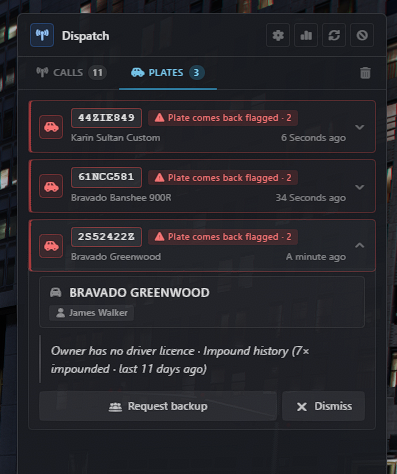
The dispatch menu has two tabs: Calls (the shared board) and Plates (this officer's own plate-check log).
Config.PlateScanner= {
Enabled=true, -- false removes the tab and the tab bar with itMaxHits=40,
CodeNames= { 'platecheck' }, -- empty = any alert with a plate AND a footerBackupButton=true,
BackupCooldownMs=60000,
}
Nothing needs wiring up. Plate checks already arrive as targeted alerts — ps-mdt's PlateCheckAlert sends them through SendTargetedAlert — and the log keeps the ones that scroll past. Hits never leave the client that ran them, which is both the privacy guarantee and why no database is involved.
A muted platecheck type still lands in the log: muting is about screen noise, not about forgetting what you looked up.
Each entry can be dismissed, copied, or escalated with Request backup, which sends the ordinary OfficerBackup alert so it reaches the board like any other backup call.
| Key | What it does |
|---|---|
Config.PinnedCodes | code names always kept at the top |
Config.NotifyRateLimit | per-player cap on outgoing alerts |
Config.AlertCommandCooldown | cooldown on /911 and /311 |
Config.PhoneRequired, Config.PhoneItems | require a phone item to call |
Config.WeaponWhitelist | weapons that do not trigger shot alerts |
Config.DefaultAlerts, Config.DefaultAlertsDelay | built-in alert set |
Config.MdtMapImage | map image the thumbnails crop from |
Config.EnableHuntingBlip | blips for hunting-zone gunfire |
Config.Locations | zones used by location-based alerts |
Config.Blips | per-alert sprite, colour, radius, sound, offset |
Config.Colors | blip colour table |
Every alert is a table. message, codeName and code are the minimum; everything else refines what responders see.
| Field | Type | Purpose |
|---|---|---|
message | string | the headline — what happened |
codeName | string | key into Config.Blips, and what mutes and pins match on |
code | string | radio code shown as a badge, e.g. 10-60 |
priority | number | 0 critical · 1 urgent · 2 routine · 3 low |
coords | vector3 | where it happened |
street | string | resolved street and zone |
jobs | table | which job types receive it |
icon | string | Font Awesome class |
information | string | free text under the header |
alertTime | number | seconds on screen, overrides Config.AlertTime |
| Field | Type | Purpose |
|---|---|---|
vehicle | string | display name of the model |
plate | string | the characters |
plateIndex | number | which plate design the vehicle wears (0-5) |
color | string | paint description |
class | string | localised vehicle class |
doors | string | door count |
heading | string | direction of travel |
plateIndex is what lets the UI draw the number on its real plate art instead of a grey badge. It comes from GetVehicleNumberPlateTextIndex(vehicle), and GetVehicleData() collects it automatically — any alert built from a vehicle already carries it.
The index order is not the intuitive one:
| Index | Design |
|---|---|
| 0 | Blue on White 2 |
| 1 | Yellow on Black |
| 2 | Yellow on Blue |
| 3 | Blue on White 1 |
| 4 | Blue on White 3 |
| 5 | North Yankton |
Four images cover six designs, so the white variants share. The mapping lives in one place — the ART table in ui/src/components/Plate.svelte — and the images in ui/public/plates/. If a design comes out wrong in game, swap two file names there.
Without a plateIndex the plate falls back to the neutral badge rather than guessing. That is deliberate: a plate check is a database lookup with no vehicle in hand, and showing a design nobody verified would be a lie. The plate log works around it by reading the design off the car in front of the officer at the moment of the scan, matching the exact plate string — a near-miss never matches, and a car that has driven off simply yields nothing.
| Field | Type | Purpose |
|---|---|---|
weapon | string | display name, e.g. Carbinerifle MK2 |
weaponClass | string | pistolsmgrifleshotgunsniperheavytaser |
weaponTier | number | 1 sidearm · 2 long gun · 3 heavy or explosive |
automaticGunFire | boolean | sustained automatic fire |
weaponTier is what the alert colours itself by: amber for a sidearm, orange for a long gun, red for heavy. A witness reporting "a rifle" changes how you approach; "Carbine Rifle MK2" does not — so the class leads and the exact model sits quietly beside it.
Both come from ClassifyWeapon(name) in client/utils.lua, which derives them from the display name in weaponTable rather than a second list keyed by hash. A parallel list of 45 hashes would drift out of step the first time one was added. Add a weapon to weaponTable and it classifies itself.
Machine guns are graded with the heavy tier: sustained automatic fire is a different problem from a rifle, and that distinction is the point of the tiers.
| Field | Type | Purpose |
|---|---|---|
name | string | officer or caller name |
callsign | string | unit callsign, rendered as a badge beside the name |
gender | string | localised |
number | string | caller's phone number |
callsign is the identifier used on the radio, so it renders as a badge pinned to the name rather than as another dot-separated fact. It travels with name through call merges: refreshing one without the other would pair one officer's callsign with another's name.
| Field | Type | Purpose |
|---|---|---|
footer | table | { icon, text, sub, tone } — marks the alert as an answer rather than a job, so no respond prompt is shown |
mapRadius | number | search circle radius, set from Config.Blips |
displayCoords | table | offset position; replaces coords on the wire |
assigned | boolean | addressed to this unit; bypasses every mute |
listed | boolean | set by the server for calls on the board, so an open menu can add them live |
exports['ps-dispatch']:CustomAlert({
message='Suspicious vehicle',
codeName='suspicious',
code='10-66',
priority=2,
coords=GetEntityCoords(ped),
vehicle='Sultan RS',
plate='ABC123',
plateIndex=GetVehicleNumberPlateTextIndex(veh),
jobs= { 'leo' },
})
Add a Config.Blips entry under the same codeName to give it a blip, sound, radius and offset.
Send to specific players only. Nothing is filtered — any field you pass arrives:
exports['ps-dispatch']:SendTargetedAlert({ src }, {
message='Plate Hit',
code='10-28',
codeName='platecheck',
plate='ABC123',
footer= { icon='fas fa-triangle-exclamation', text='Comes back flagged', tone='alert' },
})
Pass addToList = true to also put it on the shared board; without it the alert stays private.
Eight languages in locales/: endeesfrnlpt-brtrcs. Every string the Lua side shows goes through locale().
Server-side messages that reach a player send a reason code rather than a finished sentence, and the client translates it — so the text lands in the language of whoever is reading it, not whatever the server runs.
The UI itself is English. If you add a key, add it to all eight files: a missing key renders as the key name, not as a fallback.
html/is generated. Never edit it — editui/src/and rebuild.ui/public/survives a build;html/does not.Config.Debug = truealso alerts when LEO break the law: useful for testing, noisy in production.
-exports['ps-dispatch']:ArtGalleryRobbery()
-exports['ps-dispatch']:CarBoosting(vehicle)
-exports['ps-dispatch']:CarJacking(vehicle)
-exports['ps-dispatch']:CustomAlert()
-exports['ps-dispatch']:DeceasedPerson()
-exports['ps-dispatch']:DrugBoatRobbery()
-exports['ps-dispatch']:DrugSale()
-exports['ps-dispatch']:EmsDown()
-exports['ps-dispatch']:Explosion()
-exports['ps-dispatch']:Fight()
-exports['ps-dispatch']:FleecaBankRobbery(camId)
-exports['ps-dispatch']:HouseRobbery()
-exports['ps-dispatch']:HumaneRobbery()
-exports['ps-dispatch']:Hunting()
-exports['ps-dispatch']:InjuriedPerson()
-exports['ps-dispatch']:OfficerDown()
-exports['ps-dispatch']:OfficerBackup()
-exports['ps-dispatch']:OfficerInDistress()
-exports['ps-dispatch']:PacificBankRobbery(camId)
-exports['ps-dispatch']:PaletoBankRobbery(camId)
-exports['ps-dispatch']:PrisonBreak()
-exports['ps-dispatch']:Shooting()
-exports['ps-dispatch']:SignRobbery()
-exports['ps-dispatch']:SpeedingVehicle(vehicle)
-exports['ps-dispatch']:StoreRobbery(camId)
-exports['ps-dispatch']:SuspiciousActivity()
-exports['ps-dispatch']:TrainRobbery()
-exports['ps-dispatch']:UndergroundRobbery()
-exports['ps-dispatch']:UnionRobbery()
-exports['ps-dispatch']:VangelicoRobbery(camId)
-exports['ps-dispatch']:VanRobbery()
-exports['ps-dispatch']:VehicleShooting(vehicle)
-exports['ps-dispatch']:VehicleTheft(vehicle)
-exports['ps-dispatch']:YachtHeist()
-exports['ps-dispatch']:BobcatSecurityHeist()Add the following into your alerts.lua and change to your liking:
local function TestAlert()
local coords = GetEntityCoords(cache.ped)
local vehicle = GetVehicleData(cache.vehicle)
local dispatchData = {
message = locale('testalert'), -- add this into your locale
codeName = 'testalert', -- this should be the same as in config.lua
code = '10-35',
icon = 'fas fa-car-burst',
priority = 2,
coords = coords,
street = GetStreetAndZone(coords),
heading = GetPlayerHeading(),
vehicle = vehicle.name,
plate = vehicle.plate,
color = vehicle.color,
class = vehicle.class,
doors = vehicle.doors,
jobs = { 'leo' }
}
TriggerServerEvent('ps-dispatch:server:notify', dispatchData)
end
exports('TestAlert', TestAlert)
Add codeName in config.lua for the particular robbery to display the blip
["testalert"] is the codename you passed with the TriggerServerEvent in step 1
 ['testalert'] = { -- Need to match the codeName in alerts.lua
radius = 0,
sprite = 119,
color = 1,
scale = 1.5,
length = 2,
sound = 'Lose_1st',
sound2 = 'GTAO_FM_Events_Soundset',
offset = false,
flash = false
},
Information about each parameter is in the alerts.lua file.
There are no calls showing on dispatch or mdt list.
Make sure you have a job type specified in your qbcore/shared/jobs.lua like:

Make sure that you're using the correct job type as leo and make sure your qb-core is fully updated to the latest version.
On shared/config.lua make set Config.Debug = true to test calls as police officer.(ONLY to be used as testing, make sure to disable on live production)
How to change colors of the calls?
- Priority 1 is red and priority 2 is normal on the config.
To increase the time that calls are shown on the screen, do the following:
- Find the "alerts.lua" file in the client folder.
- Open this file with a text editor or a development tool like Visual Studio Code.
- Look for the code "alertTime = nil".
- Replace "nil" with the number of seconds you want the calls to display. For example, setting "alertTime = 25" means calls will be shown for 25 seconds.


We are a VPS and dedicated server provider, specializing in strong gaming DDoS protection and 99.9% uptime.
We host some of the biggest FiveM servers in the industry such as Prodigy RP, Smile RP, The Academy RP, and many more.
- 4 Tbps DDoS Protection by CosmicGuard
- 99.9% Network Uptime
- NVMe SSD Storage
- Unlimited Player Slots
- Free transfer of files and setup
- Free Windows licenses
- Windows Remote Desktop
- 24/7 Support with ~30 min average ticket response
- USA: Dallas, Ashburn, Los Angeles, Chicago
- Europe: UK, Germany, Netherlands
- Asia: Singapore
- Australia: Sydney