

Add repository to project's build.gradle
repositories {
jcenter()
maven {
url 'http://dl.bintray.com/mobisystech/maven'
}
}
Add compile dependency to app build.gradle
compile 'com.mobisys.android:autocompleteview:1.1'
Easiest way to add autocomplete view in your app.
Sample Google Place screenshot
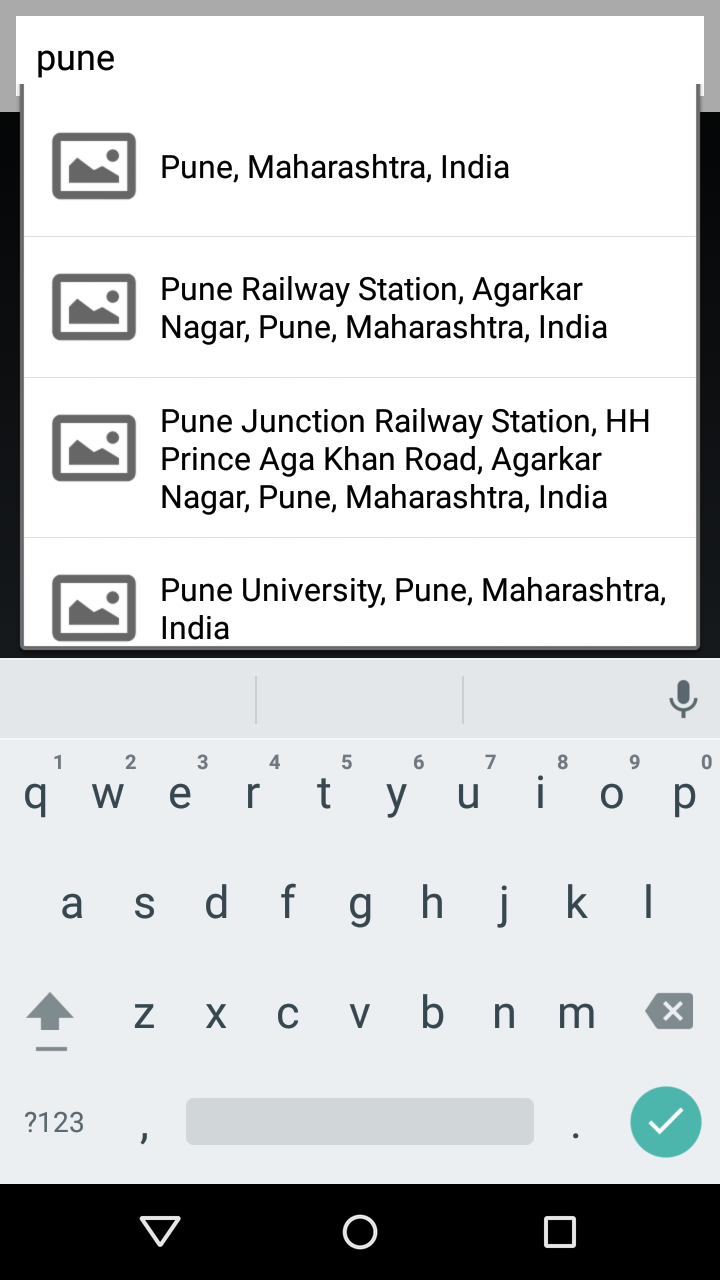
Sample:
<com.mobisys.android.autocompleteview.AutoCompleteView
android:id="@+id/auto_text_2"android:layout_width="match_parent"android:layout_height="40dp"android:layout_marginLeft="8dp"android:layout_marginTop="8dp"android:layout_marginRight="8dp"android:paddingLeft="10dp"android:paddingRight="32dp"android:hint="Google places text"
android:singleLine="true"
android:textColor="@android:color/black"android:textSize="18sp"android:background="@android:color/white"
app:autocompleteUrl="https://maps.googleapis.com/maps/api/place/autocomplete/json?sensor=false&key=AIzaSyDhFGUWlyd0KsjPQ59ATr-yL0bQKujHmeg&input="app:row_layout="@layout/row_place"app:modelClass="com.mobisys.android.autocompleteview.model.Place"/>Sample XML have following attributes:
- Autocomplete URL
autocompleteUrl:
Not mandatory. If not specified, you should setRequestDispatcher - Model Class
modelClass:
Model class (with package name) where response from server will be parsed. It is MANDATORY - Row Layout
rowLayout:
Row layout of auto-complete view. Not mandatory. Default used isandroid.R.layout.simple_dropdown_item_1line
Bind getter methods of model with row view through @ViewId annotation.
XML - row_place.xml
<?xml version="1.0" encoding="utf-8"?>
<RelativeLayout xmlns:android="http://schemas.android.com/apk/res/android"
android:layout_width="match_parent" android:layout_height="wrap_content"
android:padding="10dp">
<ImageView android:id="@+id/image"
android:layout_width="50dp"
android:layout_height="50dp"/>
<TextView android:id="@+id/name"
android:layout_width="match_parent"
android:layout_height="wrap_content"
android:layout_toRightOf="@id/image"
android:layout_marginLeft="8dp"
android:layout_centerVertical="true"
android:textSize="16sp"
android:textColor="@android:color/black"
android:text="Hello"/>
</RelativeLayout>
Corresponding Model
getName() method binds to R.id.name of row_place.xml
getImageUrl() method binds to R.id.image of row_place.xml
public class Place {
private static final String PLACE_IMAGE_URL = "https://maps.googleapis.com/maps/api/place/photo?maxwidth=800&photoreference=%s&sensor=false&key=AIzaSyDhFGUWlyd0KsjPQ59ATr-yL0bQKujHmeg";
private String name;
private String photoReference;
@ViewId(id=R.id.name)
public String getName() {
return name;
}
public void setName(String name) {
this.name = name;
}
public String getPhotoReference() {
return photoReference;
}
public void setPhotoReference(String photoReference) {
this.photoReference = photoReference;
}
@ViewId(id=R.id.image)
public String getImageUrl() {
String url = String.format(PLACE_IMAGE_URL, photoReference);
return url;
}
}
Response from Autocomplete URL should be parsed into data model which defined in modelClass attribute. We have used android's JSONObject. You can use any third party library for eg: Jackson or Gson to parse.
((com.mobisys.android.autocompleteaview.AutoCompleteView)findViewById(R.id.auto_text_2)).setParser(newAutoCompleteView.AutoCompleteResponseParser() {
@OverridepublicArrayList<? extendsObject> parseAutoCompleteResponse(Stringresponse) {
ArrayList<Place> places=null;
try {
JSONObjectjsonObj = newJSONObject(response);
finalJSONArraypredsJsonArray = jsonObj.getJSONArray("predictions");
places=newArrayList<Place>();
for(inti=0;i<predsJsonArray.length();i++){
StringplaceName = predsJsonArray.getJSONObject(i).getString("description");
StringplaceReference = predsJsonArray.getJSONObject(i).getString("reference");
Placeplace = newPlace();
place.setName(placeName);
place.setPhotoReference(placeReference);
places.add(place);
}
} catch (JSONExceptione) {
Log.e("AppUtil", "Cannot process JSON results", e);
}
returnplaces;
}
});
When user selects the item, you'll receive the selected item in SelectionListener.
SelectionListener
((com.mobisys.android.autocompleteview.AutoCompleteView)findViewById(R.id.auto_text_2)).setSelectionListener(newAutoCompleteView.AutoCompleteItemSelectionListener() {
@OverridepublicvoidonItemSelection(Objectobj) {
Placeplace = (Place)obj;
((com.mobisys.android.autocompleteview.AutoCompleteView)findViewById(R.id.auto_text_2)).setText(place.getName());
((com.mobisys.android.autocompleteview.AutoCompleteView)findViewById(R.id.auto_text_2)).clearFocus();
}
});
Note: It uses Universal Image Loader library to show images in if ImageView binds to Model.