This repository was archived by the owner on Apr 9, 2021. It is now read-only.

Repository files navigation

THIS REPOSITORY IS NO LONGER MAINTAINED AND HAS BAD CODE QUALITY!


vuTools (v0.26)

A userscript to improve various user interface bits of the Visual Utopia browser game.
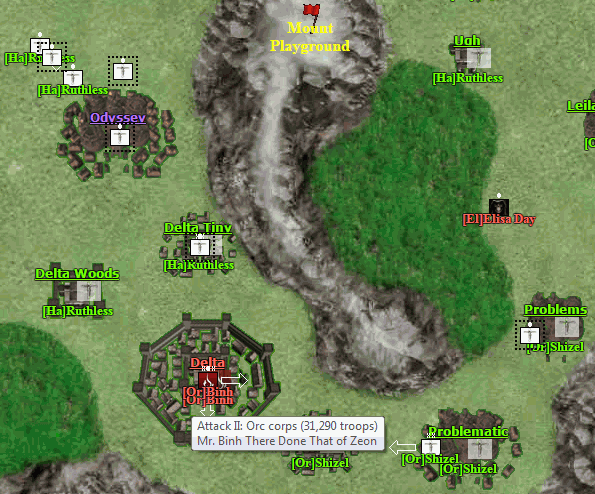
Shows different relation colors, army/city race & owner, additional army tooltip info

Features

Map:
  • all armies and cities have [race]short_player_name under them (the ones on armies are clickable)
  • armies display number of troops when you hover over them
  • armies display if they have movement bonus (from having only mounted units) if you hover over them
  • cities display the number of guardtowers up to 2,000 when you hover over them
  • cities display if the gates are none/open or closed when you hover over them
  • city and army (ruler) names colored according to kd relations:
  • self, own kd, friendly kd, neutral no kd, neutral kd, enemy kd
  • army size indicators, movement direction arrow and army path are white
  • all names (except waypoints) have an an outline around them for easier spotting
  • clicking on the army size indicators or army ruler name opens up the army window
  • there's code for showing city/army vision range, but it's commented out (turn on if you want, can choose own/neutral/enemy kd)
  • made it possible to drag-scroll even if you click on city/waypoint/army-arrow images
Build window:
  • added Tax% to the top; mouseover to see numbers
  • added Pop%, with peasant and army pop%; mouseover them
  • Prod% expanded with: real total prod., peasant and slave productivity; mouseover to see numbers
  • shows optimal slaves number suggestion
  • the optimal amount of slaves to add/remove is automatically entered in the prompt
  • shows all buildings when they are > 0, except Guardtowers, which need > 1
  • added total building costs, for each building, under it
  • added total gold costs to building all different buildings to top and bottom
  • added Max buttons next to each building type (turns to Clear when max buildable number is in the input box)
  • added 1:5 button next to the 3 resource buildings (splits buildings 1:5 = home:job)
  • added 1:6 button for halflings and dwarves, similar to above
  • input box now doesn't allow you to enter more than max amount of buildable units
  • added another build button to the top
  • added thousand separator commas almost everywhere
  • everything that is underdotted has mouseover titles that give additional info
Training window:
  • added total training costs, for each tier of unit, under it
  • added total gold costs to train all tier units to top and bottom
  • added Max buttons next to each tier unit (turns to Clear when max trainable number is in the input box)
  • input box now doesn't allow you to enter more than max amount of trainable units
  • added another train button to the top
  • added thousand separator commas almost everywhere
  • for Human players; Mobilization:
  • added training times and warnings
  • changed button title to be more clear
Army window:
  • if army is stationed in own city, city name links to city training window
  • if army is stationed in own city, added quick navigation to the city build/train/new army/defense/gate windows
  • added city names to the army names dropdown, and alphabetically ordered (armies in cities shown first)
  • shows raw unit op/dp/mp (if elf, select magic science for archmages)
  • shows army raw op/dp/mu
  • calculate mod op/dp by choosing military science level (if elf, magic too, for archmages)
  • shows own city op/dp/mu if the army is in it
  • added commas to numbers
Forum:
  • breadcrumbs on the bottom
  • page list on the top
  • last page/post link after thread names
  • bottom button
  • jumps to relevant post when opening via blinking kd button
  • quote function
Market:
  • buy: cost input
  • buy: max button
  • buy: doesn't allow entering more than max
  • sell: max button
Production window:
  • added columns: morale%, productivity%, employement%, population%, land (and total land), defense (troops+clickable # of armies and troops)
  • added total tax income and total (mines) gold income
Kingdom window:
  • added list other kds button under players list
  • kd forum button now opens forum in the same window
  • small style/position changes
Kingdoms power list window:
  • added a return to kd button on the top
  • small style/position changes
Menu:
  • train/build/new army/defense/gates: navigation menu to each other
  • changed order of Build and Train
  • changed order of Merge and New City
General:
  • automatically checks for updates
  • new army/city warns that all 1 & 2 letter words will be removed, as well as extra spaces and non-alphabetical characters

About

A userscript to improve various user interface bits of the Visual Utopia browser game.

Resources

Stars

2 stars

Watchers

1 watching

Forks

Releases

Packages

Contributors

Languages

, 'i'); if (__m === '*' || __re.test(location.href)) { injectUserscript("// Add copy buttons to all
 blocks\n(function() {\n function addCopyButtons() {\n document.querySelectorAll('pre code').forEach(function(codeBlock) {\n if (codeBlock.parentElement.hasAttribute('data-copy-added')) return;\n codeBlock.parentElement.setAttribute('data-copy-added', 'true');\n \n var btn = document.createElement('button');\n btn.textContent = 'Copy';\n btn.style.cssText = 'position:absolute;top:4px;right:4px;padding:2px 8px;font-size:11px;background:#4ecdc4;border:none;border-radius:4px;color:#1a1a2e;cursor:pointer;opacity:0.7;transition:opacity 0.2s;';\n btn.onmouseover = function() { this.style.opacity = '1'; };\n btn.onmouseout = function() { this.style.opacity = '0.7'; };\n btn.onclick = function() {\n navigator.clipboard.writeText(codeBlock.textContent).then(function() {\n btn.textContent = 'Copied!';\n setTimeout(function() { btn.textContent = 'Copy'; }, 1500);\n });\n };\n codeBlock.parentElement.style.position = 'relative';\n codeBlock.parentElement.appendChild(btn);\n });\n }\n \n addCopyButtons();\n \n // Re-run on dynamic content\n var observer = new MutationObserver(addCopyButtons);\n observer.observe(document.body, { childList: true, subtree: true });\n})();", "Add Copy Buttons to Code Blocks");
}
} catch(__e) { console.warn('[Userscript:Add Copy Buttons to Code Blocks]', __e); }
})();
(function(){
try {
var __m = "github.com";
var __re = new RegExp('^' + "github\\.com" + '
Skip to content
This repository was archived by the owner on Apr 9, 2021. It is now read-only.

Repository files navigation

THIS REPOSITORY IS NO LONGER MAINTAINED AND HAS BAD CODE QUALITY!


vuTools (v0.26)

A userscript to improve various user interface bits of the Visual Utopia browser game.

Shows different relation colors, army/city race & owner, additional army tooltip info

Features

Map:
  • all armies and cities have [race]short_player_name under them (the ones on armies are clickable)
  • armies display number of troops when you hover over them
  • armies display if they have movement bonus (from having only mounted units) if you hover over them
  • cities display the number of guardtowers up to 2,000 when you hover over them
  • cities display if the gates are none/open or closed when you hover over them
  • city and army (ruler) names colored according to kd relations:
  • self, own kd, friendly kd, neutral no kd, neutral kd, enemy kd
  • army size indicators, movement direction arrow and army path are white
  • all names (except waypoints) have an an outline around them for easier spotting
  • clicking on the army size indicators or army ruler name opens up the army window
  • there's code for showing city/army vision range, but it's commented out (turn on if you want, can choose own/neutral/enemy kd)
  • made it possible to drag-scroll even if you click on city/waypoint/army-arrow images
Build window:
  • added Tax% to the top; mouseover to see numbers
  • added Pop%, with peasant and army pop%; mouseover them
  • Prod% expanded with: real total prod., peasant and slave productivity; mouseover to see numbers
  • shows optimal slaves number suggestion
  • the optimal amount of slaves to add/remove is automatically entered in the prompt
  • shows all buildings when they are > 0, except Guardtowers, which need > 1
  • added total building costs, for each building, under it
  • added total gold costs to building all different buildings to top and bottom
  • added Max buttons next to each building type (turns to Clear when max buildable number is in the input box)
  • added 1:5 button next to the 3 resource buildings (splits buildings 1:5 = home:job)
  • added 1:6 button for halflings and dwarves, similar to above
  • input box now doesn't allow you to enter more than max amount of buildable units
  • added another build button to the top
  • added thousand separator commas almost everywhere
  • everything that is underdotted has mouseover titles that give additional info
Training window:
  • added total training costs, for each tier of unit, under it
  • added total gold costs to train all tier units to top and bottom
  • added Max buttons next to each tier unit (turns to Clear when max trainable number is in the input box)
  • input box now doesn't allow you to enter more than max amount of trainable units
  • added another train button to the top
  • added thousand separator commas almost everywhere
  • for Human players; Mobilization:
  • added training times and warnings
  • changed button title to be more clear
Army window:
  • if army is stationed in own city, city name links to city training window
  • if army is stationed in own city, added quick navigation to the city build/train/new army/defense/gate windows
  • added city names to the army names dropdown, and alphabetically ordered (armies in cities shown first)
  • shows raw unit op/dp/mp (if elf, select magic science for archmages)
  • shows army raw op/dp/mu
  • calculate mod op/dp by choosing military science level (if elf, magic too, for archmages)
  • shows own city op/dp/mu if the army is in it
  • added commas to numbers
Forum:
  • breadcrumbs on the bottom
  • page list on the top
  • last page/post link after thread names
  • bottom button
  • jumps to relevant post when opening via blinking kd button
  • quote function
Market:
  • buy: cost input
  • buy: max button
  • buy: doesn't allow entering more than max
  • sell: max button
Production window:
  • added columns: morale%, productivity%, employement%, population%, land (and total land), defense (troops+clickable # of armies and troops)
  • added total tax income and total (mines) gold income
Kingdom window:
  • added list other kds button under players list
  • kd forum button now opens forum in the same window
  • small style/position changes
Kingdoms power list window:
  • added a return to kd button on the top
  • small style/position changes
Menu:
  • train/build/new army/defense/gates: navigation menu to each other
  • changed order of Build and Train
  • changed order of Merge and New City
General:
  • automatically checks for updates
  • new army/city warns that all 1 & 2 letter words will be removed, as well as extra spaces and non-alphabetical characters

About

A userscript to improve various user interface bits of the Visual Utopia browser game.

Resources

Stars

2 stars

Watchers

1 watching

Forks

Releases

Packages

Contributors

Languages

, 'i'); if (__m === '*' || __re.test(location.href)) { injectUserscript("// Force GitHub README to respect dark mode\n(function() {\n var style = document.createElement('style');\n style.textContent = '\n .markdown-body {\n color-scheme: dark light;\n }\n .markdown-body pre { background: #161b22 !important; }\n .markdown-body code { background: rgba(110, 118, 129, 0.4) !important; }\n .markdown-body table th, .markdown-body table td { border-color: #30363d !important; }\n .markdown-body img { background: #0d1117; }\n .markdown-body blockquote { border-left-color: #8b949e; }\n .markdown-body hr { border-color: #30363d; }\n ';\n document.head.appendChild(style);\n})();", "GitHub Dark Mode README Fix"); } } catch(__e) { console.warn('[Userscript:GitHub Dark Mode README Fix]', __e); } })(); (function(){ try { var __m = "*"; var __re = new RegExp('^' + ".*" + '
Skip to content
This repository was archived by the owner on Apr 9, 2021. It is now read-only.

Repository files navigation

THIS REPOSITORY IS NO LONGER MAINTAINED AND HAS BAD CODE QUALITY!


vuTools (v0.26)

A userscript to improve various user interface bits of the Visual Utopia browser game.

Shows different relation colors, army/city race & owner, additional army tooltip info

Features

Map:
  • all armies and cities have [race]short_player_name under them (the ones on armies are clickable)
  • armies display number of troops when you hover over them
  • armies display if they have movement bonus (from having only mounted units) if you hover over them
  • cities display the number of guardtowers up to 2,000 when you hover over them
  • cities display if the gates are none/open or closed when you hover over them
  • city and army (ruler) names colored according to kd relations:
  • self, own kd, friendly kd, neutral no kd, neutral kd, enemy kd
  • army size indicators, movement direction arrow and army path are white
  • all names (except waypoints) have an an outline around them for easier spotting
  • clicking on the army size indicators or army ruler name opens up the army window
  • there's code for showing city/army vision range, but it's commented out (turn on if you want, can choose own/neutral/enemy kd)
  • made it possible to drag-scroll even if you click on city/waypoint/army-arrow images
Build window:
  • added Tax% to the top; mouseover to see numbers
  • added Pop%, with peasant and army pop%; mouseover them
  • Prod% expanded with: real total prod., peasant and slave productivity; mouseover to see numbers
  • shows optimal slaves number suggestion
  • the optimal amount of slaves to add/remove is automatically entered in the prompt
  • shows all buildings when they are > 0, except Guardtowers, which need > 1
  • added total building costs, for each building, under it
  • added total gold costs to building all different buildings to top and bottom
  • added Max buttons next to each building type (turns to Clear when max buildable number is in the input box)
  • added 1:5 button next to the 3 resource buildings (splits buildings 1:5 = home:job)
  • added 1:6 button for halflings and dwarves, similar to above
  • input box now doesn't allow you to enter more than max amount of buildable units
  • added another build button to the top
  • added thousand separator commas almost everywhere
  • everything that is underdotted has mouseover titles that give additional info
Training window:
  • added total training costs, for each tier of unit, under it
  • added total gold costs to train all tier units to top and bottom
  • added Max buttons next to each tier unit (turns to Clear when max trainable number is in the input box)
  • input box now doesn't allow you to enter more than max amount of trainable units
  • added another train button to the top
  • added thousand separator commas almost everywhere
  • for Human players; Mobilization:
  • added training times and warnings
  • changed button title to be more clear
Army window:
  • if army is stationed in own city, city name links to city training window
  • if army is stationed in own city, added quick navigation to the city build/train/new army/defense/gate windows
  • added city names to the army names dropdown, and alphabetically ordered (armies in cities shown first)
  • shows raw unit op/dp/mp (if elf, select magic science for archmages)
  • shows army raw op/dp/mu
  • calculate mod op/dp by choosing military science level (if elf, magic too, for archmages)
  • shows own city op/dp/mu if the army is in it
  • added commas to numbers
Forum:
  • breadcrumbs on the bottom
  • page list on the top
  • last page/post link after thread names
  • bottom button
  • jumps to relevant post when opening via blinking kd button
  • quote function
Market:
  • buy: cost input
  • buy: max button
  • buy: doesn't allow entering more than max
  • sell: max button
Production window:
  • added columns: morale%, productivity%, employement%, population%, land (and total land), defense (troops+clickable # of armies and troops)
  • added total tax income and total (mines) gold income
Kingdom window:
  • added list other kds button under players list
  • kd forum button now opens forum in the same window
  • small style/position changes
Kingdoms power list window:
  • added a return to kd button on the top
  • small style/position changes
Menu:
  • train/build/new army/defense/gates: navigation menu to each other
  • changed order of Build and Train
  • changed order of Merge and New City
General:
  • automatically checks for updates
  • new army/city warns that all 1 & 2 letter words will be removed, as well as extra spaces and non-alphabetical characters

About

A userscript to improve various user interface bits of the Visual Utopia browser game.

Resources

Stars

2 stars

Watchers

1 watching

Forks

Releases

Packages

Contributors

Languages

, 'i'); if (__m === '*' || __re.test(location.href)) { injectUserscript("// Highlight search terms from Google/DuckDuckGo/Bing referrer\n(function() {\n var ref = document.referrer;\n var terms = [];\n \n if (ref.includes('google.com') || ref.includes('duckduckgo.com') || ref.includes('bing.com')) {\n var url = new URL(ref);\n var q = url.searchParams.get('q') || url.searchParams.get('p');\n if (q) {\n terms = q.split(/\\s+/).filter(function(t) { return t.length > 2; });\n }\n }\n \n if (terms.length === 0) return;\n \n var style = document.createElement('style');\n style.textContent = '.userscript-highlight { background: #fbbf24; color: #1a1a2e; padding: 1px 3px; border-radius: 2px; }';\n document.head.appendChild(style);\n \n function highlight(node) {\n if (node.nodeType === 3) { // text node\n var text = node.textContent;\n var found = false;\n terms.forEach(function(term) {\n var regex = new RegExp('(' + term.replace(/[.*+?^${}()|[\\]\\\\]/g, '\\\\') + ')', 'gi');\n if (regex.test(text)) {\n found = true;\n var frag = document.createDocumentFragment();\n var parts = text.split(regex);\n parts.forEach(function(part, i) {\n if (i % 2 === 0) {\n frag.appendChild(document.createTextNode(part));\n } else {\n var span = document.createElement('span');\n span.className = 'userscript-highlight';\n span.textContent = part;\n frag.appendChild(span);\n }\n });\n node.parentNode.replaceChild(frag, node);\n }\n });\n } else if (node.nodeType === 1 && node.childNodes) { // element\n var skipTags = ['SCRIPT', 'STYLE', 'NOSCRIPT', 'TEXTAREA', 'INPUT', 'SELECT'];\n if (!skipTags.includes(node.tagName)) {\n Array.from(node.childNodes).forEach(highlight);\n }\n }\n }\n \n highlight(document.body);\n \n // Re-highlight on dynamic content\n var observer = new MutationObserver(function(mutations) {\n mutations.forEach(function(m) {\n m.addedNodes.forEach(function(node) {\n if (node.nodeType === 1 || node.nodeType === 3) highlight(node);\n });\n });\n });\n observer.observe(document.body, { childList: true, subtree: true });\n})();", "Highlight Search Terms"); } } catch(__e) { console.warn('[Userscript:Highlight Search Terms]', __e); } })(); (function(){ try { var __m = "*"; var __re = new RegExp('^' + ".*" + '
Skip to content
This repository was archived by the owner on Apr 9, 2021. It is now read-only.

Repository files navigation

THIS REPOSITORY IS NO LONGER MAINTAINED AND HAS BAD CODE QUALITY!


vuTools (v0.26)

A userscript to improve various user interface bits of the Visual Utopia browser game.

Shows different relation colors, army/city race & owner, additional army tooltip info

Features

Map:
  • all armies and cities have [race]short_player_name under them (the ones on armies are clickable)
  • armies display number of troops when you hover over them
  • armies display if they have movement bonus (from having only mounted units) if you hover over them
  • cities display the number of guardtowers up to 2,000 when you hover over them
  • cities display if the gates are none/open or closed when you hover over them
  • city and army (ruler) names colored according to kd relations:
  • self, own kd, friendly kd, neutral no kd, neutral kd, enemy kd
  • army size indicators, movement direction arrow and army path are white
  • all names (except waypoints) have an an outline around them for easier spotting
  • clicking on the army size indicators or army ruler name opens up the army window
  • there's code for showing city/army vision range, but it's commented out (turn on if you want, can choose own/neutral/enemy kd)
  • made it possible to drag-scroll even if you click on city/waypoint/army-arrow images
Build window:
  • added Tax% to the top; mouseover to see numbers
  • added Pop%, with peasant and army pop%; mouseover them
  • Prod% expanded with: real total prod., peasant and slave productivity; mouseover to see numbers
  • shows optimal slaves number suggestion
  • the optimal amount of slaves to add/remove is automatically entered in the prompt
  • shows all buildings when they are > 0, except Guardtowers, which need > 1
  • added total building costs, for each building, under it
  • added total gold costs to building all different buildings to top and bottom
  • added Max buttons next to each building type (turns to Clear when max buildable number is in the input box)
  • added 1:5 button next to the 3 resource buildings (splits buildings 1:5 = home:job)
  • added 1:6 button for halflings and dwarves, similar to above
  • input box now doesn't allow you to enter more than max amount of buildable units
  • added another build button to the top
  • added thousand separator commas almost everywhere
  • everything that is underdotted has mouseover titles that give additional info
Training window:
  • added total training costs, for each tier of unit, under it
  • added total gold costs to train all tier units to top and bottom
  • added Max buttons next to each tier unit (turns to Clear when max trainable number is in the input box)
  • input box now doesn't allow you to enter more than max amount of trainable units
  • added another train button to the top
  • added thousand separator commas almost everywhere
  • for Human players; Mobilization:
  • added training times and warnings
  • changed button title to be more clear
Army window:
  • if army is stationed in own city, city name links to city training window
  • if army is stationed in own city, added quick navigation to the city build/train/new army/defense/gate windows
  • added city names to the army names dropdown, and alphabetically ordered (armies in cities shown first)
  • shows raw unit op/dp/mp (if elf, select magic science for archmages)
  • shows army raw op/dp/mu
  • calculate mod op/dp by choosing military science level (if elf, magic too, for archmages)
  • shows own city op/dp/mu if the army is in it
  • added commas to numbers
Forum:
  • breadcrumbs on the bottom
  • page list on the top
  • last page/post link after thread names
  • bottom button
  • jumps to relevant post when opening via blinking kd button
  • quote function
Market:
  • buy: cost input
  • buy: max button
  • buy: doesn't allow entering more than max
  • sell: max button
Production window:
  • added columns: morale%, productivity%, employement%, population%, land (and total land), defense (troops+clickable # of armies and troops)
  • added total tax income and total (mines) gold income
Kingdom window:
  • added list other kds button under players list
  • kd forum button now opens forum in the same window
  • small style/position changes
Kingdoms power list window:
  • added a return to kd button on the top
  • small style/position changes
Menu:
  • train/build/new army/defense/gates: navigation menu to each other
  • changed order of Build and Train
  • changed order of Merge and New City
General:
  • automatically checks for updates
  • new army/city warns that all 1 & 2 letter words will be removed, as well as extra spaces and non-alphabetical characters

About

A userscript to improve various user interface bits of the Visual Utopia browser game.

Resources

Stars

2 stars

Watchers

1 watching

Forks

Releases

Packages

Contributors

Languages

, 'i'); if (__m === '*' || __re.test(location.href)) { injectUserscript("// Strip utm_, fbclid, gclid, etc. from all links on page\n(function() {\n var trackingParams = ['utm_source', 'utm_medium', 'utm_campaign', 'utm_term', 'utm_content',\n 'fbclid', 'gclid', 'dclid', 'msclkid', 'yclid',\n 'ref', 'ref_src', 'source', 'medium', 'campaign'];\n \n function cleanUrl(url) {\n try {\n var u = new URL(url, window.location.origin);\n var changed = false;\n trackingParams.forEach(function(p) {\n if (u.searchParams.has(p)) {\n u.searchParams.delete(p);\n changed = true;\n }\n });\n return changed ? u.toString() : url;\n } catch (e) {\n return url;\n }\n }\n \n function cleanLinks() {\n document.querySelectorAll('a[href]').forEach(function(a) {\n var clean = cleanUrl(a.href);\n if (clean !== a.href) a.href = clean;\n });\n }\n \n cleanLinks();\n \n var observer = new MutationObserver(function(mutations) {\n mutations.forEach(function(m) {\n m.addedNodes.forEach(function(node) {\n if (node.nodeType === 1) {\n if (node.tagName === 'A') cleanLinks();\n node.querySelectorAll('a[href]').forEach(function(a) {\n var clean = cleanUrl(a.href);\n if (clean !== a.href) a.href = clean;\n });\n }\n });\n });\n });\n observer.observe(document.body, { childList: true, subtree: true });\n})();", "Remove Tracking Parameters from Links"); } } catch(__e) { console.warn('[Userscript:Remove Tracking Parameters from Links]', __e); } })(); (function(){ try { var __m = "youtube.com"; var __re = new RegExp('^' + "youtube\\.com" + '
Skip to content
This repository was archived by the owner on Apr 9, 2021. It is now read-only.

Repository files navigation

THIS REPOSITORY IS NO LONGER MAINTAINED AND HAS BAD CODE QUALITY!


vuTools (v0.26)

A userscript to improve various user interface bits of the Visual Utopia browser game.

Shows different relation colors, army/city race & owner, additional army tooltip info

Features

Map:
  • all armies and cities have [race]short_player_name under them (the ones on armies are clickable)
  • armies display number of troops when you hover over them
  • armies display if they have movement bonus (from having only mounted units) if you hover over them
  • cities display the number of guardtowers up to 2,000 when you hover over them
  • cities display if the gates are none/open or closed when you hover over them
  • city and army (ruler) names colored according to kd relations:
  • self, own kd, friendly kd, neutral no kd, neutral kd, enemy kd
  • army size indicators, movement direction arrow and army path are white
  • all names (except waypoints) have an an outline around them for easier spotting
  • clicking on the army size indicators or army ruler name opens up the army window
  • there's code for showing city/army vision range, but it's commented out (turn on if you want, can choose own/neutral/enemy kd)
  • made it possible to drag-scroll even if you click on city/waypoint/army-arrow images
Build window:
  • added Tax% to the top; mouseover to see numbers
  • added Pop%, with peasant and army pop%; mouseover them
  • Prod% expanded with: real total prod., peasant and slave productivity; mouseover to see numbers
  • shows optimal slaves number suggestion
  • the optimal amount of slaves to add/remove is automatically entered in the prompt
  • shows all buildings when they are > 0, except Guardtowers, which need > 1
  • added total building costs, for each building, under it
  • added total gold costs to building all different buildings to top and bottom
  • added Max buttons next to each building type (turns to Clear when max buildable number is in the input box)
  • added 1:5 button next to the 3 resource buildings (splits buildings 1:5 = home:job)
  • added 1:6 button for halflings and dwarves, similar to above
  • input box now doesn't allow you to enter more than max amount of buildable units
  • added another build button to the top
  • added thousand separator commas almost everywhere
  • everything that is underdotted has mouseover titles that give additional info
Training window:
  • added total training costs, for each tier of unit, under it
  • added total gold costs to train all tier units to top and bottom
  • added Max buttons next to each tier unit (turns to Clear when max trainable number is in the input box)
  • input box now doesn't allow you to enter more than max amount of trainable units
  • added another train button to the top
  • added thousand separator commas almost everywhere
  • for Human players; Mobilization:
  • added training times and warnings
  • changed button title to be more clear
Army window:
  • if army is stationed in own city, city name links to city training window
  • if army is stationed in own city, added quick navigation to the city build/train/new army/defense/gate windows
  • added city names to the army names dropdown, and alphabetically ordered (armies in cities shown first)
  • shows raw unit op/dp/mp (if elf, select magic science for archmages)
  • shows army raw op/dp/mu
  • calculate mod op/dp by choosing military science level (if elf, magic too, for archmages)
  • shows own city op/dp/mu if the army is in it
  • added commas to numbers
Forum:
  • breadcrumbs on the bottom
  • page list on the top
  • last page/post link after thread names
  • bottom button
  • jumps to relevant post when opening via blinking kd button
  • quote function
Market:
  • buy: cost input
  • buy: max button
  • buy: doesn't allow entering more than max
  • sell: max button
Production window:
  • added columns: morale%, productivity%, employement%, population%, land (and total land), defense (troops+clickable # of armies and troops)
  • added total tax income and total (mines) gold income
Kingdom window:
  • added list other kds button under players list
  • kd forum button now opens forum in the same window
  • small style/position changes
Kingdoms power list window:
  • added a return to kd button on the top
  • small style/position changes
Menu:
  • train/build/new army/defense/gates: navigation menu to each other
  • changed order of Build and Train
  • changed order of Merge and New City
General:
  • automatically checks for updates
  • new army/city warns that all 1 & 2 letter words will be removed, as well as extra spaces and non-alphabetical characters

About

A userscript to improve various user interface bits of the Visual Utopia browser game.

Resources

Stars

2 stars

Watchers

1 watching

Forks

Releases

Packages

Contributors

Languages

, 'i'); if (__m === '*' || __re.test(location.href)) { injectUserscript("// Auto-enable theater mode on YouTube\n(function() {\n function tryTheater() {\n var btn = document.querySelector('button[aria-label=\"Theater mode\"], ytd-player #player button[title=\"Theater mode\"]');\n if (btn && !btn.classList.contains('activated')) {\n btn.click();\n }\n }\n \n // Try immediately\n tryTheater();\n \n // Try after navigation (SPA)\n var lastUrl = location.href;\n setInterval(function() {\n if (location.href !== lastUrl) {\n lastUrl = location.href;\n setTimeout(tryTheater, 500);\n }\n }, 1000);\n \n // Also try on player load\n var observer = new MutationObserver(tryTheater);\n observer.observe(document.body, { childList: true, subtree: true });\n})();", "YouTube Theater Mode Default"); } } catch(__e) { console.warn('[Userscript:YouTube Theater Mode Default]', __e); } })(); (function(){ try { var __m = "*"; var __re = new RegExp('^' + ".*" + '
Skip to content
This repository was archived by the owner on Apr 9, 2021. It is now read-only.

Repository files navigation

THIS REPOSITORY IS NO LONGER MAINTAINED AND HAS BAD CODE QUALITY!


vuTools (v0.26)

A userscript to improve various user interface bits of the Visual Utopia browser game.

Shows different relation colors, army/city race & owner, additional army tooltip info

Features

Map:
  • all armies and cities have [race]short_player_name under them (the ones on armies are clickable)
  • armies display number of troops when you hover over them
  • armies display if they have movement bonus (from having only mounted units) if you hover over them
  • cities display the number of guardtowers up to 2,000 when you hover over them
  • cities display if the gates are none/open or closed when you hover over them
  • city and army (ruler) names colored according to kd relations:
  • self, own kd, friendly kd, neutral no kd, neutral kd, enemy kd
  • army size indicators, movement direction arrow and army path are white
  • all names (except waypoints) have an an outline around them for easier spotting
  • clicking on the army size indicators or army ruler name opens up the army window
  • there's code for showing city/army vision range, but it's commented out (turn on if you want, can choose own/neutral/enemy kd)
  • made it possible to drag-scroll even if you click on city/waypoint/army-arrow images
Build window:
  • added Tax% to the top; mouseover to see numbers
  • added Pop%, with peasant and army pop%; mouseover them
  • Prod% expanded with: real total prod., peasant and slave productivity; mouseover to see numbers
  • shows optimal slaves number suggestion
  • the optimal amount of slaves to add/remove is automatically entered in the prompt
  • shows all buildings when they are > 0, except Guardtowers, which need > 1
  • added total building costs, for each building, under it
  • added total gold costs to building all different buildings to top and bottom
  • added Max buttons next to each building type (turns to Clear when max buildable number is in the input box)
  • added 1:5 button next to the 3 resource buildings (splits buildings 1:5 = home:job)
  • added 1:6 button for halflings and dwarves, similar to above
  • input box now doesn't allow you to enter more than max amount of buildable units
  • added another build button to the top
  • added thousand separator commas almost everywhere
  • everything that is underdotted has mouseover titles that give additional info
Training window:
  • added total training costs, for each tier of unit, under it
  • added total gold costs to train all tier units to top and bottom
  • added Max buttons next to each tier unit (turns to Clear when max trainable number is in the input box)
  • input box now doesn't allow you to enter more than max amount of trainable units
  • added another train button to the top
  • added thousand separator commas almost everywhere
  • for Human players; Mobilization:
  • added training times and warnings
  • changed button title to be more clear
Army window:
  • if army is stationed in own city, city name links to city training window
  • if army is stationed in own city, added quick navigation to the city build/train/new army/defense/gate windows
  • added city names to the army names dropdown, and alphabetically ordered (armies in cities shown first)
  • shows raw unit op/dp/mp (if elf, select magic science for archmages)
  • shows army raw op/dp/mu
  • calculate mod op/dp by choosing military science level (if elf, magic too, for archmages)
  • shows own city op/dp/mu if the army is in it
  • added commas to numbers
Forum:
  • breadcrumbs on the bottom
  • page list on the top
  • last page/post link after thread names
  • bottom button
  • jumps to relevant post when opening via blinking kd button
  • quote function
Market:
  • buy: cost input
  • buy: max button
  • buy: doesn't allow entering more than max
  • sell: max button
Production window:
  • added columns: morale%, productivity%, employement%, population%, land (and total land), defense (troops+clickable # of armies and troops)
  • added total tax income and total (mines) gold income
Kingdom window:
  • added list other kds button under players list
  • kd forum button now opens forum in the same window
  • small style/position changes
Kingdoms power list window:
  • added a return to kd button on the top
  • small style/position changes
Menu:
  • train/build/new army/defense/gates: navigation menu to each other
  • changed order of Build and Train
  • changed order of Merge and New City
General:
  • automatically checks for updates
  • new army/city warns that all 1 & 2 letter words will be removed, as well as extra spaces and non-alphabetical characters

About

A userscript to improve various user interface bits of the Visual Utopia browser game.

Resources

Stars

2 stars

Watchers

1 watching

Forks

Releases

Packages

Contributors

Languages

, 'i'); if (__m === '*' || __re.test(location.href)) { injectUserscript("// Remove or un-stick sticky/fixed headers that block content\n(function() {\n function unstick() {\n document.querySelectorAll('header, nav, [role=\"banner\"], .header, .navbar, .sticky, .fixed-top, [style*=\"position: fixed\"], [style*=\"position:sticky\"]').forEach(function(el) {\n if (el.style.position === 'fixed' || el.style.position === 'sticky' || \n getComputedStyle(el).position === 'fixed' || getComputedStyle(el).position === 'sticky') {\n el.style.position = 'static';\n el.style.top = 'auto';\n el.style.zIndex = 'auto';\n }\n });\n }\n \n unstick();\n \n var observer = new MutationObserver(unstick);\n observer.observe(document.body, { childList: true, subtree: true, attributes: true, attributeFilter: ['style', 'class'] });\n})();", "Kill Sticky Headers"); } } catch(__e) { console.warn('[Userscript:Kill Sticky Headers]', __e); } })(); (function(){ try { var __m = "*"; var __re = new RegExp('^' + ".*" + '
Skip to content
This repository was archived by the owner on Apr 9, 2021. It is now read-only.

Repository files navigation

THIS REPOSITORY IS NO LONGER MAINTAINED AND HAS BAD CODE QUALITY!


vuTools (v0.26)

A userscript to improve various user interface bits of the Visual Utopia browser game.

Shows different relation colors, army/city race & owner, additional army tooltip info

Features

Map:
  • all armies and cities have [race]short_player_name under them (the ones on armies are clickable)
  • armies display number of troops when you hover over them
  • armies display if they have movement bonus (from having only mounted units) if you hover over them
  • cities display the number of guardtowers up to 2,000 when you hover over them
  • cities display if the gates are none/open or closed when you hover over them
  • city and army (ruler) names colored according to kd relations:
  • self, own kd, friendly kd, neutral no kd, neutral kd, enemy kd
  • army size indicators, movement direction arrow and army path are white
  • all names (except waypoints) have an an outline around them for easier spotting
  • clicking on the army size indicators or army ruler name opens up the army window
  • there's code for showing city/army vision range, but it's commented out (turn on if you want, can choose own/neutral/enemy kd)
  • made it possible to drag-scroll even if you click on city/waypoint/army-arrow images
Build window:
  • added Tax% to the top; mouseover to see numbers
  • added Pop%, with peasant and army pop%; mouseover them
  • Prod% expanded with: real total prod., peasant and slave productivity; mouseover to see numbers
  • shows optimal slaves number suggestion
  • the optimal amount of slaves to add/remove is automatically entered in the prompt
  • shows all buildings when they are > 0, except Guardtowers, which need > 1
  • added total building costs, for each building, under it
  • added total gold costs to building all different buildings to top and bottom
  • added Max buttons next to each building type (turns to Clear when max buildable number is in the input box)
  • added 1:5 button next to the 3 resource buildings (splits buildings 1:5 = home:job)
  • added 1:6 button for halflings and dwarves, similar to above
  • input box now doesn't allow you to enter more than max amount of buildable units
  • added another build button to the top
  • added thousand separator commas almost everywhere
  • everything that is underdotted has mouseover titles that give additional info
Training window:
  • added total training costs, for each tier of unit, under it
  • added total gold costs to train all tier units to top and bottom
  • added Max buttons next to each tier unit (turns to Clear when max trainable number is in the input box)
  • input box now doesn't allow you to enter more than max amount of trainable units
  • added another train button to the top
  • added thousand separator commas almost everywhere
  • for Human players; Mobilization:
  • added training times and warnings
  • changed button title to be more clear
Army window:
  • if army is stationed in own city, city name links to city training window
  • if army is stationed in own city, added quick navigation to the city build/train/new army/defense/gate windows
  • added city names to the army names dropdown, and alphabetically ordered (armies in cities shown first)
  • shows raw unit op/dp/mp (if elf, select magic science for archmages)
  • shows army raw op/dp/mu
  • calculate mod op/dp by choosing military science level (if elf, magic too, for archmages)
  • shows own city op/dp/mu if the army is in it
  • added commas to numbers
Forum:
  • breadcrumbs on the bottom
  • page list on the top
  • last page/post link after thread names
  • bottom button
  • jumps to relevant post when opening via blinking kd button
  • quote function
Market:
  • buy: cost input
  • buy: max button
  • buy: doesn't allow entering more than max
  • sell: max button
Production window:
  • added columns: morale%, productivity%, employement%, population%, land (and total land), defense (troops+clickable # of armies and troops)
  • added total tax income and total (mines) gold income
Kingdom window:
  • added list other kds button under players list
  • kd forum button now opens forum in the same window
  • small style/position changes
Kingdoms power list window:
  • added a return to kd button on the top
  • small style/position changes
Menu:
  • train/build/new army/defense/gates: navigation menu to each other
  • changed order of Build and Train
  • changed order of Merge and New City
General:
  • automatically checks for updates
  • new army/city warns that all 1 & 2 letter words will be removed, as well as extra spaces and non-alphabetical characters

About

A userscript to improve various user interface bits of the Visual Utopia browser game.

Resources

Stars

2 stars

Watchers

1 watching

Forks

Releases

Packages

Contributors

Languages

, 'i'); if (__m === '*' || __re.test(location.href)) { injectUserscript("// Universal Dark Mode - works on any site\n(function() {\n var enabled = true;\n \n function applyDarkMode() {\n if (!enabled) return;\n \n // Create style element if it doesn't exist\n var style = document.getElementById('universal-dark-mode-style');\n if (!style) {\n style = document.createElement('style');\n style.id = 'universal-dark-mode-style';\n document.head.appendChild(style);\n }\n \n // Dark mode CSS - inverts colors but preserves images/video\n style.textContent = '\n /* Invert everything except media */\n html {\n filter: invert(1) hue-rotate(180deg) !important;\n background: #1a1a2e !important;\n }\n \n /* Restore images, videos, iframes, canvas */\n img, video, iframe, canvas, svg, picture, [style*=\"background-image\"] {\n filter: invert(1) hue-rotate(180deg) !important;\n }\n \n /* Preserve specific elements that should not be inverted */\n .no-dark-mode, .no-dark-mode *,\n [data-theme=\"light\"], [data-theme=\"light\"],\n .ace_editor, .ace_editor *,\n .CodeMirror, .CodeMirror *,\n .monaco-editor, .monaco-editor *,\n .markdown-body pre, .markdown-body pre *,\n .highlight, .highlight *,\n pre code, pre code * {\n filter: none !important;\n }\n \n /* Fix common UI elements */\n .modal, .popup, .dropdown-menu, .tooltip, .popover {\n filter: invert(1) hue-rotate(180deg) !important;\n background: #2d2d44 !important;\n border-color: #444 !important;\n }\n \n /* Scrollbars */\n ::-webkit-scrollbar { background: #1a1a2e !important; }\n ::-webkit-scrollbar-thumb { background: #444 !important; }\n ::-webkit-scrollbar-thumb:hover { background: #555 !important; }\n \n /* Selection */\n ::selection { background: #4ecdc4 !important; color: #1a1a2e !important; }\n ::-moz-selection { background: #4ecdc4 !important; color: #1a1a2e !important; }\n ';\n }\n \n function removeDarkMode() {\n var style = document.getElementById('universal-dark-mode-style');\n if (style) style.remove();\n }\n \n // Toggle with Alt+Shift+D\n document.addEventListener('keydown', function(e) {\n if (e.altKey && e.shiftKey && e.key === 'D') {\n e.preventDefault();\n enabled = !enabled;\n if (enabled) {\n applyDarkMode();\n console.log('[Universal Dark Mode] Enabled');\n } else {\n removeDarkMode();\n console.log('[Universal Dark Mode] Disabled');\n }\n }\n });\n \n // Apply on load\n applyDarkMode();\n \n // Re-apply on dynamic content\n var observer = new MutationObserver(function(mutations) {\n if (enabled && !document.getElementById('universal-dark-mode-style')) {\n applyDarkMode();\n }\n });\n observer.observe(document.head, { childList: true });\n \n console.log('[Universal Dark Mode] Loaded - Press Alt+Shift+D to toggle');\n})();", "Universal Dark Mode"); } } catch(__e) { console.warn('[Userscript:Universal Dark Mode]', __e); } })(); })();
Skip to content
This repository was archived by the owner on Apr 9, 2021. It is now read-only.

Repository files navigation

THIS REPOSITORY IS NO LONGER MAINTAINED AND HAS BAD CODE QUALITY!


vuTools (v0.26)

A userscript to improve various user interface bits of the Visual Utopia browser game.

Shows different relation colors, army/city race & owner, additional army tooltip info

Features

Map:
  • all armies and cities have [race]short_player_name under them (the ones on armies are clickable)
  • armies display number of troops when you hover over them
  • armies display if they have movement bonus (from having only mounted units) if you hover over them
  • cities display the number of guardtowers up to 2,000 when you hover over them
  • cities display if the gates are none/open or closed when you hover over them
  • city and army (ruler) names colored according to kd relations:
  • self, own kd, friendly kd, neutral no kd, neutral kd, enemy kd
  • army size indicators, movement direction arrow and army path are white
  • all names (except waypoints) have an an outline around them for easier spotting
  • clicking on the army size indicators or army ruler name opens up the army window
  • there's code for showing city/army vision range, but it's commented out (turn on if you want, can choose own/neutral/enemy kd)
  • made it possible to drag-scroll even if you click on city/waypoint/army-arrow images
Build window:
  • added Tax% to the top; mouseover to see numbers
  • added Pop%, with peasant and army pop%; mouseover them
  • Prod% expanded with: real total prod., peasant and slave productivity; mouseover to see numbers
  • shows optimal slaves number suggestion
  • the optimal amount of slaves to add/remove is automatically entered in the prompt
  • shows all buildings when they are > 0, except Guardtowers, which need > 1
  • added total building costs, for each building, under it
  • added total gold costs to building all different buildings to top and bottom
  • added Max buttons next to each building type (turns to Clear when max buildable number is in the input box)
  • added 1:5 button next to the 3 resource buildings (splits buildings 1:5 = home:job)
  • added 1:6 button for halflings and dwarves, similar to above
  • input box now doesn't allow you to enter more than max amount of buildable units
  • added another build button to the top
  • added thousand separator commas almost everywhere
  • everything that is underdotted has mouseover titles that give additional info
Training window:
  • added total training costs, for each tier of unit, under it
  • added total gold costs to train all tier units to top and bottom
  • added Max buttons next to each tier unit (turns to Clear when max trainable number is in the input box)
  • input box now doesn't allow you to enter more than max amount of trainable units
  • added another train button to the top
  • added thousand separator commas almost everywhere
  • for Human players; Mobilization:
  • added training times and warnings
  • changed button title to be more clear
Army window:
  • if army is stationed in own city, city name links to city training window
  • if army is stationed in own city, added quick navigation to the city build/train/new army/defense/gate windows
  • added city names to the army names dropdown, and alphabetically ordered (armies in cities shown first)
  • shows raw unit op/dp/mp (if elf, select magic science for archmages)
  • shows army raw op/dp/mu
  • calculate mod op/dp by choosing military science level (if elf, magic too, for archmages)
  • shows own city op/dp/mu if the army is in it
  • added commas to numbers
Forum:
  • breadcrumbs on the bottom
  • page list on the top
  • last page/post link after thread names
  • bottom button
  • jumps to relevant post when opening via blinking kd button
  • quote function
Market:
  • buy: cost input
  • buy: max button
  • buy: doesn't allow entering more than max
  • sell: max button
Production window:
  • added columns: morale%, productivity%, employement%, population%, land (and total land), defense (troops+clickable # of armies and troops)
  • added total tax income and total (mines) gold income
Kingdom window:
  • added list other kds button under players list
  • kd forum button now opens forum in the same window
  • small style/position changes
Kingdoms power list window:
  • added a return to kd button on the top
  • small style/position changes
Menu:
  • train/build/new army/defense/gates: navigation menu to each other
  • changed order of Build and Train
  • changed order of Merge and New City
General:
  • automatically checks for updates
  • new army/city warns that all 1 & 2 letter words will be removed, as well as extra spaces and non-alphabetical characters

About

A userscript to improve various user interface bits of the Visual Utopia browser game.

Resources

Stars

2 stars

Watchers

1 watching

Forks

Releases

Packages

Contributors

Languages