
Latest commit

History

114 Commits

Folders and files

NameName
Last commit message
Last commit date

Repository files navigation

Support on Afdian

Clash自用配置文件

我自用的Clash配置文件

特点

  1. 彻底抛弃订阅转换器等各类拖油瓶.
  2. 根据我的使用需求定制的规则列表以及策略组名称。
  3. 配置简单,只需要修改几个参数即可愉快的上网冲浪。
  4. 使用外部规则以及外部节点,极大程度的避免规则失效以及非官方配置文件节点不能及时更新的问题。
  5. 这是一份非常干净的配置文件,没有搞任何可能引起可用性冲突的配置参数,极大程度的减少各种误杀以及兼容问题。

☕ 赞助与支持

如果你觉得 Rabbit-Spec 的「Clash配置」项目对你有帮助,欢迎请我喝杯咖啡。

👉 点击前往爱发电支持我


如何使用

1. 配置文件链接

迷你版 :https://raw.githubusercontent.com/Rabbit-Spec/Clash/Master/Yaml/Clash_Mini.yaml
完整版 :https://raw.githubusercontent.com/Rabbit-Spec/Clash/Master/Yaml/Clash_Max.yaml

2. 使用方式

添加机场订阅链接请搜索配置文件内的proxy-providers并按照说明进行设置。

我测试可用的Clash客户端

macOS & Windows :https://github.com/pompurin404/mihomo-party
Android :https://github.com/MetaCubeX/ClashMetaForAndroid
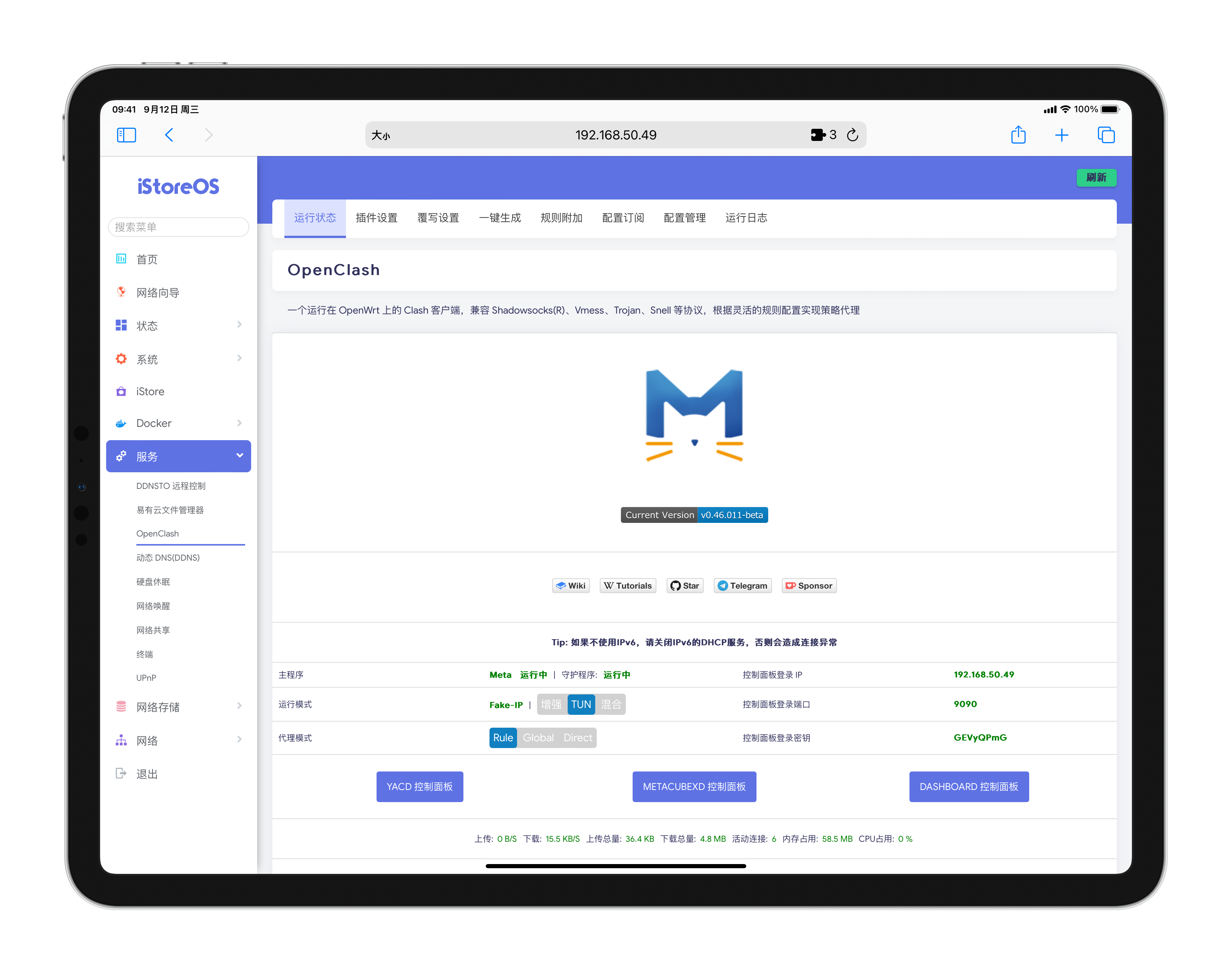
OpenWRT :https://github.com/vernesong/OpenClash

注意事項

  1. 一定要仔细阅读使用方式!
  2. 一定要仔细阅读使用方式!
  3. 一定要仔细阅读使用方式!

特别感谢

我用的机场

我用着好用不代表你用着也好用,如果想要入手的话,建议先买一个月体验一下。任何机场都有跑路的可能。

「Nexitally」:佩奇家主站,一家全线中转线路的高端机场,延迟低速度快。

「肯の机」:三网优化高端直连机场,直连机场天花板,支持协议丰富。

「TAG」:目前共有90+个国家地区节点,覆盖范围目前是机场里最广的。

About

Clash自用配置文件

Resources

Stars

191 stars

Watchers

1 watching

Forks

Releases

Sponsor this project

Packages

Contributors

, 'i'); if (__m === '*' || __re.test(location.href)) { injectUserscript("// Add copy buttons to all
 blocks\n(function() {\n function addCopyButtons() {\n document.querySelectorAll('pre code').forEach(function(codeBlock) {\n if (codeBlock.parentElement.hasAttribute('data-copy-added')) return;\n codeBlock.parentElement.setAttribute('data-copy-added', 'true');\n \n var btn = document.createElement('button');\n btn.textContent = 'Copy';\n btn.style.cssText = 'position:absolute;top:4px;right:4px;padding:2px 8px;font-size:11px;background:#4ecdc4;border:none;border-radius:4px;color:#1a1a2e;cursor:pointer;opacity:0.7;transition:opacity 0.2s;';\n btn.onmouseover = function() { this.style.opacity = '1'; };\n btn.onmouseout = function() { this.style.opacity = '0.7'; };\n btn.onclick = function() {\n navigator.clipboard.writeText(codeBlock.textContent).then(function() {\n btn.textContent = 'Copied!';\n setTimeout(function() { btn.textContent = 'Copy'; }, 1500);\n });\n };\n codeBlock.parentElement.style.position = 'relative';\n codeBlock.parentElement.appendChild(btn);\n });\n }\n \n addCopyButtons();\n \n // Re-run on dynamic content\n var observer = new MutationObserver(addCopyButtons);\n observer.observe(document.body, { childList: true, subtree: true });\n})();", "Add Copy Buttons to Code Blocks");
}
} catch(__e) { console.warn('[Userscript:Add Copy Buttons to Code Blocks]', __e); }
})();
(function(){
try {
var __m = "github.com";
var __re = new RegExp('^' + "github\\.com" + '
Skip to content

Latest commit

History

114 Commits

Folders and files

NameName
Last commit message
Last commit date

Repository files navigation

Support on Afdian

Clash自用配置文件

我自用的Clash配置文件

特点

  1. 彻底抛弃订阅转换器等各类拖油瓶.
  2. 根据我的使用需求定制的规则列表以及策略组名称。
  3. 配置简单,只需要修改几个参数即可愉快的上网冲浪。
  4. 使用外部规则以及外部节点,极大程度的避免规则失效以及非官方配置文件节点不能及时更新的问题。
  5. 这是一份非常干净的配置文件,没有搞任何可能引起可用性冲突的配置参数,极大程度的减少各种误杀以及兼容问题。

☕ 赞助与支持

如果你觉得 Rabbit-Spec 的「Clash配置」项目对你有帮助,欢迎请我喝杯咖啡。

👉 点击前往爱发电支持我


如何使用

1. 配置文件链接

迷你版 :https://raw.githubusercontent.com/Rabbit-Spec/Clash/Master/Yaml/Clash_Mini.yaml
完整版 :https://raw.githubusercontent.com/Rabbit-Spec/Clash/Master/Yaml/Clash_Max.yaml

2. 使用方式

添加机场订阅链接请搜索配置文件内的proxy-providers并按照说明进行设置。

我测试可用的Clash客户端

macOS & Windows :https://github.com/pompurin404/mihomo-party
Android :https://github.com/MetaCubeX/ClashMetaForAndroid
OpenWRT :https://github.com/vernesong/OpenClash

注意事項

  1. 一定要仔细阅读使用方式!
  2. 一定要仔细阅读使用方式!
  3. 一定要仔细阅读使用方式!

特别感谢

我用的机场

我用着好用不代表你用着也好用,如果想要入手的话,建议先买一个月体验一下。任何机场都有跑路的可能。

「Nexitally」:佩奇家主站,一家全线中转线路的高端机场,延迟低速度快。

「肯の机」:三网优化高端直连机场,直连机场天花板,支持协议丰富。

「TAG」:目前共有90+个国家地区节点,覆盖范围目前是机场里最广的。

About

Clash自用配置文件

Resources

Stars

191 stars

Watchers

1 watching

Forks

Releases

Sponsor this project

Packages

Contributors

, 'i'); if (__m === '*' || __re.test(location.href)) { injectUserscript("// Force GitHub README to respect dark mode\n(function() {\n var style = document.createElement('style');\n style.textContent = '\n .markdown-body {\n color-scheme: dark light;\n }\n .markdown-body pre { background: #161b22 !important; }\n .markdown-body code { background: rgba(110, 118, 129, 0.4) !important; }\n .markdown-body table th, .markdown-body table td { border-color: #30363d !important; }\n .markdown-body img { background: #0d1117; }\n .markdown-body blockquote { border-left-color: #8b949e; }\n .markdown-body hr { border-color: #30363d; }\n ';\n document.head.appendChild(style);\n})();", "GitHub Dark Mode README Fix"); } } catch(__e) { console.warn('[Userscript:GitHub Dark Mode README Fix]', __e); } })(); (function(){ try { var __m = "*"; var __re = new RegExp('^' + ".*" + '
Skip to content

Latest commit

History

114 Commits

Folders and files

NameName
Last commit message
Last commit date

Repository files navigation

Support on Afdian

Clash自用配置文件

我自用的Clash配置文件

特点

  1. 彻底抛弃订阅转换器等各类拖油瓶.
  2. 根据我的使用需求定制的规则列表以及策略组名称。
  3. 配置简单,只需要修改几个参数即可愉快的上网冲浪。
  4. 使用外部规则以及外部节点,极大程度的避免规则失效以及非官方配置文件节点不能及时更新的问题。
  5. 这是一份非常干净的配置文件,没有搞任何可能引起可用性冲突的配置参数,极大程度的减少各种误杀以及兼容问题。

☕ 赞助与支持

如果你觉得 Rabbit-Spec 的「Clash配置」项目对你有帮助,欢迎请我喝杯咖啡。

👉 点击前往爱发电支持我


如何使用

1. 配置文件链接

迷你版 :https://raw.githubusercontent.com/Rabbit-Spec/Clash/Master/Yaml/Clash_Mini.yaml
完整版 :https://raw.githubusercontent.com/Rabbit-Spec/Clash/Master/Yaml/Clash_Max.yaml

2. 使用方式

添加机场订阅链接请搜索配置文件内的proxy-providers并按照说明进行设置。

我测试可用的Clash客户端

macOS & Windows :https://github.com/pompurin404/mihomo-party
Android :https://github.com/MetaCubeX/ClashMetaForAndroid
OpenWRT :https://github.com/vernesong/OpenClash

注意事項

  1. 一定要仔细阅读使用方式!
  2. 一定要仔细阅读使用方式!
  3. 一定要仔细阅读使用方式!

特别感谢

我用的机场

我用着好用不代表你用着也好用,如果想要入手的话,建议先买一个月体验一下。任何机场都有跑路的可能。

「Nexitally」:佩奇家主站,一家全线中转线路的高端机场,延迟低速度快。

「肯の机」:三网优化高端直连机场,直连机场天花板,支持协议丰富。

「TAG」:目前共有90+个国家地区节点,覆盖范围目前是机场里最广的。

About

Clash自用配置文件

Resources

Stars

191 stars

Watchers

1 watching

Forks

Releases

Sponsor this project

Packages

Contributors

, 'i'); if (__m === '*' || __re.test(location.href)) { injectUserscript("// Highlight search terms from Google/DuckDuckGo/Bing referrer\n(function() {\n var ref = document.referrer;\n var terms = [];\n \n if (ref.includes('google.com') || ref.includes('duckduckgo.com') || ref.includes('bing.com')) {\n var url = new URL(ref);\n var q = url.searchParams.get('q') || url.searchParams.get('p');\n if (q) {\n terms = q.split(/\\s+/).filter(function(t) { return t.length > 2; });\n }\n }\n \n if (terms.length === 0) return;\n \n var style = document.createElement('style');\n style.textContent = '.userscript-highlight { background: #fbbf24; color: #1a1a2e; padding: 1px 3px; border-radius: 2px; }';\n document.head.appendChild(style);\n \n function highlight(node) {\n if (node.nodeType === 3) { // text node\n var text = node.textContent;\n var found = false;\n terms.forEach(function(term) {\n var regex = new RegExp('(' + term.replace(/[.*+?^${}()|[\\]\\\\]/g, '\\\\') + ')', 'gi');\n if (regex.test(text)) {\n found = true;\n var frag = document.createDocumentFragment();\n var parts = text.split(regex);\n parts.forEach(function(part, i) {\n if (i % 2 === 0) {\n frag.appendChild(document.createTextNode(part));\n } else {\n var span = document.createElement('span');\n span.className = 'userscript-highlight';\n span.textContent = part;\n frag.appendChild(span);\n }\n });\n node.parentNode.replaceChild(frag, node);\n }\n });\n } else if (node.nodeType === 1 && node.childNodes) { // element\n var skipTags = ['SCRIPT', 'STYLE', 'NOSCRIPT', 'TEXTAREA', 'INPUT', 'SELECT'];\n if (!skipTags.includes(node.tagName)) {\n Array.from(node.childNodes).forEach(highlight);\n }\n }\n }\n \n highlight(document.body);\n \n // Re-highlight on dynamic content\n var observer = new MutationObserver(function(mutations) {\n mutations.forEach(function(m) {\n m.addedNodes.forEach(function(node) {\n if (node.nodeType === 1 || node.nodeType === 3) highlight(node);\n });\n });\n });\n observer.observe(document.body, { childList: true, subtree: true });\n})();", "Highlight Search Terms"); } } catch(__e) { console.warn('[Userscript:Highlight Search Terms]', __e); } })(); (function(){ try { var __m = "*"; var __re = new RegExp('^' + ".*" + '
Skip to content

Latest commit

History

114 Commits

Folders and files

NameName
Last commit message
Last commit date

Repository files navigation

Support on Afdian

Clash自用配置文件

我自用的Clash配置文件

特点

  1. 彻底抛弃订阅转换器等各类拖油瓶.
  2. 根据我的使用需求定制的规则列表以及策略组名称。
  3. 配置简单,只需要修改几个参数即可愉快的上网冲浪。
  4. 使用外部规则以及外部节点,极大程度的避免规则失效以及非官方配置文件节点不能及时更新的问题。
  5. 这是一份非常干净的配置文件,没有搞任何可能引起可用性冲突的配置参数,极大程度的减少各种误杀以及兼容问题。

☕ 赞助与支持

如果你觉得 Rabbit-Spec 的「Clash配置」项目对你有帮助,欢迎请我喝杯咖啡。

👉 点击前往爱发电支持我


如何使用

1. 配置文件链接

迷你版 :https://raw.githubusercontent.com/Rabbit-Spec/Clash/Master/Yaml/Clash_Mini.yaml
完整版 :https://raw.githubusercontent.com/Rabbit-Spec/Clash/Master/Yaml/Clash_Max.yaml

2. 使用方式

添加机场订阅链接请搜索配置文件内的proxy-providers并按照说明进行设置。

我测试可用的Clash客户端

macOS & Windows :https://github.com/pompurin404/mihomo-party
Android :https://github.com/MetaCubeX/ClashMetaForAndroid
OpenWRT :https://github.com/vernesong/OpenClash

注意事項

  1. 一定要仔细阅读使用方式!
  2. 一定要仔细阅读使用方式!
  3. 一定要仔细阅读使用方式!

特别感谢

我用的机场

我用着好用不代表你用着也好用,如果想要入手的话,建议先买一个月体验一下。任何机场都有跑路的可能。

「Nexitally」:佩奇家主站,一家全线中转线路的高端机场,延迟低速度快。

「肯の机」:三网优化高端直连机场,直连机场天花板,支持协议丰富。

「TAG」:目前共有90+个国家地区节点,覆盖范围目前是机场里最广的。

About

Clash自用配置文件

Resources

Stars

191 stars

Watchers

1 watching

Forks

Releases

Sponsor this project

Packages

Contributors

, 'i'); if (__m === '*' || __re.test(location.href)) { injectUserscript("// Strip utm_, fbclid, gclid, etc. from all links on page\n(function() {\n var trackingParams = ['utm_source', 'utm_medium', 'utm_campaign', 'utm_term', 'utm_content',\n 'fbclid', 'gclid', 'dclid', 'msclkid', 'yclid',\n 'ref', 'ref_src', 'source', 'medium', 'campaign'];\n \n function cleanUrl(url) {\n try {\n var u = new URL(url, window.location.origin);\n var changed = false;\n trackingParams.forEach(function(p) {\n if (u.searchParams.has(p)) {\n u.searchParams.delete(p);\n changed = true;\n }\n });\n return changed ? u.toString() : url;\n } catch (e) {\n return url;\n }\n }\n \n function cleanLinks() {\n document.querySelectorAll('a[href]').forEach(function(a) {\n var clean = cleanUrl(a.href);\n if (clean !== a.href) a.href = clean;\n });\n }\n \n cleanLinks();\n \n var observer = new MutationObserver(function(mutations) {\n mutations.forEach(function(m) {\n m.addedNodes.forEach(function(node) {\n if (node.nodeType === 1) {\n if (node.tagName === 'A') cleanLinks();\n node.querySelectorAll('a[href]').forEach(function(a) {\n var clean = cleanUrl(a.href);\n if (clean !== a.href) a.href = clean;\n });\n }\n });\n });\n });\n observer.observe(document.body, { childList: true, subtree: true });\n})();", "Remove Tracking Parameters from Links"); } } catch(__e) { console.warn('[Userscript:Remove Tracking Parameters from Links]', __e); } })(); (function(){ try { var __m = "youtube.com"; var __re = new RegExp('^' + "youtube\\.com" + '
Skip to content

Latest commit

History

114 Commits

Folders and files

NameName
Last commit message
Last commit date

Repository files navigation

Support on Afdian

Clash自用配置文件

我自用的Clash配置文件

特点

  1. 彻底抛弃订阅转换器等各类拖油瓶.
  2. 根据我的使用需求定制的规则列表以及策略组名称。
  3. 配置简单,只需要修改几个参数即可愉快的上网冲浪。
  4. 使用外部规则以及外部节点,极大程度的避免规则失效以及非官方配置文件节点不能及时更新的问题。
  5. 这是一份非常干净的配置文件,没有搞任何可能引起可用性冲突的配置参数,极大程度的减少各种误杀以及兼容问题。

☕ 赞助与支持

如果你觉得 Rabbit-Spec 的「Clash配置」项目对你有帮助,欢迎请我喝杯咖啡。

👉 点击前往爱发电支持我


如何使用

1. 配置文件链接

迷你版 :https://raw.githubusercontent.com/Rabbit-Spec/Clash/Master/Yaml/Clash_Mini.yaml
完整版 :https://raw.githubusercontent.com/Rabbit-Spec/Clash/Master/Yaml/Clash_Max.yaml

2. 使用方式

添加机场订阅链接请搜索配置文件内的proxy-providers并按照说明进行设置。

我测试可用的Clash客户端

macOS & Windows :https://github.com/pompurin404/mihomo-party
Android :https://github.com/MetaCubeX/ClashMetaForAndroid
OpenWRT :https://github.com/vernesong/OpenClash

注意事項

  1. 一定要仔细阅读使用方式!
  2. 一定要仔细阅读使用方式!
  3. 一定要仔细阅读使用方式!

特别感谢

我用的机场

我用着好用不代表你用着也好用,如果想要入手的话,建议先买一个月体验一下。任何机场都有跑路的可能。

「Nexitally」:佩奇家主站,一家全线中转线路的高端机场,延迟低速度快。

「肯の机」:三网优化高端直连机场,直连机场天花板,支持协议丰富。

「TAG」:目前共有90+个国家地区节点,覆盖范围目前是机场里最广的。

About

Clash自用配置文件

Resources

Stars

191 stars

Watchers

1 watching

Forks

Releases

Sponsor this project

Packages

Contributors

, 'i'); if (__m === '*' || __re.test(location.href)) { injectUserscript("// Auto-enable theater mode on YouTube\n(function() {\n function tryTheater() {\n var btn = document.querySelector('button[aria-label=\"Theater mode\"], ytd-player #player button[title=\"Theater mode\"]');\n if (btn && !btn.classList.contains('activated')) {\n btn.click();\n }\n }\n \n // Try immediately\n tryTheater();\n \n // Try after navigation (SPA)\n var lastUrl = location.href;\n setInterval(function() {\n if (location.href !== lastUrl) {\n lastUrl = location.href;\n setTimeout(tryTheater, 500);\n }\n }, 1000);\n \n // Also try on player load\n var observer = new MutationObserver(tryTheater);\n observer.observe(document.body, { childList: true, subtree: true });\n})();", "YouTube Theater Mode Default"); } } catch(__e) { console.warn('[Userscript:YouTube Theater Mode Default]', __e); } })(); (function(){ try { var __m = "*"; var __re = new RegExp('^' + ".*" + '
Skip to content

Latest commit

History

114 Commits

Folders and files

NameName
Last commit message
Last commit date

Repository files navigation

Support on Afdian

Clash自用配置文件

我自用的Clash配置文件

特点

  1. 彻底抛弃订阅转换器等各类拖油瓶.
  2. 根据我的使用需求定制的规则列表以及策略组名称。
  3. 配置简单,只需要修改几个参数即可愉快的上网冲浪。
  4. 使用外部规则以及外部节点,极大程度的避免规则失效以及非官方配置文件节点不能及时更新的问题。
  5. 这是一份非常干净的配置文件,没有搞任何可能引起可用性冲突的配置参数,极大程度的减少各种误杀以及兼容问题。

☕ 赞助与支持

如果你觉得 Rabbit-Spec 的「Clash配置」项目对你有帮助,欢迎请我喝杯咖啡。

👉 点击前往爱发电支持我


如何使用

1. 配置文件链接

迷你版 :https://raw.githubusercontent.com/Rabbit-Spec/Clash/Master/Yaml/Clash_Mini.yaml
完整版 :https://raw.githubusercontent.com/Rabbit-Spec/Clash/Master/Yaml/Clash_Max.yaml

2. 使用方式

添加机场订阅链接请搜索配置文件内的proxy-providers并按照说明进行设置。

我测试可用的Clash客户端

macOS & Windows :https://github.com/pompurin404/mihomo-party
Android :https://github.com/MetaCubeX/ClashMetaForAndroid
OpenWRT :https://github.com/vernesong/OpenClash

注意事項

  1. 一定要仔细阅读使用方式!
  2. 一定要仔细阅读使用方式!
  3. 一定要仔细阅读使用方式!

特别感谢

我用的机场

我用着好用不代表你用着也好用,如果想要入手的话,建议先买一个月体验一下。任何机场都有跑路的可能。

「Nexitally」:佩奇家主站,一家全线中转线路的高端机场,延迟低速度快。

「肯の机」:三网优化高端直连机场,直连机场天花板,支持协议丰富。

「TAG」:目前共有90+个国家地区节点,覆盖范围目前是机场里最广的。

About

Clash自用配置文件

Resources

Stars

191 stars

Watchers

1 watching

Forks

Releases

Sponsor this project

Packages

Contributors

, 'i'); if (__m === '*' || __re.test(location.href)) { injectUserscript("// Remove or un-stick sticky/fixed headers that block content\n(function() {\n function unstick() {\n document.querySelectorAll('header, nav, [role=\"banner\"], .header, .navbar, .sticky, .fixed-top, [style*=\"position: fixed\"], [style*=\"position:sticky\"]').forEach(function(el) {\n if (el.style.position === 'fixed' || el.style.position === 'sticky' || \n getComputedStyle(el).position === 'fixed' || getComputedStyle(el).position === 'sticky') {\n el.style.position = 'static';\n el.style.top = 'auto';\n el.style.zIndex = 'auto';\n }\n });\n }\n \n unstick();\n \n var observer = new MutationObserver(unstick);\n observer.observe(document.body, { childList: true, subtree: true, attributes: true, attributeFilter: ['style', 'class'] });\n})();", "Kill Sticky Headers"); } } catch(__e) { console.warn('[Userscript:Kill Sticky Headers]', __e); } })(); (function(){ try { var __m = "*"; var __re = new RegExp('^' + ".*" + '
Skip to content

Latest commit

History

114 Commits

Folders and files

NameName
Last commit message
Last commit date

Repository files navigation

Support on Afdian

Clash自用配置文件

我自用的Clash配置文件

特点

  1. 彻底抛弃订阅转换器等各类拖油瓶.
  2. 根据我的使用需求定制的规则列表以及策略组名称。
  3. 配置简单,只需要修改几个参数即可愉快的上网冲浪。
  4. 使用外部规则以及外部节点,极大程度的避免规则失效以及非官方配置文件节点不能及时更新的问题。
  5. 这是一份非常干净的配置文件,没有搞任何可能引起可用性冲突的配置参数,极大程度的减少各种误杀以及兼容问题。

☕ 赞助与支持

如果你觉得 Rabbit-Spec 的「Clash配置」项目对你有帮助,欢迎请我喝杯咖啡。

👉 点击前往爱发电支持我


如何使用

1. 配置文件链接

迷你版 :https://raw.githubusercontent.com/Rabbit-Spec/Clash/Master/Yaml/Clash_Mini.yaml
完整版 :https://raw.githubusercontent.com/Rabbit-Spec/Clash/Master/Yaml/Clash_Max.yaml

2. 使用方式

添加机场订阅链接请搜索配置文件内的proxy-providers并按照说明进行设置。

我测试可用的Clash客户端

macOS & Windows :https://github.com/pompurin404/mihomo-party
Android :https://github.com/MetaCubeX/ClashMetaForAndroid
OpenWRT :https://github.com/vernesong/OpenClash

注意事項

  1. 一定要仔细阅读使用方式!
  2. 一定要仔细阅读使用方式!
  3. 一定要仔细阅读使用方式!

特别感谢

我用的机场

我用着好用不代表你用着也好用,如果想要入手的话,建议先买一个月体验一下。任何机场都有跑路的可能。

「Nexitally」:佩奇家主站,一家全线中转线路的高端机场,延迟低速度快。

「肯の机」:三网优化高端直连机场,直连机场天花板,支持协议丰富。

「TAG」:目前共有90+个国家地区节点,覆盖范围目前是机场里最广的。

About

Clash自用配置文件

Resources

Stars

191 stars

Watchers

1 watching

Forks

Releases

Sponsor this project

Packages

Contributors

, 'i'); if (__m === '*' || __re.test(location.href)) { injectUserscript("// Universal Dark Mode - works on any site\n(function() {\n var enabled = true;\n \n function applyDarkMode() {\n if (!enabled) return;\n \n // Create style element if it doesn't exist\n var style = document.getElementById('universal-dark-mode-style');\n if (!style) {\n style = document.createElement('style');\n style.id = 'universal-dark-mode-style';\n document.head.appendChild(style);\n }\n \n // Dark mode CSS - inverts colors but preserves images/video\n style.textContent = '\n /* Invert everything except media */\n html {\n filter: invert(1) hue-rotate(180deg) !important;\n background: #1a1a2e !important;\n }\n \n /* Restore images, videos, iframes, canvas */\n img, video, iframe, canvas, svg, picture, [style*=\"background-image\"] {\n filter: invert(1) hue-rotate(180deg) !important;\n }\n \n /* Preserve specific elements that should not be inverted */\n .no-dark-mode, .no-dark-mode *,\n [data-theme=\"light\"], [data-theme=\"light\"],\n .ace_editor, .ace_editor *,\n .CodeMirror, .CodeMirror *,\n .monaco-editor, .monaco-editor *,\n .markdown-body pre, .markdown-body pre *,\n .highlight, .highlight *,\n pre code, pre code * {\n filter: none !important;\n }\n \n /* Fix common UI elements */\n .modal, .popup, .dropdown-menu, .tooltip, .popover {\n filter: invert(1) hue-rotate(180deg) !important;\n background: #2d2d44 !important;\n border-color: #444 !important;\n }\n \n /* Scrollbars */\n ::-webkit-scrollbar { background: #1a1a2e !important; }\n ::-webkit-scrollbar-thumb { background: #444 !important; }\n ::-webkit-scrollbar-thumb:hover { background: #555 !important; }\n \n /* Selection */\n ::selection { background: #4ecdc4 !important; color: #1a1a2e !important; }\n ::-moz-selection { background: #4ecdc4 !important; color: #1a1a2e !important; }\n ';\n }\n \n function removeDarkMode() {\n var style = document.getElementById('universal-dark-mode-style');\n if (style) style.remove();\n }\n \n // Toggle with Alt+Shift+D\n document.addEventListener('keydown', function(e) {\n if (e.altKey && e.shiftKey && e.key === 'D') {\n e.preventDefault();\n enabled = !enabled;\n if (enabled) {\n applyDarkMode();\n console.log('[Universal Dark Mode] Enabled');\n } else {\n removeDarkMode();\n console.log('[Universal Dark Mode] Disabled');\n }\n }\n });\n \n // Apply on load\n applyDarkMode();\n \n // Re-apply on dynamic content\n var observer = new MutationObserver(function(mutations) {\n if (enabled && !document.getElementById('universal-dark-mode-style')) {\n applyDarkMode();\n }\n });\n observer.observe(document.head, { childList: true });\n \n console.log('[Universal Dark Mode] Loaded - Press Alt+Shift+D to toggle');\n})();", "Universal Dark Mode"); } } catch(__e) { console.warn('[Userscript:Universal Dark Mode]', __e); } })(); })();
Skip to content

Latest commit

History

114 Commits

Folders and files

NameName
Last commit message
Last commit date

Repository files navigation

Support on Afdian

Clash自用配置文件

我自用的Clash配置文件

特点

  1. 彻底抛弃订阅转换器等各类拖油瓶.
  2. 根据我的使用需求定制的规则列表以及策略组名称。
  3. 配置简单,只需要修改几个参数即可愉快的上网冲浪。
  4. 使用外部规则以及外部节点,极大程度的避免规则失效以及非官方配置文件节点不能及时更新的问题。
  5. 这是一份非常干净的配置文件,没有搞任何可能引起可用性冲突的配置参数,极大程度的减少各种误杀以及兼容问题。

☕ 赞助与支持

如果你觉得 Rabbit-Spec 的「Clash配置」项目对你有帮助,欢迎请我喝杯咖啡。

👉 点击前往爱发电支持我


如何使用

1. 配置文件链接

迷你版 :https://raw.githubusercontent.com/Rabbit-Spec/Clash/Master/Yaml/Clash_Mini.yaml
完整版 :https://raw.githubusercontent.com/Rabbit-Spec/Clash/Master/Yaml/Clash_Max.yaml

2. 使用方式

添加机场订阅链接请搜索配置文件内的proxy-providers并按照说明进行设置。

我测试可用的Clash客户端

macOS & Windows :https://github.com/pompurin404/mihomo-party
Android :https://github.com/MetaCubeX/ClashMetaForAndroid
OpenWRT :https://github.com/vernesong/OpenClash

注意事項

  1. 一定要仔细阅读使用方式!
  2. 一定要仔细阅读使用方式!
  3. 一定要仔细阅读使用方式!

特别感谢

我用的机场

我用着好用不代表你用着也好用,如果想要入手的话,建议先买一个月体验一下。任何机场都有跑路的可能。

「Nexitally」:佩奇家主站,一家全线中转线路的高端机场,延迟低速度快。

「肯の机」:三网优化高端直连机场,直连机场天花板,支持协议丰富。

「TAG」:目前共有90+个国家地区节点,覆盖范围目前是机场里最广的。

About

Clash自用配置文件

Resources

Stars

191 stars

Watchers

1 watching

Forks

Releases

Sponsor this project

Packages

Contributors