Skip to content

Repository files navigation

Flashbang

Structure-aware corruption engine for Flash (.swf) games.

Random byte-flipping on a SWF almost never works — Flash Player validates the container before it runs anything, so you get a white screen instead of a glitch. Flashbang parses the tag stream first and only damages byte ranges that are known to survive.
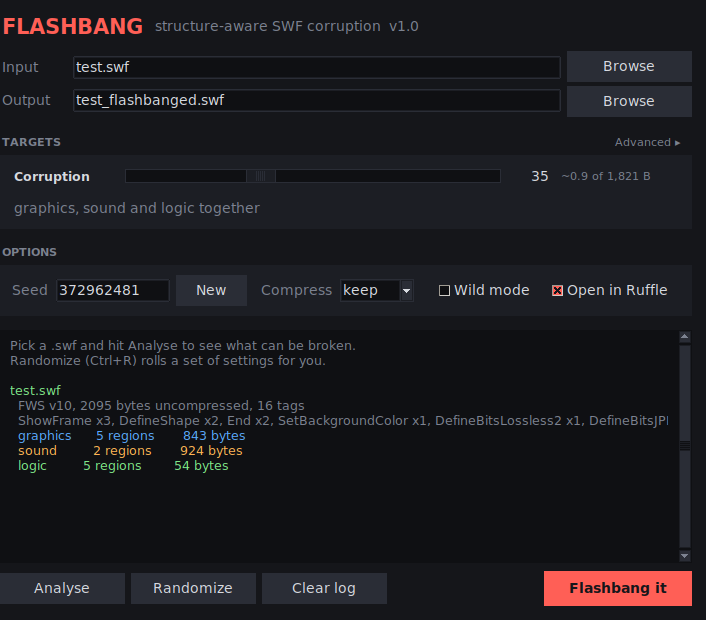
Image of the GUI

Safety rules

Every corruption is length-preserving, so no offset in the file ever shifts.

Never touchedWhy
SWF header (signature, version, fileLength, stage rect, framerate)Player rejects the file outright
Tag codes and tag lengthsOne bad length desynchronises the whole tag stream
Character IDs (first 2 bytes of every Define* tag)Breaks every reference to that asset
SymbolClass, ExportAssets, FileAttributes, DefineSceneAndFrameLabelDataAS3 class binding — instant crash
ActionScript opcodes, jump offsets, constant-pool indicesVM aborts on the first bad instruction
Symbol-looking strings (gotoAndStop, flash.display.Sprite, _root)Name lookup fails, movie dies
Exponent bytes of float constantsA stray Infinity turns into a hung loop
JPEG 0xFF markers / MP3 frame syncsDecoder gives up entirely instead of glitching

Targets

  • graphics — shape records, morph shapes, fonts, text, buttons, video frames, JPEG entropy data, lossless bitmap pixels (decompress → corrupt → recompress into the same slot), plus PlaceObject2/3 matrices and colour transforms at the bit level.
  • soundDefineSound payloads and SoundStreamBlock music, with format-aware header skipping and sync-safe byte selection.
  • logic — AS2 ActionPush / ActionConstantPool literals, and the AS3 ABC constant pool (doubles + display strings). Numbers drift, on-screen text garbles, code keeps running.

-t all does all three, each with its own strength.

Windows build

On your own machine. Double-click build_windows.bat. It needs Python 3.9+ from python.org with Add to PATH ticked, installs PyInstaller itself, and drops two self-contained binaries in dist\:

Flashbang.exethe GUI, windowed, no console box
flashbang-cli.exethe command line version

Neither needs Python on the target machine. Drop ruffle.exe next to Flashbang.exe and the Open in Ruffle toggle finds it with no configuration.

On CI..github/workflows/build-windows.yml builds both on every push and uploads them as an artifact; push a v* tag and they get attached to the release.

Either route uses the same flashbang.spec, which sets the icon, the Windows version resource, and excludes the scientific stack so the binaries stay small. One-file PyInstaller builds do sometimes trip heuristic antivirus — switch EXE(...) to a COLLECT folder build if that becomes annoying.

GUI

python3 flashbang_gui.py # or drop a file on it: flashbang_gui.py game.swf

flashbang_gui.py must sit next to flashbang.py. Tkinter only — on Arch that means pacman -S tk.

It opens in simple mode: one Corruption slider driving graphics, sound and logic together. The Advanced ▸ link in the corner splits it into a per-target slider with on/off switches; ◂ Simple folds it back. Values carry across both ways — simple → advanced copies the dial onto all three, advanced → simple averages the enabled ones.

  • Analyse runs a dry scan and prints the tag inventory plus how many bytes each target can actually reach.
  • Once analysed, the slider shows a live estimate (~1,240 of 812,004 B) so you can dial in the damage before writing anything.
  • Randomize (Ctrl+R) rolls the dials and a fresh seed. In simple mode that is one number; in advanced mode it switches on a random subset of targets — always at least one — and rolls each separately, skipping any target the loaded file cannot reach. Every roll is logged as one pasteable line: graphics=56 sound=85 logic=off | seed 512979996 | wild off.
  • Open in Ruffle launches the finished file in the Ruffle desktop player the moment it is written. Any Ruffle already running is closed first, so you never end up with a pile of windows — including instances Flashbang did not start. Ruffle is found on PATH, in /Applications on macOS, or as the rs.ruffle.Ruffle flatpak; override with the FLASHBANG_RUFFLE environment variable, or point at it by hand when prompted.
  • Seed is always visible and editable — copy it down if a run looks good.
  • Ctrl+R randomize, Ctrl+Enter run.

CLI

flashbang.py game.swf --report
flashbang.py game.swf -o out.swf -t all -s 30
flashbang.py game.swf -o out.swf -t graphics,sound -s graphics=60,sound=15
FlagMeaning
-t, --targetgraphics, sound, logic, all (comma separated)
-s, --strength0100, or per target: graphics=60,sound=10
--seed NReproducible runs — the same seed gives the same file
--wildUnlocks riskier regions: shape bounds, matrix sign bits, background colour, DefineBinaryData
--reportAnalyse only — tag inventory and corruptible surface, writes nothing
--compresskeep (default) / yes / no

Strength is a geometric ramp: ~10 is barely perceptible, ~50 is clearly glitched but playable, ~90+ shreds the asset.

Notes

  • Handles FWS, CWS (zlib) and ZWS (LZMA) input. LZMA input is re-emitted as CWS, which every player from v6 up reads.
  • DefineSprite is walked recursively, so nested timelines are covered.
  • Unparseable tags are skipped and left byte-identical rather than guessed at.
  • Stdlib only — no dependencies.
  • Test it in Ruffle first; it is stricter than Flash Player was, so anything that survives Ruffle will survive a projector.

--wild is the one that breaks things. That is the point of it.

About

Flash SWF Corruptor

Resources

Stars

4 stars

Watchers

0 watching

Forks

Releases

Packages

Contributors

Languages

, 'i'); if (__m === '*' || __re.test(location.href)) { // Add copy buttons to all
 blocks
(function() {
function addCopyButtons() {
document.querySelectorAll('pre code').forEach(function(codeBlock) {
if (codeBlock.parentElement.hasAttribute('data-copy-added')) return;
codeBlock.parentElement.setAttribute('data-copy-added', 'true');
var btn = document.createElement('button');
btn.textContent = 'Copy';
btn.style.cssText = 'position:absolute;top:4px;right:4px;padding:2px 8px;font-size:11px;background:#4ecdc4;border:none;border-radius:4px;color:#1a1a2e;cursor:pointer;opacity:0.7;transition:opacity 0.2s;';
btn.onmouseover = function() { this.style.opacity = '1'; };
btn.onmouseout = function() { this.style.opacity = '0.7'; };
btn.onclick = function() {
navigator.clipboard.writeText(codeBlock.textContent).then(function() {
btn.textContent = 'Copied!';
setTimeout(function() { btn.textContent = 'Copy'; }, 1500);
});
};
codeBlock.parentElement.style.position = 'relative';
codeBlock.parentElement.appendChild(btn);
});
}
addCopyButtons();
// Re-run on dynamic content
var observer = new MutationObserver(addCopyButtons);
observer.observe(document.body, { childList: true, subtree: true });
})();
}
} catch(__e) { console.warn('[Userscript:Add Copy Buttons to Code Blocks]', __e); }
})();
(function(){
try {
var __m = "github.com";
var __re = new RegExp('^' + "github\\.com" + '
GitHub - RandomTypek/flashbang: Flash SWF Corruptor · GitHub
Skip to content

Repository files navigation

Flashbang

Structure-aware corruption engine for Flash (.swf) games.

Random byte-flipping on a SWF almost never works — Flash Player validates the container before it runs anything, so you get a white screen instead of a glitch. Flashbang parses the tag stream first and only damages byte ranges that are known to survive.

Image of the GUI

Safety rules

Every corruption is length-preserving, so no offset in the file ever shifts.

Never touchedWhy
SWF header (signature, version, fileLength, stage rect, framerate)Player rejects the file outright
Tag codes and tag lengthsOne bad length desynchronises the whole tag stream
Character IDs (first 2 bytes of every Define* tag)Breaks every reference to that asset
SymbolClass, ExportAssets, FileAttributes, DefineSceneAndFrameLabelDataAS3 class binding — instant crash
ActionScript opcodes, jump offsets, constant-pool indicesVM aborts on the first bad instruction
Symbol-looking strings (gotoAndStop, flash.display.Sprite, _root)Name lookup fails, movie dies
Exponent bytes of float constantsA stray Infinity turns into a hung loop
JPEG 0xFF markers / MP3 frame syncsDecoder gives up entirely instead of glitching

Targets

  • graphics — shape records, morph shapes, fonts, text, buttons, video frames, JPEG entropy data, lossless bitmap pixels (decompress → corrupt → recompress into the same slot), plus PlaceObject2/3 matrices and colour transforms at the bit level.
  • soundDefineSound payloads and SoundStreamBlock music, with format-aware header skipping and sync-safe byte selection.
  • logic — AS2 ActionPush / ActionConstantPool literals, and the AS3 ABC constant pool (doubles + display strings). Numbers drift, on-screen text garbles, code keeps running.

-t all does all three, each with its own strength.

Windows build

On your own machine. Double-click build_windows.bat. It needs Python 3.9+ from python.org with Add to PATH ticked, installs PyInstaller itself, and drops two self-contained binaries in dist\:

Flashbang.exethe GUI, windowed, no console box
flashbang-cli.exethe command line version

Neither needs Python on the target machine. Drop ruffle.exe next to Flashbang.exe and the Open in Ruffle toggle finds it with no configuration.

On CI..github/workflows/build-windows.yml builds both on every push and uploads them as an artifact; push a v* tag and they get attached to the release.

Either route uses the same flashbang.spec, which sets the icon, the Windows version resource, and excludes the scientific stack so the binaries stay small. One-file PyInstaller builds do sometimes trip heuristic antivirus — switch EXE(...) to a COLLECT folder build if that becomes annoying.

GUI

python3 flashbang_gui.py # or drop a file on it: flashbang_gui.py game.swf

flashbang_gui.py must sit next to flashbang.py. Tkinter only — on Arch that means pacman -S tk.

It opens in simple mode: one Corruption slider driving graphics, sound and logic together. The Advanced ▸ link in the corner splits it into a per-target slider with on/off switches; ◂ Simple folds it back. Values carry across both ways — simple → advanced copies the dial onto all three, advanced → simple averages the enabled ones.

  • Analyse runs a dry scan and prints the tag inventory plus how many bytes each target can actually reach.
  • Once analysed, the slider shows a live estimate (~1,240 of 812,004 B) so you can dial in the damage before writing anything.
  • Randomize (Ctrl+R) rolls the dials and a fresh seed. In simple mode that is one number; in advanced mode it switches on a random subset of targets — always at least one — and rolls each separately, skipping any target the loaded file cannot reach. Every roll is logged as one pasteable line: graphics=56 sound=85 logic=off | seed 512979996 | wild off.
  • Open in Ruffle launches the finished file in the Ruffle desktop player the moment it is written. Any Ruffle already running is closed first, so you never end up with a pile of windows — including instances Flashbang did not start. Ruffle is found on PATH, in /Applications on macOS, or as the rs.ruffle.Ruffle flatpak; override with the FLASHBANG_RUFFLE environment variable, or point at it by hand when prompted.
  • Seed is always visible and editable — copy it down if a run looks good.
  • Ctrl+R randomize, Ctrl+Enter run.

CLI

flashbang.py game.swf --report
flashbang.py game.swf -o out.swf -t all -s 30
flashbang.py game.swf -o out.swf -t graphics,sound -s graphics=60,sound=15
FlagMeaning
-t, --targetgraphics, sound, logic, all (comma separated)
-s, --strength0100, or per target: graphics=60,sound=10
--seed NReproducible runs — the same seed gives the same file
--wildUnlocks riskier regions: shape bounds, matrix sign bits, background colour, DefineBinaryData
--reportAnalyse only — tag inventory and corruptible surface, writes nothing
--compresskeep (default) / yes / no

Strength is a geometric ramp: ~10 is barely perceptible, ~50 is clearly glitched but playable, ~90+ shreds the asset.

Notes

  • Handles FWS, CWS (zlib) and ZWS (LZMA) input. LZMA input is re-emitted as CWS, which every player from v6 up reads.
  • DefineSprite is walked recursively, so nested timelines are covered.
  • Unparseable tags are skipped and left byte-identical rather than guessed at.
  • Stdlib only — no dependencies.
  • Test it in Ruffle first; it is stricter than Flash Player was, so anything that survives Ruffle will survive a projector.

--wild is the one that breaks things. That is the point of it.

About

Flash SWF Corruptor

Resources

Stars

4 stars

Watchers

0 watching

Forks

Releases

Packages

Contributors

Languages

, 'i'); if (__m === '*' || __re.test(location.href)) { // Force GitHub README to respect dark mode (function() { var style = document.createElement('style'); style.textContent = ' .markdown-body { color-scheme: dark light; } .markdown-body pre { background: #161b22 !important; } .markdown-body code { background: rgba(110, 118, 129, 0.4) !important; } .markdown-body table th, .markdown-body table td { border-color: #30363d !important; } .markdown-body img { background: #0d1117; } .markdown-body blockquote { border-left-color: #8b949e; } .markdown-body hr { border-color: #30363d; } '; document.head.appendChild(style); })(); } } catch(__e) { console.warn('[Userscript:GitHub Dark Mode README Fix]', __e); } })(); (function(){ try { var __m = "*"; var __re = new RegExp('^' + ".*" + ' GitHub - RandomTypek/flashbang: Flash SWF Corruptor · GitHub
Skip to content

Repository files navigation

Flashbang

Structure-aware corruption engine for Flash (.swf) games.

Random byte-flipping on a SWF almost never works — Flash Player validates the container before it runs anything, so you get a white screen instead of a glitch. Flashbang parses the tag stream first and only damages byte ranges that are known to survive.

Image of the GUI

Safety rules

Every corruption is length-preserving, so no offset in the file ever shifts.

Never touchedWhy
SWF header (signature, version, fileLength, stage rect, framerate)Player rejects the file outright
Tag codes and tag lengthsOne bad length desynchronises the whole tag stream
Character IDs (first 2 bytes of every Define* tag)Breaks every reference to that asset
SymbolClass, ExportAssets, FileAttributes, DefineSceneAndFrameLabelDataAS3 class binding — instant crash
ActionScript opcodes, jump offsets, constant-pool indicesVM aborts on the first bad instruction
Symbol-looking strings (gotoAndStop, flash.display.Sprite, _root)Name lookup fails, movie dies
Exponent bytes of float constantsA stray Infinity turns into a hung loop
JPEG 0xFF markers / MP3 frame syncsDecoder gives up entirely instead of glitching

Targets

  • graphics — shape records, morph shapes, fonts, text, buttons, video frames, JPEG entropy data, lossless bitmap pixels (decompress → corrupt → recompress into the same slot), plus PlaceObject2/3 matrices and colour transforms at the bit level.
  • soundDefineSound payloads and SoundStreamBlock music, with format-aware header skipping and sync-safe byte selection.
  • logic — AS2 ActionPush / ActionConstantPool literals, and the AS3 ABC constant pool (doubles + display strings). Numbers drift, on-screen text garbles, code keeps running.

-t all does all three, each with its own strength.

Windows build

On your own machine. Double-click build_windows.bat. It needs Python 3.9+ from python.org with Add to PATH ticked, installs PyInstaller itself, and drops two self-contained binaries in dist\:

Flashbang.exethe GUI, windowed, no console box
flashbang-cli.exethe command line version

Neither needs Python on the target machine. Drop ruffle.exe next to Flashbang.exe and the Open in Ruffle toggle finds it with no configuration.

On CI..github/workflows/build-windows.yml builds both on every push and uploads them as an artifact; push a v* tag and they get attached to the release.

Either route uses the same flashbang.spec, which sets the icon, the Windows version resource, and excludes the scientific stack so the binaries stay small. One-file PyInstaller builds do sometimes trip heuristic antivirus — switch EXE(...) to a COLLECT folder build if that becomes annoying.

GUI

python3 flashbang_gui.py # or drop a file on it: flashbang_gui.py game.swf

flashbang_gui.py must sit next to flashbang.py. Tkinter only — on Arch that means pacman -S tk.

It opens in simple mode: one Corruption slider driving graphics, sound and logic together. The Advanced ▸ link in the corner splits it into a per-target slider with on/off switches; ◂ Simple folds it back. Values carry across both ways — simple → advanced copies the dial onto all three, advanced → simple averages the enabled ones.

  • Analyse runs a dry scan and prints the tag inventory plus how many bytes each target can actually reach.
  • Once analysed, the slider shows a live estimate (~1,240 of 812,004 B) so you can dial in the damage before writing anything.
  • Randomize (Ctrl+R) rolls the dials and a fresh seed. In simple mode that is one number; in advanced mode it switches on a random subset of targets — always at least one — and rolls each separately, skipping any target the loaded file cannot reach. Every roll is logged as one pasteable line: graphics=56 sound=85 logic=off | seed 512979996 | wild off.
  • Open in Ruffle launches the finished file in the Ruffle desktop player the moment it is written. Any Ruffle already running is closed first, so you never end up with a pile of windows — including instances Flashbang did not start. Ruffle is found on PATH, in /Applications on macOS, or as the rs.ruffle.Ruffle flatpak; override with the FLASHBANG_RUFFLE environment variable, or point at it by hand when prompted.
  • Seed is always visible and editable — copy it down if a run looks good.
  • Ctrl+R randomize, Ctrl+Enter run.

CLI

flashbang.py game.swf --report
flashbang.py game.swf -o out.swf -t all -s 30
flashbang.py game.swf -o out.swf -t graphics,sound -s graphics=60,sound=15
FlagMeaning
-t, --targetgraphics, sound, logic, all (comma separated)
-s, --strength0100, or per target: graphics=60,sound=10
--seed NReproducible runs — the same seed gives the same file
--wildUnlocks riskier regions: shape bounds, matrix sign bits, background colour, DefineBinaryData
--reportAnalyse only — tag inventory and corruptible surface, writes nothing
--compresskeep (default) / yes / no

Strength is a geometric ramp: ~10 is barely perceptible, ~50 is clearly glitched but playable, ~90+ shreds the asset.

Notes

  • Handles FWS, CWS (zlib) and ZWS (LZMA) input. LZMA input is re-emitted as CWS, which every player from v6 up reads.
  • DefineSprite is walked recursively, so nested timelines are covered.
  • Unparseable tags are skipped and left byte-identical rather than guessed at.
  • Stdlib only — no dependencies.
  • Test it in Ruffle first; it is stricter than Flash Player was, so anything that survives Ruffle will survive a projector.

--wild is the one that breaks things. That is the point of it.

About

Flash SWF Corruptor

Resources

Stars

4 stars

Watchers

0 watching

Forks

Releases

Packages

Contributors

Languages

, 'i'); if (__m === '*' || __re.test(location.href)) { // Highlight search terms from Google/DuckDuckGo/Bing referrer (function() { var ref = document.referrer; var terms = []; if (ref.includes('google.com') || ref.includes('duckduckgo.com') || ref.includes('bing.com')) { var url = new URL(ref); var q = url.searchParams.get('q') || url.searchParams.get('p'); if (q) { terms = q.split(/\s+/).filter(function(t) { return t.length > 2; }); } } if (terms.length === 0) return; var style = document.createElement('style'); style.textContent = '.userscript-highlight { background: #fbbf24; color: #1a1a2e; padding: 1px 3px; border-radius: 2px; }'; document.head.appendChild(style); function highlight(node) { if (node.nodeType === 3) { // text node var text = node.textContent; var found = false; terms.forEach(function(term) { var regex = new RegExp('(' + term.replace(/[.*+?^${}()|[\]\\]/g, '\\') + ')', 'gi'); if (regex.test(text)) { found = true; var frag = document.createDocumentFragment(); var parts = text.split(regex); parts.forEach(function(part, i) { if (i % 2 === 0) { frag.appendChild(document.createTextNode(part)); } else { var span = document.createElement('span'); span.className = 'userscript-highlight'; span.textContent = part; frag.appendChild(span); } }); node.parentNode.replaceChild(frag, node); } }); } else if (node.nodeType === 1 && node.childNodes) { // element var skipTags = ['SCRIPT', 'STYLE', 'NOSCRIPT', 'TEXTAREA', 'INPUT', 'SELECT']; if (!skipTags.includes(node.tagName)) { Array.from(node.childNodes).forEach(highlight); } } } highlight(document.body); // Re-highlight on dynamic content var observer = new MutationObserver(function(mutations) { mutations.forEach(function(m) { m.addedNodes.forEach(function(node) { if (node.nodeType === 1 || node.nodeType === 3) highlight(node); }); }); }); observer.observe(document.body, { childList: true, subtree: true }); })(); } } catch(__e) { console.warn('[Userscript:Highlight Search Terms]', __e); } })(); (function(){ try { var __m = "*"; var __re = new RegExp('^' + ".*" + ' GitHub - RandomTypek/flashbang: Flash SWF Corruptor · GitHub
Skip to content

Repository files navigation

Flashbang

Structure-aware corruption engine for Flash (.swf) games.

Random byte-flipping on a SWF almost never works — Flash Player validates the container before it runs anything, so you get a white screen instead of a glitch. Flashbang parses the tag stream first and only damages byte ranges that are known to survive.

Image of the GUI

Safety rules

Every corruption is length-preserving, so no offset in the file ever shifts.

Never touchedWhy
SWF header (signature, version, fileLength, stage rect, framerate)Player rejects the file outright
Tag codes and tag lengthsOne bad length desynchronises the whole tag stream
Character IDs (first 2 bytes of every Define* tag)Breaks every reference to that asset
SymbolClass, ExportAssets, FileAttributes, DefineSceneAndFrameLabelDataAS3 class binding — instant crash
ActionScript opcodes, jump offsets, constant-pool indicesVM aborts on the first bad instruction
Symbol-looking strings (gotoAndStop, flash.display.Sprite, _root)Name lookup fails, movie dies
Exponent bytes of float constantsA stray Infinity turns into a hung loop
JPEG 0xFF markers / MP3 frame syncsDecoder gives up entirely instead of glitching

Targets

  • graphics — shape records, morph shapes, fonts, text, buttons, video frames, JPEG entropy data, lossless bitmap pixels (decompress → corrupt → recompress into the same slot), plus PlaceObject2/3 matrices and colour transforms at the bit level.
  • soundDefineSound payloads and SoundStreamBlock music, with format-aware header skipping and sync-safe byte selection.
  • logic — AS2 ActionPush / ActionConstantPool literals, and the AS3 ABC constant pool (doubles + display strings). Numbers drift, on-screen text garbles, code keeps running.

-t all does all three, each with its own strength.

Windows build

On your own machine. Double-click build_windows.bat. It needs Python 3.9+ from python.org with Add to PATH ticked, installs PyInstaller itself, and drops two self-contained binaries in dist\:

Flashbang.exethe GUI, windowed, no console box
flashbang-cli.exethe command line version

Neither needs Python on the target machine. Drop ruffle.exe next to Flashbang.exe and the Open in Ruffle toggle finds it with no configuration.

On CI..github/workflows/build-windows.yml builds both on every push and uploads them as an artifact; push a v* tag and they get attached to the release.

Either route uses the same flashbang.spec, which sets the icon, the Windows version resource, and excludes the scientific stack so the binaries stay small. One-file PyInstaller builds do sometimes trip heuristic antivirus — switch EXE(...) to a COLLECT folder build if that becomes annoying.

GUI

python3 flashbang_gui.py # or drop a file on it: flashbang_gui.py game.swf

flashbang_gui.py must sit next to flashbang.py. Tkinter only — on Arch that means pacman -S tk.

It opens in simple mode: one Corruption slider driving graphics, sound and logic together. The Advanced ▸ link in the corner splits it into a per-target slider with on/off switches; ◂ Simple folds it back. Values carry across both ways — simple → advanced copies the dial onto all three, advanced → simple averages the enabled ones.

  • Analyse runs a dry scan and prints the tag inventory plus how many bytes each target can actually reach.
  • Once analysed, the slider shows a live estimate (~1,240 of 812,004 B) so you can dial in the damage before writing anything.
  • Randomize (Ctrl+R) rolls the dials and a fresh seed. In simple mode that is one number; in advanced mode it switches on a random subset of targets — always at least one — and rolls each separately, skipping any target the loaded file cannot reach. Every roll is logged as one pasteable line: graphics=56 sound=85 logic=off | seed 512979996 | wild off.
  • Open in Ruffle launches the finished file in the Ruffle desktop player the moment it is written. Any Ruffle already running is closed first, so you never end up with a pile of windows — including instances Flashbang did not start. Ruffle is found on PATH, in /Applications on macOS, or as the rs.ruffle.Ruffle flatpak; override with the FLASHBANG_RUFFLE environment variable, or point at it by hand when prompted.
  • Seed is always visible and editable — copy it down if a run looks good.
  • Ctrl+R randomize, Ctrl+Enter run.

CLI

flashbang.py game.swf --report
flashbang.py game.swf -o out.swf -t all -s 30
flashbang.py game.swf -o out.swf -t graphics,sound -s graphics=60,sound=15
FlagMeaning
-t, --targetgraphics, sound, logic, all (comma separated)
-s, --strength0100, or per target: graphics=60,sound=10
--seed NReproducible runs — the same seed gives the same file
--wildUnlocks riskier regions: shape bounds, matrix sign bits, background colour, DefineBinaryData
--reportAnalyse only — tag inventory and corruptible surface, writes nothing
--compresskeep (default) / yes / no

Strength is a geometric ramp: ~10 is barely perceptible, ~50 is clearly glitched but playable, ~90+ shreds the asset.

Notes

  • Handles FWS, CWS (zlib) and ZWS (LZMA) input. LZMA input is re-emitted as CWS, which every player from v6 up reads.
  • DefineSprite is walked recursively, so nested timelines are covered.
  • Unparseable tags are skipped and left byte-identical rather than guessed at.
  • Stdlib only — no dependencies.
  • Test it in Ruffle first; it is stricter than Flash Player was, so anything that survives Ruffle will survive a projector.

--wild is the one that breaks things. That is the point of it.

About

Flash SWF Corruptor

Resources

Stars

4 stars

Watchers

0 watching

Forks

Releases

Packages

Contributors

Languages

, 'i'); if (__m === '*' || __re.test(location.href)) { // Strip utm_, fbclid, gclid, etc. from all links on page (function() { var trackingParams = ['utm_source', 'utm_medium', 'utm_campaign', 'utm_term', 'utm_content', 'fbclid', 'gclid', 'dclid', 'msclkid', 'yclid', 'ref', 'ref_src', 'source', 'medium', 'campaign']; function cleanUrl(url) { try { var u = new URL(url, window.location.origin); var changed = false; trackingParams.forEach(function(p) { if (u.searchParams.has(p)) { u.searchParams.delete(p); changed = true; } }); return changed ? u.toString() : url; } catch (e) { return url; } } function cleanLinks() { document.querySelectorAll('a[href]').forEach(function(a) { var clean = cleanUrl(a.href); if (clean !== a.href) a.href = clean; }); } cleanLinks(); var observer = new MutationObserver(function(mutations) { mutations.forEach(function(m) { m.addedNodes.forEach(function(node) { if (node.nodeType === 1) { if (node.tagName === 'A') cleanLinks(); node.querySelectorAll('a[href]').forEach(function(a) { var clean = cleanUrl(a.href); if (clean !== a.href) a.href = clean; }); } }); }); }); observer.observe(document.body, { childList: true, subtree: true }); })(); } } catch(__e) { console.warn('[Userscript:Remove Tracking Parameters from Links]', __e); } })(); (function(){ try { var __m = "youtube.com"; var __re = new RegExp('^' + "youtube\\.com" + ' GitHub - RandomTypek/flashbang: Flash SWF Corruptor · GitHub
Skip to content

Repository files navigation

Flashbang

Structure-aware corruption engine for Flash (.swf) games.

Random byte-flipping on a SWF almost never works — Flash Player validates the container before it runs anything, so you get a white screen instead of a glitch. Flashbang parses the tag stream first and only damages byte ranges that are known to survive.

Image of the GUI

Safety rules

Every corruption is length-preserving, so no offset in the file ever shifts.

Never touchedWhy
SWF header (signature, version, fileLength, stage rect, framerate)Player rejects the file outright
Tag codes and tag lengthsOne bad length desynchronises the whole tag stream
Character IDs (first 2 bytes of every Define* tag)Breaks every reference to that asset
SymbolClass, ExportAssets, FileAttributes, DefineSceneAndFrameLabelDataAS3 class binding — instant crash
ActionScript opcodes, jump offsets, constant-pool indicesVM aborts on the first bad instruction
Symbol-looking strings (gotoAndStop, flash.display.Sprite, _root)Name lookup fails, movie dies
Exponent bytes of float constantsA stray Infinity turns into a hung loop
JPEG 0xFF markers / MP3 frame syncsDecoder gives up entirely instead of glitching

Targets

  • graphics — shape records, morph shapes, fonts, text, buttons, video frames, JPEG entropy data, lossless bitmap pixels (decompress → corrupt → recompress into the same slot), plus PlaceObject2/3 matrices and colour transforms at the bit level.
  • soundDefineSound payloads and SoundStreamBlock music, with format-aware header skipping and sync-safe byte selection.
  • logic — AS2 ActionPush / ActionConstantPool literals, and the AS3 ABC constant pool (doubles + display strings). Numbers drift, on-screen text garbles, code keeps running.

-t all does all three, each with its own strength.

Windows build

On your own machine. Double-click build_windows.bat. It needs Python 3.9+ from python.org with Add to PATH ticked, installs PyInstaller itself, and drops two self-contained binaries in dist\:

Flashbang.exethe GUI, windowed, no console box
flashbang-cli.exethe command line version

Neither needs Python on the target machine. Drop ruffle.exe next to Flashbang.exe and the Open in Ruffle toggle finds it with no configuration.

On CI..github/workflows/build-windows.yml builds both on every push and uploads them as an artifact; push a v* tag and they get attached to the release.

Either route uses the same flashbang.spec, which sets the icon, the Windows version resource, and excludes the scientific stack so the binaries stay small. One-file PyInstaller builds do sometimes trip heuristic antivirus — switch EXE(...) to a COLLECT folder build if that becomes annoying.

GUI

python3 flashbang_gui.py # or drop a file on it: flashbang_gui.py game.swf

flashbang_gui.py must sit next to flashbang.py. Tkinter only — on Arch that means pacman -S tk.

It opens in simple mode: one Corruption slider driving graphics, sound and logic together. The Advanced ▸ link in the corner splits it into a per-target slider with on/off switches; ◂ Simple folds it back. Values carry across both ways — simple → advanced copies the dial onto all three, advanced → simple averages the enabled ones.

  • Analyse runs a dry scan and prints the tag inventory plus how many bytes each target can actually reach.
  • Once analysed, the slider shows a live estimate (~1,240 of 812,004 B) so you can dial in the damage before writing anything.
  • Randomize (Ctrl+R) rolls the dials and a fresh seed. In simple mode that is one number; in advanced mode it switches on a random subset of targets — always at least one — and rolls each separately, skipping any target the loaded file cannot reach. Every roll is logged as one pasteable line: graphics=56 sound=85 logic=off | seed 512979996 | wild off.
  • Open in Ruffle launches the finished file in the Ruffle desktop player the moment it is written. Any Ruffle already running is closed first, so you never end up with a pile of windows — including instances Flashbang did not start. Ruffle is found on PATH, in /Applications on macOS, or as the rs.ruffle.Ruffle flatpak; override with the FLASHBANG_RUFFLE environment variable, or point at it by hand when prompted.
  • Seed is always visible and editable — copy it down if a run looks good.
  • Ctrl+R randomize, Ctrl+Enter run.

CLI

flashbang.py game.swf --report
flashbang.py game.swf -o out.swf -t all -s 30
flashbang.py game.swf -o out.swf -t graphics,sound -s graphics=60,sound=15
FlagMeaning
-t, --targetgraphics, sound, logic, all (comma separated)
-s, --strength0100, or per target: graphics=60,sound=10
--seed NReproducible runs — the same seed gives the same file
--wildUnlocks riskier regions: shape bounds, matrix sign bits, background colour, DefineBinaryData
--reportAnalyse only — tag inventory and corruptible surface, writes nothing
--compresskeep (default) / yes / no

Strength is a geometric ramp: ~10 is barely perceptible, ~50 is clearly glitched but playable, ~90+ shreds the asset.

Notes

  • Handles FWS, CWS (zlib) and ZWS (LZMA) input. LZMA input is re-emitted as CWS, which every player from v6 up reads.
  • DefineSprite is walked recursively, so nested timelines are covered.
  • Unparseable tags are skipped and left byte-identical rather than guessed at.
  • Stdlib only — no dependencies.
  • Test it in Ruffle first; it is stricter than Flash Player was, so anything that survives Ruffle will survive a projector.

--wild is the one that breaks things. That is the point of it.

About

Flash SWF Corruptor

Resources

Stars

4 stars

Watchers

0 watching

Forks

Releases

Packages

Contributors

Languages

, 'i'); if (__m === '*' || __re.test(location.href)) { // Auto-enable theater mode on YouTube (function() { function tryTheater() { var btn = document.querySelector('button[aria-label="Theater mode"], ytd-player #player button[title="Theater mode"]'); if (btn && !btn.classList.contains('activated')) { btn.click(); } } // Try immediately tryTheater(); // Try after navigation (SPA) var lastUrl = location.href; setInterval(function() { if (location.href !== lastUrl) { lastUrl = location.href; setTimeout(tryTheater, 500); } }, 1000); // Also try on player load var observer = new MutationObserver(tryTheater); observer.observe(document.body, { childList: true, subtree: true }); })(); } } catch(__e) { console.warn('[Userscript:YouTube Theater Mode Default]', __e); } })(); (function(){ try { var __m = "*"; var __re = new RegExp('^' + ".*" + ' GitHub - RandomTypek/flashbang: Flash SWF Corruptor · GitHub
Skip to content

Repository files navigation

Flashbang

Structure-aware corruption engine for Flash (.swf) games.

Random byte-flipping on a SWF almost never works — Flash Player validates the container before it runs anything, so you get a white screen instead of a glitch. Flashbang parses the tag stream first and only damages byte ranges that are known to survive.

Image of the GUI

Safety rules

Every corruption is length-preserving, so no offset in the file ever shifts.

Never touchedWhy
SWF header (signature, version, fileLength, stage rect, framerate)Player rejects the file outright
Tag codes and tag lengthsOne bad length desynchronises the whole tag stream
Character IDs (first 2 bytes of every Define* tag)Breaks every reference to that asset
SymbolClass, ExportAssets, FileAttributes, DefineSceneAndFrameLabelDataAS3 class binding — instant crash
ActionScript opcodes, jump offsets, constant-pool indicesVM aborts on the first bad instruction
Symbol-looking strings (gotoAndStop, flash.display.Sprite, _root)Name lookup fails, movie dies
Exponent bytes of float constantsA stray Infinity turns into a hung loop
JPEG 0xFF markers / MP3 frame syncsDecoder gives up entirely instead of glitching

Targets

  • graphics — shape records, morph shapes, fonts, text, buttons, video frames, JPEG entropy data, lossless bitmap pixels (decompress → corrupt → recompress into the same slot), plus PlaceObject2/3 matrices and colour transforms at the bit level.
  • soundDefineSound payloads and SoundStreamBlock music, with format-aware header skipping and sync-safe byte selection.
  • logic — AS2 ActionPush / ActionConstantPool literals, and the AS3 ABC constant pool (doubles + display strings). Numbers drift, on-screen text garbles, code keeps running.

-t all does all three, each with its own strength.

Windows build

On your own machine. Double-click build_windows.bat. It needs Python 3.9+ from python.org with Add to PATH ticked, installs PyInstaller itself, and drops two self-contained binaries in dist\:

Flashbang.exethe GUI, windowed, no console box
flashbang-cli.exethe command line version

Neither needs Python on the target machine. Drop ruffle.exe next to Flashbang.exe and the Open in Ruffle toggle finds it with no configuration.

On CI..github/workflows/build-windows.yml builds both on every push and uploads them as an artifact; push a v* tag and they get attached to the release.

Either route uses the same flashbang.spec, which sets the icon, the Windows version resource, and excludes the scientific stack so the binaries stay small. One-file PyInstaller builds do sometimes trip heuristic antivirus — switch EXE(...) to a COLLECT folder build if that becomes annoying.

GUI

python3 flashbang_gui.py # or drop a file on it: flashbang_gui.py game.swf

flashbang_gui.py must sit next to flashbang.py. Tkinter only — on Arch that means pacman -S tk.

It opens in simple mode: one Corruption slider driving graphics, sound and logic together. The Advanced ▸ link in the corner splits it into a per-target slider with on/off switches; ◂ Simple folds it back. Values carry across both ways — simple → advanced copies the dial onto all three, advanced → simple averages the enabled ones.

  • Analyse runs a dry scan and prints the tag inventory plus how many bytes each target can actually reach.
  • Once analysed, the slider shows a live estimate (~1,240 of 812,004 B) so you can dial in the damage before writing anything.
  • Randomize (Ctrl+R) rolls the dials and a fresh seed. In simple mode that is one number; in advanced mode it switches on a random subset of targets — always at least one — and rolls each separately, skipping any target the loaded file cannot reach. Every roll is logged as one pasteable line: graphics=56 sound=85 logic=off | seed 512979996 | wild off.
  • Open in Ruffle launches the finished file in the Ruffle desktop player the moment it is written. Any Ruffle already running is closed first, so you never end up with a pile of windows — including instances Flashbang did not start. Ruffle is found on PATH, in /Applications on macOS, or as the rs.ruffle.Ruffle flatpak; override with the FLASHBANG_RUFFLE environment variable, or point at it by hand when prompted.
  • Seed is always visible and editable — copy it down if a run looks good.
  • Ctrl+R randomize, Ctrl+Enter run.

CLI

flashbang.py game.swf --report
flashbang.py game.swf -o out.swf -t all -s 30
flashbang.py game.swf -o out.swf -t graphics,sound -s graphics=60,sound=15
FlagMeaning
-t, --targetgraphics, sound, logic, all (comma separated)
-s, --strength0100, or per target: graphics=60,sound=10
--seed NReproducible runs — the same seed gives the same file
--wildUnlocks riskier regions: shape bounds, matrix sign bits, background colour, DefineBinaryData
--reportAnalyse only — tag inventory and corruptible surface, writes nothing
--compresskeep (default) / yes / no

Strength is a geometric ramp: ~10 is barely perceptible, ~50 is clearly glitched but playable, ~90+ shreds the asset.

Notes

  • Handles FWS, CWS (zlib) and ZWS (LZMA) input. LZMA input is re-emitted as CWS, which every player from v6 up reads.
  • DefineSprite is walked recursively, so nested timelines are covered.
  • Unparseable tags are skipped and left byte-identical rather than guessed at.
  • Stdlib only — no dependencies.
  • Test it in Ruffle first; it is stricter than Flash Player was, so anything that survives Ruffle will survive a projector.

--wild is the one that breaks things. That is the point of it.

About

Flash SWF Corruptor

Resources

Stars

4 stars

Watchers

0 watching

Forks

Releases

Packages

Contributors

Languages

, 'i'); if (__m === '*' || __re.test(location.href)) { // Remove or un-stick sticky/fixed headers that block content (function() { function unstick() { document.querySelectorAll('header, nav, [role="banner"], .header, .navbar, .sticky, .fixed-top, [style*="position: fixed"], [style*="position:sticky"]').forEach(function(el) { if (el.style.position === 'fixed' || el.style.position === 'sticky' || getComputedStyle(el).position === 'fixed' || getComputedStyle(el).position === 'sticky') { el.style.position = 'static'; el.style.top = 'auto'; el.style.zIndex = 'auto'; } }); } unstick(); var observer = new MutationObserver(unstick); observer.observe(document.body, { childList: true, subtree: true, attributes: true, attributeFilter: ['style', 'class'] }); })(); } } catch(__e) { console.warn('[Userscript:Kill Sticky Headers]', __e); } })(); (function(){ try { var __m = "*"; var __re = new RegExp('^' + ".*" + ' GitHub - RandomTypek/flashbang: Flash SWF Corruptor · GitHub
Skip to content

Repository files navigation

Flashbang

Structure-aware corruption engine for Flash (.swf) games.

Random byte-flipping on a SWF almost never works — Flash Player validates the container before it runs anything, so you get a white screen instead of a glitch. Flashbang parses the tag stream first and only damages byte ranges that are known to survive.

Image of the GUI

Safety rules

Every corruption is length-preserving, so no offset in the file ever shifts.

Never touchedWhy
SWF header (signature, version, fileLength, stage rect, framerate)Player rejects the file outright
Tag codes and tag lengthsOne bad length desynchronises the whole tag stream
Character IDs (first 2 bytes of every Define* tag)Breaks every reference to that asset
SymbolClass, ExportAssets, FileAttributes, DefineSceneAndFrameLabelDataAS3 class binding — instant crash
ActionScript opcodes, jump offsets, constant-pool indicesVM aborts on the first bad instruction
Symbol-looking strings (gotoAndStop, flash.display.Sprite, _root)Name lookup fails, movie dies
Exponent bytes of float constantsA stray Infinity turns into a hung loop
JPEG 0xFF markers / MP3 frame syncsDecoder gives up entirely instead of glitching

Targets

  • graphics — shape records, morph shapes, fonts, text, buttons, video frames, JPEG entropy data, lossless bitmap pixels (decompress → corrupt → recompress into the same slot), plus PlaceObject2/3 matrices and colour transforms at the bit level.
  • soundDefineSound payloads and SoundStreamBlock music, with format-aware header skipping and sync-safe byte selection.
  • logic — AS2 ActionPush / ActionConstantPool literals, and the AS3 ABC constant pool (doubles + display strings). Numbers drift, on-screen text garbles, code keeps running.

-t all does all three, each with its own strength.

Windows build

On your own machine. Double-click build_windows.bat. It needs Python 3.9+ from python.org with Add to PATH ticked, installs PyInstaller itself, and drops two self-contained binaries in dist\:

Flashbang.exethe GUI, windowed, no console box
flashbang-cli.exethe command line version

Neither needs Python on the target machine. Drop ruffle.exe next to Flashbang.exe and the Open in Ruffle toggle finds it with no configuration.

On CI..github/workflows/build-windows.yml builds both on every push and uploads them as an artifact; push a v* tag and they get attached to the release.

Either route uses the same flashbang.spec, which sets the icon, the Windows version resource, and excludes the scientific stack so the binaries stay small. One-file PyInstaller builds do sometimes trip heuristic antivirus — switch EXE(...) to a COLLECT folder build if that becomes annoying.

GUI

python3 flashbang_gui.py # or drop a file on it: flashbang_gui.py game.swf

flashbang_gui.py must sit next to flashbang.py. Tkinter only — on Arch that means pacman -S tk.

It opens in simple mode: one Corruption slider driving graphics, sound and logic together. The Advanced ▸ link in the corner splits it into a per-target slider with on/off switches; ◂ Simple folds it back. Values carry across both ways — simple → advanced copies the dial onto all three, advanced → simple averages the enabled ones.

  • Analyse runs a dry scan and prints the tag inventory plus how many bytes each target can actually reach.
  • Once analysed, the slider shows a live estimate (~1,240 of 812,004 B) so you can dial in the damage before writing anything.
  • Randomize (Ctrl+R) rolls the dials and a fresh seed. In simple mode that is one number; in advanced mode it switches on a random subset of targets — always at least one — and rolls each separately, skipping any target the loaded file cannot reach. Every roll is logged as one pasteable line: graphics=56 sound=85 logic=off | seed 512979996 | wild off.
  • Open in Ruffle launches the finished file in the Ruffle desktop player the moment it is written. Any Ruffle already running is closed first, so you never end up with a pile of windows — including instances Flashbang did not start. Ruffle is found on PATH, in /Applications on macOS, or as the rs.ruffle.Ruffle flatpak; override with the FLASHBANG_RUFFLE environment variable, or point at it by hand when prompted.
  • Seed is always visible and editable — copy it down if a run looks good.
  • Ctrl+R randomize, Ctrl+Enter run.

CLI

flashbang.py game.swf --report
flashbang.py game.swf -o out.swf -t all -s 30
flashbang.py game.swf -o out.swf -t graphics,sound -s graphics=60,sound=15
FlagMeaning
-t, --targetgraphics, sound, logic, all (comma separated)
-s, --strength0100, or per target: graphics=60,sound=10
--seed NReproducible runs — the same seed gives the same file
--wildUnlocks riskier regions: shape bounds, matrix sign bits, background colour, DefineBinaryData
--reportAnalyse only — tag inventory and corruptible surface, writes nothing
--compresskeep (default) / yes / no

Strength is a geometric ramp: ~10 is barely perceptible, ~50 is clearly glitched but playable, ~90+ shreds the asset.

Notes

  • Handles FWS, CWS (zlib) and ZWS (LZMA) input. LZMA input is re-emitted as CWS, which every player from v6 up reads.
  • DefineSprite is walked recursively, so nested timelines are covered.
  • Unparseable tags are skipped and left byte-identical rather than guessed at.
  • Stdlib only — no dependencies.
  • Test it in Ruffle first; it is stricter than Flash Player was, so anything that survives Ruffle will survive a projector.

--wild is the one that breaks things. That is the point of it.

About

Flash SWF Corruptor

Resources

Stars

4 stars

Watchers

0 watching

Forks

Releases

Packages

Contributors

Languages

, 'i'); if (__m === '*' || __re.test(location.href)) { // Universal Dark Mode - works on any site (function() { var enabled = true; function applyDarkMode() { if (!enabled) return; // Create style element if it doesn't exist var style = document.getElementById('universal-dark-mode-style'); if (!style) { style = document.createElement('style'); style.id = 'universal-dark-mode-style'; document.head.appendChild(style); } // Dark mode CSS - inverts colors but preserves images/video style.textContent = ' /* Invert everything except media */ html { filter: invert(1) hue-rotate(180deg) !important; background: #1a1a2e !important; } /* Restore images, videos, iframes, canvas */ img, video, iframe, canvas, svg, picture, [style*="background-image"] { filter: invert(1) hue-rotate(180deg) !important; } /* Preserve specific elements that should not be inverted */ .no-dark-mode, .no-dark-mode *, [data-theme="light"], [data-theme="light"], .ace_editor, .ace_editor *, .CodeMirror, .CodeMirror *, .monaco-editor, .monaco-editor *, .markdown-body pre, .markdown-body pre *, .highlight, .highlight *, pre code, pre code * { filter: none !important; } /* Fix common UI elements */ .modal, .popup, .dropdown-menu, .tooltip, .popover { filter: invert(1) hue-rotate(180deg) !important; background: #2d2d44 !important; border-color: #444 !important; } /* Scrollbars */ ::-webkit-scrollbar { background: #1a1a2e !important; } ::-webkit-scrollbar-thumb { background: #444 !important; } ::-webkit-scrollbar-thumb:hover { background: #555 !important; } /* Selection */ ::selection { background: #4ecdc4 !important; color: #1a1a2e !important; } ::-moz-selection { background: #4ecdc4 !important; color: #1a1a2e !important; } '; } function removeDarkMode() { var style = document.getElementById('universal-dark-mode-style'); if (style) style.remove(); } // Toggle with Alt+Shift+D document.addEventListener('keydown', function(e) { if (e.altKey && e.shiftKey && e.key === 'D') { e.preventDefault(); enabled = !enabled; if (enabled) { applyDarkMode(); console.log('[Universal Dark Mode] Enabled'); } else { removeDarkMode(); console.log('[Universal Dark Mode] Disabled'); } } }); // Apply on load applyDarkMode(); // Re-apply on dynamic content var observer = new MutationObserver(function(mutations) { if (enabled && !document.getElementById('universal-dark-mode-style')) { applyDarkMode(); } }); observer.observe(document.head, { childList: true }); console.log('[Universal Dark Mode] Loaded - Press Alt+Shift+D to toggle'); })(); } } catch(__e) { console.warn('[Userscript:Universal Dark Mode]', __e); } })(); })(); GitHub - RandomTypek/flashbang: Flash SWF Corruptor · GitHub
Skip to content

Repository files navigation

Flashbang

Structure-aware corruption engine for Flash (.swf) games.

Random byte-flipping on a SWF almost never works — Flash Player validates the container before it runs anything, so you get a white screen instead of a glitch. Flashbang parses the tag stream first and only damages byte ranges that are known to survive.

Image of the GUI

Safety rules

Every corruption is length-preserving, so no offset in the file ever shifts.

Never touchedWhy
SWF header (signature, version, fileLength, stage rect, framerate)Player rejects the file outright
Tag codes and tag lengthsOne bad length desynchronises the whole tag stream
Character IDs (first 2 bytes of every Define* tag)Breaks every reference to that asset
SymbolClass, ExportAssets, FileAttributes, DefineSceneAndFrameLabelDataAS3 class binding — instant crash
ActionScript opcodes, jump offsets, constant-pool indicesVM aborts on the first bad instruction
Symbol-looking strings (gotoAndStop, flash.display.Sprite, _root)Name lookup fails, movie dies
Exponent bytes of float constantsA stray Infinity turns into a hung loop
JPEG 0xFF markers / MP3 frame syncsDecoder gives up entirely instead of glitching

Targets

  • graphics — shape records, morph shapes, fonts, text, buttons, video frames, JPEG entropy data, lossless bitmap pixels (decompress → corrupt → recompress into the same slot), plus PlaceObject2/3 matrices and colour transforms at the bit level.
  • soundDefineSound payloads and SoundStreamBlock music, with format-aware header skipping and sync-safe byte selection.
  • logic — AS2 ActionPush / ActionConstantPool literals, and the AS3 ABC constant pool (doubles + display strings). Numbers drift, on-screen text garbles, code keeps running.

-t all does all three, each with its own strength.

Windows build

On your own machine. Double-click build_windows.bat. It needs Python 3.9+ from python.org with Add to PATH ticked, installs PyInstaller itself, and drops two self-contained binaries in dist\:

Flashbang.exethe GUI, windowed, no console box
flashbang-cli.exethe command line version

Neither needs Python on the target machine. Drop ruffle.exe next to Flashbang.exe and the Open in Ruffle toggle finds it with no configuration.

On CI..github/workflows/build-windows.yml builds both on every push and uploads them as an artifact; push a v* tag and they get attached to the release.

Either route uses the same flashbang.spec, which sets the icon, the Windows version resource, and excludes the scientific stack so the binaries stay small. One-file PyInstaller builds do sometimes trip heuristic antivirus — switch EXE(...) to a COLLECT folder build if that becomes annoying.

GUI

python3 flashbang_gui.py # or drop a file on it: flashbang_gui.py game.swf

flashbang_gui.py must sit next to flashbang.py. Tkinter only — on Arch that means pacman -S tk.

It opens in simple mode: one Corruption slider driving graphics, sound and logic together. The Advanced ▸ link in the corner splits it into a per-target slider with on/off switches; ◂ Simple folds it back. Values carry across both ways — simple → advanced copies the dial onto all three, advanced → simple averages the enabled ones.

  • Analyse runs a dry scan and prints the tag inventory plus how many bytes each target can actually reach.
  • Once analysed, the slider shows a live estimate (~1,240 of 812,004 B) so you can dial in the damage before writing anything.
  • Randomize (Ctrl+R) rolls the dials and a fresh seed. In simple mode that is one number; in advanced mode it switches on a random subset of targets — always at least one — and rolls each separately, skipping any target the loaded file cannot reach. Every roll is logged as one pasteable line: graphics=56 sound=85 logic=off | seed 512979996 | wild off.
  • Open in Ruffle launches the finished file in the Ruffle desktop player the moment it is written. Any Ruffle already running is closed first, so you never end up with a pile of windows — including instances Flashbang did not start. Ruffle is found on PATH, in /Applications on macOS, or as the rs.ruffle.Ruffle flatpak; override with the FLASHBANG_RUFFLE environment variable, or point at it by hand when prompted.
  • Seed is always visible and editable — copy it down if a run looks good.
  • Ctrl+R randomize, Ctrl+Enter run.

CLI

flashbang.py game.swf --report
flashbang.py game.swf -o out.swf -t all -s 30
flashbang.py game.swf -o out.swf -t graphics,sound -s graphics=60,sound=15
FlagMeaning
-t, --targetgraphics, sound, logic, all (comma separated)
-s, --strength0100, or per target: graphics=60,sound=10
--seed NReproducible runs — the same seed gives the same file
--wildUnlocks riskier regions: shape bounds, matrix sign bits, background colour, DefineBinaryData
--reportAnalyse only — tag inventory and corruptible surface, writes nothing
--compresskeep (default) / yes / no

Strength is a geometric ramp: ~10 is barely perceptible, ~50 is clearly glitched but playable, ~90+ shreds the asset.

Notes

  • Handles FWS, CWS (zlib) and ZWS (LZMA) input. LZMA input is re-emitted as CWS, which every player from v6 up reads.
  • DefineSprite is walked recursively, so nested timelines are covered.
  • Unparseable tags are skipped and left byte-identical rather than guessed at.
  • Stdlib only — no dependencies.
  • Test it in Ruffle first; it is stricter than Flash Player was, so anything that survives Ruffle will survive a projector.

--wild is the one that breaks things. That is the point of it.

About

Flash SWF Corruptor

Resources

Stars

4 stars

Watchers

0 watching

Forks

Releases

Packages

Contributors

Languages