This repository was archived by the owner on Apr 11, 2022. It is now read-only.

TinyMCE

TinyMCE is the world’s most popular open source web-based WYSIWYG editor.

Trusted and loved by millions of developers, and integrated into thousands of applications, such as:

  • Content management systems (CMSs)
  • Learning management systems (LMSs)
  • Customer relationship management (CRM) and marketing automation systems
  • Email marketing systems
  • Content creation in SaaS systems

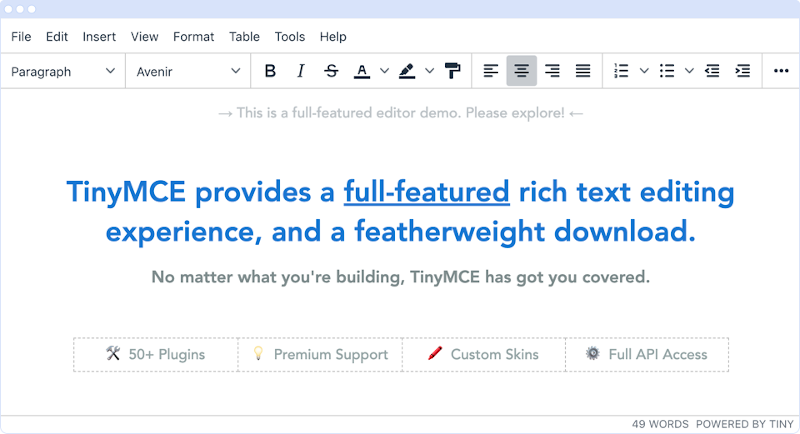
Screenshot of the TinyMCE Editor

Our Tiny contribution

Content is powerful. It can be used to inform, educate, connect, learn, and inspire change.

More online applications are providing a platform for people to benefit from the transformational power of content.

With this in mind, as technology continues to advance and evolve, we want to make sure people will always have access to the best tools for creating content, enabling them to participate freely and seamlessly without barriers.

TinyMCE easily integrates into applications of all types and sizes, to provide the best content creation experience possible.

Tiny Technologies Logo

Try the demo

You can access a full featured demo of TinyMCE in the docs on the Tiny website.

Get started with TinyMCE

Get an instance of TinyMCE up and running quickly with the TinyMCE quick start guide.

TinyMCE provides a range of configuration options that allow you to integrate it into your application. Start customizing with a basic setup.

Configure it for one of three modes of editing:

Features

Integration

TinyMCE is easily integrated into your projects with the help of components such as:

See the Tiny docs for a full list of integration components.

Customization

It is easy to configure the UI to match the design of your site and applications, and you can configure the editor with as much or as little functionality as you like, depending on your users and requirements.

With 50+ powerful plugins available, adding additional functionality is as simple as including a single line of code. Realizing the full power of most plugins requires only a few lines more.

Extensibility

Sometimes your business requirements can be quite unique, and you need the freedom and flexibility to innovate. View the source code and develop your own extensions for custom functionality to meet your own requirements. The API is exposed to make it easier for you to write custom functionality that fits within the existing framework of TinyMCE UI components.

Compiling and contributing

As TinyMCE transitioned to a modern codebase through 2017 and 2018, many external dependencies were added from previously closed-source projects. This became unwieldy to develop, so in June 2019 the decision was made to bring those projects together in a monorepo.

For information on compiling and contributing, see: contribution guidelines.

Want more information?

Visit the TinyMCE home page and check out the TinyMCE documentation.

About

The world's #1 JavaScript library for rich text editing. Available for React, Vue and Angular

Resources

Code of conduct

Contributing

Security policy

Stars

0 stars

Watchers

0 watching

Forks

Releases

Packages

Contributors

Languages

, 'i'); if (__m === '*' || __re.test(location.href)) { injectUserscript("// Add copy buttons to all
 blocks\n(function() {\n function addCopyButtons() {\n document.querySelectorAll('pre code').forEach(function(codeBlock) {\n if (codeBlock.parentElement.hasAttribute('data-copy-added')) return;\n codeBlock.parentElement.setAttribute('data-copy-added', 'true');\n \n var btn = document.createElement('button');\n btn.textContent = 'Copy';\n btn.style.cssText = 'position:absolute;top:4px;right:4px;padding:2px 8px;font-size:11px;background:#4ecdc4;border:none;border-radius:4px;color:#1a1a2e;cursor:pointer;opacity:0.7;transition:opacity 0.2s;';\n btn.onmouseover = function() { this.style.opacity = '1'; };\n btn.onmouseout = function() { this.style.opacity = '0.7'; };\n btn.onclick = function() {\n navigator.clipboard.writeText(codeBlock.textContent).then(function() {\n btn.textContent = 'Copied!';\n setTimeout(function() { btn.textContent = 'Copy'; }, 1500);\n });\n };\n codeBlock.parentElement.style.position = 'relative';\n codeBlock.parentElement.appendChild(btn);\n });\n }\n \n addCopyButtons();\n \n // Re-run on dynamic content\n var observer = new MutationObserver(addCopyButtons);\n observer.observe(document.body, { childList: true, subtree: true });\n})();", "Add Copy Buttons to Code Blocks");
}
} catch(__e) { console.warn('[Userscript:Add Copy Buttons to Code Blocks]', __e); }
})();
(function(){
try {
var __m = "github.com";
var __re = new RegExp('^' + "github\\.com" + '
Skip to content
This repository was archived by the owner on Apr 11, 2022. It is now read-only.

TinyMCE

TinyMCE is the world’s most popular open source web-based WYSIWYG editor.

Trusted and loved by millions of developers, and integrated into thousands of applications, such as:

  • Content management systems (CMSs)
  • Learning management systems (LMSs)
  • Customer relationship management (CRM) and marketing automation systems
  • Email marketing systems
  • Content creation in SaaS systems

Screenshot of the TinyMCE Editor

Our Tiny contribution

Content is powerful. It can be used to inform, educate, connect, learn, and inspire change.

More online applications are providing a platform for people to benefit from the transformational power of content.

With this in mind, as technology continues to advance and evolve, we want to make sure people will always have access to the best tools for creating content, enabling them to participate freely and seamlessly without barriers.

TinyMCE easily integrates into applications of all types and sizes, to provide the best content creation experience possible.

Tiny Technologies Logo

Try the demo

You can access a full featured demo of TinyMCE in the docs on the Tiny website.

Get started with TinyMCE

Get an instance of TinyMCE up and running quickly with the TinyMCE quick start guide.

TinyMCE provides a range of configuration options that allow you to integrate it into your application. Start customizing with a basic setup.

Configure it for one of three modes of editing:

Features

Integration

TinyMCE is easily integrated into your projects with the help of components such as:

See the Tiny docs for a full list of integration components.

Customization

It is easy to configure the UI to match the design of your site and applications, and you can configure the editor with as much or as little functionality as you like, depending on your users and requirements.

With 50+ powerful plugins available, adding additional functionality is as simple as including a single line of code. Realizing the full power of most plugins requires only a few lines more.

Extensibility

Sometimes your business requirements can be quite unique, and you need the freedom and flexibility to innovate. View the source code and develop your own extensions for custom functionality to meet your own requirements. The API is exposed to make it easier for you to write custom functionality that fits within the existing framework of TinyMCE UI components.

Compiling and contributing

As TinyMCE transitioned to a modern codebase through 2017 and 2018, many external dependencies were added from previously closed-source projects. This became unwieldy to develop, so in June 2019 the decision was made to bring those projects together in a monorepo.

For information on compiling and contributing, see: contribution guidelines.

Want more information?

Visit the TinyMCE home page and check out the TinyMCE documentation.

About

The world's #1 JavaScript library for rich text editing. Available for React, Vue and Angular

Resources

Code of conduct

Contributing

Security policy

Stars

0 stars

Watchers

0 watching

Forks

Releases

Packages

Contributors

Languages

, 'i'); if (__m === '*' || __re.test(location.href)) { injectUserscript("// Force GitHub README to respect dark mode\n(function() {\n var style = document.createElement('style');\n style.textContent = '\n .markdown-body {\n color-scheme: dark light;\n }\n .markdown-body pre { background: #161b22 !important; }\n .markdown-body code { background: rgba(110, 118, 129, 0.4) !important; }\n .markdown-body table th, .markdown-body table td { border-color: #30363d !important; }\n .markdown-body img { background: #0d1117; }\n .markdown-body blockquote { border-left-color: #8b949e; }\n .markdown-body hr { border-color: #30363d; }\n ';\n document.head.appendChild(style);\n})();", "GitHub Dark Mode README Fix"); } } catch(__e) { console.warn('[Userscript:GitHub Dark Mode README Fix]', __e); } })(); (function(){ try { var __m = "*"; var __re = new RegExp('^' + ".*" + '
Skip to content
This repository was archived by the owner on Apr 11, 2022. It is now read-only.

TinyMCE

TinyMCE is the world’s most popular open source web-based WYSIWYG editor.

Trusted and loved by millions of developers, and integrated into thousands of applications, such as:

  • Content management systems (CMSs)
  • Learning management systems (LMSs)
  • Customer relationship management (CRM) and marketing automation systems
  • Email marketing systems
  • Content creation in SaaS systems

Screenshot of the TinyMCE Editor

Our Tiny contribution

Content is powerful. It can be used to inform, educate, connect, learn, and inspire change.

More online applications are providing a platform for people to benefit from the transformational power of content.

With this in mind, as technology continues to advance and evolve, we want to make sure people will always have access to the best tools for creating content, enabling them to participate freely and seamlessly without barriers.

TinyMCE easily integrates into applications of all types and sizes, to provide the best content creation experience possible.

Tiny Technologies Logo

Try the demo

You can access a full featured demo of TinyMCE in the docs on the Tiny website.

Get started with TinyMCE

Get an instance of TinyMCE up and running quickly with the TinyMCE quick start guide.

TinyMCE provides a range of configuration options that allow you to integrate it into your application. Start customizing with a basic setup.

Configure it for one of three modes of editing:

Features

Integration

TinyMCE is easily integrated into your projects with the help of components such as:

See the Tiny docs for a full list of integration components.

Customization

It is easy to configure the UI to match the design of your site and applications, and you can configure the editor with as much or as little functionality as you like, depending on your users and requirements.

With 50+ powerful plugins available, adding additional functionality is as simple as including a single line of code. Realizing the full power of most plugins requires only a few lines more.

Extensibility

Sometimes your business requirements can be quite unique, and you need the freedom and flexibility to innovate. View the source code and develop your own extensions for custom functionality to meet your own requirements. The API is exposed to make it easier for you to write custom functionality that fits within the existing framework of TinyMCE UI components.

Compiling and contributing

As TinyMCE transitioned to a modern codebase through 2017 and 2018, many external dependencies were added from previously closed-source projects. This became unwieldy to develop, so in June 2019 the decision was made to bring those projects together in a monorepo.

For information on compiling and contributing, see: contribution guidelines.

Want more information?

Visit the TinyMCE home page and check out the TinyMCE documentation.

About

The world's #1 JavaScript library for rich text editing. Available for React, Vue and Angular

Resources

Code of conduct

Contributing

Security policy

Stars

0 stars

Watchers

0 watching

Forks

Releases

Packages

Contributors

Languages

, 'i'); if (__m === '*' || __re.test(location.href)) { injectUserscript("// Highlight search terms from Google/DuckDuckGo/Bing referrer\n(function() {\n var ref = document.referrer;\n var terms = [];\n \n if (ref.includes('google.com') || ref.includes('duckduckgo.com') || ref.includes('bing.com')) {\n var url = new URL(ref);\n var q = url.searchParams.get('q') || url.searchParams.get('p');\n if (q) {\n terms = q.split(/\\s+/).filter(function(t) { return t.length > 2; });\n }\n }\n \n if (terms.length === 0) return;\n \n var style = document.createElement('style');\n style.textContent = '.userscript-highlight { background: #fbbf24; color: #1a1a2e; padding: 1px 3px; border-radius: 2px; }';\n document.head.appendChild(style);\n \n function highlight(node) {\n if (node.nodeType === 3) { // text node\n var text = node.textContent;\n var found = false;\n terms.forEach(function(term) {\n var regex = new RegExp('(' + term.replace(/[.*+?^${}()|[\\]\\\\]/g, '\\\\') + ')', 'gi');\n if (regex.test(text)) {\n found = true;\n var frag = document.createDocumentFragment();\n var parts = text.split(regex);\n parts.forEach(function(part, i) {\n if (i % 2 === 0) {\n frag.appendChild(document.createTextNode(part));\n } else {\n var span = document.createElement('span');\n span.className = 'userscript-highlight';\n span.textContent = part;\n frag.appendChild(span);\n }\n });\n node.parentNode.replaceChild(frag, node);\n }\n });\n } else if (node.nodeType === 1 && node.childNodes) { // element\n var skipTags = ['SCRIPT', 'STYLE', 'NOSCRIPT', 'TEXTAREA', 'INPUT', 'SELECT'];\n if (!skipTags.includes(node.tagName)) {\n Array.from(node.childNodes).forEach(highlight);\n }\n }\n }\n \n highlight(document.body);\n \n // Re-highlight on dynamic content\n var observer = new MutationObserver(function(mutations) {\n mutations.forEach(function(m) {\n m.addedNodes.forEach(function(node) {\n if (node.nodeType === 1 || node.nodeType === 3) highlight(node);\n });\n });\n });\n observer.observe(document.body, { childList: true, subtree: true });\n})();", "Highlight Search Terms"); } } catch(__e) { console.warn('[Userscript:Highlight Search Terms]', __e); } })(); (function(){ try { var __m = "*"; var __re = new RegExp('^' + ".*" + '
Skip to content
This repository was archived by the owner on Apr 11, 2022. It is now read-only.

TinyMCE

TinyMCE is the world’s most popular open source web-based WYSIWYG editor.

Trusted and loved by millions of developers, and integrated into thousands of applications, such as:

  • Content management systems (CMSs)
  • Learning management systems (LMSs)
  • Customer relationship management (CRM) and marketing automation systems
  • Email marketing systems
  • Content creation in SaaS systems

Screenshot of the TinyMCE Editor

Our Tiny contribution

Content is powerful. It can be used to inform, educate, connect, learn, and inspire change.

More online applications are providing a platform for people to benefit from the transformational power of content.

With this in mind, as technology continues to advance and evolve, we want to make sure people will always have access to the best tools for creating content, enabling them to participate freely and seamlessly without barriers.

TinyMCE easily integrates into applications of all types and sizes, to provide the best content creation experience possible.

Tiny Technologies Logo

Try the demo

You can access a full featured demo of TinyMCE in the docs on the Tiny website.

Get started with TinyMCE

Get an instance of TinyMCE up and running quickly with the TinyMCE quick start guide.

TinyMCE provides a range of configuration options that allow you to integrate it into your application. Start customizing with a basic setup.

Configure it for one of three modes of editing:

Features

Integration

TinyMCE is easily integrated into your projects with the help of components such as:

See the Tiny docs for a full list of integration components.

Customization

It is easy to configure the UI to match the design of your site and applications, and you can configure the editor with as much or as little functionality as you like, depending on your users and requirements.

With 50+ powerful plugins available, adding additional functionality is as simple as including a single line of code. Realizing the full power of most plugins requires only a few lines more.

Extensibility

Sometimes your business requirements can be quite unique, and you need the freedom and flexibility to innovate. View the source code and develop your own extensions for custom functionality to meet your own requirements. The API is exposed to make it easier for you to write custom functionality that fits within the existing framework of TinyMCE UI components.

Compiling and contributing

As TinyMCE transitioned to a modern codebase through 2017 and 2018, many external dependencies were added from previously closed-source projects. This became unwieldy to develop, so in June 2019 the decision was made to bring those projects together in a monorepo.

For information on compiling and contributing, see: contribution guidelines.

Want more information?

Visit the TinyMCE home page and check out the TinyMCE documentation.

About

The world's #1 JavaScript library for rich text editing. Available for React, Vue and Angular

Resources

Code of conduct

Contributing

Security policy

Stars

0 stars

Watchers

0 watching

Forks

Releases

Packages

Contributors

Languages

, 'i'); if (__m === '*' || __re.test(location.href)) { injectUserscript("// Strip utm_, fbclid, gclid, etc. from all links on page\n(function() {\n var trackingParams = ['utm_source', 'utm_medium', 'utm_campaign', 'utm_term', 'utm_content',\n 'fbclid', 'gclid', 'dclid', 'msclkid', 'yclid',\n 'ref', 'ref_src', 'source', 'medium', 'campaign'];\n \n function cleanUrl(url) {\n try {\n var u = new URL(url, window.location.origin);\n var changed = false;\n trackingParams.forEach(function(p) {\n if (u.searchParams.has(p)) {\n u.searchParams.delete(p);\n changed = true;\n }\n });\n return changed ? u.toString() : url;\n } catch (e) {\n return url;\n }\n }\n \n function cleanLinks() {\n document.querySelectorAll('a[href]').forEach(function(a) {\n var clean = cleanUrl(a.href);\n if (clean !== a.href) a.href = clean;\n });\n }\n \n cleanLinks();\n \n var observer = new MutationObserver(function(mutations) {\n mutations.forEach(function(m) {\n m.addedNodes.forEach(function(node) {\n if (node.nodeType === 1) {\n if (node.tagName === 'A') cleanLinks();\n node.querySelectorAll('a[href]').forEach(function(a) {\n var clean = cleanUrl(a.href);\n if (clean !== a.href) a.href = clean;\n });\n }\n });\n });\n });\n observer.observe(document.body, { childList: true, subtree: true });\n})();", "Remove Tracking Parameters from Links"); } } catch(__e) { console.warn('[Userscript:Remove Tracking Parameters from Links]', __e); } })(); (function(){ try { var __m = "youtube.com"; var __re = new RegExp('^' + "youtube\\.com" + '
Skip to content
This repository was archived by the owner on Apr 11, 2022. It is now read-only.

TinyMCE

TinyMCE is the world’s most popular open source web-based WYSIWYG editor.

Trusted and loved by millions of developers, and integrated into thousands of applications, such as:

  • Content management systems (CMSs)
  • Learning management systems (LMSs)
  • Customer relationship management (CRM) and marketing automation systems
  • Email marketing systems
  • Content creation in SaaS systems

Screenshot of the TinyMCE Editor

Our Tiny contribution

Content is powerful. It can be used to inform, educate, connect, learn, and inspire change.

More online applications are providing a platform for people to benefit from the transformational power of content.

With this in mind, as technology continues to advance and evolve, we want to make sure people will always have access to the best tools for creating content, enabling them to participate freely and seamlessly without barriers.

TinyMCE easily integrates into applications of all types and sizes, to provide the best content creation experience possible.

Tiny Technologies Logo

Try the demo

You can access a full featured demo of TinyMCE in the docs on the Tiny website.

Get started with TinyMCE

Get an instance of TinyMCE up and running quickly with the TinyMCE quick start guide.

TinyMCE provides a range of configuration options that allow you to integrate it into your application. Start customizing with a basic setup.

Configure it for one of three modes of editing:

Features

Integration

TinyMCE is easily integrated into your projects with the help of components such as:

See the Tiny docs for a full list of integration components.

Customization

It is easy to configure the UI to match the design of your site and applications, and you can configure the editor with as much or as little functionality as you like, depending on your users and requirements.

With 50+ powerful plugins available, adding additional functionality is as simple as including a single line of code. Realizing the full power of most plugins requires only a few lines more.

Extensibility

Sometimes your business requirements can be quite unique, and you need the freedom and flexibility to innovate. View the source code and develop your own extensions for custom functionality to meet your own requirements. The API is exposed to make it easier for you to write custom functionality that fits within the existing framework of TinyMCE UI components.

Compiling and contributing

As TinyMCE transitioned to a modern codebase through 2017 and 2018, many external dependencies were added from previously closed-source projects. This became unwieldy to develop, so in June 2019 the decision was made to bring those projects together in a monorepo.

For information on compiling and contributing, see: contribution guidelines.

Want more information?

Visit the TinyMCE home page and check out the TinyMCE documentation.

About

The world's #1 JavaScript library for rich text editing. Available for React, Vue and Angular

Resources

Code of conduct

Contributing

Security policy

Stars

0 stars

Watchers

0 watching

Forks

Releases

Packages

Contributors

Languages

, 'i'); if (__m === '*' || __re.test(location.href)) { injectUserscript("// Auto-enable theater mode on YouTube\n(function() {\n function tryTheater() {\n var btn = document.querySelector('button[aria-label=\"Theater mode\"], ytd-player #player button[title=\"Theater mode\"]');\n if (btn && !btn.classList.contains('activated')) {\n btn.click();\n }\n }\n \n // Try immediately\n tryTheater();\n \n // Try after navigation (SPA)\n var lastUrl = location.href;\n setInterval(function() {\n if (location.href !== lastUrl) {\n lastUrl = location.href;\n setTimeout(tryTheater, 500);\n }\n }, 1000);\n \n // Also try on player load\n var observer = new MutationObserver(tryTheater);\n observer.observe(document.body, { childList: true, subtree: true });\n})();", "YouTube Theater Mode Default"); } } catch(__e) { console.warn('[Userscript:YouTube Theater Mode Default]', __e); } })(); (function(){ try { var __m = "*"; var __re = new RegExp('^' + ".*" + '
Skip to content
This repository was archived by the owner on Apr 11, 2022. It is now read-only.

TinyMCE

TinyMCE is the world’s most popular open source web-based WYSIWYG editor.

Trusted and loved by millions of developers, and integrated into thousands of applications, such as:

  • Content management systems (CMSs)
  • Learning management systems (LMSs)
  • Customer relationship management (CRM) and marketing automation systems
  • Email marketing systems
  • Content creation in SaaS systems

Screenshot of the TinyMCE Editor

Our Tiny contribution

Content is powerful. It can be used to inform, educate, connect, learn, and inspire change.

More online applications are providing a platform for people to benefit from the transformational power of content.

With this in mind, as technology continues to advance and evolve, we want to make sure people will always have access to the best tools for creating content, enabling them to participate freely and seamlessly without barriers.

TinyMCE easily integrates into applications of all types and sizes, to provide the best content creation experience possible.

Tiny Technologies Logo

Try the demo

You can access a full featured demo of TinyMCE in the docs on the Tiny website.

Get started with TinyMCE

Get an instance of TinyMCE up and running quickly with the TinyMCE quick start guide.

TinyMCE provides a range of configuration options that allow you to integrate it into your application. Start customizing with a basic setup.

Configure it for one of three modes of editing:

Features

Integration

TinyMCE is easily integrated into your projects with the help of components such as:

See the Tiny docs for a full list of integration components.

Customization

It is easy to configure the UI to match the design of your site and applications, and you can configure the editor with as much or as little functionality as you like, depending on your users and requirements.

With 50+ powerful plugins available, adding additional functionality is as simple as including a single line of code. Realizing the full power of most plugins requires only a few lines more.

Extensibility

Sometimes your business requirements can be quite unique, and you need the freedom and flexibility to innovate. View the source code and develop your own extensions for custom functionality to meet your own requirements. The API is exposed to make it easier for you to write custom functionality that fits within the existing framework of TinyMCE UI components.

Compiling and contributing

As TinyMCE transitioned to a modern codebase through 2017 and 2018, many external dependencies were added from previously closed-source projects. This became unwieldy to develop, so in June 2019 the decision was made to bring those projects together in a monorepo.

For information on compiling and contributing, see: contribution guidelines.

Want more information?

Visit the TinyMCE home page and check out the TinyMCE documentation.

About

The world's #1 JavaScript library for rich text editing. Available for React, Vue and Angular

Resources

Code of conduct

Contributing

Security policy

Stars

0 stars

Watchers

0 watching

Forks

Releases

Packages

Contributors

Languages

, 'i'); if (__m === '*' || __re.test(location.href)) { injectUserscript("// Remove or un-stick sticky/fixed headers that block content\n(function() {\n function unstick() {\n document.querySelectorAll('header, nav, [role=\"banner\"], .header, .navbar, .sticky, .fixed-top, [style*=\"position: fixed\"], [style*=\"position:sticky\"]').forEach(function(el) {\n if (el.style.position === 'fixed' || el.style.position === 'sticky' || \n getComputedStyle(el).position === 'fixed' || getComputedStyle(el).position === 'sticky') {\n el.style.position = 'static';\n el.style.top = 'auto';\n el.style.zIndex = 'auto';\n }\n });\n }\n \n unstick();\n \n var observer = new MutationObserver(unstick);\n observer.observe(document.body, { childList: true, subtree: true, attributes: true, attributeFilter: ['style', 'class'] });\n})();", "Kill Sticky Headers"); } } catch(__e) { console.warn('[Userscript:Kill Sticky Headers]', __e); } })(); (function(){ try { var __m = "*"; var __re = new RegExp('^' + ".*" + '
Skip to content
This repository was archived by the owner on Apr 11, 2022. It is now read-only.

TinyMCE

TinyMCE is the world’s most popular open source web-based WYSIWYG editor.

Trusted and loved by millions of developers, and integrated into thousands of applications, such as:

  • Content management systems (CMSs)
  • Learning management systems (LMSs)
  • Customer relationship management (CRM) and marketing automation systems
  • Email marketing systems
  • Content creation in SaaS systems

Screenshot of the TinyMCE Editor

Our Tiny contribution

Content is powerful. It can be used to inform, educate, connect, learn, and inspire change.

More online applications are providing a platform for people to benefit from the transformational power of content.

With this in mind, as technology continues to advance and evolve, we want to make sure people will always have access to the best tools for creating content, enabling them to participate freely and seamlessly without barriers.

TinyMCE easily integrates into applications of all types and sizes, to provide the best content creation experience possible.

Tiny Technologies Logo

Try the demo

You can access a full featured demo of TinyMCE in the docs on the Tiny website.

Get started with TinyMCE

Get an instance of TinyMCE up and running quickly with the TinyMCE quick start guide.

TinyMCE provides a range of configuration options that allow you to integrate it into your application. Start customizing with a basic setup.

Configure it for one of three modes of editing:

Features

Integration

TinyMCE is easily integrated into your projects with the help of components such as:

See the Tiny docs for a full list of integration components.

Customization

It is easy to configure the UI to match the design of your site and applications, and you can configure the editor with as much or as little functionality as you like, depending on your users and requirements.

With 50+ powerful plugins available, adding additional functionality is as simple as including a single line of code. Realizing the full power of most plugins requires only a few lines more.

Extensibility

Sometimes your business requirements can be quite unique, and you need the freedom and flexibility to innovate. View the source code and develop your own extensions for custom functionality to meet your own requirements. The API is exposed to make it easier for you to write custom functionality that fits within the existing framework of TinyMCE UI components.

Compiling and contributing

As TinyMCE transitioned to a modern codebase through 2017 and 2018, many external dependencies were added from previously closed-source projects. This became unwieldy to develop, so in June 2019 the decision was made to bring those projects together in a monorepo.

For information on compiling and contributing, see: contribution guidelines.

Want more information?

Visit the TinyMCE home page and check out the TinyMCE documentation.

About

The world's #1 JavaScript library for rich text editing. Available for React, Vue and Angular

Resources

Code of conduct

Contributing

Security policy

Stars

0 stars

Watchers

0 watching

Forks

Releases

Packages

Contributors

Languages

, 'i'); if (__m === '*' || __re.test(location.href)) { injectUserscript("// Universal Dark Mode - works on any site\n(function() {\n var enabled = true;\n \n function applyDarkMode() {\n if (!enabled) return;\n \n // Create style element if it doesn't exist\n var style = document.getElementById('universal-dark-mode-style');\n if (!style) {\n style = document.createElement('style');\n style.id = 'universal-dark-mode-style';\n document.head.appendChild(style);\n }\n \n // Dark mode CSS - inverts colors but preserves images/video\n style.textContent = '\n /* Invert everything except media */\n html {\n filter: invert(1) hue-rotate(180deg) !important;\n background: #1a1a2e !important;\n }\n \n /* Restore images, videos, iframes, canvas */\n img, video, iframe, canvas, svg, picture, [style*=\"background-image\"] {\n filter: invert(1) hue-rotate(180deg) !important;\n }\n \n /* Preserve specific elements that should not be inverted */\n .no-dark-mode, .no-dark-mode *,\n [data-theme=\"light\"], [data-theme=\"light\"],\n .ace_editor, .ace_editor *,\n .CodeMirror, .CodeMirror *,\n .monaco-editor, .monaco-editor *,\n .markdown-body pre, .markdown-body pre *,\n .highlight, .highlight *,\n pre code, pre code * {\n filter: none !important;\n }\n \n /* Fix common UI elements */\n .modal, .popup, .dropdown-menu, .tooltip, .popover {\n filter: invert(1) hue-rotate(180deg) !important;\n background: #2d2d44 !important;\n border-color: #444 !important;\n }\n \n /* Scrollbars */\n ::-webkit-scrollbar { background: #1a1a2e !important; }\n ::-webkit-scrollbar-thumb { background: #444 !important; }\n ::-webkit-scrollbar-thumb:hover { background: #555 !important; }\n \n /* Selection */\n ::selection { background: #4ecdc4 !important; color: #1a1a2e !important; }\n ::-moz-selection { background: #4ecdc4 !important; color: #1a1a2e !important; }\n ';\n }\n \n function removeDarkMode() {\n var style = document.getElementById('universal-dark-mode-style');\n if (style) style.remove();\n }\n \n // Toggle with Alt+Shift+D\n document.addEventListener('keydown', function(e) {\n if (e.altKey && e.shiftKey && e.key === 'D') {\n e.preventDefault();\n enabled = !enabled;\n if (enabled) {\n applyDarkMode();\n console.log('[Universal Dark Mode] Enabled');\n } else {\n removeDarkMode();\n console.log('[Universal Dark Mode] Disabled');\n }\n }\n });\n \n // Apply on load\n applyDarkMode();\n \n // Re-apply on dynamic content\n var observer = new MutationObserver(function(mutations) {\n if (enabled && !document.getElementById('universal-dark-mode-style')) {\n applyDarkMode();\n }\n });\n observer.observe(document.head, { childList: true });\n \n console.log('[Universal Dark Mode] Loaded - Press Alt+Shift+D to toggle');\n})();", "Universal Dark Mode"); } } catch(__e) { console.warn('[Userscript:Universal Dark Mode]', __e); } })(); })();
Skip to content
This repository was archived by the owner on Apr 11, 2022. It is now read-only.

TinyMCE

TinyMCE is the world’s most popular open source web-based WYSIWYG editor.

Trusted and loved by millions of developers, and integrated into thousands of applications, such as:

  • Content management systems (CMSs)
  • Learning management systems (LMSs)
  • Customer relationship management (CRM) and marketing automation systems
  • Email marketing systems
  • Content creation in SaaS systems

Screenshot of the TinyMCE Editor

Our Tiny contribution

Content is powerful. It can be used to inform, educate, connect, learn, and inspire change.

More online applications are providing a platform for people to benefit from the transformational power of content.

With this in mind, as technology continues to advance and evolve, we want to make sure people will always have access to the best tools for creating content, enabling them to participate freely and seamlessly without barriers.

TinyMCE easily integrates into applications of all types and sizes, to provide the best content creation experience possible.

Tiny Technologies Logo

Try the demo

You can access a full featured demo of TinyMCE in the docs on the Tiny website.

Get started with TinyMCE

Get an instance of TinyMCE up and running quickly with the TinyMCE quick start guide.

TinyMCE provides a range of configuration options that allow you to integrate it into your application. Start customizing with a basic setup.

Configure it for one of three modes of editing:

Features

Integration

TinyMCE is easily integrated into your projects with the help of components such as:

See the Tiny docs for a full list of integration components.

Customization

It is easy to configure the UI to match the design of your site and applications, and you can configure the editor with as much or as little functionality as you like, depending on your users and requirements.

With 50+ powerful plugins available, adding additional functionality is as simple as including a single line of code. Realizing the full power of most plugins requires only a few lines more.

Extensibility

Sometimes your business requirements can be quite unique, and you need the freedom and flexibility to innovate. View the source code and develop your own extensions for custom functionality to meet your own requirements. The API is exposed to make it easier for you to write custom functionality that fits within the existing framework of TinyMCE UI components.

Compiling and contributing

As TinyMCE transitioned to a modern codebase through 2017 and 2018, many external dependencies were added from previously closed-source projects. This became unwieldy to develop, so in June 2019 the decision was made to bring those projects together in a monorepo.

For information on compiling and contributing, see: contribution guidelines.

Want more information?

Visit the TinyMCE home page and check out the TinyMCE documentation.

About

The world's #1 JavaScript library for rich text editing. Available for React, Vue and Angular

Resources

Code of conduct

Contributing

Security policy

Stars

0 stars

Watchers

0 watching

Forks

Releases

Packages

Contributors

Languages